LinkedIn scraping means collecting structured data from LinkedIn pages or interfaces with software. Before writing a crawler, check whether LinkedIn provides an approved API for your use case, whether you have permission to process the data, and whether the result can be obtained from a first-party export or licensed source instead.
That check is not optional. LinkedIn's current User Agreement prohibits using crawlers, scripts, bots, and similar processes to scrape or copy its services unless LinkedIn gives separate permission. Proxies can provide stable routing for an approved integration or authorized test, but they do not grant permission, expand API access, or make prohibited collection acceptable.
This guide explains the practical decision process, the available data-access methods, and how to design a controlled workflow when you have authorization.
LinkedIn Scraping: Choose the Data Source First
Start with the narrow business question, not the extraction tool. "Track changes to job listings we own" is testable and bounded; the job data scraping guide explains how to model listing sources, fields, duplicates, and closures across an authorized pipeline. "Collect every profile in an industry" is broad, privacy-heavy, and unlikely to map to an approved access method.
Use this order of preference:
- Your own records or exports. If the data belongs to your organization or account, use the export and reporting features available to you.
- An approved LinkedIn API. Request only the product and scopes that match the application.
- A licensed data provider. Confirm its collection rights, permitted uses, update process, and deletion process.
- Collection with written authorization. Define the exact pages, fields, rate, retention period, and security controls before running it.
- Do not collect. If no authorized source covers the requirement, proxies and browser automation do not close that gap.
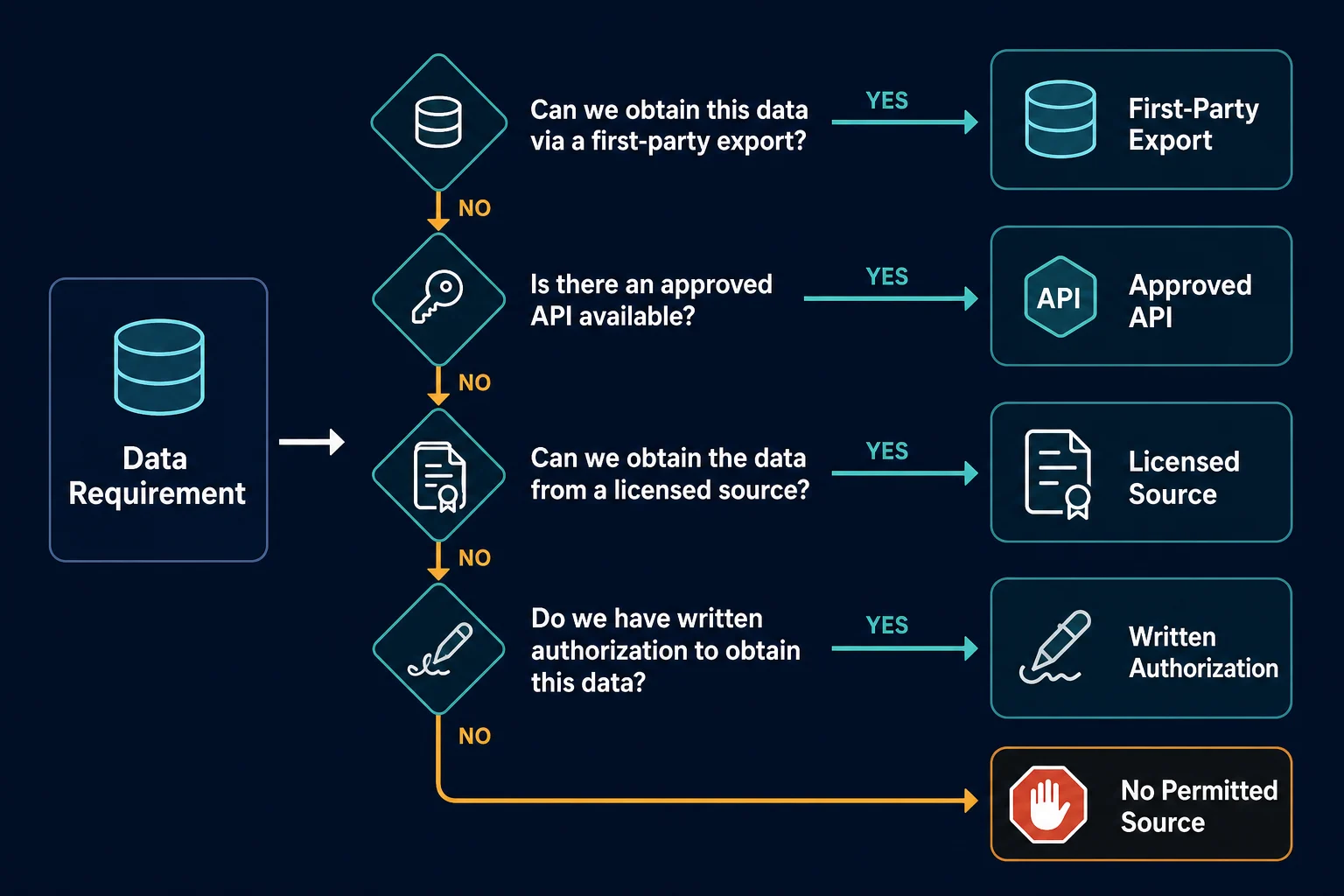
This order saves engineering time. It also makes the resulting dataset easier to defend, maintain, and delete when a person or source record changes.
Is LinkedIn Scraping Allowed?
There is no universal yes-or-no answer for every collection project because contracts, authorization, data type, jurisdiction, and purpose all matter. There is, however, a clear platform rule: LinkedIn says unauthorized third-party tools must not scrape or automate activity on its website. Its help page on prohibited software and extensions explicitly includes crawlers, bots, browser plug-ins, and browser extensions.
Before collecting anything, review four separate layers:
- Contract and platform rules: Does the proposed method comply with LinkedIn's terms and any product-specific agreement?
- Technical permission: Does an API token, account role, or written authorization cover these fields and actions?
- Privacy and data protection: Do you have a lawful purpose, a retention limit, access controls, and a way to honor correction or deletion requests?
- Content rights: Are you copying text, images, or other material whose reuse needs permission?
Public visibility does not automatically mean unrestricted reuse. A profile that can be viewed in a browser can still contain personal data and copyrighted content, and the service can still impose contractual access limits.
Treat robots.txt as one input, not as a permission document. The Robots Exclusion Protocol standard describes crawler access rules, but it does not replace terms, authentication requirements, privacy obligations, or written authorization.
If the project involves personal data at scale, sensitive inferences, employment decisions, or cross-border transfers, get qualified legal and privacy review. The broader data scraping legality guide provides a source-agnostic preflight for access, terms, data rights, purpose, and technical controls. This article is an engineering guide, not legal advice.
LinkedIn API vs Browser Collection
LinkedIn's API is the first method to investigate because it provides explicit authentication, scopes, and product boundaries. LinkedIn's official API access documentation says most permissions and partner programs require approval; only a limited set of open permissions is self-service.
| Method | Good fit | Main constraint |
|---|---|---|
| First-party export | Your own account or organization data | Limited to available export fields |
| Approved API | Supported product integration | Product approval and OAuth scopes |
| Licensed provider | Contracted enrichment or research workflow | License terms, provenance, and deletion duties |
| Authorized browser test | QA for pages and accounts you are permitted to test | Fragile selectors and strict scope |
| Unauthorized crawler | None | Conflicts with platform rules and creates legal, privacy, and account risk |
The API is not a general profile-search endpoint. LinkedIn documents open access for functions such as member-authorized sign-in and sharing, while marketing, sales, talent, and other data products have separate approval paths.
For approved applications, LinkedIn uses OAuth 2.0. The official authentication overview distinguishes member authorization from application authorization and recommends requesting the minimum scopes required. Your application should store tokens as secrets, handle expiration and revocation, and reject any response fields outside the approved schema.
Use browser collection only when your written authorization specifically covers it, such as testing a company-managed page or validating an integration in a controlled environment. Browser HTML changes frequently, loads data asynchronously, and carries session state that makes it more expensive and brittle than an API.
Define a Minimal LinkedIn Data Schema
Do not collect a page and decide what to keep later. Write a field-level schema before the first request.
For an authorized job-listing monitor, a narrow schema might be:
{
  "source_record_id": "approved-source-id",
  "job_title": "Example title",
  "location": "Example location",
  "published_at": "2026-06-28T09:00:00Z",
  "source_url": "https://www.linkedin.com/...",
  "observed_at": "2026-06-28T12:00:00Z"
}
The production record should also carry provenance: the approved source, authorization basis, collector version, and retention class. Avoid storing raw HTML, session cookies, access tokens, profile photos, contact details, or free-form text unless each field is necessary and approved.
A field inventory makes privacy review concrete:
| Field question | Decision to record |
|---|---|
| Why is this field needed? | Specific product or research requirement |
| Where did it come from? | Export, API product, licensed source, or authorized page |
| How long is it kept? | Fixed retention window |
| Who can read it? | Named service roles and teams |
| How is it corrected or deleted? | Source refresh and request workflow |
| Can a derived value identify a person? | Treat as personal data when it can |
Data minimization also reduces operational cost. Smaller records are faster to validate, easier to diff, and less damaging if a credential or storage system is compromised.
Build an Authorized Collection Pipeline
Once authorization and schema are documented, separate acquisition from processing. A reliable pipeline has explicit controls at every boundary.
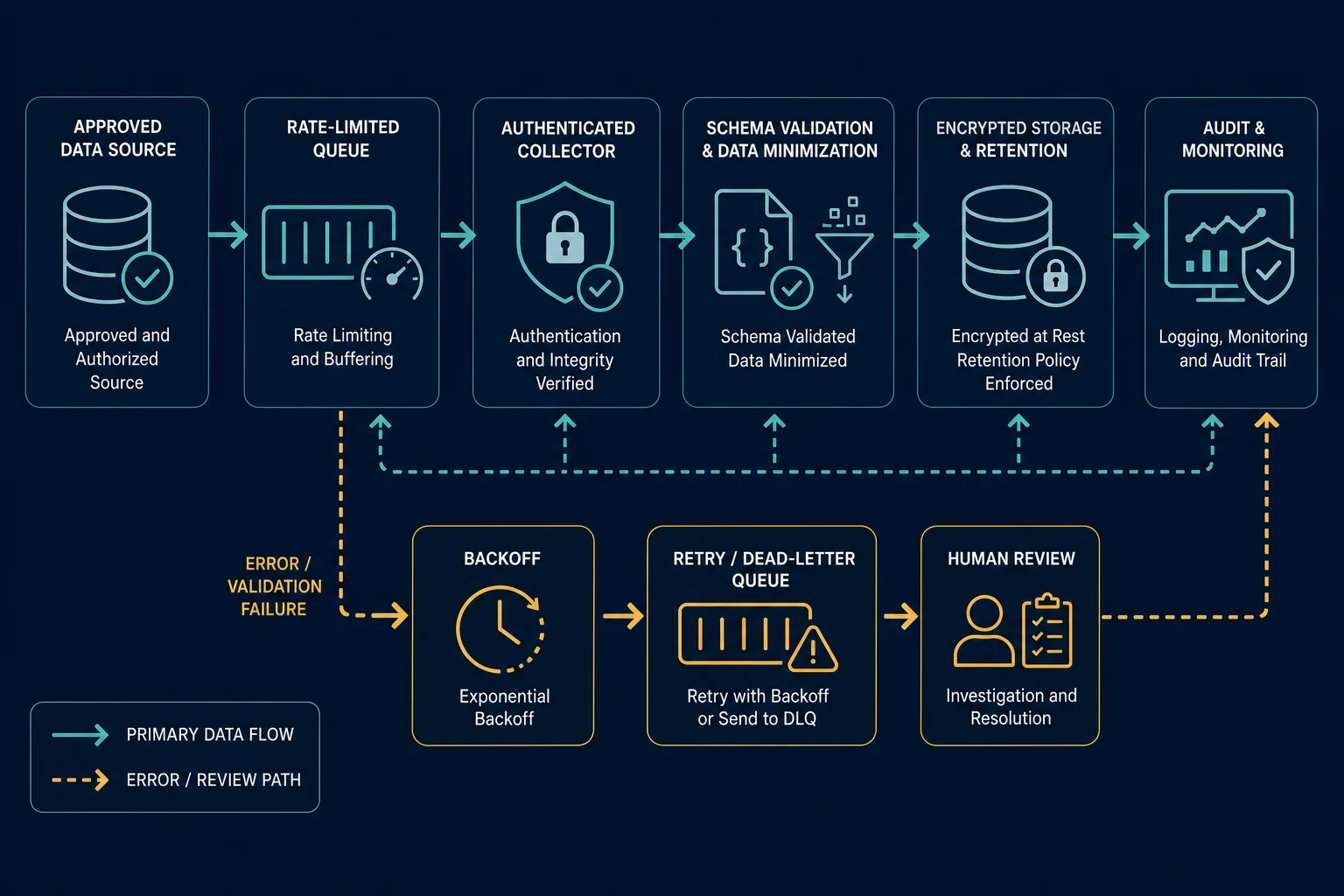
Use these components:
- Source registry: Store the approved source type, fields, owner, authorization reference, and expiry date.
- Rate-limited queue: Set concurrency and request budgets per integration, account, and endpoint.
- Authenticated collector: Load API and proxy credentials from a secret manager, never from the job payload.
- Schema validator: Drop unexpected fields and reject records that lack required provenance.
- Minimization step: Transform only the approved fields instead of archiving entire responses.
- Controlled storage: Encrypt data, restrict service roles, and apply automatic retention.
- Audit and deletion jobs: Record access, refresh stale records, and propagate removals.
Make the collector idempotent. A retry should update the same source record rather than create duplicates. Use a stable approved identifier as the key, and store observed_at separately from the source's own publication or update timestamp.
For transient failures, use capped exponential backoff with jitter. Honor Retry-After when a response provides it. Stop the queue after repeated authorization failures rather than rotating identities and continuing.
When Proxies Fit an Approved Workflow
A proxy changes the network route between your collector and the approved source. It can help with controlled regional QA, stable egress allowlisting, network isolation, and distributing permitted requests across infrastructure. It cannot create API scopes or override a platform limit.
Choose the proxy behavior around the session:
- Use one stable ISP proxy when an approved account session or allowlist expects a consistent source IP.
- Use a sticky residential session for authorized geographic QA that must preserve cookies and browser state.
- Rotate only between independent, permitted jobs when the authorization and endpoint policy allow it.
- Keep the same proxy, cookies, headers, and browser context throughout a multi-step session.
For API integrations, a fixed outbound IP is usually more useful than a rotating pool. It simplifies allowlists, incident review, and traffic attribution. For browser-based QA, route one isolated browser context through one sticky session; the Playwright proxy guide shows the configuration pattern.
If you need consumer-style regional egress for a permitted test, residential proxies provide location targeting and sticky sessions. For stable dedicated egress, compare ISP options on the pricing page. Select the route based on authorization and session design, not on an attempt to evade controls.
Failure Signals and the Correct Response
Treat an access failure as a reason to diagnose or stop, not a signal to become more aggressive.
| Signal | Likely meaning | Correct response |
|---|---|---|
401 Unauthorized |
Token is missing, expired, revoked, or malformed | Refresh through the approved OAuth flow and verify scopes |
403 Forbidden |
Permission, policy, or resource access denied | Stop and verify the app, user, product, and authorization |
429 Too Many Requests |
Request budget exceeded | Honor backoff, lower concurrency, and inspect rate limits |
| Login or challenge page | Session or account requires attention | Pause automation and use the supported recovery process |
| HTML selector disappears | Page or experiment changed | Stop the parser; do not guess at replacement fields |
| Unexpected personal fields | Source response exceeds the schema | Drop the fields and review the integration |
The guides to HTTP 403 Forbidden and HTTP 429 Too Many Requests cover transport-level diagnosis in more detail. Neither error should be handled by an unlimited proxy-rotation loop.
Log status code, endpoint class, approved source ID, application ID, proxy ID, attempt number, and backoff time. Do not log access tokens, cookies, full response bodies, or unnecessary personal fields.
LinkedIn Scraping Project Checklist
Use this gate before development:
- The business question and target records are specific.
- The source is an export, approved API, licensed provider, or explicitly authorized test.
- LinkedIn's current terms and the relevant product agreement were reviewed.
- API products and OAuth scopes match the fields being requested.
- A field-level schema and prohibited-field list exist.
- Privacy, content rights, retention, deletion, and security were reviewed.
- Concurrency, backoff, and stop conditions are configured.
- Proxy use has a documented operational purpose.
- Tokens, cookies, and proxy credentials are kept out of logs and code.
- Data provenance and authorization expiry are auditable.
- A human owner can stop the collector and delete its dataset.
If any of the first six items is unresolved, the project is not ready for implementation.
Frequently Asked Questions
Can you scrape LinkedIn without logging in?
Some LinkedIn pages or snippets may be visible without an account, but visibility does not grant unrestricted collection rights. LinkedIn's User Agreement prohibits unauthorized scraping of its services, including profiles and other data. Use an approved API, export, licensed source, or written authorization.
Is it legal to scrape public LinkedIn profiles?
Legality depends on jurisdiction, purpose, data, method, and authorization, while contractual and privacy obligations remain separate questions. Do not infer permission from public visibility. Get qualified advice for a real project, especially when collecting personal data at scale.
Does LinkedIn have a public scraping API?
No general-purpose scraping API exists. LinkedIn offers specific APIs and partner programs with defined products, OAuth scopes, and approval requirements. Check the official API access documentation for the capability your application needs.
Do residential proxies prevent LinkedIn blocks?
No. Residential proxies change network routing; they do not grant permission or guarantee access. In an approved workflow, they may support regional QA or sticky sessions. Rate limits, account rules, API scopes, and consistent session behavior still apply.
Should I use Playwright or an HTTP client?
Use the approved API with an HTTP client when it provides the required data. Use Playwright only for a browser workflow you are specifically authorized to test. Browser collection is heavier, more stateful, and more fragile than an API integration.
What should happen when a collector receives a 429?
Pause or reduce the queue, honor Retry-After, and apply capped backoff with jitter. Check the documented request budget and application limits. Do not respond by rapidly rotating proxies and retrying the same action.
Conclusion
LinkedIn scraping should begin with authorization, source selection, and a minimal data schema—not with selectors or a proxy pool. Prefer first-party exports and approved APIs, document every retained field, and build hard limits for concurrency, retries, retention, and deletion.
When an authorized workflow needs regional or stable network routing, proxies can support that infrastructure. They remain a transport tool, not a substitute for LinkedIn approval, OAuth scopes, privacy review, or responsible request behavior.