A Playwright proxy lets browser traffic run through a proxy server while your automation code controls Chromium, Firefox, or WebKit. You can set the proxy once when launching the browser, or create separate browser contexts with different proxy settings when your workflow needs isolated sessions.
Use a Playwright proxy for localization checks, QA, web scraping, monitoring, and browser workflows where a normal HTTP client is not enough. The key is to match the proxy level to the task: global proxy for one browser identity, context proxy for separated identities, and sticky sessions for flows that need continuity.
This guide focuses on Playwright for Node.js, with notes that map cleanly to Playwright Python. If you are comparing browser tools, the companion guide covers Python Selenium proxy setup.
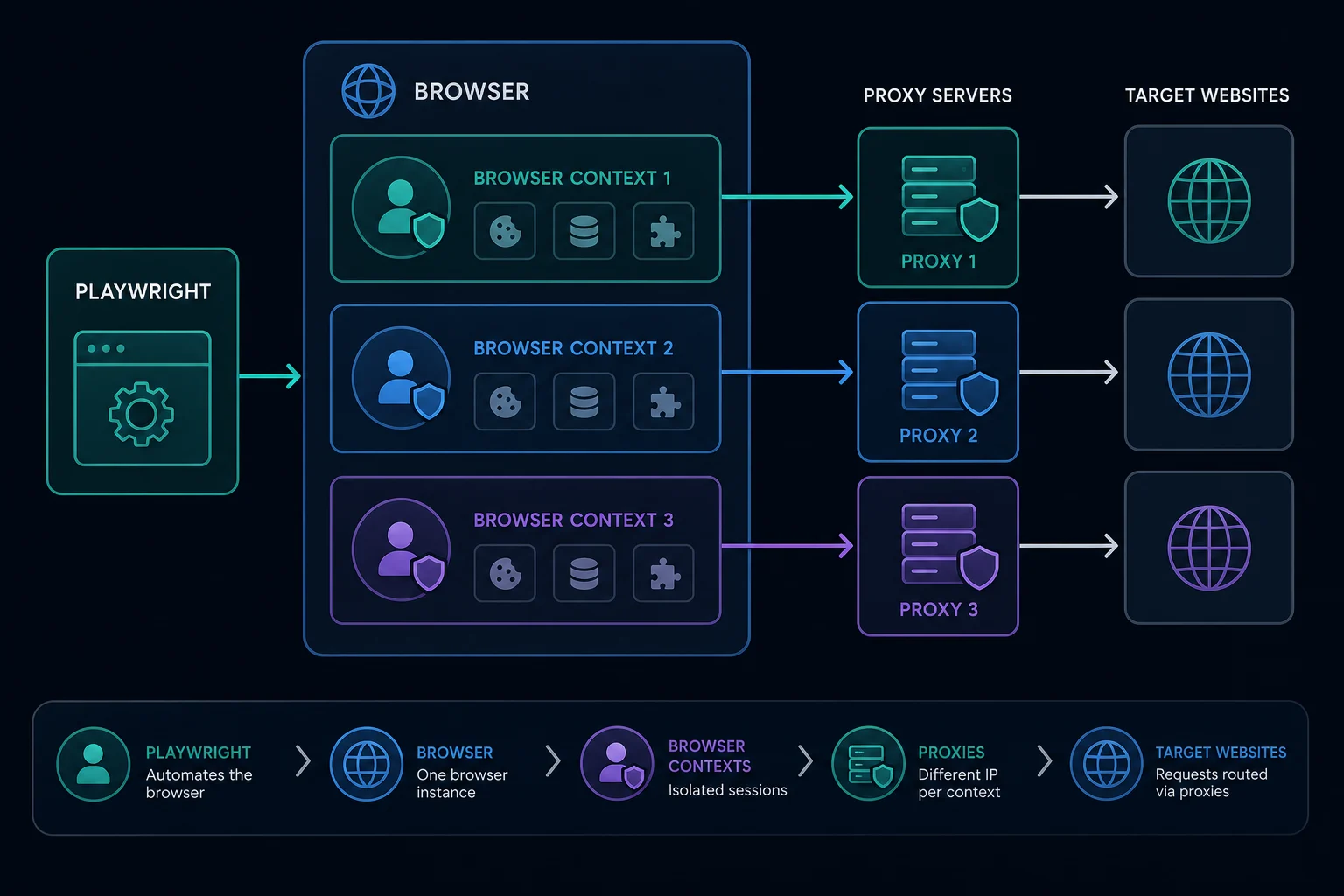
Playwright Proxy: Quick Setup
For a single proxy across the whole browser, pass proxy to chromium.launch():
import { chromium } from "playwright";

const browser = await chromium.launch({
  proxy: {
    server: "http://proxy.example.com:8080",
  },
});

const page = await browser.newPage();
await page.goto("https://example.com");
console.log(await page.title());

await browser.close();
This is the simplest Playwright proxy setup. Every page and context created from that browser uses the same proxy unless you explicitly create contexts with their own proxy settings.
Global Proxy vs Context Proxy
Playwright supports proxy settings at two useful levels:
| Level | Best for | Tradeoff |
|---|---|---|
| Browser launch proxy | One identity for the whole run | Simple, but less flexible |
| Browser context proxy | Multiple isolated identities | More setup, better session separation |
Use a global proxy when the whole job should come from one route:
const browser = await chromium.launch({
  proxy: { server: "http://proxy.example.com:8080" },
});
Use a context proxy when you need separate identities inside one browser process:
const browser = await chromium.launch();

const context = await browser.newContext({
  proxy: {
    server: "http://proxy.example.com:8080",
  },
});

const page = await context.newPage();
await page.goto("https://example.com");

await context.close();
await browser.close();
The context pattern is one of Playwright's biggest advantages for proxy work. A browser context isolates cookies, local storage, permissions, and pages. That makes it a cleaner unit for rotating proxy sessions than reusing one page with different network assumptions.
Authenticated Playwright Proxies
For username and password authentication, keep credentials in the proxy object:
const browser = await chromium.launch({
  proxy: {
    server: "http://proxy.example.com:8080",
    username: process.env.PROXY_USERNAME,
    password: process.env.PROXY_PASSWORD,
  },
});
You can use the same shape at the context level:
const context = await browser.newContext({
  proxy: {
    server: "http://proxy.example.com:8080",
    username: process.env.PROXY_USERNAME,
    password: process.env.PROXY_PASSWORD,
  },
});
Do not hardcode proxy credentials in scripts that might be committed. Load them from environment variables, CI secrets, or your own vault.
If your provider gives you a four-part format like host:port:username:password, convert it to:
server: "http://host:port"
username: "username"
password: "password"
Unknown Proxies users can use the proxy converter when a tool expects a different layout.
SOCKS5 and HTTP Proxy Support
Playwright's network documentation describes proxy support for HTTP(S) and SOCKSv5. In practice, HTTP(S) proxies are the default fit for web scraping and browser automation because most targets are normal HTTP or HTTPS websites.
Use SOCKS5 when:
- Your proxy plan or tool specifically requires it.
- You need a lower-level tunnel and the browser supports the scheme.
- HTTP proxy configuration fails for a client-specific reason.
Use HTTP(S) when:
- You are automating normal websites.
- You need the simplest setup across browsers and CI.
- Your provider dashboard defaults to HTTP proxy endpoints.
For a protocol-level comparison, read SOCKS5 vs HTTP proxy.
Rotating Proxies in Playwright
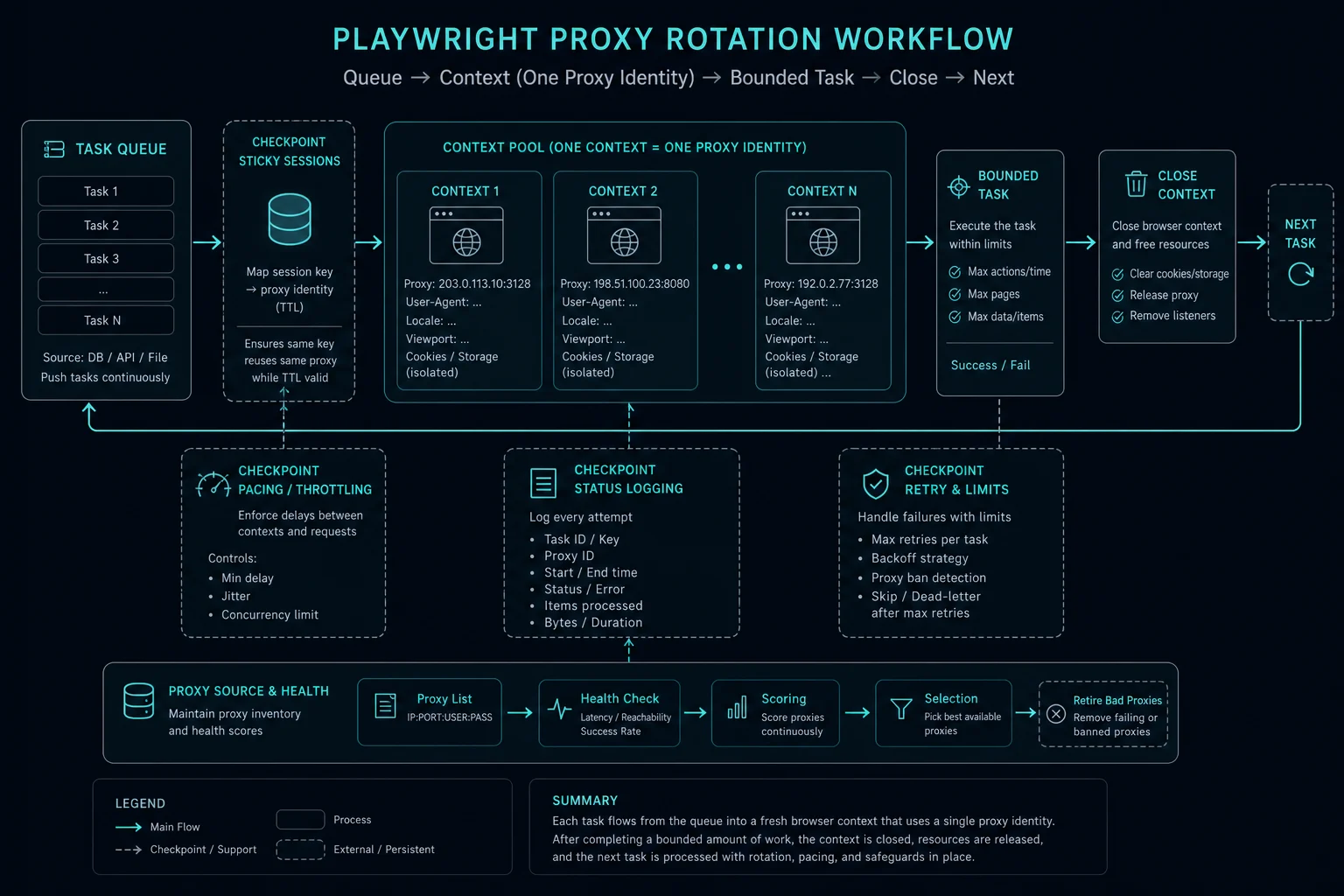
The safest rotation unit is a browser context. Create a new context for each proxy identity, do one bounded task, then close it:
import { chromium, type BrowserContextOptions } from "playwright";

const proxies: BrowserContextOptions["proxy"][] = [
  { server: "http://proxy-1.example.com:8080" },
  { server: "http://proxy-2.example.com:8080" },
  { server: "http://proxy-3.example.com:8080" },
];

const browser = await chromium.launch();

for (const proxy of proxies) {
  const context = await browser.newContext({ proxy });
  const page = await context.newPage();

  try {
    await page.goto("https://example.com", { waitUntil: "domcontentloaded" });
    // Run one bounded workflow for this proxy identity.
  } finally {
    await context.close();
  }
}

await browser.close();
This avoids mixing cookies, storage, and network identity across tasks. If the target expects the same visitor across a login, cart, checkout, or account workflow, do not rotate between steps. Use a sticky residential session or stable ISP proxy for the whole flow.
For fully independent pages, rotation can be useful when it is paired with respectful pacing. Playwright can run fast enough to overload a site or your own proxy pool if you let it. Use explicit queues and limits rather than unbounded parallel pages.
Playwright Test Proxy Setup
If you use Playwright Test, put a shared proxy in playwright.config.ts:
import { defineConfig } from "@playwright/test";

export default defineConfig({
  use: {
    proxy: {
      server: "http://proxy.example.com:8080",
      username: process.env.PROXY_USERNAME,
      password: process.env.PROXY_PASSWORD,
    },
  },
});
This is useful for QA runs that should execute from one region or one egress path. For scraping jobs with many identities, explicit context creation in your own worker code is usually clearer than hiding rotation inside the test config.
Bypass Rules and Localhost
Some runs need local services to stay direct while external traffic uses a proxy. Playwright supports a bypass setting:
const browser = await chromium.launch({
  proxy: {
    server: "http://proxy.example.com:8080",
    bypass: "localhost,127.0.0.1,.internal.example.com",
  },
});
Use bypass rules sparingly. If a target is accidentally bypassed, your local IP may hit the site instead of the proxy. If an internal service is accidentally proxied, tests may fail with confusing connection errors.
Debugging a Playwright Proxy
When a Playwright proxy fails, test one layer at a time:
- Verify the proxy with
curl. - Launch one browser with one proxy.
- Visit an IP check page through Playwright.
- Test a normal HTTPS page.
- Add authentication only after the unauthenticated shape is correct.
- Try headed mode before headless mode.
- Compare the same target without the proxy.
Use this table for common symptoms:
| Symptom | Likely cause | First fix |
|---|---|---|
page.goto times out |
Proxy host, port, protocol, or target connectivity issue | Test with curl -x |
| Authentication fails | Wrong credential placement or provider setting | Use username and password fields |
| Local app fails in tests | Localhost is being proxied | Add bypass rules |
| First page works, later actions fail | Session, WebSocket, asset, or proxy stability issue | Keep one sticky session and inspect network logs |
| Target returns 403 or 429 | Site policy, rate limit, or fingerprint issue | Slow down and debug behavior |
If a target returns HTTP 403 Forbidden or HTTP 429 Too Many Requests, the proxy setting may already be working. Those responses usually mean the site received the traffic and rejected it based on rules, rate limits, or session signals.
Concurrency and Session Design
Playwright makes concurrency easy, but proxy pools still need limits. A high number of pages can create many requests because each browser page loads scripts, images, API calls, and tracking endpoints.
Target-specific rules still apply to browser automation. For professional-network data, review the authorization and source-selection requirements in the LinkedIn scraping guide before adapting a Playwright collector.
Good defaults:
- Start with one context per proxy identity.
- Limit concurrent contexts per proxy.
- Use sticky sessions for multi-step user journeys.
- Rotate between independent tasks, not mid-session.
- Add jitter and backoff after failures.
- Log proxy ID, target host, status, timeout, and retry count.
- Stop retrying when the target clearly blocks a pattern.
The delay calculator can help estimate pacing when you are trying to avoid accidental request bursts.
Residential vs ISP Proxies for Playwright
Residential proxies fit Playwright workflows that need consumer-style IPs, geographic variety, or rotating sessions for independent public-page checks.
ISP proxies fit workflows that need speed, stability, and repeated access from the same dedicated IP. They are often easier for QA, account workflows, and monitoring where identity continuity matters.
The proxy type does not replace good browser behavior. Headers, cookies, viewport, timing, JavaScript execution, and request volume still matter. Choose the proxy type for infrastructure fit, then design the automation to behave consistently.
Unknown Proxies offers both residential proxies and stable ISP plans through pricing. Use residential when you need rotation and geography; use ISP when you need consistent dedicated sessions.
Playwright Python Proxy Example
The same idea applies in Playwright Python:
from playwright.sync_api import sync_playwright

with sync_playwright() as p:
    browser = p.chromium.launch(proxy={
        "server": "http://proxy.example.com:8080",
        "username": "USERNAME",
        "password": "PASSWORD",
    })

    page = browser.new_page()
    page.goto("https://example.com")
    print(page.title())

    browser.close()
For context-level proxies in Python, create a browser first, then call browser.new_context(proxy={...}). The same session rules apply: one context per identity is cleaner than changing proxy assumptions inside a reused context.
FAQ
How do I set a proxy in Playwright?
Pass a proxy object to browserType.launch() for a global proxy, or pass proxy to browser.newContext() for an isolated context-level proxy.
Does Playwright support authenticated proxies?
Yes. Put the proxy endpoint in server, then pass username and password as separate fields. Keep credentials in environment variables or secrets.
Can Playwright rotate proxies?
Playwright can rotate proxies by creating new contexts or browsers with different proxy settings. Use one proxy identity per bounded task and close the context when that task finishes.
Should I use a global proxy or context proxy?
Use a global proxy when the whole run should share one identity. Use context proxies when you need isolated cookies, storage, and proxy identities inside one browser process.
Why does Playwright work without a proxy but fail with one?
The proxy may be unreachable, the protocol may be wrong, authentication may be rejected, or the target may treat the proxied traffic differently. Test the proxy with curl, then run Playwright in headed mode with one page.
Final Thoughts
A Playwright proxy is most reliable when proxy identity matches browser context identity. Use launch-level proxy settings for one simple route, context-level settings for isolated sessions, and sticky sessions when the target expects continuity. Rotate only between independent tasks, log failures clearly, and treat 403 or 429 responses as target behavior to debug rather than proof that the proxy setting failed.
For proxy list formatting, use the proxy converter. For rotation-heavy browser workflows, compare residential proxies. For stable dedicated automation, review ISP proxy pricing.
Technical references: Playwright network proxy documentation, Playwright Python network documentation, and Chromium proxy support notes.