SOCKS5 vs HTTP proxy comes down to what your tool is sending through the proxy. Use an HTTP proxy when you are routing normal web traffic and your client expects an HTTP or HTTPS proxy URL. Use a SOCKS5 proxy when you need a lower-level tunnel for more protocols, stricter tool compatibility, or applications that explicitly ask for SOCKS.
For most web scraping, browser automation, retail bots, and account workflows, HTTP(S) proxies are the simpler default. They work cleanly with browsers, Python HTTP clients, cURL, Playwright, Puppeteer, and most scraping tools. SOCKS5 is useful when the software supports SOCKS better than HTTP, when the traffic is not strictly HTTP, or when you want the proxy to operate as a generic TCP tunnel.
Unknown Proxies supports HTTP(S) and SOCKS connections on residential and ISP proxies. If you are still choosing the proxy type first, start with datacenter proxies vs residential proxies. If you already know you need residential traffic, compare residential proxy pricing after choosing the protocol your tool supports best.
SOCKS5 vs HTTP Proxy: Quick Answer
Use this decision table first:
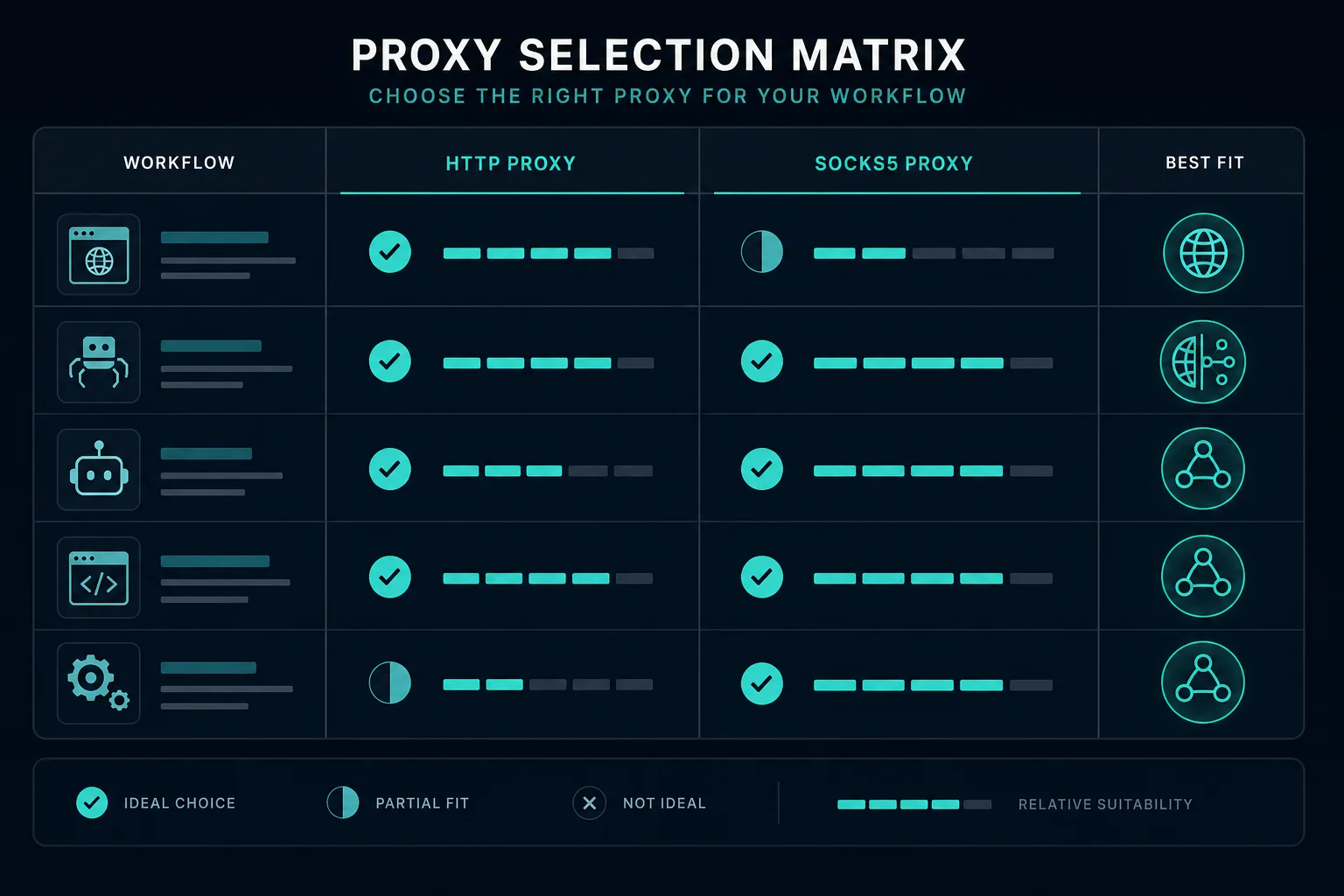
| Situation | Choose | Why |
|---|---|---|
| Browser, scraper, bot, or API client asks for HTTP or HTTPS proxy | HTTP proxy | It is the native fit for web traffic |
| Tool specifically asks for SOCKS or SOCKS5 | SOCKS5 proxy | Match the tool instead of forcing translation |
| You are routing normal website requests | HTTP proxy | Simpler setup and broader scraping-library support |
| You need a generic tunnel for non-HTTP traffic | SOCKS5 proxy | SOCKS5 can carry more than web requests |
| You are using residential proxies for web scraping | Usually HTTP(S) | Most scraping stacks expect HTTP proxy URLs |
| You are debugging proxy format issues | Either, but format carefully | Use the proxy converter when tools expect different layouts |
The protocol does not make a bad proxy good. IP quality, target rules, session handling, rate limits, and request behavior still matter more than whether the connection is HTTP or SOCKS5.
What Is an HTTP Proxy?
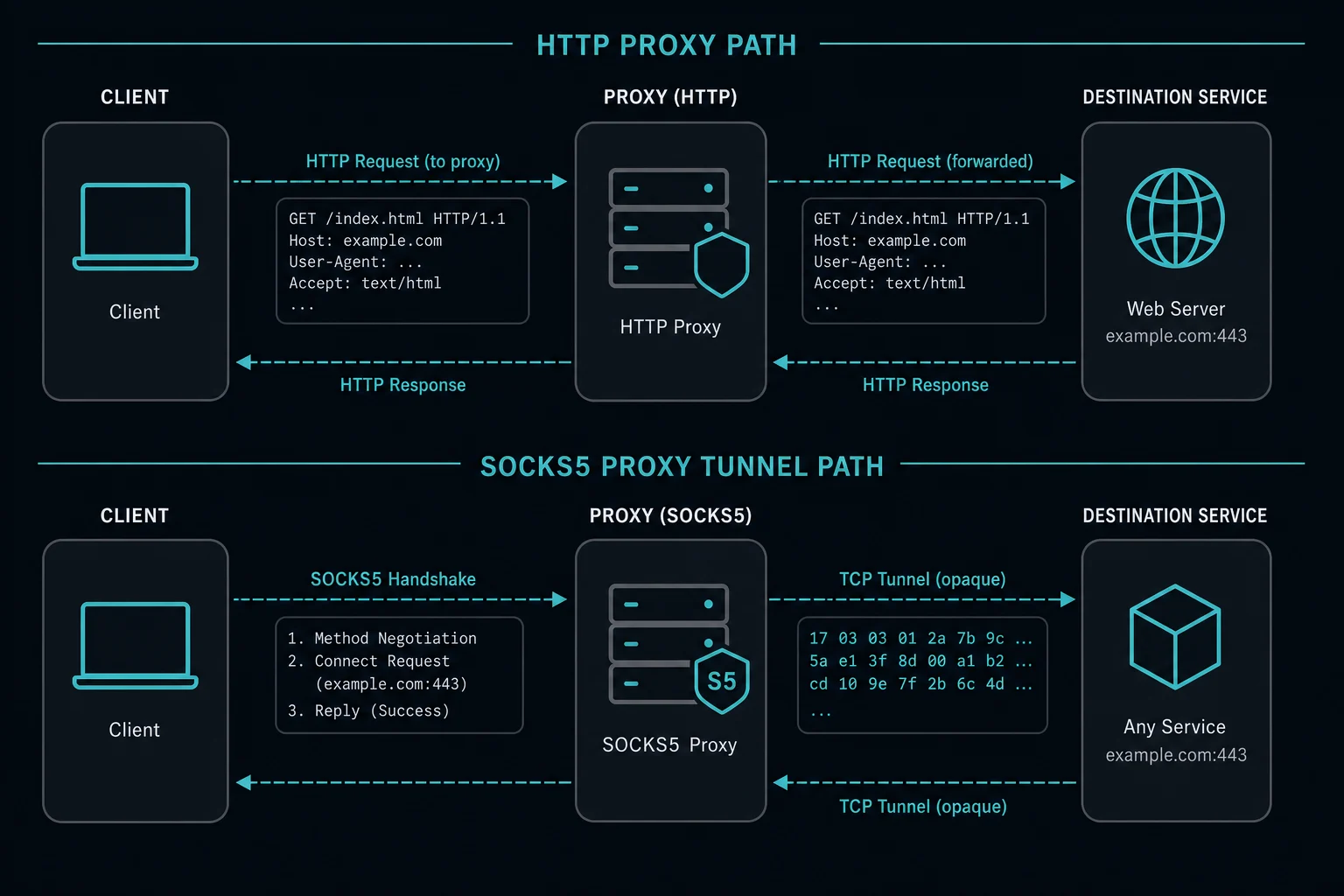
An HTTP proxy is built for HTTP-style web traffic. Your client sends a request to the proxy, and the proxy forwards that request to the target server.
For HTTPS websites, the client normally uses the CONNECT method to create a tunnel through the HTTP proxy. That lets the browser or scraping client establish TLS to the destination while still routing through the proxy.
HTTP proxies are common because most scraping and browser tools understand them. When a dashboard gives you a proxy address in a format like host:port:username:password, many tools can use it directly as an HTTP or HTTPS proxy after you place the fields in the format that tool expects.
What Is a SOCKS5 Proxy?
SOCKS5 is a proxy protocol that works at a lower level than an HTTP proxy. Instead of being designed around web requests, it creates a tunnel between the client and a destination host and port.
That makes SOCKS5 more flexible. It can support traffic that is not ordinary HTTP web browsing, as long as the client application supports SOCKS5. It also keeps the proxy from needing to understand the application protocol being carried through the tunnel.
The tradeoff is setup. Some libraries, browsers, and bots handle HTTP proxies by default but need extra configuration, a different dependency, or a different URL format for SOCKS5.
Windows 11 does not expose a native SOCKS5 switch in its manual web proxy settings. The Windows 11 SOCKS5 proxy setup guide covers app-level configuration, authenticated endpoint testing, Chrome limitations, and multi-app routing.
Chrome supports SOCKS5 routing but not SOCKS5 username/password authentication. Use the Chrome SOCKS5 proxy guide to choose between an extension, isolated launch flag, system setting, or local authenticated forwarder. For automation, the Puppeteer proxy error guide lists the SOCKS errors Chrome returns.
Android is a good example: its built-in Wi-Fi proxy field is not a native SOCKS5 setting. The Android SOCKS5 proxy setup guide explains when to use app-level configuration, a VPN-service-based proxy client, or an HTTP endpoint in the Wi-Fi settings.
Apple's per-network Wi-Fi setting also expects an HTTP proxy or PAC URL. The iPhone HTTP proxy guide shows how to enter manual credentials, verify the route, and understand which traffic is outside that setting's scope.
When to Use an HTTP Proxy
Use an HTTP proxy when your workflow is web-first.
HTTP proxies fit well for:
- Web scraping public pages.
- Browser automation with Playwright, Puppeteer, Selenium, or similar tools.
- Retail bots and monitor tasks that request product pages.
- API clients that support HTTP proxy settings.
- Residential proxy setup for normal web traffic.
- Account workflows where the software already expects HTTP(S).
- Teams that need the simplest proxy format across many tools.
For residential proxy buyers, HTTP(S) is usually the practical first choice. Unknown Proxies residential plans support both protocols, but most users running web scraping, monitoring, and browser workflows should start with HTTP unless their tool tells them otherwise.
If you are also choosing between rotating and sticky residential sessions, read how to use residential proxies without breaking sessions before changing protocol settings.
When to Use a SOCKS5 Proxy
Use SOCKS5 when your application asks for it or when your traffic is not just ordinary web requests.
SOCKS5 proxies fit well for:
- Applications that only support SOCKS or work better with SOCKS.
- Non-browser tools that need a generic TCP tunnel.
- Software where HTTP proxy support is incomplete or unreliable.
- Local apps that have a SOCKS-specific proxy field.
- Workflows where the target protocol is not HTTP.
- Testing when HTTP proxy configuration fails but SOCKS5 is supported.
Do not switch to SOCKS5 because it sounds more advanced. If the traffic is normal HTTPS browsing and the tool works with HTTP proxies, SOCKS5 may add configuration work without improving success rate.
Protocol Choice for Scraping and Bots
For scraping and bots, protocol choice should follow the client library first and the target site second.
If you are using Python requests, browser automation, cURL, or most retail bot proxy lists, HTTP(S) is usually easiest. The proxy setting is widely supported and the error messages are easier to debug.
SOCKS5 can be useful in Python when you install SOCKS support and your library supports the socks5:// scheme. But if you are only scraping normal websites, a working HTTP proxy is usually enough.
Applications with mixed traffic need separate testing. The Discord proxies guide is one example: routing HTTPS or WebSocket traffic does not prove that a proxy also carries the application's UDP voice path.
The target site usually sees the resulting request, IP reputation, session state, headers, timing, and browser behavior. It generally does not care that you selected SOCKS5 inside your proxy client unless that choice changes how your client connects or behaves.
Proxy Address Formats
The same proxy can be written in several formats depending on the tool:
| Tool format | Example shape |
|---|---|
| Four-part list | host:port:username:password |
| URL with scheme | http://username:password@host:port |
| SOCKS URL | socks5://username:password@host:port |
| Auth fields | Host, port, username, password in separate inputs |
If your tool rejects a proxy, check the format before assuming the proxy is down. Some tools need the scheme, some reject the scheme, and some expect username and password in separate fields.
Use the proxy converter when you need to reformat a proxy list between tools. Protocol and format are separate decisions: socks5://user:pass@host:port selects SOCKS5, while http://user:pass@host:port selects an HTTP proxy.
If the proxy server responds with 407 Proxy Authentication Required, fix credentials and format before changing protocol. A 407 means the proxy did not accept authentication, not that SOCKS5 or HTTP is automatically the wrong choice.
Does SOCKS5 Improve Proxy Success Rate?
Not by itself. SOCKS5 changes how the client connects to the proxy. It does not automatically improve IP reputation, bypass rate limits, fix session mistakes, or make a target accept traffic it would otherwise reject.
If you are getting HTTP 403 Forbidden, HTTP 429 Too Many Requests, or Cloudflare rate-limit pages, debug timing, identity, sessions, and target rules before changing protocol. A protocol switch can fix tool compatibility, but it rarely fixes a bad request pattern.
For higher-friction targets, proxy type often matters more than protocol. Residential proxies can help when you need consumer-style IP reputation and rotation. ISP proxies can help when you need stable dedicated IPs. Compare Unknown Proxies pricing when the issue is product fit rather than protocol setup.
HTTP vs SOCKS5 for Residential Proxies
Use HTTP(S) residential proxies for most web workflows:
- Scraping public pages.
- Localized search checks.
- Ad verification.
- Retail monitoring.
- Browser automation.
- Account workflows that expect web traffic.
Use SOCKS5 residential proxies when your software asks for SOCKS5 or when HTTP proxy settings do not fit the application. The same session rules still apply: use sticky sessions when the site expects continuity, and rotating sessions when each request can stand alone.
Two details matter for rotating residential proxies over SOCKS5:
- Rotation happens per connection. A SOCKS5 connection is one tunnel to one destination through one exit IP. Requests that reuse that connection share the exit. Open a new connection to get a new exit. Our guide to backconnect rotating proxies explains how the gateway picks exits.
- DNS can leak to your local resolver. With
socks5://in curl and Pythonrequests, your machine resolves the hostname. Withsocks5h://, the proxy resolves it. Usesocks5h://when the DNS lookup should come from the proxy side.
curl -x "socks5h://USER:PASS@HOST:PORT" https://api.ipify.org
For residential setup details, read how to use residential proxies, then compare residential proxy plans.
HTTP vs SOCKS5 for ISP Proxies
ISP proxies are usually chosen for stability, lower latency, and repeated workflows. Protocol choice is secondary.
Use HTTP(S) for browser and web automation. Use SOCKS5 only when the app or bot expects SOCKS. If your ISP plan dashboard lets you switch protocol, match the setting to the tool loading the proxies.
For stable dedicated IP workflows, compare ISP proxy pricing. If you need broad rotation instead, residential proxies are usually the better fit.
Common Protocol Mistakes
Most SOCKS5 vs HTTP proxy problems come from setup details:
- Using an HTTP proxy URL in a SOCKS-only field.
- Using
socks5://in a tool that only acceptshost:port:user:pass. - Forgetting to install SOCKS support in a library.
- Mixing username and password order.
- Changing protocol while also changing proxy type, session mode, and request timing.
- Assuming SOCKS5 fixes rate limits or access policy blocks.
- Testing with a browser but deploying with a different client.
Change one variable at a time. If the same proxy works as HTTP in one tool but fails as SOCKS5 in another, the problem is probably client configuration, not proxy inventory.
FAQ
Is SOCKS5 better than HTTP proxy?
SOCKS5 is more flexible for generic tunneling, but HTTP proxies are usually easier for web scraping, browsers, bots, and normal HTTPS traffic. Better depends on the application.
Should I use SOCKS5 or HTTP for web scraping?
Use HTTP(S) first unless your scraper requires SOCKS5. Most web scraping libraries and browser automation tools support HTTP proxies cleanly.
Does SOCKS5 hide more than HTTP?
No. SOCKS5 is a proxy protocol, not a guarantee of anonymity or success. IP reputation, DNS behavior, browser fingerprinting, sessions, and request timing still matter.
Can I use SOCKS5 with residential proxies?
Yes. Unknown Proxies residential proxies support HTTP(S) and SOCKS connections. Use the protocol your tool expects, then choose sticky or rotating sessions based on the workflow.
Why does my proxy work in HTTP but not SOCKS5?
The tool may not support SOCKS5, may require a different URL scheme, or may need a SOCKS dependency. Recheck the proxy address format and protocol field before replacing the proxy.
Final Thoughts
SOCKS5 vs HTTP proxy is mainly a setup decision. Use HTTP proxies for most web scraping, browser automation, bots, and API clients. Use SOCKS5 when your application requires it, when HTTP proxy support is unreliable, or when you need a generic tunnel instead of a web-focused proxy.
After protocol, choose the right proxy type and session mode. For rotating residential workflows, start with residential proxies. For stable dedicated IP workflows, compare ISP plans.
Technical references: RFC 1928 SOCKS Protocol Version 5, MDN Proxy servers and tunneling, and RFC 9110 HTTP Semantics.