407 Proxy Authentication Required means your client reached a proxy server, but the proxy refused to forward the request because authentication was missing, invalid, expired, or formatted incorrectly.
This is different from a normal website login error. A 407 happens at the proxy layer before the request is sent to the target site. In scraping tools, browsers, bots, cURL, Python clients, Playwright, Puppeteer, and mobile apps, it usually points to a bad proxy username, password, host, port, protocol, or account status.
The quick fix is to recheck the proxy address, credentials, protocol, plan status, and tool format. If the proxy works in one tool but fails in another, use the proxy converter to reformat the same host, port, username, and password before replacing the proxy.
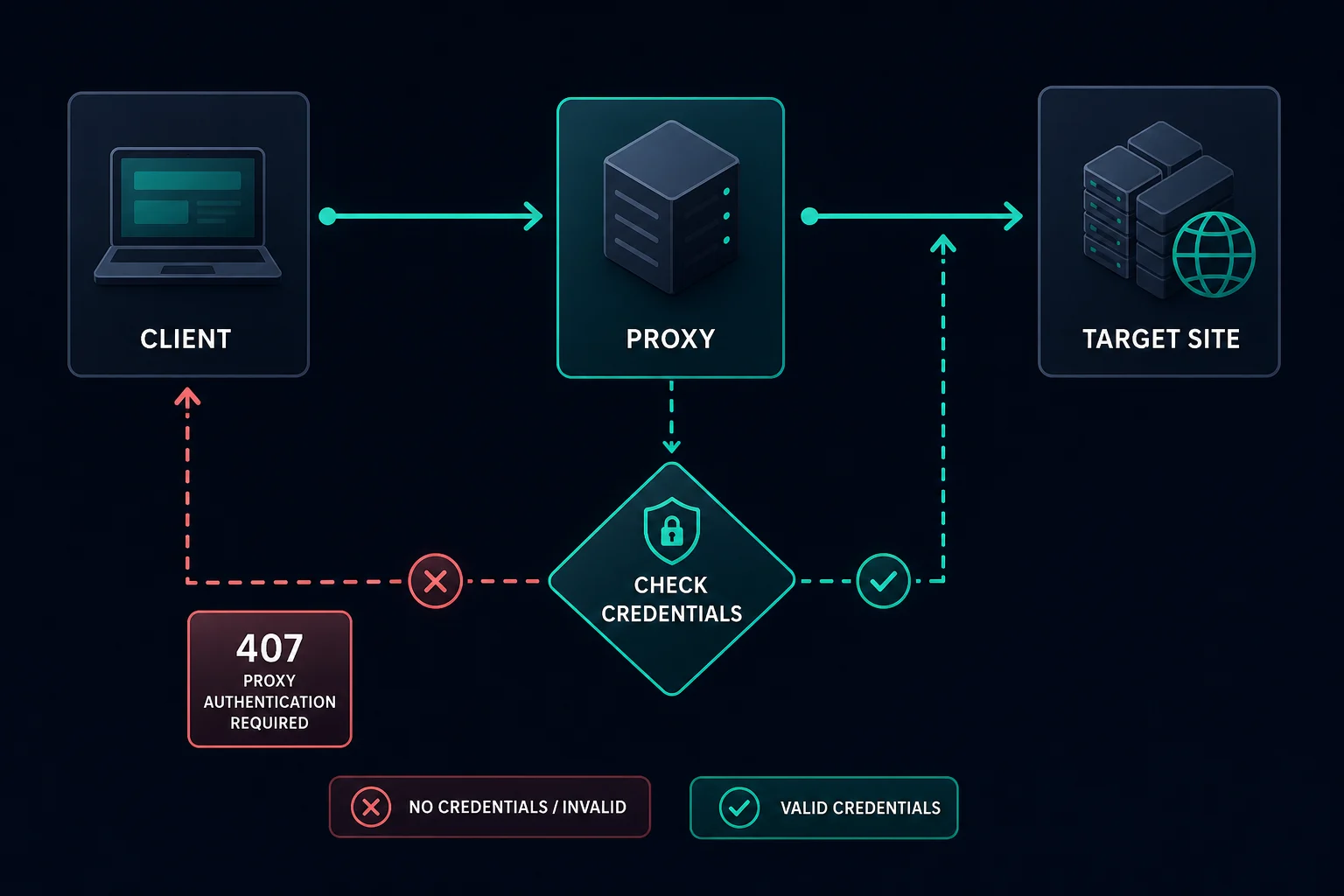
407 Proxy Authentication Required: Quick Fix
Start with the most common causes:
| Symptom | Likely cause | First fix |
|---|---|---|
| Every request returns 407 | Missing or wrong proxy credentials | Re-enter username and password |
| Works in browser but not scraper | Tool expects a different proxy format | Convert host:port:user:pass to the required layout |
| Works with HTTP but not SOCKS5 | Wrong protocol or scheme | Match the dashboard protocol and tool setting |
| Started failing after plan change | Expired, canceled, or changed credentials | Check dashboard plan status and regenerate if needed |
| Only some proxies fail | Mixed list, old credentials, or wrong region route | Remove stale rows and retest a clean sample |
| Target site shows login page | Not a proxy 407 | Debug site authentication instead |
If you are seeing 407 Proxy Authentication Required, do not start by changing target headers or rotating IPs. First prove that the proxy credentials are accepted.
What 407 Proxy Authentication Required Means
HTTP 407 is a standard client-error status code. It means the client must authenticate with the proxy before the proxy will send the request onward.
The proxy may include a Proxy-Authenticate header describing the authentication method. The client then needs to send credentials in a Proxy-Authorization header or through the proxy configuration fields supported by the tool.
In practical proxy setups, the credentials are often delivered as one of these formats:
host:port:username:password
http://username:password@host:port
socks5://username:password@host:port
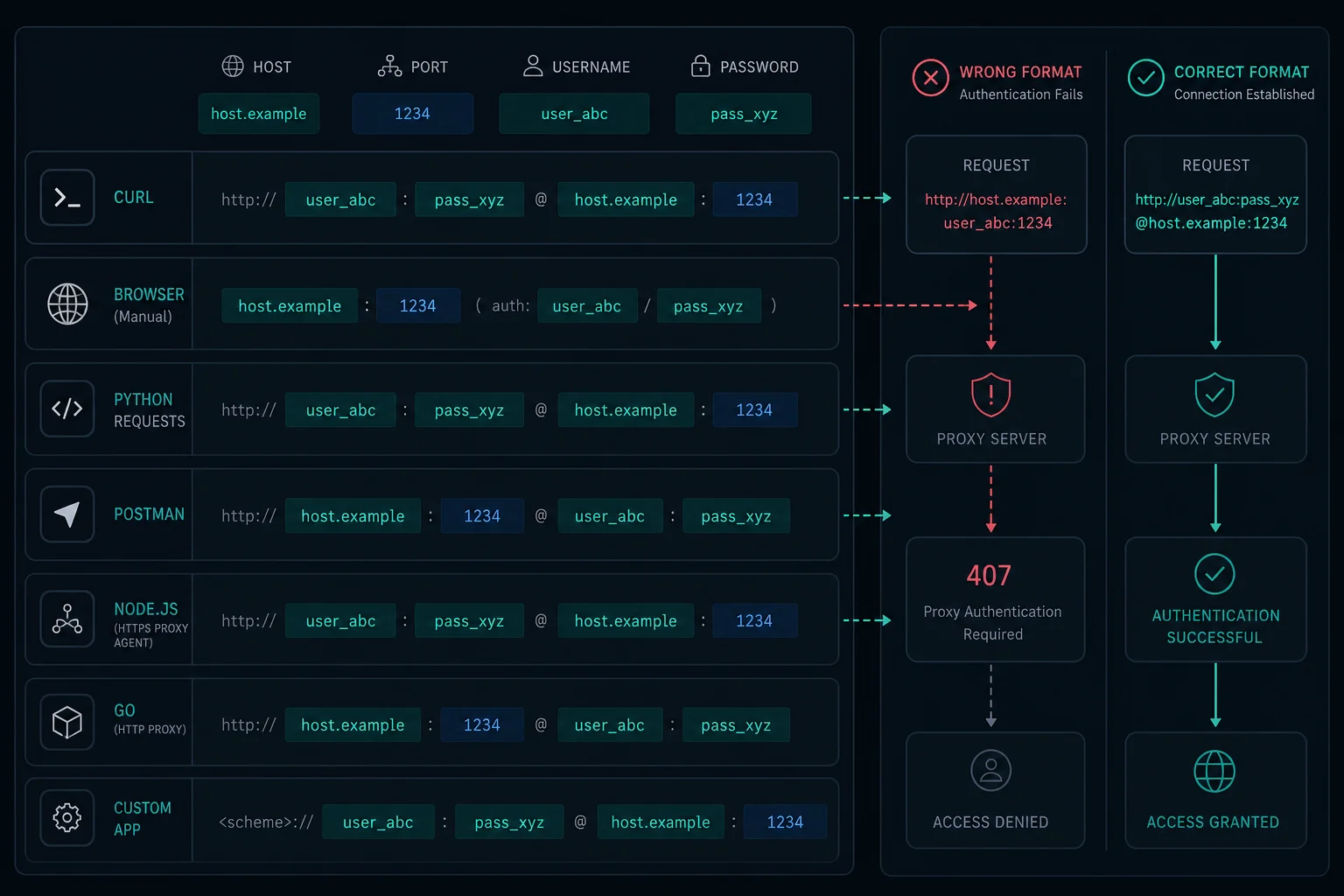
Some tools want the full URL. Some want host, port, username, and password in separate fields. Some want no scheme at all. That format mismatch is one of the most common reasons valid proxies return 407.
407 vs 401 vs 403
These errors are easy to mix up:
| Status | Layer | Meaning |
|---|---|---|
| 401 Unauthorized | Target site or API | The destination wants user, API, or app authentication |
| 403 Forbidden | Target site, CDN, WAF, or app | The request is understood but access is denied |
| 407 Proxy Authentication Required | Proxy server | The proxy wants valid proxy credentials before forwarding |
If a target API returns 401, fix the API token or login. If a website returns HTTP 403 Forbidden, debug permissions, WAF policy, target rules, and IP reputation. If the proxy returns 407, fix proxy authentication first.
Common Causes of 407 Proxy Authentication Required
Most 407 errors come from setup details.
Check these first:
- Wrong username.
- Wrong password.
- Extra spaces copied into credentials.
- Expired or canceled proxy plan.
- Old credentials after a plan change.
- Wrong host or port.
- HTTP proxy loaded into a SOCKS-only field.
- SOCKS5 URL loaded into an HTTP-only field.
- Credentials placed in the wrong order.
- Special characters in credentials not handled by the tool.
- IP-authenticated proxy used from an unallowed IP.
- Tool strips
Proxy-Authorizationheaders. - Environment variables override your proxy settings.
Do not debug the target website until you know the proxy accepts authentication.
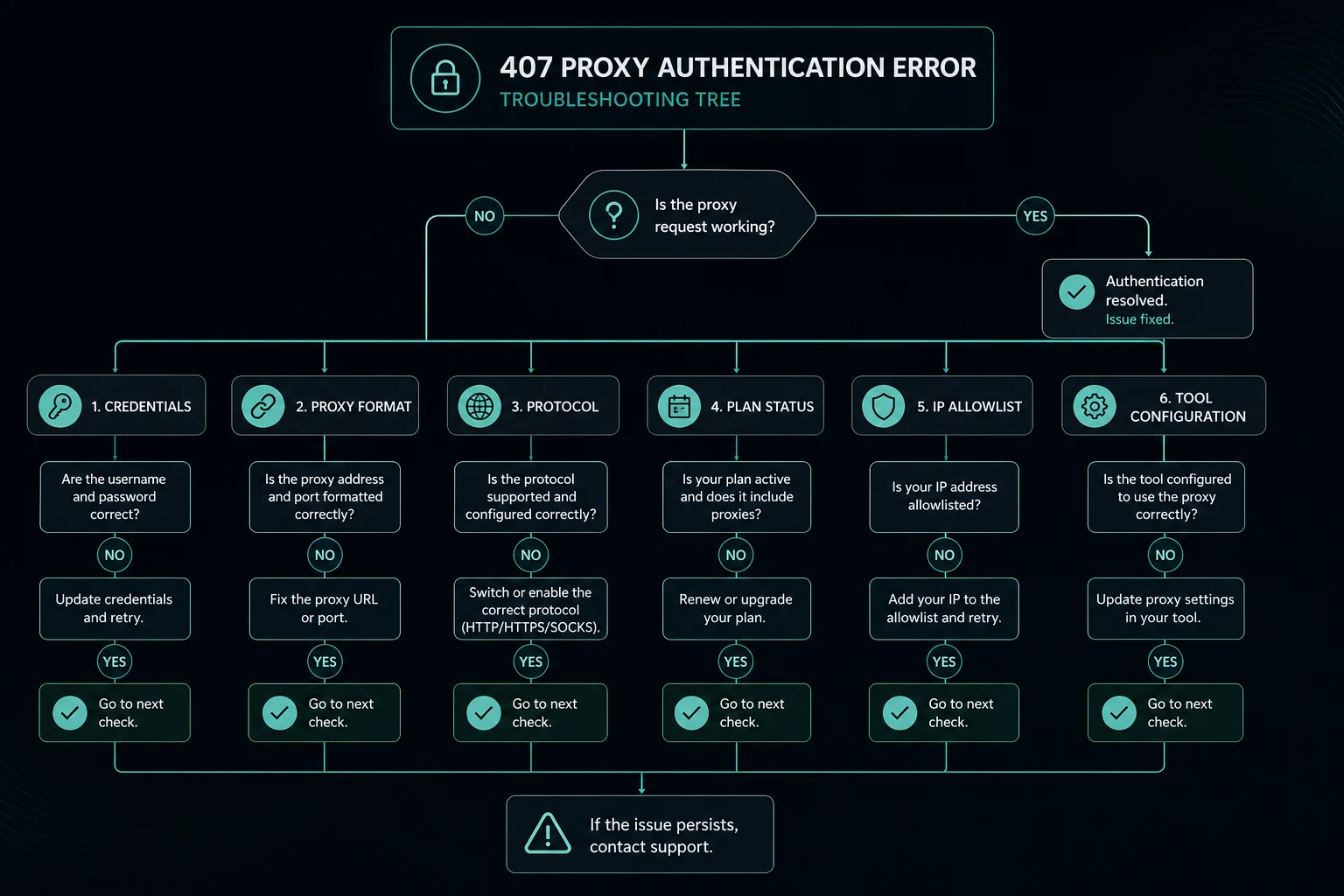
How to Fix 407 in Browsers
For browsers, verify the proxy settings directly:
- Check the proxy host and port.
- Confirm whether the browser is using HTTP, HTTPS, or SOCKS.
- Re-enter the username and password.
- Remove saved wrong credentials for that proxy.
- Disable conflicting VPN or proxy extensions.
- Test a single proxy before loading a full list.
- Try another browser profile to rule out cached credentials.
If the browser prompts for a username and password, the proxy is reachable. If the prompt keeps returning after correct credentials, the username, password, protocol, plan status, or allowed client IP is probably wrong.
For macOS system fields, browser coverage, and rollback steps, follow the Mac proxy settings guide before changing the proxy format.
How to Fix 407 in cURL
For cURL, use the proxy URL format explicitly:
curl -x "http://username:password@host:port" "https://example.com"
For SOCKS5:
curl -x "socks5://username:password@host:port" "https://example.com"
If your password includes special characters such as @, :, /, ?, or #, the URL parser may split it incorrectly. Either URL-encode the credential or use cURL options that pass credentials separately if your workflow supports that.
How to Fix 407 in Python Scrapers
In Python, confirm the library supports the proxy protocol you selected.
For requests with HTTP proxies:
proxies = {
    "http": "http://username:password@host:port",
    "https": "http://username:password@host:port",
}
For SOCKS5, install SOCKS support and use the right scheme:
pip install "requests[socks]"
proxies = {
    "http": "socks5://username:password@host:port",
    "https": "socks5://username:password@host:port",
}
If the format is unclear, compare your code against the Python proxy requests examples before changing proxy providers or target settings. For username and password parsing problems in requests, use the Python requests proxy authentication guide.
If your rotating proxy Python script gets 407 on every request, stop the loop and test one proxy manually. Repeated retries with wrong credentials only create noisy logs and can hide the real issue.
How to Fix 407 in Playwright or Puppeteer
Browser automation tools usually want proxy credentials in structured fields, not always inside the URL.
Check:
- The proxy server includes the correct scheme and port.
- Username and password are passed in the proxy config.
- The browser context is not overriding the launch proxy.
- The same credentials are not accidentally URL-encoded twice.
- The target page is not behind a separate site login.
Keep proxy authentication separate from website authentication. A target login form, cookie, or bearer token does not authenticate you to the proxy.
For Puppeteer-specific connection failures, authentication prompts, tunnel errors, and timeouts, use the Puppeteer proxy server errors guide after confirming whether the response is really a 407.
Proxy Format Examples
Many 407 errors are just format errors.
| Input you have | Tool may expect | Notes |
|---|---|---|
host:port:user:pass |
http://user:pass@host:port |
Common for HTTP clients |
user:pass@host:port |
host:port:user:pass |
Common for proxy-list fields |
host:port plus credentials |
Separate host, port, username, password fields | Common in browsers and automation tools |
| HTTP endpoint | http://... scheme |
Do not label it SOCKS unless the endpoint supports SOCKS |
| SOCKS endpoint | socks5://... scheme |
Use only when the client supports SOCKS5 |
Use SOCKS5 vs HTTP proxy if you are unsure which protocol your tool should use. Use the proxy converter if the proxy is valid but the app expects a different layout.
Can Proxies Fix a 407 Error?
Buying more proxies does not fix 407 if the credentials are wrong. A 407 is usually an authentication or formatting problem.
Changing proxy providers or plans may help only when:
- The current plan expired.
- The credentials cannot be recovered.
- The provider account is disabled.
- The provider does not support the protocol your tool requires.
- The proxy list is stale or mixed with old inventory.
If the proxy authenticates correctly and the target site still blocks you, then move to scraping diagnostics such as HTTP 403 Forbidden, HTTP 429 Too Many Requests, or sticky vs rotating proxies.
Prevention Checklist
Use this checklist before loading a proxy list into production:
- Test one proxy in cURL or a browser.
- Confirm HTTP or SOCKS5 protocol support.
- Convert the proxy format for the exact tool.
- Keep credentials out of logs.
- Avoid copying extra spaces or hidden characters.
- Do not mix old and new proxy lists.
- Track plan expiration and credential changes.
- Stop workers after repeated 407 responses.
- Separate proxy authentication errors from target-site errors.
For Unknown Proxies users, compare active plan details in the dashboard before assuming the target site is blocking the request.
FAQ
What does 407 Proxy Authentication Required mean?
407 Proxy Authentication Required means the proxy server needs valid proxy credentials before it will forward the request to the destination.
Is 407 caused by the target website?
Usually no. A 407 is caused by the proxy layer. The target website often never receives the request.
How do I fix 407 proxy authentication required?
Recheck the proxy username, password, host, port, protocol, plan status, IP allowlist, and tool-specific proxy format. Test one proxy before retrying a full scraper.
Why does my proxy work in one tool but return 407 in another?
The second tool probably expects a different format or protocol. Convert the proxy layout and confirm whether it wants HTTP, HTTPS, or SOCKS5.
What is a proxy address?
A proxy address is the host and port your client connects to before reaching the target site. Many authenticated proxy tools also require username and password fields, but those credentials are separate from the proxy address itself.
Is 407 the same as proxy authentication error 2606?
Not necessarily. 407 is a standard HTTP status code. A proxy authentication error 2606 is usually an application-specific error label that may point to the same credential or format problem, depending on the tool.
Should I rotate proxies after a 407?
No. Fix authentication first. Rotating through more proxies with the same wrong credentials usually returns more 407 errors.
Final Thoughts
407 Proxy Authentication Required is a proxy-layer authentication failure. Fix the proxy username, password, host, port, protocol, plan status, and tool format before debugging the target website.
If the issue is format-related, use the proxy converter. If it is protocol-related, compare SOCKS5 vs HTTP proxy. Once authentication works, choose the right proxy type and session mode for the job instead of treating 407 as a target block.
Technical references: MDN 407 Proxy Authentication Required, MDN Proxy-Authenticate header, and RFC 9110 HTTP Semantics.