Python requests proxy authentication usually means putting the proxy username and password in the proxy URL, assigning that URL to both http and https keys, and testing the proxy against a neutral IP endpoint before touching your scraper logic.
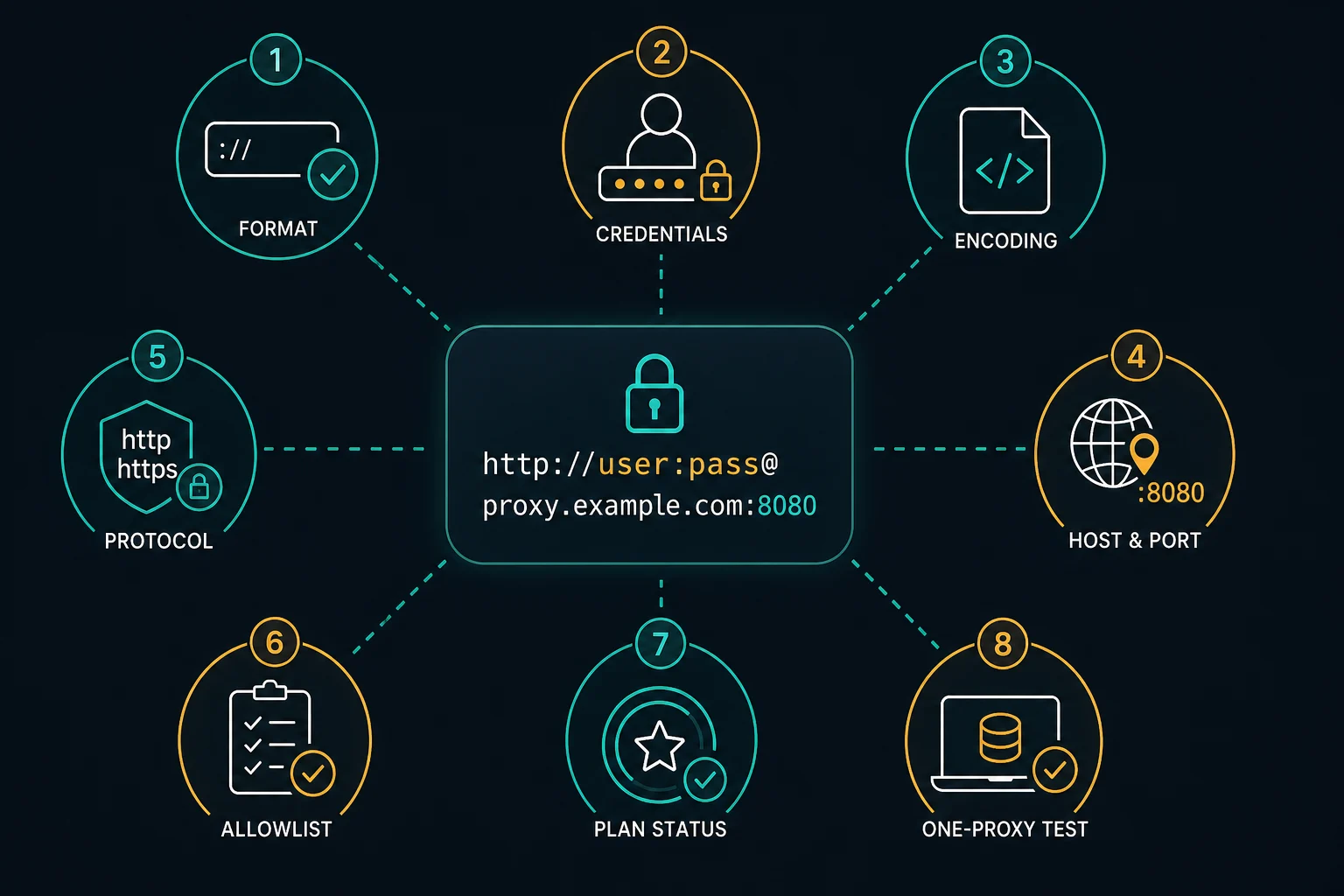
The most common format is http://username:password@host:port. If requests returns 407 Proxy Authentication Required, the proxy rejected your credentials, format, protocol, account status, or IP allowlist before the target site handled the request.
Use this guide when a proxy works in a dashboard, browser, cURL, or proxy checker but fails in Python requests. For a broader proxy setup walkthrough, start with the Python proxy requests guide. For a status-code-first explanation, use the 407 proxy authentication guide.
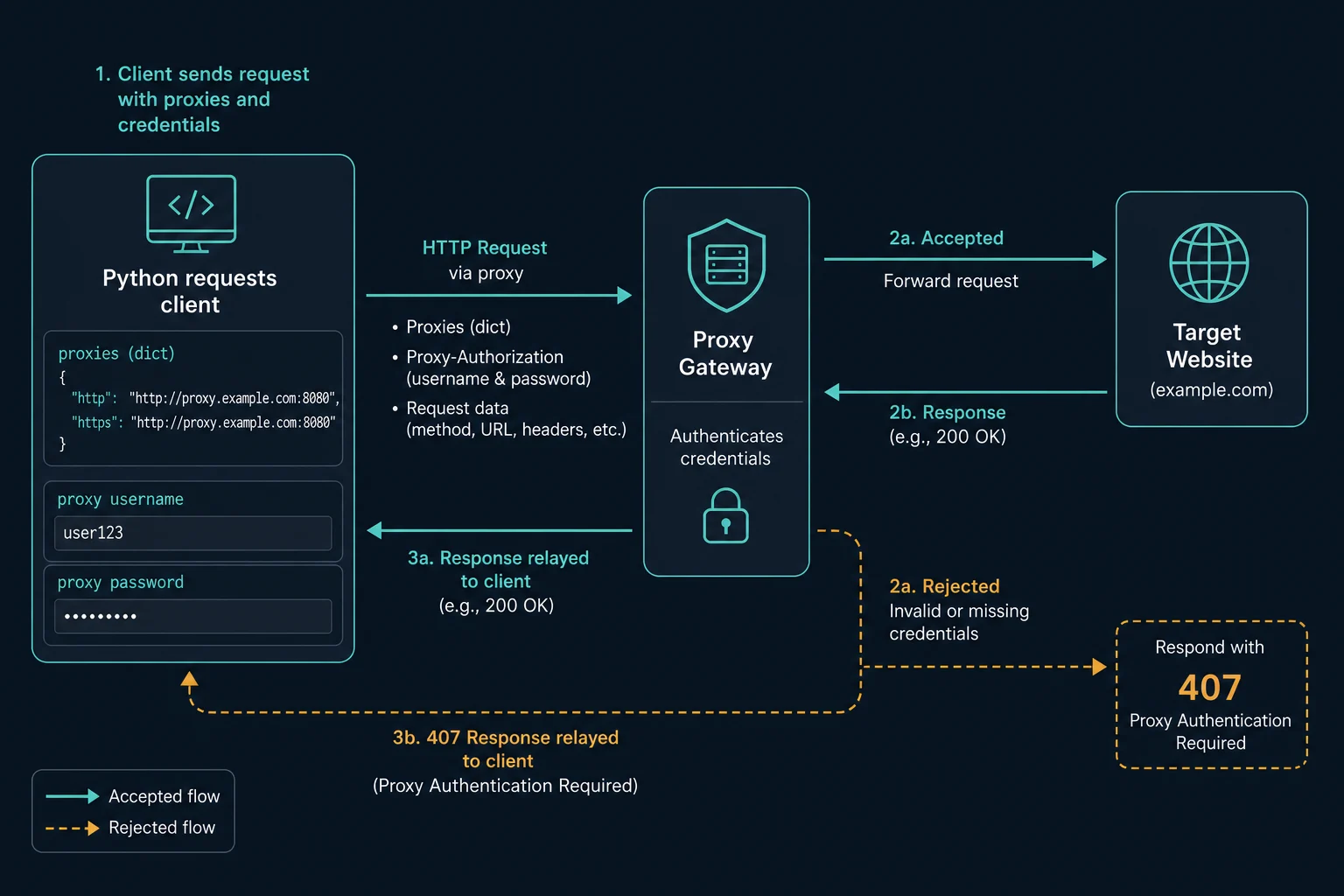
Python Requests Proxy Authentication Quick Fix
Start with one known-good proxy, not a full rotating list:
import requests

proxy_url = "http://username:password@proxy.example.com:8000"

proxies = {
    "http": proxy_url,
    "https": proxy_url,
}

response = requests.get(
    "https://ipv4.unknownproxies.com/ip",
    proxies=proxies,
    timeout=15,
)

print(response.status_code)
print(response.text)
If this works, Python can authenticate with the proxy and route traffic through it. Then test your real target.
If it fails with 407, check these before changing headers, user agents, target URLs, or rotation:
| Check | Why it matters |
|---|---|
| Username and password | A typo, stale password, copied space, or wrong account will fail before the target loads |
| Host and port | Residential, ISP, HTTP, and SOCKS endpoints may use different ports |
| Protocol scheme | Most HTTP proxy URLs start with http://, even for HTTPS target pages |
| URL encoding | @, :, /, ?, #, spaces, and similar characters can break proxy URL parsing |
| IP allowlist | If your account uses allowlist auth, the server running Python must be allowed |
| Plan status | Expired plans, empty balances, or wrong product endpoints can look like bad credentials |
Do not rotate proxies to fix a shared authentication mistake. If every proxy in the list uses the same wrong username, password, port, or allowlist setting, every request will fail.
The Correct Username and Password Format
requests expects a proxy mapping by URL scheme:
proxy_url = "http://username:password@host:port"

proxies = {
    "http": proxy_url,
    "https": proxy_url,
}
The dictionary keys describe the destination URL scheme. The proxy URL value describes how Python connects to the proxy.
That distinction causes a lot of confusion. For an HTTPS target such as https://example.com, the https key should often still point to an http:// proxy URL:
proxies = {
    "https": "http://username:password@host:port",
}
Many HTTP proxies support HTTPS destinations through the HTTP CONNECT method. Only use an https:// proxy URL if your proxy provider explicitly gives you an HTTPS proxy endpoint and your installed client stack supports it.
If your provider gives you this common four-part format:
host:port:username:password
convert it to:
http://username:password@host:port
The proxy converter is useful when you need to convert larger lists without manually moving each field.
URL-Encode Special Characters in Credentials
Proxy credentials live inside a URL. That means reserved URL characters can change how Python parses the string.
This proxy URL is ambiguous:
http://customer@example.com:p@ss:word#1@proxy.example.com:8000
Python may read part of the username or password as the host, separator, fragment, or port. Build the URL with encoded credentials instead:
from urllib.parse import quote

username = quote("customer@example.com", safe="")
password = quote("p@ss:word#1", safe="")

proxy_url = f"http://{username}:{password}@proxy.example.com:8000"

proxies = {
    "http": proxy_url,
    "https": proxy_url,
}
Encode only the username and password values. Do not encode the whole proxy URL, because requests still needs to understand the scheme, host, and port.
The Python standard library documents urllib.parse.quote for escaping URL components. Use it when credentials include spaces, email-style usernames, symbols, or provider-generated session parameters.
Use Environment Variables for Proxy Secrets
Do not commit real proxy credentials into Python files, notebooks, GitHub issues, logs, or screenshots. Keep the proxy URL in an environment variable:
export PROXY_URL="http://username:password@proxy.example.com:8000"
Then read it in Python:
import os
import requests

proxy_url = os.environ["PROXY_URL"]

response = requests.get(
    "https://ipv4.unknownproxies.com/ip",
    proxies={"http": proxy_url, "https": proxy_url},
    timeout=15,
)

print(response.text)
For production jobs, use the secret system provided by your host, CI runner, container platform, or scheduler. If a request fails, log a proxy label or host, not the full credential-bearing URL.
Fix 407 Proxy Authentication Required in Requests
407 Proxy Authentication Required means the proxy server wants valid proxy credentials before it forwards the request. It is different from:
| Response | Layer | Meaning |
|---|---|---|
| 401 | Target site or API | The destination wants user, API, or app authentication |
| 403 | Target site, CDN, WAF, or app | The request was understood but access was denied |
| 407 | Proxy server | The proxy needs valid proxy credentials before forwarding |
| 429 | Target, API, CDN, WAF, or proxy layer | Too much request volume from an identity |
In requests, catch proxy errors separately so your logs do not treat authentication failures like normal target blocks:
import requests

proxy_url = "http://username:password@proxy.example.com:8000"

try:
    response = requests.get(
        "https://ipv4.unknownproxies.com/ip",
        proxies={"http": proxy_url, "https": proxy_url},
        timeout=15,
    )
    response.raise_for_status()
except requests.exceptions.ProxyError as error:
    print("Proxy connection or authentication failed:", error)
except requests.exceptions.HTTPError as error:
    print("HTTP response failed:", error.response.status_code)
If the response status is 407, use this order:
- Copy the credentials again from the provider dashboard.
- Remove spaces, quotes, and hidden line breaks.
- Confirm the exact host and port for the proxy product.
- Confirm whether the endpoint is HTTP(S) or SOCKS5.
- URL-encode special characters in username and password.
- Check whether your account is in username/password mode or IP allowlist mode.
- Test the same proxy with cURL.
- Test from the same machine that will run the Python job.
Here is a matching cURL check:
curl -x "http://username:password@proxy.example.com:8000" \
  "https://ipv4.unknownproxies.com/ip"
If cURL fails too, fix the proxy account, credentials, allowlist, or endpoint before changing Python code. If cURL works but requests fails, focus on URL encoding, environment proxy variables, SOCKS support, and how the Python app builds the proxy string.
HTTP, HTTPS, and SOCKS Authentication
For HTTP proxy endpoints, the basic authenticated format is:
http://username:password@host:port
For SOCKS5 endpoints, install SOCKS support first:
pip install "requests[socks]"
Then use the SOCKS scheme:
proxies = {
    "http": "socks5://username:password@host:port",
    "https": "socks5://username:password@host:port",
}
Use socks5h:// when DNS resolution should happen through the proxy:
proxies = {
    "http": "socks5h://username:password@host:port",
    "https": "socks5h://username:password@host:port",
}
Do not switch protocols as a guess. If the provider sold you an HTTP proxy, use the HTTP proxy format. If the provider sold you a SOCKS5 endpoint, install SOCKS support and use the SOCKS scheme. For a deeper protocol comparison, read SOCKS5 vs HTTP proxy.
Session Authentication With requests.Session
If one workflow should keep the same proxy, headers, cookies, and connection pool, put the proxy on a requests.Session:
import os
import requests

session = requests.Session()

session.proxies.update({
    "http": os.environ["PROXY_URL"],
    "https": os.environ["PROXY_URL"],
})

session.headers.update({
    "User-Agent": "Mozilla/5.0 (compatible; ExampleBot/1.0)",
})

first = session.get("https://example.com", timeout=15)
second = session.get("https://example.com/account", timeout=15)

print(first.status_code, second.status_code)
Keep one authenticated proxy identity tied to one logical session when cookies, login state, cart state, or account behavior matters. Rotating the proxy while reusing the same cookies can create avoidable challenges or inconsistent responses.
For independent public-page scraping, rotation can be fine after authentication works. If rotation is the main problem, use the rotating proxy Python guide after this single-proxy test passes.
Environment Proxy Variables Can Override Your Test
requests can also read proxy settings from environment variables such as HTTP_PROXY, HTTPS_PROXY, ALL_PROXY, and NO_PROXY.
That is useful for global configuration, but it can hide mistakes when you are debugging explicit credentials. If your code says one proxy but traffic leaves through another, check the shell environment:
env | grep -i proxy
For a controlled test, pass the proxies dictionary directly and unset conflicting variables in the environment running the script. If you intentionally use environment-level proxy settings, keep them in the same credential format:
export HTTPS_PROXY="http://username:password@proxy.example.com:8000"
Then test one target and one IP echo endpoint before running the full scraper.
Troubleshooting Matrix
Use this matrix to avoid changing the wrong layer:
| Symptom in Python requests | Likely cause | Next step |
|---|---|---|
407 Proxy Authentication Required |
Bad credentials, format, protocol, allowlist, or plan access | Test one proxy with encoded credentials |
ProxyError with connection refused |
Wrong host, port, protocol, or network route | Confirm endpoint and test with cURL |
Missing dependencies for SOCKS support |
SOCKS URL used without the extra package | Install requests[socks] or use HTTP endpoint |
| Local IP appears in IP test | Proxy was not applied to that scheme | Set both http and https keys |
| Target returns 403 after IP test works | Target rejected the request | Debug permissions, WAF policy, sessions, and site rules |
| Target returns 429 after IP test works | Request rate is too high | Lower concurrency, add backoff, and use the delay calculator |
For scraping and automation, keep the debugging sequence responsible and narrow. Confirm your proxy account and client are configured correctly, respect site terms and applicable law, and reduce request pressure before scaling workers.
Common Mistakes
Avoid these mistakes when setting up Python requests proxy authentication:
- Using
host:port:user:passdirectly whenrequestsexpectshttp://user:pass@host:port. - Forgetting the
httpskey, then wondering why HTTPS targets skip the proxy. - Starting the proxy URL with
https://just because the target URL is HTTPS. - Leaving
@,:, or#unencoded inside credentials. - Pasting a full proxy URL into a host-only field in shared config.
- Logging the full proxy URL with the password visible.
- Retrying hundreds of times after 407 instead of stopping the job.
- Mixing old and new proxy credentials in the same list.
- Debugging target headers before proving proxy authentication works.
Change one thing at a time. A clean single-proxy test is faster than guessing across proxy type, headers, retries, and target URLs at the same time.
FAQ
How do I add proxy authentication to Python requests?
Put the proxy username and password in the proxy URL, then pass it in the proxies dictionary: {"http": proxy_url, "https": proxy_url}. The common URL format is http://username:password@host:port.
Why does requests return 407 Proxy Authentication Required?
requests returns 407 when the proxy did not accept authentication. Check the username, password, host, port, protocol scheme, URL encoding, plan status, and IP allowlist.
Should I use http or https in the proxy URL?
Usually use http:// for an HTTP proxy endpoint, even when the destination URL is HTTPS. The https key in the proxies dictionary applies the proxy to HTTPS destinations.
How do I handle special characters in a proxy password?
Use urllib.parse.quote on the username and password values before building the proxy URL. Encode the credential values, not the whole URL.
Can I pass proxy username and password separately in requests?
For normal requests proxy dictionaries, username and password are usually embedded in the proxy URL. Some applications keep separate config fields internally, then build the URL before passing it to requests.
Is a 407 the same as a website block?
No. A 407 is a proxy-layer authentication problem. Website blocks usually appear after the proxy connects, often as 403, 429, CAPTCHA pages, WAF responses, or login redirects.
Final Thoughts
Python requests proxy authentication is mostly a formatting and verification problem: build http://username:password@host:port, URL-encode credentials when needed, set both http and https keys, and test one proxy against an IP endpoint before running a scraper.
If authentication works but the target still blocks or rate limits the job, move to session design, pacing, and proxy selection. For setup basics, use the Python proxy requests guide. For scaling across multiple exits, use rotating proxy Python. For proxy plans that fit real scraping workflows, compare Unknown Proxies pricing.
Technical references: Requests advanced usage: proxies, Python urllib.parse.quote, and MDN 407 Proxy Authentication Required.