Python proxy requests are configured with a proxies dictionary, optional authentication in the proxy URL, a timeout, and a verification request that proves traffic is leaving through the expected proxy. For most HTTP and HTTPS targets, the proxy URL starts with http:// even when the destination page is HTTPS.
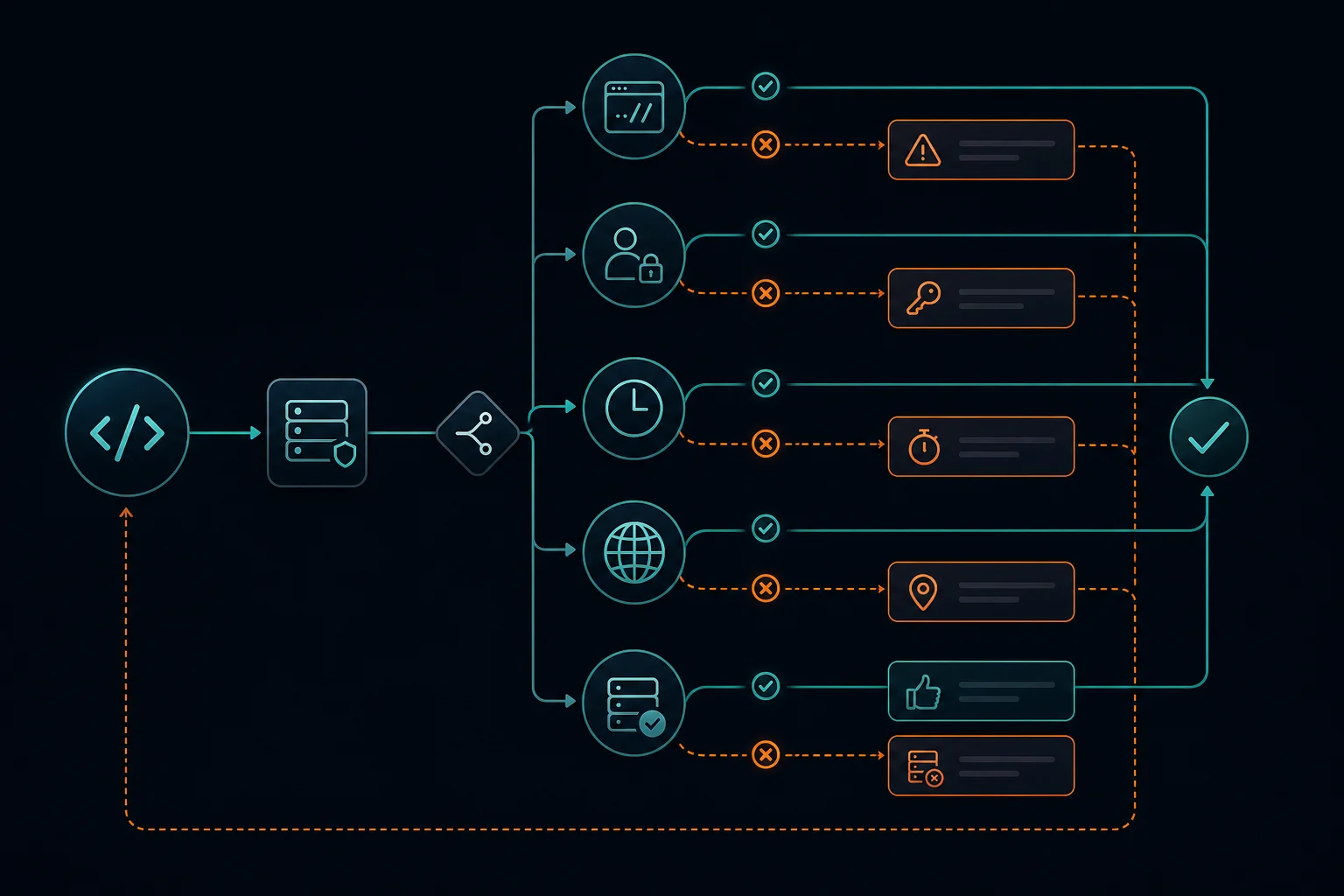
The important part is separating proxy connection problems from target-site responses. A 407 usually means proxy authentication failed. A timeout may mean the proxy, route, or target is slow. A 403 or 429 often means the target received your request and rejected it based on authorization, rate, reputation, or request pattern.
Use this guide when you need exact Python requests examples for HTTP proxies, HTTPS targets, username/password auth, sessions, SOCKS5, environment variables, and quick debugging. If you need the surrounding fetch, parse, pagination, and storage pipeline first, start with the Python scraping guide. If your main problem is rotating many proxies across a scraper, read the rotating proxy Python guide after the basic format works.
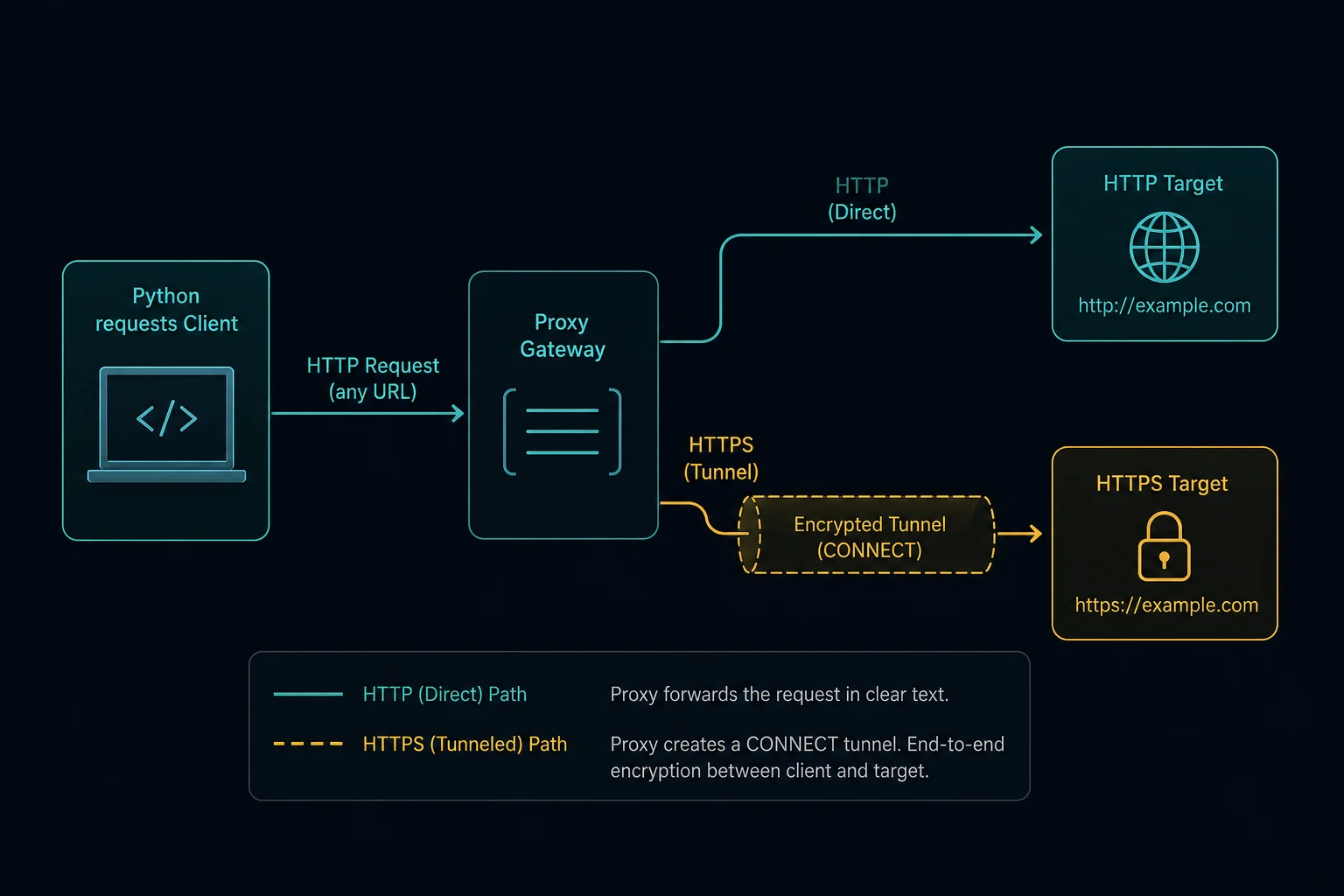
Python Proxy Requests Quick Setup
Install requests if your environment does not already have it:
pip install requests
Then pass a proxy dictionary into the request:
import requests

proxy_url = "http://username:password@proxy.example.com:8000"

proxies = {
    "http": proxy_url,
    "https": proxy_url,
}

response = requests.get(
    "https://ipv4.unknownproxies.com/ip",
    proxies=proxies,
    timeout=15,
)

print(response.status_code)
print(response.text)
Use a neutral IP echo endpoint first. That tells you whether Python is reaching the proxy and whether the proxy is the exit path before you test a real target.
Do not skip timeout. Without a timeout, a bad proxy route can leave a worker hanging much longer than intended.
HTTP Proxy Format in Requests
For a plain HTTP target, use the http key:
import requests

proxies = {
    "http": "http://username:password@proxy.example.com:8000",
}

response = requests.get(
    "http://example.com",
    proxies=proxies,
    timeout=15,
)

print(response.status_code)
The value is the proxy URL, not the target URL. The general format is:
http://username:password@host:port
If your proxy provider gives you a compact line like this:
host:port:username:password
convert it before passing it to requests:
http://username:password@host:port
The proxy converter is useful when you need to reformat larger proxy lists without editing every line by hand.
HTTPS Proxy Requests in Python
For HTTPS target pages, set the https key too:
import requests

proxy_url = "http://username:password@proxy.example.com:8000"

proxies = {
    "http": proxy_url,
    "https": proxy_url,
}

response = requests.get(
    "https://example.com",
    proxies=proxies,
    timeout=15,
)

print(response.status_code)
The https key means "use this proxy for HTTPS destinations." It does not always mean the proxy URL itself should start with https://.
Many HTTP proxies support HTTPS websites by using the HTTP CONNECT method to create a tunnel to the destination host. In that common setup, the proxy URL still starts with http://, while the destination URL starts with https://.
Only use an https:// proxy URL when your proxy provider explicitly gives you an HTTPS proxy endpoint and your client supports it.
Proxy Authentication Examples
Most paid proxy services use username/password authentication in the proxy URL:
proxy_url = "http://customer-123:secret-pass@proxy.example.com:8000"

proxies = {
    "http": proxy_url,
    "https": proxy_url,
}
If your username or password contains reserved URL characters such as @, :, /, ?, #, or spaces, encode those values before building the proxy URL:
from urllib.parse import quote

username = quote("customer@example.com", safe="")
password = quote("p@ss:word/with symbols", safe="")

proxy_url = f"http://{username}:{password}@proxy.example.com:8000"
That prevents Python from reading part of the password as the host, port, or URL separator.
If the proxy returns 407 Proxy Authentication Required, focus on credentials first. Check the username, password, plan status, IP allowlist mode, endpoint host, and port. The Python requests proxy authentication guide covers credential formatting and URL encoding, and the 407 proxy authentication guide covers that failure path in more detail.
Keep Sessions Stable When State Matters
Use requests.Session() when one workflow should keep headers, cookies, and connection pooling together:
import requests

session = requests.Session()

session.proxies.update({
    "http": "http://username:password@proxy.example.com:8000",
    "https": "http://username:password@proxy.example.com:8000",
})

session.headers.update({
    "User-Agent": "Mozilla/5.0 (compatible; ExampleBot/1.0)",
})

home = session.get("https://example.com", timeout=15)
account = session.get("https://example.com/account", timeout=15)

print(home.status_code, account.status_code)
Keep one session tied to one logical identity. If the workflow logs in, carries cookies, checks account state, or follows a multi-step path, do not rotate the proxy inside the same session unless you also reset cookies and state.
For stateless scraping, per-request rotation may be fine. For account or cart flows, stable proxy sessions are usually safer. The sticky vs rotating proxies guide explains that tradeoff.
For choosing a minimal User-Agent, Accept, locale, cookie, and cache-validator policy, use the web scraping headers guide. Avoid copying a complete browser request into requests, because browser-only metadata may contradict the actual client.
Read Proxy URLs From Environment Variables
Do not hard-code real proxy credentials in source files. Use environment variables so credentials stay out of Git history and shared snippets.
export PROXY_URL="http://username:password@proxy.example.com:8000"
Then read the value in Python:
import os
import requests

proxy_url = os.environ["PROXY_URL"]

proxies = {
    "http": proxy_url,
    "https": proxy_url,
}

response = requests.get(
    "https://ipv4.unknownproxies.com/ip",
    proxies=proxies,
    timeout=15,
)

print(response.text)
For production jobs, pass secrets through your host, CI system, container runtime, or secret manager instead of committing .env files.
If you need the opposite behavior and want one Requests session to ignore inherited proxy variables, use the Python Requests no-proxy guide. It covers trust_env = False, targeted NO_PROXY rules, and direct-route verification without exposing proxy credentials.
SOCKS5 Proxies With Requests
If your proxy endpoint is SOCKS5, install the SOCKS extra:
pip install "requests[socks]"
Then use a SOCKS URL:
import requests

proxies = {
    "http": "socks5://username:password@proxy.example.com:1080",
    "https": "socks5://username:password@proxy.example.com:1080",
}

response = requests.get(
    "https://example.com",
    proxies=proxies,
    timeout=15,
)

print(response.status_code)
Use socks5h:// when DNS resolution should happen through the proxy:
proxies = {
    "http": "socks5h://username:password@proxy.example.com:1080",
    "https": "socks5h://username:password@proxy.example.com:1080",
}
For normal web scraping with requests, HTTP(S) proxy endpoints are usually simpler. Use SOCKS5 when your provider, network route, or tool specifically requires it. The SOCKS5 vs HTTP proxy guide covers the protocol choice.
Add Timeouts, Status Handling, and Safe Retries
Proxy code should fail clearly. Start with a timeout and explicit status handling:
import requests

proxy_url = "http://username:password@proxy.example.com:8000"
proxies = {"http": proxy_url, "https": proxy_url}

try:
    response = requests.get(
        "https://example.com",
        proxies=proxies,
        timeout=15,
    )
    print(response.status_code)
except requests.ProxyError as error:
    print("Proxy connection failed:", error)
except requests.Timeout:
    print("Request timed out")
except requests.RequestException as error:
    print("Request failed:", error)
For light retry behavior, mount an HTTPAdapter with urllib3.util.Retry:
from requests import Session
from requests.adapters import HTTPAdapter
from urllib3.util import Retry

retry = Retry(
    total=3,
    connect=2,
    read=2,
    status=2,
    backoff_factor=1,
    status_forcelist=[429, 502, 503, 504],
    allowed_methods={"GET", "HEAD"},
    respect_retry_after_header=True,
)

session = Session()
adapter = HTTPAdapter(max_retries=retry)
session.mount("http://", adapter)
session.mount("https://", adapter)

session.proxies.update({
    "http": "http://username:password@proxy.example.com:8000",
    "https": "http://username:password@proxy.example.com:8000",
})

response = session.get("https://example.com", timeout=15)
print(response.status_code)
Retries are not a substitute for pacing. If every worker gets HTTP 429 Too Many Requests, reduce concurrency, add jitter, respect Retry-After, and lower requests per proxy before expanding the pool. The delay calculator can help size request pacing before you scale jobs.
Common Python Requests Proxy Errors
If the exception does not make the failing layer clear, work through the general proxy error checklist before changing Python code, credentials, and the proxy pool at the same time.
| Symptom | Likely cause | What to check |
|---|---|---|
407 Proxy Authentication Required |
Proxy credentials failed | Username, password, endpoint, port, plan status, allowlist mode |
ProxyError |
Python could not connect through the proxy | Host, port, protocol prefix, network access, provider status |
| Timeout | Slow proxy, slow target, blocked route, or missing timeout budget | Retry slowly, test an IP endpoint, compare another proxy |
403 Forbidden |
Target rejected the request | Authorization, site policy, IP reputation, headers, session consistency |
429 Too Many Requests |
Request rate is too high for the identity | Lower concurrency, add backoff, reduce per-IP traffic |
| Local IP still appears | Proxy was not applied | Check proxies keys, environment proxy variables, redirects, and test URL |
Log the proxy endpoint or proxy ID, target URL, status code, elapsed time, retry count, and exception class. Without those fields, proxy debugging turns into guesswork.
Choosing Residential or ISP Proxies for Requests
The right proxy type depends on the request pattern:
| Workflow | Better fit | Why |
|---|---|---|
| Independent public-page scraping | Rotating residential proxies | Spreads stateless requests across a larger pool |
| Geo checks across many regions | Residential proxies | More location coverage and rotation options |
| Logged-in or repeated account checks | ISP proxies or sticky residential sessions | Keeps a stable identity for stateful flows |
| Low-friction high-speed tests | Datacenter or ISP proxies | Lower cost and fast throughput when the target allows it |
Use residential proxies when you need broad rotation or location diversity. Compare Unknown Proxies plans when you need to decide between residential, ISP, and datacenter-style workflows.
FAQ
How do I use a proxy with Python requests?
Create a proxies dictionary and pass it to requests.get(), requests.post(), or a requests.Session. Use {"http": proxy_url, "https": proxy_url} when you want both HTTP and HTTPS targets to use the proxy.
Should the HTTPS proxy value start with http or https?
Usually http://. The https dictionary key means the rule applies to HTTPS destinations. Many HTTP proxies tunnel HTTPS traffic with CONNECT, so the proxy URL itself still starts with http://.
How do I authenticate a proxy in Python requests?
Put the username and password in the proxy URL: http://username:password@host:port. URL-encode special characters in credentials before building the URL.
Why is requests showing my local IP instead of the proxy IP?
The proxy may not be applied to the URL scheme you are testing. Set both http and https keys, verify the proxy URL format, and test against a neutral IP endpoint before testing your target site.
Can Python requests use SOCKS5 proxies?
Yes. Install requests[socks], then use socks5:// or socks5h:// proxy URLs in the same proxies dictionary.
Conclusion
Python proxy requests work best when the basics are explicit: use the correct proxy URL format, set both HTTP and HTTPS keys when needed, encode credentials, add timeouts, verify the exit IP, and separate proxy failures from target-site blocks. Once a single proxy request works cleanly, you can decide whether the job needs stable sessions, residential rotation, ISP proxies, or stricter pacing.
Technical references: Requests advanced usage, urllib3 Retry API, and MDN CONNECT.