Python web scraping means fetching permitted website pages, extracting defined fields from their HTML, validating those fields, and saving structured records. For a static site, the simplest reliable stack is requests for HTTP and Beautiful Soup for parsing.
The code is only one part of the job. A dependable scraper also checks the response before parsing, limits pagination, separates network failures from selector failures, and stops when a site returns a rate limit or access denial. Check the site's terms, access rules, and applicable law before collecting data; robots.txt is a useful machine-readable signal, but it is not permission by itself.
This tutorial builds a small scraper against Books to Scrape, a practice catalog made for scraping exercises. It collects book titles, prices, stock messages, and URLs, follows pagination, retries transient errors, and writes the result to CSV.
Short version: pip install requests beautifulsoup4, fetch with a requests.Session and a timeout, check the status and content type, parse with BeautifulSoup(html, "html.parser").select(...), follow the next-page link with a page limit, and write rows with csv.DictWriter. Each step has code below.
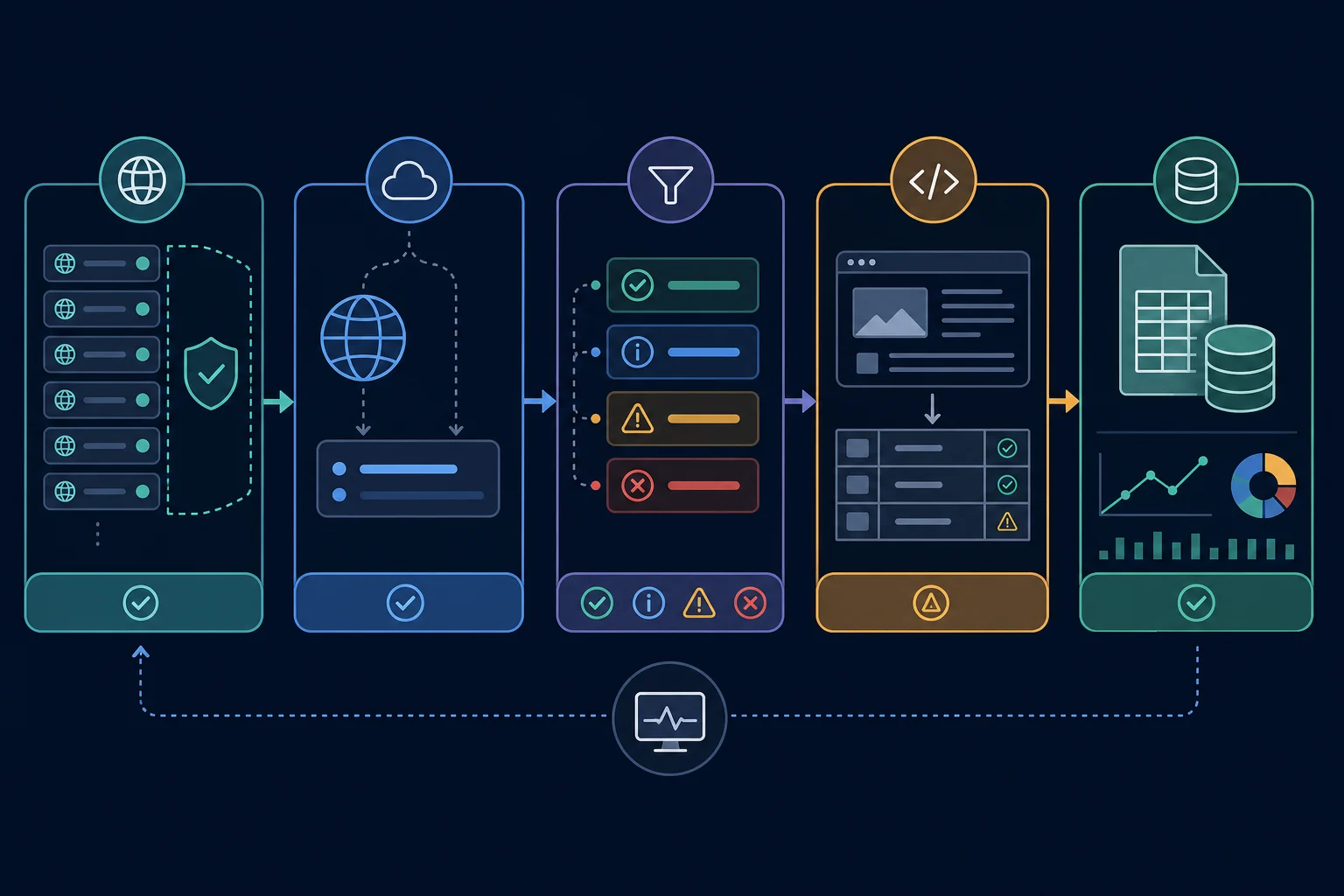
Python web scraping workflow at a glance
A maintainable collector has five distinct stages:
- Discover: define the allowed pages, required fields, and stopping rule.
- Fetch: request one page with an honest client identity and explicit timeout.
- Classify: check status, final URL, and content type before parsing.
- Parse and validate: extract fields, normalize URLs, and reject incomplete records.
- Store and monitor: save observations with source metadata and track failures separately.
Keeping these stages separate matters. If parse_products() accepts stored HTML instead of making its own request, you can test a selector change without repeatedly contacting the website.
Choose requests, Beautiful Soup, or a browser
Start with the least complex client that returns the data you are allowed to collect.
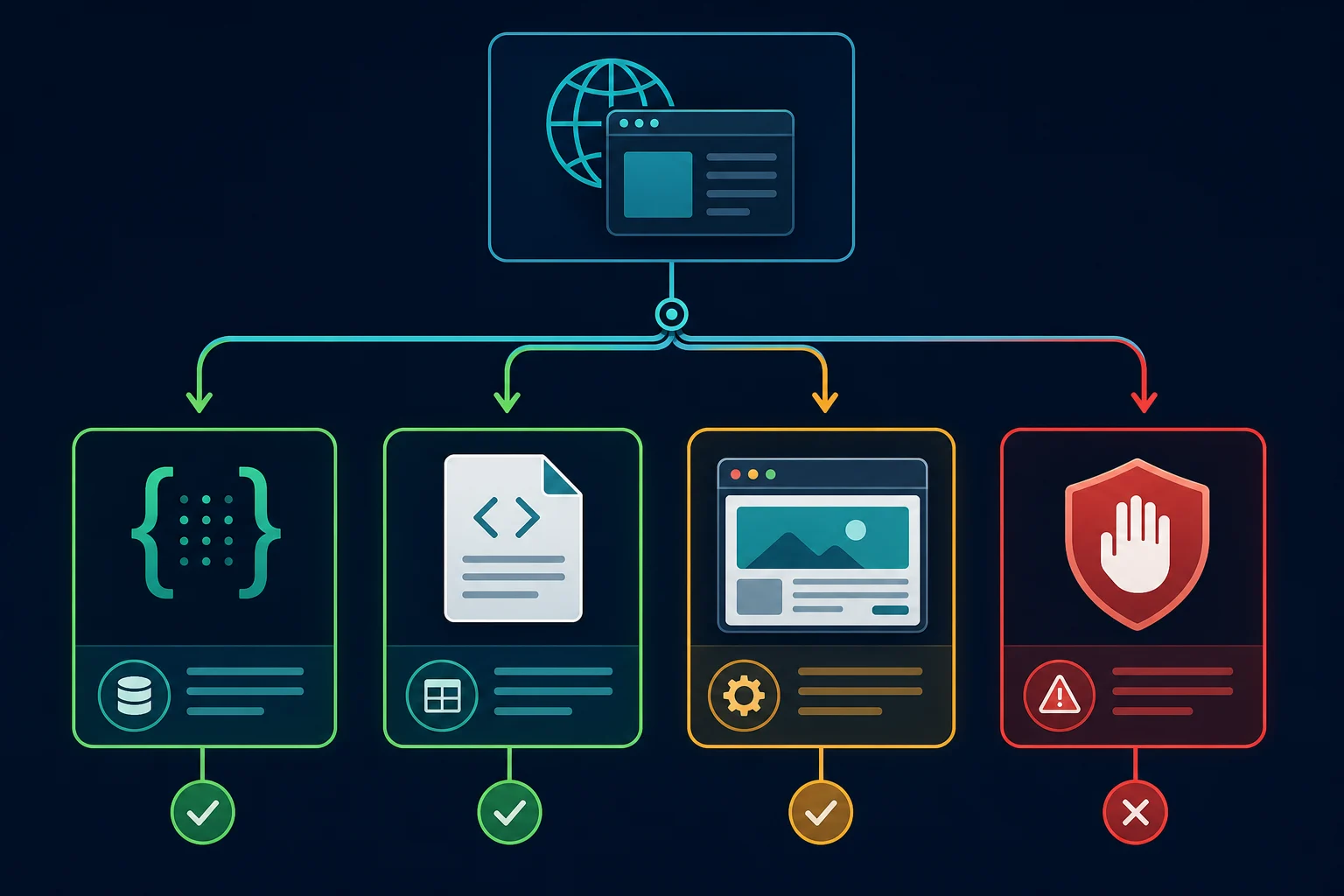
| Page behavior | Start with | Why |
|---|---|---|
| Data is present in the initial HTML | requests + Beautiful Soup |
Fast, low overhead, and easy to test with saved fixtures |
| Data comes from a documented JSON endpoint | The documented API or requests |
Structured data is less fragile than HTML selectors |
| Many pages, scheduled crawls, built-in retries and throttling | Scrapy | A crawl framework handles queues, concurrency, and middleware |
| Allowed data appears only after JavaScript runs | Playwright or Selenium | A real browser can render and interact with the page |
| Login, consent, or access denial blocks the resource | Stop and review access | Changing libraries does not grant authorization |
Before adding a browser, save the response body and search it for the expected field. Some pages contain the data in embedded JSON even when the visible interface uses JavaScript. If browser rendering is genuinely required, the official Playwright Python documentation covers installation and browser setup.
Do not use a browser merely because an HTML selector returned nothing. The response may be an error page, consent page, login page, or changed template. Classify it first. If your project has outgrown this small Python stack, compare the broader set of web data scraping tools before adding infrastructure.
Install the Python scraping packages
Create a virtual environment, then install the two packages used in the example:
python -m venv .venv
source .venv/bin/activate
python -m pip install requests beautifulsoup4
The examples use Python 3.10+ type hints. The fetch, parse, pagination, CSV, Scrapy, and Playwright snippets were run in October 2026 with requests 2.34, beautifulsoup4 4.15, Scrapy 2.19, and Playwright 1.64.
On Windows PowerShell, activate the environment with .venv\Scripts\Activate.ps1.
requests handles the HTTP session, redirects, status codes, and timeouts. Beautiful Soup turns HTML into a searchable tree. Its official documentation describes select() and select_one(), which use familiar CSS selectors.
Inspect the page before writing selectors
Open one representative page in developer tools and identify the smallest container that repeats once per record. On the practice catalog, each book is inside article.product_pod.
Inside that container, the example needs:
h3 afor the title and relative detail URL.price_colorfor the displayed price.availabilityfor the stock messageli.next aoutside the cards for the next-page URL
Prefer selectors tied to semantic elements or stable attributes. Deep paths such as body > div:nth-child(2) > div > ... break when an unrelated wrapper changes. Keep every target-specific selector inside the parser so future markup changes have one repair point. If you collect from many sources with different templates, the AI web scraping guide shows how to add validated LLM extraction as a fallback when per-site selectors stop scaling.
Build a safe fetch function
Fetching should return HTML only after it has confirmed that the response is usable:
import requests

session = requests.Session()
session.headers.update({
    "User-Agent": "ExampleCatalogResearch/1.0 (+https://example.org/collector-info)",
    "Accept": "text/html,application/xhtml+xml",
})

def fetch_html(url: str) -> bytes:
    response = session.get(url, timeout=(5, 20))
    response.raise_for_status()

    content_type = response.headers.get("Content-Type", "")
    if "text/html" not in content_type.lower():
        raise ValueError(f"Expected HTML, received {content_type!r}")

    return response.content
The function returns response.content (bytes) instead of response.text. When a server sends Content-Type: text/html without a charset, Requests guesses ISO-8859-1 for .text, and the practice site's pound signs turn into £. Beautiful Soup reads the page's own <meta charset> from the raw bytes, so the text comes out right. The Requests quickstart makes the same point: for HTML, use r.content to find the encoding.
Use both a connection and read timeout. The Requests quickstart notes that Requests does not time out unless you set one, and raise_for_status() turns unsuccessful HTTP responses into visible exceptions.
The client identity above is deliberately descriptive rather than copied from Chrome. Replace the example contact page with real operator information when appropriate. For a deeper header policy, use the web scraping headers guide. If you later move the project to Scrapy, the same identity goes in its USER_AGENT setting, as our Scrapy user agent guide shows.
Retry transient errors with backoff
Timeouts and 502/503 responses are often temporary. Mount a urllib3 Retry policy on the session instead of writing a retry loop:
from requests.adapters import HTTPAdapter
from urllib3.util.retry import Retry

retry = Retry(
    total=3,
    backoff_factor=1,
    status_forcelist=[429, 500, 502, 503, 504],
    allowed_methods=["GET"],
    respect_retry_after_header=True,
)
session.mount("https://", HTTPAdapter(max_retries=retry))
session.mount("http://", HTTPAdapter(max_retries=retry))
Keep total small. After the retries run out, requests raises an exception and fetch_html() stops. That is the correct result for a page that keeps failing. respect_retry_after_header=True makes urllib3 wait for the time a 429 or 503 response asks for. Do not retry 403; repeating a denied request does not change the answer.
Parse and validate each record
The parser should receive HTML (bytes or text) and its source URL. urljoin() converts each relative link into a complete URL, while field checks prevent broken cards from entering the dataset.
from bs4 import BeautifulSoup
from urllib.parse import urljoin

def parse_books(html: bytes | str, page_url: str) -> tuple[list[dict], str | None]:
    document = BeautifulSoup(html, "html.parser")
    records = []

    for card in document.select("article.product_pod"):
        link = card.select_one("h3 a")
        price = card.select_one(".price_color")
        availability = card.select_one(".availability")

        if not link or not price or not availability:
            continue

        title = link.get("title", "").strip()
        href = link.get("href", "").strip()

        if not title or not href:
            continue

        records.append({
            "title": title,
            "price": price.get_text(strip=True),
            "availability": availability.get_text(" ", strip=True),
            "url": urljoin(page_url, href),
            "source_page": page_url,
        })

    next_link = document.select_one("li.next a")
    next_url = urljoin(page_url, next_link["href"]) if next_link else None

    return records, next_url
Skipping an incomplete card is acceptable only if you also count and monitor rejected records. Otherwise, a selector change can quietly turn a successful HTTP response into bad data. In production, return a rejection count or raise an alert when the accepted-record count falls outside its normal range.
Follow pagination without an infinite crawl
A pagination loop needs more than a "next" selector. Bound it with an explicit page limit and a set of previously seen URLs. For larger jobs, the guide to crawling a website without getting blocked adds URL-frontier deduplication, per-host scheduling, caching, response classification, and stop rules.
import time

START_URL = "https://books.toscrape.com/"
MAX_PAGES = 5

all_books = []
seen_pages = set()
next_url = START_URL

while next_url and len(seen_pages) < MAX_PAGES:
    if next_url in seen_pages:
        raise RuntimeError(f"Pagination loop detected at {next_url}")

    seen_pages.add(next_url)
    html = fetch_html(next_url)
    books, next_url = parse_books(html, next_url)

    if not books:
        raise RuntimeError("No books parsed; inspect the saved response")

    all_books.extend(books)

    if next_url:
        time.sleep(1.5)

print(f"Collected {len(all_books)} books from {len(seen_pages)} pages")
The fixed delay is suitable for this bounded tutorial, not a universal crawl rate. Follow the target's documented limits and slow down or stop on 429.
Store URLs in seen_pages after redirects have been resolved if the target frequently redirects. Also enforce an allowed-host list before following links so a malformed or external "next" URL cannot move the collector outside its intended scope.
Save the results to CSV
The standard library can write the validated dictionaries without another dependency:
import csv

fieldnames = ["title", "price", "availability", "url", "source_page"]

with open("books.csv", "w", newline="", encoding="utf-8") as output:
    writer = csv.DictWriter(output, fieldnames=fieldnames)
    writer.writeheader()
    writer.writerows(all_books)
For recurring runs, add observed_at, a parser version, and a stable record key. Keep the raw displayed price as collected, then normalize currency and numeric value in a separate transformation step. That preserves evidence if a parser or locale rule later changes.
CSV works for a small export. Use a database when multiple workers must deduplicate records, update observations transactionally, or query change history.
Analysis is a separate step from collection. The data mining vs web scraping comparison explains where acquisition ends and pattern discovery begins.
When requests and Beautiful Soup are not enough
Two upgrades cover most cases. Scrapy replaces your loop when the job is many pages on a schedule. Playwright replaces requests when the permitted data only exists after JavaScript runs.
Scrapy for larger crawls
A spider plus a few settings gives you queueing, per-domain throttling, and a page cap. Install it with python -m pip install scrapy, save this as books_spider.py, and run scrapy runspider books_spider.py -O books.json:
import scrapy


class BooksSpider(scrapy.Spider):
    name = "books"
    start_urls = ["https://books.toscrape.com/"]
    custom_settings = {
        "USER_AGENT": "ExampleCatalogResearch/1.0 (+https://example.org/collector-info)",
        "ROBOTSTXT_OBEY": True,
        "DOWNLOAD_DELAY": 1.5,
        "CONCURRENT_REQUESTS_PER_DOMAIN": 1,
        "CLOSESPIDER_PAGECOUNT": 5,
    }

    def parse(self, response):
        for card in response.css("article.product_pod"):
            yield {
                "title": card.css("h3 a::attr(title)").get(),
                "price": card.css(".price_color::text").get(),
                "url": response.urljoin(card.css("h3 a::attr(href)").get()),
            }

        next_page = response.css("li.next a::attr(href)").get()
        if next_page:
            yield response.follow(next_page, callback=self.parse)
-O overwrites the output file on each run. The Scrapy tutorial explains selectors, response.follow, and feed exports, and Scrapy settings lists every option above. If a Scrapy run starts returning 403s, the Scrapy 403 guide walks through the diagnosis.
Playwright for JavaScript-rendered pages
Install it with python -m pip install playwright, then playwright install chromium to download the browser. This sync example loads the same page in headless Chromium and waits for the cards to render before reading them:
from playwright.sync_api import sync_playwright

with sync_playwright() as p:
    browser = p.chromium.launch()
    page = browser.new_page()
    page.goto("https://books.toscrape.com/", wait_until="domcontentloaded")
    page.locator("article.product_pod").first.wait_for()
    titles = page.locator("article.product_pod h3 a").evaluate_all(
        "links => links.map(a => a.title)"
    )
    print(len(titles), titles[:2])
    browser.close()
Reach for a browser last. It costs far more CPU and bandwidth per page than an HTTP client. See the Playwright Python docs for locators and auto-waiting, and the Playwright proxy guide for per-context proxy setup.
Check robots.txt and site rules
Python includes urllib.robotparser for reading and querying robots.txt rules:
from urllib.robotparser import RobotFileParser

robots = RobotFileParser("https://example.com/robots.txt")
robots.read()

allowed = robots.can_fetch("ExampleCatalogResearch/1.0", "https://example.com/products")
print("Allowed by robots.txt:", allowed)
The Python robotparser documentation also covers crawl_delay(), request_rate(), and sitemap entries. The standardized behavior of the protocol is defined in RFC 9309.
Treat this check as one input to your access decision. A missing or permissive file does not override terms, authentication, copyright, privacy obligations, or instructions from the site owner. Conversely, a disallowed path is a clear reason not to send the collector there.
Test the parser without repeated live requests
Save a permitted sample page as a test fixture and call parse_books() with the stored HTML. At minimum, test:
- a normal page with several records
- the last page, which has no next link
- a card with a missing price or URL
- an empty page or unexpected template
- a login, consent, access-denied, or rate-limit response
Assert field values, absolute URLs, record count, and the next-page result. Network tests can verify one small canary request separately; parser tests should be deterministic and fast.
A 200 OK does not prove that parsing succeeded. Monitor HTTP status, final URL, content type, response size, accepted records, rejected records, duplicates, and parser-empty rate. Quarantine unexpected pages for review rather than overwriting a previously good dataset with zero rows.
When proxies fit a Python scraping project
Many Python website scraping jobs do not need a proxy. Start with direct, low-rate requests and make the parser reliable first. If Requests inherits a system proxy that this test should not use, the Python Requests no-proxy guide shows how to create a direct session without weakening TLS verification. A proxy can be appropriate for authorized geo-specific testing, independent regional observations, or distributing an approved workload that would otherwise depend on one network route.
Proxies do not repair broken selectors, missing permission, invalid authentication, or excessive request volume. If direct and proxied requests behave differently, keep the URL, headers, cookies, and timing constant while testing the route. The best proxy for web scraping guide explains the tradeoffs among residential, ISP, and datacenter routes.
The choice follows the same rule as other scraping work. Use ISP proxies when one stable, dedicated IP should repeat the same checks. Use residential proxies when independent requests need many IPs or locations.
For stateless public pages that require legitimate location coverage, residential proxies offer rotation and geographic targeting. For stateful workflows, keep cookies and one sticky route together. The Python proxy requests guide covers the proxies dictionary, timeouts, and route verification without mixing those details into the parser. Browser-based scrapers configure proxies differently; our Selenium proxy setup for Chrome explains why Chrome ignores user:pass in the proxy URL.
Common Python scraping failures
| Symptom | Likely cause | Next check |
|---|---|---|
403 Forbidden |
Authorization, policy, firewall, session, or route denial | Stop retries; inspect the response and access requirements |
429 Too Many Requests |
Request rate or concurrency is too high | Honor Retry-After, reduce work, and add bounded backoff |
200 OK with no records |
Wrong selector or unexpected page type | Save and classify the HTML before editing selectors |
| Garbled or wrong fields | Selector is too broad or locale changed | Test individual cards and record locale/content type |
| Duplicate pages | Pagination redirects or loops | Track canonical page URLs and enforce a page limit |
| Missing JavaScript data | Field is absent from initial HTML | Check a documented API, embedded data, then permitted browser rendering |
Change one variable at a time. Rotating IPs, randomizing headers, replacing the parser, and raising concurrency together makes the original failure impossible to diagnose.
FAQ
How do I start web scraping with Python?
Install requests and beautifulsoup4, fetch one permitted page with a timeout, and print the elements your CSS selector finds. Once the selector returns the right fields, add validation, pagination with a page limit, and CSV output, in that order.
Is Python good for website scraping?
Yes. Python has mature HTTP, HTML parsing, browser automation, validation, and storage libraries. Its readable syntax also makes it practical to keep fetching, parsing, and data cleanup in separate testable functions.
Do I need Beautiful Soup for web scraping?
No. Beautiful Soup is convenient for irregular HTML and CSS selectors, but structured APIs can be parsed with the standard json module. lxml, Scrapy, and browser locators are alternatives for other performance and workflow needs.
Can requests scrape JavaScript websites?
requests downloads the HTTP response but does not execute JavaScript. It works if the required data is already in the HTML, embedded structured data, or an approved API response. Use a browser only when permitted data truly requires rendering or interaction.
How often should a Python scraper send requests?
There is no universal safe interval. Use the site's published limits, Retry-After, robots.txt signals, and written permission where applicable. Begin with a small canary run, cap concurrency, cache unchanged pages, and stop on denial or sustained rate limiting.
Should I use Scrapy or requests with Beautiful Soup?
Use requests with Beautiful Soup for a few pages or a one-off script. Move to Scrapy when you need a crawl queue, per-domain throttling, retries, and feed exports without writing them yourself.
Should I rotate proxies on every page?
Not by default. Per-request rotation can break stateful sessions and make debugging harder. Use it only for independent, authorized requests where the proxy plan and target workflow support rotation; otherwise keep one session and route together.
Final thoughts
Reliable Python scraping is a pipeline, not one CSS selector. Fetch with explicit timeouts, check each response, parse stored HTML, validate records, cap pagination, and watch for empty results before you scale. Start with requests and Beautiful Soup on one permitted page. Move to Scrapy for volume and Playwright only when the data needs a rendered page, and add a proxy only after direct requests show a routing problem.