To learn how to crawl a website without getting blocked, begin with permission and a small URL scope, then control requests through one per-host scheduler. Cache unchanged pages, keep each session internally consistent, honor Retry-After, and stop rather than escalating when the site denies access.
The goal is not to make a crawler invisible. The goal is to collect permitted data with predictable load, and with enough logging to tell a rate limit, an access rule, a broken session, and a network failure apart. Proxies can solve a demonstrated routing or IP-concentration problem, but they cannot grant access or repair an aggressive crawl.
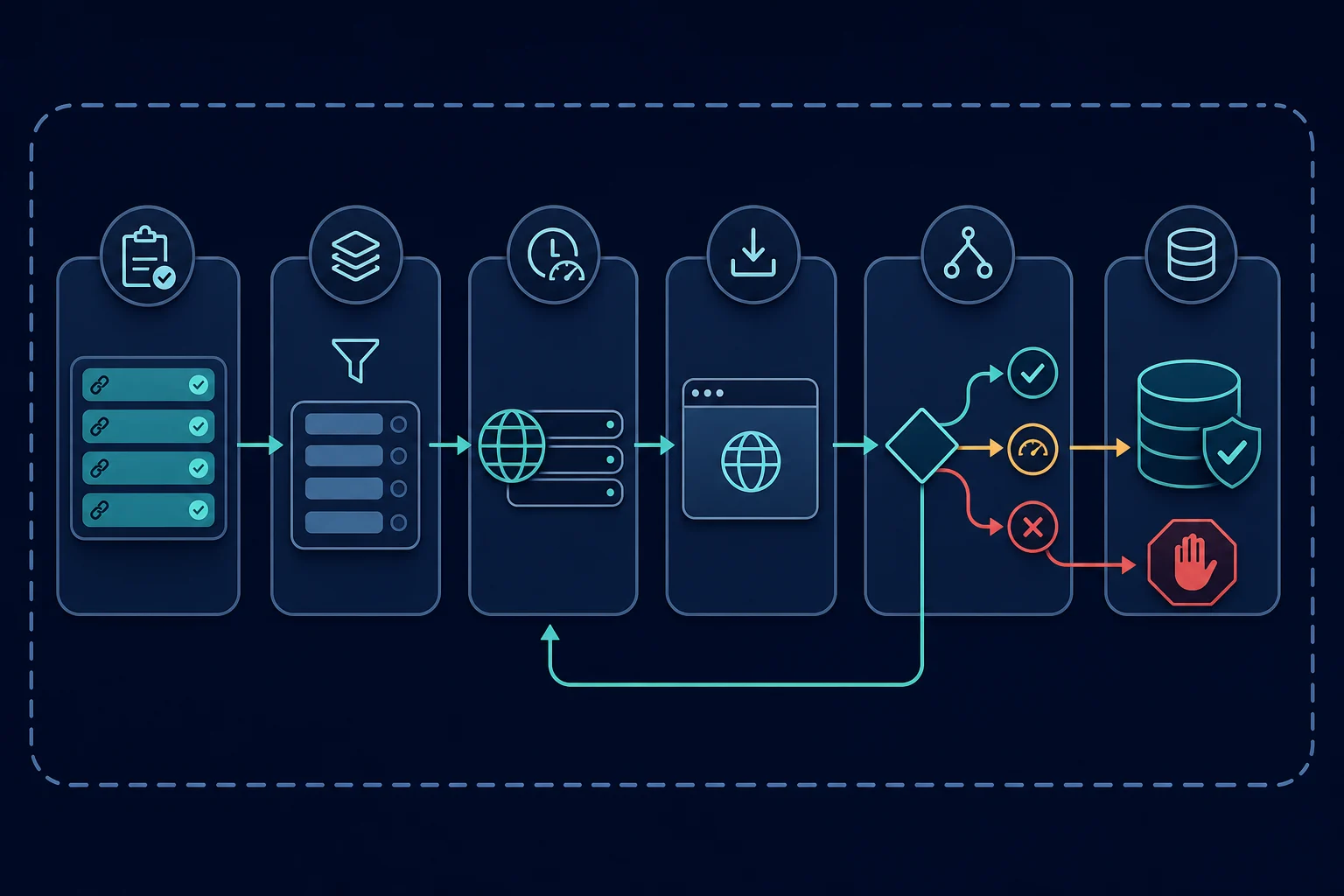
How to crawl a website without getting blocked: quick plan
Use this sequence before increasing crawl speed:
- Confirm the source, pages, fields, and collection method are permitted.
- Start from a bounded URL list, sitemap, or approved feed instead of recursively following every link.
- Normalize and deduplicate URLs before they enter the fetch queue.
- Apply one concurrency and pacing policy per hostname.
- Reuse cached pages and send conditional requests for known URLs.
- Keep headers, cookies, locale, and network route consistent within each session.
- Classify every response before parsing or retrying it.
- Cool down on 429, stop automatic retries on 403, and cap transient retries.
- Run a small canary, measure results, and increase one limit at a time.
If a slow one-page test fails, more workers and more IP addresses are not the next step. First determine whether the URL is allowed, the response is really the expected page, and the client has the required authorization.
Confirm permission and crawl rules first
Review the site's terms, documented API or feed, access requirements, and applicable law before sending automated requests. The data scraping legal guide provides a fuller project-level review of access, terms, data rights, privacy, and purpose.
Retrieve and evaluate robots.txt for the user agent you operate. The Robots Exclusion Protocol defines how crawlers locate, parse, and cache those rules. It also makes an important distinction: robots rules are crawler instructions, not access authorization. Permission, contracts, and legal obligations still need separate review.
Turn the review into configuration rather than leaving it in a ticket:
- Allowlisted hosts and URL prefixes.
- Disallowed paths and query parameters.
- Approved fields and retention period.
- Maximum pages, crawl depth, and run duration.
- Per-host concurrency and minimum delay.
- A contact and kill switch for the operator.
Do not attempt to route around a login, paywall, CAPTCHA, explicit IP denial, or other access control. If the permitted source is unavailable, request access or use an authorized API, export, or licensed feed.
Build a bounded URL frontier
A URL frontier is the queue of pages waiting to be fetched. An unbounded frontier will discover calendars, filters, session URLs, tracking parameters, and repeated navigation paths faster than useful records. Those crawl traps waste traffic and can look abusive even at modest concurrency.
Prefer an explicit seed source:
- A documented API or data export.
- A known list of record IDs or canonical detail URLs.
- An XML sitemap when its contents fit the approved scope. The Sitemaps protocol defines its URL and sitemap-index formats.
- A bounded category or pagination path with a clear stop condition.
Normalize each discovered URL before enqueueing it. Resolve relative links, remove fragments, lowercase the hostname, reject non-HTTP schemes, discard known tracking parameters, and apply target-specific rules for meaningful query parameters. Keep a set of canonical URLs so the same resource is not fetched through several aliases.
Every run should have hard limits. Set maximum pages, depth, redirects, response bytes, elapsed time, and newly discovered URLs. A pagination crawler should also remember visited pages and stop when the next link repeats. For a concrete fetch-and-parse implementation, see the Python scraping workflow.
Reduce requests before changing IP addresses
The most reliable request is the one the crawler does not need to send. Eliminate duplicate work before tuning delays or proxy pools:
- Use an official API, feed, sitemap, or change stream when available.
- Store fetch timestamps, final URLs, content hashes, and parser versions.
- Do not download images, fonts, scripts, or CSS when an HTTP parser only needs HTML.
- Cache stable lookup pages and share results across workers.
- Schedule pages according to how often their data actually changes.
- Avoid refetching a listing merely because several category pages link to it.
When a server returns ETag or Last-Modified, save the validator and use If-None-Match or If-Modified-Since on a later GET. A 304 Not Modified response avoids transferring and parsing the full representation. The HTTP specification describes validators and conditional requests.
Caching reduces target load, bandwidth, and proxy data use at the same time. It is usually a better first optimization than distributing unchanged requests across more addresses.
Pace requests per host, not just per worker
A sleep inside each worker does not create a global rate limit. Ten workers with a two-second delay can still start roughly five requests per second, and synchronized jobs may create much larger bursts.
Put all work for one hostname behind a shared scheduler. Control at least these values:
| Control | Safe starting behavior | Why it matters |
|---|---|---|
| Concurrency | One request in flight per host | Reveals baseline behavior without overlapping load |
| Minimum interval | Use the published limit or a conservative measured delay | Prevents a tight request stream |
| Jitter | Add a small bounded variation | Prevents every worker restarting simultaneously |
| Queue priority | Fetch high-value, change-prone pages first | Avoids spending the request budget on low-value URLs |
| Cooldown | Pause the host after rate-limit signals | Stops retries from extending the block |
| Daily page cap | End the run at a defined ceiling | Contains discovery bugs and crawl traps |
There is no universal delay that prevents blocking. Site capacity, endpoint cost, permission, account quotas, and traffic from other clients all matter. Use the site's stated limits when available. Otherwise start with a small canary at concurrency one, observe latency and response classes, and scale gradually.
Keep each request and session consistent
Randomizing one signal on every request often creates contradictions rather than reliability. A basic HTTP collector should send a minimal, stable identity appropriate for the actual client. The web scraping headers guide explains which headers belong in an HTTP client and why copied browser headers can be misleading.
Preserve related state together:
- Use one cookie jar per logical session.
- Keep the locale stable when it affects page content.
- Keep one proxy route throughout a stateful path.
- Do not combine cookies from one browser profile with another profile's headers.
- Record the client, header policy, session, route, and parser versions for each fetch.
Independent public pages can begin with clean sessions. A multi-page flow that legitimately requires cookies should keep the same session identity until it ends. Rotating the IP between the first and second page while keeping the cookie can look inconsistent and can also change regional content mid-record.
Start with a normal HTTP client when the permitted data is present in the response. Use a browser only when JavaScript rendering or interaction is genuinely required. Browsers load more resources and create more session state, so blocking is not fixed merely by replacing requests with Playwright or Selenium.
Classify responses before retrying
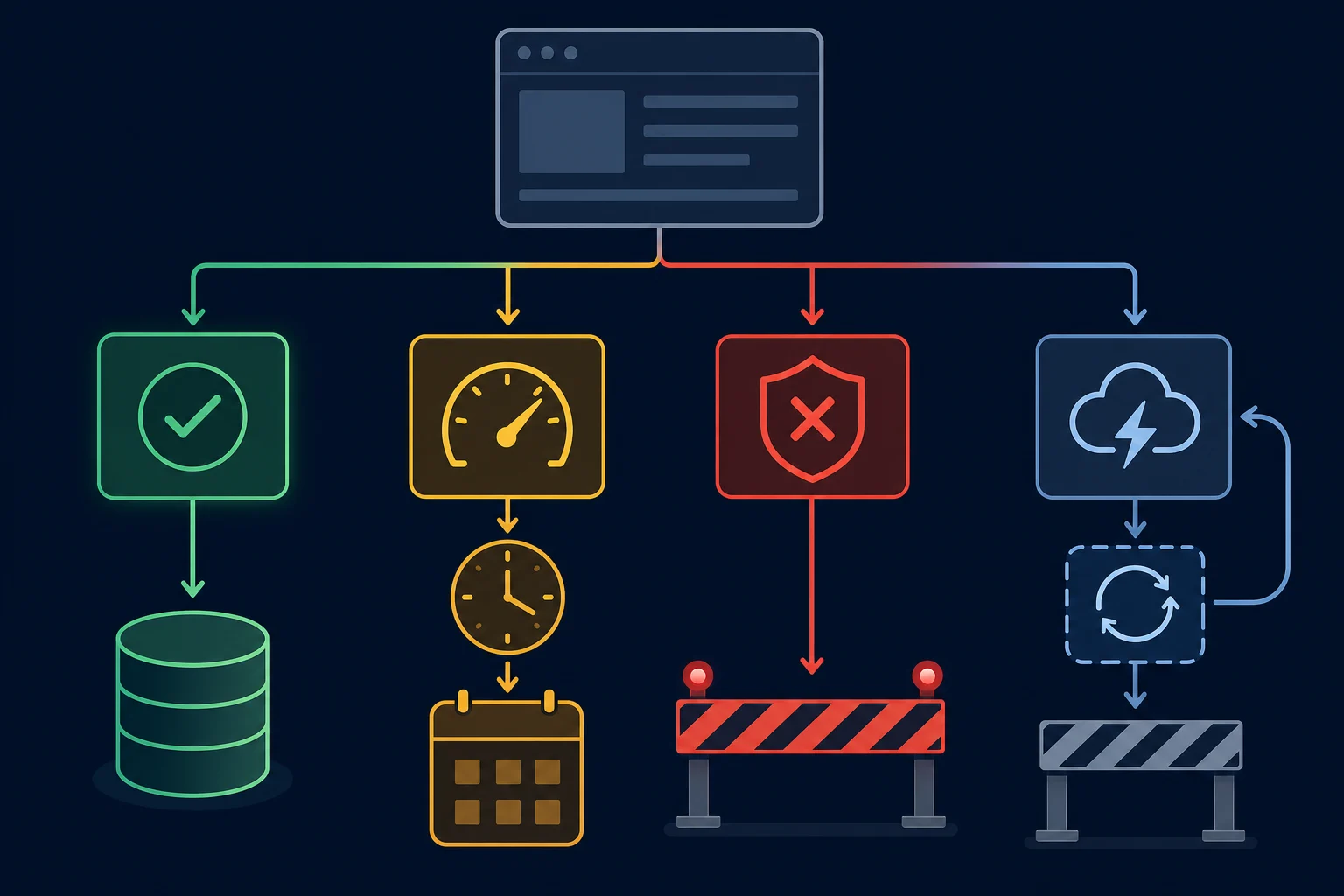
Do not treat every non-record as a network error. Record the status, final URL, redirect chain, Content-Type, response size, timing, selected response headers, and a redacted page classification before the parser runs.
| Result | Likely meaning | Automatic action |
|---|---|---|
| 200 with expected content | Successful fetch | Parse, validate, and cache |
| 200 with login, consent, or challenge page | Wrong page class or missing access | Quarantine and stop that path |
| 301, 302, 307, or 308 | Moved resource or workflow redirect | Follow only a small bounded chain, then store the final canonical URL |
| 304 | Cached representation is still current | Reuse the stored body and metadata |
| 401 | Authentication is required or invalid | Stop and repair approved credentials |
| 403 | Access, policy, firewall, or authorization denial | Stop automatic retries and review access |
| 404 or 410 | Resource is missing or gone | Remove or age out the URL according to policy |
| 429 | Rate limit | Honor Retry-After, lower concurrency, and cool down the host |
| 5xx | Source or upstream failure | Retry a small number of times with backoff and jitter |
| Timeout or proxy error | Unclear network layer failure | Retry within a low cap; isolate direct, proxy, DNS, and target timing |
An HTTP 200 is not enough. If the expected product grid has been replaced by a challenge page, parsing it as an empty dataset can be worse than a visible error. Validate page type and minimum record expectations before replacing previously good data.
When a page loads in a browser but the crawler gets a challenge or a 403, save a HAR file from the browser's DevTools and open it in the HAR analyzer. Compare its status codes, redirects, cookies, and request headers with what your crawler logged.
Use bounded backoff and stop rules
Retries add traffic precisely when a server or network may be struggling. Only retry operations that are safe to repeat, and place failed work back in the scheduler with an attempt count and future run time.
For a transient 5xx or timeout, exponential backoff with jitter prevents every worker from retrying in lockstep. Cap the attempt count and total retry window. If failures rise across many URLs on the same host, open a circuit breaker and pause the source rather than exhausting the queue one URL at a time.
For 429, treat Retry-After as the minimum cooldown when present. The HTTP semantics standard defines Retry-After as either a delay in seconds or an HTTP date. Resume with lower concurrency and spread workers across time instead of releasing the whole queue at once. The HTTP 429 guide covers rate-limit headers and backoff in more detail.
For 401, 403, login pages, CAPTCHAs, or explicit denials, stop automatic retries. These are not transient errors to overwhelm with rotation. Review authorization, source policy, account state, and whether the requested page remains inside the approved scope. If you crawl with Scrapy, the Scrapy 403 diagnosis guide shows how to log a denied response without retrying it.
When proxies help a website crawl
Proxies are useful when testing shows that network route, IP reputation, geography, or per-IP concentration is the actual constraint in an otherwise permitted and well-paced crawl. They are also useful for legitimate regional observations where the exit location is part of the dataset.
Match the route to the job:
- Use rotating residential proxies between independent public-page tasks that do not share cookies.
- Use a sticky residential session for a permitted multi-page regional flow.
- Use a stable ISP proxy when repeated checks need one consistent, dedicated route.
- Test without a proxy at low volume when geography and network isolation are not requirements.
Never rotate midway through a page load or stateful flow. Keep the main document and its required subrequests on one identity. If the target rate-limits an account, API key, cookie, endpoint, or behavior, adding IPs will not increase the permitted quota.
The best proxy for web scraping guide compares residential, ISP, and datacenter routes by target and session shape. If the crawl needs legitimate geographic coverage, residential proxies provide rotating and sticky sessions with location targeting. Review sticky vs rotating proxies before assigning sessions to workers.
Launch with a canary and monitor block signals
Run the first crawl against a small representative URL set at concurrency one. Include a normal page, pagination path, redirect, missing page, and an unchanged page with a saved validator. Confirm that every response enters the right class and that every stop condition actually stops work.
Track these measures by hostname, endpoint group, session, and network route:
- Requests, concurrency, and queue depth.
- Status-code and page-class distribution.
- Latency, timeouts, and retry attempts.
- Cache hits, 304 responses, and bytes transferred.
- Discovered, deduplicated, rejected, and fetched URLs.
- Parsed, invalid, empty, and quarantined records.
- 403, 429, challenge, and login-page rates.
Set operational thresholds before scaling. For example, pause a host when 429s appear across several URLs, when expected pages become challenges, or when the valid-record rate falls sharply. The exact threshold depends on normal traffic, but the action should be automatic and conservative.
Increase only one control at a time: page cap, run frequency, or concurrency. A versioned crawl configuration makes the result attributable. If blocks rise after a change, roll that control back instead of simultaneously changing headers, retries, proxies, and parser logic.
FAQ
Can a website block a crawler even if it follows robots.txt?
Yes. robots.txt communicates crawler preferences but is not permission, authentication, or a guarantee of access. A site may still enforce account, rate, firewall, geographic, or other access rules. Follow both the robots directives and the source's other applicable requirements.
What is a safe crawl delay?
There is no universal safe value. Use a published limit or agreed schedule when available. Otherwise begin at concurrency one with a conservative interval, measure response behavior, and increase gradually. A delay per worker is not enough unless a shared per-host scheduler also limits aggregate traffic.
Should a crawler change its user agent on every request?
No. A stable, appropriate user agent is easier for a site operator to understand and for you to debug. Changing only that header does not turn an HTTP client into a browser, and random combinations can make a session internally inconsistent. To see the User-Agent string a real browser sends, open the user agent checker in that browser.
Should I rotate proxies after a 403?
Not automatically. A 403 can mean missing permission, authentication failure, a firewall rule, disallowed endpoint, session mismatch, or IP reputation. Stop retries and diagnose the rule first. Only change routes when authorized testing demonstrates that routing is the constraint.
Does a headless browser prevent crawler blocks?
No. A browser can render JavaScript and maintain browser state, but it also loads more resources. It does not override site rules, account limits, rate limits, or authorization. Use it only when the permitted data actually requires browser execution.
How do I crawl an entire website without an infinite loop?
Do not define "entire" as every reachable URL. Start from an approved sitemap or URL set, normalize and deduplicate URLs, allowlist paths, reject crawl traps, and enforce hard limits on pages, depth, redirects, run time, and discovery.
Conclusion
The practical answer to how to crawl a website without getting blocked is disciplined crawl control: obtain permission, bound the URL frontier, reduce duplicate requests, pace work per host, preserve session consistency, classify responses, and stop on denials. A crawler built this way protects the target, produces cleaner data, and makes failures explainable.
Start with a small direct canary and change one limit at a time. Add residential proxies only when legitimate geographic coverage, route isolation, or a measured IP constraint calls for it. They do not replace scope, caching, backoff, or authorization.