A Scrapy 403 error means the target received your request and refused to fulfill it. Scrapy itself is usually not broken. The cause is often missing permission, a blocked endpoint, inconsistent cookies or headers, too much traffic, a WAF rule, or the network route of the request.
Quick fix order, checked against the Scrapy 2.19 docs (released 10 September 2026):
- Let one 403 reach a callback (
handle_httpstatus_list = [403]) and log the status, final URL,Content-Type, and page title. - Find out who sent the 403: the application, a CDN or WAF, or the web server.
- Test one permitted URL at low rate. Change one variable at a time: headers, cookies, pacing, then proxy route.
- Do not add 403 to
RETRY_HTTP_CODES. A repeated identical request usually gets the same answer.
Confirm that the site allows the access and the collection method before you change the crawler.
Scrapy 403 quick diagnosis
Match the evidence to the likely layer:
| What you observe | Likely cause | First action |
|---|---|---|
| Browser and Scrapy both return 403 | Permission, account, endpoint, or site policy | Confirm access and use the supported API, feed, login, or permission path |
| Browser succeeds, a minimal Scrapy request fails | Request profile, cookies, rendering, or WAF classification | Inspect the exact response and compare one request field at a time |
| Direct Scrapy succeeds, the same request through a proxy fails | Proxy region, ASN, reputation, or session route | Keep every other variable fixed and test an approved route |
| The proxy replies with 407 | Proxy credentials or allowlist | Fix proxy authentication. This is not a target-site 403 |
| Responses change from 200 to 403 as load rises | Rate or abuse control returning 403 | Stop, cool down, lower concurrency, and review the site's limits |
Log shows Ignoring response <403 ...>: HTTP status code is not handled or not allowed |
HttpErrorMiddleware filtered the 403 before your callback |
Allow 403 temporarily for diagnosis. This does not grant access |
What 403 Forbidden means for a Scrapy spider
A 403 means that the server understood the request but refuses to fulfill it. The server that answered can be a CDN or WAF in front of the site, and the cause can be permission, IP reputation, location, request rate, or a WAF rule. For the full HTTP definition and how 403 differs from 401, see the HTTP 403 Forbidden guide.
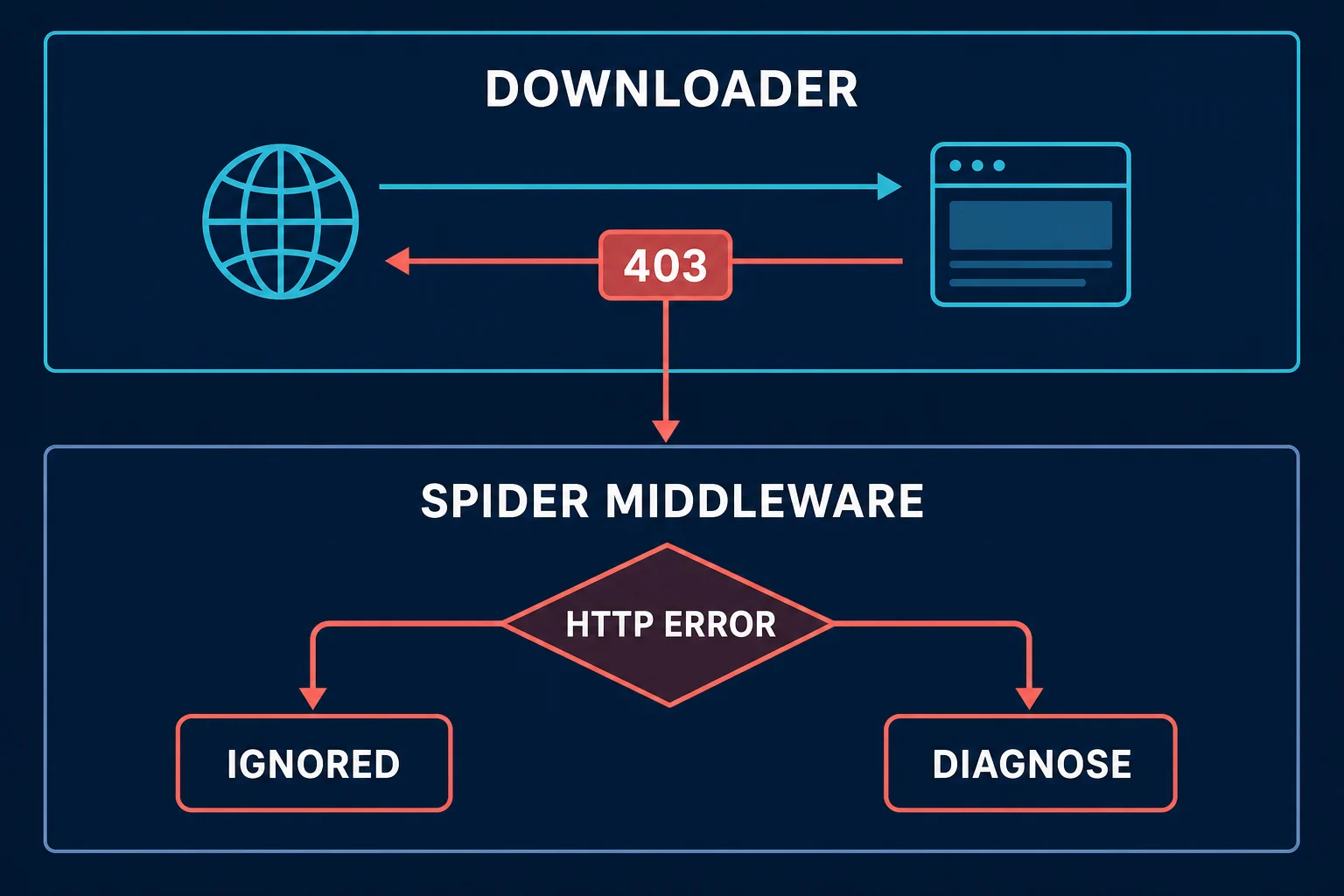
Why Scrapy does not call parse() for a 403
Scrapy downloads the response before its spider middleware decides whether your callback should receive it. By default, HttpErrorMiddleware filters unsuccessful responses, so a 403 can appear in the crawl log and statistics without reaching parse().
These examples use async def start(), which requires Scrapy 2.13 or later. Save each spider in the spiders/ directory of an existing Scrapy project.
For a short diagnostic run, allow that status on the spider:
import hashlib
import os

import scrapy


class ForbiddenProbeSpider(scrapy.Spider):
    name = "forbidden_probe"
    handle_httpstatus_list = [403]

    custom_settings = {
        "CONCURRENT_REQUESTS_PER_DOMAIN": 1,
        "DOWNLOAD_DELAY": 2.0,
        "ROBOTSTXT_OBEY": True,
        "USER_AGENT": (
            "ExampleResearchBot/1.0 "
            "(+https://example.org/crawler-info)"
        ),
    }

    async def start(self):
        yield scrapy.Request(
            os.environ["TARGET_URL"],
            callback=self.parse_probe,
            errback=self.on_download_error,
            meta={"proxy": None},
        )

    def parse_probe(self, response):
        body_hash = hashlib.sha256(response.body).hexdigest()[:12]
        content_type = response.headers.get(
            b"Content-Type", b""
        ).decode(errors="replace")
        title = response.css("title::text").get()

        self.logger.warning(
            "status=%s url=%s type=%r title=%r body_sha256=%s",
            response.status,
            response.url,
            content_type,
            title,
            body_hash,
        )

    def on_download_error(self, failure):
        self.logger.error("download failed: %r", failure.value)
Run it against a URL you are authorized to test:
TARGET_URL="https://example.com/public-page" \
  scrapy crawl forbidden_probe
Scrapy documents handle_httpstatus_list and the project-wide HTTPERROR_ALLOWED_CODES setting in its HttpErrorMiddleware reference. Use the spider or per-request scope for diagnosis. If you allow every error globally, you can hide failures that other spiders should reject.
The probe sets meta={"proxy": None} so Scrapy does not inherit an environment proxy. Run it only where direct access is allowed.
This code does not bypass or fix the 403. It only makes the response available for classification. It logs a short body hash instead of dumping the page, cookies, authorization header, or proxy credentials. During an approved local investigation, you can save the body privately or inspect a short redacted sample to identify a login page, WAF template, consent screen, or application error.
Check the crawl stats before you change anything
At shutdown, review Scrapy's stats for keys such as:
downloader/response_status_count/403
httperror/response_ignored_status_count/403
retry/count
The first tells you how many 403 responses the downloader received. The second indicates how many were filtered by HttpErrorMiddleware. If retry counts rise but 403 is not in your retry list, you may have timeouts, 429 responses, or server errors mixed into the same run. Scrapy's stats collector is also available through crawler.stats when you need per-spider metrics.
Track response classes by endpoint family, not just across the whole crawl. A site may allow public category pages while denying search, account, checkout, or API routes. One aggregate 403 percentage can hide that distinction.
Fix Scrapy 403 errors one layer at a time
Randomly changing the user agent, proxy, cookie jar, delay, and retry policy at once can produce a successful request without explaining why. Use the following order so each test has a clear interpretation.
1. Confirm the resource and method are allowed
Check the site's terms, API documentation, account permissions, and robots.txt before debugging access. The Robots Exclusion Protocol standardizes crawler instructions, but robots rules are not authorization and do not replace other legal or contractual requirements.
If the resource requires an account, use credentials issued for that purpose and the documented authentication flow. If an API token lacks a scope or a plan does not include the endpoint, headers and proxies cannot add that permission.
2. Identify who generated the 403
Inspect the final URL after redirects, Content-Type, a redacted body sample, and useful response headers. A JSON authorization error suggests the application or API. A branded block page may identify a CDN or WAF. A plain web-server page can point to server configuration. A 407 with Proxy-Authenticate comes from the forward proxy, not the destination.
Do not classify by status alone. Some sites return 200 OK with a login or challenge page, while some rate controls use 403 instead of 429. Validate page type before parsing fields.
3. Reduce the spider to one known URL
Temporarily remove pagination, broad link extraction, and concurrency. Test one permitted URL with one request. Record:
- Effective Scrapy settings and release
- Request method and final URL
- Non-secret request headers
- Cookie-jar and logical-session identifiers
- Whether the request used a proxy
- Response status,
Content-Type, body hash, and elapsed time
To see what a working browser sent, export a HAR file from the browser's DevTools Network tab and open it in the HAR analyzer. Compare its final URL, method, headers, and cookies with the request your spider logs.
scrapy shell is the fastest way to run that canary. Start it with scrapy shell -s USER_AGENT="ExampleResearchBot/1.0 (+https://example.org/crawler-info)" "https://example.com/public-page", then check response.status, response.headers, and response.text[:300]. Run from inside the project folder, the shell uses your project settings, so it reproduces the same middleware stack as the spider.
If this canary fails, scaling the same request only adds noise. If it succeeds, reintroduce one production behavior at a time: session state, next-page navigation, proxy route, then concurrency.
4. Use a deliberate Scrapy user agent
Set USER_AGENT once at project or spider scope. A transparent crawler can identify its application and contact page. An authorized browser-compatibility test should use a real browser rather than claiming browser behavior through one copied string.
Changing only User-Agent cannot reproduce browser JavaScript, TLS behavior, cookie state, client hints, or navigation context. The Scrapy user agent guide explains configuration precedence and how to verify the value that Scrapy actually sent.
Keep the rest of the request minimal. The web scraping headers guide covers Accept, language, authentication, cookies, and why copying a full browser request often creates contradictions.
5. Keep cookies and route stable within a session
Scrapy's CookiesMiddleware keeps a default cookie jar, and a request can select another jar with meta={"cookiejar": session_id}. That cookiejar key is not automatically sticky when you build a new request, so pass it to each request in the same logical session.
Keep the same user-agent profile, locale, cookie jar, and proxy route throughout a stateful flow. Rotating the IP midway through login, consent, pagination, or a cart while retaining the cookies can look like a broken session even when each component works independently.
Do not paste a browser's Cookie header into DEFAULT_REQUEST_HEADERS. Let the cookie middleware process Set-Cookie updates, and never emit cookies or auth values in normal logs.
6. Lower concurrency and stop retry storms
Use a conservative diagnostic configuration:
CONCURRENT_REQUESTS_PER_DOMAIN = 1
DOWNLOAD_DELAY = 2.0
DOWNLOAD_DELAY_JITTER = 0.5  # Scrapy 2.19+; older releases: RANDOMIZE_DOWNLOAD_DELAY = True

AUTOTHROTTLE_ENABLED = True
AUTOTHROTTLE_START_DELAY = 2.0
AUTOTHROTTLE_MAX_DELAY = 30.0
AUTOTHROTTLE_TARGET_CONCURRENCY = 0.5

RETRY_TIMES = 2
RETRY_HTTP_CODES = [408, 429, 500, 502, 503, 504, 522, 524]
These are starting values, not a universal safe rate. A published limit or explicit agreement takes precedence. Scrapy 2.19 deprecated RANDOMIZE_DOWNLOAD_DELAY in favor of DOWNLOAD_DELAY_JITTER, so use the setting that matches your installed release. Scrapy's AutoThrottle documentation explains that the extension respects normal concurrency and minimum-delay settings and does not let fast non-200 responses reduce the delay.
Scrapy's default retry status list includes transient server errors, timeout-related codes, and 429, but not 403. Preserve that principle. Adding 403 to RETRY_HTTP_CODES repeats an access denial without changing its cause and may make the block worse. The RetryMiddleware settings document the current defaults and per-request controls.
If the response supplies Retry-After, treat it as a minimum pause for that route. For broader pacing logic, the HTTP 429 guide separates retryable rate limits from forbidden access.
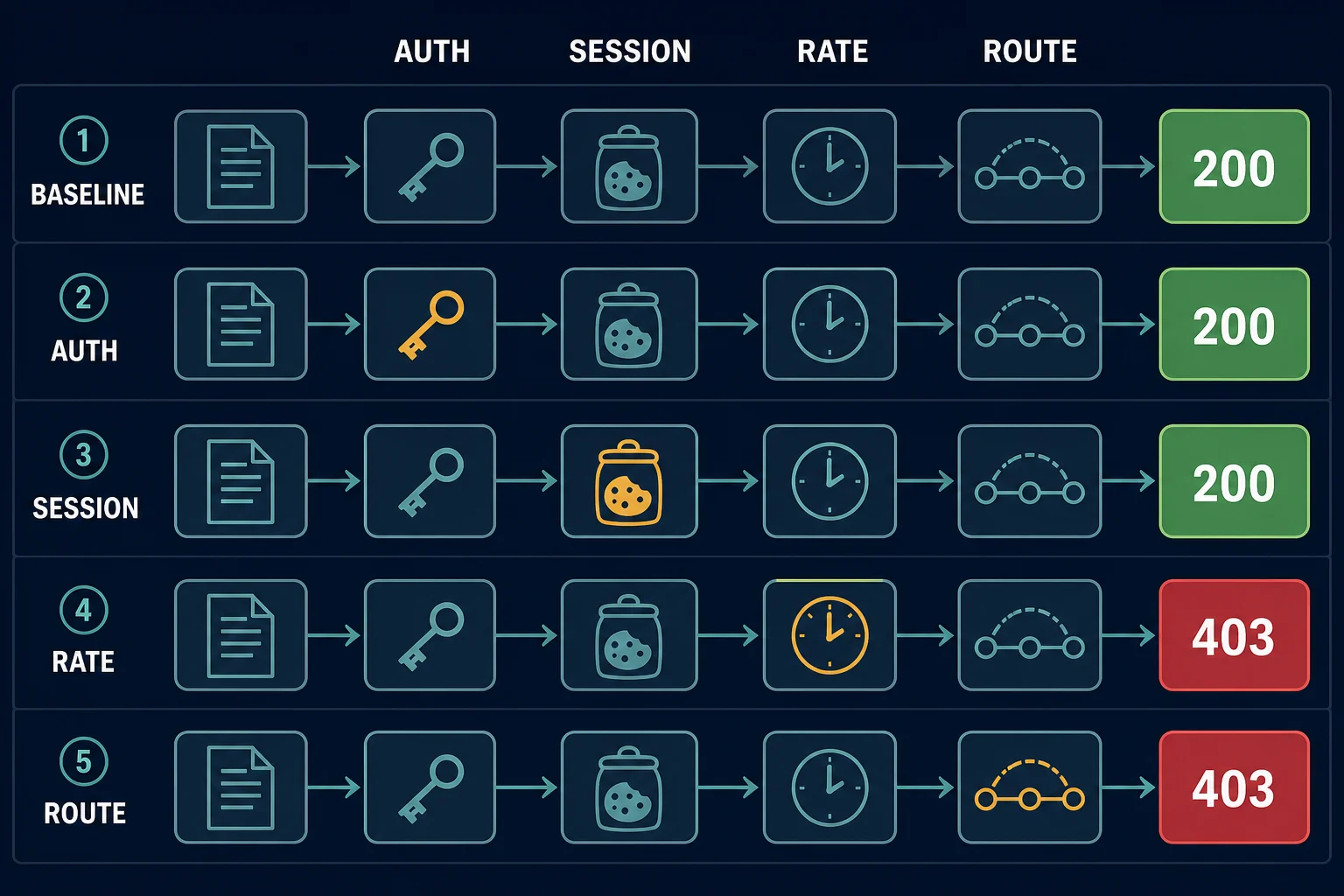
7. Check the TLS handshake when a WAF sits in front
Scrapy's default download handler connects with Twisted and OpenSSL, so its TLS handshake does not look like Chrome's. A CDN or WAF that scores the handshake can return a 403 or a block page for a request whose headers are fine. If the body is a branded block page, such as a Cloudflare rule page, read the Cloudflare Error 1020 guide to see what the owner's firewall rule means before you change the client.
For a permitted target where handshake scoring is the measured cause, a download handler built on curl_cffi can send a browser-like handshake. The community package scrapy-impersonate documents this setup:
DOWNLOAD_HANDLERS = {
    "http": "scrapy_impersonate.ImpersonateDownloadHandler",
    "https": "scrapy_impersonate.ImpersonateDownloadHandler",
}
TWISTED_REACTOR = "twisted.internet.asyncioreactor.AsyncioSelectorReactor"
Then choose a profile per request with meta={"impersonate": "chrome110"}. Pick a target from the curl_cffi impersonation list, and confirm the package supports your Scrapy version before you depend on it. If the page also needs JavaScript, use a real browser instead (see the section on the wrong client below).
When a proxy can help a Scrapy 403
A proxy can help only when an authorized test shows that network location, IP reputation, ASN, or per-IP request concentration is the constraint. It will not fix missing access, invalid credentials, a disallowed endpoint, lost cookies, incorrect request semantics, or a page that genuinely requires browser execution.
Scrapy's HttpProxyMiddleware reads the proxy URL from request metadata:
import os

import scrapy


class RegionalProbeSpider(scrapy.Spider):
    name = "regional_probe"
    handle_httpstatus_list = [403, 407]

    async def start(self):
        yield scrapy.Request(
            os.environ["TARGET_URL"],
            callback=self.parse,
            meta={
                "proxy": os.environ["PROXY_URL"],
                "cookiejar": "approved-region-test-1",
            },
        )

    def parse(self, response):
        yield {
            "status": response.status,
            "url": response.url,
            "content_type": response.headers.get(
                b"Content-Type", b""
            ).decode(errors="replace"),
        }
Allowing 407 lets the callback inspect a proxy-authentication response when Scrapy exposes it as an HTTP response. For HTTPS destinations, a failed CONNECT tunnel can instead appear as a downloader error before parse() runs.
Keep PROXY_URL in an environment variable or secret manager. Do not log it, because a URL can contain the proxy username and password.
For a useful direct-versus-proxy comparison, keep the target URL, user agent, headers, cookie state, and request timing identical. Run the probes separately at low frequency. If only the proxy path receives the 403, test an approved region or cleaner pool while holding the request constant. If both paths fail, return to permission, request, and session diagnosis.
Use a sticky route for multi-page sessions and rotation only for independent requests. For retail and ticketing sessions that must keep one IP from login to checkout, a static address from the ISP plans fits better than rotation. If measured route quality is the issue, compare residential proxy infrastructure for location-aware rotation with the stable options described in the best proxy for web scraping guide. Neither option is a substitute for permission or pacing.
When Scrapy is the wrong client
Some permitted pages require JavaScript to render public data or complete a supported browser flow. In that case, an HTTP response body may be only an app shell, login handoff, or challenge that Scrapy alone cannot execute.
Do not approximate a browser by pasting browser-only headers into Scrapy. Use an actual browser when rendering is a real requirement, keep the workflow within the site's rules, and re-check whether an API or feed is simpler. The Playwright proxy guide explains browser-context routing when an authorized browser workflow also needs a proxy.
A browser still does not grant access. If the resource is private, the account lacks permission, or the site prohibits the collection method, changing clients is not a fix.
Scraper works locally but fails in production
A spider that runs clean on a laptop and then returns timeouts, connection errors, or 403s on a server usually meets a different network, not different code. Check these differences first:
| Production symptom | Common cause | How to check |
|---|---|---|
| 403 on every request from the server | Cloud or datacenter IP ranges have a lower reputation, or the site blocks the hosting ASN | Run scrapy shell "<url>" on the server and on your laptop, then compare status and body |
| Connection timeouts or connection refused errors | Egress firewall, security group, or container network blocks the port | Run curl -v to the target from the same container |
| DNS lookup errors | Different resolver in the container or VPC | Resolve the hostname from the container with dig or nslookup |
| Requests go through an unexpected proxy | HTTP_PROXY or HTTPS_PROXY is set in the environment, and HttpProxyMiddleware reads it |
Print the environment, or set meta={"proxy": None} for a direct test |
| Timeouts rise with load | Higher CONCURRENT_REQUESTS in production, or a slow proxy route |
Compare downloader/response_status_count/* and retry/count stats between runs |
Scrapy retries connection errors and timeouts by default (see RETRY_EXCEPTIONS, and RETRY_TIMES defaults to 2), and DOWNLOAD_TIMEOUT defaults to 180 seconds per the settings reference. A run with many slow failures can therefore look stuck before it shows errors. Lower DOWNLOAD_TIMEOUT for diagnosis, log the error class per request in an errback, and split stats by host and proxy route so you can see which layer fails.
Production prevention checklist
Before scaling the repaired spider:
- Start from an approved URL set and enforce page, depth, and time limits.
- Keep
ROBOTSTXT_OBEYenabled when appropriate and review site requirements separately. - Version the user-agent and header policy used by each deployment.
- Keep cookies, locale, and proxy route aligned per logical session.
- Bound concurrency per host or download slot, not only per worker.
- Cache unchanged pages and avoid duplicate fetches.
- Do not automatically retry 403 responses.
- Track 403, 407, 429, timeout, challenge-page, and parser failures separately.
- Alert on changes by endpoint and route before increasing traffic.
- Run a small canary after code, header, auth, or proxy changes.
For the wider crawler design, including scope control, URL normalization, caching, backoff, and stop conditions, use the guide to crawling a website without getting blocked.
FAQ
Why does Scrapy return 403 but my browser works?
The browser may have an authenticated session, consent state, JavaScript execution, different request metadata, or a different network route. Compare a permitted low-rate request one variable at a time. Do not assume the user agent alone is the cause.
How do I make Scrapy parse a 403 response?
Add handle_httpstatus_list = [403] to the diagnostic spider, use meta={"handle_httpstatus_list": [403]} on one request, or configure HTTPERROR_ALLOWED_CODES = [403]. This only lets your callback inspect the response. It does not resolve the denial.
Should I add 403 to RETRY_HTTP_CODES?
Usually no. A repeated identical request does not change a permission, policy, session, or reputation decision. Keep 403 out of automatic retry rules, classify the response, and require a specific approved change before another probe.
Will a proxy fix a Scrapy 403?
It may help when the request is permitted and the measured problem is IP location, reputation, ASN, or traffic concentration. It cannot fix missing permissions, invalid authentication, a broken session, or an unsupported collection method.
Does Scrapy need TLS impersonation to avoid a 403?
Not for most sites. It matters when a CDN or WAF scores the TLS handshake and the same request works from a real browser. Test with a handshake-impersonating handler such as scrapy-impersonate on a permitted URL, and use a real browser if the page also needs JavaScript.
Why does my spider get 403 on the server but not on my laptop?
The server usually has a different network, not different code. Datacenter and cloud IP ranges often carry a lower reputation, and containers can pick up proxy environment variables. Run scrapy shell on both machines against the same URL and compare the status and body.
What is the difference between Scrapy 403 and 407?
A 403 normally comes from the destination site, CDN, WAF, or application after it receives the request. A 407 comes from an authenticating forward proxy. Fix the proxy URL, credentials, or IP allowlist for 407; investigate destination access for 403.
Final thoughts
Expose one denied response, find out which layer produced it, and change one approved variable at a time. Start with permission and authentication, then request consistency, session continuity, pacing, the TLS handshake, and the network route last. Keep 403 out of automatic retries and track status and page classes by endpoint. Add a proxy only when a direct and a proxied test show that the route is the constraint.