To make Python Requests use no proxy, create a Session and set session.trust_env = False. That stops Requests from reading HTTP_PROXY, HTTPS_PROXY, ALL_PROXY, and OS proxy settings, so every call through that session connects directly, including after redirects. Omitting proxies= is not enough, because Requests falls back to your environment.
import requests

session = requests.Session()
session.trust_env = False

response = session.get("https://example.com", timeout=(5, 20))
response.raise_for_status()
trust_env also turns off .netrc authentication and the REQUESTS_CA_BUNDLE or CURL_CA_BUNDLE certificate paths, so set those explicitly if your application needs them. To bypass the proxy only for some hosts, keep trust_env on and set NO_PROXY="localhost,.internal.example.com" instead.
Ways to disable a proxy in Requests, tested
We ran each method below against requests 2.34.2 (the latest release on PyPI as of October 2026) with urllib3 2.8.0 and Python 3.10. A local server stood in for the proxy and another for the direct target, so "proxy used" means the proxy server saw the request. The tests used plain HTTP URLs, and HTTPS goes through the same proxy selection code.
| Method | Works for HTTP_PROXY / HTTPS_PROXY |
Works for ALL_PROXY |
Survives redirects |
|---|---|---|---|
session.trust_env = False |
Yes | Yes | Yes |
proxies={"http": None, "https": None} |
Yes, for the first request | No | No |
proxies={"http": None, "https": None, "all": None} |
Yes, for the first request | Yes, for the first request | No |
session.proxies with None values |
No, the environment wins | No | No |
proxies={} |
No | No | No |
NO_PROXY or proxies={"no_proxy": "host"} |
Only for matching hosts | Only for matching hosts | Only for matching hosts |
| Unset the variables before launch | Yes | Yes | Yes |
The None trick is the one people copy from Stack Overflow. It works on a simple call when only HTTP_PROXY and HTTPS_PROXY are set. Once the server redirects, Requests rebuilds the proxy settings for the new URL and the environment proxy comes back. In our test the first hop went direct and the redirect target went through the proxy. Use trust_env = False unless you control every redirect.
What Session.trust_env controls
Session.trust_env defaults to True. This table shows what changes when you set it to False, based on the current requests/sessions.py source:
| Setting | trust_env = True (default) |
trust_env = False |
|---|---|---|
HTTP_PROXY, HTTPS_PROXY, ALL_PROXY (any case) |
Used for requests that have no explicit proxy for that scheme | Ignored |
| OS proxy settings (Windows registry, macOS system config) | Used when no proxy environment variables exist, through urllib.request.getproxies() |
Ignored |
NO_PROXY |
Removes environment proxies for matching hosts | Ignored (nothing to bypass) |
.netrc credentials |
Used for target auth if you pass no auth |
Ignored |
REQUESTS_CA_BUNDLE, CURL_CA_BUNDLE |
Used when verify is True |
Ignored |
proxies= argument and session.proxies |
Used | Still used |
The last row matters. trust_env = False does not turn off proxies you set in code. It only stops Requests from adding proxies from the environment.
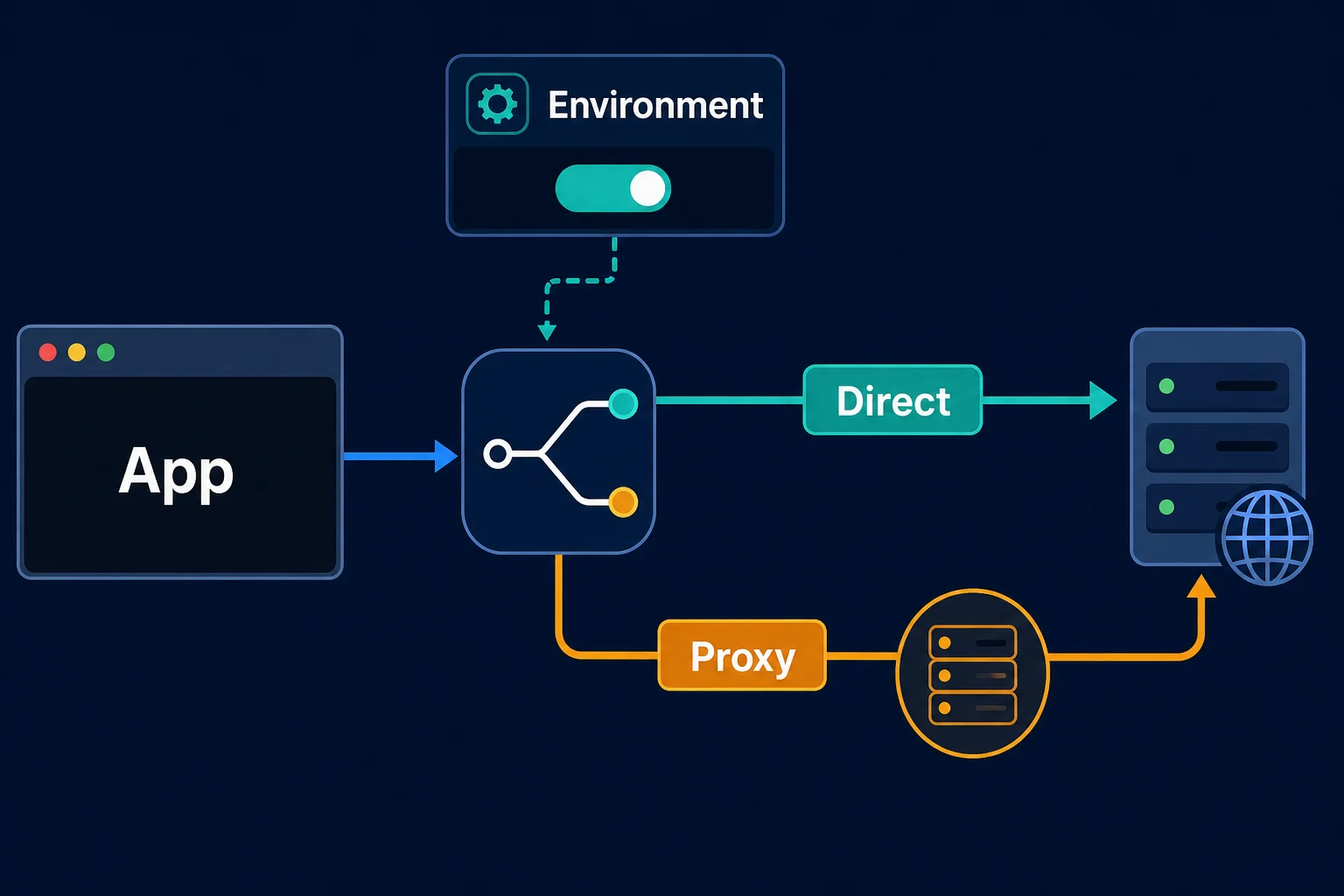
Direct in Requests is not direct on the network
Do not treat a direct Requests connection as proof that no network intermediary exists. A VPN, service mesh, transparent gateway, firewall, or corporate egress device can route traffic without appearing in Requests' proxy settings. The code here controls application-level proxy selection.
Why Requests uses a proxy you did not configure
Requests trusts environment settings by default. If the running process contains a proxy variable, a plain call such as requests.get(url) can inherit it even though the code contains no proxy dictionary.
The relevant variables are:
HTTP_PROXYandhttp_proxyfor HTTP destinationsHTTPS_PROXYandhttps_proxyfor HTTPS destinationsALL_PROXYandall_proxyas a fallback for multiple schemesNO_PROXYandno_proxyfor destinations that should bypass those proxies
The Requests proxy documentation confirms that both lowercase and uppercase variants are supported. Requests' current proxy-selection code gives the lowercase form priority when both cases are present, so duplicated variables with different values are a source of confusing results.
Check which names exist without printing credentials embedded in their values:
import os

proxy_names = (
    "http_proxy",
    "https_proxy",
    "all_proxy",
    "no_proxy",
    "HTTP_PROXY",
    "HTTPS_PROXY",
    "ALL_PROXY",
    "NO_PROXY",
)

configured = [name for name in proxy_names if os.environ.get(name)]
print("Proxy-related variables present:", configured)
Environment proxies also beat session.proxies. The Requests docs warn that values in session.proxies "will be overwritten by environmental proxies." If you set session.proxies and still see the environment proxy, either pass proxies= on each call or set session.trust_env = False on that session.
Environment values may be injected outside your interactive terminal. Check the actual runtime configuration for a systemd service, Docker container, Kubernetes pod, IDE, scheduled task, or CI job instead of assuming it matches your login shell.
Disable environment proxies for a whole session
Use a dedicated direct session when all requests in one logical workflow must ignore environment proxy settings:
import requests

direct_session = requests.Session()
direct_session.trust_env = False

response = direct_session.get(
    "https://example.com/health",
    timeout=(5, 20),
)
response.raise_for_status()
trust_env belongs to Session; it is not an argument accepted by requests.get(). The top-level helper creates and closes a temporary session internally, so create your own session when you need to change this behavior.
Keep that session local to the code path that requires a direct connection. Giving it a clear name such as direct_session makes the routing policy visible during review and reduces the chance that another call accidentally uses the wrong transport configuration.
Preserve a custom CA bundle explicitly
Setting trust_env = False is broader than “ignore proxy variables.” Requests also stops reading REQUESTS_CA_BUNDLE and CURL_CA_BUNDLE. If your direct destination uses a private certificate authority, assign the certificate bundle explicitly:
import requests

session = requests.Session()
session.trust_env = False
session.verify = "/etc/ssl/certs/internal-ca-bundle.pem"

response = session.get(
    "https://service.example.internal/health",
    timeout=(5, 20),
)
response.raise_for_status()
Do not replace a missing CA configuration with verify=False. That disables TLS certificate verification and turns a routing fix into a security problem. Requests documents both the environment CA variables and explicit verify paths in its SSL certificate verification guidance.
Supply authentication explicitly when needed
A session with trust_env = False also ignores credentials discovered through .netrc. Pass approved target authentication through the method your service expects, such as an explicit auth= tuple, token header, or application credential provider.
This does not affect credentials inside a proxy URL because the direct session is not supposed to use that URL. It affects authentication to the destination itself.
Use NO_PROXY for selected hosts
If most outbound traffic must use an organization proxy but internal services or local development endpoints should connect directly, keep environment proxy discovery enabled and define a bypass list:
export HTTPS_PROXY="http://proxy.example.net:8080"
export NO_PROXY="localhost,127.0.0.1,.example.internal,api.example.com:8443"
Then ordinary Requests calls use the proxy except when the destination matches NO_PROXY:
import requests

response = requests.get(
    "https://service.example.internal/health",
    timeout=(5, 20),
)
response.raise_for_status()
Use hostnames, IP addresses, domain suffixes, or host-and-port entries. Do not use full URLs or URL paths. Matching rules in the current Requests source:
NO_PROXY entry |
Matches |
|---|---|
example.com |
example.com and any subdomain, such as api.example.com |
.example.com |
The same. Requests strips the leading dot before matching. |
api.example.com:8443 |
That host only on port 8443 |
10.0.0.5 |
That exact IPv4 address |
10.0.0.0/8 |
Any IPv4 address in the CIDR range |
* |
Every host (handled by Python's urllib) |
*.example.com |
Nothing. Wildcard prefixes are not supported, so use .example.com. |
Entries are comma-separated. Spaces are removed. If both no_proxy and NO_PROXY exist, the lowercase one wins. We confirmed the rows above, including the CIDR range, the port rule, and the failed *.example.com pattern, against requests 2.34.2. CIDR support is a Requests feature, not a general rule: GitLab's comparison of NO_PROXY handling shows that Python's urllib, curl, and wget do not support CIDR blocks, so the same variable can behave differently across tools.
Three details surprise people:
NO_PROXYdoes not affect explicit proxies. It only removes environment proxies. If you passproxies={"https": "http://proxy:8080"}, a matchingNO_PROXYentry does not make that request direct.- You can pass the bypass list in code, per request. Requests reads a
no_proxykey from theproxiesargument and uses it in place of theNO_PROXYvariable:requests.get(url, proxies={"no_proxy": "localhost,.internal.example.com"}). Putting the same key insession.proxieshas no effect in our test, so pass it on each call. Like the variable, it only filters environment proxies. HTTP_PROXYis ignored under CGI. IfREQUEST_METHODis set in the environment, Python'surllibdrops the lowercase and uppercasehttpproxy entry to avoid the httpoxy attack. If a proxy applies in your shell and vanishes in a CGI or some web-server context, this is why.
Be precise with suffixes. A broad entry can send more traffic directly than intended, while an entry that includes the wrong port may fail to match. After changing NO_PROXY, test both a bypassed host and a host that should still use the proxy.
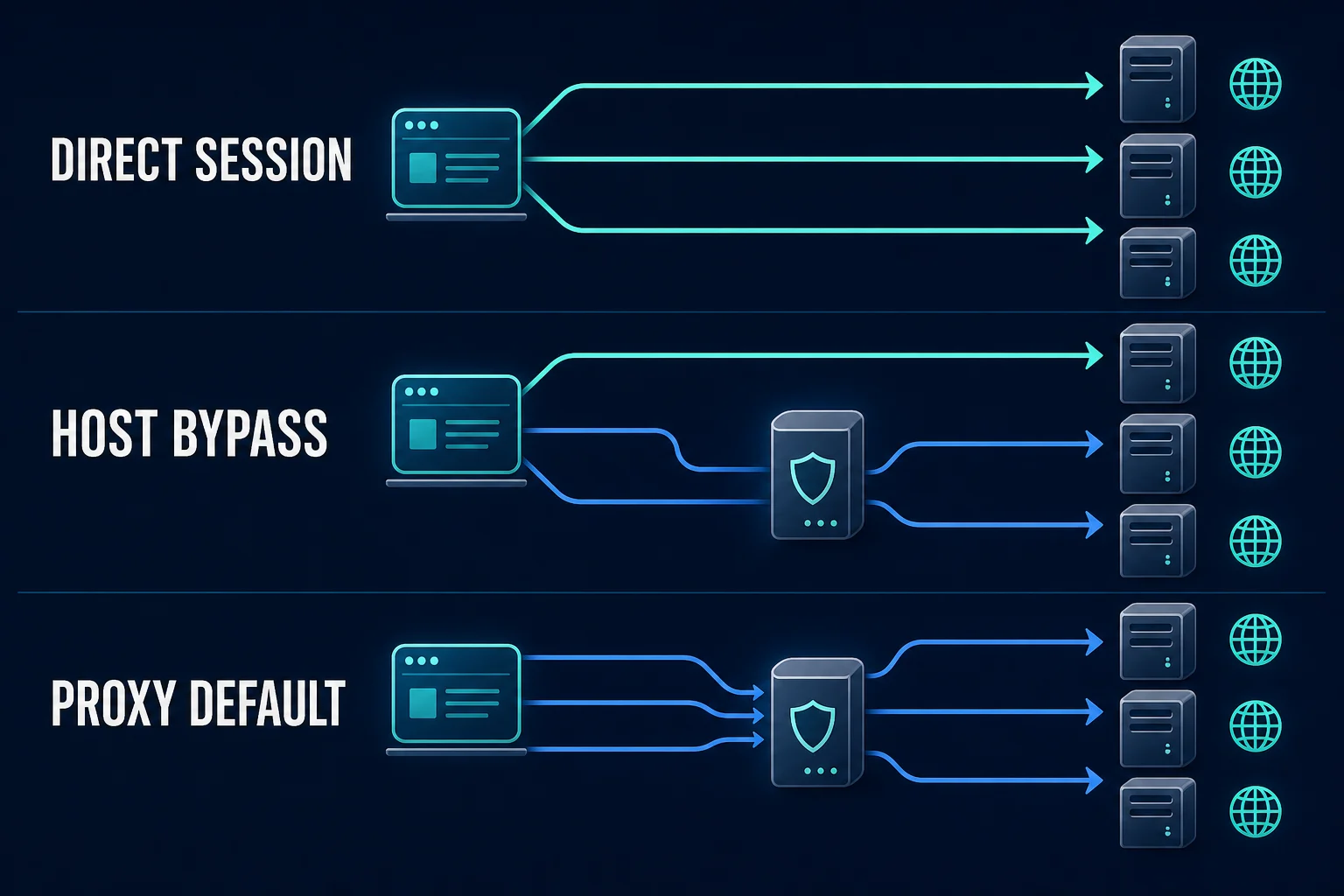
Why proxies={} and {"https": None} fall short
An empty proxy dictionary looks like an explicit instruction, but Requests fills missing keys from the environment while trust_env is on. In our test, proxies={} with HTTP_PROXY set still sent the request to the proxy:
# Still uses HTTP_PROXY, HTTPS_PROXY, or ALL_PROXY from the environment.
response = requests.get(
    "https://example.com",
    proxies={},
    timeout=(5, 20),
)
Setting keys to None does remove them. The Requests docs say a None value omits that key from a merged dict parameter, and the environment merge skips keys that are already present. That is why this works on a plain call:
response = requests.get(
    "http://example.com",
    proxies={"http": None, "https": None},
    timeout=(5, 20),
)
It breaks in two cases. An inherited ALL_PROXY still fills the all key, so you need "all": None as well. And on a redirect, Requests re-resolves proxies for the new URL and puts the environment proxy back, because the None keys were dropped when the settings were merged. A session with trust_env = False states the policy once and applies it to every hop.
If your goal is the opposite, and you want to configure a proxy on purpose, use an explicit proxy mapping and the examples in our guide to the Python requests proxies dictionary. Keep direct and proxied sessions separate when an application needs both. For per-request rotation on top of that, see rotating proxies with Python Requests.
If you are switching to a direct connection only because an intended proxy failed, use the proxy error troubleshooting checklist to identify the failing layer first. For a 407 Proxy Authentication Required response, follow the Python Requests proxy authentication guide instead of bypassing a proxy that the network or workflow requires.
How Requests reads environment proxies
If you want to confirm the behavior in the source, these are the functions involved, from requests/sessions.py and requests/utils.py:
Session.request()callsSession.merge_environment_settings(url, proxies, stream, verify, cert).- If
self.trust_envisTrue, that method callsget_environ_proxies(url, no_proxy=...). Theno_proxyvalue comes from theproxiesdict, if you passed one. get_environ_proxies()callsshould_bypass_proxies(url, no_proxy). If the host matches, it returns{}. Otherwise it returnsurllib.request.getproxies(), which reads environment variables and, when none exist, OS proxy settings.- Back in
merge_environment_settings(), each environment proxy is added withproxies.setdefault(key, value). Keys you passed explicitly are kept. Missing keys, includingall, are filled from the environment. - The result is merged over
session.proxies. Request-level values, now including the environment ones, win. - At send time,
select_proxy(url, proxies)picks the first match in this order:scheme://hostname,scheme,all://hostname,all. - On redirects,
rebuild_proxies()callsresolve_proxies(), which re-checksNO_PROXYand the environment for the new URL.
Step 4 explains why proxies={} and {"https": None} are not reliable ways to disable proxies. Step 5 explains the documented session.proxies warning.
Use separate direct and proxied sessions
One application may need a direct route for an internal API and a proxy for approved location testing. Model those as two sessions instead of changing global environment variables between requests:
import os
import requests

direct = requests.Session()
direct.trust_env = False

proxied = requests.Session()
proxied.trust_env = False
proxy_url = os.environ["PROXY_URL"]
proxied.proxies.update({
    "http": proxy_url,
    "https": proxy_url,
})

internal_response = direct.get(
    "https://service.example.internal/health",
    timeout=(5, 20),
)

regional_response = proxied.get(
    "https://example.com/catalog",
    timeout=(5, 20),
)
If PROXY_URL uses http://, the connection to the proxy is unencrypted. Basic proxy credentials and the initial CONNECT request are exposed on that connection even when the destination uses HTTPS. Use an authenticated HTTP proxy only over a trusted network, or use a TLS-protected proxy endpoint supported by the provider and your Requests/urllib3 versions.
Never log proxy_url; authenticated proxy URLs commonly contain a username and password. Keep cookies and authentication state separated too. Reusing one cookie jar across direct and proxied identities can make a stateful workflow inconsistent.
If the application does not need proxy routing at all, do not create the second session. Many small, permitted scraping jobs are easier to test directly at a low request rate before adding network infrastructure. The Python scraping workflow explains how to validate fetching and parsing before scaling.
Remove proxy variables for one process
When several libraries in the same process should ignore inherited proxy variables, remove them at process launch rather than mutating os.environ halfway through a multithreaded program.
On a Linux or macOS shell:
env \
  -u HTTP_PROXY -u HTTPS_PROXY -u ALL_PROXY -u NO_PROXY \
  -u http_proxy -u https_proxy -u all_proxy -u no_proxy \
  python app.py
On PowerShell, start a clean child process from a block that temporarily removes the variables, then restore them if the parent session still needs them. In containers and CI, removing proxy variables from that service's environment definition is usually clearer than modifying them inside application code.
This process-level method can affect package managers, telemetry clients, cloud SDKs, and every other library that honors the same variables. Prefer the session-level switch when only Requests should connect directly.
Verify that Requests is not using a proxy
Use a controlled destination and compare the result with your expected direct egress address. Unknown Proxies provides a small IP response endpoint that is useful for this check:
import requests

session = requests.Session()
session.trust_env = False

response = session.get(
    "https://ipv4.unknownproxies.com/ip",
    timeout=(5, 20),
)
response.raise_for_status()
print(response.text.strip())
Run the same test from the same host with your intentional proxy session and compare the addresses. A difference proves that the two application routes have different public exits; it does not identify every gateway between your process and the internet.
For an internal service, server-side access logs are stronger evidence. Record a request ID on the client and confirm the source address and route at the destination. Avoid treating a successful 200 response alone as proof of direct routing.
Diagnose failures by layer
Changing to no-proxy mode can expose a real network requirement. Use the symptom to choose the next check:
| Symptom after disabling the proxy | Likely explanation | Next check |
|---|---|---|
| Connection timeout | Direct egress is blocked, destination is unavailable, or routing is wrong | Test DNS, port access, and organization egress policy |
| DNS resolution error | Direct DNS cannot resolve the host or the name is only available through a network gateway | Compare DNS inside the actual runtime environment |
| TLS verification error | The session stopped loading an environment CA bundle | Set session.verify to the approved CA path |
401 Unauthorized |
.netrc credentials are no longer loaded or target auth is missing |
Configure destination authentication explicitly |
403 Forbidden |
The destination received the request but refused it | Review permissions, policy, session state, and source network |
429 Too Many Requests |
The destination is rate limiting the direct identity | Reduce concurrency and honor Retry-After |
A 403 or 429 does not mean Requests secretly used a proxy. Those are destination responses, while a proxy connection failure usually appears as requests.exceptions.ProxyError. The proxy versus firewall guide provides a layer-by-layer comparison when the boundary is unclear.
What httpx and aiohttp do differently
If you move from Requests to another client, the defaults change. httpx reads HTTP_PROXY, HTTPS_PROXY, ALL_PROXY, and NO_PROXY by default, like Requests. Turn that off with trust_env=False, either on a client or on a top-level call:
import httpx

with httpx.Client(trust_env=False, timeout=20.0) as client:
    response = client.get("https://example.com")
    response.raise_for_status()
aiohttp goes the other way. ClientSession does not read proxy environment variables unless you pass trust_env=True. That means a script that picked up a proxy under Requests can connect directly under aiohttp with no code change, which surprises people who compare the two while debugging. Check the current docs for the client you use before assuming the Requests behavior carries over.
Libraries built on these clients can still sidestep NO_PROXY. Pydantic AI's web_fetch_tool resolves the hostname itself and asks the proxy for a tunnel to the IP address, so a NO_PROXY=example.com entry never matches. The Pydantic AI web tools guide shows the proxy log and a custom tool that keeps the route under your control.
Common no-proxy mistakes
- Passing
proxies={}while environment proxy variables remain active. - Using
{"http": None, "https": None}and then hitting a redirect or anALL_PROXYvalue. - Disabling
trust_envand forgetting that the session also relied onREQUESTS_CA_BUNDLEor.netrc. - Setting
NO_PROXYto a full URL such ashttps://api.example.com/pathinstead of a hostname. - Checking proxy variables only in an interactive shell when the application runs in a container or service.
- Printing an authenticated proxy URL into CI logs while debugging.
- Using
verify=Falseto hide a certificate error caused by a missing CA path. - Assuming
localhostinside a container refers to a service running on the host machine. - Treating a target-side
403or429as proof that proxy bypass failed.
Change one layer at a time. First confirm which environment variable names exist, then choose a session-wide or host-specific bypass, and finally verify the observed route.
FAQ
How do I force Python Requests to use no proxy?
Create a requests.Session(), set session.trust_env = False, and make the request through that session. This prevents Requests from importing proxy rules from environment variables, and it holds across redirects.
Does proxies={"http": None, "https": None} disable the proxy?
For one request with no redirect, and only when the proxy comes from HTTP_PROXY or HTTPS_PROXY, yes. It does not override ALL_PROXY unless you add "all": None, and the environment proxy returns on a redirect. proxies={} does not disable anything. Use trust_env = False when the session must stay direct.
What does Session.trust_env do in Requests?
It controls whether a session reads settings from its environment: proxy variables, OS proxy settings, NO_PROXY, .netrc credentials, and the REQUESTS_CA_BUNDLE and CURL_CA_BUNDLE paths. It defaults to True. Setting it to False disables all of those for that session but keeps proxies you pass in code.
Why does Requests still use a proxy I never set in code?
Requests reads HTTP_PROXY, HTTPS_PROXY, ALL_PROXY, and NO_PROXY (upper or lower case) from the process environment, and falls back to Windows or macOS system proxy settings. The environment also overrides session.proxies, as the Requests docs warn. Print the variable names present at runtime, not in your login shell.
Does NO_PROXY apply when I pass proxies= explicitly?
No. NO_PROXY only removes proxies that came from the environment. An explicit proxies= value still applies. To keep some hosts direct while other calls use an explicit proxy, send those calls through a separate session with trust_env = False and no proxies.
Can I disable a proxy for one request?
Requests has no trust_env keyword on an individual get() call. Create a dedicated direct session and use it for that request, or pass proxies={"http": None, "https": None, "all": None} if the URL will not redirect. A separate session is clearer than changing process-wide environment variables.
Do httpx and aiohttp use environment proxies?
httpx does by default and accepts trust_env=False to stop. aiohttp ignores proxy environment variables unless you create the session with trust_env=True.
Final thoughts
For a Python Requests no proxy setup, use a dedicated Session with trust_env = False. It is the only in-code method we tested that survives redirects and ALL_PROXY. Reach for NO_PROXY when most traffic must keep using an environment proxy and only some hosts should go direct.
Remember that trust_env also switches off environment CA bundles and .netrc, so set verify and auth explicitly. Keep direct and proxied sessions separate, and never use verify=False to get a direct request through.
Technical references: Requests advanced usage: proxies, Requests Session API, and Python urllib.request.getproxies().