Proxy vs firewall troubleshooting starts with one distinction: a proxy forwards a connection on behalf of a client, while a firewall decides whether traffic is allowed to cross a boundary. A proxy changes the request path. A firewall filters that path according to security rules.
The two can produce similar symptoms, such as timeouts, refused connections, 403 responses, or pages that work directly but fail through a proxy. They are still not interchangeable. The fastest diagnosis is to test the destination directly, test the proxy endpoint itself, then send the same request through the proxy without changing anything else.
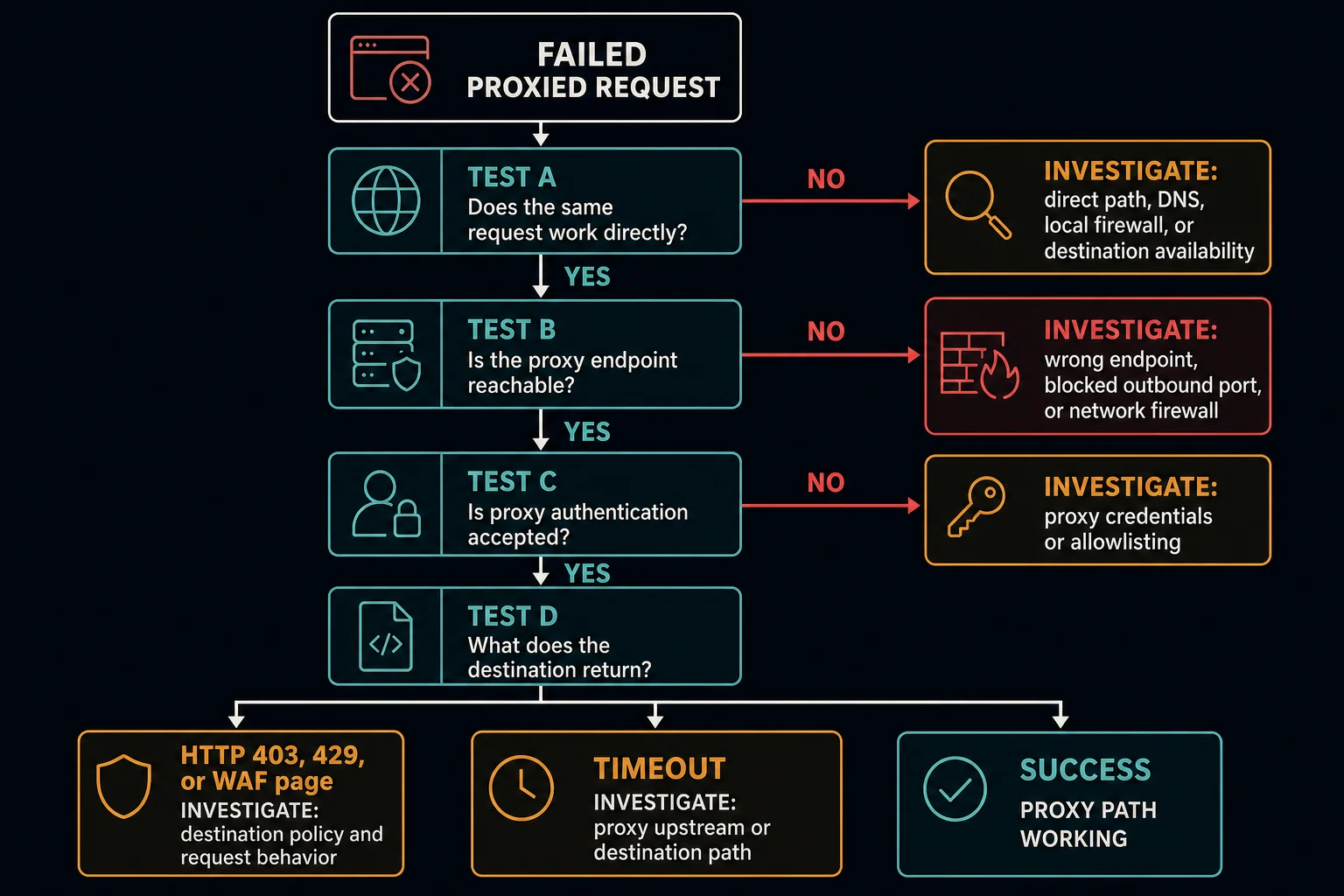
If direct and proxied requests both fail, investigate the destination, local network, or firewall first. If direct access works but the proxy endpoint is unreachable, investigate the proxy address, port, protocol, and outbound firewall rules. If the proxy connects but returns 407, fix proxy authentication. If the request reaches the destination and returns 403, 429, or a WAF block page, investigate destination policy and request behavior rather than the proxy connection alone.
Proxy vs Firewall: Quick Comparison
| Question | Proxy | Firewall |
|---|---|---|
| Primary job | Receive and forward traffic for another client or server | Allow, reject, or drop traffic according to rules |
| Where it can run | On a device, gateway, hosted endpoint, or in front of an origin | On a device, network edge, cloud network, server, CDN, or application edge |
| Does it become part of the connection path? | Yes; the client connects to the proxy, which connects onward | Usually filters traffic at a boundary; a WAF may inspect HTTP requests at the application edge |
| Can it change the public source IP? | A forward proxy normally presents its exit IP to the destination | A basic firewall does not provide a new exit IP, although one product may combine firewall, NAT, and proxy features |
| Common failure clues | Cannot reach proxy host/port, protocol mismatch, tunnel failure, 407 Proxy Authentication Required |
Connection timeout, connection refused, policy log, 403, WAF block page, or silently dropped packets |
| First useful test | Connect to the proxy endpoint, then make one request through it | Compare direct and proxied tests, then inspect the firewall or security-event log |
This comparison describes functions, not product labels. A secure web gateway can include both proxying and firewall controls. A CDN may act as a reverse proxy and run a web application firewall. A home router may combine routing, NAT, and firewall features in one box.
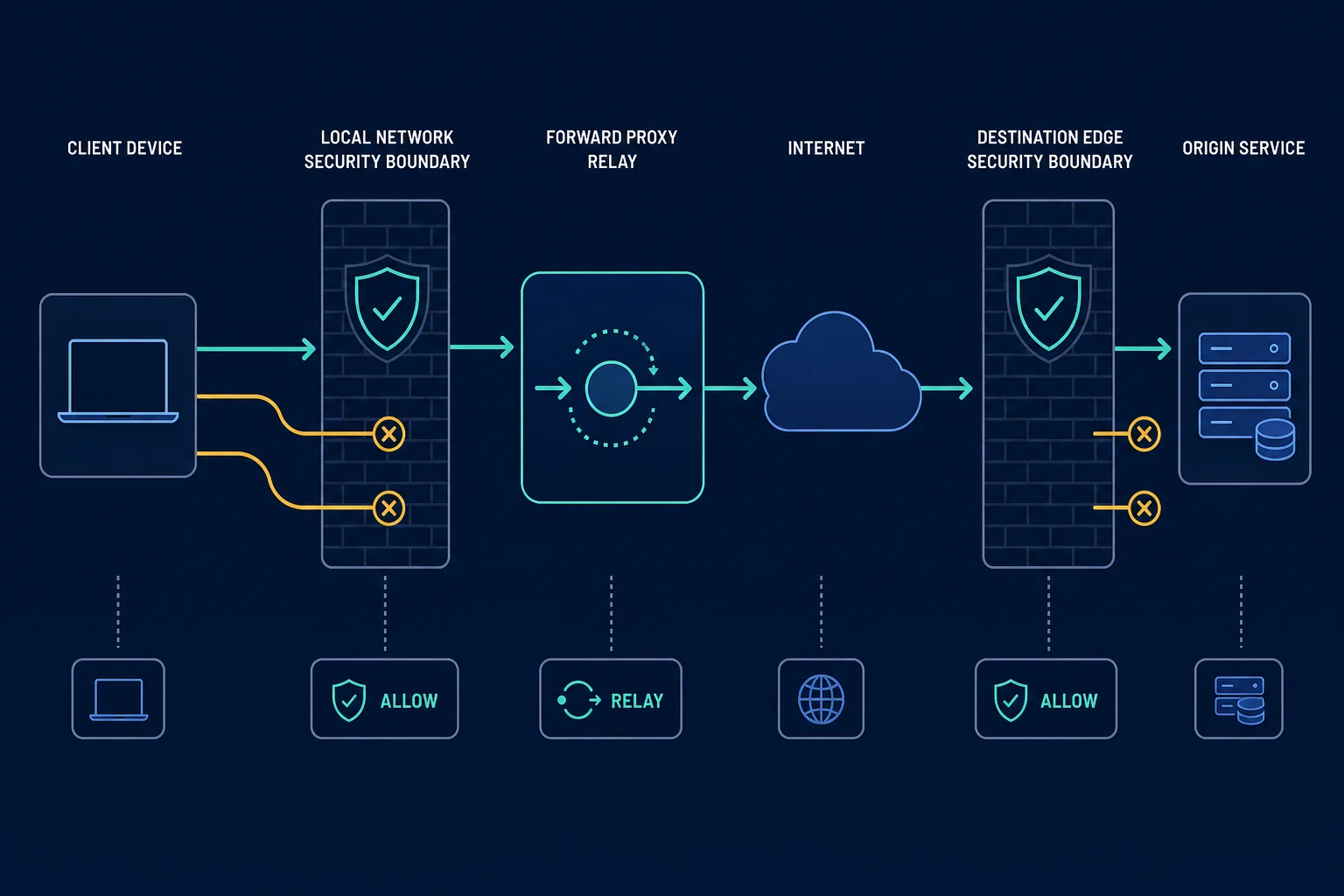
What a Proxy Does in the Request Path
A forward proxy acts for the client. Your browser, script, or bot connects to the proxy endpoint, and the proxy opens or relays a connection toward the destination. The destination usually sees the proxy's exit address as the network source.
That forwarding role creates a separate layer to configure and test:
- Proxy hostname or IP address
- Proxy port
- HTTP, HTTPS, or SOCKS protocol
- Username and password, or source-IP allowlisting
- Tunnel support for HTTPS destinations
- Rotation or sticky-session behavior
For an HTTPS request through an HTTP proxy, the client commonly uses the HTTP CONNECT method to establish a tunnel. MDN's proxy and tunneling guide also distinguishes forward proxies, which act for clients, from reverse proxies, which sit in front of servers.
A proxy can enforce policy, but forwarding is the defining function for this diagnosis. If the client cannot establish a usable connection to the proxy, the destination may never see the request.
What a Firewall Does in the Request Path
A firewall controls whether traffic can pass between networks or hosts with different security requirements. NIST SP 800-41 Rev. 1 describes firewalls as devices or programs that control network traffic flow between networks or hosts with different security postures.
The firewall may evaluate properties such as:
- Source and destination IP address
- Source and destination port
- Network protocol
- Connection state
- Application or process on a device
- HTTP path, method, headers, cookies, or other request signals in a WAF
The action matters. A firewall can allow traffic, reject it immediately, silently drop it, log it, or send it to a challenge. Those actions create different symptoms. A reject may produce a quick connection error; a silent drop often looks like a timeout; a WAF block commonly produces an HTTP response.
Cloud firewalls and WAFs make the boundary less visible, but the same principle applies. For example, Cloudflare WAF custom rules match incoming requests and can take actions such as Block or Managed Challenge.
Why a Proxy and Firewall Are Easy to Confuse
Both sit between the client and destination, and both may inspect some traffic. They can also exist inside the same service. The practical difference is what happens to the connection:
- A proxy terminates or relays one side of a connection and creates or tunnels the next leg.
- A firewall evaluates traffic and decides whether it may continue.
- A reverse proxy receives traffic for an origin; a WAF attached to it can then allow or block the HTTP request.
- A corporate forward proxy may authenticate users and enforce browsing policy, so it behaves as both an intermediary and a control point.
Do not diagnose by product name alone. Identify the hop that produced the evidence. A 407 from an explicit proxy means something different from a 403 generated by a destination WAF, even if both products are marketed as security gateways.
What Is a Proxy Firewall?
A proxy firewall combines both jobs in one device. NIST SP 800-41 calls it an application-proxy gateway. The client connects to the firewall, and the firewall opens a second, separate connection to the destination. The two hosts never talk directly.
Because it terminates the connection, a proxy firewall can inspect application-layer content and allow or deny traffic based on HTTP headers or payloads. It can also require each user to authenticate. Some decrypt TLS traffic, inspect it, and encrypt it again. That only works when client devices trust the gateway's certificate, which is common on managed company laptops.
Next-generation firewalls and secure web gateways often include this proxy mode. On a network like that, "the proxy" and "the firewall" can be the same box. The diagnosis steps below still work, because they test the forwarding and filtering jobs separately.
Do You Need Both a Proxy and a Firewall?
On most networks, yes, because they solve different problems. Every network edge and server needs a firewall to decide which traffic may pass. A proxy is optional. Companies use forward proxies for web filtering, logging, and caching. Developers and automation teams use them to choose the exit IP and location for each task. A proxy never replaces a firewall, and a basic firewall cannot give you a different exit IP.
How to Tell Whether the Proxy or Firewall Is Blocking Access
Use one stable test URL and change one variable at a time. Record the timestamp, client, proxy endpoint, destination, response code, and whether the failure was immediate or delayed.
1. Test the destination without the proxy
Make a direct request from the same device and network.
curl -v --connect-timeout 10 https://example.com/
If this fails, the proxy is not yet the differentiating variable. Check DNS, general connectivity, the local firewall, network policy, and destination availability. A direct 403 can still be a destination access rule; a direct timeout points to a different class of failure.
If direct access works, save the response status and enough non-sensitive headers to compare later. Do not change the URL, user agent, cookies, or request rate before the proxy test.
2. Test whether the proxy endpoint is reachable
Confirm that the proxy host resolves and that its assigned port accepts a connection. A quick port test does not prove authentication or forwarding works, but it separates endpoint reachability from destination behavior.
If the port times out:
- Recheck the hostname and port against the provider dashboard.
- Confirm the plan or tunnel is active.
- Test from another approved network.
- Check whether a device, router, corporate, or cloud egress firewall blocks that outbound port.
- Ask the network administrator whether only standard ports such as
80and443are permitted.
If the connection is refused immediately, the endpoint may be offline, the port may be wrong, or no service may be listening. A firewall can also reject instead of silently dropping traffic, so use logs or a second network test before assigning the cause.
3. Send the same request through the proxy
Use the protocol the provider actually supplies. This example uses an HTTP proxy without embedding credentials in shell history:
curl -v --connect-timeout 10 --proxy http://proxy.example:8080 https://example.com/
Interpret the first clear failure:
| Result | Likely layer | Next step |
|---|---|---|
| Proxy hostname does not resolve | DNS or proxy configuration | Recopy the endpoint and test DNS |
| Connection to proxy host/port times out | Network path or outbound firewall | Test the port from another allowed network and inspect egress rules |
| Connection is refused | Wrong port, offline proxy service, or active rejection | Verify endpoint status and protocol |
| TLS or tunnel setup fails before an HTTP response | Proxy protocol, interception, certificate trust, or tunnel policy | Confirm proxy type and inspect the verbose handshake |
407 Proxy Authentication Required |
Proxy authentication | Fix credentials, allowlisting, encoding, or account status |
403, 429, or branded block page from the site |
Destination application, rate limit, CDN, or WAF | Review permission, pacing, session, headers, IP reputation, and site policy |
| Success with a different exit IP | Proxy path is working | Continue with a small, controlled workflow test |
The 407 Proxy Authentication Required guide covers credential and format failures. If the request receives a destination response instead, use the HTTP 403 guide or HTTP 429 guide as appropriate.
4. Compare the failure scope
Scope often identifies the controlling layer faster than the error text:
- One application fails: inspect its proxy settings, extension, certificate store, and protocol support.
- Every application fails only when proxied: test the proxy endpoint, credentials, and outbound port.
- The same proxy works from another network: inspect the original device, router, corporate egress policy, or cloud security group.
- One destination fails through every tested route: investigate the destination's availability, authorization, and access policy.
- One proxy pool fails while direct access and another approved pool work: compare proxy ASN, country, reputation, and session behavior.
- Every route gets the same HTTP block: stop rotating and confirm the workflow is authorized and the request is valid.
5. Check logs at the boundary you control
Client output proves what the client observed; it does not always prove who caused it. Use firewall deny logs, proxy access logs, cloud flow logs, WAF security events, and application logs when you control those systems.
A useful correlation record includes:
- UTC timestamp
- Source device or workload
- Proxy endpoint and session identifier, without passwords
- Destination hostname and port
- Response status or network error
- Firewall rule ID, WAF event ID, or request ID
- Test case: direct or proxied
Do not log proxy passwords, authorization headers, session cookies, or full personal data. Keep only what is needed to correlate the failed hop.
Firewall Failures at Different Locations
"The firewall" is not one location. Name the boundary before changing rules.
Device firewall
A host firewall may block the browser, runtime, or script from opening an outbound connection. If another application works on the same device, compare application-specific rules. Do not disable the whole firewall as a routine test; create a narrow, temporary test rule only when you administer the device and understand the exposure.
Router or corporate egress firewall
Network policy may permit ordinary HTTPS to port 443 but block connections to a proxy's assigned port. This pattern makes direct browsing work while the proxy endpoint times out from every application on that network.
Test the same endpoint from another approved network. If it works there, give the administrator the destination hostname, port, protocol, timestamp, and business purpose. Changing proxy credentials cannot fix a blocked outbound port.
Cloud firewall or security group
A scraper running in a VM, container platform, or serverless environment may be subject to security groups, network ACLs, egress gateways, or organization policy. Compare a port-level connectivity test from the actual workload with one from your laptop; they do not share the same network boundary.
Destination firewall or WAF
The target may filter by IP, ASN, country, rate, path, method, headers, cookies, or risk signals. A WAF usually has enough application context to return a block page or 403, while a network firewall may drop or reject the connection earlier.
For Cloudflare-specific access denials, use the Cloudflare Error 1020 guide. If Cloudflare cannot connect to its origin, Error 521 and Error 522 point to origin reachability rather than the visitor's proxy setup.
When Changing Proxies Helps and When It Does Not
Changing the proxy route is a useful controlled test when direct access works and the problem varies by proxy endpoint, network, country, ASN, or IP reputation. It can also help with legitimate geo-testing, distributing permitted monitoring work, or isolating independent sessions.
A different proxy will not fix:
- Wrong proxy credentials or a
407response - An outbound firewall that blocks the proxy port
- A protocol mismatch, such as entering an HTTP endpoint as SOCKS5
- Missing site authorization or account permission
- A broken destination or origin server
- A request rate that exceeds the site's allowed limits across every route
- An explicitly prohibited automation workflow
When IP quality is the demonstrated variable, residential proxies can support rotating and location-sensitive tests, while stable ISP routes may fit longer sessions. Compare the available options on the pricing page, but keep the request, session, and rate constant during evaluation so the result is attributable to the route.
Proxies are routing infrastructure, not permission to bypass access controls. Follow site terms, robots guidance where applicable, contractual restrictions, and relevant law. If the operator has revoked access or every controlled route receives the same policy denial, stop and review authorization.
A Repeatable Proxy vs Firewall Troubleshooting Checklist
- Record the exact error, timestamp, URL, client, and network.
- Test the same destination directly.
- Resolve the proxy hostname and test its assigned port.
- Confirm the proxy protocol and endpoint format.
- Send one unchanged request through the proxy.
- Separate network errors from HTTP responses.
- Fix
407at the proxy authentication layer. - Investigate
403,429, or WAF pages at the destination-policy layer. - Compare one variable at a time from another approved network or proxy route.
- Correlate client evidence with proxy, firewall, WAF, and application logs.
If you are still setting up the endpoint, follow the proxy setup guide. For the broader choice between per-application routing and device-level tunneling, see proxy server vs VPN.
FAQ
Is a proxy the same as a firewall?
No. A proxy receives and forwards traffic on behalf of a client or server. A firewall allows, rejects, or drops traffic according to security rules. One product can perform both functions, but the functions remain different.
Can a firewall block a proxy?
Yes. A device, router, corporate, or cloud firewall can block the proxy hostname, IP, port, protocol, or client application. A destination firewall or WAF can also block requests that arrive from a proxy exit.
How do I know if my firewall is blocking a proxy?
Test direct access, then the proxy endpoint's port, then one request through the proxy. If direct access works, the proxy port times out on one network, and the same endpoint works from another approved network, an outbound firewall or network policy is a strong suspect. Confirm with firewall logs when possible.
Does a proxy bypass a firewall?
Not inherently. A proxy changes the connection path, but local, network, proxy-side, and destination firewalls can still inspect or block traffic. Do not use a proxy to evade a security policy or access restriction.
Is a 403 a proxy or firewall error?
A 403 Forbidden response means an HTTP-speaking system understood the request and refused it. The response might come from an origin application, reverse proxy, CDN, or WAF. An explicit forward proxy usually uses 407 when proxy authentication is required, so inspect the response body and headers to identify the source.
What is the difference between a proxy server and a firewall?
A proxy server is a middle hop that makes connections for you, so the destination sees the proxy's IP. A firewall is a filter that checks traffic against rules and allows, rejects, or drops it. A proxy changes where traffic goes. A firewall decides whether it may go at all.
Why does Chrome say "Checking the proxy and the firewall"?
Chrome shows that line as a suggestion on its "This site can't be reached" page. It does not prove that a proxy or firewall caused the error. The Chrome proxy and firewall checklist walks through the checks in order.
Why does my proxy time out only on one network?
That network may block the proxy's port or IP, require an approved corporate proxy, or route traffic differently. Verify the endpoint from another authorized network and ask the administrator to check egress logs before changing the proxy account.
Conclusion
The proxy vs firewall difference is easiest to see in the request path: the proxy forwards traffic, while the firewall decides whether traffic may pass. Troubleshoot in that same order: direct destination, proxy endpoint, proxy authentication, then destination response. Keep every other variable stable.
That sequence turns a vague access failure into evidence about a specific layer. Fix proxy configuration when the relay fails, firewall policy when a boundary blocks the connection, and destination permissions or request behavior when the site returns an access decision.