Proxy server vs VPN is not just a privacy comparison when you are running automation. For scripts, scrapers, retail bots, browser profiles, and monitoring jobs, the better choice is usually a proxy because it can be assigned per task, per account, per browser, or per request.
A VPN routes traffic at the device or network level. That is useful when a person wants one encrypted tunnel for most traffic on a laptop or phone. It is usually awkward for automation because every task shares the same exit unless you run multiple devices, containers, virtual machines, or complex network rules.
Use a proxy server for automation when you need rotation, sticky sessions, account-to-IP mapping, geo-targeted requests, or per-client control. Use a VPN when the goal is full-device tunneling for manual browsing, public Wi-Fi privacy, or simple location testing from one exit.
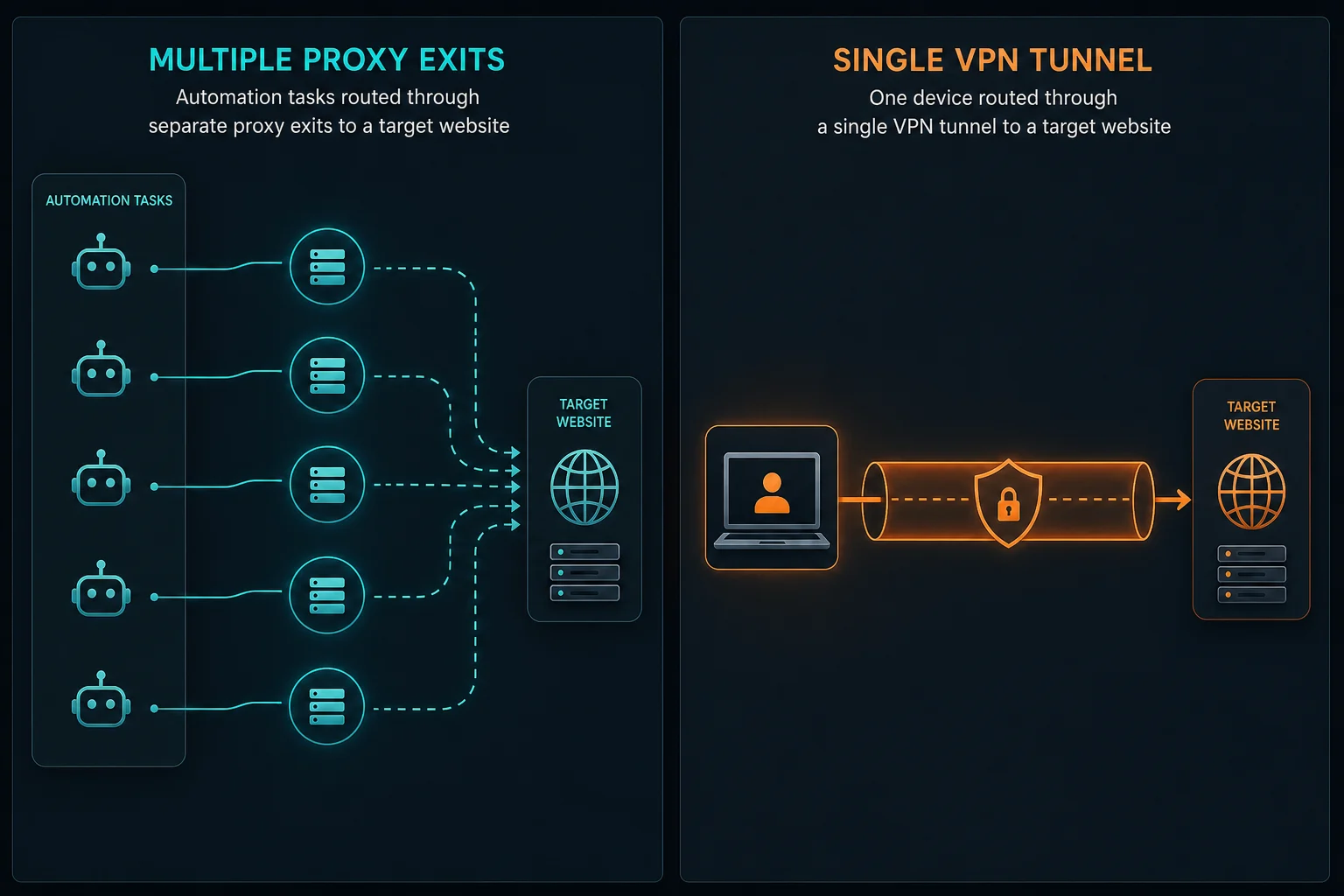
Proxy Server vs VPN: Quick Decision
Start with the workflow:
| Need | Usually choose | Why |
|---|---|---|
| Per-account or per-task IP assignment | Proxy server | Each task can use its own endpoint |
| Rotating IPs for stateless scraping | Proxy server | Rotation is built into many proxy products |
| Sticky sessions for login, carts, or checkout | Proxy server | A session can stay tied to one identity |
| Full-device privacy on public Wi-Fi | VPN | The entire device uses one encrypted tunnel |
| Manual location check from one region | VPN or proxy | Either can work if one exit is enough |
| Browser automation at scale | Proxy server | Playwright, Puppeteer, Selenium, and bots support per-browser proxy settings |
| Nontechnical personal browsing | VPN | Easier one-click setup for a single user |
| Production scraping or monitoring | Proxy server | Easier logging, rotation, pooling, and failure isolation |
The short version: VPNs are convenient for people. Proxies are more controllable for automation.
What a Proxy Server Does
A proxy server sits between your client and the target service. The browser, bot, or script connects to the proxy, and the proxy forwards the request to the destination.
For automation, the important detail is control. You can give one browser profile an ISP proxy, route stateless requests through rotating residential proxies, or assign a sticky residential session to one account. You can also log which proxy handled which request, which makes debugging much easier.
Most web automation uses HTTP(S) proxies. Some tools support SOCKS5 for generic tunneling or tool compatibility. If protocol choice is the problem you are solving, read SOCKS5 vs HTTP proxy before changing proxy type.
What a VPN Does
A VPN creates an encrypted tunnel between a device and a VPN server. Traffic from that device exits through the VPN server unless the operating system, VPN client, or network rules split it differently.
That model is useful for personal privacy on untrusted networks and simple location changes. It is less flexible for automation because all applications often share the same exit IP. If ten bot tasks run on the same machine behind one VPN, the target may still see one concentrated source.
Advanced teams can run multiple VPN clients in containers or virtual machines, but at that point they are rebuilding the per-task routing that proxy infrastructure already provides.
Why Proxies Usually Fit Automation Better
Automation needs repeatable routing rules.
Proxies fit because they let you:
- Assign one proxy to one account, browser profile, or task.
- Use sticky sessions for multi-step workflows.
- Use rotating sessions for independent requests.
- Choose country, state, or city routes when the product supports it.
- Mix proxy types by workload.
- Track failures by proxy identity.
- Scale workers without tunneling the whole machine through one exit.
That does not mean proxies bypass every block. They do not replace sane delays, clean headers, valid authentication, responsible scraping rules, or compliance with site terms and applicable law. Proxies give you routing control; they do not make a bad request pattern good.
Where VPNs Still Make Sense
A VPN can be the right tool when the job is human-first or device-first.
Use a VPN for:
- Personal browsing on public Wi-Fi.
- One-off manual checks from another country.
- Protecting all traffic from a laptop through one tunnel.
- Simple device-level location testing.
- Internal company access where the VPN connects to a private network.
Use a proxy instead when multiple clients on the same machine need different exits. That includes browser profiles, scraper workers, bot tasks, account checks, monitors, QA crawlers, and API clients.
Browser Automation: Proxy vs VPN
Browser automation usually needs more than one browser context.
With proxies, a Playwright, Puppeteer, or Selenium run can launch separate browser contexts with separate proxy settings. That lets profile A keep one sticky session while profile B uses another. It also makes it easier to compare regions or debug one failing identity without changing the whole machine.
With a VPN, every automated browser on the machine often exits from the same VPN server. That may be fine for one manual test, but it becomes a bottleneck when you need ten accounts, ten regions, or ten independent sessions.
For account workflows, keep proxy identity, browser profile, cookies, and account together. If you rotate the IP while preserving the same cookies, the target may treat the session as suspicious. The residential proxy session guide explains when to use sticky sessions versus rotating sessions.
Scraping: Proxy vs VPN
For scraping, proxies are usually the practical choice.
Use rotating residential proxies when each request can stand alone, such as public-page collection, localized search checks, ad verification, or price monitoring. Use ISP proxies or sticky residential sessions when the scraper follows a flow that needs continuity.
A VPN can work for small manual tests, but it does not give you pool control, per-request rotation, task-level logs, or clean worker assignment. If a target returns HTTP 429 Too Many Requests, putting all workers behind one VPN exit can make concentration worse.
If the target blocks datacenter or hosting traffic but your workflow is otherwise well paced, residential proxies may be a better fit than a consumer VPN. If the target is permissive, datacenter or ISP proxies may be more cost-effective. The datacenter vs residential proxy guide covers that proxy-type decision.
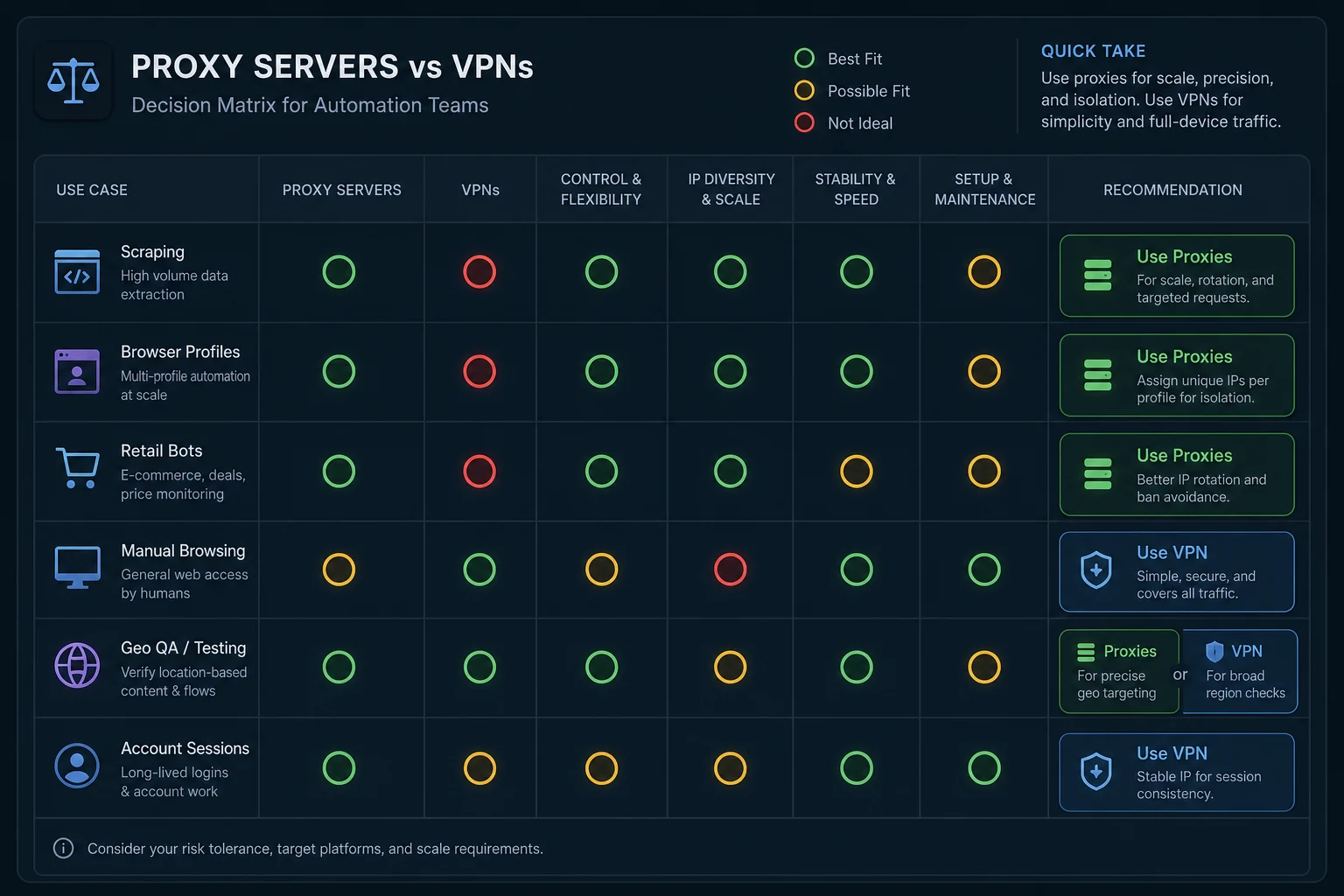
Retail Bots and Monitoring
Retail bots, monitors, and checkout workflows usually need stable task-to-proxy mapping. A VPN gives every task the same exit unless you run extra infrastructure around it. That makes it harder to keep accounts separated and harder to debug which route caused a failure.
Proxies let you build cleaner assignments:
| Work item | Better fit | Reason |
|---|---|---|
| Product monitoring loop | ISP proxy | Stable, fast, dedicated route |
| Account login | ISP or sticky residential | Avoid identity changes during authentication |
| Cart or checkout flow | ISP or sticky residential | Keep session signals aligned |
| Public inventory checks by region | Residential proxy | Route by country, state, or city when needed |
| Large stateless checks | Rotating residential | Spread independent requests across a pool |
If you run Refract or similar retail automation, read the Refract Bot Target guide for a concrete bot setup example. The product and target may differ, but the routing principle is the same: stable workflows need stable identity.
Cost and Scaling Differences
VPN pricing is usually simple: one subscription for one user or a small number of devices. That works well for personal use, but it does not map cleanly to automation capacity.
Proxy pricing usually follows the resource you consume:
| Resource model | Common product | Automation impact |
|---|---|---|
| Per dedicated IP | ISP proxies | Easy task-to-IP mapping |
| Per GB of bandwidth | Residential proxies | Good for rotation and location spread |
| Per server or account | VPN | Simple for one device, less precise for many tasks |
The cheapest option depends on the workload. A VPN may be cheaper for one person checking a page manually. Proxies are usually more cost-effective when failed tasks, blocked accounts, retries, and debugging time matter.
For monitoring-style jobs, use the delay calculator to estimate task count and pacing before buying more capacity.
Security and Privacy Differences
A VPN typically encrypts traffic between your device and the VPN server. That is useful on public networks and for personal privacy. A proxy may or may not encrypt the connection to the proxy depending on protocol and provider setup, while HTTPS still encrypts the browser-to-site content through the tunnel.
For automation, privacy is usually not the only requirement. You also need routing control, repeatability, observability, and session design. A VPN may provide a private tunnel but still leave you with one shared exit for every task.
Do not treat either tool as a guarantee of anonymity. Browser fingerprints, account behavior, cookies, payment signals, request timing, DNS behavior, and site-side risk systems can all matter.
Troubleshooting Proxy and VPN Problems
Use these checks before changing products:
| Symptom | More likely with | What to check |
|---|---|---|
| Every task has the same IP | VPN | Use per-task proxies if tasks need separation |
| Login breaks after a few steps | Rotating proxy or VPN switching | Keep IP, cookies, and profile stable |
| Scraper gets repeated 429s | Either | Lower concurrency and add backoff |
| One account failure affects all tasks | VPN | Separate accounts by proxy identity |
| Region does not match expected output | Either | Confirm endpoint region and target localization rules |
| Bot cannot import route | Proxy setup | Recheck proxy format and protocol |
| Browser works, script fails | Proxy setup | Check client proxy support and auth fields |
If the status code is 403, 429, or a WAF page, do not assume the answer is more exits. Check whether the target allows the workflow, whether you are authenticated correctly, and whether your retries are making the pattern worse.
Decision Checklist
Choose a proxy server when:
- You need per-task, per-account, or per-browser routing.
- You need rotating or sticky sessions.
- You need location targeting across many requests.
- You need production logs tied to each route.
- You are running scraping, monitoring, bots, or browser automation.
- You need to scale beyond one device-level exit.
Choose a VPN when:
- One person needs full-device tunneling.
- One exit IP is enough.
- The task is manual browsing or simple QA.
- You want a simple privacy tool for a laptop or phone.
- The VPN is required for private network access.
For most automation teams comparing proxy server vs VPN options, proxies should be the default test. VPNs still have a place, but they solve a different routing problem.
FAQ
Is a proxy server better than a VPN for automation?
Usually, yes. A proxy server gives more control over individual tasks, accounts, browser profiles, sessions, and locations. A VPN is better for one device-level tunnel.
Can I use a VPN for web scraping?
You can use a VPN for small manual tests, but it is usually limited for production scraping. Proxies provide better rotation, sticky sessions, per-worker routing, and logging.
Do proxies or VPNs prevent blocks?
No tool prevents blocks by itself. Request pacing, site policy, authentication, session consistency, headers, and IP reputation all matter.
Should bots use proxies or a VPN?
Most bots should use proxies because each task, profile, or account can get its own route. A VPN often puts every task behind the same exit IP.
Are residential proxies the same as VPNs?
No. Residential proxies provide proxy endpoints through residential IP space and often support rotation or sticky sessions. VPNs usually tunnel device traffic through a VPN server.
Final Thoughts
Proxy server vs VPN decisions should start with control. If you need one tunnel for one person, a VPN can be enough. If you need automation that routes browsers, bots, scripts, accounts, and sessions independently, use proxies.
For web automation, choose the proxy type after the routing model is clear. Use residential proxies when rotation and location coverage matter. Use ISP proxies when stable dedicated IPs fit the workflow. Then keep sessions consistent, pace requests carefully, and log failures by route.
Technical references: MDN Proxy servers and tunneling, NIST guide to IPsec VPNs, and RFC 9110 HTTP Semantics.