How to use residential proxies correctly depends on one question: does the website expect the same visitor identity to stay consistent? If the workflow includes login, carts, queues, checkout, account checks, or multi-step browsing, keep one session for the whole flow. If each request is independent, let the IP rotate.
Residential proxies are useful because they route traffic through residential IP space with broad location coverage. They are not a shortcut around bad scraping logic. You still need sane delays, consistent headers and cookies, stable task-to-session mapping, and respect for site terms, robots guidance, and applicable law.
Start with residential proxies when you need consumer-style IP reputation, location targeting, sticky sessions, and rotating sessions. Compare residential pricing when bandwidth-based proxy access fits the job. If you are still choosing between proxy categories, read datacenter proxies vs residential proxies first, then compare ISP proxies vs residential proxies when the choice is stable dedicated IPs versus rotating pool access.
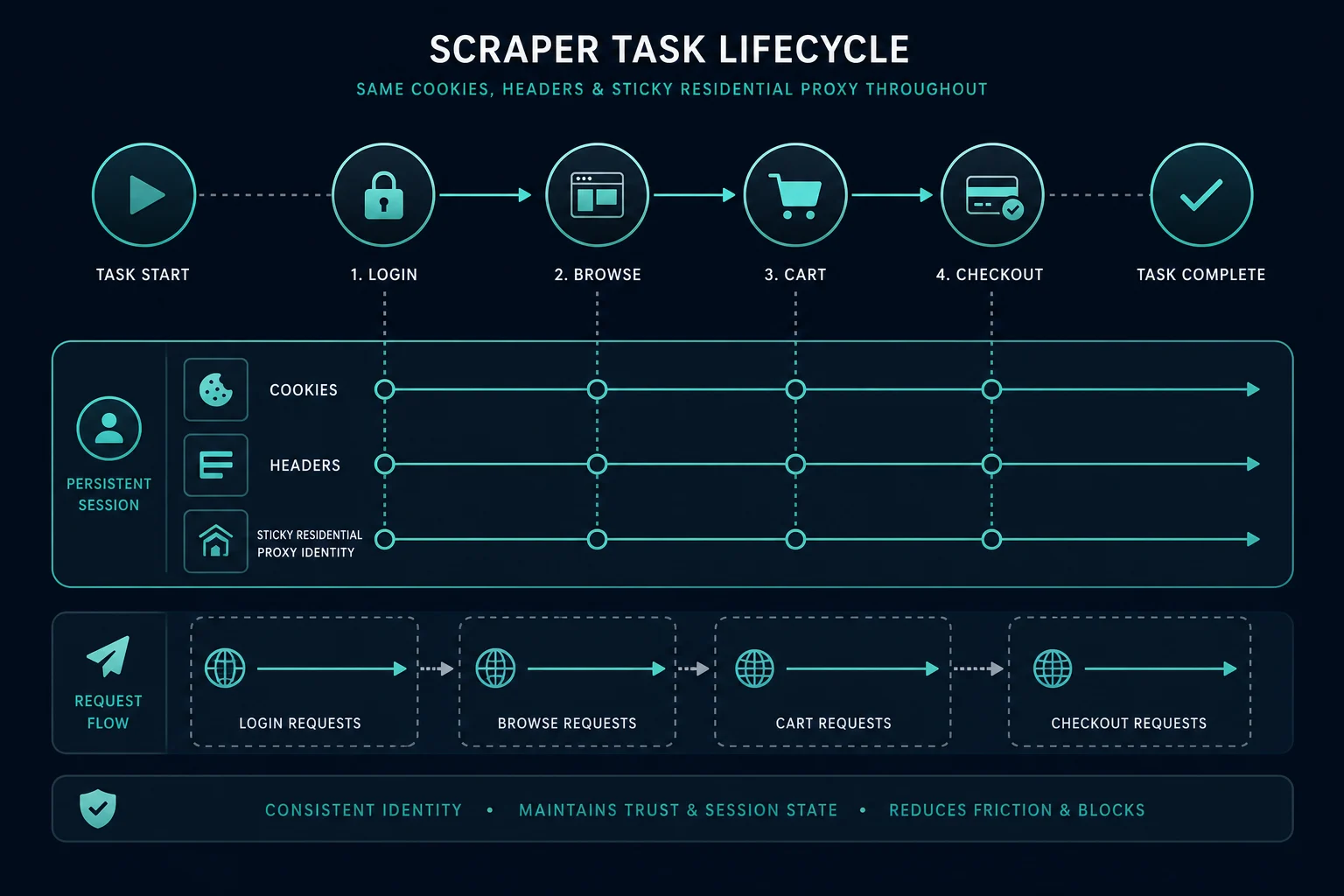
How to Use Residential Proxies: Quick Setup
Use this setup flow:
- Choose the target country, state, or city only as specifically as the workflow needs.
- Pick sticky sessions for multi-step workflows and rotating sessions for stateless requests.
- Choose HTTP(S) or SOCKS based on what your tool supports, and export the lines in the format your tool reads. The proxy formatter converts between layouts.
- Assign each task, account, or browser profile to one session identity.
- Keep cookies, headers, browser profile, and proxy identity consistent inside that session.
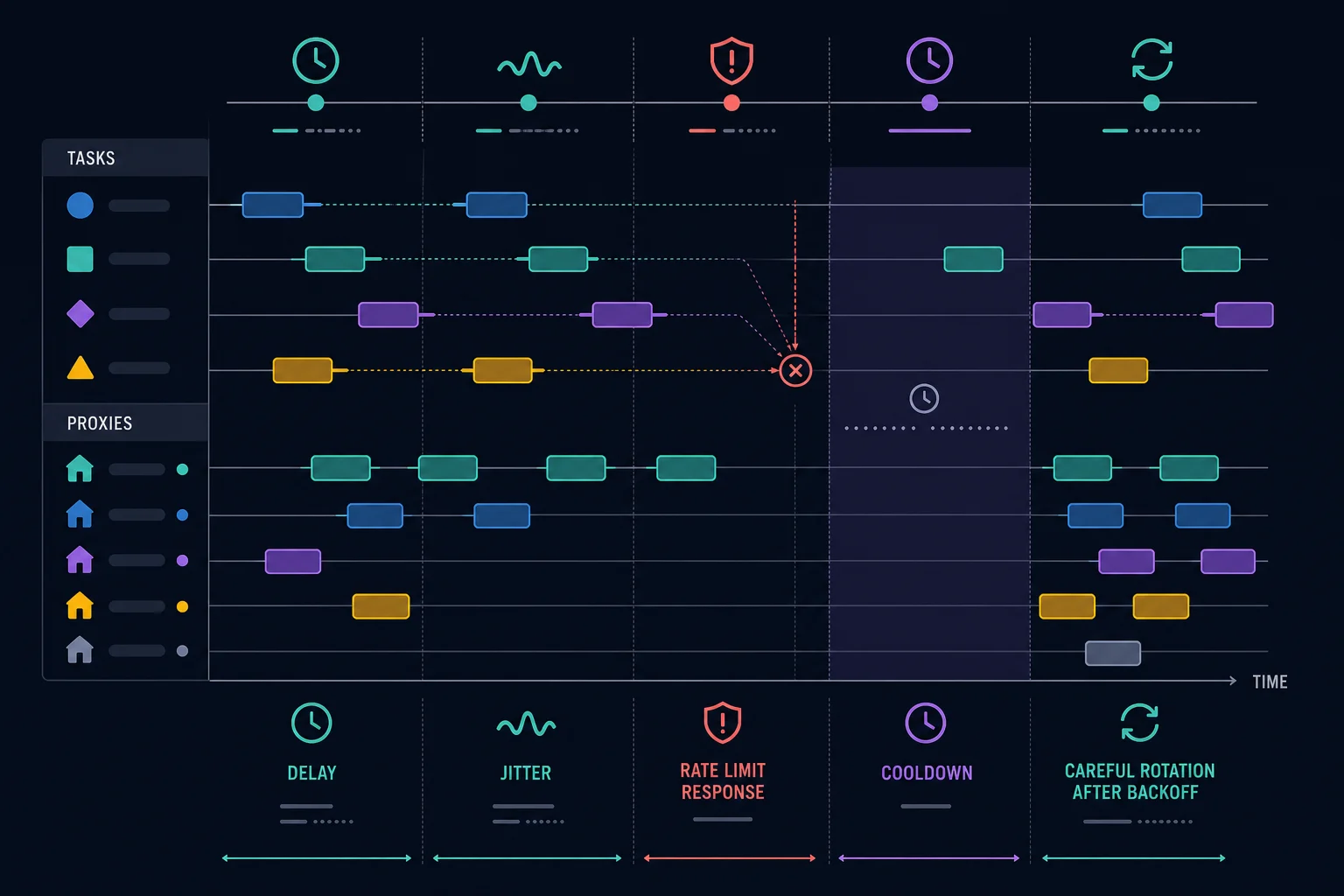
- Add delays, jitter, and backoff before increasing task count.
- Log errors by proxy, session, URL, account, and endpoint.
If a slower test works and a faster test breaks, the problem is not the proxy type. It is usually request pacing, concurrency, retries, or session churn.
How Residential Proxies Work
Most residential proxies run through a gateway. You connect to one host and port with your username and password. The gateway sends your traffic out through an exit IP on a consumer internet connection, and the target site sees that exit IP.
Three settings decide which exit you get:
- Location: country, state, or city. With Unknown Proxies, the location is part of the hostname you generate.
- Session mode: sticky lines carry a session ID and keep one exit for up to 2 hours. Rotating lines can get a new exit for each new connection.
- Protocol: HTTP(S) or SOCKS, depending on your tool.
Rotation happens per connection. If your client keeps a connection open, requests through it share one exit. Our guide to backconnect rotating proxies explains the gateway in detail.
Choose Sticky or Rotating Sessions
Choose the session mode before you write task logic. Use this rule:
- Sticky sessions for logins, account checks, carts, queues, checkout, and other multi-step flows. The site expects one visitor, so keep one exit IP, one cookie jar, and one browser profile until the flow ends.
- Rotating sessions for independent requests, such as public-page scraping, search result checks, ad verification, and price checks. Each request can stand alone, so rotation spreads the requests across the pool.
Do not rotate during a login or checkout. The site can treat the new IP as a different visitor who took over the session. Sticky also does not mean unlimited speed. Too many requests through one sticky session can still cause rate limits.
For a full comparison, test steps, and when a static ISP proxy is a better fit than a sticky session, read the sticky vs rotating proxies guide.
Residential HTTP Proxy or SOCKS
Protocol should follow the tool you are using.
Use HTTP(S) for most web scraping, browsers, retail bots, and API clients. Use SOCKS only when the app asks for SOCKS or works better with it. Unknown Proxies residential plans support both HTTP(S) and SOCKS connections.
For a full protocol decision, read SOCKS5 vs HTTP proxy. Protocol choice affects setup, but it usually matters less than session mode, request pacing, and IP reputation.
Keep Sessions Consistent
Residential sessions break when too many identity signals change at once.
Keep these stable inside a session:
- Proxy identity.
- Cookie jar.
- Browser profile.
- User agent.
- Headers.
- Login account.
- Cart state.
- Locale and target region.
- Task assignment.
If you change the proxy, wipe the session or start a fresh task. If you keep the session, keep the proxy stable. Mixing old cookies with a new exit IP every few requests is one of the fastest ways to create suspicious behavior.
Set Delays Before Scaling
Residential proxies can make traffic distribution easier, but they do not remove rate limits.
Before scaling, define:
- Maximum requests per second per session.
- Maximum concurrent tasks per proxy identity.
- Jitter around repeated requests.
- Backoff after 429, 403, timeout, or WAF responses.
- Cooldown before reusing a struggling session.
- A stop condition for repeated failures.
For monitoring workflows, use the delay calculator to estimate proxy-to-task sizing. For bandwidth, estimate GB per month with the data usage calculator before you pick a plan. If your task count is too high for the delay and proxy pool, you should expect blocks, session resets, or noisy logs.
Map Tasks to Proxy Sessions
Treat proxy assignment as part of your application state.
For account workflows, assign each account to a stable session. For browser workflows, assign each browser profile to a stable session. For stateless scraping, assign requests through a rotating pool but keep retry logic conservative.
A basic mapping looks like this:
| Work item | Session choice | Notes |
|---|---|---|
| Account A | Sticky session A | Keep cookies and IP together |
| Account B | Sticky session B | Do not share cookies between accounts |
| Public URL batch | Rotating pool | Use delays and backoff |
| Checkout task | Sticky or ISP | Avoid changing identity mid-flow |
| Geo check | Residential region route | Choose only the needed location |
If a task fails, log the session ID, proxy endpoint, target URL, account, error, and timestamp. Without that data, it is hard to tell whether you have a bad proxy, bad timing, broken cookies, or a target-side issue.
Avoid Common Residential Proxy Mistakes
Most broken residential sessions come from avoidable setup errors:
- Rotating during login or checkout.
- Reusing cookies after changing proxy identity.
- Running too many tasks through one sticky session.
- Creating a new session for every request when continuity is required.
- Ignoring 429 and retrying immediately.
- Switching protocol, region, browser profile, and delay at the same time.
- Using a country or city target that is more specific than needed.
- Treating residential bandwidth like unlimited free requests.
Change one variable at a time. If you switch from sticky to rotating, keep the same delay and client. If you switch from HTTP to SOCKS, keep the same proxy type and session mode. That makes failures easier to diagnose.
Residential Proxies for Scraping
For scraping, choose the lightest setup that works.
Use rotating residential proxies for independent public-page requests. Keep delays realistic, cache repeated pages, and avoid synchronized workers that all start at the same second.
Keep one session when the scrape follows a flow: search, result page, detail page, cart, account area, or any path that expects continuity. Keep the same session until the flow finishes, then release it.
If residential proxies are unnecessary for a permissive target, use cheaper infrastructure. The datacenter vs residential proxy guide explains when datacenter or ISP proxies make more sense.
FAQ
How do I use residential proxies without getting logged out?
Use sticky sessions, keep the same cookie jar and browser profile, and avoid rotating proxy identity during login, cart, checkout, or account flows.
Do residential proxies work with SOCKS5?
Yes. Unknown Proxies residential proxies support HTTP(S) and SOCKS connections. Choose the protocol your tool supports best.
Why do my residential proxy sessions keep breaking?
Common causes include rotating mid-session, changing cookies and headers, running too many requests through one identity, retrying too aggressively, or using a client format your tool does not support.
How many residential proxies do I need?
For bandwidth-priced residential pools, size by request rate, task count, page weight, and delay. Test at low concurrency before scaling.
Final Thoughts
Using residential proxies without breaking sessions is mostly about consistency. Use sticky sessions for workflows that need continuity. Use rotating sessions for independent requests. Keep cookies, browser profile, account, region, and proxy identity aligned.
Once the session design is clear, compare residential proxies, review residential pricing, and choose HTTP(S) or SOCKS based on your tool. Better residential proxies help, but disciplined pacing and session handling are what keep workflows stable.
Technical references: MDN Proxy servers and tunneling, MDN HTTP cookies, and RFC 6265 HTTP State Management Mechanism.