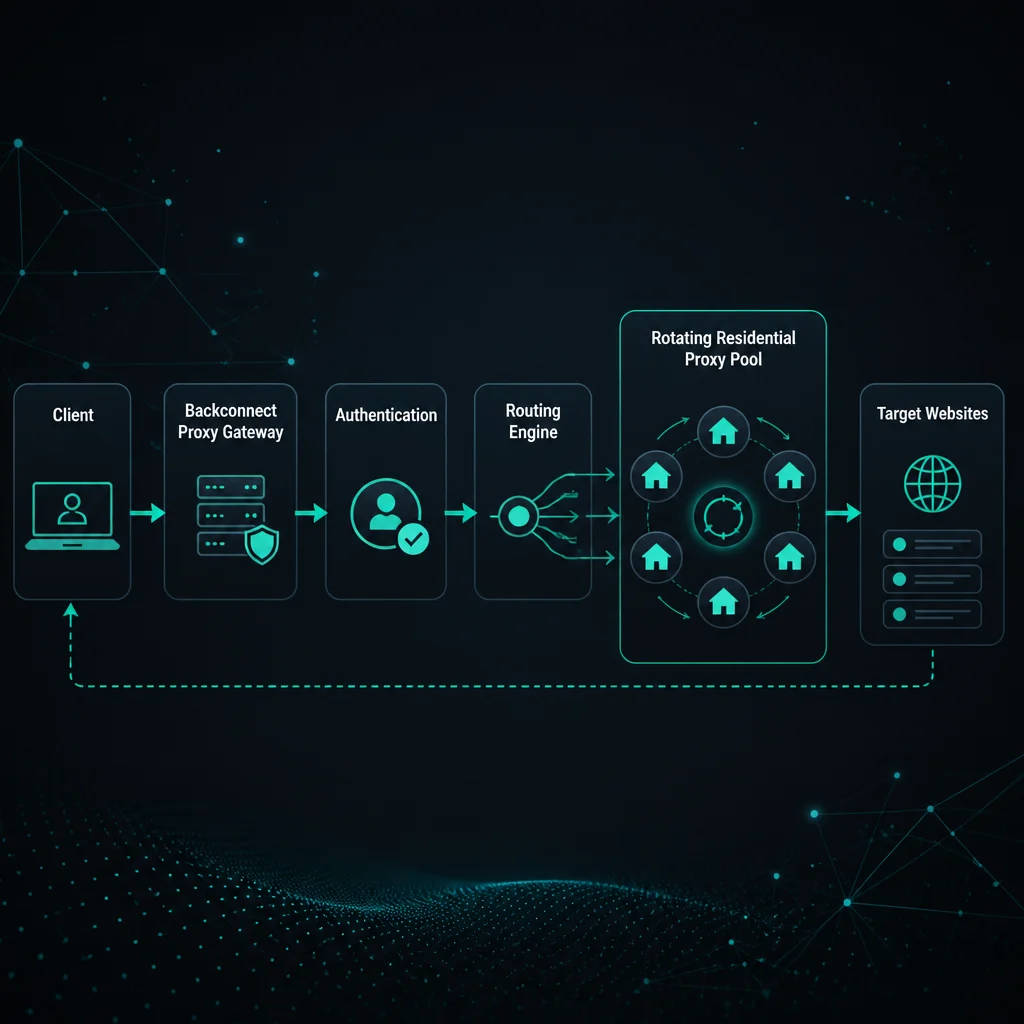
Backconnect rotating proxies use one gateway endpoint to connect your scraper, browser, or bot to a larger proxy pool. Instead of loading thousands of individual IPs into your tool, you connect to a host and port, authenticate, and the provider routes each request or session through an available exit IP.
This setup is common for residential proxy pools because rotation, location targeting, and session control can be handled behind the gateway. It is useful for stateless scraping, localized checks, ad verification, and workflows where a rotating pool is easier to manage than a long proxy list.
Backconnect does not automatically mean every request should rotate. Some workflows need sticky sessions. Others need static ISP proxies. If you are still choosing the session pattern, read sticky vs rotating proxies.
Backconnect Rotating Proxies: Quick Definition
A backconnect rotating proxy is a proxy gateway that gives you access to a rotating pool through one endpoint.
The request path usually looks like this:
- Your tool connects to a provider host and port.
- Your tool sends proxy credentials.
- The provider gateway chooses an exit IP based on rotation rules, location, and session settings.
- The exit IP sends the request to the target site.
- The response returns through the gateway to your tool.
For the user, the proxy endpoint may stay the same while the exit IP changes. That is the main convenience of backconnect access.
How Backconnect Rotation Works
Backconnect providers can rotate in different ways:
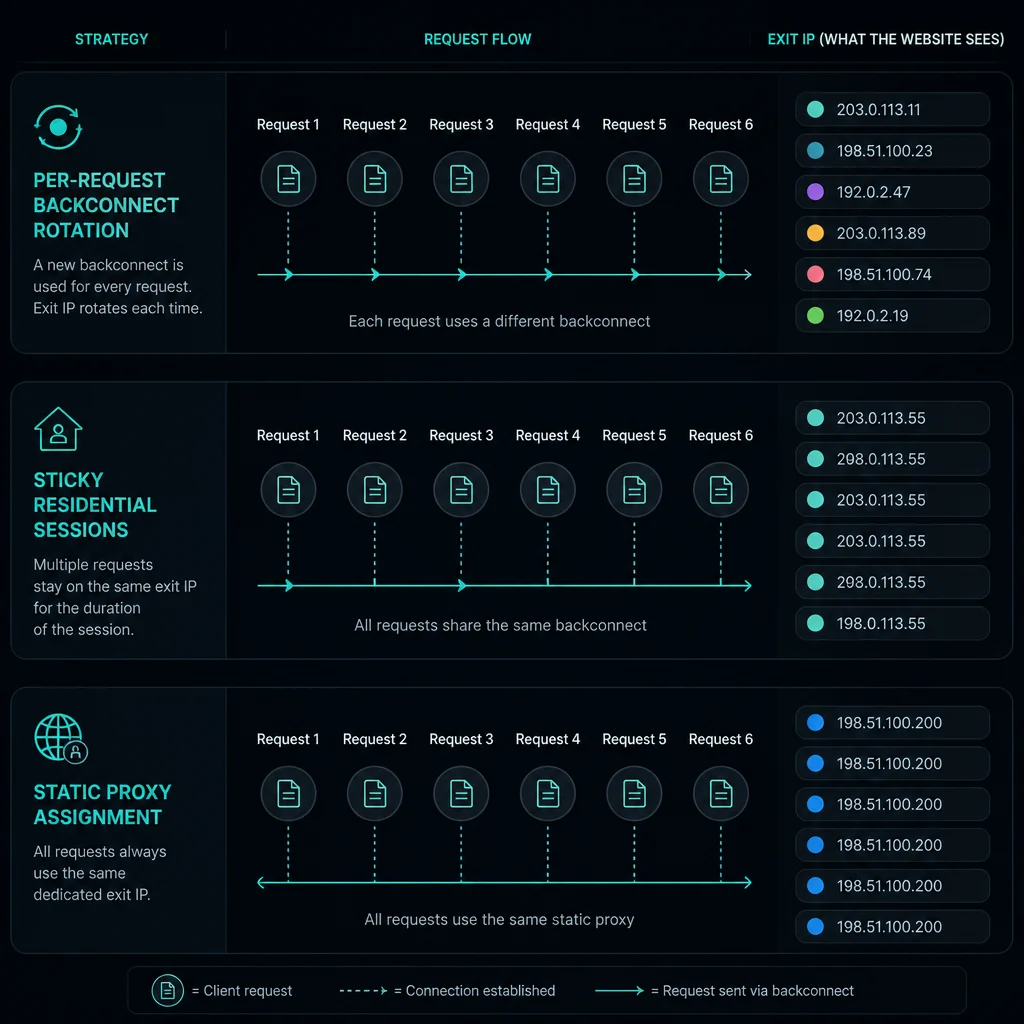
- Per request: each request can use a new exit IP.
- Per session: a session identifier holds one exit IP for a time window.
- Per time interval: the exit changes after a set duration.
- Per failure: the gateway retries or assigns a different exit when one fails.
- Per location route: the gateway selects exits from a chosen country, state, or city.
The exact behavior depends on provider configuration. For Unknown Proxies residential setup, choose sticky sessions when continuity matters and rotating sessions when requests are independent. The residential proxy setup guide covers the practical setup rules.
When Backconnect Rotating Proxies Help
Backconnect rotating proxies help when pool management would otherwise be messy.
They fit:
- Public-page scraping.
- Search result checks.
- Ad verification.
- Price and catalog checks.
- Localized QA.
- Monitoring pages without account state.
- Workflows that need many locations.
- Scrapers that should not manage thousands of individual IP rows.
The backconnect gateway makes the proxy layer easier to operate. Your scraper can keep one endpoint format while the provider handles exit selection and pool health.
When Backconnect Rotation Hurts
Backconnect rotation hurts when the target expects continuity.
Be careful with:
- Login sessions.
- Account checks.
- Carts and checkout.
- Ticket queues.
- Browser profiles with cookies.
- Multi-step research flows.
- Any workflow where IP changes reset risk checks.
If the gateway rotates on every request while your client keeps the same cookies, the target may see one session jump across unrelated networks. That can cause logouts, challenges, inconsistent content, or access denials.
Use sticky residential sessions or static ISP proxies when continuity matters.
Backconnect vs Static Proxies
Backconnect rotating proxies and static proxies solve different problems.
| Feature | Backconnect rotating proxy | Static proxy |
|---|---|---|
| Endpoint | One gateway endpoint | One fixed proxy IP |
| Exit IP behavior | Rotates by request, session, or rule | Stays the same |
| Best fit | Stateless scraping and location checks | Accounts, monitoring, carts, checkout |
| Pool management | Provider handles rotation | User assigns IPs to tasks |
| Main risk | Breaking continuity | Concentrating too much traffic on one IP |
If your workflow needs a stable identity, use sticky residential sessions or static ISP proxies. If it needs broad residential rotation, start with residential proxies.
Backconnect vs Sticky Residential Sessions
Backconnect is the gateway pattern. Sticky is the session behavior.
A residential proxy provider can expose a backconnect endpoint and still let you choose sticky sessions. In that setup, the endpoint stays the same, but a session token or username parameter tells the gateway to hold one exit IP for a period.
Use sticky backconnect sessions when:
- The workflow needs cookies.
- The scrape follows multiple pages.
- A browser profile stays active.
- The same task should keep one IP temporarily.
- You want residential pool access without rotating on every request.
Use per-request rotation when each request is independent.
Setup Checklist
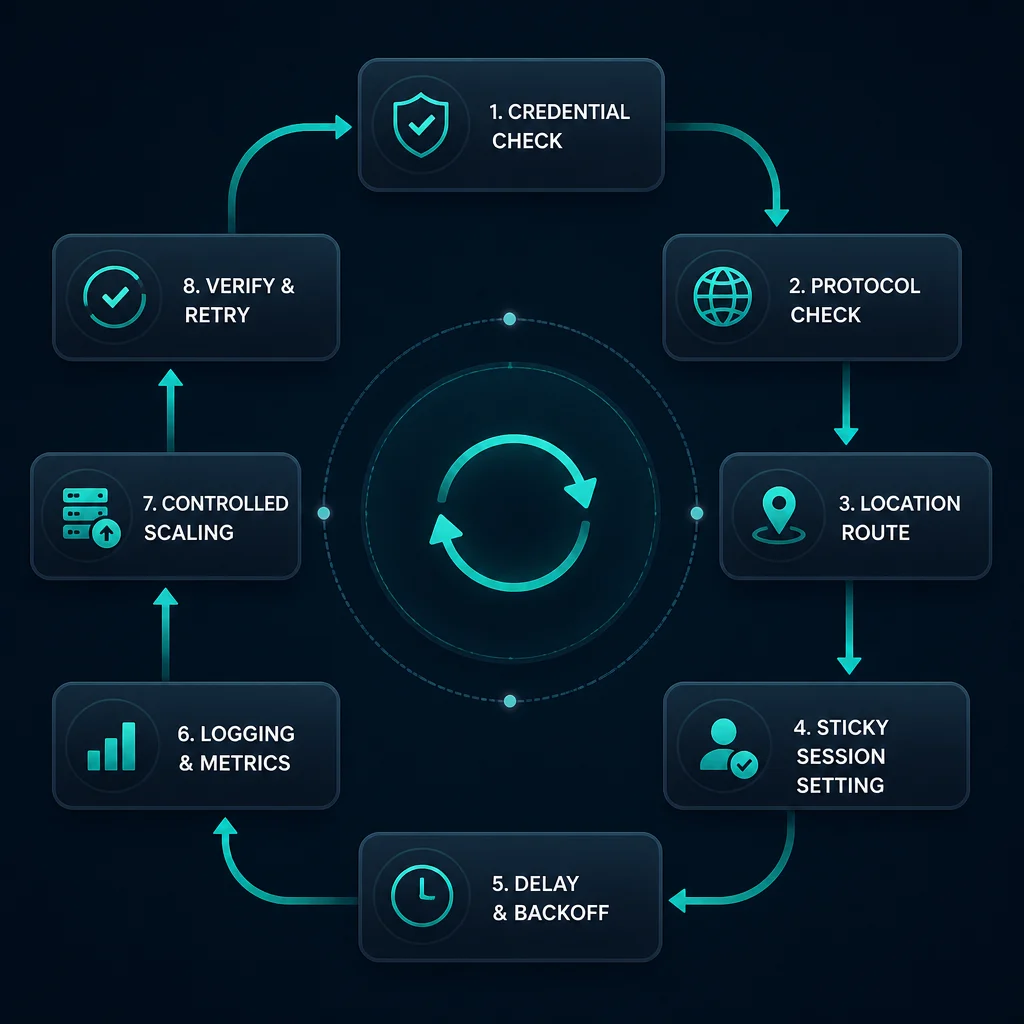
Before using backconnect rotating proxies, confirm:
- Host and port.
- Username and password format.
- HTTP(S) or SOCKS support.
- Country, state, or city route syntax.
- Sticky session syntax if needed.
- Rotation interval or per-request behavior.
- Error behavior after failed exits.
- Bandwidth and fair-use limits.
- Whether the target allows your automation pattern.
If a tool returns 407, fix proxy authentication before debugging rotation. If it returns 429, slow down before assuming the pool is too small.
Common Mistakes
Avoid these mistakes:
- Using per-request rotation for login or checkout.
- Reusing cookies while changing exit IP every request.
- Ignoring sticky-session options.
- Running synchronized workers through the same route.
- Treating backconnect rotation as unlimited request capacity.
- Not logging the exit IP, session ID, target URL, and error code.
- Confusing gateway host with the final exit IP.
- Assuming every provider uses the same session syntax.
The safer pattern is to start with low concurrency, log results, and increase slowly. Rotation should reduce concentration, not hide an uncontrolled retry loop.
FAQ
What are backconnect rotating proxies?
Backconnect rotating proxies are gateway proxy endpoints that route your requests through a larger rotating proxy pool. Your tool connects to one host and port while the provider manages exit selection.
Are backconnect proxies residential proxies?
They can be. Backconnect is an access pattern, not a proxy category. Many residential proxy products use backconnect gateways because they make rotation and location targeting easier to manage.
Do backconnect proxies rotate every request?
Some do, but not all. Rotation can be per request, per session, per time interval, or controlled by provider-specific settings.
Are backconnect proxies good for scraping?
They are good for stateless scraping and location-sensitive checks. They are risky for login, checkout, carts, account sessions, or browser flows unless sticky sessions are configured correctly.
What is the difference between backconnect and sticky proxies?
Backconnect describes the gateway endpoint. Sticky describes session behavior. A backconnect residential endpoint can support sticky sessions if the provider offers session controls.
Final Thoughts
Backconnect rotating proxies are useful when you want one gateway endpoint to manage access to a larger rotating pool. They are strongest for stateless scraping, localized checks, ad verification, and workflows that benefit from residential rotation.
They are not the right default for every task. Use sticky sessions when continuity matters. Use static ISP proxies when you need stable dedicated IP assignment. For residential pool access, start with residential proxies, then use the residential proxy setup guide to choose sticky or rotating behavior.
Technical references: MDN Proxy servers and tunneling, MDN Proxy server glossary, and RFC 9110 HTTP Semantics.