ISP proxies vs residential proxies is a choice between one fixed IP and many changing ones. ISP proxies are static IPs registered to an internet provider and hosted on servers, so they are fast and hold one identity for weeks. Residential proxies route through real home connections, rotate or stick for a session window, and cover far more locations.
The decision rule: if the website expects the same visitor through several steps, use ISP proxies. That covers logins, carts, checkout, ticket queues, and repeated retail checks. If each request can stand alone, or you need many cities, use residential proxies. If you need continuity and wide location coverage at once, use sticky residential sessions.
Unknown Proxies sells both because they solve different problems. Compare ISP pricing when you need stable dedicated IPs, or residential pricing when you need bandwidth-based access to a rotating pool.
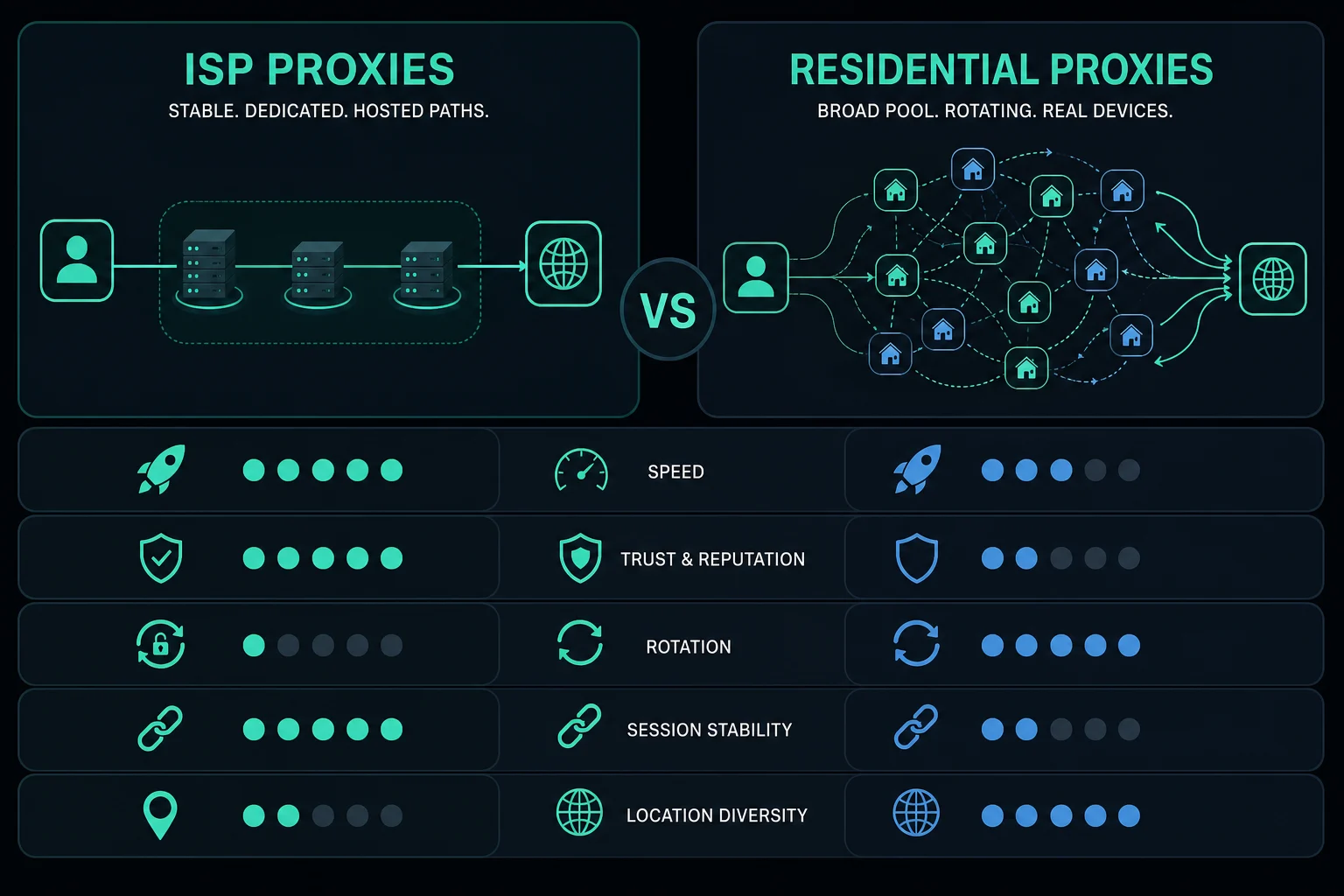
ISP vs residential proxies: quick decision
Use this table before overthinking the label.
| Need | Usually choose | Reason |
|---|---|---|
| Stable IP for one account or browser profile | ISP proxies | The same exit IP stays tied to the session |
| Broad IP rotation across many independent requests | Residential proxies | Rotation spreads traffic across a larger pool |
| Lowest latency and predictable speed | ISP proxies | Server paths with no home connection in the middle |
| Country, state, or city-level diversity | Residential proxies | Residential pools offer broader routing options |
| Retail monitoring or restock checks | ISP proxies | Dedicated IPs are fast and stable |
| Ad verification or localized SERP checks | Residential proxies | Consumer exits in many regions |
| Checkout, queue, cart, or login flow | ISP proxies or sticky residential | Identity should not change mid-flow |
| Heavy browser scraping with strict targets | Test both | ISP may be faster, residential may rotate better |
If the target site is permissive, you may not need either. The datacenter proxies vs residential proxies guide explains when cheaper datacenter IPs are enough, and how residential pools are sourced.
Where the IPs come from
Both types use IPs that belong to internet service providers. That is why both pass the network-type check that blocks datacenter proxies. The difference is the machine on the other end.
An ISP proxy runs on a server in a data center. The provider holds a fixed range registered to an ISP's network and routes it to its own hardware. You get the same IP every time you connect, on server bandwidth. If the category is new to you, what are ISP proxies covers the definition and how providers get the ranges.
A residential proxy exits through a real consumer connection, such as a home broadband line or a device on one. You connect to a backconnect gateway, and the gateway picks an exit from the pool for each request or session. The exit is somebody's connection, so it can be slow, busy, or offline when you need it.
Why ISP proxies get called static residential
Many sellers call ISP proxies "static residential proxies." The "residential" part refers to the IP owner, which is an ISP, and the "static" part means the IP does not change. The label does not mean the traffic passes through a home. If you see both terms on one site, they almost always mean the same product.
Speed and latency
ISP proxies are usually faster and more predictable than residential proxies. The path is your client, the proxy server, and the target. There is no consumer upload link or Wi-Fi hop in the middle.
Residential speed depends on the exit. One exit sits on fast fiber, the next on a congested cable line, and a third drops when its owner turns the device off. That does not make residential slow by default. It means latency and throughput change across exits, locations, and sessions, and a long session can end without warning.
For retail monitoring and checkout, predictable latency matters more than raw speed. If every second counts, ISP proxies are the cleaner starting point. For scraping or verification where location coverage matters more than speed, residential is worth the variability.

Trust, reputation, and ASN signals
Proxy trust is not a single score. Websites weigh IP reputation, ASN, subnet history, country, request rate, cookies, browser fingerprint, account age, and endpoint behavior together.
ASN matters because it identifies the network announcing an IP route. Some sites block or challenge whole networks when abuse is concentrated there. For a technical definition, see the ARIN ASN guide.
ISP proxies pass the ASN check, but two things can still count against them. First, some IP databases label ISP proxy ranges as hosting, and ranges from small or regional ISPs get that label more often. Second, every request from one static IP builds that IP's history, so aggressive traffic from one proxy stays attached to it.
Residential exits look like ordinary customers because they are customer connections. They carry their own baggage, though. An exit may have been used by other pool customers minutes earlier. Bad pacing, synchronized workers, noisy retries, and broken sessions still trigger blocks on either type.
Rotation vs stable sessions
The biggest practical difference is rotation.
ISP proxies are stable. You can assign Proxy 1 to Account A, Proxy 2 to Account B, and keep those identities consistent for the life of the plan. That is useful when cookies, login state, cart state, or queue position need continuity.
Residential proxies can rotate on every request or stay sticky for a session window, depending on how you configure the gateway. Rotating mode suits stateless public-page scraping. Sticky mode suits multi-step browsing, but the session ends when the window closes or the exit goes offline. The sticky vs rotating proxies guide covers session windows in detail.
See the difference in one test
Send three requests through each proxy and print the exit IP:
# ISP proxy: expect the same IP three times
for i in 1 2 3; do curl -s -x "http://USER:PASS@ISP_HOST:PORT" https://api.ipify.org; echo; done

# Rotating residential gateway: expect a different IP most times
for i in 1 2 3; do curl -s -x "http://USER:PASS@RESI_HOST:PORT" https://api.ipify.org; echo; done
If your workflow logs in on the first request and checks out on the third, the second output shows why rotating mode breaks it.
Use this rule:
- If the website expects continuity, use ISP proxies or sticky residential sessions.
- If each request is independent, use rotating residential proxies.
- If the target is permissive and cost matters most, test datacenter proxies first.
Pool size and location coverage
An ISP plan is a fixed list of IPs in the cities where the provider has servers and ranges. You know exactly which IPs you have, and that list does not grow by itself. Unknown Proxies ISP proxies are hosted in Ashburn (Virginia), New York City, and San Francisco in the US, and in London, Frankfurt, Amsterdam, Paris, Rome, Sydney, and Hong Kong.
A residential pool is a large, changing set of exits spread across many countries, with state or city targeting on many gateways. You do not own any single IP. You get access to whichever exits match your targeting at that moment.
That changes how you plan. With ISP proxies, you size the list to the number of accounts or tasks that need their own IP. With residential, you size the bandwidth and pick the targeting, and the pool supplies the IPs.
Use cases for ISP proxies
ISP proxies fit workflows where stable speed and identity matter:
- Retail monitoring and product availability checks.
- Sneaker and retail bot tasks. The sneaker proxies guide compares ISP and residential proxies for each bot job.
- Ticketing queues.
- Account checks and login sessions.
- Checkout and cart flows.
- Repeated region-specific monitoring.
ISP proxies are most useful when changing IPs would create risk. If a website sees one account jump across many unrelated IPs during a short session, it may trigger extra verification, logouts, or access challenges.
For owned social accounts and approved regional QA, use the best social media proxies guide to decide whether that stable assignment should be ISP, sticky residential, mobile, or direct API egress. Platform guides cover the Instagram proxy setup, Twitter (X) proxies, and TikTok account regions.
Use cases for residential proxies
Residential proxies fit workflows where diversity, rotation, or location coverage matter:
- Public-page scraping.
- Localized search checks.
- Ad verification.
- Price monitoring across regions.
- Travel fare checks.
- Geo QA and market research.
- Repeated lookups where each request can stand alone.
Residential proxies also help when datacenter IPs fail even at conservative request rates. Before scaling, keep delays sane and rotate only when the workflow can tolerate a new identity. If you already know you need residential access, start with how to use residential proxies so session mode does not become the next failure point.
For regional price checks, use a price monitoring pipeline that keeps market, currency, seller, and offer identity attached to every observation. Routing alone does not make prices comparable.
Pricing and cost model
ISP and residential plans are priced differently, so compare total workflow cost rather than headline price.
| Factor | ISP proxies | Residential proxies |
|---|---|---|
| Common billing model | IP count and duration | Bandwidth usage |
| Cost driver | Number of static IPs | GB consumed by requests and pages |
| Best efficiency | Repeated checks and long sessions | Many independent requests and location tests |
| Waste pattern | Too many idle IPs | Heavy pages, retries, and browser assets |
| Scaling question | How many tasks need their own IP? | How much traffic, in how many locations? |
If you run full browser sessions through residential proxies, bandwidth goes fast. Block unnecessary assets when allowed, cache repeated pages, and avoid reloading unchanged URLs. The data usage calculator estimates GB per run before you buy. LLM-driven browsers are an extreme case. The Browser Use agent proxy guide estimates per-run bandwidth and explains when per-IP ISP pricing fits agents better.
If you run too many tasks through a small ISP list, you overload stable IPs and turn a good proxy type into a rate-limit problem. Use the delay calculator for monitoring-style sizing before increasing task count.
Running ISP and residential proxies together
Many teams buy both and split by job. The common pattern is ISP proxies for anything tied to an account and residential for wide collection.
A retail or ticketing example:
- ISP proxies hold the accounts. Each account gets one IP for login, queue entry, cart, and checkout.
- Residential proxies watch the market. Rotating exits check stock, prices, or event pages across regions where a fixed city list would not reach.
Keep the two apart in your config. An account that logs in on an ISP IP and then checks out on a residential exit has changed identity mid-flow, which defeats the point of the static IP.
Common mistakes
Avoid these when choosing between ISP and residential proxies:
- Choosing residential rotation for login or checkout flows that need continuity.
- Choosing ISP proxies for a job that needs thousands of independent rotating exits.
- Comparing price without estimating bandwidth or task-to-IP ratio.
- Rotating IPs while reusing cookies from a different session.
- Running too many concurrent tasks through one ISP proxy.
- Treating proxy type as a fix for forbidden endpoints or account-level limits.
- Changing proxy type, headers, browser profile, and request rate at the same time during tests.
Change one variable at a time. If success improves only when the proxy type changes, IP reputation or rotation was involved. If it does not, look at pacing, sessions, headers, authentication, browser behavior, and site policy.
FAQ
Are ISP proxies better than residential proxies?
ISP proxies are better for stable sessions, speed, and dedicated IP assignment. Residential proxies are better for broad rotation, location coverage, and jobs where each request can use a new IP.
Are ISP proxies faster than residential proxies?
Usually, yes. ISP proxies run on servers with data center bandwidth. Residential exits depend on consumer connections, so speed varies from one exit to the next and sessions can drop.
Are ISP proxies residential proxies?
Not in the strict sense. ISP proxies use IPs registered to an ISP, which is why sellers also call them static residential proxies. They run on servers, though, while residential proxies exit through real home connections.
Which is cheaper, ISP or residential proxies?
It depends on your traffic. ISP proxies are billed per IP, so they are cheaper for heavy, repeated traffic through a small number of identities. Residential proxies are billed per GB, so they are cheaper for light requests spread across many IPs and locations.
Are residential proxies more trusted than ISP proxies?
It depends on the target and the traffic. Residential exits are real customer connections. ISP proxies use ISP-registered IPs on servers, and some IP databases label those ranges as hosting. Bad request behavior hurts either one.
Should I use ISP or residential proxies for scraping?
Use ISP proxies when the scrape needs stable sessions or repeated checks from fixed IPs. Use residential proxies when it needs rotation, location coverage, or many independent requests.
Final thoughts
Count the identities your workflow needs before you pick a type. If the answer is a fixed number of accounts or monitors that must keep one IP, buy that many ISP proxies and map them one to one. If the answer is "a different IP per request" or a list of cities, size residential bandwidth instead. If you are still choosing between all three types, ISP vs datacenter proxies covers when a cheaper hosting IP is enough.
Technical references: MDN Proxy servers and tunneling, MDN Connection management in HTTP/1.x, and ARIN Autonomous System Numbers.