What are ISP proxies? An ISP proxy is a static proxy IP that is registered to an internet service provider but runs on a server in a data center. A website that looks up the IP sees an ISP network instead of a hosting company. You get server speed and uptime with an IP that passes network-type checks. Many sellers call the same product a static residential proxy.
In practice, ISP proxies are the pick when one task needs to keep one fast IP for days or weeks. Think account logins, carts, checkout, ticket queues, and repeated retail monitoring. They are a poor pick when you need a new IP on every request or coverage in dozens of cities.
This page explains what an ISP proxy is and how it works. If you are already choosing between proxy types, three comparison guides go further. ISP vs datacenter proxies shows how to look up an IP's network owner and when the cheaper datacenter option is enough. ISP proxies vs residential proxies covers static IPs against rotating pools, location coverage, and per-IP vs per-GB pricing. Datacenter proxies vs residential proxies covers the two ends of the range, including shared datacenter plans and how residential pools are sourced.
What an ISP proxy is made of
An ISP proxy has two parts, and the name comes from the first one.
The IP address belongs to an ISP. The range is registered to, or announced by, the autonomous system (ASN) of an internet service provider. An ASN is the network identity that tells the rest of the internet who routes a block of addresses. The ARIN ASN guide explains how that works. When a site checks the IP, the owner field shows a telecom or broadband company.
The machine is a server. The proxy runs on hardware in a data center with data center bandwidth and power. Your traffic never passes through someone's home router or phone. That is why ISP proxies are fast and why they stay online.
Put together, the IP looks like an ISP customer to a lookup, while the connection behaves like a server.
Why they are also called static residential proxies
"Static residential proxy" and "ISP proxy" usually mean the same product. Sellers use "residential" because the IP's owner is a consumer or business ISP, which is what IP reputation databases care about. They use "static" because the IP does not change.
The label is a little loose. A true residential proxy routes through a real home connection, and an ISP proxy does not. Some IP checkers also label ISP proxy ranges as hosting, because the servers sit in a data center, and ranges from small regional ISPs are more likely to get that label. If a seller says "static residential," ask which ASN announces the IPs and how the common IP databases classify it.
How ISP proxies work
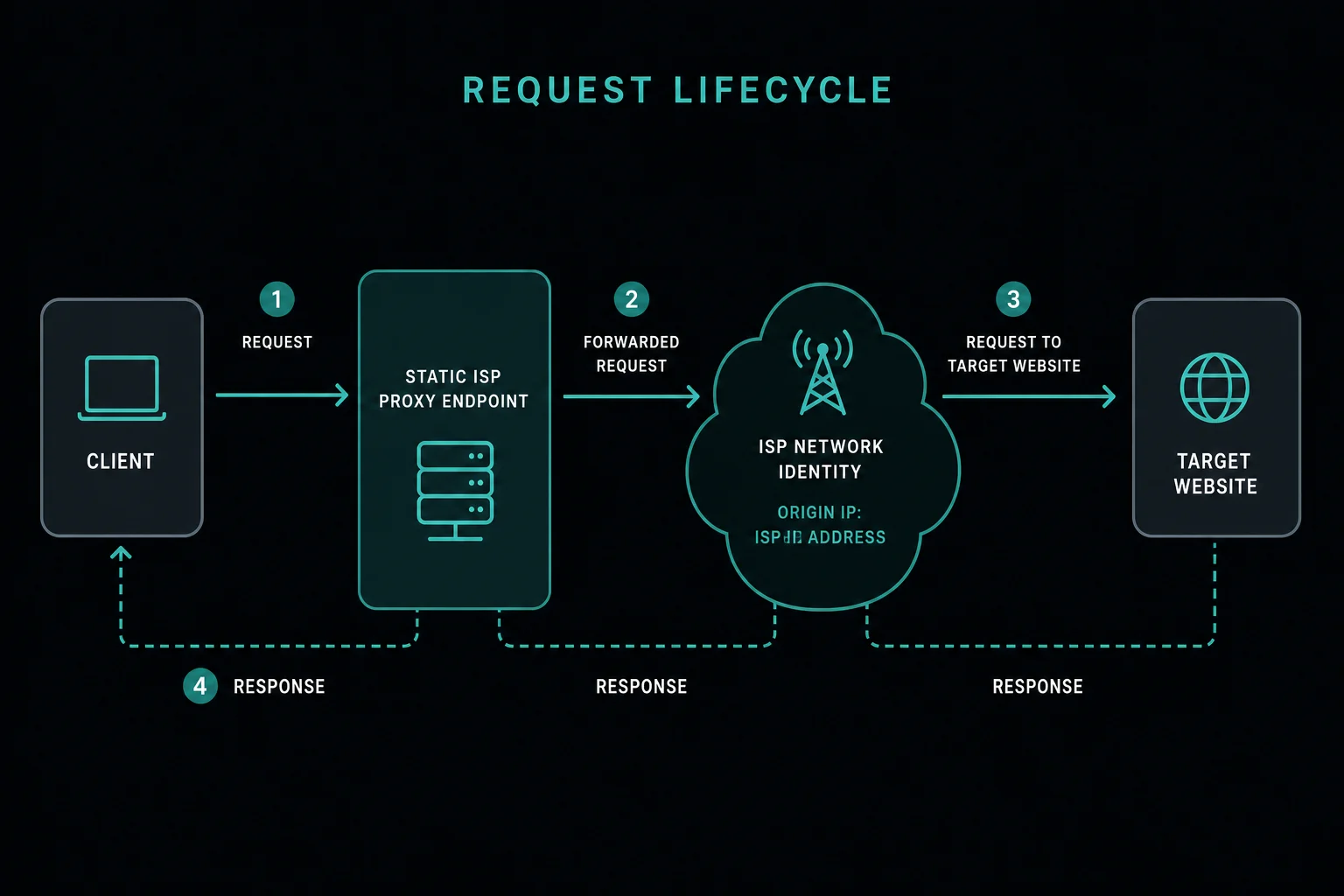
When your tool connects through an ISP proxy, the request path looks like this:
- Your browser, bot, scraper, or app sends a request to the proxy endpoint.
- The proxy checks your credentials: username and password, or an allowlisted source IP.
- The proxy forwards the request from its assigned ISP-registered IP.
- The target website sees that IP and returns a response.
- The proxy sends the response back to your tool.
Because the IP is static, you can give one proxy to one task, account, browser profile, or region. That consistency is the main value. If your workflow keeps cookies, cart state, or login state, the network identity stays aligned with the rest of the session.
Where providers get the IPs
A provider cannot invent ISP-registered addresses. It has to get ranges that an ISP's network announces, usually by leasing them from an ISP or working out an agreement for the ISP to announce ranges the provider holds. The provider then routes those addresses to its own servers.
IPv4 space is scarce, which keeps supply tight. ARIN, the registry for North America, ran out of its free IPv4 pool on 24 September 2015, according to its IPv4 guide. New space now mostly changes hands through transfers. That scarcity is why ISP proxies are sold in smaller, fixed lists and cost more per IP than datacenter proxies. The ISP vs datacenter comparison breaks down where that price difference comes from.
Static, dedicated, shared, and rotating ISP proxies
"ISP proxy" covers a few product shapes. Check which one you are buying before you plan tasks around it.
| Type | How it behaves | Usually billed by |
|---|---|---|
| Static dedicated | One IP, assigned only to you, held for the plan term | IP count and duration |
| Static shared | One IP, also used by other customers | IP count, lower price |
| Rotating ISP | A pool of ISP-registered IPs that changes per request or session | Bandwidth (GB) |
Dedicated is the standard choice for account and checkout work, because no other customer's traffic builds history on your IP. Shared ISP IPs save money but carry the same neighbor risk as shared datacenter proxies. Rotating ISP pools exist, but once you need rotation, compare them against a residential pool, which usually covers more locations.
Unknown Proxies ISP proxies are static and do not rotate unless you request a manual rotation. Plans include one free manual rotation every 30 days.
Where ISP proxies fit among proxy types
ISP proxies sit between datacenter and residential proxies. The split is about who owns the IP and where the connection runs.
| Datacenter | ISP | Residential | |
|---|---|---|---|
| IP registered to | Hosting or cloud company | Internet service provider | Internet service provider |
| Runs on | Data center server | Data center server | Home or mobile device |
| IP behavior | Usually static | Static | Rotating or sticky |
| Usual billing | Per IP | Per IP | Per GB |
The short version is that ISP proxies share their hardware with datacenter proxies and their IP owner with residential proxies. The comparison guides linked above cover each pair in depth.

Advantages and limitations
What ISP proxies do well:
- They pass the network-type check that blocks most datacenter IPs on retail, ticketing, and account sites.
- They have server latency and uptime, with no home device that can go offline mid-session.
- One IP stays assigned to one task for the whole plan, so sessions and cookies stay consistent.
- Pricing is per IP, so the monthly cost is easier to predict than a per-GB bandwidth bill.
Where they fall short:
- Location coverage is limited to the cities where the provider has servers and ranges.
- There is no rotation. If a site flags an IP, that IP stays flagged until you replace it.
- They cost more per IP than datacenter proxies.
- A subnet that other users abused can carry that history to your IPs.
When to use ISP proxies
Use ISP proxies when stable identity matters more than broad rotation.
Good fits include:
- Retail monitoring and product availability checks.
- Sneaker and retail bots. The sneaker proxies guide shows how bots split ISP and residential proxies by job.
- Ticketing queues, where one identity has to hold its place through the line.
- Account checks and login sessions.
- Cart and checkout flows.
- Repeated monitoring from a fixed region.
- Workflows where datacenter proxies are blocked by network type.
The common pattern is continuity. If the target sets cookies, tracks a cart, ties risk to an account, or expects one visitor to complete several steps, a stable ISP proxy avoids needless identity changes. For owned social profiles, the best social media proxies guide explains one-to-one account mapping and when a static ISP route beats residential or mobile rotation.
When not to use ISP proxies
Use another option when:
- Each request is independent and needs broad rotation.
- You need country, state, or city coverage beyond the provider's ISP regions.
- Bandwidth-priced residential access is cheaper for the job.
- The target blocks the specific ISP ASN or subnet.
- The site forbids the automation you plan to run.
- The real problem is request pacing, bad retries, broken cookies, or missing permissions.
If a workflow gets blocked, do not buy more proxies first. Check whether the same request works from your local connection, whether lower concurrency helps, and whether cookies and headers stay consistent. Then check whether the target's rules allow your access pattern.
Static sessions and task mapping
ISP proxies work best when you map tasks on purpose. Give each identity one stable assignment:
| Work item | Assignment |
|---|---|
| Account A | ISP Proxy A |
| Account B | ISP Proxy B |
| Browser profile A | ISP Proxy A |
| Product monitor group | Fixed proxy subset |
| Checkout task | One proxy for the full flow |
Do not rotate static ISP proxies across accounts just to spread traffic if that breaks continuity. If you need to move an account to a new proxy, start a fresh session and do not reuse old cookies in the new network context.
The same mapping applies to AI agents that run in their own sandbox. A computer use agent that logs in to the same portal every day should get one fixed ISP proxy for its sandbox, not a share of a rotating pool.
For residential session mapping, read how to use residential proxies. The identity rules are the same, but rotating and sticky modes change the details. The sticky vs rotating proxies guide explains how long each session type holds an IP.
How to test ISP proxies
Start by confirming what you bought. This request goes through the proxy and returns the exit IP with the network that owns it:
curl -s -x "http://USER:PASS@HOST:PORT" https://ipinfo.io/json
The org field should name an ISP, not a cloud or hosting company. The ISP vs datacenter guide has the full lookup, including Team Cymru and reverse DNS checks.
Then run a controlled test before scaling:
- Pick a small number of target URLs or tasks.
- Use conservative delays and low concurrency.
- Keep browser profile, headers, cookies, and account state consistent.
- Assign each task to one proxy.
- Log status codes, response times, target endpoint, proxy, account, and timestamp.
- Compare results with your local connection and with another proxy type if you have one.
If ISP proxies improve success while the rest of the setup stays constant, network type or IP stability was part of the issue. If nothing improves, look at request logic, authentication, rate limits, browser fingerprinting, and site policy. Protocol choice is a separate question, covered in SOCKS5 vs HTTP proxy.
FAQ
What does ISP mean in ISP proxy?
ISP stands for internet service provider. The name refers to who the IP address is registered to. The proxy itself runs on a server in a data center, but the IP belongs to an ISP's network, so lookups show an ISP instead of a hosting company.
Are ISP proxies the same as static residential proxies?
Usually, yes. Most sellers use both names for static IPs registered to an ISP and hosted on servers. Neither type routes through a real home connection, which is what rotating residential proxies do.
Do ISP proxies rotate?
Most do not. ISP proxies are normally static and keep the same IP for the plan term. Some providers sell rotating ISP pools billed by bandwidth. Unknown Proxies ISP proxies stay fixed unless you request a manual rotation, and plans include one free manual rotation every 30 days.
Are ISP proxies good for scraping?
They are good for scraping that needs stable sessions or repeated checks of the same pages from fixed IPs. For stateless scraping across many pages or many locations, a rotating residential pool usually fits better.
Can websites detect ISP proxies?
Sometimes. An ISP proxy passes the network-type check, but sites also look at request rate, cookies, browser fingerprint, account history, and subnet history. Some IP databases also label ISP proxy ranges as hosting. A static IP that sends too many requests still gets flagged.
Are ISP proxies legal?
Using a proxy is legal in most places. What you do through it is what matters, including the target site's terms and the data rules that apply to you. The guide on whether data scraping is legal covers the questions to check before automating.
Where are Unknown Proxies ISP proxies located?
US ISP proxies are hosted in Ashburn (Virginia), New York City, and San Francisco. International ISP proxies are hosted in London, Frankfurt, Amsterdam, Paris, Rome, Sydney, and Hong Kong. They support HTTP(S) and SOCKS, with username and password or IP-based authentication.
Final thoughts
Treat an ISP proxy as a fixed identity you assign, not a pool you draw from. Check the exit IP's owner the day you buy, map one proxy to one account or task, and keep request rates where a real customer would be. If the job needs rotation or many cities, it belongs on a residential pool instead.
Compare ISP plans for static dedicated IPs, or residential plans for rotation and wider location coverage.
Technical references: MDN Proxy servers and tunneling, ARIN Autonomous System Numbers, ARIN IPv4 address space, and IPinfo on classifying ASN types.