Datacenter proxies vs residential proxies is usually a choice between speed, price, IP reputation, and session behavior. Datacenter proxies are fast and inexpensive, but they come from hosting networks that many websites can identify quickly. Residential proxies cost more, but they route traffic through residential IP space that looks closer to normal consumer traffic.
Use datacenter proxies when the target is permissive, the workflow is high-volume, and speed matters more than looking like a household connection. Use residential proxies when you need stronger IP reputation, location diversity, rotating IPs, or consumer-style traffic for scraping, localized QA, ad verification, retail monitoring, or account-sensitive workflows.
There is also a middle option: ISP proxies. They are dedicated, stable IPs with better reputation than typical datacenter ranges, but they do not rotate like a large residential pool. If your decision is really ISP proxies vs residential proxies, choose ISP proxies for stable sessions and lower latency, and choose residential proxies for broad rotation, geo targeting, and higher-friction targets.
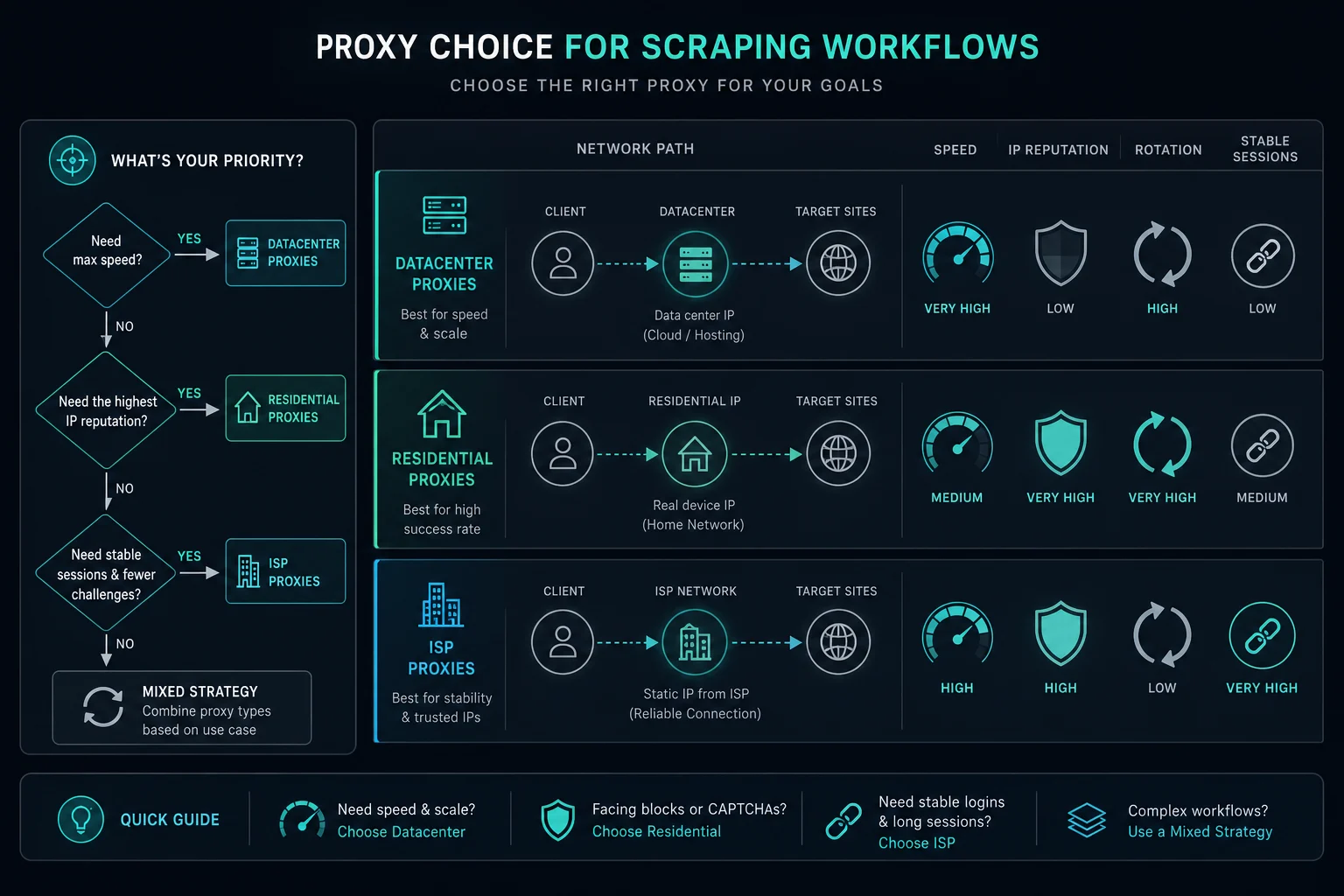
Datacenter Proxies vs Residential Proxies: Quick Decision
Start with the job you are running:
| Use case | Usually choose | Why |
|---|---|---|
| Cheap high-speed requests to permissive sites | Datacenter proxies | Lowest cost per IP and strong throughput |
| Strict anti-bot or reputation-sensitive targets | Residential proxies | Consumer-style IP reputation is less likely to be grouped with hosting traffic |
| Geo-targeted scraping or localized QA | Residential proxies | Large country, state, and city coverage is easier to route |
| Long account sessions or carts | ISP proxies or sticky residential | Stable IP behavior matters more than constant rotation |
| Retail monitoring and restock workflows | ISP proxies | Dedicated IPs are fast and stable for repeated checks |
| Stateless scraping across many public pages | Rotating residential or datacenter | Choose based on target strictness and block rate |
| API access with account-level limits | Neither by itself | Respect API limits, cache, and reduce concurrency |
The fastest rule is practical: if clean datacenter proxies work at your target request rate, use them. If they get blocked quickly because the network looks like hosting traffic, test residential or ISP proxies before scaling volume.
What Are Datacenter Proxies?
Datacenter proxies are proxy IPs hosted in data centers, cloud networks, or similar infrastructure. They are not tied to a normal home internet connection.
Their main advantage is efficiency. Datacenter proxies are usually fast, stable, inexpensive, and easy to buy in predictable quantities. That makes them useful for internal QA, market research, simple scraping, SEO checks, uptime monitoring, and other workflows where the target site does not heavily penalize hosting-network traffic.
The tradeoff is classification. Many websites, CDNs, WAFs, and bot-management systems can identify data center IP ranges, hosting ASNs, and overused proxy subnets. If the target already treats those networks as risky, adding more datacenter IPs may only spread the same problem across a larger pool. The same pattern hits an agentic browser running on a cloud VM: a task that works from a laptop can fail on its first page because the exit IP belongs to a hosting ASN.
What Are Residential Proxies?
Residential proxies route requests through residential IP space associated with consumer internet networks. To the target site, the request is less likely to look like it came from a hosting provider.
That reputation profile is why residential proxies are popular for web scraping, ad verification, localized search checks, ticketing, retail automation, and other workflows where websites respond differently to consumer networks than to datacenter networks.
Residential proxies are usually priced by bandwidth rather than by a fixed number of dedicated IPs. They are also more variable than datacenter proxies. Latency, speed, and availability can change because the pool is built for diversity and rotation, not one static server-like path.
How Sites Tell Datacenter and Residential IPs Apart
Detection starts with the IP address, before the site looks at your browser or behavior. A site, CDN, or bot-management system checks:
- The ASN. The autonomous system number shows which network announces the IP. Hosting and cloud companies have their own ASNs, and IP databases label them as hosting.
- IP type databases. Commercial databases tag ranges as hosting, ISP, mobile, business, or known proxy and VPN ranges.
- Reverse DNS. Cloud IPs often resolve to hostnames that name the provider.
- Range history. Abuse from other users of the same subnet can follow the whole range.
A datacenter IP fails the first check on any site that distrusts hosting networks, no matter how clean your requests are. A residential exit passes that check because it belongs to a consumer ISP. It still has to pass the rest: request rate, cookies, browser fingerprint, and the exit's own history. That is why residential proxies lower IP-based blocks but do not remove blocks caused by behavior.
Our ISP vs datacenter proxies comparison shows the commands to look up an IP's ASN and reverse DNS yourself.
When to Use Datacenter Proxies
Use datacenter proxies when speed, cost, and predictable infrastructure are the main priorities.
They fit well when:
- The target site allows automated access or has light bot protection.
- You need high throughput at a low cost.
- Your workflow is mostly stateless.
- You are testing your own site, app, CDN, or API.
- You need stable performance from a fixed region.
- The data is public and the target does not block hosting networks aggressively.
- Your requests are already paced well and do not trigger HTTP 429 Too Many Requests.
Datacenter proxies are often the right first test because they show whether the target is sensitive to proxy reputation at all. If a small, properly paced datacenter test succeeds, residential bandwidth may be unnecessary.
They are the wrong fit when every run gets blocked for ASN reputation, proxy-network reputation, or hosting-network signals even at low request volume. If a permitted workflow receives an anonymous proxy detected warning, isolate the route with a controlled test before changing pools. Switching datacenter providers may not be enough if the target broadly distrusts that category of traffic.
When to Use Residential Proxies
Use residential proxies when IP reputation, rotation, and location targeting matter more than raw cost.
They fit well when:
- The site treats datacenter or VPN traffic as suspicious.
- You need country, state, or city-level routing.
- Search results, prices, ads, inventory, language, taxes, or content change by location.
- You need rotating IPs for stateless scraping.
- You need sticky sessions for carts, account checks, or multi-step flows.
- You are debugging access blocks such as HTTP 403 Forbidden where proxy reputation is one of the signals.
- You need a practical best proxy for web scraping choice on higher-friction public targets.
Residential proxies do not make bad scraping logic safe. You still need reasonable request pacing, backoff, session consistency, and respect for site terms, robots guidance, and applicable law. If your crawler sends bursty retries or ignores rate limits, better IPs will only make the bad pattern more expensive.
For Unknown Proxies, compare residential pricing when you need bandwidth-based access to a rotating residential pool.
Where ISP Proxies Fit
ISP proxies sit between datacenter and residential proxies. They are usually hosted with datacenter-like performance, but use ISP-registered IP space that can have better reputation than ordinary hosting ranges. If the category is new to you, start with what are ISP proxies.
Choose ISP proxies when:
- You need stable dedicated IPs.
- You need lower latency than a rotating residential pool.
- You are running account sessions, product monitoring, cart flows, or retail automation. The sneaker proxies guide shows how retail bots split ISP and residential proxies by task.
- You want the same IP to stay attached to the same task.
- The target is stricter than a simple datacenter-friendly site, but constant residential rotation would hurt the workflow.
Choose residential proxies instead when you need large-scale rotation, many locations, or consumer-style traffic across a broader pool. Choose datacenter proxies when the target is permissive and cost matters most.
If your workflow needs stable IPs, review ISP proxy pricing. If it needs rotation and location spread, start with residential pricing instead.
Sticky vs Rotating Proxies
The sticky vs rotating proxies decision matters as much as the proxy type.
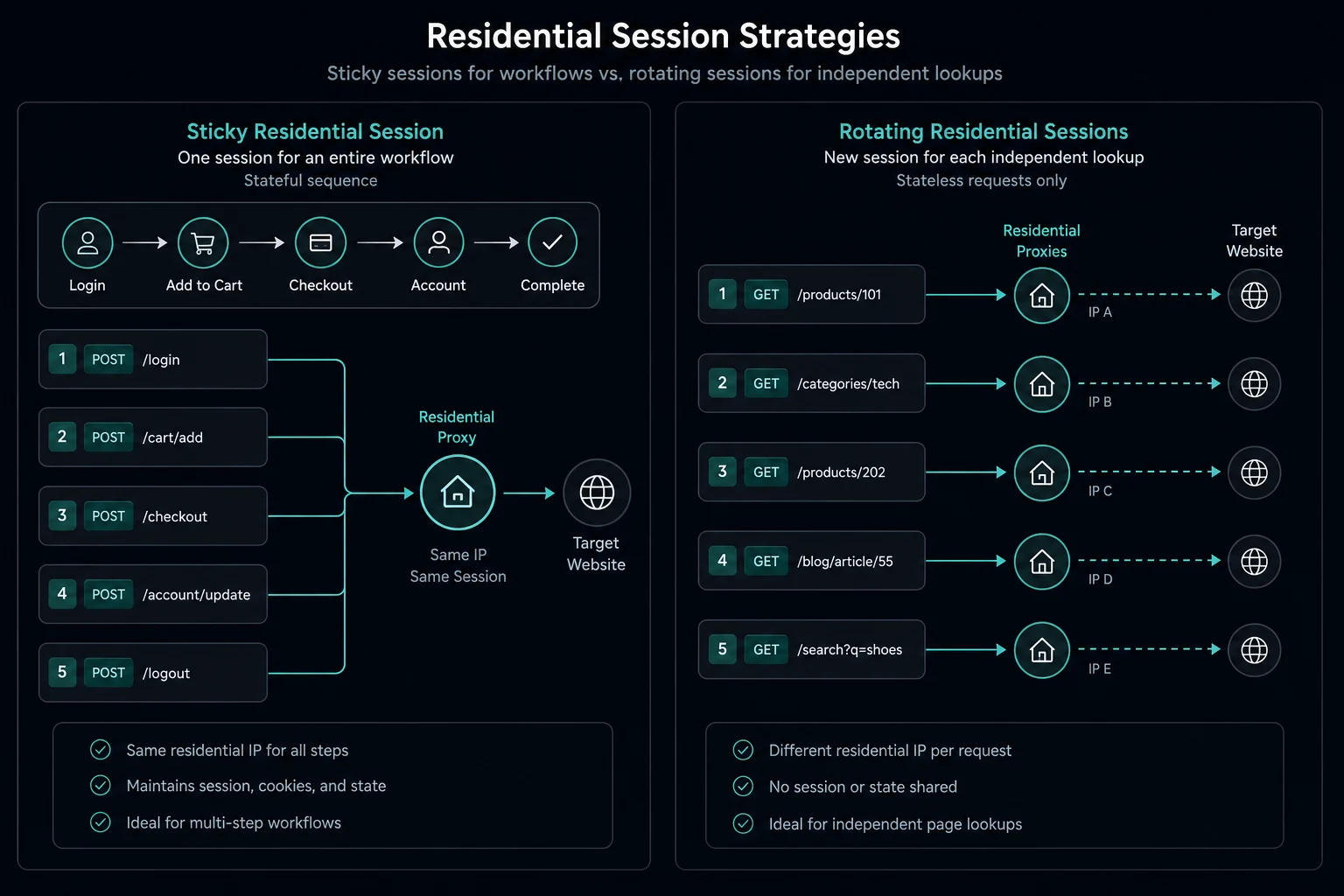
Rotating proxies change the exit IP frequently. They are useful for stateless scraping, search checks, ad verification, and monitoring where each request can stand alone.
Sticky proxies keep the same exit IP for a session window. They are useful when a website expects continuity, such as login, carts, queues, checkout, account checks, or multi-step research flows.
Unknown Proxies residential plans support both sticky and rotating modes. Sticky residential sessions rotate every 2 hours, while rotating residential proxies rotate on every request. ISP proxies are naturally stable and do not rotate unless a manual rotation is requested.
Do not rotate just to hammer through blocks. If a site returns 429, 403, or a WAF page, slow down, log the cause, and fix the request pattern before burning through more IPs.
If you are configuring residential sessions in a scraper or bot, read how to use residential proxies without breaking sessions before choosing rotating mode for every task.
Web Scraping: Which Proxy Type Works Best?
The best proxy type for web scraping depends on target strictness and workflow shape.
Use datacenter proxies for scraping when:
- The target allows automated access.
- The data is public and low friction.
- You can cache responses and keep request volume low.
- You need fast, cheap checks across many URLs.
- Your block rate stays low during small tests.
Use residential proxies for scraping when:
- Datacenter traffic gets blocked even at conservative rates.
- You need local search results, ads, pricing, or catalog views.
- The target is sensitive to hosting-network IPs.
- You need rotation across many IPs and regions.
- Bandwidth cost is acceptable for the value of the data.
Use ISP proxies for scraping when:
- Sessions need to stay stable.
- Speed matters.
- You are monitoring the same pages repeatedly.
- You need dedicated IPs for task-to-proxy assignment.
- Residential rotation breaks login, cart, or account continuity.
For rank tracking and SERP checks, residential proxies are usually the better fit. Search engines challenge datacenter IPs quickly, and results change by location. The guide to scraping Google search results covers pacing and allowed methods.
Before changing proxy type, run a controlled test. Keep the same headers, browser profile, account state, concurrency, and delays. Change only the proxy category. If the success rate improves, proxy reputation was likely part of the problem. If nothing improves, the issue is probably timing, session handling, fingerprinting, authentication, endpoint policy, or site rules.
Protocol can also affect tool setup. If your scraper supports both protocols, compare SOCKS5 vs HTTP proxy after you choose the proxy type.
Cost and Performance Tradeoffs
Proxy cost is not just the invoice price. It is also the cost of retries, blocks, failed sessions, bandwidth, and engineering time.
| Factor | Datacenter proxies | Residential proxies | ISP proxies |
|---|---|---|---|
| Typical cost model | Per IP or subnet | Per GB of bandwidth | Per dedicated IP and duration |
| Speed | Usually fastest | Variable | Fast |
| Rotation | Limited unless provider supports it | Strong rotation options | Usually stable, not rotating |
| IP reputation | Easier to classify as hosting traffic | Consumer-style reputation | Stronger than typical datacenter |
| Location coverage | Depends on provider regions | Broad country, state, and city options | More limited than residential |
| Best fit | Permissive targets and high throughput | Strict targets and location-sensitive workflows | Stable sessions and retail monitoring |
If residential proxies reduce blocks but the pages are heavy, bandwidth can become the main cost. Block images, cache responses, avoid unnecessary browser sessions, and do not reload unchanged pages just because the proxy pool can handle it.
If ISP proxies work, they can be more predictable than residential for repeated monitoring. If they fail because the target requires broader consumer rotation, residential is usually the next test.
Common Mistakes When Choosing Proxies
The biggest mistake is treating proxies as a replacement for good traffic design.
Avoid these patterns:
- Running too many concurrent tasks per IP.
- Retrying immediately after 429, 403, timeout, or WAF responses.
- Rotating IPs while constantly changing cookies, headers, and fingerprints.
- Using rotating proxies for workflows that require a stable session.
- Using sticky sessions for stateless scraping where rotation would reduce concentration.
- Sending every request through the same endpoint at the same interval.
- Buying more proxies before checking whether account, API key, cookie, or device signals are the actual limit.
Proxy type should match the site and workflow. Rate limits, account rules, and access policies still matter even with clean IPs.
Decision Checklist
Use this checklist before buying or switching proxy types:
- Identify whether the target blocks by IP, ASN, subnet, country, account, session, endpoint, or request rate.
- Run a small test with low concurrency and clean session handling.
- Compare success rate from your normal connection, datacenter proxies, ISP proxies, and residential proxies if available.
- Decide whether the workflow needs rotation or sticky sessions.
- Estimate bandwidth if you plan to use residential proxies.
- Check whether the target's terms allow your intended automation.
- Add backoff, jitter, caching, and monitoring before increasing volume.
If the answer is still unclear, start with the cheapest proxy type that plausibly fits the target. Upgrade only when the test shows the cheaper option is the actual bottleneck.
FAQ
Are residential proxies better than datacenter proxies?
Residential proxies are better for strict targets, geo-targeted workflows, and cases where datacenter IPs are blocked because they look like hosting traffic. Datacenter proxies are better when the target is permissive and speed or cost matters most.
When should I use residential proxies instead of datacenter proxies?
Switch to residential when a small, well-paced datacenter test still gets blocked or challenged, when results depend on location, or when the site is known to block hosting networks. If datacenter proxies work at your request rate, keep using them.
Are datacenter proxies faster than residential proxies?
Usually, yes. Datacenter proxies run from controlled infrastructure and often have lower latency and higher throughput. Residential proxies trade some performance predictability for stronger IP diversity and consumer-style reputation.
Should I use datacenter or residential proxies for scraping?
Use datacenter proxies for low-friction public scraping where the target allows your request pattern. Use residential proxies when the target is sensitive to hosting networks, requires local results, or blocks datacenter traffic even at reasonable rates.
Are ISP proxies the same as residential proxies?
No. ISP proxies are stable, dedicated IPs with ISP-style reputation and datacenter-like performance. Residential proxies are usually bandwidth-priced pool access with sticky and rotating session modes.
Should I use sticky or rotating residential proxies?
Use rotating residential proxies for stateless scraping and repeated lookups. Use sticky residential proxies when a task needs continuity, such as login, carts, queues, checkout, account checks, or multi-step browsing.
Can proxies bypass every block?
No. Proxies can help when IP reputation, location, or request concentration is the problem. They do not override site policy, account limits, API limits, bad session handling, or aggressive retry behavior.
Final Thoughts
Datacenter proxies vs residential proxies comes down to the target's tolerance for hosting traffic and your workflow's need for speed, stability, rotation, and location targeting. Datacenter proxies are the practical low-cost option when the target allows them. Residential proxies are the better fit when reputation and location diversity matter. ISP proxies are the middle path when you need stable dedicated IPs with stronger reputation than typical datacenter ranges.
For broad rotation and geo-targeted workflows, start with Unknown Proxies residential proxies or compare residential pricing. For stable sessions, retail monitoring, and dedicated IP workflows, compare ISP proxy pricing.
Technical references: MDN Proxy servers and tunneling, MDN Proxy server glossary, and RFC 9110 HTTP Semantics.