Refract Bot is a desktop retail checkout bot for macOS and Windows. Its website lists end-to-end checkout for Amazon, Target, Walmart, Best Buy, and Apple. You buy it on refractbot.com, download it from the Refract dashboard, and get support through the Refract Discord. On Target, Refract uses an in-bot cookie harvester to deal with Shape, Target's anti-bot system.
Quick answers:
- Where to get Refract: refractbot.com. After purchase, the installer is in the Download tab of the Refract dashboard.
- Refract Bot Discord: use the Join Discord link on refractbot.com. Support runs through tickets in that server.
- Refract harvester: the in-bot harvester (Settings > Harvesters) generates Target login and add-to-cart cookies. The old browser extension is deprecated.
- Refract proxies for Target: ISP proxies on the monitor. At starter size, no proxies on tasks and harvesters. Past that, Refract recommends residential proxies on tasks and especially on harvesters.
The first thing you want to know about using software or "bots" to buy items in high demand is that it gives you an edge, but nothing is guaranteed. That's why I'm here: to help you increase that edge. Botting is a hobby to some and a full-time job for others, so don't get frustrated. Give yourself time to learn the ins and outs. You'll be competing with the pros, and there are no divisions separating newcomers from seasoned veterans in this game.
What Is Refract Bot?
Refract is software that monitors products and runs checkout tasks for you. You load accounts, profiles (shipping and payment details), and proxies, then create tasks for the products you want. When a product restocks, the tasks try to cart and check out.
Facts from refractbot.com and the Refract help center, as of October 2026:
| Question | Answer |
|---|---|
| Supported sites | Amazon, Target, Walmart, Best Buy, and Apple |
| Platforms | Windows 10/11, Windows Server 2016 or newer, macOS 12 (Monterey) or newer |
| Price | $1,999 upfront for the first 3 months, then $50 per month. Each extra device running at once is +$50 per month |
| License | No license keys. Your dashboard account is your license |
| If you stop paying | The app stops working when the subscription expires |
| Proxies | Built-in proxy rotation and per-task assignment |
Prices and sites can change, so confirm them on refractbot.com before you buy.
How to Download Refract Bot
 Refract Bot Purchasing
First, if you have not done so already, head over to refractbot.com and pick up a copy of arguably the best Target auto-checkout software publicly available.
Once purchased, you will land on your online dashboard. Open the Download tab and pick your version. There is one Windows download and two Mac downloads: Apple Silicon (M1 to M4 chips) and Intel. To check your Mac, open the Apple menu and click About This Mac. The help center guides were made by the Refract developers, and I highly suggest reading them.
Run the installer, then launch Refract and sign in with the same email and password you use on the dashboard. You will see a set of tabs on the left side. Take a deep breath; don't get worked up. I'm here to help.
Refract Bot Discord: Webhooks and Support
There are two Discord pieces: the Refract support server, and your own private webhook channel for checkout alerts.
For support, join the server from the Join Discord link on refractbot.com. The help center says to check each module guide's Common Errors section first, then open a ticket in Discord. For strategy questions, Refract points you to your cook group.
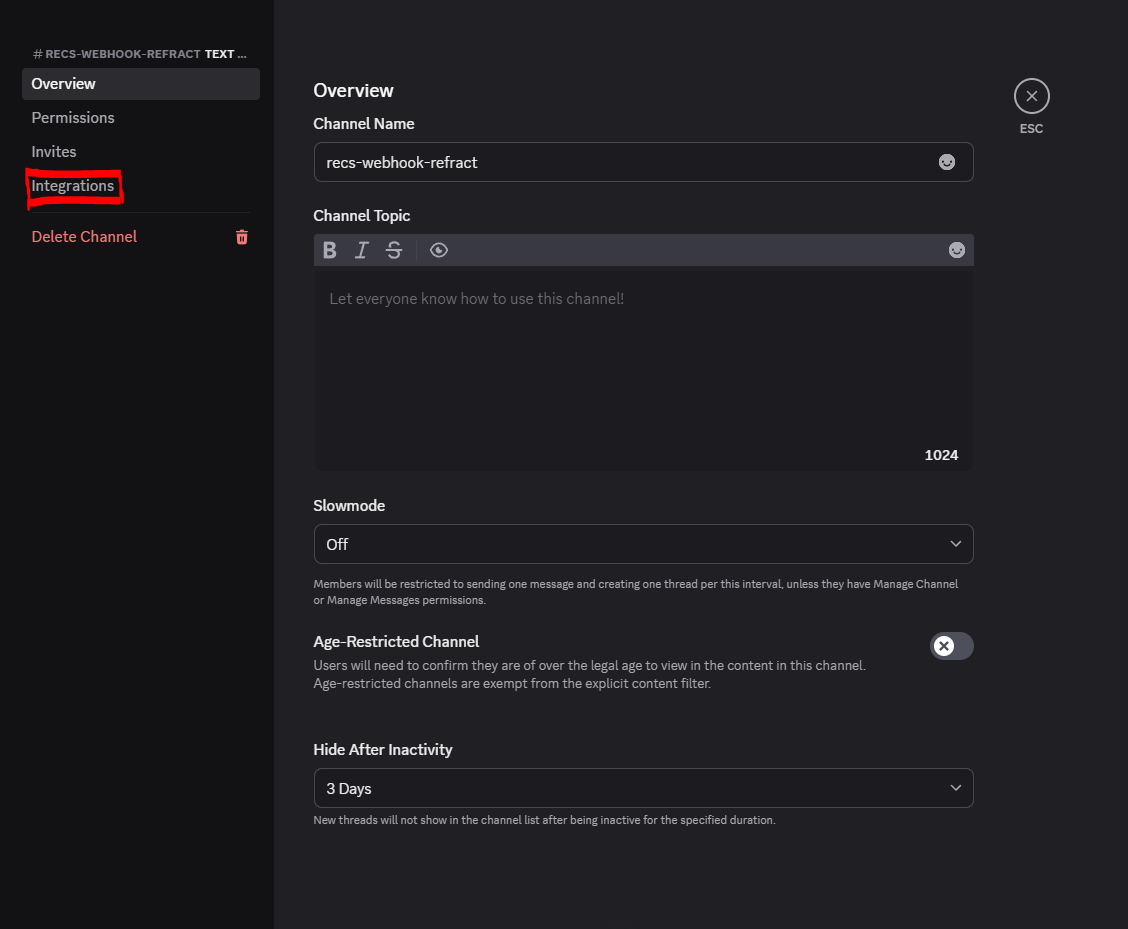 Refract Bot Discord Webhook
To set up a webhook, go to the Settings tab on the left side (gear wheel). There you will see a Webhooks section.
- In Discord, create a personal server for your eyes only.
- Create a channel and name it whatever you'd like. I named mine "Refract Checkouts".
- Right-click the channel, click Edit Channel, and open Integrations.
- Create a webhook. The button reads Create Webhook, or New Webhook under Webhooks if the channel already has one.
- Click Copy Webhook URL.
- Paste the webhook in Refract's settings, enable declines to webhook, and press save.
- Press the test button in Refract. When a test checkout shows up in your Discord channel, you did it correctly.
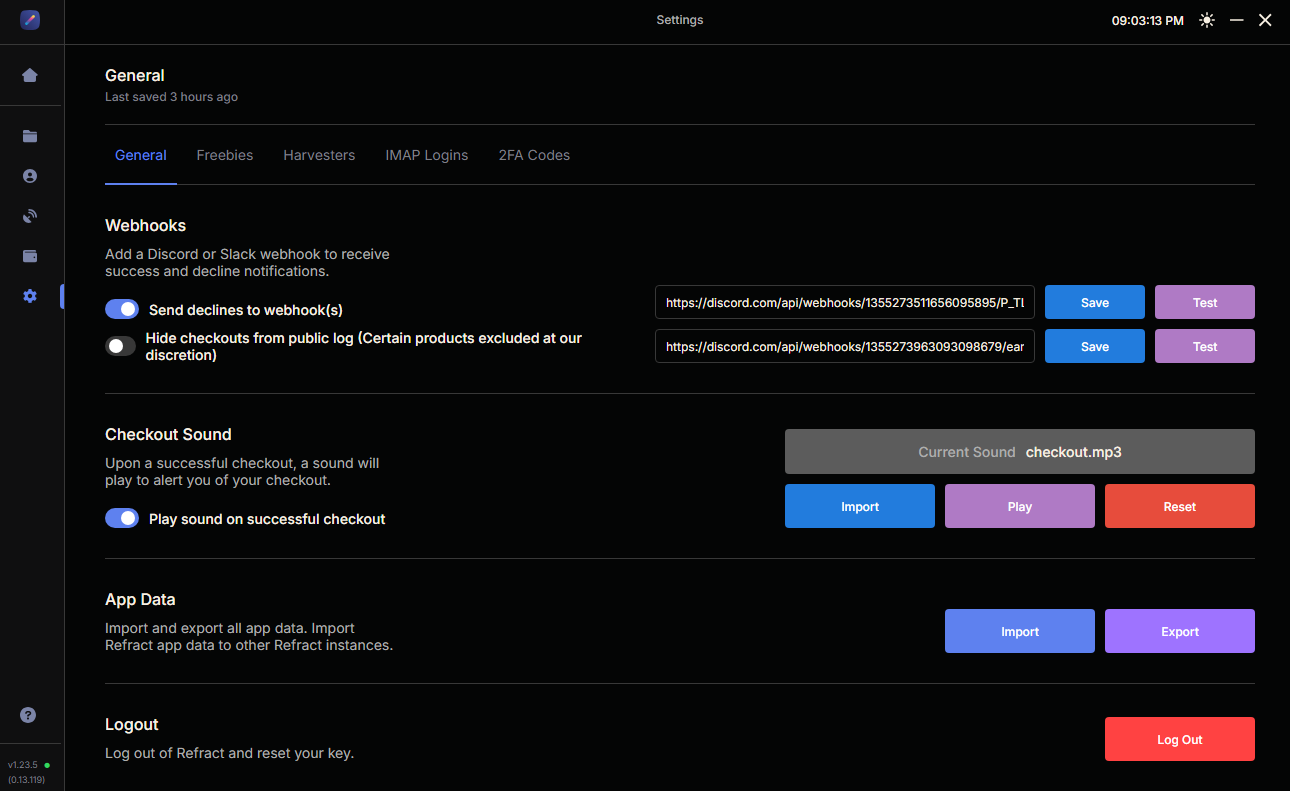 Refract Bot Webhook Settings
Creating Profiles in Refract Bot
Now go to the "Profile Groups" tab on the left and create a group called "Target." Input all your personal information. Refract's Target guide calls for one unique profile per task, so plan one profile for every task you will run.
I highly recommend physical credit cards. If you don't have enough, you can use virtual credit cards, such as Eno. Amex has some, or even Privacy as a last resort. You do not need to add the address or card to the Target account yourself: Refract sets the profile's details on the account when the task starts.
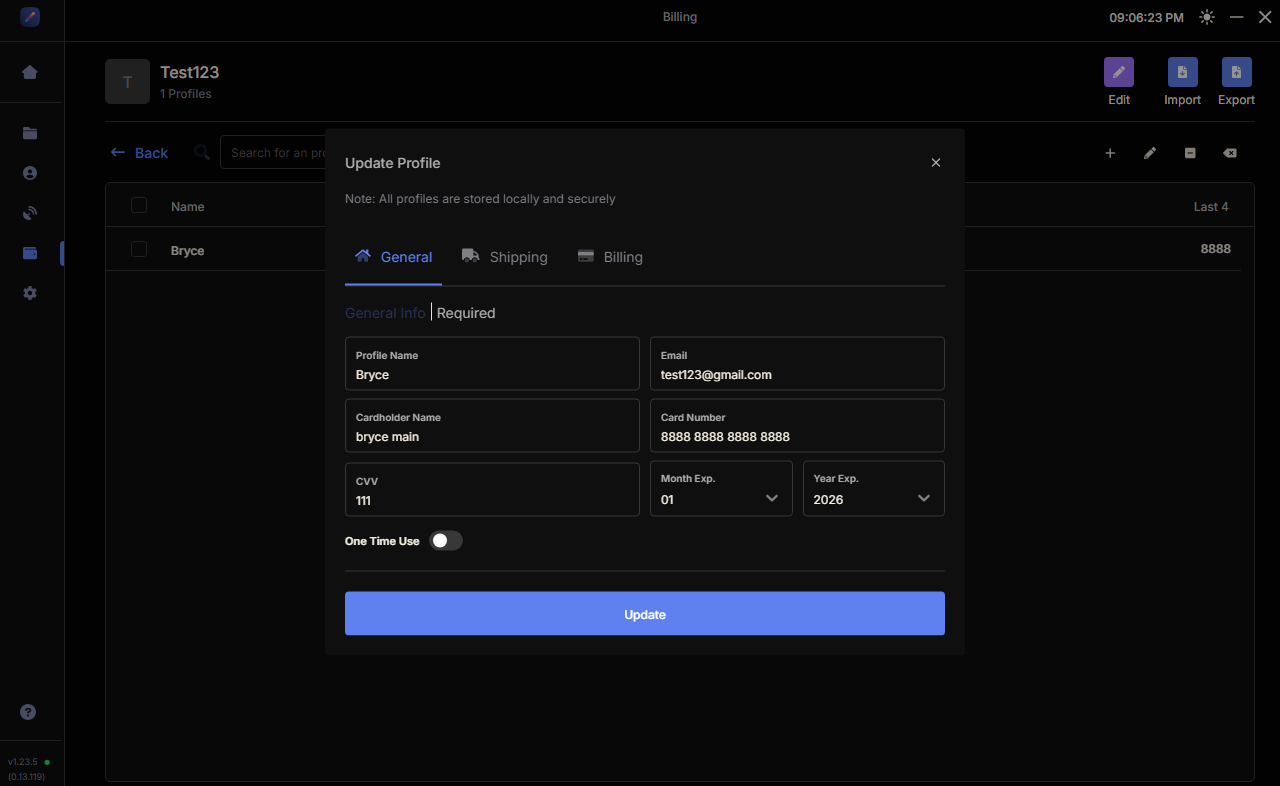 Refract Bot Profile Creation
Best Proxies for Refract Bot on Target
Select the "Proxies" tab. Proxies are IP addresses your requests route through instead of your home connection. They let you run many tasks without every request coming from the same IP. Choose a reliable provider that also offers excellent support in case you have issues.
Target uses Shape, an anti-bot system that is very good at detecting bad proxies and unusual activity. Refract's Target setup guide splits proxy advice by setup size:
| Your setup | Tasks and harvesters | Monitor |
|---|---|---|
| Starter: up to 10 tasks and 2 harvesters, local | No proxies. Your home IP is residential | ISP proxies |
| Scaled: more than 10 tasks or more than 2 harvesters | Residential proxies, on harvesters above all | ISP proxies |
| Any server, including a Mac mini server | Residential proxies, always | ISP proxies |
Harvester proxies matter most. Refract explains that tasks present the harvester's proxy to Shape for add to cart and login.
For the monitor, I highly recommend Unknown Proxies Signature ISPs. Our site list shows Signature and Event ISPs supported for Target monitoring and checkout. Our residential plan is not on the Target list, so check the site list before you buy residential for Target. You can find the ISP plans on our ISP pricing page. For the broader ISP vs residential decision on other retail sites, read our sneaker proxies guide.
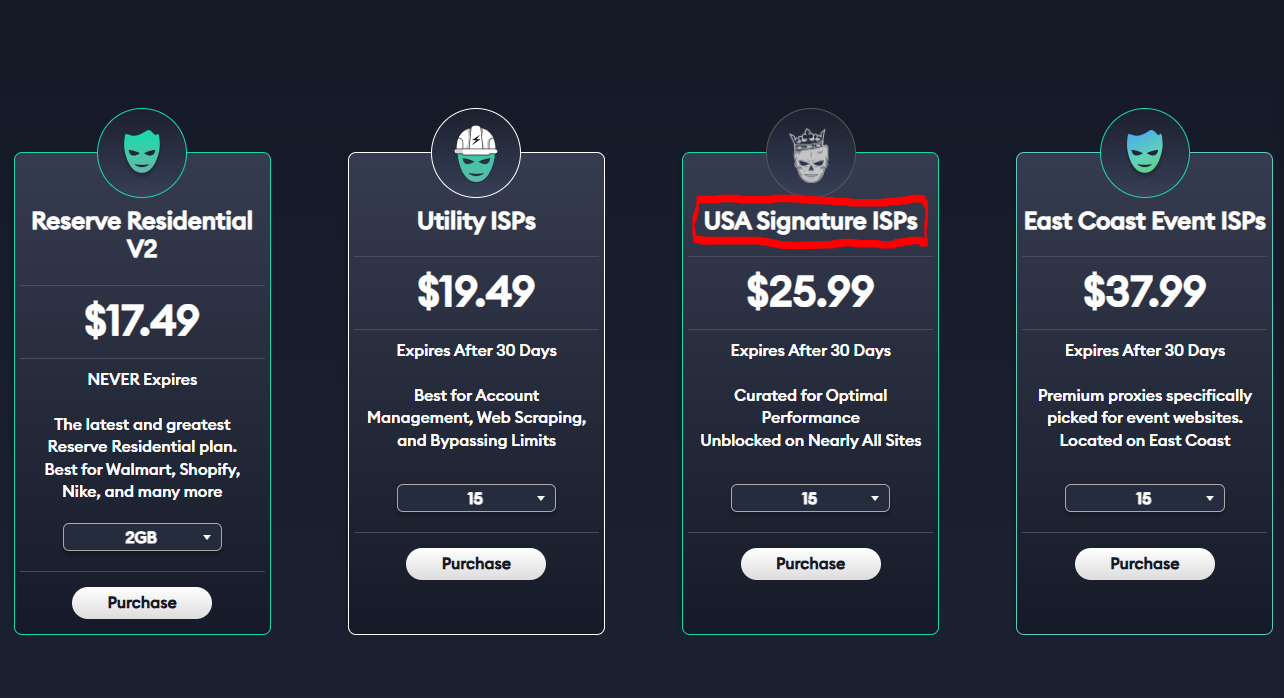 Best Proxies for Target
How Many Proxies Refract Needs for Target
Now you're probably wondering how many proxies to buy. Luckily, we made a delay calculator. It asks for the site, the number of SKUs, and your monitor delay, then shows how many monitor proxies you need.
Refract's default Target monitor delay is 3500 ms (3.5 seconds). Worked example: 5 SKUs at 3500 ms with the Target preset comes out to 15 monitor proxies. Refract's own minimum is 1 proxy per monitor input on multi-SKU, so the calculator number gives you more headroom.
For tasks, the starter setup runs on your home IP. When you scale, plan one proxy per task: Refract shuffles your list and reuses proxies when you have fewer proxies than tasks.
Sizing monitors this way keeps traffic from concentrating on a few IPs, which is what causes HTTP 429 Too Many Requests or Cloudflare rate-limit errors like Error 1015.
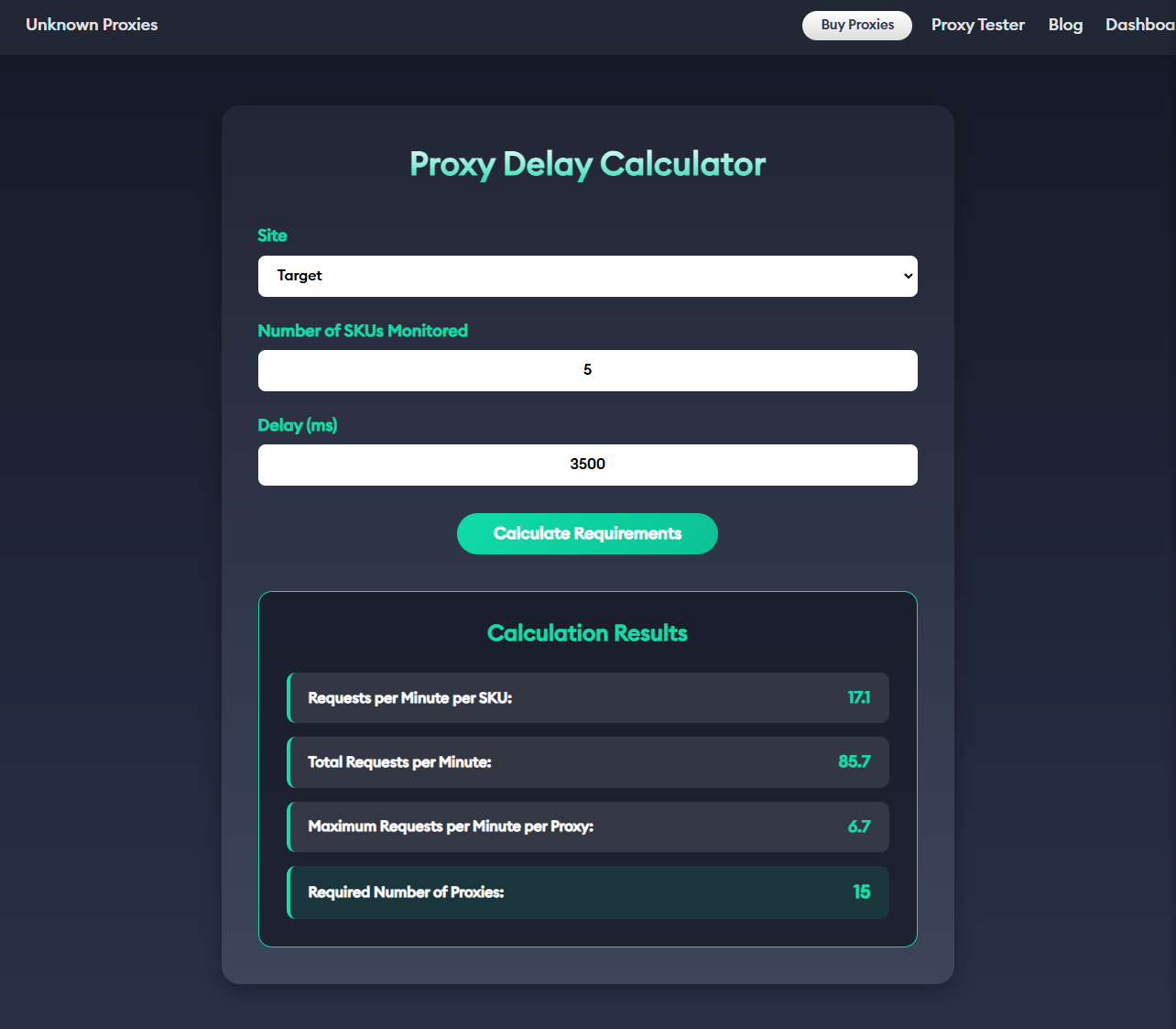 Unknown Proxies Calculator
How to Add Proxies in Refract Bot
Once you buy the plan that fits you best, you will land on your Unknown Proxies dashboard. Copy your ISP proxies, create a new proxy list in Refract's Proxies tab, paste them in, and save. Put one proxy per line. Our dashboard exports lines as ip:port:user:pass. If you need another layout, the proxy formatter converts the whole list.
A few things Refract's proxy docs explain that save a lot of confusion:
- Refract removes duplicates. If only one proxy shows after you paste several, you pasted the same line more than once.
- The bot shuffles the list, then hands out proxies in order and wraps around at the end.
- Swapping a list on running tasks is not instant. Tasks keep their current proxy until they hit an error. Restart tasks to apply a new list right away.
Wipe the sweat off your forehead, and let's continue.
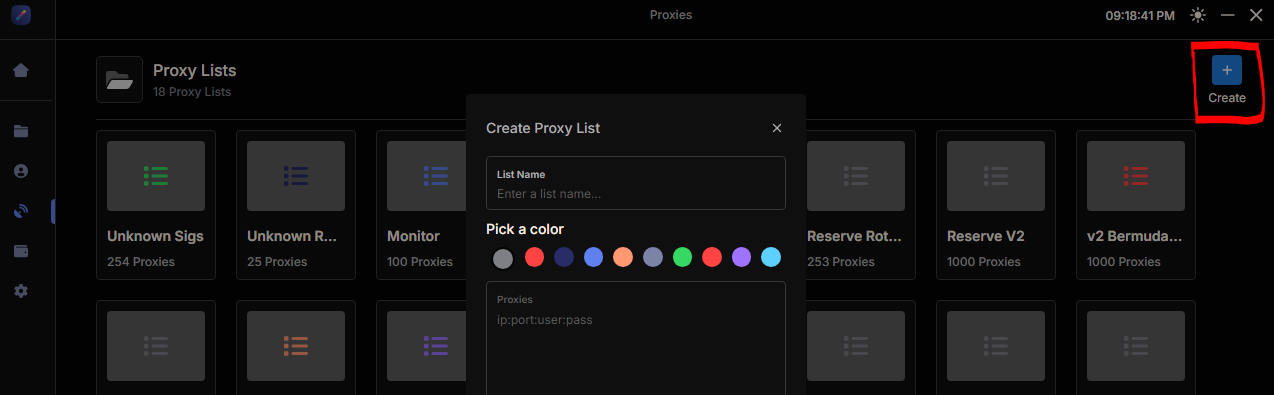 Creating Proxy List in Refract
How to Add Accounts in Refract Bot
Navigate to the "Accounts" tab on the left sidebar and add your Target accounts, then group them. If you don't have any, create some. I recommend no more than 5 accounts per unique address. If you use more, you risk flagging your accounts and address.
Do not log the accounts in from the Accounts tab. On Target, tasks log in with harvested cookies, and Refract says those logins last much longer. Refract's starter setup is 10 tasks on 10 unique accounts, one task per account per product.
Creating Target Tasks in Refract Bot
Click the "Tasks" tab. This is where you create and manage all your tasks. Press the + button at the top next to "Groups" and name the group "Target," for example.
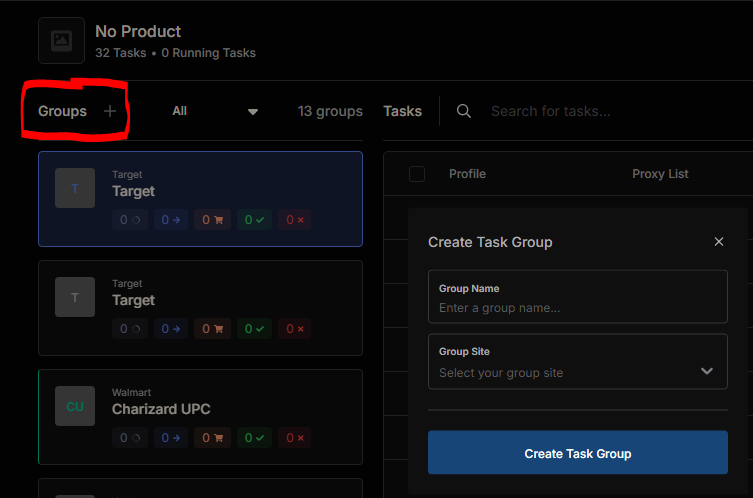 Creating Tasks in Refract Bot
Select "Target" in the group's site dropdown, turn on "Use Multi Input," and add the products you want to monitor. Target's monitor input is the TCIN, the number at the end of the product URL, not the full URL. For example, https://www.target.com/p/local/A-81114595 becomes 81114595. Put one product per line. You can add a price cap after a semicolon, such as 94631752;120, but use whole dollars only. You will find SKUs in cook groups that share release info, such as Poke Signals. Remember, the more SKUs you monitor, the more proxies you need.
Group settings from Refract's current Target guide:
| Setting | Value |
|---|---|
| Monitor Proxy List | Your ISP list, such as Signature ISPs |
| Monitor Delay | 3500 (default) |
| Hype Product | ON for Shape-protected drops |
| High Stock & Pre-Orders only | OFF |
| Loop Checkouts | OFF (optional, may increase cancels) |
Now click the blue + at the top right to create tasks. Add your profiles, your task proxy list (or leave it blank on the starter setup to use your home IP), and your account group. I like to add profiles one at a time, so each task gets its own.
| Task setting | Value |
|---|---|
| Retry Delay | 3500 (recommended) |
| Task Qty | 1 |
| Item Quantity | 1 (a ceiling: the task goes for up to this) |
Press create, and repeat for all your profiles and accounts.
Refract Harvester: In-Bot Harvester vs Cookie Extension
Target tasks need two kinds of cookies: login cookies and add-to-cart cookies. Both come from the harvester.
Refract now recommends the in-bot harvester. Set it up in Settings > Harvesters:
- Use Chromium browsers only: Chrome, Brave, Edge, or similar. Safari and Firefox do not work.
- On the starter setup, run 2 harvesters: one on Chrome and one on Brave (set the Brave path on the second).
- Keep about 3 cookies banked per running task. Set Max Cookie Count to 3 times your running tasks. Banking far more than that raises your flag risk.
- Set cookie expiry between 300 and 600 seconds. Refract says most Shape cookies last about 10 minutes.
- Harvest on any product that is in stock and available for shipping. If cookies stop coming, the product went out of stock.
The older Refract cookie extension still connects to the bot, but Refract has deprecated it. It is no longer updated, and the guides no longer cover it.
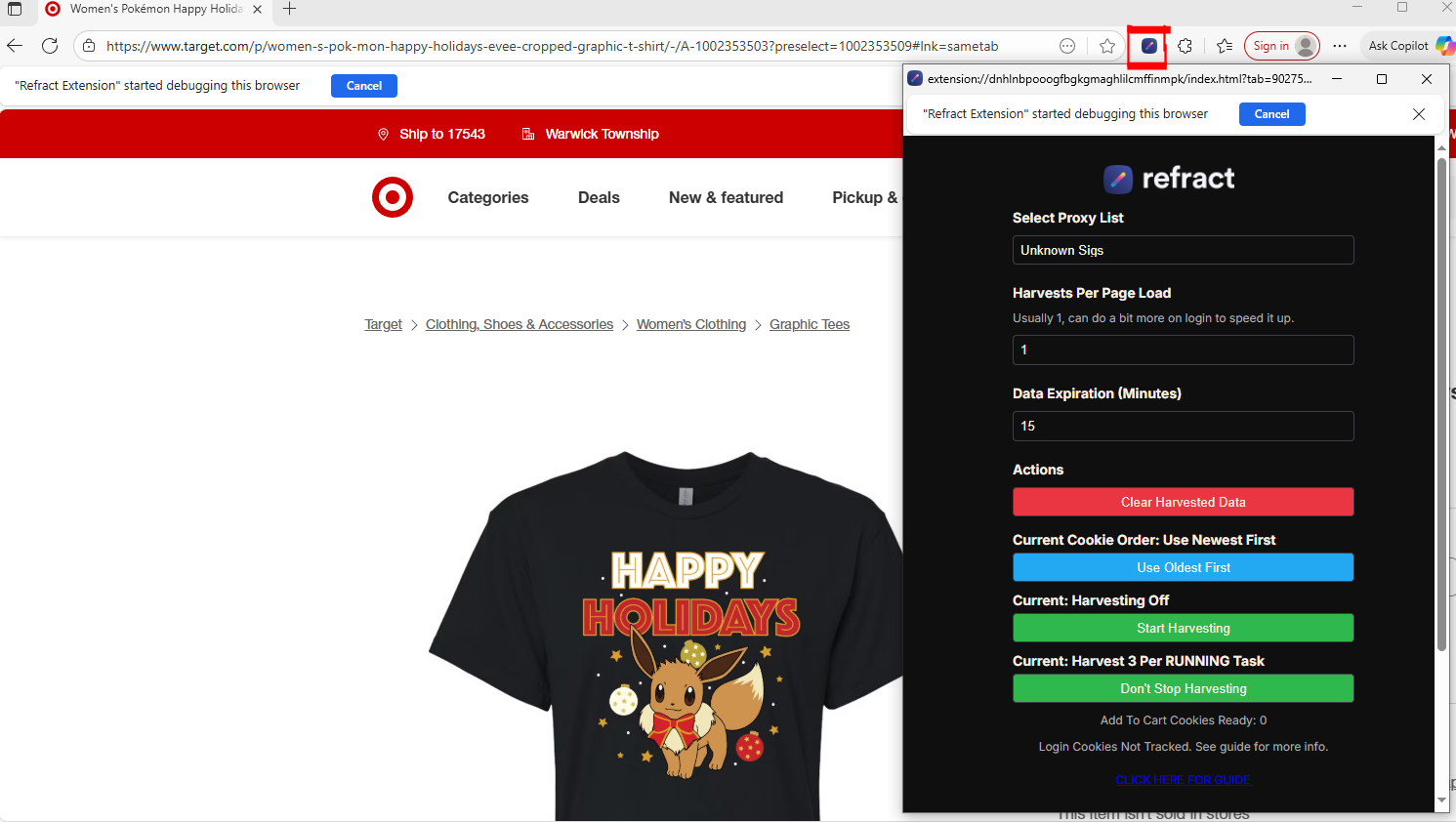 _Refract Bot Cookie Harvester _
Starting Your Tasks
- Start your tasks. They will sit on "Waiting for Cookies (Login)." That is your cue to harvest.
- Start your in-bot harvesters. Tasks log in and move on as login cookies arrive.
- Keep the harvesters running for as long as tasks run, because every add-to-cart attempt uses a cookie.
If you get Shape blocked on login, turn on "Login with OTP" in the task settings and pair it with IMAP so the codes are entered for you. Log accounts in slowly instead of all at once.
Now you can sit back and let Refract help you increase your chances. Don't expect every task to check out: Refract itself notes that only about 1% of carts turn into an order on Target drops. Keep your head up; success comes with persistence.
If you have questions or want more information on proxy products, join our Discord support server. We're always helping users and newcomers in chat.
My name is reconciled on Discord. I welcome you to @ me in chat and say hello. Thanks for reading this Refract Bot guide. I look forward to seeing your success with Refract Bot and Unknown Proxies soon!
FAQ
What is Refract Bot?
Refract Bot is a paid desktop checkout bot for macOS and Windows. It monitors products and runs checkout tasks on Amazon, Target, Walmart, Best Buy, and Apple.
How much is Refract Bot?
As of October 2026, refractbot.com lists $1,999 upfront for the first 3 months, then $50 per month, plus $50 per month for each extra device running at once. Check the site for current pricing.
Where do I download Refract Bot?
After you buy, open the Download tab in the Refract dashboard. Choose Windows, Mac Apple Silicon, or Mac Intel, then sign in with your dashboard email and password.
Is there a Refract Bot Discord?
Yes. Use the Join Discord link on refractbot.com. Refract handles support through tickets in that server. You also connect your own Discord channel to Refract with a webhook for checkout alerts.
What is the Refract harvester?
It generates the Shape cookies that Target tasks need for login and add to cart. Use the in-bot harvester in Settings > Harvesters. The older Refract browser extension is deprecated.
What proxies should I use with Refract?
On Target, use ISP proxies for the monitor. Refract recommends your home IP for small local setups and residential proxies for tasks and harvesters as you scale. Check a provider's site list for Target support before you buy.
Does Refract work for Pokémon cards?
Refract's site says it has purchased products "across Pokémon, electronics & more." Its supported retailers are Amazon, Target, Walmart, Best Buy, and Apple. The help center does not list a Pokémon Center module.