Cloudflare error 1015 "You are being rate limited" means the website owner set a rate limiting rule, and your requests went over its limit. Cloudflare blocks further requests from you for a set time, then lets you back in.
Cloudflare's documentation gives the cause as: "The website owner has configured rate limiting rules that restrict how many requests a visitor can make to their site in a given time period." Cloudflare support does not set or remove these limits. The site owner does.
The 1015 page is normally served with HTTP status 429 Too Many Requests, so scripts and API clients see a 429 response with Cloudflare's HTML page in the body.
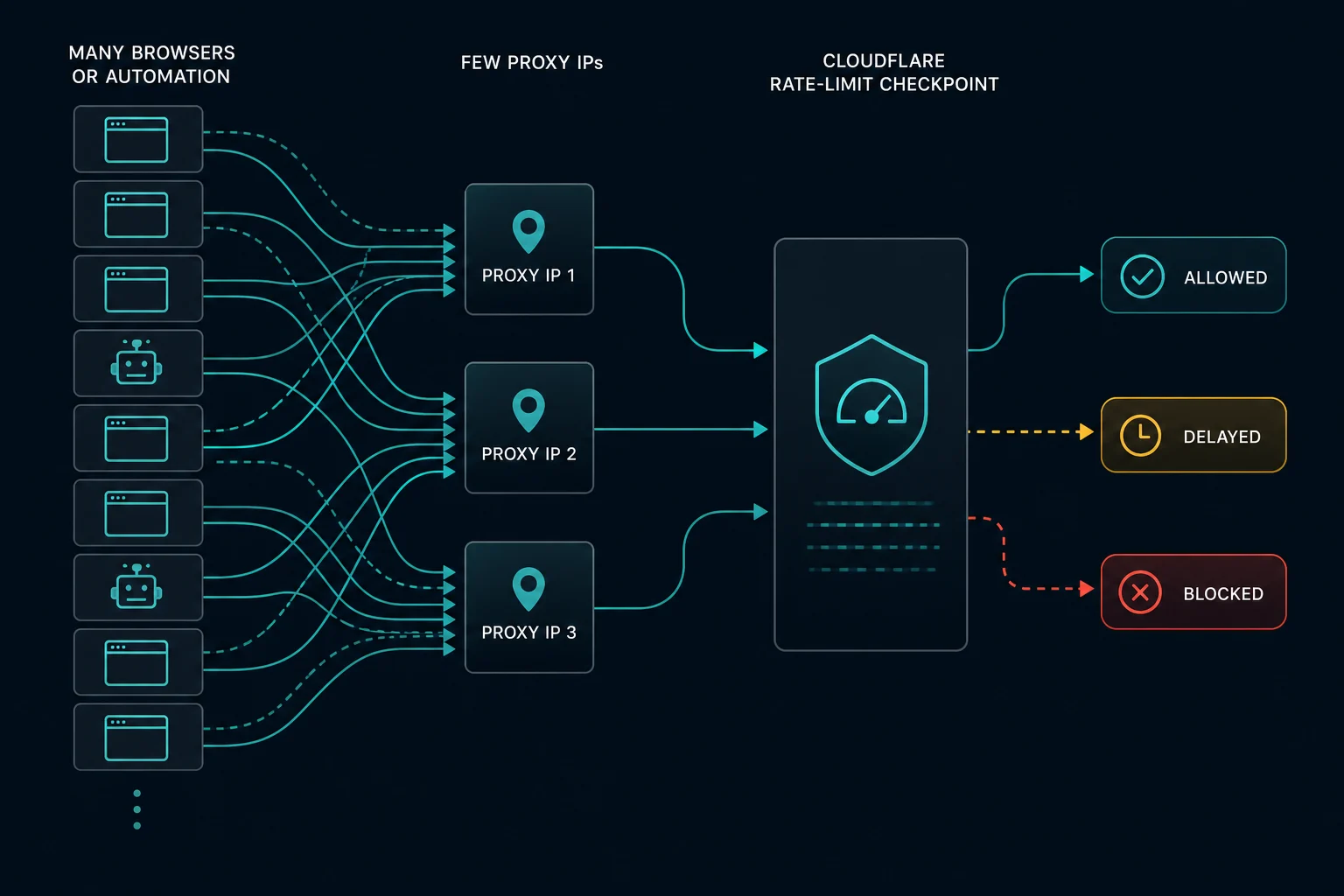
Quick fix for Cloudflare error 1015
| Situation | What to do |
|---|---|
| You are a normal visitor | Stop reloading. Wait at least a minute, then try once. Close extra tabs and auto-refresh extensions |
| You are on a shared network or VPN | Other users on the same IP count toward the same limit. Turn off the VPN or switch networks |
| You own the website | Find the rule in Security Events, then raise the threshold or lengthen the counting period |
| You run a scraper, monitor, or bot | Lower requests per IP, add jitter, and back off after a 429 instead of retrying at once |
| Every IP you use gets 1015 | Your request pattern is the problem, not the IPs. Fix pacing before you add proxies |
What is Cloudflare error 1015?
Error 1015 is Cloudflare's page for a rate limiting rule with a block action. The page usually shows:
Error 1015You are being rate limitedThe owner of this website (example.com) has banned you temporarily from accessing this website.- A Cloudflare Ray ID and your IP address
It does not mean the site is down, and it is not a permanent ban. The origin server may be fine. Cloudflare stopped your requests at the edge because they matched a counting rule.
Cloudflare uses the same code for an unrelated message, "Unable to purge", when cache purge requests in the dashboard or API are rate limited. If you saw 1015 while purging cache, wait and retry the purge.
How a rate limiting rule works
Each rule has a few settings. Knowing them explains how long the block lasts and why it hits some users and not others.
| Setting | What it does |
|---|---|
| Matching expression | Which requests the rule counts, for example /login or the whole site |
| Characteristics | How Cloudflare groups requests. On Free and Pro plans this is the client IP. Business adds IP with NAT support. Enterprise with Advanced Rate Limiting can count by headers, cookies, JA3/JA4 fingerprints, and more |
| Requests and period | The threshold, for example 20 requests per 10 seconds |
| Mitigation timeout | How long the block lasts after you go over the limit |
| Action | Block (shows 1015), or a challenge, or a log-only test |
Plan limits, from Cloudflare's rate limiting documentation:
| Plan | Rules | Counting period | Maximum block time |
|---|---|---|---|
| Free | 1 | 10 seconds | 10 seconds |
| Pro | 2 | Up to 1 minute | Up to 1 hour |
| Business | 5 | Up to 10 minutes | Up to 1 day |
| Enterprise | 100 | Up to 65,535 seconds | Up to 1 day |
How long does error 1015 last?
It lasts for the rule's mitigation timeout. On a Free plan site that is 10 seconds. On paid plans the owner can set up to 1 hour (Pro) or 1 day (Business and Enterprise).
When the block ends, counting starts again. If you go straight back to the same request rate, you match the rule again and get a new block. Most visitors see 1015 clear within a few minutes once they stop reloading.
How to fix error 1015 as a visitor
- Stop reloading the page.
- Wait a few minutes, then load the page once.
- Close duplicate tabs for the same site.
- Turn off extensions that auto-refresh pages or prefetch links.
- Turn off your VPN or free proxy. Many people share those IPs, and their traffic counts toward the same limit.
- If you are on office, school, or mobile carrier Wi-Fi, try another network.
- If it does not clear, send the site owner the Ray ID from the error page.
How to fix error 1015 as a site owner
If real users report 1015, find the event before you change the rule.
- In the Cloudflare dashboard, open your domain and go to Security > Analytics > Events (shown as Security > Events on some dashboards).
- Filter by the Ray ID or the client IP from the visitor's screenshot. The time on the error page is in UTC.
- Open the event. It names the rate limiting rule that matched.
- Open the rule under Security > WAF > Rate limiting rules (or Security > Security rules on the newer dashboard).
Then adjust:
- Very short periods catch normal bursts. Cloudflare suggests a longer period when a rule blocks requests too fast, for example 10 seconds instead of 1 second.
- Shared IPs look like one heavy user. Offices, schools, and mobile carriers put many people behind one IP. Raise the threshold for public pages, or count by another characteristic if your plan allows it.
- Scope the rule. Keep strict limits on
/login,/api, and checkout. Use wider limits on product and content pages. - Test before you block. Use the Log action first to see how many real users a new rule would catch.
- Use a challenge where it fits. A Managed Challenge lets real browsers continue while it still slows scripts.
Error 1015 vs. error 1020 vs. HTTP 429
| Error | What it means | Usual fix |
|---|---|---|
| Error 1015 | A Cloudflare rate limiting rule blocked you for a set time | Slow down and wait out the mitigation timeout |
| Error 1020 | A Cloudflare custom rule denied access, whatever the rate | Find out which signal (IP, country, path, headers) matched |
| HTTP 429 | Too many requests, sent by any server, API, or CDN | Read Retry-After if present and back off |
The test is simple. If waiting fixes it, it is a rate limit (1015 or 429). If waiting does nothing, it is an access rule (1020).
How to fix error 1015 when scraping or monitoring
For automation, 1015 almost always means too many requests from one IP inside the rule's counting period.
- Measure requests per IP per 10 seconds and per minute. Those are the periods most rules use.
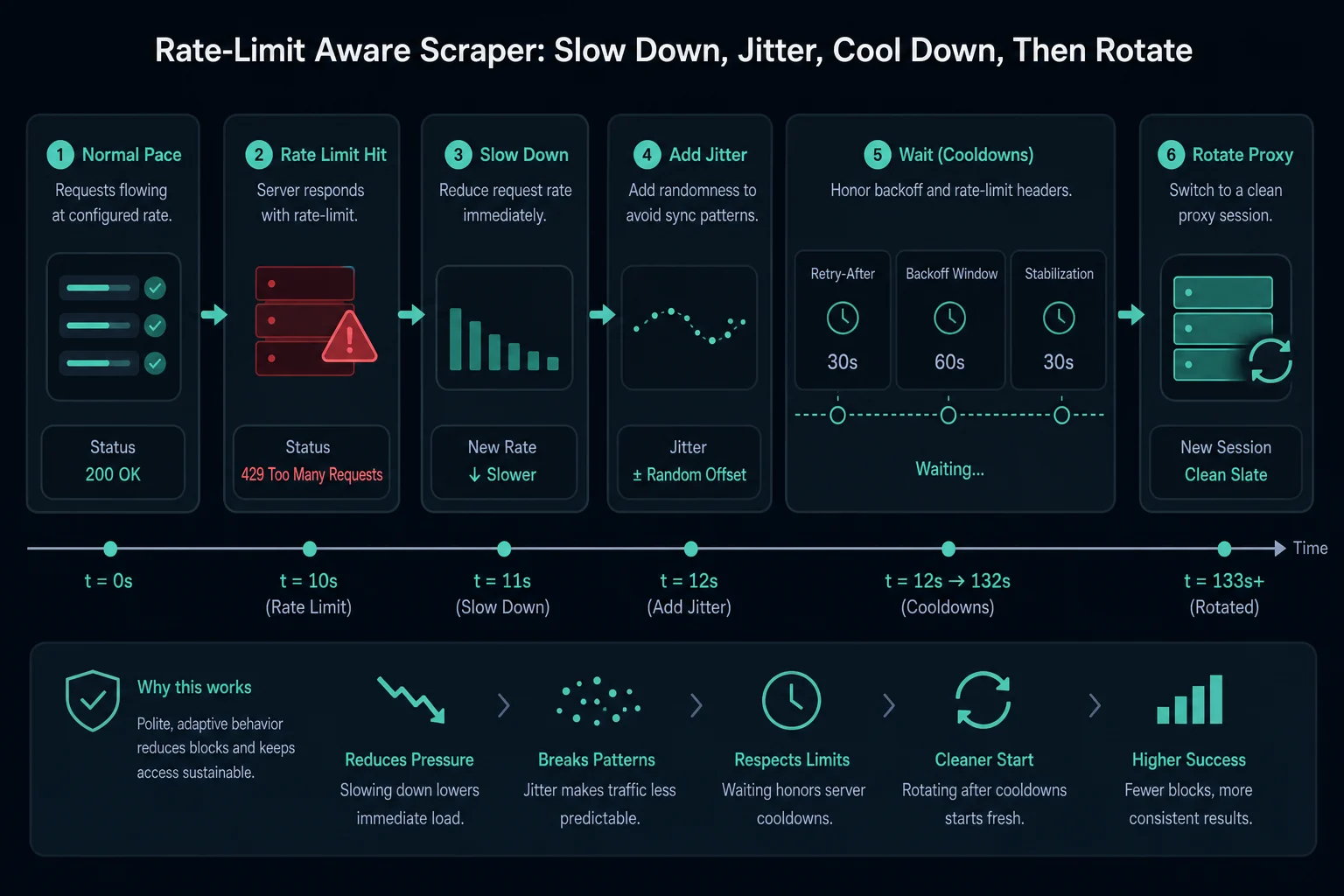
- Add random jitter so tasks do not fire at the same moment.
- Cap concurrent tasks per proxy.
- Reuse cookies and sessions instead of creating a new client for every request.
- On a 429 or 1015, pause that IP for at least the block time, then retry with a longer delay. Exponential backoff works well here.
- Keep sensitive endpoints (login, search, cart, checkout) on slower schedules than public product pages.
- Log blocks by proxy, endpoint, and time so you can see which limit you hit.
Do not rotate to a new IP and repeat the same burst. That spreads the same pattern across more IPs, and on Enterprise plans with Advanced Rate Limiting the rule may count by something other than IP.
If you monitor many products or drops, size the proxy list to your delay first. The delay calculator gives the proxy count for a target delay and task count. For bandwidth-priced residential plans, the data usage calculator turns request volume into a GB estimate.
When proxies help with error 1015
Free and Pro plan rules count by IP address. If your pacing is reasonable but too many tasks share one IP, more IPs lower the count per IP. Shared, heavily used proxy pools can also hit limits because of other users' traffic.
Proxies do not help when every IP gets blocked at your current rate, or when the rule counts by a cookie, header, or session. In those cases, slow down.
| Proxy type | Fits when | Watch out for |
|---|---|---|
| Residential proxies | You need many rotating IPs across locations | Rotation that breaks sessions the site expects to stay stable |
| ISP proxies | You need fast, stable IPs for monitors and account sessions | Each IP still has its own limit. Keep per-IP rate under the threshold |
| Datacenter proxies | The site is permissive | Many sites apply stricter rules to hosting networks |
Our guide to sticky vs rotating sessions helps you decide when to keep one IP per session and when to rotate.
FAQ
What does Cloudflare error 1015 mean?
It means the site's Cloudflare rate limiting rule counted too many requests from you in a short period, so Cloudflare blocks you for a set time.
How long does Cloudflare error 1015 last?
As long as the rule's mitigation timeout. That is 10 seconds on the Free plan, up to 1 hour on Pro, and up to 1 day on Business and Enterprise. Going straight back to the same request rate starts a new block.
Is error 1015 the same as HTTP 429?
Error 1015 is Cloudflare's page for its rate limiting rules, and it normally comes with HTTP status 429. HTTP 429 itself is a general status that any server can send.
Can Cloudflare support remove a 1015 block?
No. The website owner sets the rule. Contact the site owner with the Ray ID.
Can a VPN cause error 1015?
Yes. VPN servers share one IP among many users, and all of their requests count toward the same limit. Turning off the VPN often fixes it.
Should I rotate proxies after error 1015?
Not right away. Pause and reduce your request rate first. Rotate only if a few IPs are blocked while others at the same rate work.
Final thoughts
Error 1015 is a timer, not a ban. Visitors should stop reloading and wait. Site owners should find the rule in Security Events and widen it for public pages. Automation should pace requests per IP below the rule's limit and back off on every 429.
Technical references: Cloudflare error 1015 and Cloudflare rate limiting rules.