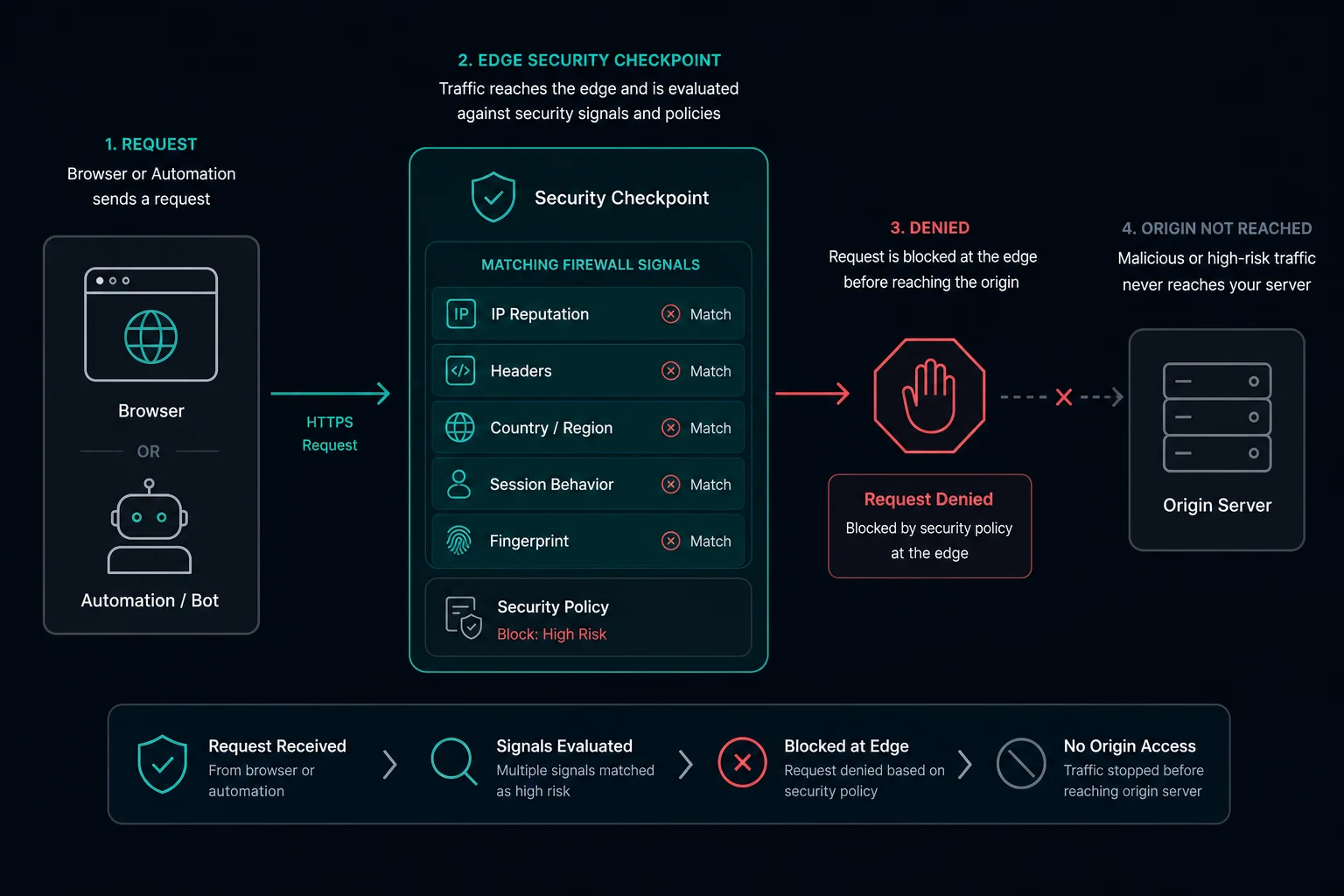
Cloudflare error 1020 "Access denied" means the website owner created a Cloudflare firewall rule, and your request matched it. Cloudflare blocked the request at its edge, so it never reached the website's server.
Cloudflare's documentation states the cause as: "A client or browser is blocked by a Cloudflare customer's Firewall Rules." Firewall Rules are now called WAF custom rules, but the error page is the same. The page is served with HTTP status 403 Forbidden.
The site is not down. The block applies to your request: your IP address, country, network, browser, or request pattern. Only the site owner can change the rule.
Quick fix for Cloudflare error 1020
| Situation | What to do |
|---|---|
| You are a normal visitor | Turn off your VPN or proxy, try another browser with extensions disabled, then send the owner a screenshot with the Ray ID |
| You use a VPN | Disconnect it or switch to a different server. Many sites block VPN networks or countries |
| You own the website | Search Security > Analytics > Events for the Ray ID or client IP, then narrow the rule that fired |
| You run a scraper or monitor | Compare your request with a real browser request. Fix headers, cookies, and rate first, then test other IPs |
| Every request fails from everywhere | The site may block your use case on purpose. Check that you are allowed to access it |
Waiting does not usually fix 1020. If the block goes away after a few minutes, you were probably rate limited, which is Cloudflare error 1015.
What is Cloudflare error 1020?
Error 1020 is the page Cloudflare shows when a site's custom rule uses the Block action and your request matches it. The page shows:
Error 1020Access denied- A message that the site uses a security service to protect itself
- A Cloudflare Ray ID, a UTC timestamp, and your IP address
The Ray ID matters most. The site owner can use it to find the exact blocked request and the rule that matched.
Why error 1020 happens
A custom rule can match almost any request field. Common rule conditions are:
- IP address, IP range, or IP reputation
- Country or region
- ASN, the network that owns the IP (hosting providers, VPNs, and some mobile carriers)
- Request path, such as
/wp-login.php,/admin, or/api - User-Agent, or a missing User-Agent
- Missing or unusual headers
- Bot score or known bot signatures
- HTTP method or query string
For normal visitors, 1020 is often a false positive: a VPN exit in a blocked country, or a privacy extension that strips headers. For scrapers, it usually means the request does not look like the client it claims to be.
Error code 1020 with a VPN
VPNs are the most common reason normal visitors see 1020. Site owners often block:
- Countries they do not serve, and your VPN server sits in one of them.
- Hosting and VPN networks by ASN. VPN servers run in data centers, so they share ASNs with hosting providers.
- IPs with a bad reputation. VPN IPs are shared by many users, so one person's abuse affects everyone on that server.
To fix it, disconnect the VPN and reload. If you need the VPN, switch to a server in your own country or try a different provider's server. If the site still blocks you without a VPN, contact the owner.
Error 1020 vs. error 1005 vs. HTTP 403
| Error | What blocked you | Where to look |
|---|---|---|
| Error 1020 | A Cloudflare custom rule set by the owner | The rule that matched in Security Events |
| Error 1005 | The owner banned your network's ASN | IP Access Rules or ASN conditions |
| HTTP 403 Forbidden without a Cloudflare page | The website server or app refused the request | Origin app, login, permissions, or origin WAF |
| Error 1015 | A Cloudflare rate limiting rule | Request rate, and wait for the block to expire |
Error 1020 and 1005 both happen at Cloudflare's edge. A plain 403 page without Cloudflare branding usually comes from the origin. If you are not sure which layer blocks you, the proxy vs firewall comparison shows how to separate a local proxy problem from a destination firewall decision.
How to fix error 1020 as a visitor
- Turn off your VPN or proxy and reload.
- Disable browser extensions that change headers, block scripts, or spoof your User-Agent. Then reload.
- Try a different browser or a private window.
- Try a different network, such as mobile data instead of office Wi-Fi.
- Send the site owner a screenshot of the error page, including the Ray ID and time.
Cloudflare support cannot unblock you. The owner controls the rule.
How to fix error 1020 as a site owner
These steps follow Cloudflare's error 1020 documentation.
- Ask the visitor for a screenshot of the error page.
- In the Cloudflare dashboard, open the domain and go to Security > Analytics, then the Events tab (shown as Security > Events on some dashboards).
- Filter by the Ray ID or client IP. Convert the UTC time on the error page to your local time if you search by time.
- Open the event. It shows the rule that blocked the request and the matched fields.
- Fix the rule, or allow the visitor's IP with an IP Access Rule.
Good fixes are narrow:
- Change Block to Managed Challenge for rules that catch real users. Humans pass the challenge, and simple scripts do not.
- Exclude safe paths from strict rules, for example
and not http.request.uri.path contains "/api/webhooks"for payment or app callbacks. - Allow known partners or monitors by IP instead of turning off the rule.
- Review country and ASN rules that block whole mobile carriers or regions you serve.
Do not turn off a rule site-wide before you know why it fired.
How to fix error 1020 when scraping
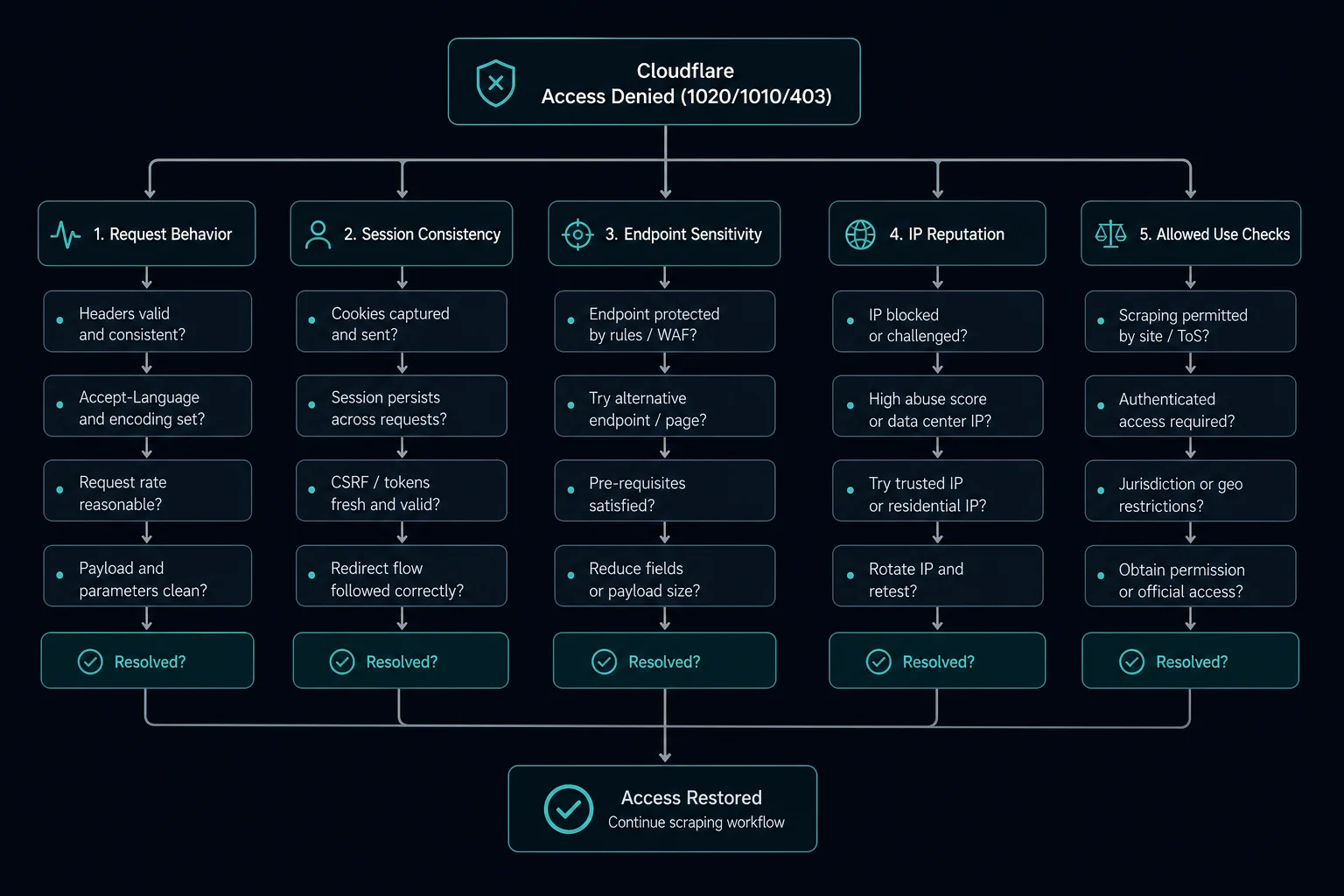
For scrapers and monitors, 1020 means a rule matched your request. Rotating IPs straight away often hides the real cause.
- Confirm the target allows your use case and that you follow its terms.
- Capture a working request from a real browser and the failing request from your client. The HAR analyzer helps you compare headers, cookies, and redirects side by side.
- Make the headers match the client you claim to be. A Chrome User-Agent with missing
Accept-LanguageorSec-Fetch-*headers is easy to flag. Our guide to web scraping headers lists what real browsers send. - Keep cookies and sessions between requests instead of starting fresh each time.
- Lower your rate, add jitter, and stop instant retries after a block.
- Then test IPs. Send the same request through two or three proxy types. If one network fails and another passes, IP reputation or ASN is part of the rule.
If the same request works from your home connection but fails through your proxy, the proxy network is likely flagged. If it fails from every network, fix the request itself.
When proxies help with error 1020
Proxies help only when the rule uses IP signals: a blocked country, a blocked hosting ASN, or poor IP reputation. They do not help when the rule matches your headers, path, or bot score.
| Proxy type | Helps when | Tradeoff |
|---|---|---|
| Residential proxies | The rule blocks hosting ASNs or needs a specific country | Usually priced by bandwidth, and slower than ISP proxies |
| ISP proxies | You need stable, fast IPs for sessions and retail monitoring | Fewer IPs to rotate than a residential pool |
| Datacenter proxies | The site does not filter hosting networks | Often the first thing a 1020 rule blocks |
Test with a small controlled run. Keep the URL, headers, cookies, rate, and session logic the same, and change only the proxy pool. That tells you whether the IP is the trigger.
How to prevent error 1020 in automation
- Keep headers, User-Agent, and TLS client consistent within a session.
- Use conservative delays with jitter.
- Reuse sessions where a real browser would.
- Track block rates by proxy pool and by endpoint.
- Keep login, search, and cart endpoints on slower schedules than public pages.
- Remove IPs that keep getting blocked instead of retrying them.
For retail and drop monitoring, the delay calculator helps you size the proxy list to your delay, so each IP sends fewer requests.
FAQ
What does Cloudflare error 1020 access denied mean?
It means a firewall rule (now called a WAF custom rule) that the site owner created matched your request, and Cloudflare blocked it before it reached the site.
Why do I get error code 1020 with a VPN?
The site likely blocks the VPN's country, its network (ASN), or its IP reputation. Disconnect the VPN or pick a server in your own country.
Does error 1020 go away by itself?
Usually not. The rule stays until the owner changes it. It only clears if something about your request changes, such as your IP, country, or browser.
Is error 1020 caused by my proxy?
Sometimes. If the same request works without the proxy and fails through it, the proxy's IP reputation, ASN, or location probably matches the rule.
Can I fix error 1020 by changing my User-Agent?
Only if the rule matches the User-Agent or a mismatched browser profile. The user agent checker shows what your client sends. If the rule matches your IP or country, a new User-Agent changes nothing.
What is a Cloudflare Ray ID?
A Ray ID is a unique ID that Cloudflare gives each request. The site owner searches for it in Security Events to find the blocked request and the rule behind it.
Final thoughts
Error 1020 is a deliberate block by the site owner, not an outage. Visitors should drop the VPN and send the Ray ID to the owner. Owners should find the event in Security Events and narrow the rule. Scrapers should fix the request first and test IPs second.
Technical reference: Cloudflare error 1020 documentation.