Cloudflare error 1005 "Access denied: Autonomous System Number (ASN) banned" means the website owner blocked the network you connect from. Cloudflare maps your IP address to its ASN, finds a block rule for that ASN, and stops the request at its edge. The request never reaches the website's server.
An ASN identifies one network operator, such as an ISP, a mobile carrier, a cloud host, a VPN service, or a proxy provider. Error 1005 does not mean the site is down. It means the site does not accept traffic from your network.
Quick fix:
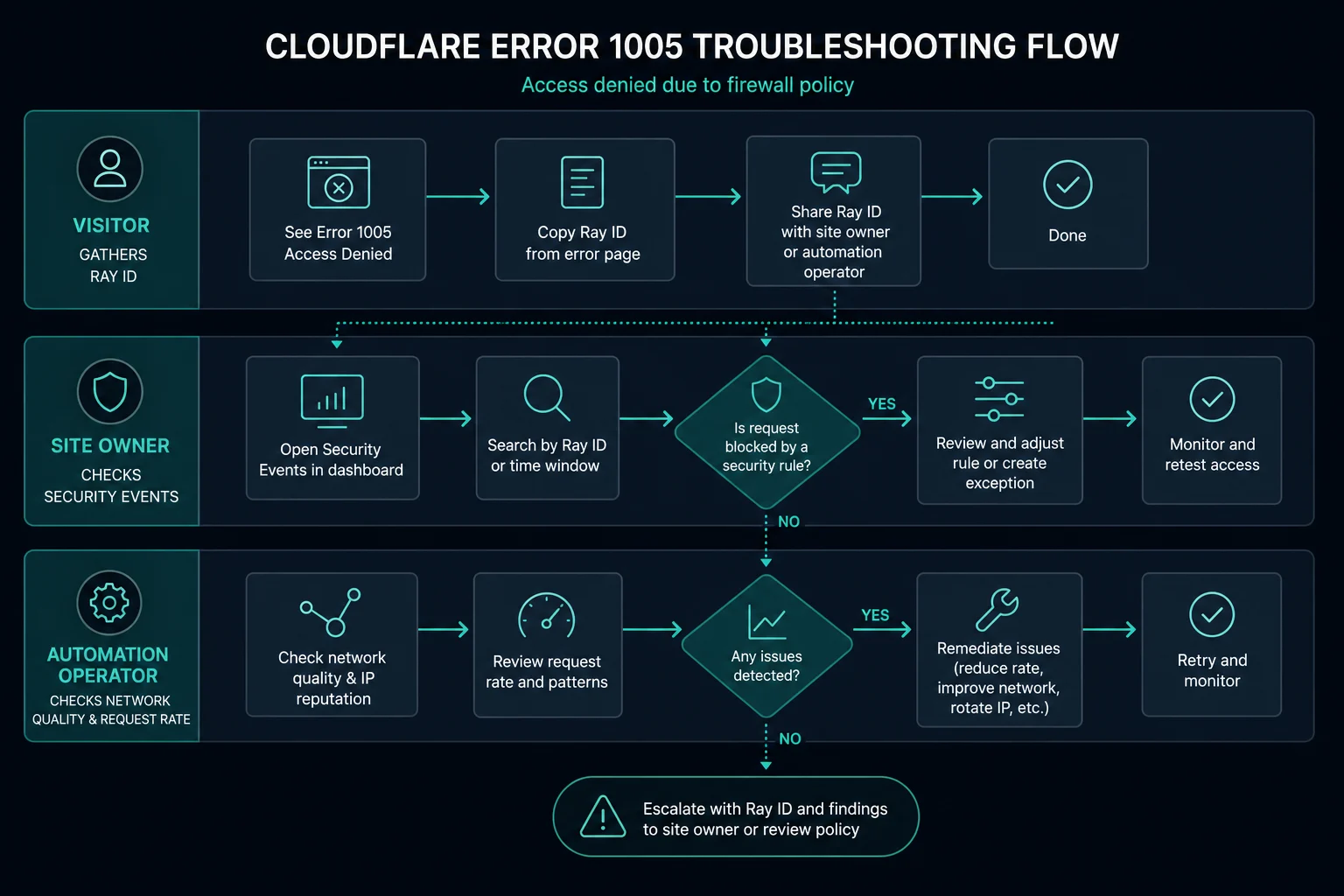
- Visitor: Turn off your VPN or proxy, or switch to another network such as mobile data. If the error stays, send the site owner a screenshot that shows the Ray ID.
- Site owner: Search Security Events for the Ray ID or client IP. Then remove or narrow the ASN block in IP Access Rules or in your custom rules.
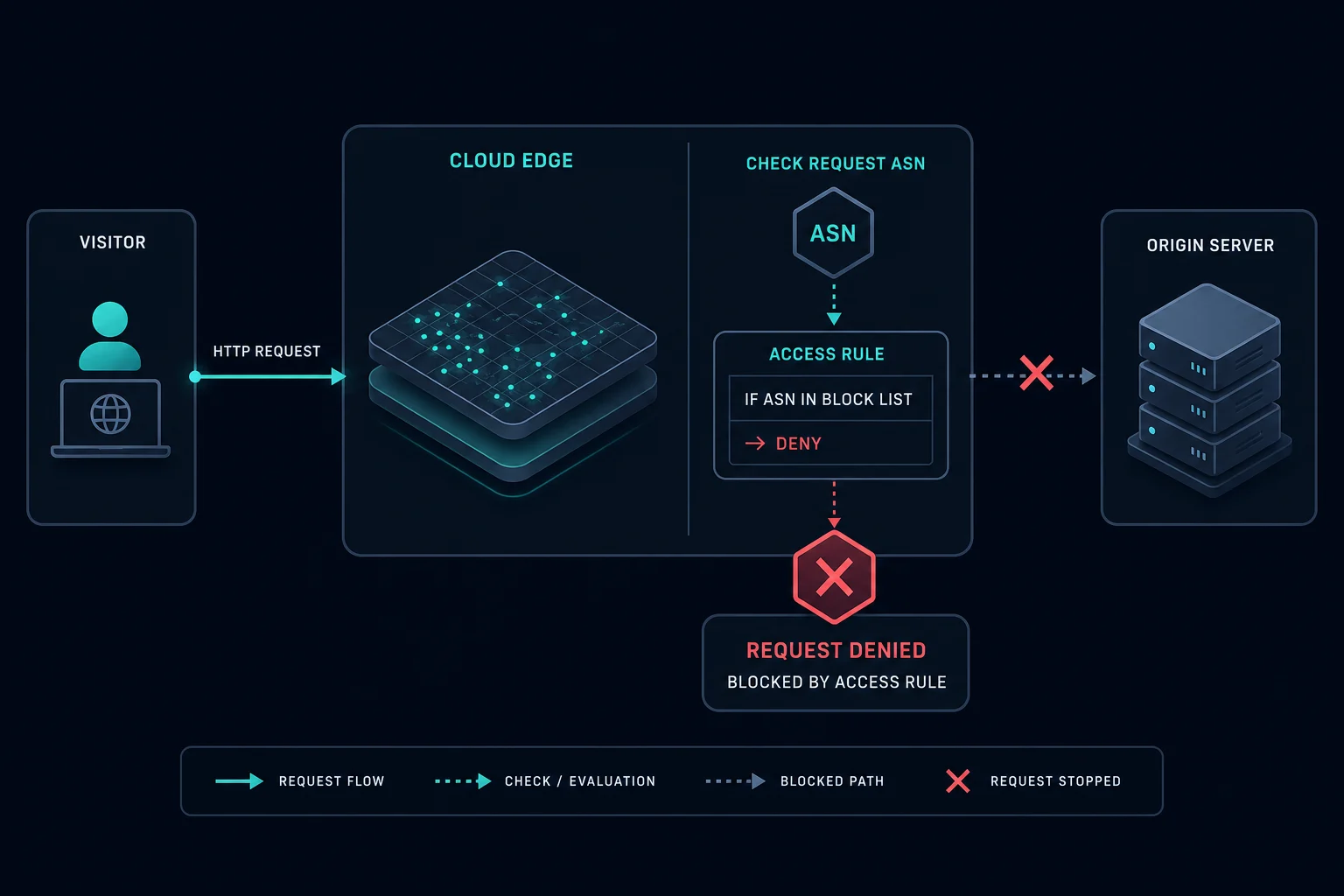
What error 1005 means
Cloudflare's documentation names the error "Access Denied: Autonomous System Number (ASN) banned" and gives one cause: the website owner blocked an ASN.
The request path is short:
- You request a page on a site that uses Cloudflare.
- Cloudflare reads your IP address and looks up its ASN.
- The ASN matches a block rule that the site owner set.
- Cloudflare returns error 1005. The origin server never sees the request.
Because the block happens at Cloudflare, the site owner will not find your request in their own server logs. They must look in Cloudflare Security Events.
How to find your ASN
You need your ASN to confirm the block and to explain it to the site owner. Run this from the same device and network that got the error:
curl https://ipinfo.io/json
The org field shows the ASN and the network name, for example "org": "AS64496 Example Telecom". You can also open the same URL in a browser.
If the ASN belongs to a VPN, a cloud host, or a proxy provider, that network is the likely target of the ban. If the ASN belongs to your home ISP or mobile carrier, the site owner may have blocked a whole consumer network by mistake.
Error 1005 vs. 1020 vs. 403
These errors all deny access, but they come from different rules.
| Error | What blocked you | Where the owner looks |
|---|---|---|
| Error 1005 | A ban on your network's ASN | IP Access Rules and Security Events |
| Cloudflare error 1020 | A firewall or custom rule | Security Events, matched rule, request fields |
| HTTP 403 Forbidden | The server, app, CDN, or WAF refused the request | Auth, permissions, WAF, and app logs |
Error 1005 is about network identity only. Error 1020 can match many signals, such as country, path, headers, or bot score. If the owner blocks an ASN with a custom rule instead of an IP Access Rule, visitors usually see 1020, not 1005.
How to fix error 1005 as a visitor
You cannot remove an ASN ban yourself. The site owner controls the rule. You can test whether your network is the cause:
- Turn off any VPN, proxy, or privacy relay.
- Load the page from another network, for example mobile data instead of office Wi-Fi.
- If the page loads on the other network, your first network's ASN is banned.
- If you need access from the blocked network, contact the site owner.
Send the owner:
- A screenshot of the error 1005 page with the Ray ID
- The URL and the time, with your timezone
- Your ASN and network name from the
ipinfo.iocheck - Whether you used a VPN, proxy, or work network
Do not refresh many times. The block will not change, and repeated requests make the owner's logs harder to read.
How to fix error 1005 as a website owner
Cloudflare's steps are:
- Get the screenshot of the 1005 error from the visitor.
- Search Security Events by Ray ID or client IP. Convert the visitor's time to UTC or to your timezone first.
- Find the rule that blocked the request. Confirm whether the ASN should be allowed in your IP Access Rules.
If the ASN block is too broad, change it:
- Remove the block if the ASN is a normal ISP or mobile carrier.
- Change the action from Block to a challenge if you are not sure the traffic is abuse.
- Block only specific IPs or ranges that sent the abuse.
- Limit the rule to the paths that need protection, such as login or checkout.
Cloudflare now recommends custom rules over IP Access Rules for this kind of control. A custom rule can match the ASN field and other fields together. This example matches one ASN:
(ip.src.asnum eq 64496)
Combine it with a path or method check to keep the rule narrow.
Error 1005 in scraping and automation
For scraping, price monitoring, and retail bots, error 1005 means the target does not trust the network that carries your traffic. Common examples are cheap datacenter ranges, overused VPN exits, and abused public proxy pools. The residential sneaker proxy setup guide explains how to spread subnet and ASN risk across a bot setup.
Before you change networks, check:
- Does the site allow your use case in its terms?
- Does the same request work from a normal browser on a home connection?
- Does only one provider network fail, or do all networks fail?
- Are you sending bursts or tight retry loops from one ASN?
If only one network fails, the ASN ban is the trigger. If every network fails, the cause is more likely your request pattern or a broader rule, and you will often see 1020 or 403 instead.
When proxies help with error 1005
A different proxy network helps only when the site bans the ASN you use now and allows your activity. Moving from a banned datacenter ASN to an ISP or residential network changes the ASN that Cloudflare sees.
ISP proxies give static IPs that suit long sessions on one account. Residential proxies give rotating IPs on consumer networks, which suits broad monitoring and geo testing. Both are on different ASNs from typical datacenter and VPN ranges.
A new network does not fix a block on your activity itself, missing permission, or rules that block every proxy. If the owner bans your behavior, changing IPs is not the fix.
How to prevent error 1005
For site owners:
- Block a full ASN only when the abuse clearly comes from that network.
- Prefer scoped custom rules by path, rate, or behavior.
- Use a challenge action when the signal is uncertain.
- Review Security Events before you add a new ASN block.
- Publish a contact path for users who get blocked.
For automation teams:
- Spread traffic across more than one network.
- Keep request rates low and back off after an access error.
- Log blocks by ASN and endpoint, so you can see which network fails.
FAQ
What does error 1005 access denied mean?
It means Cloudflare blocked your request because the website owner banned the ASN of your network.
What is an ASN ban on Cloudflare?
An ASN ban is a rule that blocks every IP address that belongs to one network operator. Site owners add it in IP Access Rules or in custom rules. One rule can block a whole ISP, cloud host, or VPN service.
Is error 1005 caused by my browser?
No. Cookies, extensions, and browser settings do not cause error 1005. The block depends only on the network your IP belongs to.
Is error 1005 the same as Cloudflare error 1020?
No. Error 1005 is an ASN ban. Error 1020 means a firewall or custom rule denied the request, and that rule can use many signals.
Can I fix error 1005 by changing proxies?
Sometimes. It works only if the banned ASN belongs to the proxy or VPN you use and the site allows your activity. If the site blocks your activity on purpose, a new IP is not the real fix.
Technical reference: Cloudflare error 1005 documentation.