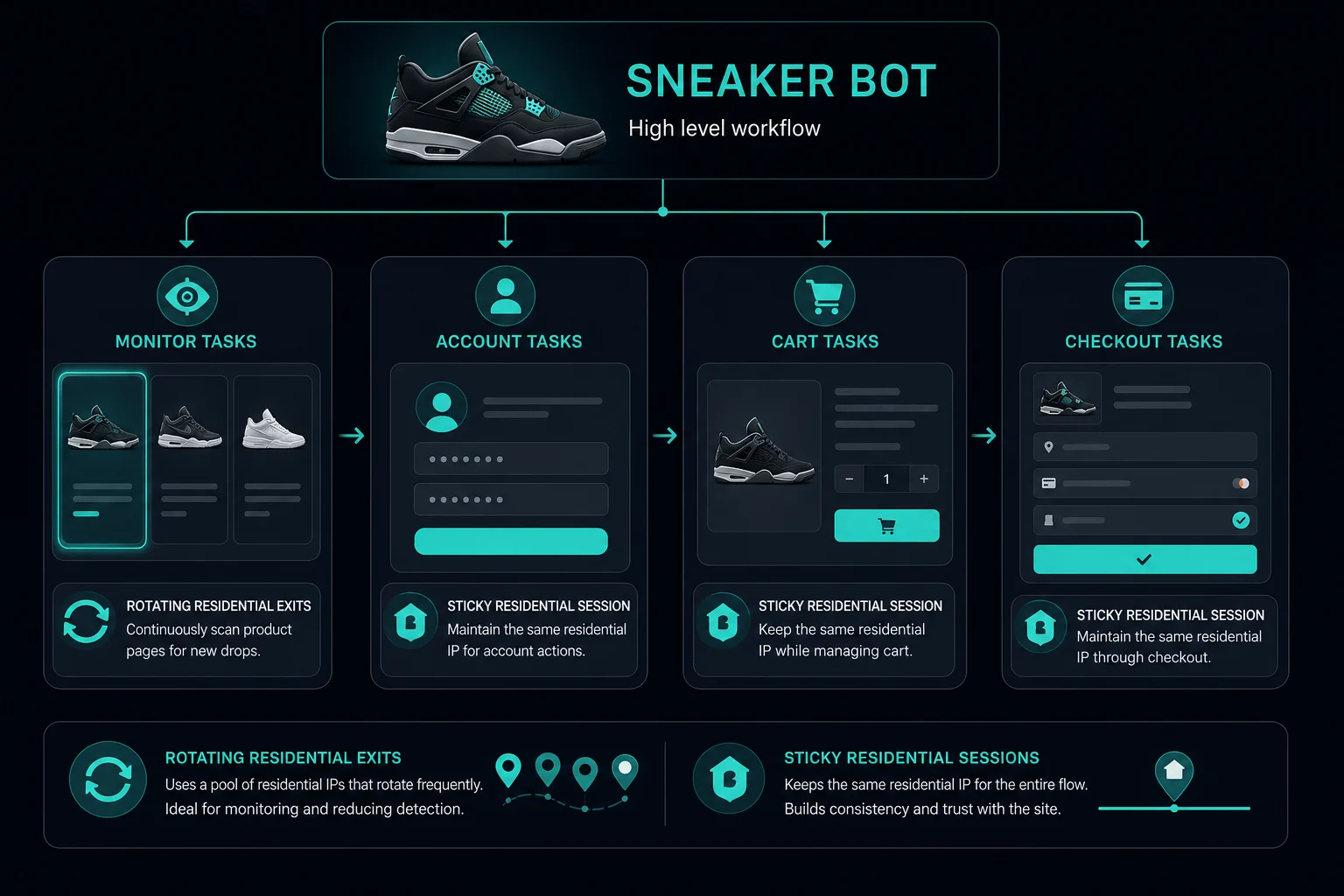
The best residential proxies for sneaker bots are the ones that match your task type: sticky residential sessions for accounts, carts, queues, and checkout; rotating residential sessions for independent product-page monitoring and geo checks. Residential IP reputation helps, but session consistency and delays are what keep a setup usable.
For sneaker bots, residential proxies are useful because they route traffic through residential IP space and can provide broad country, state, or city coverage. That does not mean you should rotate every request. A login or checkout flow usually needs one stable identity, while a public monitor can use rotation because each request stands alone.
If you are starting from zero, read what are sneaker proxies first. Then use this guide to choose residential session mode, assign proxies to tasks, calculate delays, and decide when residential pricing makes sense.
Best Residential Proxies for Sneaker Bots: Quick Answer
Choose residential proxies with four capabilities:
- Sticky session support for account, cart, queue, and checkout flows.
- Rotating session support for stateless monitoring.
- Region targeting only as specific as the retailer workflow needs.
- Clear bandwidth pricing so browser-heavy tasks do not surprise you.
Unknown Proxies residential plans support sticky and rotating sessions, HTTP(S) and SOCKS connections, country-level routing, and US state and city targeting. Compare residential proxy plans when your sneaker bot workflow needs rotating bandwidth or consumer-style IP reputation.
Use ISP proxies instead when you need fixed dedicated IPs, lower latency, or one-to-one stable retail monitoring. The ISP proxies vs residential proxies guide covers that category decision.
Why Sneaker Bots Use Residential Proxies
Sneaker bots create traffic patterns that normal browsing usually does not. A setup may monitor several SKUs, keep multiple accounts signed in, wait in queues, create carts, retry errors, and attempt checkout during a short release window.
Residential proxies help reduce the risk of sending all of that traffic from one IP address or one obvious hosting network. They can also help when you need a location-specific view of inventory, shipping, pricing, or queue behavior.
The key is that residential proxies are only one signal. Retailers may also evaluate cookies, account age, payment method, shipping address, browser fingerprint, request timing, and previous behavior. A residential proxy will not compensate for unrealistic task volume or a broken checkout profile.
Sticky Residential Sessions for Checkout
Use sticky residential sessions when one task needs to look like one continuous visitor.
Sticky sessions fit:
- Account login.
- Account checks.
- Queue or waiting room flows.
- Cart creation.
- Checkout.
- Cookie generation.
- Browser automation with saved profiles.
For these flows, keep the same proxy identity attached to the same account and browser profile. The practical mapping is one account, one cookie jar, one browser profile, and one sticky residential session.
Do not change the proxy in the middle of a cart or checkout flow unless you also reset the rest of the session. If the retailer sees old cookies from one IP and a checkout request from another unrelated IP, the task can trigger extra verification or fail silently.
Unknown Proxies sticky residential sessions rotate every 2 hours. That is usually enough continuity for short retail sessions, but long-running account workflows should still be tested before a real release.
Rotating Residential Proxies for Monitoring
Use rotating residential proxies when the request does not need to remember previous steps.
Rotating residential proxies fit:
- Public product-page monitoring.
- SKU availability checks without login.
- Regional catalog checks.
- Price checks.
- Lightweight stock checks.
Rotation spreads independent requests across the residential pool. That can reduce concentration when many product pages or SKUs are monitored, but it does not remove the need for delays.
If every monitor worker fires at the same moment, rotates aggressively, and retries immediately after errors, you can still trigger HTTP 429 Too Many Requests. Rotation is not a replacement for pacing.
Residential Proxy Setup for Sneaker Bots
Use this setup sequence:
- Split bot tasks by workflow: monitor, account, cart, checkout, and retry.
- Assign sticky residential sessions to workflows that need continuity.
- Assign rotating residential sessions to public monitoring that can stand alone.
- Set country, state, or city targeting only when it affects the retailer result.
- Keep cookies, account, browser profile, user agent, and proxy identity aligned.
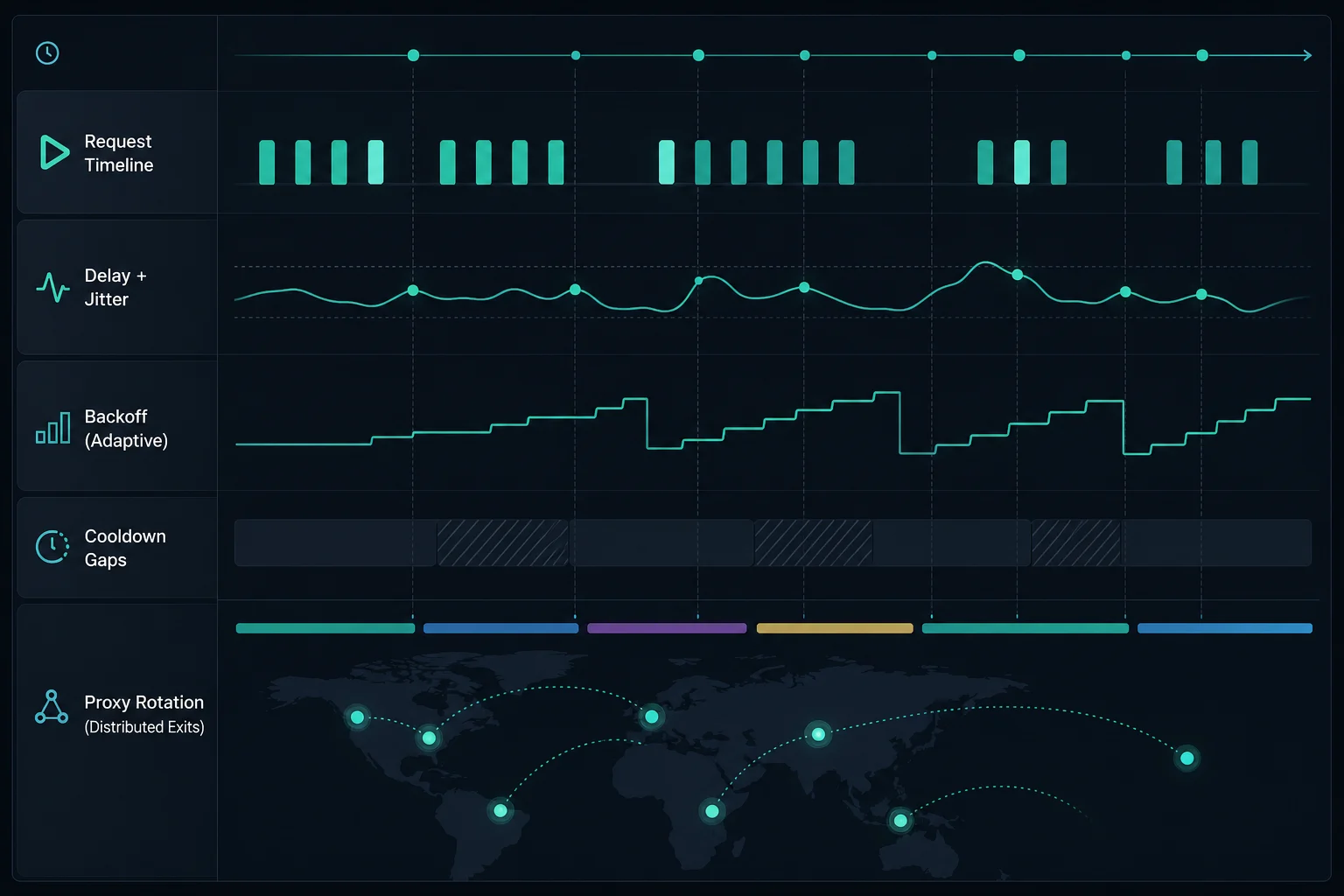
- Configure monitor delay, error delay, retry limits, and cooldowns.
- Log failures with proxy session, account, URL, status code, and timestamp.
This is the same discipline covered in the broader residential proxy setup guide. Sneaker bots are less forgiving because release windows are short, so bad assumptions show up quickly.
Rotation Tips That Prevent Broken Sessions
Residential rotation should match the task.
Good rotation patterns:
- Rotate public monitor requests where cookies are not reused.
- Keep one sticky session per account during login and checkout.
- Retire a session after repeated 403, 429, timeout, or challenge responses.
- Use cooldowns instead of immediate retries.
- Keep region targeting consistent inside a session.
Bad rotation patterns:
- Rotating on every checkout step.
- Sharing one logged-in account across many exits.
- Reusing cookies after changing proxy identity.
- Retrying failed checkout tasks through a new proxy without resetting state.
- Rotating because of every single error without checking the cause.
When in doubt, ask whether the next request depends on the previous request. If yes, keep the proxy sticky. If no, rotation may be useful.
Delay, Jitter, and Backoff
Delays are part of proxy setup, not an afterthought.
Define these values before scaling:
| Setting | Why it matters |
|---|---|
| Monitor delay | Controls how often each SKU or product page is checked |
| Error delay | Prevents instant retry loops after blocks or failures |
| Jitter | Stops tasks from firing in perfect sync |
| Backoff | Slows traffic after repeated errors |
| Cooldown | Gives struggling sessions time before reuse |
| Stop condition | Prevents a bot from burning bandwidth on a broken flow |
Use the delay calculator to estimate task-to-proxy sizing for monitoring. If the math says your proxy pool is too small for the delay and number of SKUs, increasing bot tasks will usually create more failures, not more success.
Bandwidth Planning for Residential Sneaker Proxies
Residential proxies are usually priced by bandwidth, so task design affects cost.
Lightweight product-page checks consume less data than full browser sessions. Checkout flows, images, scripts, queue pages, and repeated retries can use much more bandwidth. If your bot loads full pages instead of lean endpoints, plan for higher data usage.
To reduce wasted bandwidth:
- Test with a small task count before a release.
- Avoid unnecessary image and media loading when your tool supports it.
- Do not retry endlessly after errors.
- Separate monitor tasks from checkout tasks.
- Stop tasks that are repeatedly challenged or timing out.
- Review logs after each run and remove noisy SKUs or endpoints.
Compare residential pricing after you estimate page weight, task count, delay, and expected run time.
When Residential Proxies Are Not the Best Choice
Residential proxies are not always the default.
Use ISP proxies instead when:
- You need fixed dedicated IPs.
- Low latency matters more than broad rotation.
- A retailer workflow expects the same IP for long periods.
- You want one proxy per account or one proxy per monitor task.
- Bandwidth pricing is a poor fit for heavy browser automation.
Use datacenter proxies only when the target is permissive and does not heavily penalize hosting networks. For the full comparison, read datacenter proxies vs residential proxies.
The best sneaker setup may use more than one proxy type: ISP proxies for stable retail tasks and residential proxies for rotating monitor or geo workflows.
Troubleshooting Residential Sneaker Bot Errors
Do not diagnose every failure as a bad proxy.
Use this quick map:
| Symptom | Likely cause | First check |
|---|---|---|
| 429 or rate limit | Too many requests, low delay, aggressive retries | Increase delay and reduce concurrency |
| 403 or access denied | Session, reputation, policy, or request fingerprint issue | Check cookies, headers, account, and proxy reputation |
| Logged out mid-flow | Rotating or inconsistent identity | Use sticky session and stable browser profile |
| Cart disappears | Session mismatch or site-side cart rules | Keep account, cookies, proxy, and region stable |
| Bandwidth drains fast | Browser-heavy tasks or retry loops | Reduce media loading and stop repeated failures |
If you need the HTTP-level background, MDN's HTTP response status codes are useful for interpreting whether a failure is rate limiting, authorization, server error, or timeout behavior.
FAQ
What are the best residential proxies for sneaker bots?
The best residential proxies for sneaker bots support sticky sessions, rotating sessions, reliable regions, HTTP(S) or SOCKS formats, and transparent bandwidth pricing. The session mode matters more than the marketing label.
Should I use sticky or rotating residential proxies for sneaker bots?
Use sticky residential proxies for login, queues, carts, checkout, and account tasks. Use rotating residential proxies for public product monitoring or other independent requests.
How much residential bandwidth do sneaker bots use?
It depends on the bot, page weight, task count, runtime, retries, and whether full browser sessions load images and scripts. Start with a small run, review usage, then scale.
Are residential proxies better than ISP proxies for sneaker bots?
Not always. Residential proxies are better for rotation and location diversity. ISP proxies are often better for stable, low-latency retail sessions. Test based on the retailer and task type.
Can rotating residential proxies improve checkout success?
Usually not by themselves. Checkout is a session-sensitive flow, so rotating mid-checkout often hurts more than it helps. Use sticky sessions or ISP proxies for checkout tasks.
Final Thoughts
The best residential proxies for sneaker bots are not just the biggest pool. They are residential proxies configured with the right session mode, delay, region, and task mapping.
Use sticky residential sessions for accounts, carts, queues, and checkout. Use rotating residential proxies for independent monitoring. Keep bot behavior realistic, respect retailer rules, size monitoring with the delay calculator, and compare residential proxy pricing when bandwidth-based access fits the workflow.
Technical references: MDN Proxy servers and tunneling, MDN HTTP cookies, and RFC 6585 section 4 for HTTP 429.