Sneaker proxies are proxies used for retail drops, restock monitoring, account session, cart and checkout flows where request timing and session consistency matter. The right setup is usually ISP proxies for stable, account-sensitive workflows and residential proxies for broader rotation, location diversity, or public-page monitoring.
The proxy does not guarantee checkout success. Drops are competitive, retailers enforce rules, and poor task setup can trigger rate limits, account checks, or failed sessions even with clean proxies. Treat proxies as infrastructure: they help distribute legitimate traffic and keep sessions consistent when your workflow is designed well.
If you are setting up Refract for Target, read the Refract Bot Target guide for the tool-specific walkthrough. This article focuses on the broader sneaker proxies decision: ISP vs residential, sticky vs rotating, delay sizing, and profile-to-proxy mapping.
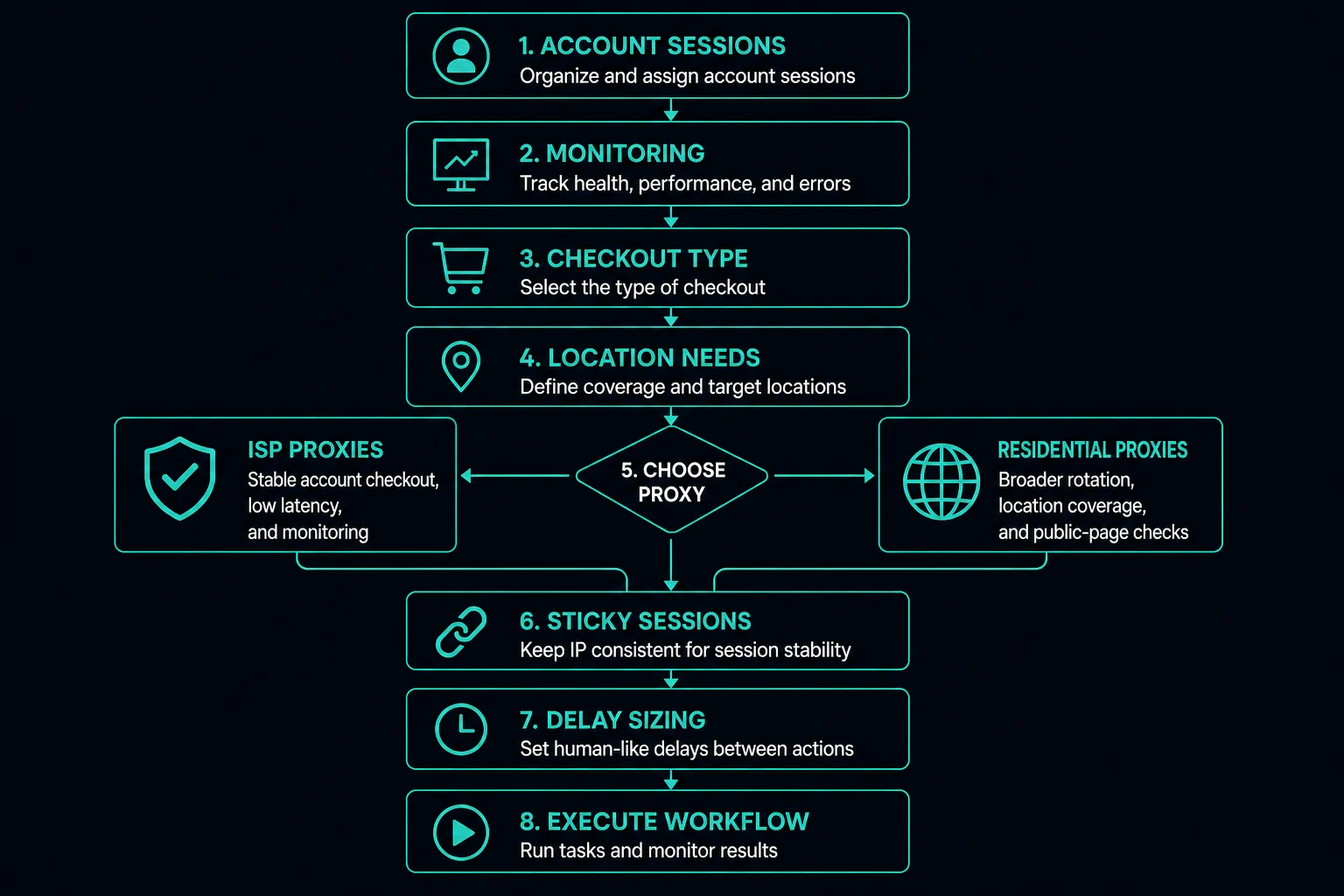
Sneaker Proxies: Quick Setup
Use the workflow to choose the proxy type:
| Drop workflow | Better starting point | Why |
|---|---|---|
| Account login and profile tasks | ISP proxies or sticky residential | Stable identity keeps account, cookies, and proxy aligned |
| Cart, queue, checkout, or payment flow | ISP proxies | Dedicated IPs and low latency usually matter |
| Product monitoring from fixed regions | ISP proxies | Fast repeated checks and predictable assignment |
| Public product-page checks across locations | Residential proxies | Rotation and location targeting help broader coverage |
| Cookie harvesting or browser profile work | ISP or sticky residential | Do not rotate identity mid-session |
| High-volume stateless page checks | Residential or datacenter, target-dependent | Choose based on block rate, location, and cost |
For stable dedicated IP workflows, compare ISP proxy pricing. For rotating pool access and location coverage, compare residential pricing.
ISP vs Residential Sneaker Proxies
ISP proxies are usually the first choice for session-sensitive retail bot workflows. They are static, fast, and easier to map to accounts, profiles, and tasks.
Use ISP proxies when:
- You run account-based tasks.
- You need one proxy per account, profile, or task.
- Checkout speed matters.
- The workflow should keep the same IP through login, cart, and checkout.
- You want predictable proxy count and duration.
- You are monitoring the same SKUs repeatedly.
Residential proxies are useful when you need broader pool diversity.
Use residential proxies when:
- You need country, state, or city-level targeting.
- You are checking public product pages without login state.
- You need rotating consumer-style IPs for stateless requests.
- You want pool access rather than a fixed list of dedicated IPs.
- You are testing localized availability, pricing, or catalog views.
For session settings, task assignment, and bandwidth planning, use the residential proxy setup guide for sneaker bots.
For a direct category comparison, read ISP proxies vs residential proxies. The short version: ISP proxies fit stable sessions and speed; residential proxies fit broad rotation and location diversity.
Sticky vs Rotating for Drops
Sneaker proxies fail when the session mode does not match the workflow.
Use sticky sessions when:
- The task logs in.
- Cookies are reused.
- A profile stays active across multiple requests.
- The workflow enters a cart or checkout path.
- The same account should keep one identity.
Use rotating sessions when:
- Each request is independent.
- No cookies or account state need to persist.
- You are checking public pages.
- You need many locations or exits.
- You are not carrying a browser session across requests.
The sticky vs rotating proxies guide covers this decision in more detail. For drops, default to stability for anything account or checkout related.
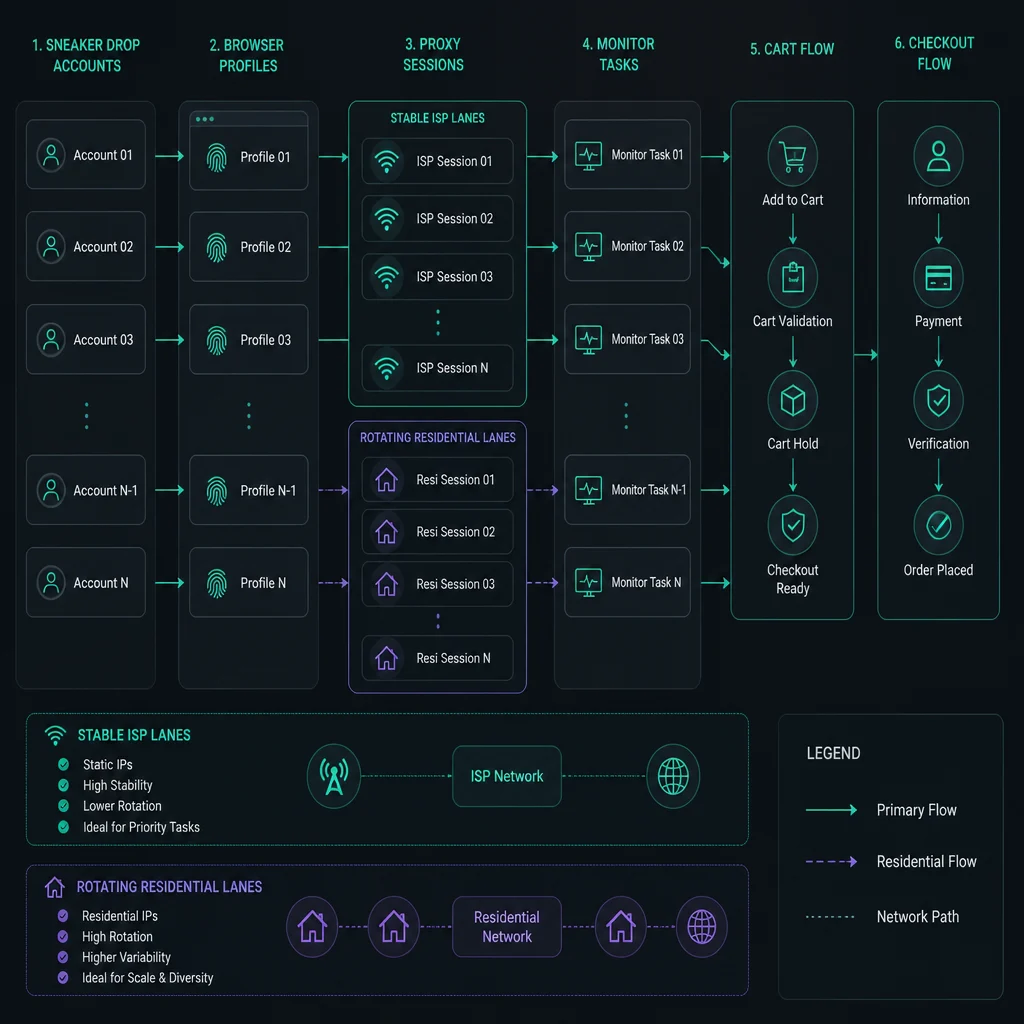
Proxy-to-Task Ratios
The right ratio depends on the site, bot, delay, account count, and endpoint sensitivity. A simple starting point is to avoid stacking too many active tasks on one proxy identity.
Use these principles:
- Map account tasks to stable proxy identities.
- Keep browser profiles and cookies tied to the same proxy session.
- Do not run every monitor through one IP.
- Add headroom for retries, login refreshes, and failed sessions.
- Use lower delays only after a slower test is stable.
- Watch 429, 403, timeout, and checkout failure rates by proxy.
For monitoring-style sizing, use the delay calculator. If the delay is too low for your task count and proxy pool, rate limits are expected.
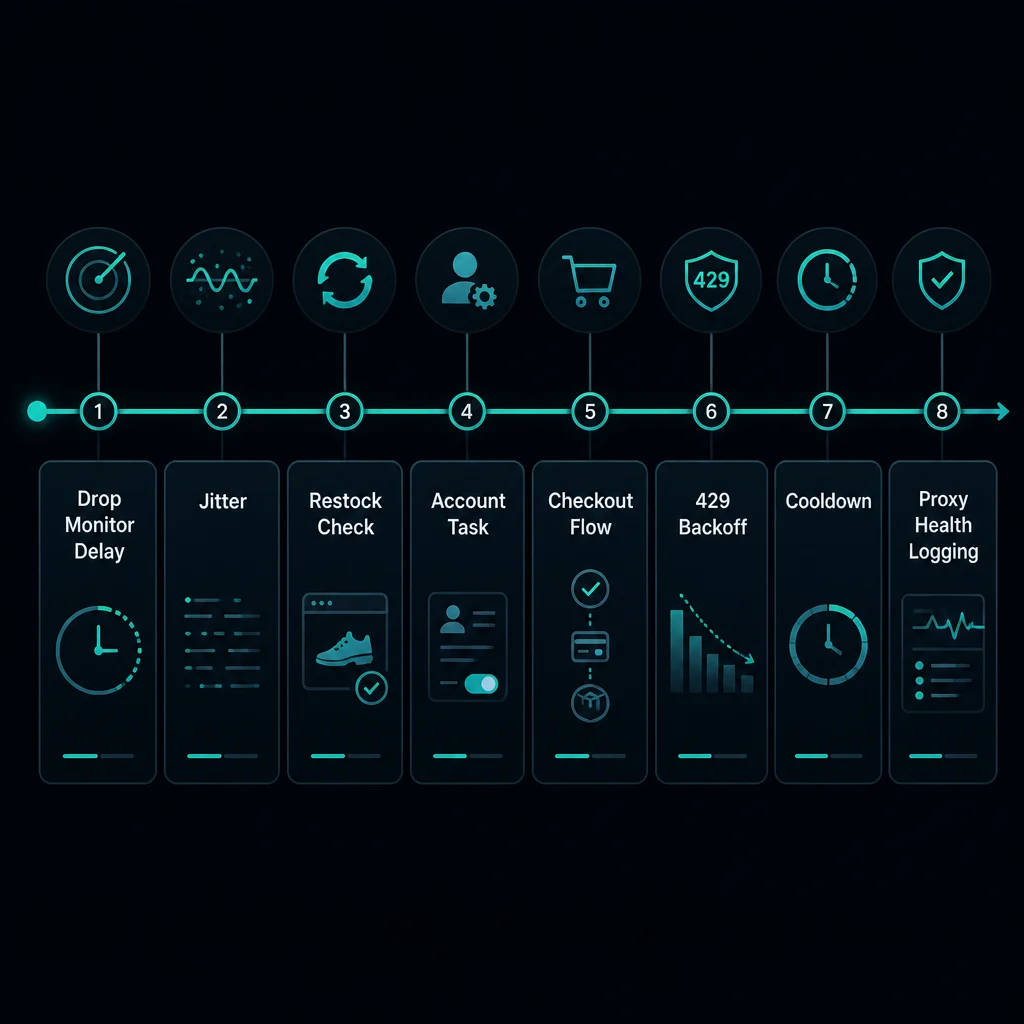
Monitor Delays and Backoff
Delay settings matter as much as proxy quality.
For retail drops, avoid synchronized traffic patterns:
- Set a conservative monitor delay.
- Add jitter if your tool supports it.
- Avoid starting every task at the exact same second.
- Back off after 429, 403, timeout, or WAF responses.
- Separate monitor tasks from checkout tasks.
- Reduce concurrency before replacing the whole proxy list.
If a slower setup works and a faster setup fails, the problem is usually request pressure. Better proxies can reduce false positives, but they cannot make an unsafe request rate safe.
Account and Profile Mapping
Treat proxy assignment as part of account state.
For account workflows:
- One account should map to one browser profile.
- One browser profile should map to one proxy identity.
- Cookies should stay with the same proxy identity.
- Checkout tasks should not rotate mid-flow.
- If you change the proxy, start a fresh session.
This is why ISP proxies are common in sneaker and retail bot setups. They are easier to assign, monitor, and replace when each account needs a stable route.
Residential proxies can still work when sticky sessions are configured correctly. Rotating residential mode is better for independent monitoring than for account continuity.
Refract and Target Setup Notes
For Refract on Target, the Refract Bot Target guide walks through profiles, proxy groups, tasks, delay calculator usage, and cookie harvesting.
The broader proxy principles are the same:
- Use stable proxies for account and checkout workflows.
- Keep task, account, profile, and proxy assignments consistent.
- Size proxy count around task count and delay.
- Do not rotate identity during login or cookie harvesting.
- Log failures by account, proxy, SKU, and task.
Target-style retail workflows tend to punish noisy setup more than a single isolated request. Keep changes small and measurable.
Common Sneaker Proxy Mistakes
Avoid these patterns:
- Using rotating residential proxies for checkout without sticky sessions.
- Reusing cookies after switching proxy identity.
- Running too many monitors through one proxy.
- Ignoring 429s and retrying immediately.
- Mixing account tasks and monitor tasks without separate pacing.
- Choosing a proxy type before testing the target at low concurrency.
- Buying more proxies before checking delay, account health, or task mapping.
- Treating proxies as a way around retailer rules.
Most drop issues need logs, not guesses. Track proxy, account, profile, SKU, task, status code, and timestamp.
Choosing a Plan
Choose the plan around the job:
| Need | Better fit |
|---|---|
| Stable account sessions | ISP proxies |
| Fast repeated SKU monitoring | ISP proxies |
| Broad rotating public-page checks | Residential proxies |
| Location-sensitive catalog checks | Residential proxies |
| Mixed account and public-page workflows | ISP for accounts, residential for stateless checks |
If you are unsure, start with the smallest setup that can test the workflow. Scale after you know whether the bottleneck is proxy reputation, session consistency, delay, account quality, or target policy.
FAQ
What are sneaker proxies?
Sneaker proxies are proxies used for sneaker and retail bot workflows such as monitoring, account sessions, carts, queues, and checkout tasks.
Are ISP proxies better for sneaker drops?
ISP proxies are usually better for account, cart, checkout, and repeated monitoring workflows because they are stable and fast. Residential proxies are better when you need broad rotation or location diversity.
Should sneaker proxies be sticky or rotating?
Use sticky or static sessions for login, profiles, carts, queues, and checkout. Use rotating sessions only for independent public-page checks that do not reuse cookies.
How many sneaker proxies do I need?
It depends on task count, accounts, SKUs, delay, retries, and target sensitivity. Use the delay calculator for monitoring-style sizing, then test at low concurrency.
Do sneaker proxies guarantee checkout success?
No. Proxies are only one part of the setup. Bot configuration, account health, delays, target rules, payment behavior, stock, and competition all matter.
Final Thoughts
Sneaker proxies should match the drop workflow. Use ISP proxies for stable account sessions, repeated monitoring, carts, queues, and checkout paths. Use residential proxies for broader rotation, location coverage, and stateless public-page checks.
For Target-specific setup, read the Refract Bot Target guide. For session design, read sticky vs rotating proxies. For plan comparison, start with ISP pricing or residential pricing.
Technical references: MDN Proxy servers and tunneling, MDN HTTP 429 Too Many Requests, and RFC 9110 HTTP Semantics.