Cloudflare error 521 "Web server is down" means the origin web server refused the connection from Cloudflare. Cloudflare is working. Your server either is not running or is rejecting Cloudflare's IP addresses.
Cloudflare names two common causes: the web server application is offline, or a security tool on the origin blocks Cloudflare requests.
Quick fix for site owners:
- Confirm the web server process runs, for example with
systemctl status nginx. - Confirm it listens on the port your SSL/TLS mode uses: port 80 for Flexible, port 443 for Full and Full (strict).
- Allow all Cloudflare IP ranges in your firewall and security tools. Make sure nothing rate limits them.
- Test the origin directly with
curl --resolve(see below).
Visitors: refresh once and wait a few minutes. You cannot fix a 521 from your side. If it continues, tell the site owner.
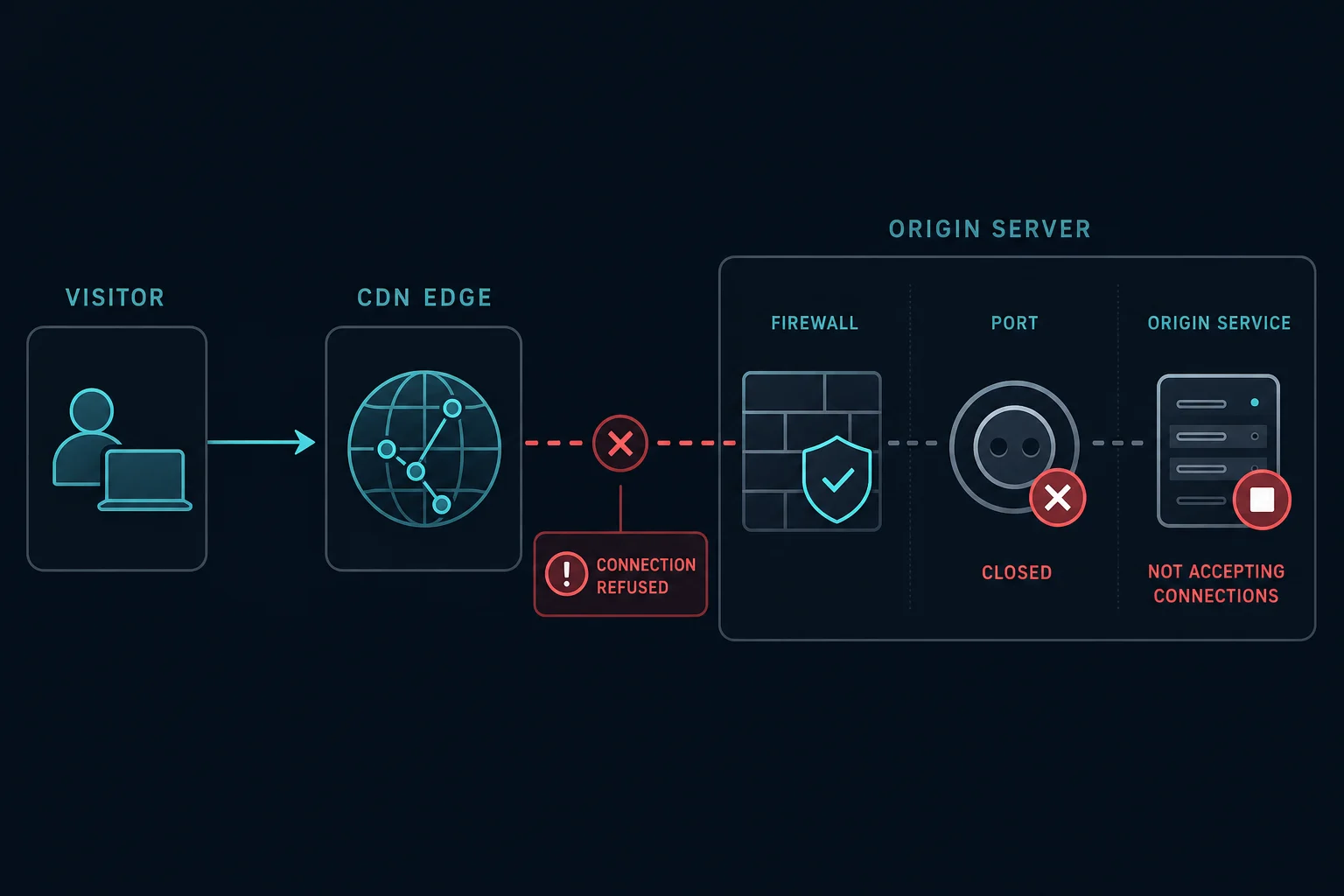
What "connection refused" means in error 521
A refused or rejected connection is an active answer. Cloudflare sends a TCP connection request, and the origin side answers with a reset or a firewall reject. This happens when:
- No process listens on the port, so the operating system resets the connection.
- A firewall rule rejects Cloudflare's IP address.
- A security tool, such as fail2ban or a hosting DDoS filter, banned Cloudflare IPs.
A timeout is different. If packets are dropped and nothing answers, Cloudflare shows error 522 instead. That is why a "521 connection rejected" search usually ends at a stopped service or a firewall reject rule.
Error 521 vs. 522 vs. 523
| Error | What happened | First check |
|---|---|---|
| 521 | The origin refused the connection | Web server running, port open, Cloudflare IPs allowed |
| 522 | The connection attempt timed out | Firewall drops, overload, network path |
| 523 | Cloudflare cannot reach the origin at all | DNS A/AAAA record, routing, origin IP |
Restarting the web server can fix 521. It will not fix a wrong DNS record (523) or a firewall that silently drops packets (522). If the site runs behind Cloudflare Tunnel, a stopped cloudflared connector shows error 1033 instead of 521.
How to fix error 521 as a website owner
Work from the server outward.
1. Check that the web server runs.
sudo systemctl status nginx
Use apache2, httpd, caddy, or your app service name if you do not use Nginx. If the service stopped, read the error log before you restart it. A crash loop, a bad config, or a full disk will stop it again.
2. Check that it listens on the right port.
sudo ss -tlnp | grep -E ':(80|443)\b'
You need a listener on port 443 if Cloudflare uses Full or Full (strict) mode. Flexible mode connects on port 80. A common 521 cause is Full mode with no HTTPS listener on the origin. In that case, install a certificate on the origin, for example a free Cloudflare Origin CA certificate, and enable HTTPS.
3. Test the origin directly. This command connects to your origin IP but sends the real hostname. Replace example.com and 203.0.113.10 with your values:
curl -v --resolve example.com:443:203.0.113.10 https://example.com/
Connection refusedmeans nothing listens on 443, or a firewall rejects you.- A normal response means the server works. If Cloudflare still shows 521, the origin probably blocks Cloudflare IPs only.
- A long wait that ends in a timeout points to 522, not 521.
For Flexible mode, test port 80 with curl -v --resolve example.com:80:203.0.113.10 http://example.com/.
4. Allow Cloudflare IP addresses. Cloudflare publishes the current IPv4 and IPv6 ranges at https://www.cloudflare.com/ips/. Add them to every layer that filters traffic:
- The host firewall, such as
ufw,firewalld, oriptables - Cloud security groups and provider firewalls
- fail2ban, ModSecurity, and WordPress security plugins
- Hosting DDoS or rate-limit filters
With ufw, this loop allows all IPv4 ranges on port 443:
for ip in $(curl -s https://www.cloudflare.com/ips-v4); do sudo ufw allow from "$ip" to any port 443 proto tcp; done
Repeat with https://www.cloudflare.com/ips-v6 if your origin has an AAAA record. For fail2ban, check the active bans with sudo fail2ban-client status <jail> and look for Cloudflare addresses.
5. Check limits and load balancers. An overloaded server can refuse new connections. Check connection limits, worker limits, and memory. If a load balancer sits in front of the app, confirm it has healthy backends.
6. Ask the host. If all checks pass, contact your hosting provider with the time and Ray ID. Ask them to review the origin error logs and any network filter in front of your server.
How to fix error 521 as a visitor
- Refresh the page once.
- Wait a few minutes.
- Contact the website owner if the error stays.
Error 521 is not caused by your browser, your IP, or too many refreshes. It is a site-side problem.
Can proxies fix error 521?
No. Error 521 is about the connection between Cloudflare and the origin. Your IP is not part of that connection, so a new proxy changes nothing.
If you scrape or monitor a site and see 521, treat it as downtime on the target. Pause or slow down, and do not retry in a tight loop. Log 521 apart from access blocks so the two do not mix in your metrics.
How to prevent error 521
- Monitor the web server process and alert when it stops.
- Alert when ports 80 or 443 stop accepting connections.
- Keep Cloudflare IP ranges allowlisted, and update them when Cloudflare changes the list.
- Exclude Cloudflare IPs from fail2ban and automatic ban tools.
- Watch memory, CPU, disk, and connection limits.
- Confirm the SSL/TLS mode still matches the origin after a migration.
FAQ
What does Cloudflare error 521 mean?
It means the origin web server refused Cloudflare's connection. The server is offline, not listening on the port, or blocking Cloudflare.
What does "web server is down, origin refused connection" mean?
It is the same error. Cloudflare reached the origin IP, but the origin rejected the connection instead of serving the page.
Is error 521 a Cloudflare outage?
No. Cloudflare returns the error page, so Cloudflare works. The fault is on the origin server or its firewall.
Can a firewall cause error 521?
Yes. A firewall or security plugin that blocks Cloudflare IP ranges is one of the two main causes Cloudflare lists.
Is error 521 the same as error 522?
No. Error 521 means the origin refused the connection. Error 522 means the connection attempt timed out.
Technical reference: Cloudflare error 521 documentation.