Cloudflare error 523 "Origin is unreachable" means Cloudflare cannot contact your origin web server. The cause is almost always a wrong IP address in DNS or a routing problem between Cloudflare and your server. Your app code is rarely involved.
Quick fix for site owners:
- Open Cloudflare DNS and check the A and AAAA records. They must point to the current public IP of your origin.
- If you moved hosts or your server got a new IP, update every record that still uses the old IP.
- Remove an AAAA record if your origin does not serve the site over IPv6.
- On AWS, check that no VPC route table sends
172.64.0.0/13to a private destination. - If DNS is correct, ask your host for an MTR or traceroute from the origin to a Cloudflare IP.
Visitors: wait a few minutes and try again. If the error stays, tell the site owner. Nothing in your browser causes or fixes a 523.
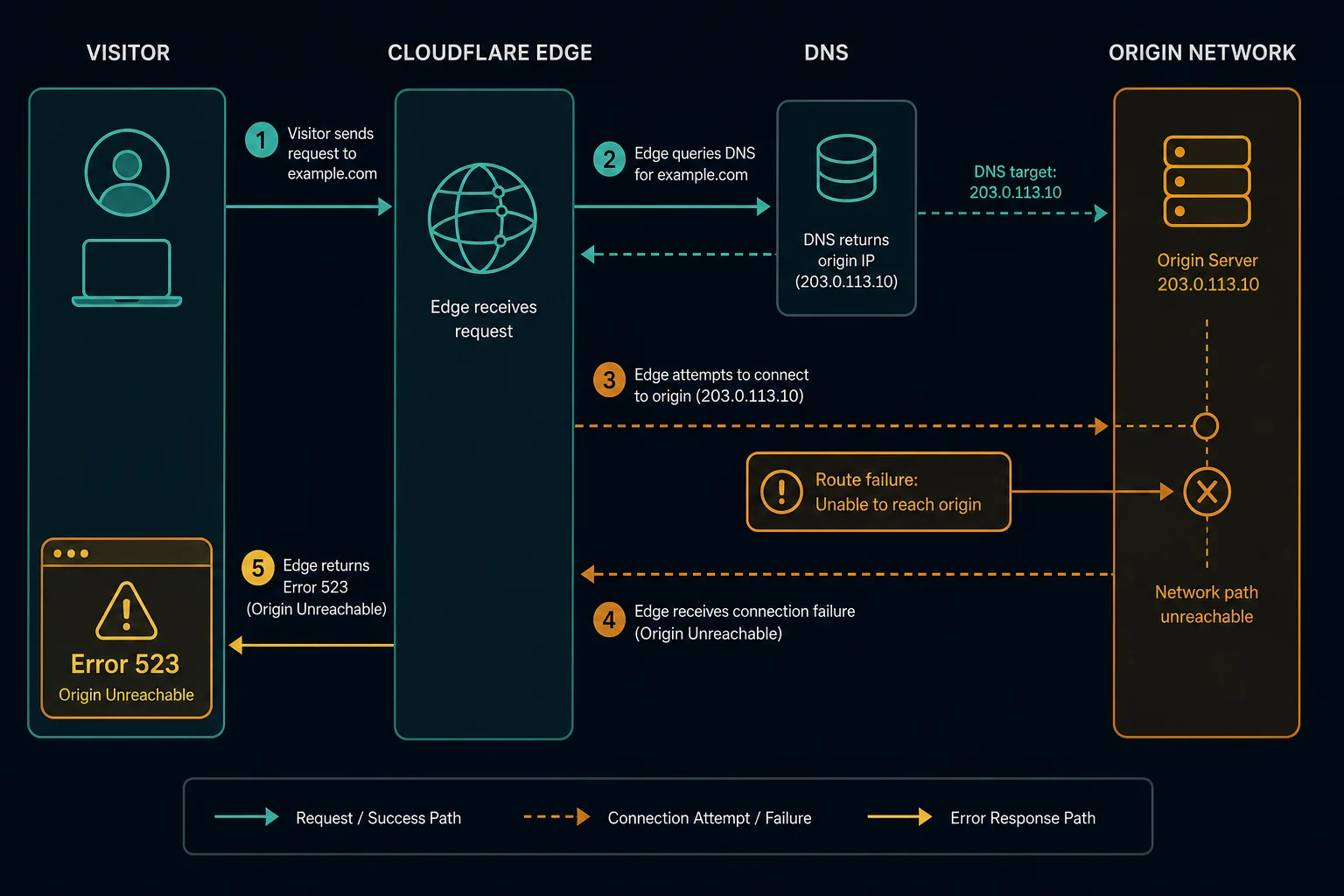
What error 523 means
Cloudflare's documentation says error 523 occurs when Cloudflare cannot contact your origin web server. The main cause is a network device that has no correct route to the origin's IP address.
In practice, three things cause most 523s:
- Wrong origin IP. The A or AAAA record points to an old, private, or wrong address.
- Origin IP changed. A migration, a new VPS, or a cloud instance restart gave the server a new public IP, and DNS still has the old one.
- Routing problem. A router, cloud route table, or provider network has no working route between Cloudflare and the origin.
Error 523 vs. 521 vs. 522
All three are origin connection errors. They fail at different points.
| Error | What happened | First check |
|---|---|---|
| 521 | Cloudflare reached the origin, and it refused the connection | Web server running, port open, Cloudflare IPs allowed |
| 522 | Cloudflare sent the connection request, and it timed out | Firewall drops, overload, network path |
| 523 | Cloudflare cannot reach the origin address | DNS records, origin IP, routing |
Restarting Nginx can fix a 521. It does nothing for a 523, because the traffic never arrives at the server.
If the hostname uses Cloudflare Tunnel instead of a public IP, the related error is Cloudflare error 1033. That error means the tunnel has no healthy cloudflared connector.
How to fix error 523 as a website owner
1. Check the DNS records in Cloudflare. You cannot use a public dig lookup for this. Proxied records return Cloudflare IPs, not your origin IP. Open the DNS page in the Cloudflare dashboard and read the content of each A and AAAA record for the failing hostname.
2. Compare with the real origin IP. On the server, check its public IP:
curl -4 https://ifconfig.me
On a cloud host, compare with the public or elastic IP in the provider console. If the server has a load balancer in front of it, the DNS record must point to the load balancer, not the server.
3. Test IPv4 and IPv6 apart. If the hostname has an AAAA record, Cloudflare can connect over IPv6. Confirm that the origin answers on that IPv6 address. If it does not, fix IPv6 or remove the AAAA record.
4. Test the origin from outside your network. From another machine, connect to the origin IP with the real hostname. Replace example.com and 203.0.113.10:
curl -v --resolve example.com:443:203.0.113.10 https://example.com/
If this also cannot reach the server, the problem is the IP or the host network, not Cloudflare.
5. Check AWS VPC route tables. Cloudflare documents a specific AWS case. A broad route such as 172.0.0.0/8 in a VPC route table also matches Cloudflare's public range 172.64.0.0/13. Return traffic to Cloudflare then goes to a private target and never arrives. Fix it by removing the broad route or by adding a more specific route for 172.64.0.0/13 to your Internet Gateway.
6. Get an MTR from the origin. If DNS is correct, ask your host for an MTR or traceroute from the origin server to a Cloudflare IP that connected to the origin before the problem started. You can find such an IP in your origin access logs. If you have shell access, you can run it yourself:
mtr -rwc 100 <cloudflare-ip>
Send the output to your host. It shows the hop where the route breaks.
How to fix error 523 as a visitor
- Refresh once.
- Wait a few minutes.
- Send the site owner the URL and the time.
Browser cookies, extensions, and proxy settings do not cause error 523.
Can proxies fix error 523?
No. The broken route is between Cloudflare and the origin. Your IP is not part of that path.
If you scrape or monitor a site and see 523, treat it as an outage on the target. Back off, log it apart from access blocks, and retry later.
How to prevent error 523
- Update Cloudflare DNS as part of every host migration.
- Use a static or elastic IP for origin servers.
- Remove stale A and AAAA records after you move a service.
- Review cloud route tables after VPC or subnet changes.
- Monitor the origin from outside your hosting network.
FAQ
What does error 523 mean?
It means Cloudflare cannot contact the origin web server. The origin IP in DNS is wrong or unreachable, or a network route between Cloudflare and the origin is broken.
What does "origin is unreachable, error code 523" mean on a site I visit?
The site's server is offline or misconfigured behind Cloudflare. Only the site owner can fix it. Wait and try again later.
Is error 523 caused by Cloudflare?
Usually not. Cloudflare shows the error page, so Cloudflare works. The usual cause is a DNS record, an origin IP change, or host routing.
How is error 523 different from error 521?
With 521, the origin receives the connection and refuses it. With 523, Cloudflare cannot reach the origin address in the first place.
Technical reference: Cloudflare error 523 documentation.