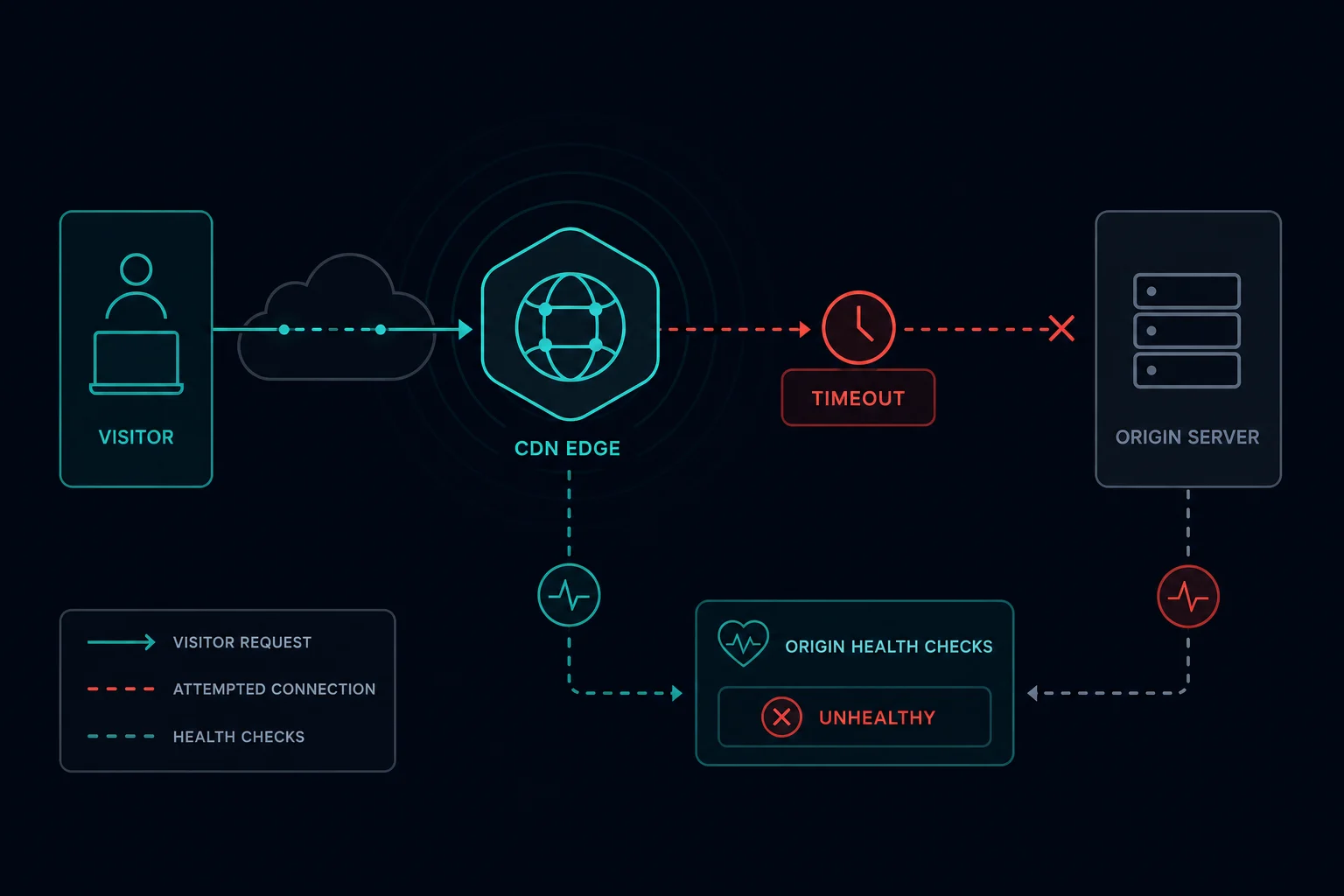
Error code 522 "Connection timed out" means Cloudflare tried to connect to the website's own server (the origin) and got no answer in time. Cloudflare is working, and your browser is working. The origin server, or something in front of it, did not respond.
Cloudflare documents two timeouts that produce 522:
- Cloudflare sends a TCP SYN to the origin and gets no SYN+ACK within 19 seconds.
- The TCP connection opens, but the origin does not acknowledge Cloudflare's request within 90 seconds.
In most cases the origin firewall drops Cloudflare's traffic, the server is overloaded or offline, or the DNS record points to the wrong IP address.
Error 522 quick fix: visitor or site owner?
If you are visiting the site
The 522 page shows three boxes: your browser, the Cloudflare location, and the host. When the host box says "Error" and the other two say "Working", the problem is on the website's server. Nothing on your device causes it.
- Wait a few minutes and reload. Short spikes and server restarts often clear by themselves.
- Try another page on the same site. If nothing loads, the whole origin is down.
- If it lasts, tell the site owner the URL, the time, and the Ray ID at the bottom of the page.
Clearing your cache, changing DNS, or turning a VPN on or off does not fix a real 522.
If you own the site
Check these in order. The first three cover most 522 errors.
- Is the origin server online and is the web server running?
- Does the origin firewall allow all of Cloudflare's IP ranges on ports 80 and 443?
- Does the A or AAAA record in Cloudflare DNS point to the current origin IP?
- Is the origin overloaded or out of connection slots?
- Are keepalives enabled on the web server?
What does error 522 mean?
Error 522 is a timeout between Cloudflare and your origin. The request path is:
- A visitor requests your site.
- Cloudflare receives the request at its nearest data center.
- Cloudflare opens a TCP connection to the origin IP in your DNS settings.
- The origin does not answer the SYN within 19 seconds, or does not acknowledge the request within 90 seconds.
- Cloudflare returns error 522.
A timeout usually means packets were dropped. If the origin actively refused the connection, Cloudflare shows error 521 instead. That difference helps you narrow the cause: a firewall that silently drops traffic gives 522, while a stopped web server on a reachable host gives 521.
How to fix error 522 as a site owner
1. Test the origin directly
Bypass Cloudflare and connect to the origin IP. Run this from a machine outside the server's own network:
curl -v --resolve example.com:443:203.0.113.10 https://example.com/
Replace example.com with your hostname and 203.0.113.10 with your origin IP. For a site on port 80, use --resolve example.com:80:203.0.113.10 http://example.com/.
- It hangs and times out. The origin is down, overloaded, or a firewall drops all traffic. Fix the server first.
- It works fast. The server is fine for you but not for Cloudflare. That usually means a firewall or security tool blocks Cloudflare's IPs.
On the server, confirm the web server listens on the expected ports:
sudo ss -tlnp | grep -E ':(80|443)\s'
2. Allow all Cloudflare IP ranges
Cloudflare names this as the most common cause of 522. Every request to your origin comes from a Cloudflare IP, so a firewall or rate limiter that blocks or throttles those IPs blocks your visitors.
Cloudflare publishes its ranges at https://www.cloudflare.com/ips-v4 and https://www.cloudflare.com/ips-v6. To allow them with UFW:
for ip in $(curl -s https://www.cloudflare.com/ips-v4) $(curl -s https://www.cloudflare.com/ips-v6); do
  sudo ufw allow proto tcp from "$ip" to any port 80,443
done
With iptables (IPv4 shown, repeat with ip6tables for IPv6, then save the rules so they survive a reboot):
for ip in $(curl -s https://www.cloudflare.com/ips-v4); do
  sudo iptables -I INPUT -p tcp -m multiport --dports 80,443 -s "$ip" -j ACCEPT
done
Also check the layers that are not on the server itself:
- Cloud firewalls such as AWS security groups, Google Cloud firewall rules, or Oracle Cloud security lists.
- Hosting panel firewalls such as CSF in cPanel. Add the Cloudflare ranges to the allow list.
- Fail2ban, ModSecurity, Wordfence, and host-level DDoS protection. Search their logs for Cloudflare IPs.
Security tools often ban Cloudflare IPs because every visitor appears to come from a few Cloudflare addresses. Restore real visitor IPs on the origin with mod_remoteip for Apache or ngx_http_realip_module for Nginx, using the CF-Connecting-IP header. Then rate limits and bans apply to real visitors instead of to Cloudflare.
3. Check the DNS record
In the Cloudflare dashboard, open DNS > Records and compare each proxied A and AAAA record with the real origin IP. After a host migration, an old IP often stays in Cloudflare DNS and every request times out.
Check AAAA records too. If an AAAA record points to an IPv6 address the server no longer uses, Cloudflare can try that address and time out. Delete IPv6 records that do not work.
Public DNS lookups like dig example.com return Cloudflare's IPs, not your origin, so check the dashboard.
4. Match the port to your SSL/TLS mode
Cloudflare's SSL/TLS mode decides which origin port it uses:
| SSL/TLS mode | Cloudflare connects to the origin on |
|---|---|
| Flexible | Port 80 (HTTP) |
| Full or Full (strict) | Port 443 (HTTPS) |
If the mode is Full but a firewall silently drops traffic to port 443, Cloudflare times out with 522. If the port is open but nothing listens there, the server refuses the connection and you get 521 instead. Open port 443 and install a certificate, or use the mode that matches what the origin serves. Also check Rules > Origin Rules for a destination port override that sends traffic to a closed port.
5. Fix origin overload
An origin that has no free connection slots stops answering new TCP connections, and Cloudflare reports 522. Look at the error window, not at the current state:
- CPU, memory, and disk I/O on the host.
- Web server limits such as Apache
MaxRequestWorkersor Nginxworker_connections. Apache logs "server reached MaxRequestWorkers setting" when it runs out. - PHP-FPM
pm.max_children, and database connection limits. - Connection states with
ss -sduring a spike.
Raising timeouts does not fix overload. Cache more pages at Cloudflare, fix slow database queries, add capacity, or move heavy jobs out of the request path.
6. Enable keepalive
Cloudflare lists disabled keepalives at the origin as a cause of 522. Cloudflare reuses connections to your origin, and an origin that closes every connection forces a new TCP handshake for each request.
- Apache: set
KeepAlive Onand aKeepAliveTimeoutthat is not very short. - Nginx: keep
keepalive_timeoutabove zero (the default is 75 seconds). A value of0disables keepalive.
7. Home servers and self-hosting
For servers at home (Unraid, Portainer, Home Assistant, a NAS), 522 often means the internet cannot reach your router at all:
- Your ISP blocks inbound ports 80 and 443.
- You are behind CGNAT, so your public IP is shared and port forwarding does not work.
- The router does not forward 80 and 443 to the server, or your home IP changed and DNS still has the old one.
Cloudflare Tunnel avoids all three because the server makes an outbound connection to Cloudflare. If you move to a tunnel and then see a different error, our error 1033 guide covers tunnel connector problems.
8. Collect evidence for your host
If the server is fine and Cloudflare IPs are allowed, the problem may be routing between Cloudflare and your host. Collect:
- The Ray ID and the exact time of the error.
- The output of the direct
curltest. - An MTR or traceroute from the origin to a Cloudflare IP, for example
mtr -rwc 50 1.1.1.1. - Firewall logs for the error window.
Send this to your hosting provider. Cloudflare support asks for the same data.
Error 522 vs. 521, 523, and 524
| Error | What happened | First check |
|---|---|---|
| 521 | The origin refused the connection | Web server process, firewall rules that reject |
| 522 | The origin did not answer in time | Firewall drops, overload, wrong DNS IP, keepalive |
| 523 | Cloudflare could not find a route to the origin | DNS record, origin IP, network routing |
| 524 | The connection opened, but the origin took more than 100 seconds to send an HTTP response | Slow application code, long requests |
Can proxies or a VPN fix error 522?
No. Error 522 is between Cloudflare and the origin. A different visitor IP does not change that path.
If a scraper or monitor sees 522 on a target site, the target is struggling. Slow down, stop retrying the same URL in a tight loop, and log 522 apart from access blocks. If you see Cloudflare's rate-limit page instead, that is error 1015, and request pacing does matter there.
How to prevent error 522
- Keep Cloudflare's IP ranges in every firewall layer, and update them when Cloudflare changes the list.
- Restore real visitor IPs on the origin so security tools never ban Cloudflare.
- Monitor the origin from outside its network, not only from inside.
- Set web server and PHP worker limits that match the server's memory.
- Cache static and anonymous pages at Cloudflare to reduce origin load.
- Update DNS records as part of every server migration.
FAQ
What is error 522?
Error 522 is a Cloudflare error that means Cloudflare could not connect to the website's origin server before the connection timed out.
What does error code 522 mean for me as a visitor?
It means the website's server is not answering Cloudflare. Your device and connection are fine. Wait and try again, or tell the site owner.
Is error 522 Cloudflare's fault?
Rarely. Cloudflare shows the error, but the cause is almost always the origin server, its firewall, its DNS record, or the network path to the host.
What is the difference between error 522 and 524?
With 522, Cloudflare could not complete the connection to the origin. With 524, the connection opened, but the origin took too long to send an HTTP response.
Can a firewall cause error 522?
Yes. It is the most common cause. A firewall, security plugin, or host DDoS filter that drops traffic from Cloudflare IPs produces 522.
Why do only some visitors get error 522?
Different visitors reach different Cloudflare data centers, which use different IPs and network routes to your origin. If your firewall blocks some Cloudflare ranges, or one route is unstable, only some visitors see 522.
Final thoughts
Error code 522 is a connection that never finished. Test the origin directly, allow every Cloudflare IP range, confirm the DNS IP and the port for your SSL mode, then look at load and keepalive. That order fixes most 522 errors without guesswork.
Technical reference: Cloudflare error 522 documentation.