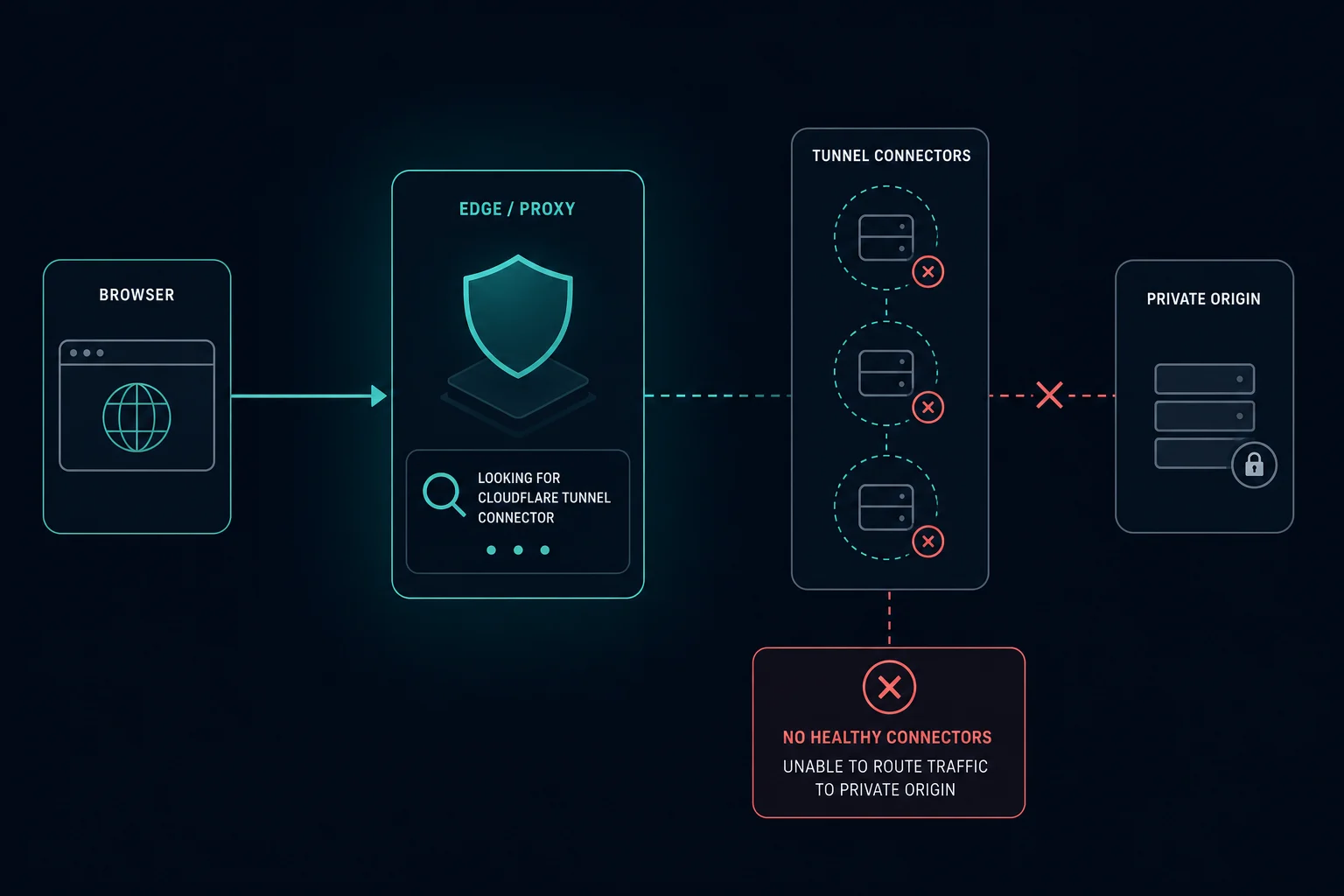
Error 1033 means the website uses Cloudflare Tunnel, and the tunnel is not connected. The site's server runs a small program called cloudflared that keeps a link open to Cloudflare. When no healthy cloudflared connector is online, Cloudflare has nowhere to send your request, so it shows "Error 1033: Cloudflare Tunnel error". Older pages call it "Argo Tunnel error", the product's former name.
It is not a problem with your browser, your IP address, or your internet connection. The fix is on the server that runs the tunnel.
Error 1033 quick fix: pick your situation
If you are visiting the site
You cannot fix error 1033 from your side. Clearing cookies, changing browsers, or turning a VPN on or off will not help, because the server behind the site is offline from Cloudflare's point of view.
- Wait a few minutes and reload. Tunnels often come back after the owner's server restarts.
- Check the site's status page or social accounts for an outage notice.
- If it lasts, send the owner the URL, the time, and the Ray ID at the bottom of the error page.
If you run the tunnel
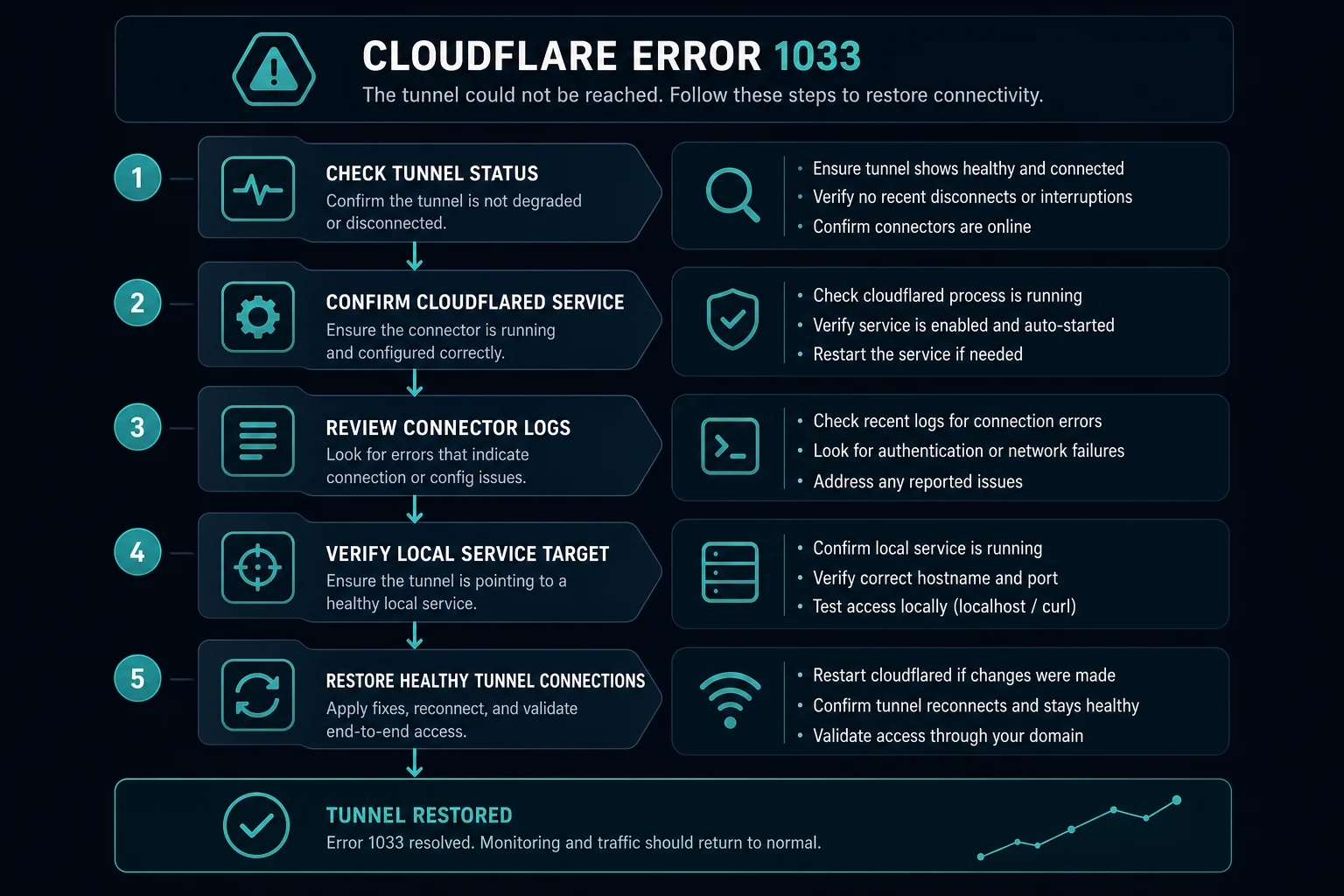
Work through these in order. Most 1033 errors end at step 1 or 2.
- Open the Cloudflare dashboard, go to Networking > Tunnels (older Zero Trust dashboards: Networks > Tunnels), and read the tunnel status.
- On the host, confirm the
cloudflaredprocess or service is running and restart it if it stopped. - Read the
cloudflaredlogs for authentication, DNS, or connection errors. - Confirm the firewall allows outbound traffic to Cloudflare on port 7844 (TCP and UDP).
- Confirm the hostname's DNS record is a CNAME to
<TUNNEL-UUID>.cfargotunnel.comfor the tunnel you actually run.
The sections below give the commands for each step.
What does error 1033 mean?
Cloudflare's documentation says error 1033 happens when a site that uses Cloudflare Tunnel "cannot be resolved" because Cloudflare has no healthy cloudflared instance to receive the traffic.
The request path looks like this:
- A visitor opens a hostname that routes to a tunnel.
- Cloudflare receives the request at its edge.
- Cloudflare looks for an active
cloudflaredconnection for that tunnel. - No connection exists, so Cloudflare returns error 1033.
The web app behind the tunnel can be perfectly healthy. If cloudflared is not connected, visitors still see 1033. In curl output and logs, the response usually carries HTTP status 530, which Cloudflare uses for its 1xxx error pages.
Check the tunnel status first
The dashboard status tells you which fix to use. The statuses below come from Cloudflare's error 1033 documentation.
| Status | What it means | What to do |
|---|---|---|
| Healthy | The tunnel is active and serving traffic through four connections | The tunnel is fine. Check the DNS record and hostname instead |
| Inactive | The tunnel exists, but no cloudflared connector has ever connected |
Install and run cloudflared on the host. The dashboard shows the install command under the tunnel's Add a replica option |
| Down | A connector was connected before, but the process stopped | Start the service. Check for reboots, crashes, power loss, or network changes |
| Degraded | cloudflared runs, but at least one connection failed |
Read the logs. Check that firewall rules allow Cloudflare Tunnel traffic |
You can also check from the command line on any machine that is logged in to the account:
# List tunnels with their connections
cloudflared tunnel list

# Show the active connectors for one tunnel
cloudflared tunnel info <NAME-or-UUID>
If cloudflared tunnel info shows no connectors, the tunnel is down from Cloudflare's view, whatever the local machine says.
Fix error 1033 on the tunnel host
Make sure cloudflared is running
On Linux with systemd:
sudo systemctl status cloudflared
sudo systemctl restart cloudflared
sudo journalctl -u cloudflared -n 100 --no-pager
On Windows (PowerShell as administrator):
Get-Service cloudflared
Restart-Service cloudflared
On macOS, check that the launch daemon is loaded:
sudo launchctl list | grep cloudflared
In Docker, check the container and its logs:
docker ps --filter "name=cloudflared"
docker logs --tail 100 <container-name>
If you started the tunnel by hand in a terminal, it stopped when that terminal closed or the machine slept. Install it as a service so it starts on boot. For a dashboard-managed tunnel, the dashboard gives you a cloudflared service install <TOKEN> command. For a locally managed tunnel with a config.yml, run cloudflared service install after the config file has the tunnel UUID and credentials-file path.
Read the logs for the real reason
Run the tunnel in the foreground with debug logging to see why connections fail:
cloudflared tunnel --loglevel debug run <NAME-or-UUID>
Common log messages point to:
- An invalid or rotated tunnel token. Copy the current token from the dashboard and reinstall the service.
- A missing or wrong credentials file for a locally managed tunnel.
- DNS failures when
cloudflaredtries to resolve Cloudflare's tunnel endpoints. - Timeouts to Cloudflare, which usually mean a firewall blocks outbound traffic.
Allow outbound traffic on port 7844
cloudflared only makes outbound connections. It does not need open inbound ports. It does need outbound access to Cloudflare on port 7844, over TCP for the http2 protocol and over UDP for quic. The main endpoints are region1.v2.argotunnel.com and region2.v2.argotunnel.com.
Test from the host:
dig A region1.v2.argotunnel.com
nc -vz region1.v2.argotunnel.com 7844
On Windows:
Test-NetConnection region1.v2.argotunnel.com -Port 7844
If UDP is blocked but TCP works, force HTTP/2 with cloudflared tunnel --protocol http2 run <NAME-or-UUID>, or set protocol: http2 in config.yml. Corporate networks, some routers, and strict cloud security groups often block outbound UDP.
Remove stale connections
If cloudflared crashed without shutting down cleanly, old connections can linger. Clear them, then start the service again:
cloudflared tunnel cleanup <NAME-or-UUID>
Check the DNS record and public hostname
A healthy tunnel still produces 1033 if the hostname points somewhere else. The DNS record for a tunnel hostname is a proxied CNAME to <TUNNEL-UUID>.cfargotunnel.com.
Check that:
- The UUID in the CNAME target matches the tunnel that is running. After you delete and recreate a tunnel, the UUID changes but old CNAME records stay.
- The DNS record is in the same Cloudflare account as the tunnel. Cloudflare only routes
cfargotunnel.comtraffic for records in the same account. - The hostname appears on the tunnel's public hostname list in the dashboard (newer dashboards call these published application routes).
For a locally managed tunnel, this command creates the correct CNAME:
cloudflared tunnel route dns <NAME-or-UUID> app.example.com
If the tunnel is connected but the local service is down, you get a different error. Cloudflare documents that case as 502 Bad Gateway: the tunnel works, but cloudflared cannot reach the service at the configured address. Test the service from the tunnel host with curl -v http://localhost:<port>.
Error 1033 in Home Assistant and self-hosted setups
Many 1033 reports come from Home Assistant, Unraid, Proxmox, and home servers that use the Cloudflared add-on or a container.
- Open the Cloudflared add-on in Home Assistant and confirm it is started. Read its Log tab for token or connection errors.
- A Home Assistant update, host reboot, or power cut stops the tunnel until the add-on starts again. Turn on "Start on boot" and the watchdog for the add-on.
- If you recreated the tunnel in the Cloudflare dashboard, paste the new token into the add-on configuration. The old token belongs to a tunnel that no longer exists.
- If you get 502 instead of 1033, the tunnel works but the add-on cannot reach Home Assistant at the configured address. If you get 400 Bad Request, Home Assistant does not trust the proxy. Set
use_x_forwarded_for: trueand add the add-on's address totrusted_proxiesin thehttp:section ofconfiguration.yaml.
Error 1033 on Shopify app dev and quick tunnels
Shopify app developers often see 1033 while running shopify app dev. The CLI creates a temporary Cloudflare quick tunnel (a random trycloudflare.com address). That tunnel exists only while the dev command runs. Stop the command, close the laptop, or lose the network, and every request to the old URL returns 1033.
To fix it:
- Run
shopify app devagain. The CLI creates a new tunnel and updates the app URLs. - For a URL that stays the same, run your own named tunnel and pass it with
--tunnel-url. - Deploy the app to real hosting before merchants use it. A quick tunnel is for development only.
The same rule applies to any cloudflared tunnel --url quick tunnel. When the process ends, the hostname stops working.
If you are a store owner and see 1033 inside an app or on a storefront widget, the app's backend is offline. Contact the app developer.
Error 1033 vs. 502, 521, and 522
| Error | What failed | Where to look |
|---|---|---|
| Error 1033 | No healthy cloudflared connector for the tunnel |
Tunnel status, cloudflared service, port 7844, CNAME target |
| 502 Bad Gateway (tunnel) | The tunnel is connected, but cloudflared cannot reach the local service |
Local service, port, and protocol in the tunnel route |
| Error 521 | A normal public origin refused Cloudflare's connection | Web server process, origin firewall |
| Error 522 | A normal public origin did not answer in time | Origin firewall, overload, DNS A record |
If the hostname has an A or AAAA record to a public IP instead of a tunnel CNAME, error 1033 does not apply. Start with the 52x errors.
Can a proxy or VPN fix error 1033?
No. Error 1033 is not an IP block or a rate limit. Every visitor gets the same error until the tunnel reconnects.
If a scraper or monitor sees 1033 on a target site, treat it as the target being offline. Back off, log the error separately from access blocks, and retry later. Faster retries or new IPs do not change the result.
How to prevent error 1033
- Run
cloudflaredas a service, not in a terminal session. - Run a second replica on another host with the same tunnel token. If one host goes down, the other keeps the tunnel healthy.
- Turn on Cloudflare's tunnel health notifications so you hear about a down tunnel before users do.
- Allow outbound port 7844 in firewall templates and cloud security groups.
- Update CNAME records when you recreate a tunnel.
- Keep
cloudflaredupdated. Very old versions can stop connecting.
FAQ
What is error 1033?
Error 1033 is a Cloudflare error page. It means the site routes traffic through Cloudflare Tunnel, and no cloudflared connector is online to carry the request to the server.
What does error 1033 mean on a website I am visiting?
It means the website's server is disconnected from Cloudflare. The problem is on the site's side. Wait and try again later, or tell the owner.
Is error 1033 the same as "Argo Tunnel error"?
Yes. Cloudflare renamed Argo Tunnel to Cloudflare Tunnel. Older error pages and forum posts still say "Argo Tunnel error".
How do I fix error 1033 on my own tunnel?
Check the tunnel status in Networking > Tunnels, restart the cloudflared service, read its logs, allow outbound port 7844, and confirm the DNS CNAME points to <TUNNEL-UUID>.cfargotunnel.com for the running tunnel.
My tunnel shows Healthy. Why do I still get error 1033?
The hostname probably points to a different tunnel. Compare the UUID in the CNAME target with the UUID from cloudflared tunnel list, and check that the DNS record and the tunnel are in the same Cloudflare account.
Does error 1033 fix itself?
Sometimes. If the server rebooted or lost its network for a short time, the cloudflared service reconnects when it starts again. If the service is not installed to start on boot, or the token changed, the error stays until someone fixes the host.
Final thoughts
Error 1033 always comes back to one question: is a cloudflared connector for this tunnel online and reachable? Check the dashboard status, the service, the logs, port 7844, and the CNAME target, in that order.
Technical references: Cloudflare error 1033, Cloudflare Tunnel common errors, and Cloudflare Tunnel firewall requirements.