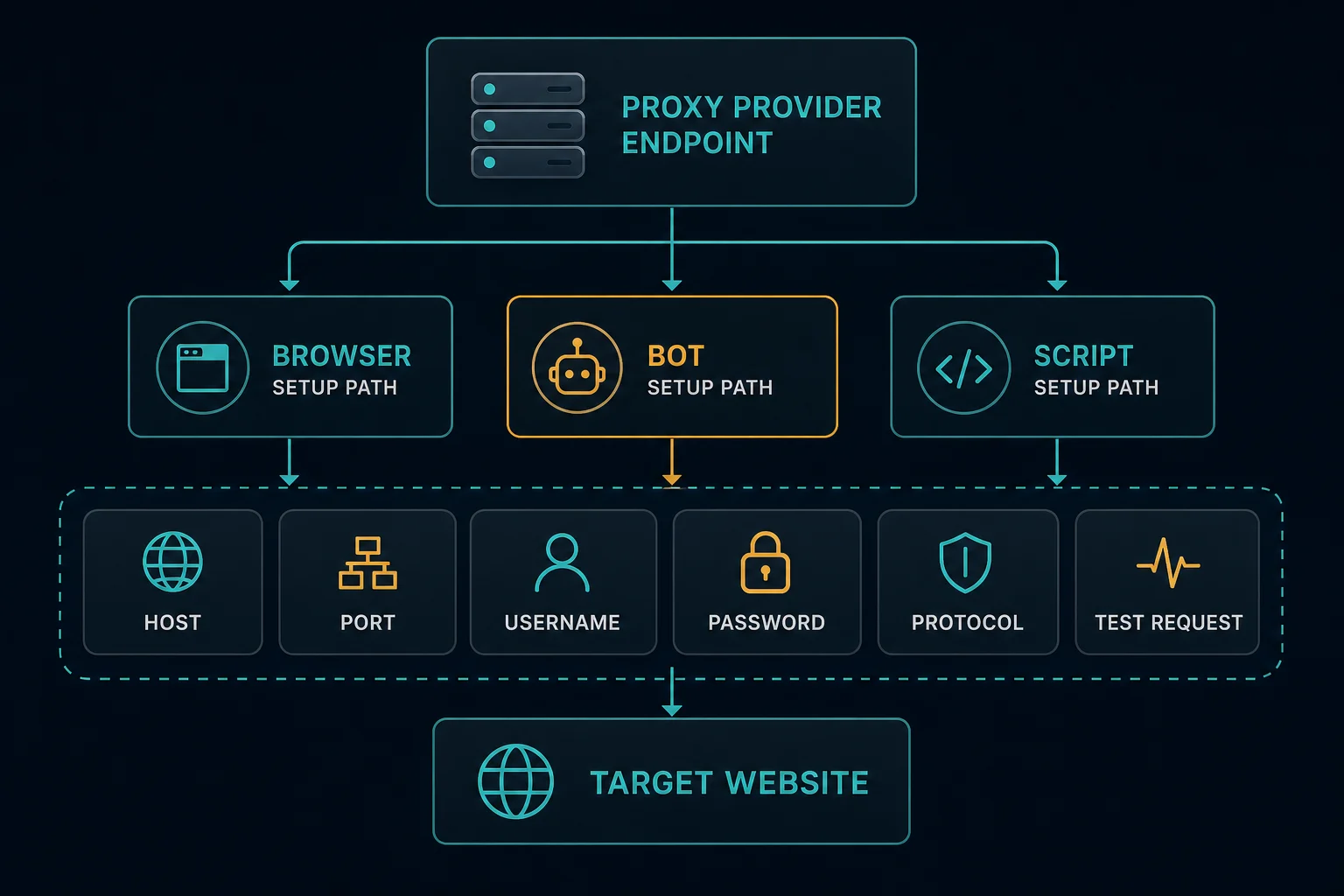
How to setup a proxy server usually means one practical task: take a proxy endpoint from your provider and route a browser, bot, scraper, or script through it. You normally do not need to build the proxy server yourself. You need the host, port, username, password, protocol, and the correct format for the tool you are using.
Start by testing one proxy in one client before loading a full list into automation. If the proxy works in cURL or a browser but fails in your bot, the issue is usually format, protocol, authentication, session handling, or request pacing rather than the proxy itself.
For most web workflows, use HTTP(S) proxies unless the tool explicitly asks for SOCKS5. If you are still choosing protocol, read SOCKS5 vs HTTP proxy. If you need rotating consumer-style traffic, start with residential proxies. If you need stable dedicated IPs for accounts, monitoring, or retail automation, compare ISP proxy plans.
How to Setup a Proxy Server: Quick Steps
Use this setup flow for almost any proxy-backed workflow:
- Copy the proxy host, port, username, password, and protocol from your dashboard.
- Confirm whether the tool expects HTTP, HTTPS, SOCKS4, or SOCKS5.
- Convert the proxy into the format the tool accepts.
- Test one proxy with a simple IP-check endpoint.
- Load a small batch into your browser, bot, or script.
- Assign proxies consistently to accounts, sessions, or tasks.
- Add delays, retries, and backoff before increasing concurrency.
- Log failures with proxy, URL, status code, account, and timestamp.
Do not start by importing hundreds of proxies into a full task run. A small controlled test tells you whether the setup is valid before request volume, cookies, accounts, and anti-bot behavior make the results noisy.
Know Your Proxy Details First
Most proxy setup problems come from mixing up fields.
You usually need:
| Field | Example shape | Notes |
|---|---|---|
| Host | proxy.example.com |
The proxy gateway or IP address |
| Port | 12345 |
The connection port for HTTP or SOCKS |
| Username | customer-zone-session |
May include pool, region, or session options |
| Password | password123 |
Keep this out of screenshots and logs |
| Protocol | http or socks5 |
Must match the client setting |
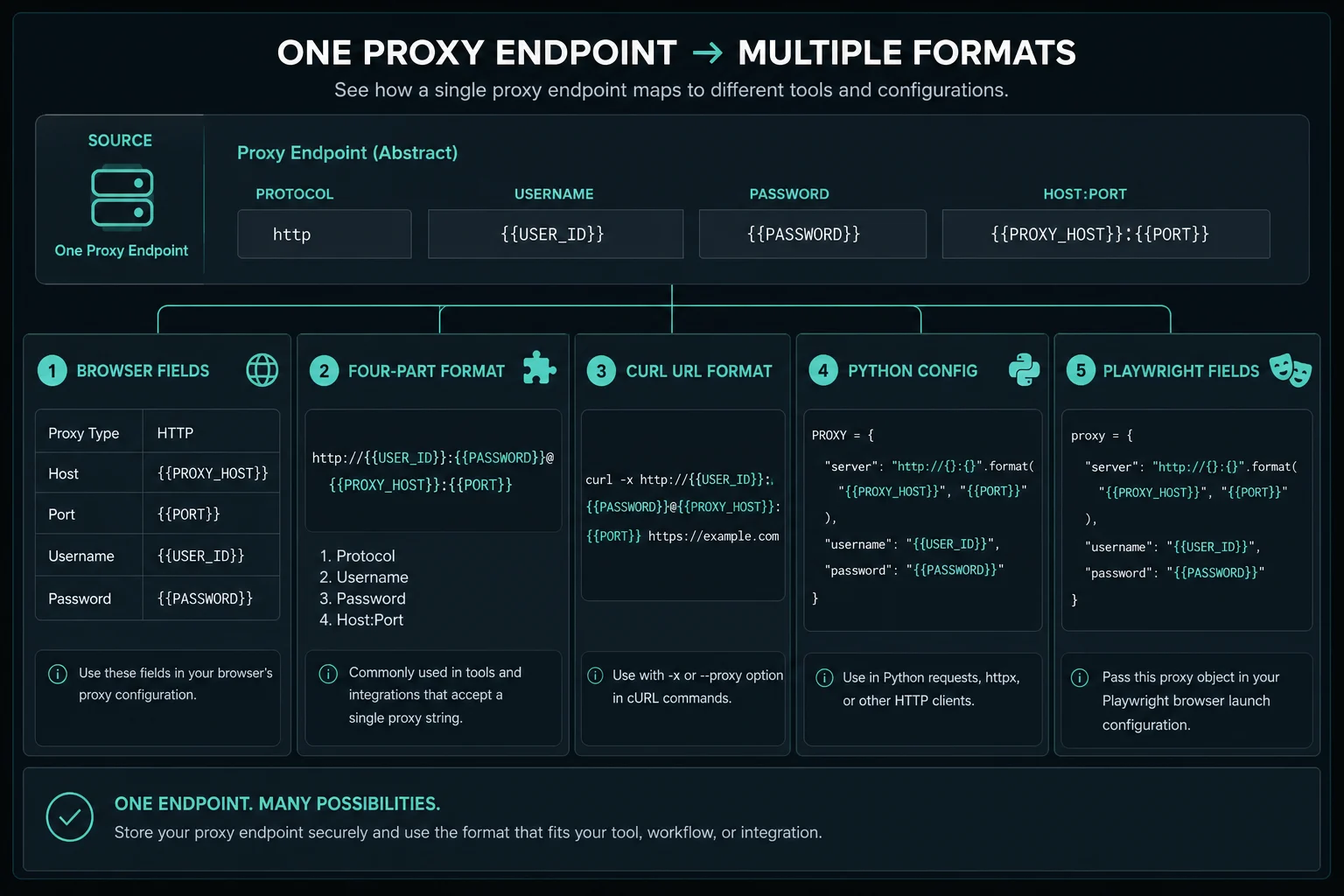
Common formats include:
| Format | Example |
|---|---|
| Four-part list | host:port:username:password |
| HTTP proxy URL | http://username:password@host:port |
| HTTPS proxy URL | https://username:password@host:port |
| SOCKS5 proxy URL | socks5://username:password@host:port |
| Separate fields | Host, port, username, and password in different inputs |
Format is not the same as protocol. A bot may ask for host:port:user:pass while still using an HTTP proxy under the hood. A script may require the http:// or socks5:// scheme to select the protocol. Use the proxy converter when you need to reformat a list without manually rearranging fields.
Set Up a Proxy in a Browser
For normal browsing, there are three common options.
Use system proxy settings when supported browsers and apps should share a proxy. Some clients ignore these settings, so verify each application. The setting can also affect more traffic than intended.
If Chrome shows ERR_PROXY_CONNECTION_FAILED, verify the system setting, extension or policy owner, and one proxy endpoint before clearing browser data or replacing a full list.
If the Windows troubleshooter reports that it could not automatically detect the network's proxy settings, check automatic, script, manual, and WinHTTP configuration separately before resetting the network.
On macOS, the Mac proxy settings guide covers the Network panel, HTTP and HTTPS fields, SOCKS endpoints, PAC files, browser behavior, verification, and safe removal.
Windows requires a separate method for SOCKS5 because its manual web proxy and WinHTTP settings are not a native SOCKS5 route. Use the Windows 11 SOCKS5 proxy guide for app-level setup, authenticated cURL testing, Chrome limitations, and multi-app routing.
Android needs an extra protocol check because its native Wi-Fi proxy field is not a SOCKS5 selector. Use the Android SOCKS5 proxy guide to choose between an app setting, a VPN-service-based client, and the built-in HTTP proxy fallback.
On iPhone, the built-in setting is also attached to one saved Wi-Fi network. Follow the iPhone HTTP proxy setup guide for manual credentials, PAC mode, route verification, and the limits around cellular data and app coverage.
Use a browser extension or browser profile when you need different proxies per profile, region, account, or test case. This is usually better for QA, local SEO checks, account workflows, and comparing locations without changing the whole device.
Firefox can configure an unauthenticated or source-IP-allowlisted SOCKS5 endpoint inside the browser profile. Follow the Firefox SOCKS5 proxy guide for the current and older Settings paths, proxy-side DNS, verification, and the manual form's username/password limitation.
For Chrome specifically, the Chrome SOCKS5 proxy setup guide compares extensions, launch flags, system routing, DNS behavior, and the browser's SOCKS5 authentication limitation.
Use browser automation settings when Playwright, Puppeteer, Selenium, or another automation framework launches the browser. In that case, configure the proxy in the automation tool rather than inside the browser UI.
For a manual browser test:
- Choose one proxy endpoint.
- Add the host and port to the browser, extension, or operating system proxy settings.
- Enter username and password when prompted.
- Visit an IP-check page.
- Confirm the displayed IP and region match the proxy.
- Open the target site only after the basic proxy test works.
If the browser repeatedly asks for credentials, check the username, password, and whether special characters need URL encoding. If pages load without the proxy IP changing, the browser may be bypassing the proxy because the system setting, extension scope, or profile setting is wrong.
Set Up Proxies in Bots
Most retail bots, monitoring tools, and automation apps accept proxy lists in one of these shapes:
host:port:username:password
username:password@host:port
http://username:password@host:port
socks5://username:password@host:port
Match the bot's import format exactly. If the bot has a protocol dropdown, do not also force a conflicting scheme in the proxy text. If it has separate fields for host, port, username, and password, paste each value into the matching field instead of using a full proxy URL.
For account or checkout workflows, map one account or profile to one stable proxy identity. That usually means ISP proxies or sticky residential sessions, not rotating on every request. For product monitoring, repeated checks, or Refract-style retail workflows, stable task-to-proxy assignment is usually easier to debug than random reassignment on every loop.
If you are using Refract, the existing Refract Bot Target guide walks through proxy groups, task setup, and delay sizing for that specific bot. This article stays broader: the same setup discipline applies whether the bot is for retail monitoring, scraping, QA, or account operations.
Set Up Proxies in Scripts
Scripts need explicit proxy configuration. Environment variables may work for some tools, but production jobs should make proxy behavior obvious in code or deployment config.
For cURL, test one HTTP proxy like this:
curl --proxy "http://username:password@host:port" https://ipv4.unknownproxies.com/ip
For SOCKS5:
curl --proxy "socks5://username:password@host:port" https://ipv4.unknownproxies.com/ip
For Python requests:
import requests

proxy = "http://username:password@host:port"
proxies = {
    "http": proxy,
    "https": proxy,
}

response = requests.get("https://ipv4.unknownproxies.com/ip", proxies=proxies, timeout=20)
print(response.text)
For more requests examples, including HTTPS targets, authentication, SOCKS5, and retries, read the Python proxy requests guide.
For Playwright:
import { chromium } from "playwright";

const browser = await chromium.launch({
  proxy: {
    server: "http://host:port",
    username: "username",
    password: "password",
  },
});

const page = await browser.newPage();
await page.goto("https://ipv4.unknownproxies.com/ip");
console.log(await page.textContent("body"));
await browser.close();
If your browser automation stack is Puppeteer, the Puppeteer use proxy guide explains when to use Chrome launch arguments, browser context proxy settings, or a fresh browser per proxy identity.
Keep secrets in environment variables or a secrets manager when the script runs outside a local test. Do not commit proxy passwords to the repo, paste them into issue trackers, or print full proxy URLs in application logs.
Choose Residential, ISP, or Datacenter Proxies
Proxy setup is easier when the proxy type fits the workflow.
| Workflow | Usually choose | Why |
|---|---|---|
| Manual browser geo checks | Residential | Broad location targeting and consumer-style IPs |
| Browser automation with login | ISP or sticky residential | Stable identity matters during sessions |
| Stateless public-page scraping | Rotating residential or datacenter | Each request can stand alone |
| Retail monitoring | ISP | Low latency and stable task assignment |
| Higher-friction public targets | Residential | Better fit when datacenter IPs are blocked |
| Internal QA or permissive targets | Datacenter or ISP | Lower cost and predictable performance |
If you are deciding between proxy categories, read datacenter proxies vs residential proxies. If the decision is stable dedicated IPs versus rotating pool access, compare ISP proxies vs residential proxies.
Residential proxies are useful when rotation, location coverage, and consumer-style IP reputation matter. ISP proxies are useful when the same task, account, or browser profile should keep the same IP. Neither option fixes bad timing, broken cookies, account-level limits, or target rules.
Keep Sessions Consistent
A proxy setup that works for one request can still break a session.
Keep these values aligned inside a session:
- Proxy identity.
- Browser profile.
- Cookie jar.
- Login account.
- User agent.
- Region or locale.
- Task assignment.
- Retry and delay behavior.
If a login starts on one IP and continues on another, the site may treat that as a session risk. If a scraper rotates IPs but reuses cookies from a previous identity, it can create confusing behavior. Use sticky residential sessions or ISP proxies for multi-step flows. Use rotating residential sessions for independent requests where continuity does not matter.
For a deeper session design walkthrough, read how to use residential proxies.
Test Before You Scale
Use a simple test plan:
- Test without a proxy to confirm the client works.
- Test one proxy against an IP-check endpoint.
- Test one proxy against the target homepage.
- Test one proxy against the exact target endpoint.
- Add authentication, cookies, and headers.
- Add a small number of concurrent tasks.
- Increase volume only after status codes and latency are stable.
Log the response status, response body snippet, proxy ID, target URL, and retry count. That data separates proxy setup errors from target-side rate limits, WAF blocks, application bugs, and account problems.
If the client only reports a vague failure, use the proxy error troubleshooting guide to classify configuration, authentication, connection, timeout, and target-response problems before changing the setup.
Troubleshooting Proxy Setup
Use the symptom to narrow the issue:
| Symptom | Likely cause | What to check |
|---|---|---|
| Authentication prompt repeats | Bad username or password | Copy credentials again and check special characters |
| Connection timeout | Wrong host, port, protocol, or firewall | Use the Chrome proxy and firewall checklist, then test with cURL |
| Works in browser, fails in bot | Bot format mismatch | Try a different accepted proxy format |
| Works once, fails after login | Session identity changed | Use sticky residential or ISP and keep cookies aligned |
| Many 429 responses | Request rate too high | Add delay, jitter, and backoff |
| Many 403 responses | Target denied the request | Check headers, session, reputation, and site policy |
| Region is wrong | Pool or username option mismatch | Recheck country, state, city, or zone fields |
For repeated HTTP 429 Too Many Requests, slow down before adding more proxies. For HTTP 403 Forbidden, check whether authentication, authorization, target policy, or IP reputation is the real cause.
Production Checklist
Before running a proxy-backed job in production, confirm:
- The proxy format matches the client.
- The protocol matches the provider and tool.
- Secrets are not committed or logged.
- Sessions are mapped to accounts or tasks consistently.
- Retry logic uses backoff instead of immediate loops.
- Timeouts are long enough for the proxy type.
- 403, 429, timeout, and CAPTCHA responses are tracked separately.
- The workflow follows site terms, robots guidance, and applicable law.
- Bandwidth-heavy pages are cached or trimmed when possible.
Use the delay calculator for monitoring-style workloads where proxy count, task count, and delay interact. A setup that looks fine at one request every few seconds can fail quickly when every worker retries at the same time.
FAQ
Do I need to create my own proxy server?
Usually, no. If you bought proxies from a provider, the proxy server already exists. Your job is to configure the endpoint correctly in your browser, bot, scraper, or script.
What proxy format should I use?
Use the format your tool expects. Common options are host:port:username:password, http://username:password@host:port, and socks5://username:password@host:port.
Should I use HTTP or SOCKS5 proxies?
Use HTTP(S) for most browsers, web scrapers, bots, and API clients. Use SOCKS5 when the app specifically asks for SOCKS or needs a generic tunnel.
Why does my proxy work in cURL but not in my bot?
The bot may require a different proxy format, a protocol dropdown, separate auth fields, or a different session mode. Test one proxy at a time and change only one setting between tests.
Can I use the same proxy for every account?
For account workflows, avoid sharing one proxy identity across many accounts unless the site naturally expects that behavior. Map accounts, profiles, and sticky sessions consistently.
Final Thoughts
How to setup a proxy server for real work comes down to clean inputs and controlled testing. Get the host, port, credentials, protocol, and format right first. Then choose the right proxy type, keep sessions consistent, and add pacing before scaling.
For protocol setup, compare SOCKS5 vs HTTP proxy. For rotating pool workflows, start with residential proxies. For stable dedicated IP workflows, review ISP proxy pricing.
Technical references: MDN Proxy servers and tunneling, curl proxy documentation, and Playwright HTTP proxy documentation.