Puppeteer use proxy setup usually means passing Chrome a proxy before the browser starts. The safest default is puppeteer.launch({ args: ["--proxy-server=http://host:port"] }), then page.authenticate() if the proxy requires a username and password.
The confusing part is "per-page proxy" wording. Puppeteer pages do not have a simple first-party proxy option like an HTTP client request. You can set a proxy at browser launch, use supported browser context proxy options for isolated sessions, or build a local forwarding layer. For most scraping, QA, monitoring, and localization work, choose the browser or context level and rotate only between independent tasks.
If you need a broader walkthrough with authentication, rotation, and debugging examples, start with the full Proxy Puppeteer setup guide. This article focuses on the launch-argument vs page-level decision.
Puppeteer Use Proxy: Quick Answer
Use this decision table before writing code:
| Goal | Use this setup | Why |
|---|---|---|
| One proxy for the whole job | --proxy-server in puppeteer.launch() |
Simple, predictable, widely supported |
| One proxy per isolated task | Browser context proxyServer, if your Puppeteer version supports it |
Keeps cookies, storage, cache, and proxy identity together |
| Authenticated proxy | Proxy host in launch/context, credentials in page.authenticate() |
Chrome proxy settings and credentials are separate concerns |
| Different proxy for every page in one browser | Prefer a new context or browser per identity | Native page-level proxy switching is not the clean default |
| Different upstream per request | Use a purpose-built forwarding proxy only when you accept the complexity | It can affect DNS, CONNECT, WebSockets, auth, and logging |
For one proxy across the whole browser, this is the basic pattern:
import puppeteer from "puppeteer";

const browser = await puppeteer.launch({
  headless: "new",
  args: ["--proxy-server=http://proxy.example.com:8080"],
});

const page = await browser.newPage();
await page.goto("https://ipv4.unknownproxies.com/ip", {
  waitUntil: "domcontentloaded",
});

console.log(await page.textContent("body"));
await browser.close();
That setting applies before Chrome starts. If the IP check shows your local IP, the proxy flag was not applied, the format is wrong, or the target was bypassed.
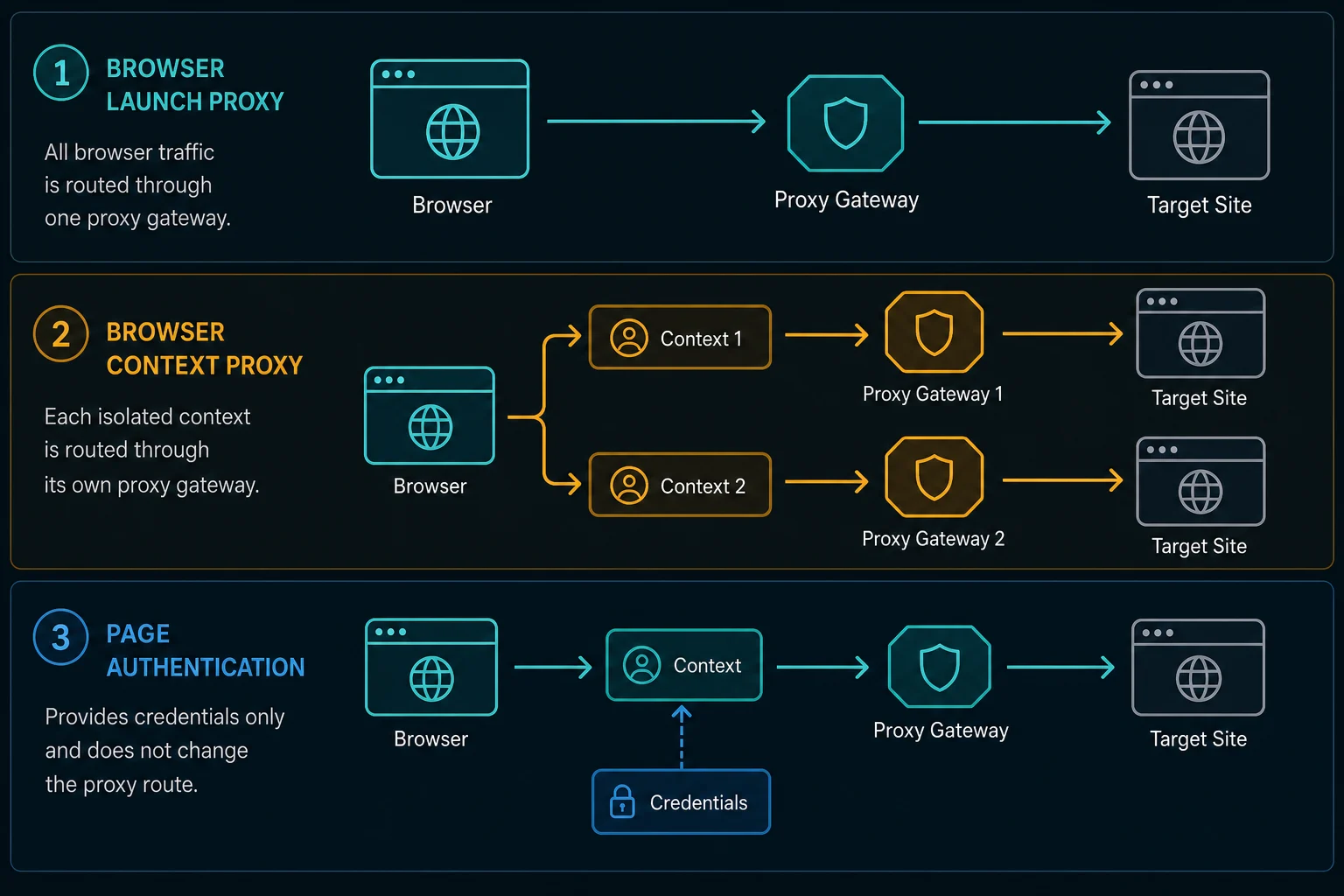
Launch Args: The Default Puppeteer Proxy Setup
Chrome handles proxy routing, so Puppeteer normally passes proxy settings into Chrome with a launch argument:
const browser = await puppeteer.launch({
  args: ["--proxy-server=http://proxy.example.com:8080"],
});
Use launch arguments when the whole run should share one proxy identity. This is the right default for:
- A single region check.
- A QA run from one exit IP.
- A monitoring job mapped to one stable route.
- A small scraper where one browser instance does one bounded task.
Chrome supports proxy server identifiers such as http://host:port and socks5://host:port. For most web automation, HTTP(S) proxies are the simpler default because the browser is loading normal HTTP and HTTPS pages. Use SOCKS5 only when your proxy plan and client workflow actually require it.
Do not put a full username:password@host:port string into the launch argument as your first choice. Keep the server and credentials separate. It is easier to debug, safer to log, and closer to how Puppeteer's own APIs handle authentication.
Auth: Use page.authenticate() Before Navigation
For an authenticated proxy, launch with the proxy host and port, then authenticate the page:
import puppeteer from "puppeteer";

const browser = await puppeteer.launch({
  headless: "new",
  args: ["--proxy-server=http://proxy.example.com:8080"],
});

const page = await browser.newPage();

await page.authenticate({
  username: process.env.PROXY_USERNAME ?? "",
  password: process.env.PROXY_PASSWORD ?? "",
});

await page.goto("https://example.com", { waitUntil: "domcontentloaded" });
await browser.close();
Call page.authenticate() before the first navigation through the proxy. Puppeteer's documentation notes that authentication turns request interception on behind the scenes, which can affect performance. That is another reason to keep concurrency controlled instead of opening many authenticated pages at once.
If authentication fails, test the exact same proxy with curl before changing Puppeteer code:
curl -x "http://USERNAME:PASSWORD@proxy.example.com:8080" https://ipv4.unknownproxies.com/ip
If curl fails, fix the proxy address, credentials, allowlist, or plan status first. If curl works and Puppeteer fails, focus on proxy format, authentication timing, headless mode, and bypass rules.
For repeated credential failures, compare the symptoms with 407 Proxy Authentication Required. A 407 means the proxy refused to forward the request because proxy authentication was missing, invalid, expired, or formatted incorrectly.
Browser Context Proxy Setup
Browser contexts are the cleaner unit when you need more than one isolated proxy identity inside one browser process. A context can keep its own cookies, storage, permissions, cache, and pages.
Recent Puppeteer versions expose proxyServer and proxyBypassList on BrowserContextOptions:
const browser = await puppeteer.launch();

const context = await browser.createBrowserContext({
  proxyServer: "http://proxy.example.com:8080",
});

const page = await context.newPage();

await page.authenticate({
  username: process.env.PROXY_USERNAME ?? "",
  password: process.env.PROXY_PASSWORD ?? "",
});

await page.goto("https://example.com", { waitUntil: "domcontentloaded" });

await context.close();
await browser.close();
Use context proxy setup when each task needs separate browser state. For example, a localized price check for region A should not share cookies, local storage, or connection assumptions with a check for region B.
If your installed Puppeteer version does not support context proxy options, rotate by launching a fresh browser for each proxy identity. That costs more CPU, but it is clearer than trying to mutate proxy identity inside an already-running browser session.
Why Per-Page Proxy Setup Is Usually the Wrong Question
A Puppeteer Page is not an independent network stack. It lives inside a browser context, and the browser context lives inside a browser process. Cookies, cache, service workers, HTTP auth, WebSockets, DNS behavior, and connection pooling can all outlive one navigation.
That is why "per-page proxy" can be misleading:
page.authenticate()sets credentials for HTTP authentication. It does not replace the proxy route by itself.- Opening a new page in the same browser context does not automatically create a new proxy identity.
- Changing proxies while reusing cookies can make one session look inconsistent.
- Request interception is not a complete replacement for browser-level proxy routing.
- Third-party proxy routing layers add complexity around CONNECT tunnels, WebSockets, DNS, and error handling.
If you need page A and page B to use different IPs, prefer separate browser contexts or separate browser processes. The browser state and the proxy route should change together.
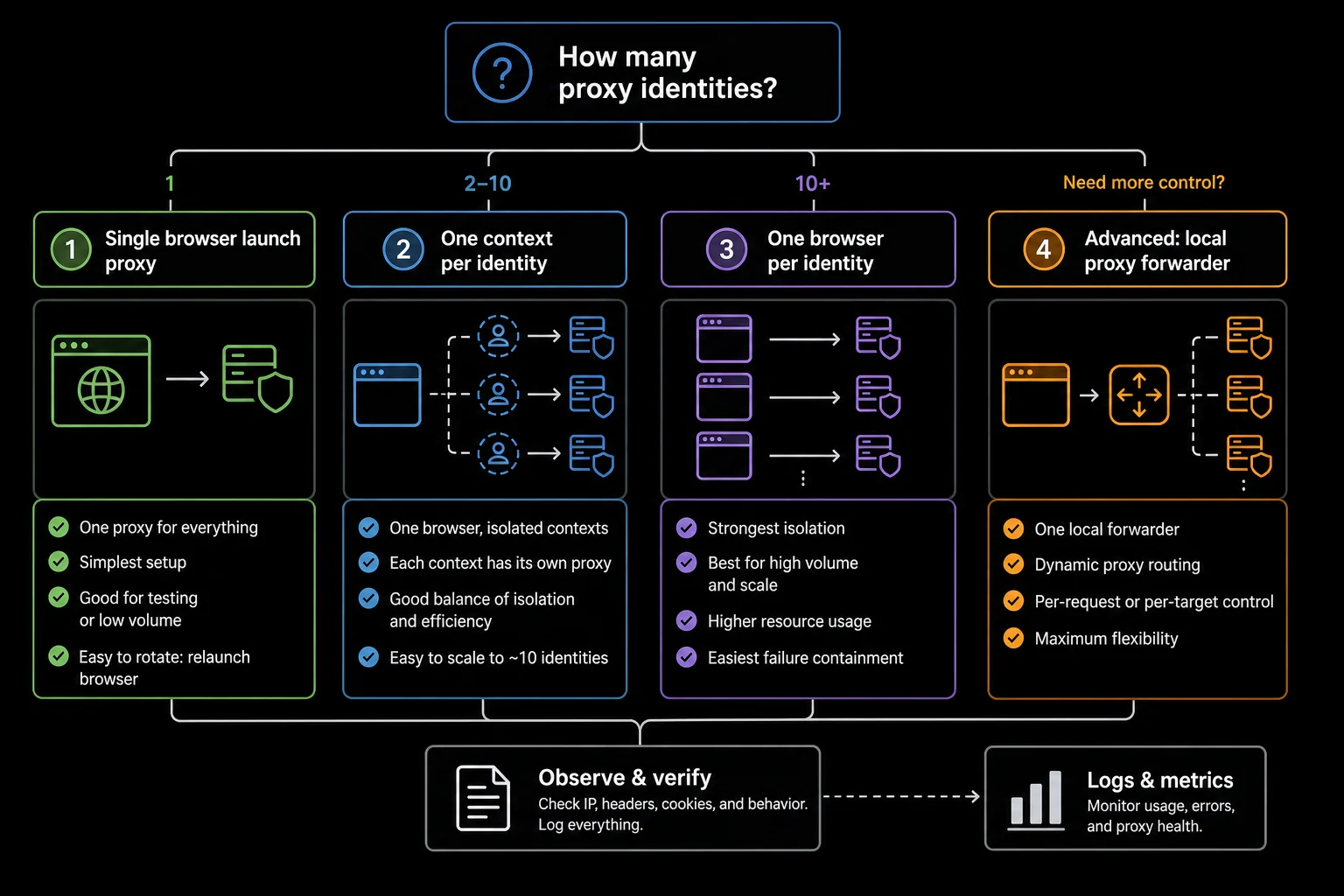
Launch Proxy vs Context Proxy
Choose the narrowest setup that matches your session model:
| Setup | Best for | Avoid when |
|---|---|---|
| Browser launch proxy | One proxy identity for one run | You need multiple isolated identities in the same process |
| Context proxy | Several isolated tasks in one browser process | Your Puppeteer version does not support it or auth becomes hard to reason about |
| New browser per proxy | Maximum isolation and simple mental model | CPU and memory cost are too high |
| Local forwarding proxy | Advanced per-request routing or upstream auth transformation | You do not own the networking complexity |
The important rule is consistency. A logged-in account, cart, checkout flow, or long browser profile should keep one proxy identity for the full workflow. Stateless public-page checks can rotate, but the rotation should happen between bounded tasks, not between clicks in the same task.
If the proxy level is part of a broader product decision, compare residential proxies for rotating or geo-targeted sessions and ISP proxy pricing for stable dedicated routes.
Rotating Proxies Safely in Puppeteer
For rotation, keep one proxy identity tied to one browser context or browser process:
import puppeteer from "puppeteer";

type ProxyRoute = {
  server: string;
  username?: string;
  password?: string;
};

const proxies: ProxyRoute[] = [
  { server: "http://proxy-1.example.com:8080" },
  { server: "http://proxy-2.example.com:8080" },
  { server: "http://proxy-3.example.com:8080" },
];

for (const proxy of proxies) {
  const browser = await puppeteer.launch({
    headless: "new",
    args: [`--proxy-server=${proxy.server}`],
  });

  try {
    const page = await browser.newPage();

    if (proxy.username && proxy.password) {
      await page.authenticate({
        username: proxy.username,
        password: proxy.password,
      });
    }

    await page.goto("https://example.com", {
      waitUntil: "domcontentloaded",
      timeout: 30_000,
    });

    // Run one bounded task for this proxy identity.
  } finally {
    await browser.close();
  }
}
This pattern is slower than changing a variable in an HTTP client, but it respects how browser sessions work. If the target returns HTTP 429 Too Many Requests, slow down before adding more proxy identities. If it returns HTTP 403 Forbidden, debug target policy, authentication, headers, browser behavior, and IP reputation separately.
For monitoring-style workloads, the delay calculator can help estimate pacing before you scale task count or proxy count.
Proxy Bypass and Localhost
Some Puppeteer runs need external traffic to use a proxy while local services stay direct. Chrome supports bypass rules:
const browser = await puppeteer.launch({
  args: [
    "--proxy-server=http://proxy.example.com:8080",
    "--proxy-bypass-list=localhost,127.0.0.1,.internal.example.com",
  ],
});
Use bypass rules carefully. If the target host is accidentally bypassed, your local IP may hit the site instead of the proxy. If localhost is accidentally proxied, tests against a local app can fail even though the proxy itself is working.
In CI, log the proxy route once at startup by visiting an IP-check endpoint. Do not log full proxy URLs with passwords.
Debugging Checklist
When Puppeteer use proxy setup fails, isolate one layer at a time:
- Test the proxy with
curl. - Launch Puppeteer with one proxy and one page.
- Visit an IP-check endpoint through the browser.
- Add authentication only after the unauthenticated server format is correct.
- Try headed mode while debugging prompts and failures.
- Check whether localhost or the target host is bypassed.
- Compare one target page with and without the proxy.
- Track status code, proxy ID, browser mode, timeout, and retry count.
Common symptoms:
| Symptom | Likely cause | First fix |
|---|---|---|
| IP check shows local IP | Proxy flag missing, malformed, or bypassed | Log launch args and test one proxy |
ERR_PROXY_CONNECTION_FAILED |
Bad host, port, protocol, or unreachable proxy | Test with curl -x from the same machine |
| Auth prompt appears | Credentials missing or rejected | Call page.authenticate() before navigation |
| Works in cURL, fails in Puppeteer | Chrome proxy format, auth timing, or headless issue | Use headed mode and one page |
| First action works, later flow fails | Session identity changed or target rejected behavior | Keep one sticky route for the full session |
| Target returns 403 or 429 | Target policy, rate limit, fingerprint, or session issue | Slow down and inspect target response |
Do not treat every failure as a proxy provider problem. Browser automation loads many subresources through the same route, and one page.goto() can create a burst of requests. Keep concurrency low until status codes and latency are stable.
FAQ
How do I make Puppeteer use proxy settings?
Pass a proxy server to Chrome before launch: puppeteer.launch({ args: ["--proxy-server=http://host:port"] }). For authenticated proxies, call page.authenticate() before navigation.
Can Puppeteer use a different proxy per page?
Not as a simple first-party page option. Use separate browser contexts with proxyServer when supported, or launch a fresh browser per proxy identity. Treat third-party per-request proxy layers as advanced networking infrastructure.
Should I use launch args or browser contexts for Puppeteer proxies?
Use launch args when the whole browser should share one proxy. Use browser context proxies when each task needs isolated cookies, storage, and proxy identity inside one browser process.
Does page.authenticate() set the proxy?
No. page.authenticate() provides HTTP authentication credentials. The proxy route still needs to be set at browser launch or browser context creation.
Can I rotate proxies without closing the browser?
Only if your Puppeteer version supports context-level proxy settings and your workflow can isolate each task in a fresh context. Otherwise, close the browser and launch a new one for each proxy identity.
Final Thoughts
Puppeteer use proxy decisions should start with the browser boundary. Use --proxy-server for one route across the browser, context proxy settings for isolated sessions when supported, and new browser processes when you need maximum isolation. Avoid treating a page as a standalone proxy client unless you have a deliberate forwarding layer and a reason to own that complexity.
For proxy format cleanup, use the proxy converter. For broader setup details, read Proxy Puppeteer. For browser automation comparisons, see Playwright proxy setup and Python Selenium proxy setup.
Technical references: Puppeteer BrowserContextOptions documentation, Puppeteer Page.authenticate() documentation, and Chromium proxy support notes.