A proxy Puppeteer setup routes Chrome or Chromium browser traffic through a proxy server before it reaches the target site. That lets your automation run from a specific exit IP, region, or proxy session while Puppeteer still controls a real browser.
Use a proxy with Puppeteer for localization checks, QA, monitoring, price checks, scraping public pages, and browser workflows where a normal HTTP client is not enough. The reliable pattern is simple: set the proxy before the browser context starts, authenticate before navigation, keep one proxy identity tied to one browser session, and rotate only between independent tasks.
This guide focuses on Puppeteer for Node.js. If you are comparing browser automation stacks, the related guides cover Playwright proxy setup and Python Selenium proxy setup.
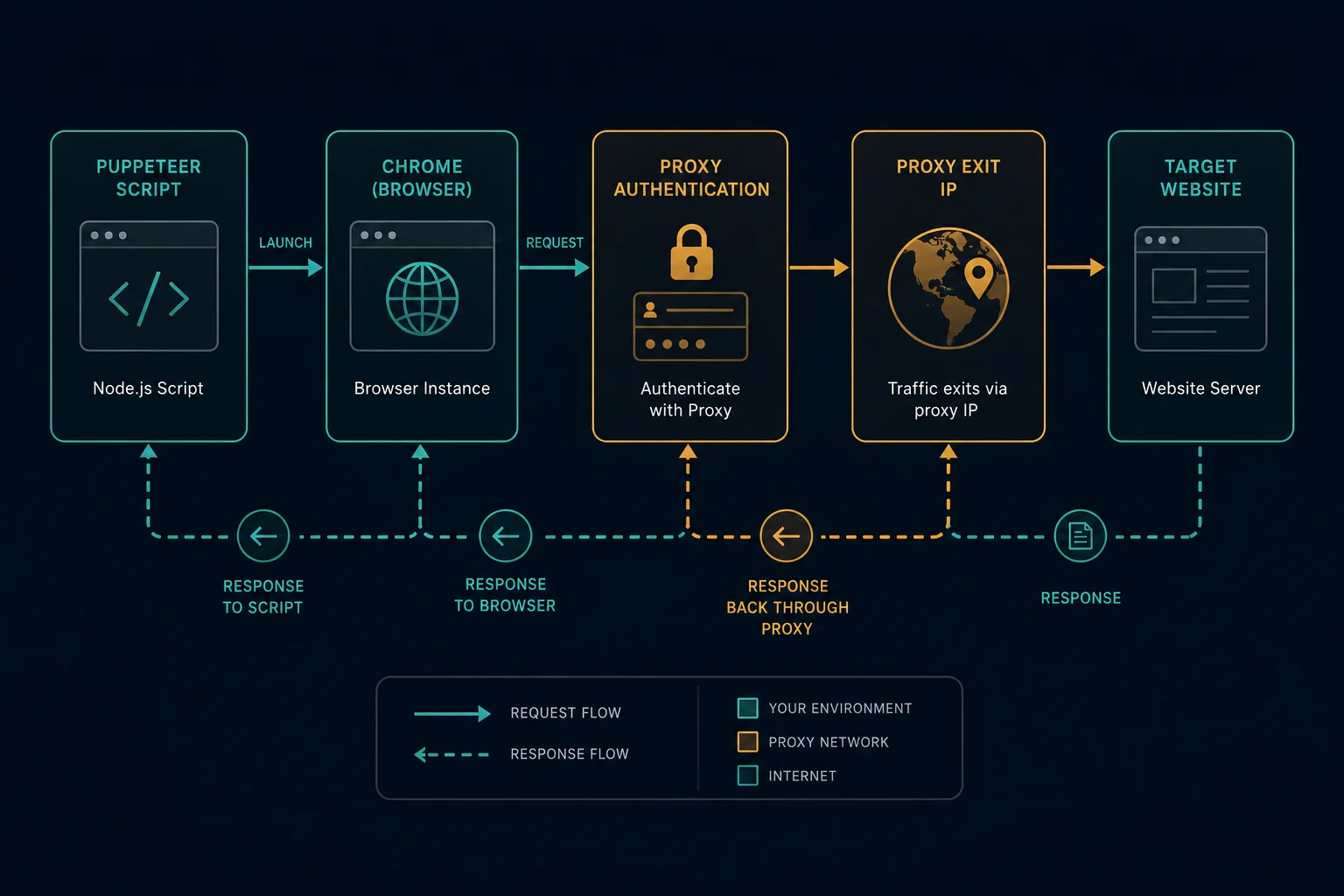
Proxy Puppeteer: Quick Setup
For one proxy across the whole browser, pass Chrome's --proxy-server flag through puppeteer.launch():
import puppeteer from "puppeteer";

const browser = await puppeteer.launch({
  headless: "new",
  args: ["--proxy-server=http://proxy.example.com:8080"],
});

const page = await browser.newPage();
await page.goto("https://example.com", { waitUntil: "domcontentloaded" });
console.log(await page.title());

await browser.close();
This routes browser network traffic through the proxy endpoint. The proxy must be set before Chrome starts. Do not expect to change --proxy-server on an already running page and have the whole browser safely switch identities.
For a basic first test, visit an IP echo endpoint through Puppeteer and compare it with the same request from your local machine:
await page.goto("https://ipv4.unknownproxies.com/ip");
console.log(await page.textContent("body"));
If the page shows the proxy exit IP, your proxy route is working. If it shows your server or laptop IP, the launch argument is wrong, the proxy is bypassed, or Chrome did not start with the flag you expected.
Proxy Formats Puppeteer Accepts
Puppeteer passes proxy configuration down to Chrome, so proxy format matters. Keep the protocol, host, port, username, and password separate in your own config even if your provider exports a four-part list.
| Provider format | Puppeteer/Chrome use | Notes |
|---|---|---|
host:port |
--proxy-server=http://host:port |
Add the scheme yourself |
host:port:user:pass |
proxy server plus page.authenticate() |
Do not put credentials in the launch flag |
http://host:port |
--proxy-server=http://host:port |
Common for HTTP proxies |
socks5://host:port |
--proxy-server=socks5://host:port |
Use only when your proxy plan supports SOCKS5 |
Chrome's proxy documentation describes --proxy-server and proxy bypass rules, including the fact that manual proxy credentials are not taken from the proxy settings themselves. In Puppeteer, keep authentication as a separate step.
If your dashboard gives you host:port:username:password, convert it into:
server: "http://host:port"
username: "username"
password: "password"
Unknown Proxies users can use the proxy converter when a tool expects a different proxy list format.
Authenticated Proxy Puppeteer Setup
For username and password proxies, launch Chrome with the proxy host and port, then authenticate the page before navigation:
import puppeteer from "puppeteer";

const browser = await puppeteer.launch({
  headless: "new",
  args: ["--proxy-server=http://proxy.example.com:8080"],
});

const page = await browser.newPage();

await page.authenticate({
  username: process.env.PROXY_USERNAME ?? "",
  password: process.env.PROXY_PASSWORD ?? "",
});

await page.goto("https://example.com", { waitUntil: "domcontentloaded" });
await browser.close();
Call page.authenticate() before page.goto(). Puppeteer's API notes that authentication turns on request interception behind the scenes, so it can affect performance. That is usually fine for browser automation, but it is one more reason to keep concurrency controlled instead of opening hundreds of authenticated pages at once.
Do not hardcode proxy credentials in source files. Load them from environment variables, CI secrets, or a secret manager:
export PROXY_USERNAME="your-username"
export PROXY_PASSWORD="your-password"
If authentication fails, test the same proxy outside Puppeteer:
curl -x "http://USERNAME:PASSWORD@proxy.example.com:8080" https://ipv4.unknownproxies.com/ip
If curl fails, fix the proxy host, port, credentials, allowlist, or account status before changing Puppeteer code. If curl works but Puppeteer fails, focus on Chrome proxy format, page authentication timing, headless mode, or proxy bypass rules.
Browser-Level vs Context-Level Proxies
There are two useful levels for a Puppeteer proxy. If you are deciding specifically between launch arguments, context proxy settings, and page-level assumptions, read the focused Puppeteer use proxy guide.
| Level | Best for | Tradeoff |
|---|---|---|
| Browser launch proxy | One proxy identity for the whole run | Simple and widely supported |
| Browser context proxy | Several isolated sessions inside one browser | More version-sensitive, but cleaner for rotation |
The launch-level pattern uses args:
const browser = await puppeteer.launch({
  args: ["--proxy-server=http://proxy.example.com:8080"],
});
Recent Puppeteer versions also expose proxyServer and proxyBypassList on BrowserContextOptions. That lets you create isolated contexts with separate cookies, storage, cache, and proxy settings:
const browser = await puppeteer.launch();

const context = await browser.createBrowserContext({
  proxyServer: "proxy.example.com:8080",
});

const page = await context.newPage();
await page.authenticate({
  username: process.env.PROXY_USERNAME ?? "",
  password: process.env.PROXY_PASSWORD ?? "",
});

await page.goto("https://example.com", { waitUntil: "domcontentloaded" });

await context.close();
await browser.close();
Use a context proxy when each task needs its own browser state but you do not want to launch a completely new browser process every time. If your installed Puppeteer version does not support context proxy options, rotate by starting a new browser per proxy identity.
Rotating Proxies in Puppeteer
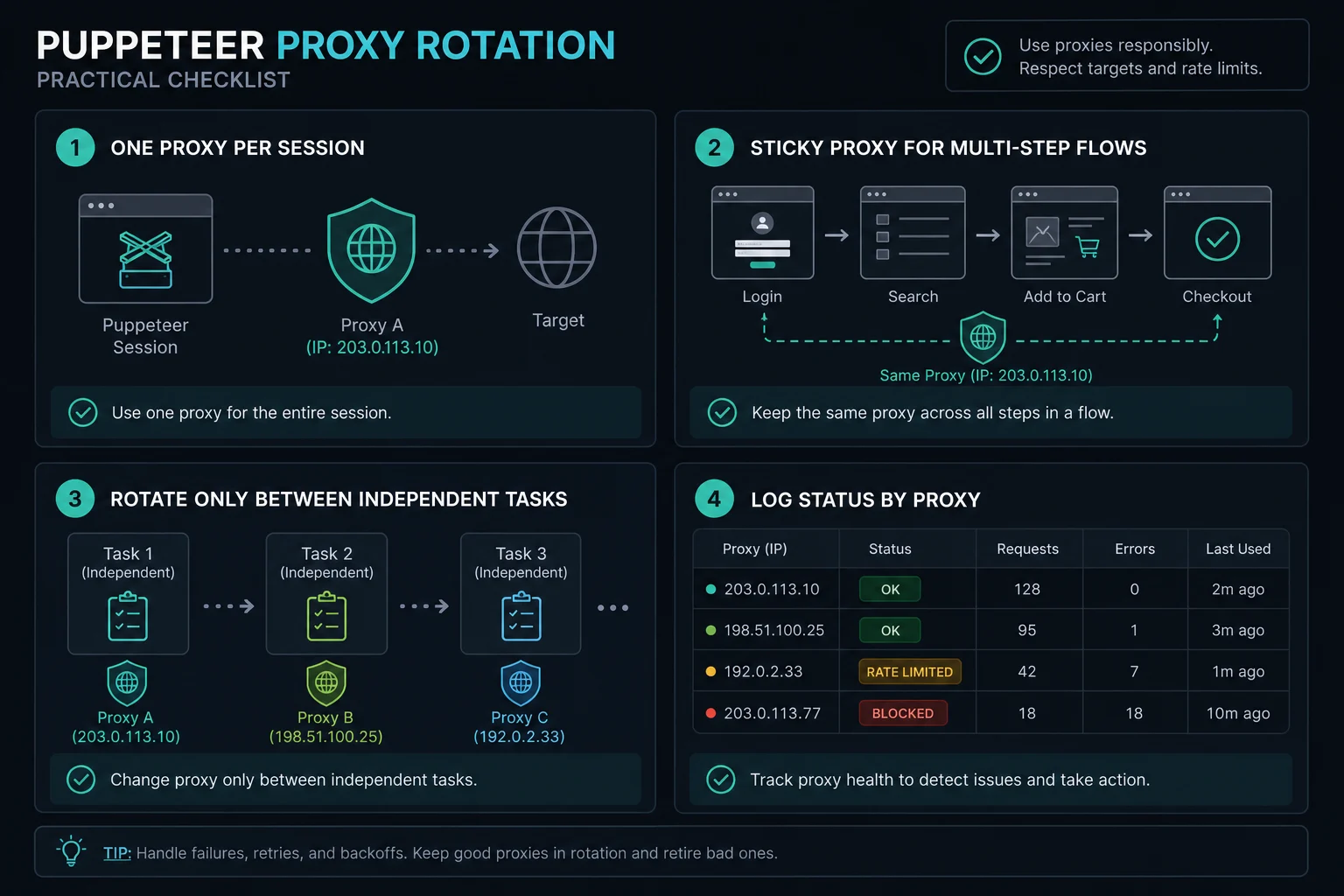
Rotation should happen between sessions, not in the middle of a session. A browser page carries cookies, local storage, service workers, connection pools, and target-side state. Changing the proxy while reusing that state can make one visitor look like several inconsistent visitors.
A safe browser-level rotation loop looks like this:
import puppeteer from "puppeteer";

type ProxyConfig = {
  server: string;
  username?: string;
  password?: string;
};

const proxies: ProxyConfig[] = [
  { server: "http://proxy-1.example.com:8080" },
  { server: "http://proxy-2.example.com:8080" },
  { server: "http://proxy-3.example.com:8080" },
];

for (const proxy of proxies) {
  const browser = await puppeteer.launch({
    headless: "new",
    args: [`--proxy-server=${proxy.server}`],
  });

  try {
    const page = await browser.newPage();

    if (proxy.username && proxy.password) {
      await page.authenticate({
        username: proxy.username,
        password: proxy.password,
      });
    }

    await page.goto("https://example.com", {
      waitUntil: "domcontentloaded",
      timeout: 30_000,
    });

    // Run one bounded task for this proxy identity.
  } finally {
    await browser.close();
  }
}
That pattern costs more CPU than changing a variable in an HTTP client, but it is predictable. For multi-step flows such as login, cart, checkout, account checks, or form submission, use the same sticky proxy for the full workflow. For independent public-page checks, rotate between bounded tasks and add pacing.
Proxy Bypass Rules and Local Testing
Sometimes you need external traffic to use a proxy while local services stay direct. Chrome supports proxy bypass rules through --proxy-bypass-list:
const browser = await puppeteer.launch({
  args: [
    "--proxy-server=http://proxy.example.com:8080",
    "--proxy-bypass-list=localhost,127.0.0.1,.internal.example.com",
  ],
});
Use bypass rules carefully. If the target site is accidentally bypassed, your local or server IP may hit the target instead of the proxy. If a local app is accidentally proxied, tests may fail even though the proxy itself is fine.
For CI jobs, log the effective proxy route during setup. A short IP-check request at the beginning of a run can prevent hours of debugging when an environment variable is empty or a launch flag was not passed into Chrome.
Debugging a Puppeteer Proxy
Debug one layer at a time:
- Test the proxy with
curl. - Launch Puppeteer with one proxy and one page.
- Visit an IP echo endpoint through the browser.
- Test a normal HTTPS page.
- Add authentication only after the proxy server format works.
- Run headed mode while debugging authentication prompts.
- Compare the same target with and without the proxy.
Common symptoms:
| Symptom | Likely cause | First fix |
|---|---|---|
| Page shows local IP | Proxy flag missing, malformed, or bypassed | Log args and test --proxy-server format |
net::ERR_PROXY_CONNECTION_FAILED |
Bad host, port, protocol, or unreachable proxy | Test with curl -x |
| Proxy auth prompt appears | Credentials were not provided or rejected | Call page.authenticate() before navigation |
| HTTP works but HTTPS fails | Tunnel, protocol, or provider issue | Test an HTTPS IP echo endpoint |
| Local app breaks | Localhost is being proxied | Add a narrow bypass rule |
| Target returns 403 or 429 | Site policy, rate limit, fingerprint, or session issue | Slow down and debug behavior |
If the problem is an error during connection, authentication, tunneling, or timeout handling, use the Puppeteer proxy server errors guide to isolate the failing layer before replacing your proxy list.
If a target returns HTTP 403 Forbidden or HTTP 429 Too Many Requests, the proxy route may already be working. Those responses usually mean the target received the request and rejected it based on authorization, rate, reputation, headers, or browser behavior.
HTTP vs SOCKS5 for Puppeteer
Use HTTP(S) proxies for most Puppeteer workflows. Chrome understands HTTP proxy endpoints well, and normal browser automation is usually just HTTPS web traffic.
Use SOCKS5 when:
- Your proxy plan explicitly provides SOCKS5.
- Your environment needs a lower-level tunnel.
- The tool or provider documentation tells you to use a SOCKS endpoint.
Do not switch protocols as a first response to blocks. Protocol choice affects how Chrome connects to the proxy. It does not fix aggressive concurrency, forbidden endpoints, invalid sessions, missing cookies, or target policies. For the full protocol comparison, read SOCKS5 vs HTTP proxy.
Residential vs ISP Proxies for Puppeteer
Choose the proxy type based on the browser workflow:
| Workflow | Better fit | Why |
|---|---|---|
| Localized public-page scraping | Residential | Broad location coverage and rotation |
| Repeated account or cart flow | ISP or sticky residential | Stable identity matters |
| QA from one region | ISP | Predictable latency and a fixed route |
| Independent product checks | Residential or ISP | Depends on rate, target tolerance, and session needs |
| High-volume browser scraping | Residential with pacing | Rotation helps only when requests are allowed and controlled |
Unknown Proxies offers residential proxies for rotating or sticky consumer-style sessions and ISP plans through pricing for stable dedicated automation routes. The proxy type does not replace good automation design. Headers, cookies, browser state, timing, and request volume still matter.
If you are sizing monitor tasks or repeated checks, use the delay calculator to estimate pacing instead of overloading a small proxy list.
Session and Rate-Limit Guidelines
Puppeteer can create more traffic than it looks like from your code. One page.goto() can load HTML, JavaScript, stylesheets, images, fonts, API calls, analytics requests, and WebSocket connections through the same proxy.
Use these guardrails:
- Keep one proxy identity tied to one browser session or context.
- Use sticky sessions for multi-step flows.
- Rotate between independent tasks, not between clicks in the same task.
- Limit concurrent pages per proxy.
- Add jitter and backoff after timeouts, 403s, 429s, and proxy errors.
- Log proxy ID, target host, status code, timeout, retry count, and browser mode.
- Stop retrying when the target clearly rejects the pattern.
For responsible scraping, also respect robots guidance, site terms, login boundaries, and applicable law. A proxy can distribute legitimate traffic and reduce false positives, but it should not be used to ignore access restrictions or overload a site.
FAQ
How do I set a proxy in Puppeteer?
Pass Chrome a proxy server before launch: puppeteer.launch({ args: ["--proxy-server=http://host:port"] }). For isolated sessions in supported Puppeteer versions, create browser contexts with proxyServer.
How do I use an authenticated proxy with Puppeteer?
Set the proxy host and port in the launch or context proxy setting, then call page.authenticate({ username, password }) before navigation. Keep credentials in environment variables or secrets.
Can Puppeteer rotate proxies?
Yes, but rotate by creating a new browser or isolated browser context for each proxy identity. Do not reuse one page while changing network identity mid-session.
Should I use user:pass@host:port in --proxy-server?
Avoid that pattern in Puppeteer. Chrome proxy settings do not reliably consume embedded credentials from manual proxy settings. Use --proxy-server=http://host:port, then authenticate with page.authenticate().
Why does Puppeteer work without a proxy but fail with one?
The proxy endpoint may be unreachable, the protocol may be wrong, authentication may be rejected, localhost may be routed incorrectly, or the target may treat proxy traffic differently. Test the proxy with curl, then test Puppeteer with one page in headed mode.
Is Puppeteer better than Playwright for proxies?
Neither is automatically better. Puppeteer is straightforward for Chrome-focused automation. Playwright has strong context-level proxy ergonomics across multiple browsers. Use the tool that fits your stack, then design sessions and pacing carefully.
Final Thoughts
A proxy Puppeteer workflow is most reliable when proxy identity, browser state, and task boundaries line up. Set the proxy before Chrome or the browser context starts, authenticate before navigation, keep credentials out of code, and rotate only between independent sessions.
If your blocker is proxy format, use the proxy converter. If you need broad rotating browser sessions, compare residential proxies. If you need stable dedicated routes for account, QA, or monitoring workflows, review ISP proxy pricing.
Technical references: Puppeteer Page.authenticate() documentation, Puppeteer BrowserContextOptions documentation, and Chromium proxy support notes.