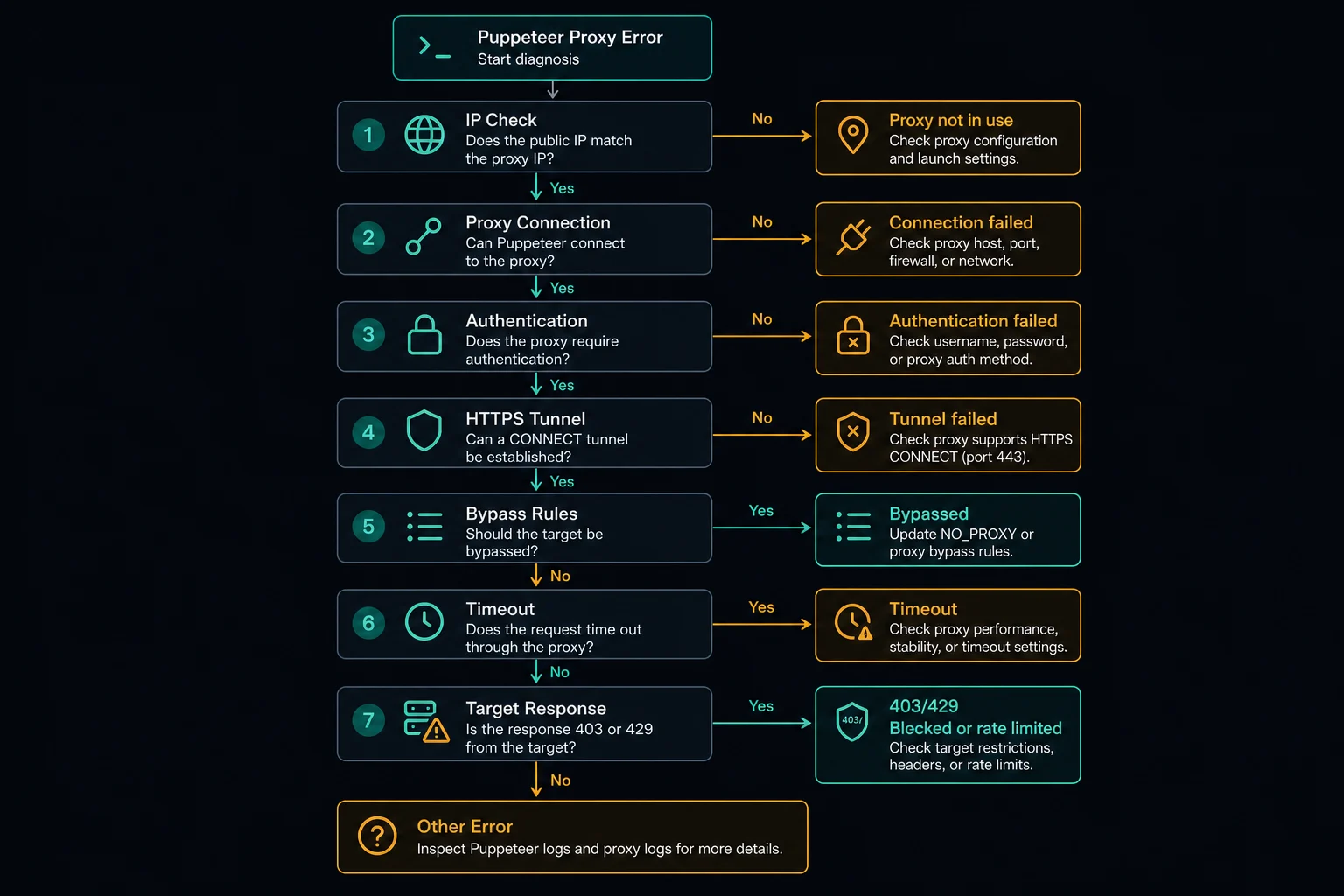
Puppeteer proxy server errors usually come from one of five places: the proxy address is formatted wrong, Chrome cannot reach the proxy, authentication is missing, traffic is being bypassed, or the target site is rejecting an otherwise working browser session.
Do not debug every layer at once. First prove that the proxy works outside Puppeteer, then prove that Chrome is using it, then add authentication, and only then look at target-site blocks such as 403, 429, or bot challenges.
If you need the full setup pattern first, start with the proxy Puppeteer guide. This article focuses on failures after you already have a --proxy-server setting or browser context proxy in place.
Puppeteer Proxy Server: Quick Diagnosis
Use this table to narrow the failure before changing code:
| Symptom | Most likely layer | First check |
|---|---|---|
| Page shows your local IP | Chrome did not use the proxy | Verify --proxy-server and bypass rules |
net::ERR_PROXY_CONNECTION_FAILED |
Proxy endpoint or protocol | Test the host and port with curl -x |
| Authentication prompt or 407 | Proxy credentials | Call page.authenticate() before navigation |
ERR_TUNNEL_CONNECTION_FAILED |
HTTPS tunnel, protocol, or upstream route | Test an HTTPS URL through the same proxy |
| Navigation timeout | Proxy latency, target latency, or blocked route | Compare proxy vs direct navigation with a timeout |
| Target returns 403 | Target access policy or reputation | Debug request behavior and proxy reputation |
| Target returns 429 | Rate limit or retry storm | Reduce concurrency and add backoff |
The key distinction is proxy-layer failure versus target-layer response. If Chrome cannot connect to the proxy, the target never sees the request. If the target returns 403 or 429, the proxy path may already be working.
Start With a Clean Proxy Test Outside Puppeteer
Before changing Puppeteer code, test the same proxy with a simple client:
curl -x "http://USERNAME:PASSWORD@proxy.example.com:8080" https://ipv4.unknownproxies.com/ip
If that fails, Puppeteer is not the first problem. Check the proxy host, port, protocol, username, password, plan status, IP allowlist, and whether your provider expects HTTP or SOCKS5.
If curl succeeds, test a normal HTTPS page:
curl -I -x "http://USERNAME:PASSWORD@proxy.example.com:8080" https://example.com
That catches proxy endpoints that can connect to an IP echo service but fail when creating a tunnel to a normal HTTPS destination. It also gives you a faster feedback loop than launching a full browser for every guess.
Check the --proxy-server Format
Chrome receives Puppeteer's proxy setting through launch arguments or browser context options. The common launch-level pattern is:
import puppeteer from "puppeteer";

const browser = await puppeteer.launch({
  headless: "new",
  args: ["--proxy-server=http://proxy.example.com:8080"],
});
Keep the proxy server separate from credentials. If your provider gives you this:
host:port:username:password
convert it to this:
server: "http://host:port"
username: "username"
password: "password"
Then authenticate the page separately:
const page = await browser.newPage();

await page.authenticate({
  username: process.env.PROXY_USERNAME ?? "",
  password: process.env.PROXY_PASSWORD ?? "",
});

await page.goto("https://ipv4.unknownproxies.com/ip", {
  waitUntil: "domcontentloaded",
  timeout: 30_000,
});
Avoid putting username:password@host:port directly inside --proxy-server as your default Puppeteer pattern. Chrome's manual proxy configuration is not the same as a normal HTTP client proxy URL. In Puppeteer, page.authenticate() is the clearer and more reliable place for credentials.
If a list needs conversion, use the proxy converter instead of editing dozens of rows by hand.
Fix net::ERR_PROXY_CONNECTION_FAILED
net::ERR_PROXY_CONNECTION_FAILED means Chrome could not establish a connection through the proxy configuration it was given. Common causes include:
If the same error appears during ordinary browsing, use the Chrome ERR_PROXY_CONNECTION_FAILED guide to inspect system settings, extensions, managed policy, and endpoint reachability before returning to Puppeteer-specific code.
- Missing
http://orsocks5://scheme. - Wrong port.
- HTTP endpoint configured as SOCKS5, or the reverse.
- Provider hostname typo.
- Dead proxy route.
- Local firewall, container, or CI network blocking outbound proxy traffic.
- Corporate or server network policy blocking the proxy port.
For a client-agnostic diagnostic sequence, use the broader proxy error troubleshooting guide to test the same endpoint outside Chromium and identify which request layer failed.
Do not rotate through a full list yet. Pick one proxy, test it with curl, and then launch one browser with one page. If one clean proxy cannot load an IP echo page, a larger pool will only produce noisier logs.
For local apps, also check bypass rules. A broad bypass list can accidentally send target traffic direct instead of through the proxy.
const browser = await puppeteer.launch({
  args: [
    "--proxy-server=http://proxy.example.com:8080",
    "--proxy-bypass-list=localhost,127.0.0.1",
  ],
});
Keep bypass rules narrow. If the target domain appears in the bypass list, the browser may show your local IP even though the proxy flag looks correct.
Fix Puppeteer 407 or Authentication Prompts
HTTP 407 means the proxy server wants valid proxy credentials before it forwards the request. It is a proxy-layer error, not a website login problem.
For Puppeteer, the usual fixes are:
- Set only host and port in
--proxy-server. - Call
page.authenticate()beforepage.goto(). - Confirm the same username and password work with
curl. - Remove copied spaces or invisible characters.
- Check whether credentials were URL-encoded twice.
- Confirm the plan is active and the endpoint matches the credentials.
If the proxy works in curl but Puppeteer still shows an auth prompt, run headed mode so you can see whether Chrome is asking for proxy credentials or the target site is asking for website credentials.
For a deeper proxy-layer explanation, read 407 Proxy Authentication Required.
Fix HTTPS Tunnel and Protocol Errors
Many Puppeteer proxy server errors happen only on HTTPS targets. That does not always mean the proxy URL should start with https://.
For most web scraping and browser automation, an HTTP proxy can reach HTTPS websites by creating a tunnel with the HTTP CONNECT method. In that setup, the proxy URL often stays http://proxy.example.com:8080 while the destination is https://example.com.
Use SOCKS5 only when your proxy plan and browser setup support it:
const browser = await puppeteer.launch({
  args: ["--proxy-server=socks5://proxy.example.com:1080"],
});
If HTTP works but HTTPS fails, test this sequence:
curlan HTTP URL through the proxy.curlan HTTPS URL through the same proxy.- Visit an HTTPS IP echo URL in Puppeteer.
- Visit a normal HTTPS website in Puppeteer.
- Compare with another proxy from the same plan.
That separates general reachability from HTTPS tunneling and target-specific blocks.
Fix Timeouts Without Hiding the Real Error
A navigation timeout can mean the proxy is slow, the target is slow, the route is blocked, or the page is waiting for assets that never finish.
Start with a short, explicit timeout and a lightweight target:
await page.goto("https://ipv4.unknownproxies.com/ip", {
  waitUntil: "domcontentloaded",
  timeout: 30_000,
});
Then test the real target with the same proxy. If the IP echo page is fast and the target times out, the proxy is probably reachable. The problem may be target-side filtering, heavy page weight, blocked assets, TLS behavior, or too much concurrency.
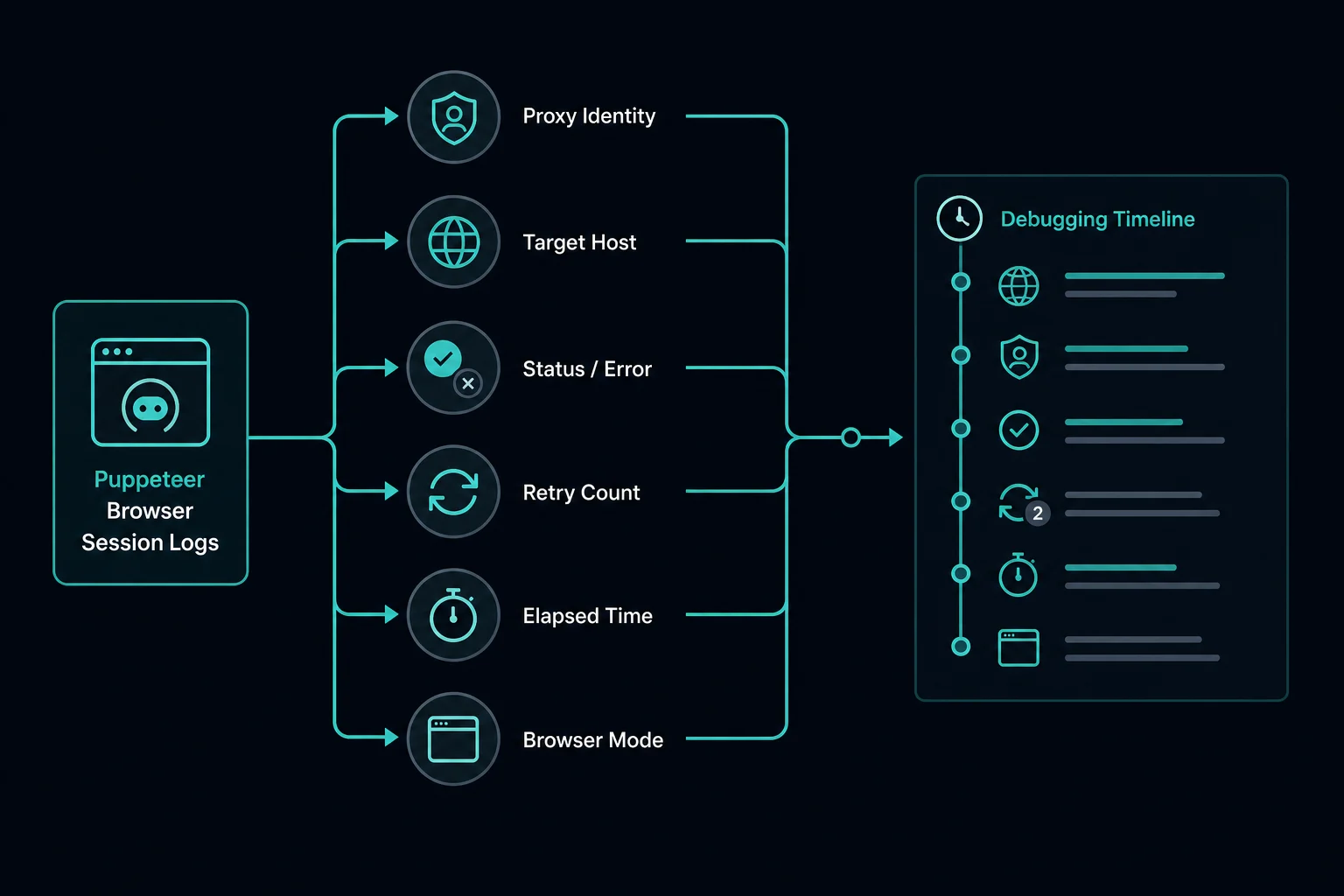
Avoid solving every timeout by increasing timeout to several minutes. That can make worker queues pile up, hold browser processes open, and hide retry storms. Log enough context to separate slow proxies from target-side failures:
| Field to log | Why it matters |
|---|---|
| Proxy ID or endpoint | Finds one bad route quickly |
| Target host | Separates global proxy issues from one domain |
| Browser mode | Headed vs headless differences are easier to compare |
| Status code or error name | Distinguishes timeout, 407, 403, and 429 |
| Retry count | Catches loops that create their own blocks |
| Elapsed time | Shows whether failures are instant or slow |
Do Not Treat 403 and 429 as Proxy Setup Errors
If the target returns 403 or 429, Puppeteer successfully reached something. That response may still involve proxy reputation or request concentration, but it is no longer the same problem as a malformed proxy server argument.
For 403, compare:
- Does the target work without a proxy?
- Does the target work with the same proxy in headed mode?
- Does a normal browser profile with the proxy fail too?
- Are headers, cookies, locale, and browser state consistent?
- Is the target private, account-gated, or explicitly disallowing the workflow?
For 429, slow down before adding more IPs. Puppeteer loads many resources per navigation, so one page can create far more requests than your script line suggests. Use the delay calculator to size monitoring tasks before increasing concurrency.
For target-side diagnosis, compare HTTP 403 Forbidden, HTTP 429 Too Many Requests, and Cloudflare Error 1015.
Rotate Only After the Proxy Server Works
Rotation should not be your first fix. If every proxy fails because the format is wrong or credentials are missing, rotation just repeats the same error.
Once one proxy works, rotate at a browser or context boundary:
for (const proxy of proxies) {
  const browser = await puppeteer.launch({
    headless: "new",
    args: [`--proxy-server=${proxy.server}`],
  });

  try {
    const page = await browser.newPage();

    if (proxy.username && proxy.password) {
      await page.authenticate({
        username: proxy.username,
        password: proxy.password,
      });
    }

    await page.goto("https://example.com", {
      waitUntil: "domcontentloaded",
      timeout: 30_000,
    });
  } finally {
    await browser.close();
  }
}
For multi-step flows, keep one browser session tied to one proxy identity. Do not rotate between login, cart, checkout, form submission, or account pages. If your workflow needs stable identity, compare sticky vs rotating proxies before changing the code.
When Better Proxies Help
Better proxies help when the Puppeteer configuration is already correct but the target is sensitive to IP reputation, region, request concentration, or unstable sessions.
Use residential proxies when you need rotating or sticky consumer-style routes, location diversity, and public-page scraping from regions that match the workflow. Use ISP proxies from pricing when you need stable dedicated routes, lower latency, and one proxy identity mapped to one browser profile or task.
They do not fix:
- Wrong
--proxy-serverformat. - Missing
page.authenticate(). - Invalid credentials.
- Localhost or target bypass mistakes.
- Unbounded concurrency.
- Account limits, private pages, or site rules.
Fix the Puppeteer proxy server path first. Then choose the proxy type based on whether the real bottleneck is rotation, stability, reputation, latency, or location.
FAQ
Why does Puppeteer show my local IP instead of the proxy IP?
The proxy flag may be missing, malformed, overridden, or bypassed. Log the launch args, remove broad bypass rules, and visit an IP echo page through the browser before testing the target site.
What does net::ERR_PROXY_CONNECTION_FAILED mean in Puppeteer?
It usually means Chrome could not connect through the configured proxy endpoint. Check the host, port, scheme, protocol support, local network rules, and whether the proxy works with curl -x.
How do I fix proxy authentication in Puppeteer?
Launch with the proxy host and port, then call page.authenticate({ username, password }) before navigation. If the same credentials fail in curl, fix the proxy account or format first.
Should I use HTTP or SOCKS5 for a Puppeteer proxy server?
Use HTTP proxies for most browser automation unless your provider specifically gives you SOCKS5 and Chrome is configured for it. Protocol changes do not fix bad credentials, aggressive traffic, or target-side blocks.
Can a proxy server fix Puppeteer 403 errors?
Sometimes, but only if IP reputation or location is the real bottleneck. A 403 can also come from permissions, headers, cookies, browser behavior, private pages, or site policy.
Final Thoughts
Puppeteer proxy server errors are easiest to fix when you separate the layers. Verify the proxy with curl, pass Chrome a clean server value, authenticate before navigation, test an IP echo page, and only then debug target-side 403, 429, timeout, or fingerprint behavior.
If the setup is correct but the target still rejects legitimate browser traffic because of IP reputation or request concentration, compare Unknown Proxies plans and choose residential or ISP proxies based on whether your workflow needs rotation or stable sessions.
Technical references: Puppeteer Page.authenticate() documentation, Puppeteer BrowserContextOptions documentation, Chromium proxy support notes, and MDN 407 Proxy Authentication Required.