A proxy error means a request did not complete normally while a proxy was configured, but it does not automatically mean the proxy server is broken. The failure may come from the client, proxy settings, DNS, authentication, the network route, the proxy gateway, or the target website.
The fastest fix is to isolate those layers. Test the destination without a proxy, test one proxy against a neutral IP endpoint, record the exact error or HTTP status, and change one variable at a time. A 407 needs an authentication fix; a connection refusal points to the endpoint or network; a 403 or 429 usually means the request reached the target and was denied or rate limited.
This guide explains what generic browser messages, app exceptions, timeouts, and HTTP responses mean. It also gives you a repeatable proxy error checklist for browsers, scripts, scraping jobs, bots, and other authorized automation.
Proxy Error Quick Fix
Use this order before replacing a proxy list or changing your scraper:
- Save the exact message, status code, timestamp, client, and target URL.
- Confirm the target works without the proxy from the same machine.
- Recheck the proxy host, port, protocol, username, and password.
- Test one proxy against a neutral HTTPS IP-check endpoint.
- Compare an HTTP target with an HTTPS target to expose tunnel or TLS problems.
- Test the same proxy with cURL to separate client configuration from proxy availability.
- If the target returns
403,429, or a challenge page, debug target policy, sessions, and pacing instead of the connection. - Retry only temporary failures, with a limit and backoff.
| What you see | Most likely layer | First action |
|---|---|---|
| Proxy hostname cannot be resolved | DNS or endpoint typo | Copy the provider hostname again and resolve it from the same machine |
| Connection refused | Host, port, firewall, or inactive endpoint | Check the port and test TCP access from the current network |
| Connection or tunnel timeout | Proxy, route, target, or timeout budget | Compare direct, proxied HTTP, and proxied HTTPS tests |
407 Proxy Authentication Required |
Proxy authentication | Verify credentials, format, plan status, and IP allowlist |
502 from a proxy or gateway |
Upstream connection or invalid upstream response | Retry once, test another target, then check provider status |
403 Forbidden from the target |
Authorization, access policy, WAF, or reputation | Stop connection debugging and inspect the target response |
429 Too Many Requests |
Request rate or retry behavior | Lower concurrency and honor backoff or Retry-After |
| Direct access works but every proxy fails | Shared proxy setup or network issue | Check protocol, credentials, port access, and client support |
| One proxy fails but another works | Individual route or exit issue | Quarantine the failing endpoint and report the timestamp |
What Does a Proxy Error Mean?
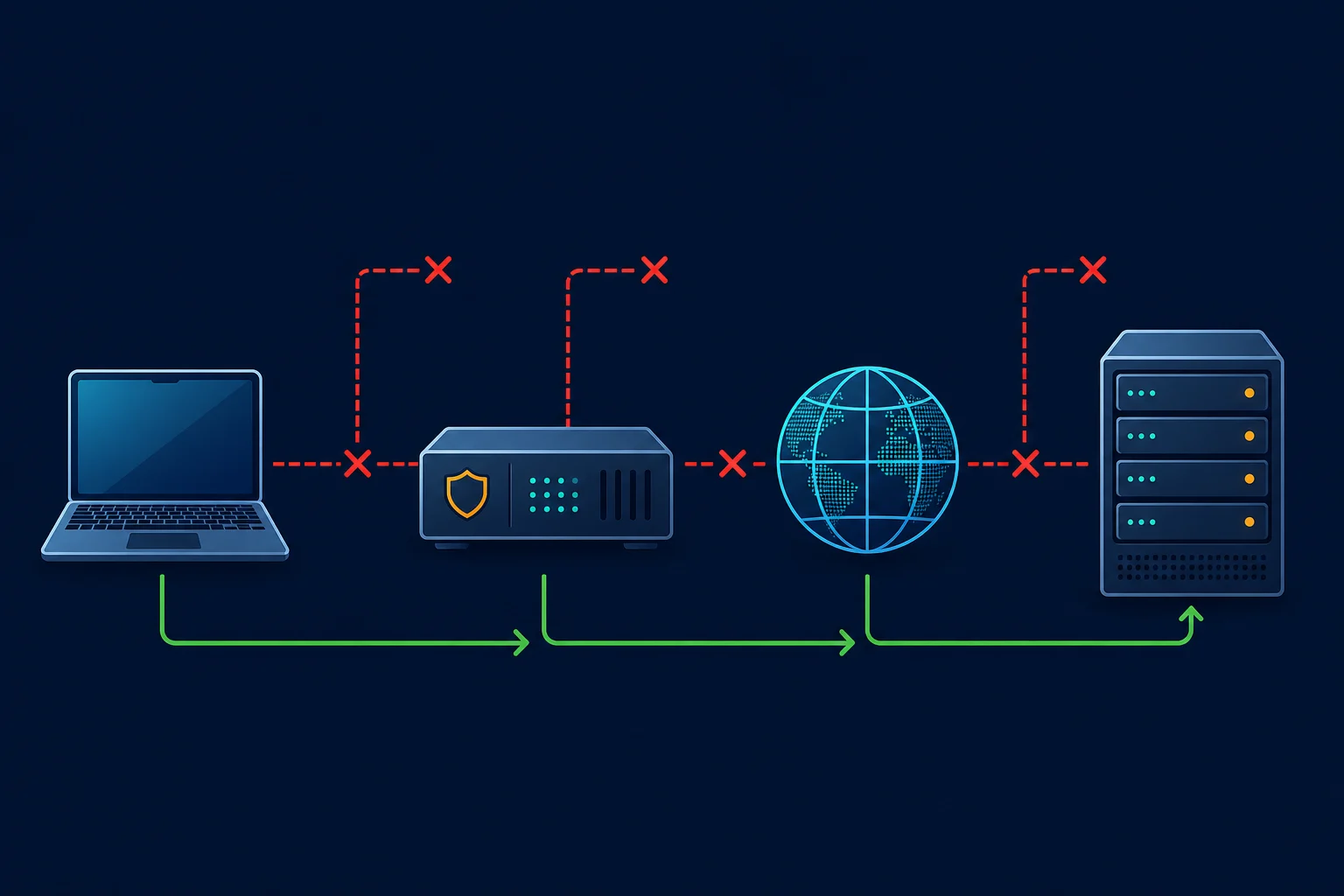
"Proxy error" is an umbrella description, not one universal protocol code. A browser may show ERR_PROXY_CONNECTION_FAILED; a Python library may raise ProxyError; a command-line client may report that it could not resolve the proxy; and a proxy gateway may return an HTTP response such as 407 or 502.
That distinction matters because each message comes from a different point in the request path:
client -> proxy configuration -> proxy gateway -> target website -> response
If the client cannot resolve or connect to the proxy, the target never sees the request. If the proxy returns 407, the client reached it but did not authenticate. If the target returns 403 or 429, the proxy path may be working correctly and the problem has moved to target-side authorization, policy, reputation, or rate limits.
HTTP also uses the word "proxy" for reverse proxies and gateways that sit in front of a website. A 502 Bad Gateway page can therefore come from the target's CDN or reverse proxy, not from the outbound proxy you configured. MDN's 502 definition identifies it as a gateway or proxy receiving an invalid upstream response.
Proxy Error Codes
Proxy providers, proxy servers, and websites use standard HTTP status codes. The same code can come from your proxy or from the website, so check which system sent it. Response headers and the error page body usually tell you.
| Code | Name | Usually sent by | What it means for a proxied request |
|---|---|---|---|
400 |
Bad Request | Proxy or target | The request or proxy URL is malformed. Check the format and special characters in credentials. |
403 |
Forbidden | Usually the target | The site understood the request and refused it. Some proxies also return 403 for blocked destinations or a source IP that is not allowlisted. |
407 |
Proxy Authentication Required | Your proxy | The proxy needs valid credentials or an allowlisted IP before it forwards anything. |
429 |
Too Many Requests | Usually the target | Too many requests in a time window. Slow down and honor Retry-After. |
502 |
Bad Gateway | Proxy or the site's reverse proxy | A gateway got an invalid response from the next server, or could not reach it. |
503 |
Service Unavailable | Proxy or target | The server is overloaded, in maintenance, or has no capacity for the request right now. |
504 |
Gateway Timeout | Proxy or the site's reverse proxy | A gateway waited too long for the next server to answer. |
Connection-level failures such as "connection refused", "could not resolve proxy", or Chrome's ERR_PROXY_CONNECTION_FAILED have no HTTP code at all. They mean the client never got an HTTP response from the proxy.
"Proxy Error" Page on a Website
Sometimes the error is not about your proxy at all. A page titled Proxy Error with this text comes from an Apache web server that sits in front of the site's application:
Proxy Error
The proxy server received an invalid response from an upstream server.
The proxy server could not handle the request GET /.

Reason: Error reading from remote server
This is a 502 Bad Gateway on the website's side. The site's backend crashed, restarted, or took too long to answer. As a visitor, you cannot fix it. Reload after a minute, try another page, and contact the site if it continues. Changing your own proxy or VPN will not help unless the site only fails for one region.
If you run the site, check the Apache error log for lines such as AH01102: error reading status line from remote server. Then confirm the backend service is running, and raise ProxyTimeout if slow requests are expected.
Find Which Layer Failed
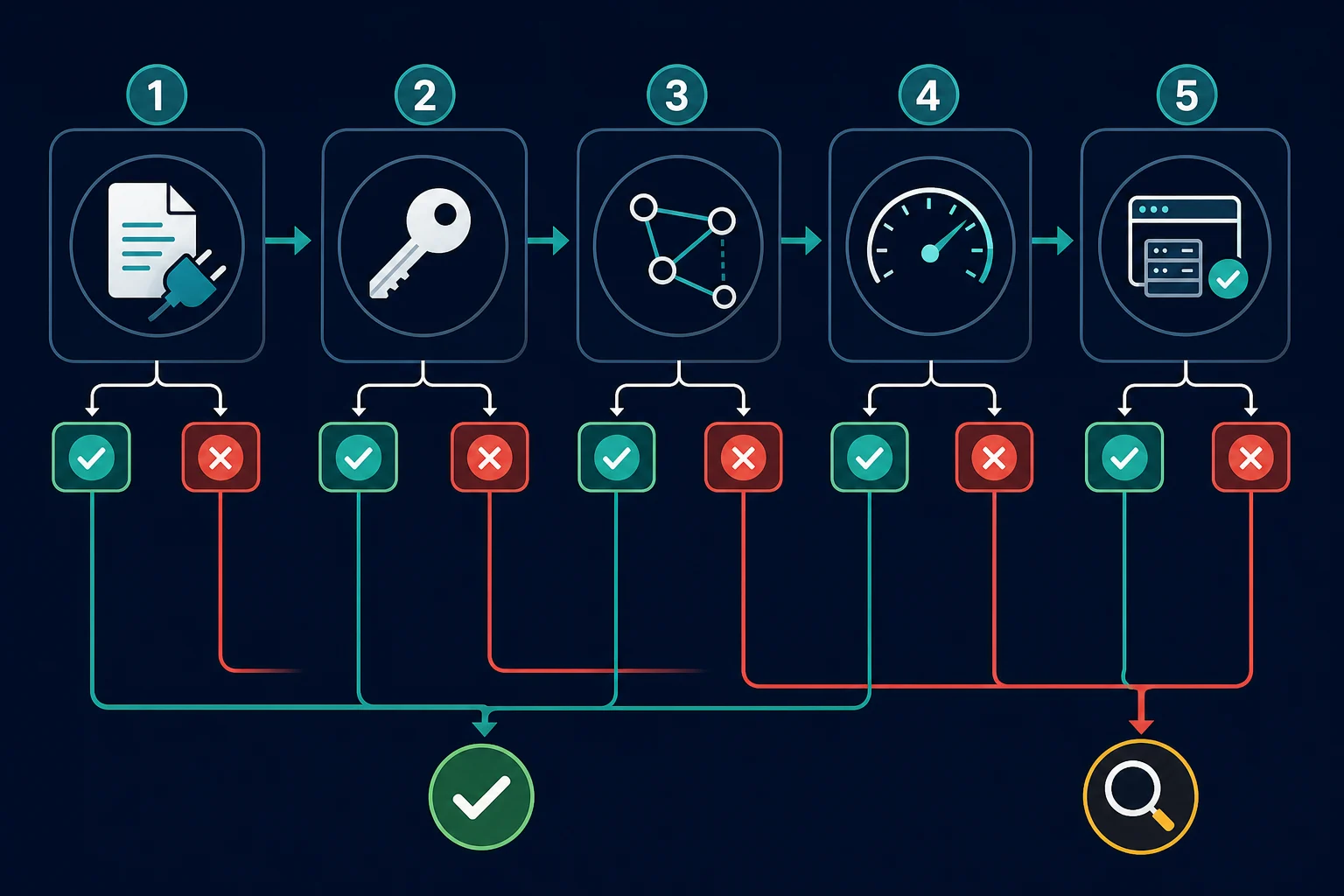
Do not change the IP, user agent, credentials, timeout, and retry settings together. Run a small test matrix and keep every other variable fixed.
1. Test the destination directly
Temporarily disable the proxy and request a public page you are allowed to access. If direct access also fails, the root cause may be local DNS, the device network, the target, or an application bug.
Direct success does not prove the target will accept the proxied route. It only establishes a working baseline.
2. Test one proxy against a neutral endpoint
Choose one known endpoint from the provider and one simple IP-check service. Avoid starting with a login, checkout, protected API, JavaScript-heavy page, or rate-limited target.
A successful test should return a normal response and show the expected exit IP. If it still shows your local IP, the client bypassed the proxy or the verification request followed a path outside your proxy configuration.
3. Compare clients
Test the same endpoint from the same machine with cURL:
curl -v --connect-timeout 10 --max-time 30 \
  --proxy "http://proxy.example.com:8000" \
  --proxy-user "username:password" \
  "https://example.com/"
Replace the sample values locally and keep real credentials out of shell history, screenshots, tickets, and repositories. cURL's proxy documentation describes supported proxy schemes and distinguishes errors such as "could not resolve proxy" from connection failures.
If cURL works but the application fails, focus on that client's proxy format, environment variables, authentication method, certificate trust, or bypass settings. If both fail in the same way, inspect the endpoint, account, provider route, firewall, and network.
4. Compare HTTP and HTTPS
An HTTP request can work while an HTTPS request fails because HTTPS commonly requires a CONNECT tunnel through an HTTP proxy. Tunnel failures can come from an unsupported protocol, blocked port, rejected destination, proxy authentication, or TLS inspection setup.
Do not assume an HTTPS destination requires an https:// proxy URL. Many clients use an http:// proxy endpoint and create a tunnel to the HTTPS destination. Match the protocol and format documented by both your provider and client.
Common Proxy Error Causes
Incorrect host, port, or protocol
One transposed digit is enough to send the client to a closed port. Protocol mismatches are similarly common: an HTTP endpoint entered as SOCKS5, a SOCKS5 endpoint entered as HTTP, or a tool expecting separate fields but receiving a full proxy URL.
Copy the values again from the current dashboard. If your tool expects a different list layout, use the proxy converter rather than manually rearranging a large file.
Missing or rejected authentication
An HTTP 407 Proxy Authentication Required response means the proxy expects acceptable credentials before forwarding the request. Check the username, password, endpoint, port, subscription status, location or session parameters, and whether the account uses username/password or source-IP allowlisting.
Special characters in credentials may need URL encoding when they are embedded in a proxy URL. The exact 407 flow, header behavior, and client-specific fixes are covered in the proxy authentication error guide.
DNS resolution failure
There are two names to resolve: the proxy hostname and the target hostname. "Could not resolve proxy" points to the first. A SOCKS client may resolve the target locally or ask the proxy to resolve it, depending on the scheme and client behavior.
For example, the Requests documentation distinguishes socks5:// local DNS resolution from socks5h:// proxy-side resolution in its proxy configuration guide. Use the mode your workflow actually needs and record which side performs DNS.
Firewall, VPN, or network policy
Corporate networks, cloud hosts, containers, security products, and local firewalls may block the proxy port or destination. A VPN can also change routing or DNS and conflict with an application-level proxy.
Compare the same test from an allowed network. Do not disable managed security controls without authorization. Ask the network owner whether outbound access to the endpoint and port is permitted. The proxy vs firewall guide shows how to tell which of the two is blocking you.
Expired plan or unavailable provider route
If a previously working proxy stops at a clear time, check account status, bandwidth, expiration, credential rotation, maintenance notices, and whether the specific region or pool is available. A provider-side failure is more likely when multiple clients and simple targets fail through the same endpoint while direct access remains healthy.
Timeout or overloaded path
A timeout only tells you that an operation exceeded its budget. It does not identify whether DNS, TCP connection, TLS, proxy tunneling, target processing, or response download was slow.
Set both a connection timeout and an overall request timeout where the client supports them. Log elapsed time and the stage that failed. Retrying the same slow path immediately can amplify an outage or turn a temporary delay into a retry storm.
Target-side denial or rate limit
A response from the target is evidence that the request traveled farther than a local proxy connection error. Treat HTTP 403 Forbidden as an authorization, policy, WAF, or reputation branch. Treat HTTP 429 Too Many Requests as a pacing and concurrency branch.
Changing proxies may help legitimate workflows when a specific exit is unhealthy, in the wrong region, or grouped with noisy traffic. It will not repair missing authorization, forbidden automation, invalid sessions, excessive request volume, or ignored site rules.
How to Fix a Proxy Error in a Browser
First determine whether the browser uses an extension, an operating-system proxy, a profile-level setting, or an automation launch argument. Disable only the relevant setting for the direct baseline, then restore it before the proxy test.
- Confirm the proxy is enabled in the browser or system layer you intended.
- Remove stale extensions or settings that configure a second proxy.
- Check whether a bypass list sends the test domain direct.
- Test a private window only to rule out extension or profile state; it will not fix a dead endpoint.
- Re-enter credentials if the prompt repeats, then use the exact
407guide if authentication still fails. - Compare another browser only after keeping the endpoint and network fixed.
If Chrome shows ERR_PROXY_CONNECTION_FAILED, follow the ERR_PROXY_CONNECTION_FAILED fix guide. If it shows "Checking the proxy and the firewall", use the Chrome proxy and firewall checklist.
On Windows, an automatic-detection warning has its own diagnostic path. Use the guide for Windows could not automatically detect this network's proxy settings instead of assuming a commercial proxy endpoint failed.
How to Fix a Proxy Error in Scripts and Automation
Make failures observable before adding rotation. Log a sanitized proxy ID, client, destination host, status or exception class, request stage, elapsed time, attempt number, and timestamp. Never log the proxy password or authorization headers.
Then classify the result:
configuration error -> stop the job and fix the shared setting
authentication error -> stop and repair credentials or allowlisting
connection error -> retry a different healthy route within a strict limit
timeout -> back off, compare layers, and retry only if the operation is safe
403 or 429 -> inspect authorization, policy, sessions, and pacing
5xx -> retry conservatively and monitor target or gateway health
For Python, start with the exact formats and exception handling in Python proxy requests. For Chromium automation, use the Puppeteer proxy server errors guide to separate ERR_PROXY_CONNECTION_FAILED, tunnel failures, authentication prompts, navigation timeouts, and target responses.
Retries should be bounded and selective. Do not retry invalid formats or 407 responses in a loop. Retry temporary connection failures and some 5xx responses only when the operation is safe to repeat, then add exponential backoff and jitter. Respect Retry-After when the target sends it.
When Should You Replace the Proxy?
Replace or quarantine an individual proxy when controlled tests show that another endpoint works with the same client, credentials, network, and target while that endpoint repeatedly fails. Keep the timestamps and failure classes so the provider can investigate the route.
Do not replace the whole pool because every endpoint shares one incorrect port, expired credential, blocked egress rule, or client configuration. Fix the shared cause first.
If your current proxy type is a poor fit for an allowed workload, choose based on traffic behavior:
| Need | Proxy approach |
|---|---|
| Independent requests across locations | Rotating residential proxies with conservative pacing |
| Stable login, cart, or multi-step session | Sticky residential session or ISP proxy |
| Low-cost access to a permissive target | Datacenter proxy, after a small test |
| One fixed route for monitoring or account continuity | Dedicated ISP proxy |
Compare residential and ISP proxy plans only after the diagnostic shows that route stability, location coverage, or IP reputation is the actual bottleneck. Better infrastructure cannot make disallowed access acceptable or compensate for uncontrolled request volume.
Prevent Proxy Errors in Production
- Validate proxy records before deployment and reject malformed hosts, ports, and schemes.
- Test a small sample against a neutral endpoint before targeting production pages.
- Keep credentials in a secret manager and rotate them deliberately.
- Monitor success rate, connection time, total latency,
407,403,429, and5xxseparately. - Use health checks that distinguish the proxy gateway from the target website.
- Keep sessions on a stable identity when cookies, accounts, or multi-step state matter.
- Cap retries and concurrency, add jitter, and avoid retrying permanent errors.
- Quarantine failing endpoints instead of returning them immediately to rotation.
- Preserve a direct baseline and a known-good client for incident comparison.
- Follow target terms, robots guidance where applicable, access controls, and data-use rules.
Proxy Error FAQ
Why do I keep getting a proxy error?
Repeated errors usually mean a shared setting is wrong or the same failure is being retried without classification. Test one endpoint with cURL, record the exact code, and check host, port, protocol, credentials, account status, firewall access, and target response in that order.
Does a proxy error mean the proxy is down?
Not necessarily. A dead endpoint is one cause, but invalid format, rejected credentials, DNS, blocked ports, tunnel problems, target denials, and short timeouts can produce proxy-related errors too. Compare one known-good endpoint and one neutral target before deciding the provider is down.
What is ERR_PROXY_CONNECTION_FAILED?
It means a Chromium-based browser could not establish the configured proxy connection. Check the endpoint, port, scheme, browser launch setting, local network policy, and provider route. The target may never have received the request.
Is 407 a proxy error?
Yes. 407 Proxy Authentication Required is an HTTP response from a proxy that requires acceptable authentication. Verify credentials, format, plan access, and allowlisting rather than rotating IPs or changing target headers.
Are 403 and 429 proxy errors?
They can appear during a proxied request, but they usually describe a target-side decision rather than failure to connect to the proxy. A 403 signals a denial; a 429 signals too many requests. Diagnose authorization, policy, reputation, request behavior, and pacing before changing the proxy.
What does "The proxy server received an invalid response from an upstream server" mean?
It is Apache's 502 Proxy Error page. The website's front server could not get a valid answer from its own backend. The problem is on the site's side, so reload later or contact the site.
Can a proxy cause a 502 error?
Yes, but identify which gateway returned it. Your outbound proxy may fail to reach the target, or the target's own CDN or reverse proxy may fail to reach its upstream server. Compare the response headers, body, direct request, other targets, and another proxy route.
Conclusion
A proxy error becomes manageable when you stop treating it as one problem. Preserve the exact message, establish a direct baseline, test one proxy against a neutral endpoint, and separate configuration, authentication, connection, timeout, and target-response failures.
Fix shared settings before rotating, retry only temporary failures with backoff, and replace an endpoint only after a controlled comparison proves that route is the variable. That process resolves most proxy errors faster and produces the evidence needed when a client, network owner, target operator, or proxy provider must help.
Technical references: MDN HTTP status codes, cURL proxy options and exit codes, and Requests proxy documentation.