ERR_PROXY_CONNECTION_FAILED means Chrome is set to use a proxy server, but it could not find or connect to that proxy. Chrome never reached the website. The error page usually says "No internet" and "There is something wrong with the proxy server, or the address is incorrect." The same error appears in Edge and other Chromium browsers, and as net::ERR_PROXY_CONNECTION_FAILED in developer tools and Electron apps.
The fastest fix: open your proxy settings, turn off any proxy you did not set on purpose, and restart Chrome. If you do use a proxy, check that the host, port, and protocol match what your provider gave you, then test the same proxy with curl outside Chrome. If curl also fails, the proxy or the network path is broken, not Chrome.
There are two common situations:
- You do not use a proxy. A VPN, extension, or other software left a proxy setting behind. Turn it off.
- You use a proxy on purpose. The host, port, or protocol is wrong, or the proxy is offline. Test it outside Chrome.
Quick fix if you do not use a proxy
- Windows 10 and 11: open Settings > Network & internet > Proxy. Turn off Use a proxy server and Use setup script. Leave Automatically detect settings on.
- Mac: open System Settings > Network, select your Wi-Fi or Ethernet service, select Details > Proxies, and turn off every proxy you did not set. Select OK.
- Chrome: open
chrome://extensionsand turn off proxy and VPN extensions you do not need. - Close Chrome completely and open it again.
- If the setting comes back after a restart, a VPN client, security tool, or unwanted program is writing it. Uninstall or update that program and scan the PC.
On a work or school device, do not remove a proxy that your organization set. Ask IT to check it.
Quick fix if you use a proxy
- Recopy the host and port. Do not put a URL path, spaces, or the website address in the proxy field.
- Match the protocol: HTTP, HTTPS, or SOCKS5. An HTTP endpoint fails if you set it as SOCKS5.
- Test the same proxy with
curlfrom the same computer and network (see step 4 below). - Check that your plan is active and that your current IP is allowlisted if the proxy uses IP authentication.
- Turn off other proxy and VPN extensions so only one tool controls the proxy.
- Check
chrome://policyfor managed proxy settings.
| Result | What it tells you | Next step |
|---|---|---|
| Direct browsing fails | The problem is broader than the proxy | Restore the internet connection first |
Direct works; proxy fails in Chrome and curl |
Endpoint, protocol, DNS, firewall, or account route is failing | Verify the proxy details and provider status |
Proxy works in curl; Chrome fails |
Chrome is using a different setting, extension, policy, or auth flow | Inspect Chrome's effective configuration |
| Chrome reaches a login prompt or returns 407 | The proxy is reachable | Fix authentication instead |
| Only one destination fails with 403 or 429 | The proxy path is probably working | Debug the destination response and request behavior |
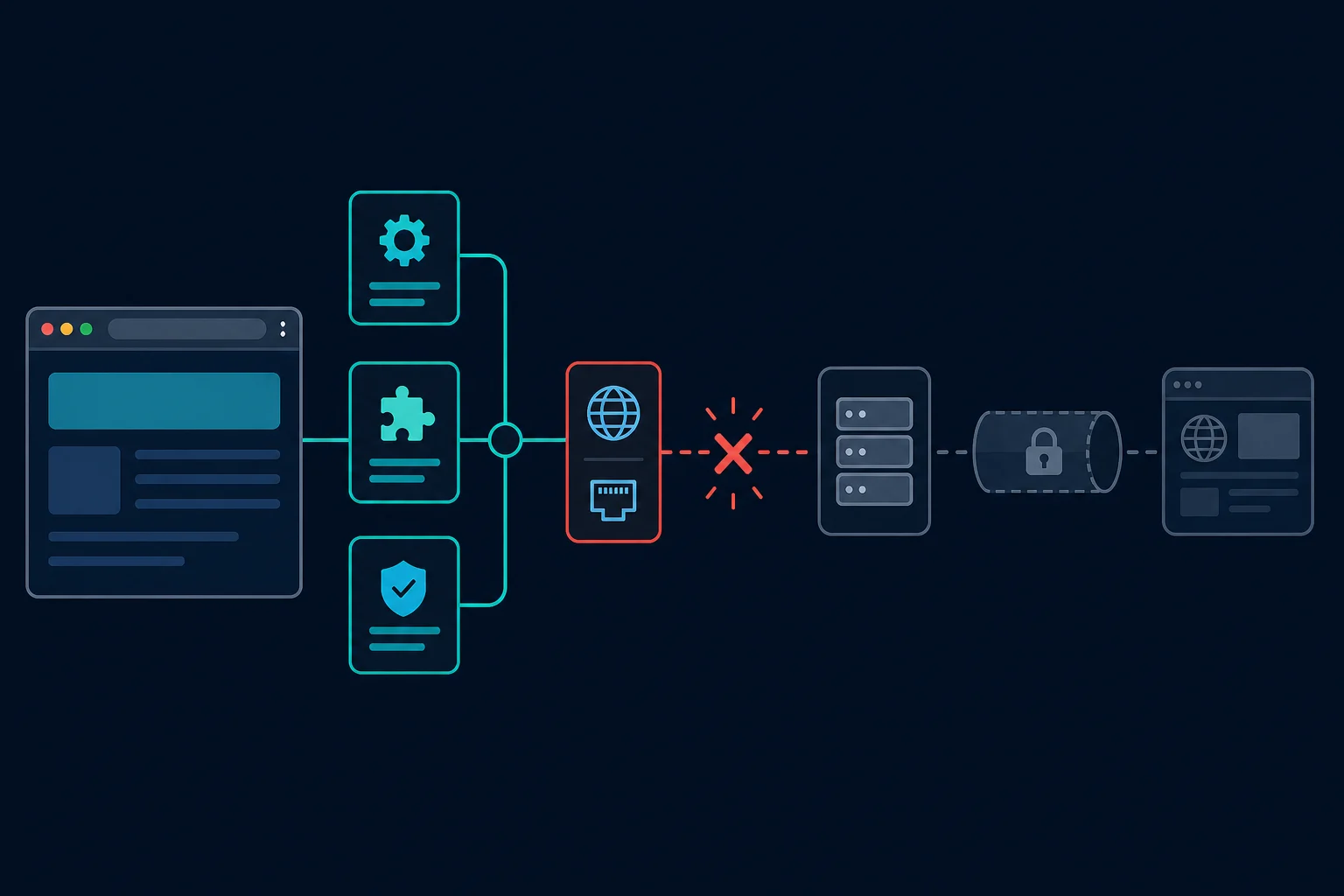
What ERR_PROXY_CONNECTION_FAILED means
Chromium defines ERR_PROXY_CONNECTION_FAILED as network error -130. It occurs when Chrome cannot create a connection to the proxy server because the proxy name could not be resolved or a socket could not connect. Chromium explicitly distinguishes it from a failure during an HTTP proxy's CONNECT tunnel.
That boundary saves time. This error is usually about the path from Chrome to the proxy, not the path from the proxy to the website.
| Error or response | Failing layer | Meaning |
|---|---|---|
ERR_PROXY_CONNECTION_FAILED |
Client to proxy | Chrome could not resolve or connect to the proxy endpoint |
ERR_TUNNEL_CONNECTION_FAILED |
Proxy tunnel | Chrome reached the proxy, but the tunnel to the destination failed |
407 Proxy Authentication Required |
Proxy authentication | The proxy is reachable but needs acceptable credentials |
403 Forbidden or 429 Too Many Requests |
Destination, CDN, or WAF | The request reached a responding service |
If Chrome shows a 407 or keeps reopening a credential prompt, use the 407 Proxy Authentication Required guide. If this happens only in browser automation, the Puppeteer proxy server errors guide covers launch arguments and page authentication without turning this Chrome-wide diagnosis into a framework tutorial.
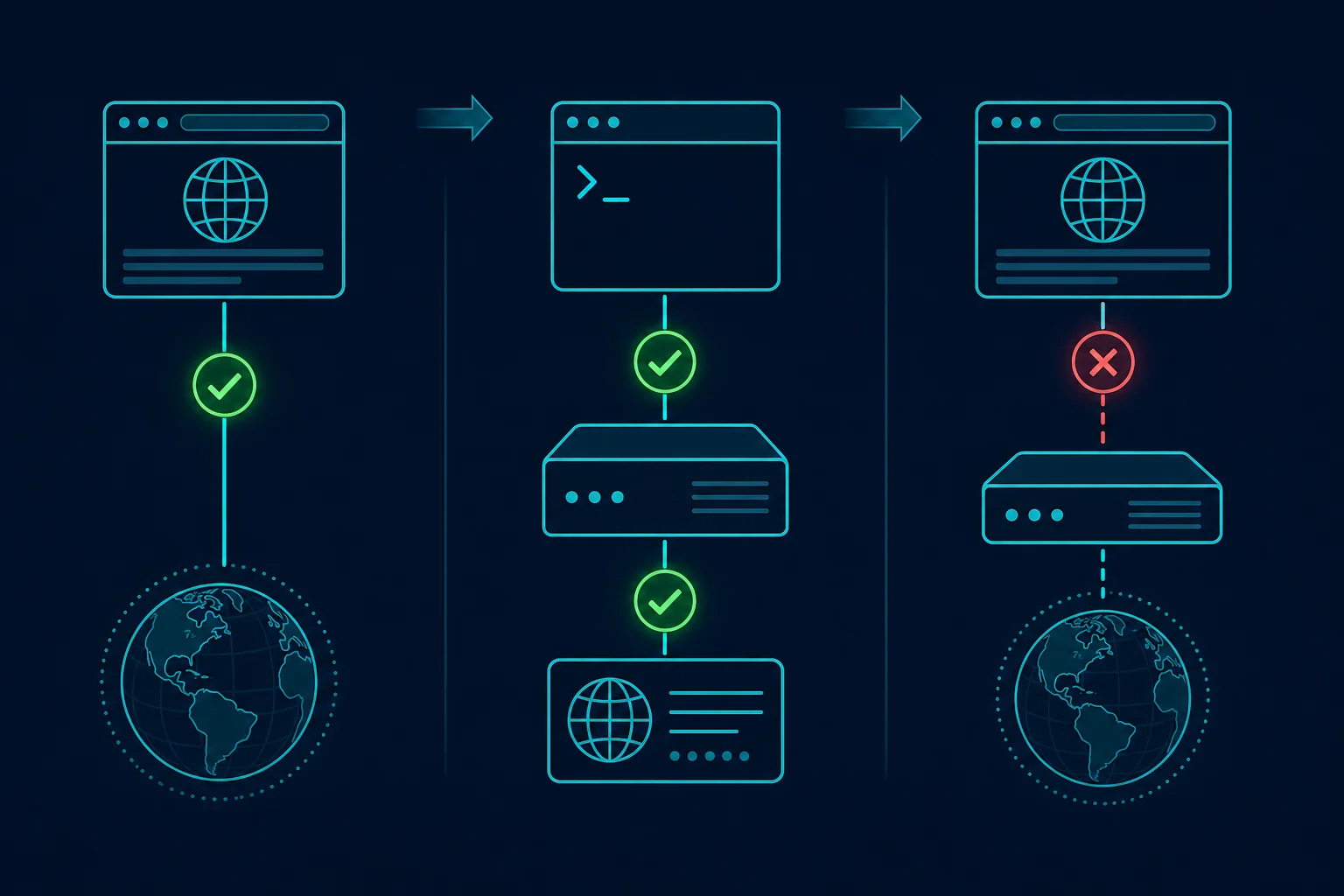
1. Confirm whether Chrome should use a proxy
First compare direct and proxied access. On a personal device where a proxy is optional, record the current setting and temporarily turn the proxy off. Then fully close Chrome, reopen it, and load two unrelated, reliable sites.
- If both sites work directly, the proxy path is the variable.
- If neither works directly, the proxy error may be only one symptom of a DNS, Wi-Fi, router, firewall, or ISP problem.
- If the proxy is required by an employer, school, or security product, do not bypass it. Ask the administrator to verify the assigned endpoint and PAC configuration.
This test does not prove that a destination permits your activity. It only separates a broken proxy connection from a broken general connection.
2. Check the proxy setting on Windows 10, Windows 11, and Mac
Chrome normally uses the operating system's network settings, including proxy settings. Open Chrome's settings, search for proxy, and select the option that opens your computer's proxy settings.
ERR_PROXY_CONNECTION_FAILED on Windows 10 and 11
Open Settings > Network & internet > Proxy. Microsoft documents three possible sources: automatic detection, a setup script, and a manual proxy. The older dialog shows the same settings: press Win + R, type inetcpl.cpl, open Connections > LAN settings, and check Use a proxy server for your LAN.
- If you do not intentionally use a proxy, turn off an unknown Use setup script or Use a proxy server entry after recording it.
- If you do use one, verify the server name or IP and port against the current provider or administrator details.
- If automatic, script, and manual settings conflict, ask which mode the network expects instead of enabling all three.
The command netsh winhttp reset proxy resets the WinHTTP proxy to direct access (Microsoft netsh reference). That is a separate setting used by services such as Windows Update, so it will not fix Chrome by itself. Use the Settings page above.
For a Windows diagnostic warning rather than Chrome error -130, follow the separate guide for when Windows could not automatically detect the network's proxy settings.
ERR_PROXY_CONNECTION_FAILED on Mac
Open System Settings > Network, select the active network service, choose Details, then Proxies. Apple exposes auto-discovery, PAC, HTTP, HTTPS, and SOCKS settings separately. Enable only the mode and fields your provider or administrator supplied. To check from Terminal, run scutil --proxy. Our Mac proxy settings guide explains each field.
Android and Chromebook
Chrome on Android uses the Wi-Fi network's proxy. Open Settings > Network & internet > Internet, tap the gear next to the Wi-Fi network, then Edit (pencil icon) > Advanced options > Proxy, and set it to None if you do not need it. Menu names vary by phone maker. If the error only appears on mobile data, check the Proxy and Port fields in your carrier's APN settings too. On a Chromebook, open Settings > Network, select the network, and check the Proxy section.
Chrome extensions and managed policy
An extension can control proxy settings even when the operating system screen looks correct. Open chrome://extensions, identify proxy or VPN extensions, and disable only those you do not need. Retry with one intended proxy controller active.
Also check how Chrome was started. A shortcut or script that adds --proxy-server=... forces a proxy for that window, whatever the system says.
Next open chrome://policy and look for proxy-related policy. If Chrome says Managed by your organization, a policy can override user choices. Copy the policy name and value for the administrator; repeatedly editing the system proxy will not beat a mandatory policy.
3. Verify host, port, protocol, and credentials
A proxy address needs a reachable host and the correct listening port. Private proxies usually also need a username and password, but those credentials are not part of the host field.
Suppose the provider gives you:
proxy.example.com:8080:USERNAME:PASSWORD
The connection details are:
Host: proxy.example.com
Port: 8080
Protocol: HTTP (confirm with the provider)
Username: USERNAME
Password: PASSWORD
Check for these common mistakes:
- A copied comma, space, slash, or quotation mark in the host or port.
- A dashboard hostname paired with a port from a different proxy product.
- An HTTP proxy entered in a SOCKS field, or a SOCKS5 proxy entered as HTTP.
- An expired endpoint, canceled plan, or region gateway no longer assigned to the account.
- A proxy restricted by client-IP allowlisting while your public IP has changed.
Do not change an HTTP proxy to HTTPS just because the destination starts with https://. Chrome can load HTTPS destinations through an HTTP proxy by using the CONNECT method. The proxy scheme describes how Chrome connects to the proxy, not the destination URL.
Chrome's manual proxy settings also do not use credentials embedded in the proxy server value. Let Chrome's normal authentication flow prompt for credentials, or use the structured authentication method required by your extension or automation tool. If you only need to rearrange list fields, the proxy converter avoids manual copy errors.
Chrome does not support SOCKS5 username/password authentication. Our Chrome SOCKS5 setup guide covers the workarounds. A successful authenticated SOCKS5 test in curl therefore does not prove that Chrome can use the same endpoint directly. Use a provider-supported HTTP proxy, a source-IP-allowlisted SOCKS5 endpoint, or a local client that handles the upstream authentication.
4. Test the proxy outside Chrome
Test from the same machine and network where Chrome fails. This keeps office egress rules, home router behavior, DNS, and firewall policy constant.
For an authenticated HTTP proxy:
curl -v --noproxy "" --proxy-user USERNAME \
  --proxy "http://proxy.example.com:8080" \
  https://ipv4.unknownproxies.com/ip
For SOCKS5 with proxy-side hostname resolution:
curl -v --noproxy "" --proxy-user USERNAME \
  --proxy "socks5h://proxy.example.com:1080" \
  https://ipv4.unknownproxies.com/ip
Replace USERNAME with your proxy username. curl prompts for the password, so it does not appear in the command. --noproxy "" clears bypass rules for this test, including NO_PROXY and no_proxy, so the IP check must use the selected proxy. This override requires curl 7.53.0 or later.
Read the earliest failure, not just the final line:
- Could not resolve proxy points to the proxy hostname, DNS, or a typo.
- Connection refused usually means the host answered but nothing accepted a connection on that port.
- Connection timed out points to an unreachable route, blocked port, firewall, or offline endpoint.
- 407 proves the proxy answered and moves the problem to credentials or account authorization.
- A returned IP address proves the basic proxy route works outside Chrome.
Do not put real proxy passwords in shell commands, tickets, or screenshots. Do not share unredacted verbose output. Redact credentials and share timestamps, the proxy hostname, port, protocol, and exact error instead.
5. Isolate extensions, VPNs, firewalls, and security software
If curl works but Chrome fails, compare Chrome's unique layers:
- Disable an unneeded proxy or VPN extension and restart Chrome.
- Disconnect a separate VPN if the proxy is not supposed to run inside it.
- Try a fresh Chrome profile with no extensions.
- Check whether endpoint security or a local firewall blocks Chrome but allows the terminal.
- Test another network, such as a phone hotspot, if policy allows it.
Local debugging proxies and antivirus HTTPS scanning
If the proxy is a tool on your own machine, such as an HTTP debugging proxy, antivirus software is a known cause. HTTP Toolkit's write-up (December 2024) says that when the tool configured the browser for you, the settings are normally right. Antivirus HTTPS scanning can then intercept the connection to the local proxy and reject its certificate. Their example is ESET, where the fix is to turn off the SSL/TLS scanning option, not the whole antivirus. Read the HTTP Toolkit explanation before changing any security setting, and only do it on a device you control.
If you want a fuller walk through the Chrome settings that firewalls and proxies touch, see checking the proxy and the firewall in Chrome.
Keep the tests controlled
Change one variable at a time. Turning off every security control at once can hide the cause and leave the device exposed. On managed systems, have the administrator review firewall or endpoint-security logs instead of disabling protection.
If every client fails only on one office or cloud network, the network may block the proxy port or destination. If the same proxy fails from multiple unrelated networks, the endpoint or provider route is the stronger suspect.
6. Check PAC scripts and collect a Chrome NetLog
A PAC script chooses a proxy per URL. If Chrome shows ERR_MANDATORY_PROXY_CONFIGURATION_FAILED (error -131) instead, Chromium means a required PAC script could not be fetched, parsed, or run. Check the setup script address in the system settings or in policy. A stale PAC URL, script error, or unexpected DIRECT/proxy rule can make behavior differ by destination. If the PAC file is organization-owned, provide the failing URL and timestamp to its administrator rather than editing the script locally.
For a repeatable Chrome-only failure, open chrome://net-export/, start logging, reproduce the error once, and stop logging. A NetLog can show proxy resolution and connection events that ordinary DevTools does not capture early enough.
Treat NetLog files as sensitive. They can contain browsing and network metadata even when exported in a sanitized mode. Share them only with a trusted administrator or support team through an approved channel.
7. Reset only after you identify the layer
Clearing cookies and browsing history rarely fixes ERR_PROXY_CONNECTION_FAILED because the failure happens before Chrome reaches the website. Prefer the smallest reset that matches the evidence:
- Restart Chrome after correcting a proxy setting.
- Restart the computer if an OS proxy service or VPN client is stuck.
- Flush DNS only when the proxy hostname fails to resolve while known hostnames resolve normally.
- Reset Chrome settings only when an extension or changed browser preference remains the likely cause.
- Use a full Windows network reset only after safer connection and proxy checks fail; it can remove adapters and require VPN software to be reconfigured.
Replacing the proxy is reasonable when its hostname, port, protocol, and authorization are correct but the endpoint remains unreachable across multiple allowed networks. Buying or rotating more proxies will not fix a typo, blocked outbound port, conflicting policy, or wrong protocol.
Prevent the error from returning
For repeatable browser and automation work:
- Store host, port, protocol, and credentials as separate fields.
- Test one endpoint before importing a full proxy list.
- Monitor DNS resolution, TCP connection time, authentication results, and plan expiry separately.
- Keep a known direct test and a known proxy test for comparison.
- Record which extension, policy, PAC script, or command-line flag owns the proxy setting.
- Stop automated retries after repeated connection failures; fast retries do not revive an unreachable socket.
- Keep one proxy identity stable during login or other multi-step sessions.
Once a working route is proven, choose residential proxies for legitimate workflows that need rotating or sticky consumer-style IPs, or compare ISP proxy plans for stable dedicated routes. Neither product type overrides destination rules, account permissions, local network policy, or site terms.
net::ERR_PROXY_CONNECTION_FAILED in DevTools and apps
net::ERR_PROXY_CONNECTION_FAILED is the same Chromium error with a net:: prefix. You see it in the DevTools console, in Electron apps such as VS Code or Discord's desktop client, and in tools built on Chromium like Puppeteer.
- In DevTools, it means the browser's proxy failed for that resource. Fix the browser or system proxy as above.
- In an Electron app, the app usually follows the system proxy or its own proxy setting. Check both.
- In VS Code, the VS Code network docs say it uses Chromium's proxy support and picks up your OS proxy settings. The
http.proxysetting applies only to extensions and the CLI. Launching with--proxy-server=<host:port>forces a proxy and--no-proxy-serverturns it off, so check for those flags in your shortcut. - In automation, check the
--proxy-serverargument and the proxy host your script passes in.
Some VPN and proxy extensions show their own text, such as "Connection failed. Cannot establish proxy connection." That message comes from the extension. Reconnect it, switch its server, or turn it off to restore direct browsing.
FAQ
Is ERR_PROXY_CONNECTION_FAILED caused by the website?
Usually no. Chrome emits it when it cannot resolve or connect to the configured proxy endpoint. The destination website normally has not received the request.
Why does Chrome fail when other browsers work?
Chrome may be using a proxy extension, managed policy, PAC result, command-line flag, or profile-specific configuration that the other browser does not use. Compare the effective proxy settings, then test a fresh Chrome profile.
What is the difference between ERR_PROXY_CONNECTION_FAILED and ERR_TUNNEL_CONNECTION_FAILED?
ERR_PROXY_CONNECTION_FAILED means Chrome could not establish the connection to the proxy itself. ERR_TUNNEL_CONNECTION_FAILED means a proxy tunnel could not be established, so check HTTPS tunneling, proxy responses, destination reachability, and authentication.
How do I fix ERR_PROXY_CONNECTION_FAILED on Windows 11?
Open Settings > Network & internet > Proxy and turn off Use a proxy server and Use setup script if you did not set them. Restart Chrome. If you need the proxy, check its host, port, and protocol with curl.
What does "There is something wrong with the proxy server, or the address is incorrect" mean?
It is the message Chrome shows for this error. Chrome is set to use a proxy, and it could not reach that proxy. Turn off a proxy you did not set, or correct the host and port of the one you did.
Why does VS Code show net::ERR_PROXY_CONNECTION_FAILED?
VS Code is built on Chromium, so it follows your operating system proxy settings. A stale system proxy, a --proxy-server launch flag, or a proxy variable in an extension can all trigger it. Fix the system setting first, then restart VS Code.
Can a new proxy fix ERR_PROXY_CONNECTION_FAILED?
Yes, if the configured endpoint is offline, expired, unreachable, or no longer assigned. A new proxy will not fix the wrong scheme, a typo, local firewall rules, conflicting extensions, or mandatory organization policy.
Final thoughts
Fix ERR_PROXY_CONNECTION_FAILED by proving the direct connection first, finding the proxy setting Chrome actually uses, and validating one host, port, and protocol outside the browser. If the proxy also fails in curl, repair the endpoint or the network path. If it works there, look at Chrome's extensions, policy, profile, PAC script, and authentication. Change one thing at a time and write down what you changed.
Technical references: Chromium network error definitions, Chromium proxy support, Microsoft Windows proxy settings, and Apple macOS proxy settings.