The best data scraping tools depend on where the data appears and who maintains the job. For static HTML, use Beautiful Soup. For recurring crawls, use Scrapy or Crawlee. For JavaScript-rendered pages, use Playwright. For no code, use Octoparse. To avoid running browsers, use a managed API such as Zyte API or Apify.
There is no single winner. A Python developer, an analyst who does not code, and a team that wants no infrastructure need different tools. These quick picks are current as of October 2026.
| You are | Start with | Why |
|---|---|---|
| An analyst who does not code | Octoparse, or a browser extension such as Web Scraper | Point-and-click setup, CSV export |
| A Python developer with a few static pages | requests + Beautiful Soup |
Small, free, easy to test |
| A Python team running recurring crawls | Scrapy | Queues, retries, pipelines, and exports built in |
| A JavaScript or mixed team | Crawlee | HTTP and browser crawlers under one API |
| Collecting from JavaScript-heavy pages | Playwright | Real browser engine with isolated contexts |
| A team that does not want to run browsers or proxies | Zyte API, ScrapingBee, or Apify | Managed fetching, rendering, and scheduling |
| A retail or ticketing team tracking prices and stock on a schedule | Scrapy or Crawlee, with a managed API for pages that need rendering | Scheduling, retries, and per-source limits matter more than raw speed |
Do not choose by feature count alone. First confirm that the source and collection method are allowed, define the output schema, and test the smallest representative URL set. A tool that extracts ten demo pages quickly can still be the wrong choice if it produces inaccurate records, hides failed page states, or becomes difficult to operate on schedule.
This guide compares ten data scraping tools by workload, control, and operational tradeoffs, then lists other tools that fit narrower jobs. It is a fit comparison, not a claim that one product wins every target or a synthetic speed benchmark.
Best web data scraping tools at a glance
| Tool | Best fit | Operating model | Main tradeoff |
|---|---|---|---|
| Beautiful Soup | Parsing saved or fetched HTML in Python | Self-hosted library | It does not fetch pages or run JavaScript |
| Scrapy | Structured Python crawlers with queues and pipelines | Self-hosted framework | More project structure than a small parsing script |
| Crawlee | HTTP and browser crawling in JavaScript or Python | Self-hosted library | Browser jobs still need careful resource controls |
| Playwright | Dynamic pages and isolated browser contexts | Self-hosted browser automation | Higher compute and bandwidth than HTTP fetching |
| Puppeteer | Chrome- or Firefox-oriented JavaScript automation | Self-hosted browser automation | You own browser lifecycle, retries, and storage |
| Selenium | Existing WebDriver and cross-browser automation stacks | Self-hosted browser automation | Scraping queues and validation are separate concerns |
| Apify | Scheduled cloud jobs and reusable Actors | Managed platform | Platform usage and Actor quality require evaluation |
| Zyte API | Hosted fetching, rendering, and structured extraction | Managed API | Less low-level control than a self-hosted stack |
| ScrapingBee | HTML, rendering, and extraction behind one API | Managed API | Request options and usage cost require testing |
| Octoparse | Visual workflows for analysts and small teams | No-code application | Complex logic can be harder to review and version |
The first decision is not Python versus JavaScript. It is whether the data is available from an authorized API, the initial HTTP response, a larger crawl, or a browser-rendered page. Start at the lightest layer that returns the required fields reliably.
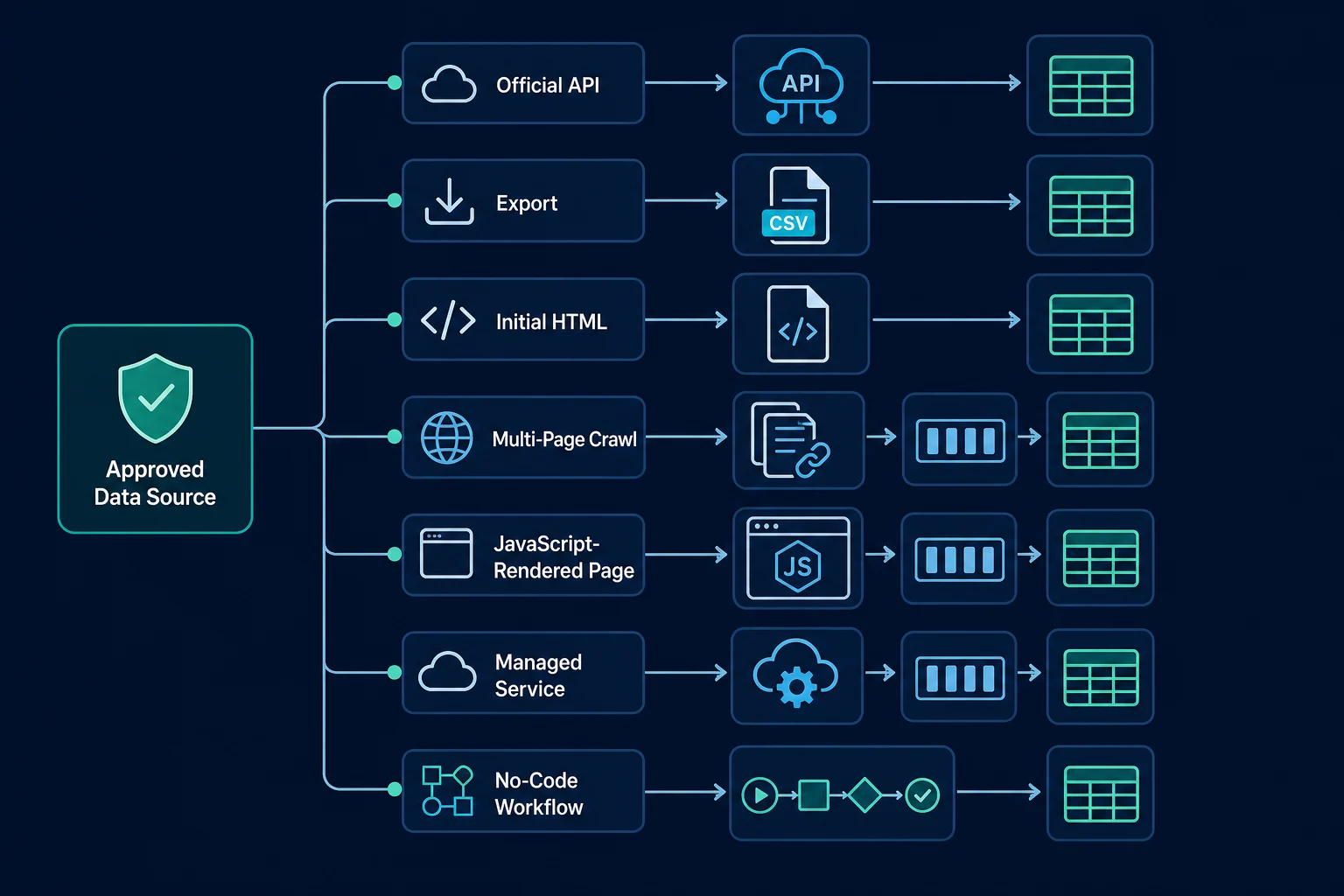
How to choose a web data scraping tool
Use a sample that represents the real workload: normal pages, empty states, pagination, redirects, localized pages, and known error responses. Then answer these questions in order.
1. Can you use an official API or export?
An authorized API, partner feed, or first-party export usually provides a clearer data contract than page markup. It may still have quotas or incomplete fields, but it avoids treating presentation HTML as a stable schema.
If the API covers the fields and freshness you need, use it. Do not add a browser merely because the team already knows browser automation.
2. Is the data in the initial HTML?
Fetch one permitted page with a normal HTTP client and inspect the response body. If the required values are present, an HTTP client plus a parser is usually easier to test and cheaper to run than a headless browser.
Keep collection separate from parsing. A parser should accept saved HTML fixtures in tests, while the fetch layer handles timeouts, caching, response classification, and policy-aware pacing. The web scraping headers guide explains how to keep the HTTP request profile minimal and consistent.
3. Do you need a crawler or only a parser?
A parser turns one document into fields. A crawler discovers or schedules URLs, controls concurrency, deduplicates requests, retries transient failures, and passes responses through extraction pipelines. Choose Scrapy or Crawlee when those controls are part of the job instead of rebuilding them around a small parser.
4. Does a permitted field require browser rendering?
Use Playwright, Puppeteer, or Selenium only after confirming that JavaScript execution or a documented browser interaction is necessary. Browsers load subresources, retain cookies and storage, consume more memory, and create more failure modes.
A rendered page is not proof that extraction succeeded. Classify the final state as expected content, consent, login, challenge, access denial, not found, or an unknown template before accepting fields.
5. Who will operate the workflow?
A no-code tool can suit an analyst-owned, modest workflow. A managed API can remove browser and routing infrastructure from a developer team. A framework provides more control when you have engineering capacity and specific scheduling, storage, or validation requirements.
Account for maintenance, not only setup time. Include selector changes, browser updates, failed-run replay, secret handling, data-quality review, observability, and exports when estimating total cost. If you are deciding between a hosted cloud browser and self-hosted Playwright, the Browserbase alternatives guide breaks down browser-hour and proxy-bandwidth pricing.
1. Beautiful Soup: best for parsing static HTML
Beautiful Soup is a Python library for navigating, searching, and modifying HTML or XML parse trees. It is a strong fit when another component already fetched the page and you want readable selectors and straightforward fixture tests.
Use it for small collectors, fixed URL sets, saved-document processing, and prototypes where discovery and scheduling are limited. Pair it with an HTTP client such as requests or httpx, but keep fetch logic outside the parser.
Beautiful Soup is not a crawler and does not execute page JavaScript. Different parser backends can also create different trees from malformed HTML, so specify the parser in both production and tests.
2. Scrapy: best for structured Python crawlers
Scrapy is an application framework for crawling sites and extracting structured data. Its scheduler, spiders, selectors, downloader middleware, item pipelines, and feed exports give a Python project one coherent place for crawl behavior.
Choose Scrapy for multi-page jobs that need controlled concurrency, URL deduplication, pagination, retry rules, and repeatable output processing. It has more concepts than a requests plus Beautiful Soup script, but that structure becomes useful when several sources or developers share a collector.
Dynamic pages may require a separate rendering strategy. Keep allowed domains and URL patterns narrow, and do not let retry middleware turn access denials into automatic request storms.
3. Crawlee: best for mixed HTTP and browser crawling
Crawlee provides crawling, request queues, storage, autoscaling, and HTTP- or browser-backed workers for JavaScript and Python. It fits projects that use lightweight HTTP collection for some sources and Playwright rendering for others.
That shared crawl model helps teams avoid treating every dynamic-looking site as a browser job. Route server-rendered sources through an HTTP crawler and reserve browser workers for pages that demonstrably require rendering.
You still need workload-specific limits. Set memory and concurrency ceilings, persist queue state, and record which crawler and parser version produced each dataset.
4. Playwright: best for dynamic pages and isolated contexts
Playwright automates Chromium, Firefox, and WebKit and provides browser contexts, locators, network controls, and auto-waiting behavior. It is a strong option when required, permitted data appears only after client-side rendering or a documented interaction.
Use one browser context per independent session so cookies, storage, locale, and network route remain aligned. Block unneeded assets only after confirming they are not required for application behavior or the fields you collect. The Playwright proxy guide covers context-level routing when legitimate regional testing or workload isolation needs a proxy.
Do not use Playwright as a default HTML downloader. If the initial response already contains the data, the browser adds cost and complexity without improving extraction.
5. Puppeteer: best for JavaScript browser automation
Puppeteer is a JavaScript library with a high-level API for controlling Chrome or Firefox. It fits Node.js teams that need rendered pages, interactions, screenshots, PDFs, or network inspection.
Selectors should describe stable page meaning rather than incidental layout. Use a fresh browser context boundary for independent identities, and validate the resulting page before extraction.
The Puppeteer proxy setup guide covers launch settings, authentication, rotation boundaries, and debugging. Routing does not replace conservative pacing or permission.
6. Selenium: best for existing WebDriver stacks
Selenium is a browser automation project built around WebDriver, with language bindings and Grid for remote execution. It is practical when an organization already operates Selenium for cross-browser testing and the collection task genuinely needs browser behavior.
Its broad language and browser ecosystem is the advantage. The tradeoff is that Selenium is not a scraping pipeline: URL queues, response classification, extraction schemas, validation, and storage still need deliberate design.
If you are starting a Python browser workflow, the Python Selenium proxy guide explains configuration and session boundaries. Compare that operating model with Playwright before standardizing a new project.
7. Apify: best for managed jobs and reusable Actors
Apify Actors are serverless cloud programs that accept structured input, run scraping or automation work, and can produce structured output. Actors can run manually, through an API or CLI, or on a schedule.
Choose Apify when managed execution, schedules, datasets, integrations, and reusable components remove more work than they add. It can suit teams that want to deploy custom code without building a complete worker control plane.
Evaluate an Actor like any dependency. Review its maintainer, inputs, output schema, source scope, update history, privacy implications, and failure behavior. A successful run does not guarantee that every returned record is correct.
8. Zyte API: best for managed extraction
Zyte API provides one endpoint for HTTP responses, browser-rendered HTML, screenshots, and supported automatic extraction types. It is useful when a team would rather call a hosted service than operate fetchers and browser fleets.
The API can use an HTTP response or browser HTML as the source for compatible extraction requests. That supports the same lightest-sufficient-method rule: use HTTP when it returns the fields reliably, and rendering only when it is necessary.
Test automatic and LLM-assisted extraction against labeled records from your own approved sources. Managed extraction reduces infrastructure work, but your application still owns source authorization, schema validation, deduplication, retention, and downstream monitoring.
9. ScrapingBee: best for a simple HTML API
ScrapingBee exposes an HTML API with options for JavaScript rendering, cookies, sessions, screenshots, CSS or XPath extraction rules, and AI-assisted extraction. It fits developers who want a request-response interface without maintaining browsers and routing infrastructure.
Test with rendering disabled when the source returns useful initial HTML, then enable it only for pages that need it. Version the request configuration so a change to rendering, session behavior, or extraction rules can be tied to a data-quality change.
The simple API surface does not remove crawl orchestration. You still need a bounded queue, schedules, retry policy, validation, storage, and alerting around each call.
10. Octoparse: best for visual no-code workflows
Octoparse builds a task from visual steps such as selecting data, clicking, and paginating. It is useful when analysts need to create a bounded workflow without maintaining a programming project.
No-code does not mean no maintenance. Record the approved source pages, expected schema, task version, schedule, and export destination. Test empty states, pagination, layout changes, and error pages as you would in code.
Move to a coded or managed-API workflow when the task needs complex branching, reusable source adapters, code review, strong automated tests, or integration logic that becomes difficult to inspect visually.
Other data scraping tools worth knowing
The ten tools above cover most jobs. These fit narrower needs.
| Tool type | Examples | Good for | Watch out for |
|---|---|---|---|
| Browser extensions | Web Scraper, Data Miner | Scraping tables and lists from pages you are viewing | Runs in your browser session, so scale and scheduling are limited |
| Desktop no-code apps | ParseHub | Visual projects with clicks and pagination | Same versioning limits as other visual tools |
| No-code monitoring | Browse AI | Watching a page for changes and exporting rows | Check how it reports failed or partial runs |
| LLM-oriented crawl APIs | Firecrawl | Turning pages into Markdown or JSON for AI pipelines | Validate extracted fields like any AI output |
| SERP APIs | Several vendors | Search engine result data | Search engines restrict direct scraping. See our guide on how to scrape Google search results. |
If an AI agent will call Firecrawl through MCP instead of your code calling its API, see Firecrawl MCP vs Playwright MCP for which jobs suit a hosted scraper and which need a browser the agent drives step by step.
Check pricing, free-tier limits, and terms on each vendor's site before you commit. Those details change often, so this guide does not list them.
How to evaluate AI-assisted scraping features
AI extraction can reduce the time needed to prototype a schema or handle pages with varied layouts. Some vendors describe this as "self-healing" extraction because a model can still find a price after a layout change that breaks a CSS selector. It does not remove validation. The same page can produce plausible yet wrong values, and model or prompt changes can alter output without a selector diff.
Treat AI extraction as one versioned stage in the pipeline:
- Define a typed schema with required and optional fields.
- Build a labeled fixture set that includes missing values and misleading page text.
- Reject records that fail type, range, identity, or cross-field checks.
- Record the service, model or extraction mode, prompt or schema version, and retrieval time.
- Compare cost per accepted record with deterministic selectors on the same sample.
- Keep a review path for low-confidence and high-impact fields.
AI assistance is most useful when it improves validated coverage or maintenance cost. It is not useful merely because it converts a page to JSON. The AI web scraping guide walks through a schema-based LLM extraction step with grounding checks and a selector-first fallback order.
Run a representative pilot before you commit
Test two or three finalists on the same approved sample. Include enough variation to expose real failure modes, not just the easiest page.
Use a pilot set with:
- Normal pages from every supported template.
- Missing fields and empty results.
- Pagination or controlled link discovery.
- Redirects and canonical URL variants.
- Localized pages when region matters.
- Consent, login, 403, 404, 429, challenge, and timeout cases.
- A saved expected record for every valid fixture.
Score each tool on accepted records, not downloaded pages:
| Measure | What to record |
|---|---|
| Correctness | Exact field accuracy and page-template classification |
| Coverage | Valid records returned from the approved sample |
| Reliability | Timeout, retry, crash, and incomplete-render rates |
| Efficiency | Wall time, compute, bandwidth, and API usage per accepted record |
| Maintainability | Selector clarity, fixture tests, version control, and replay support |
| Operations | Scheduling, secrets, logs, metrics, alerts, and failed-run recovery |
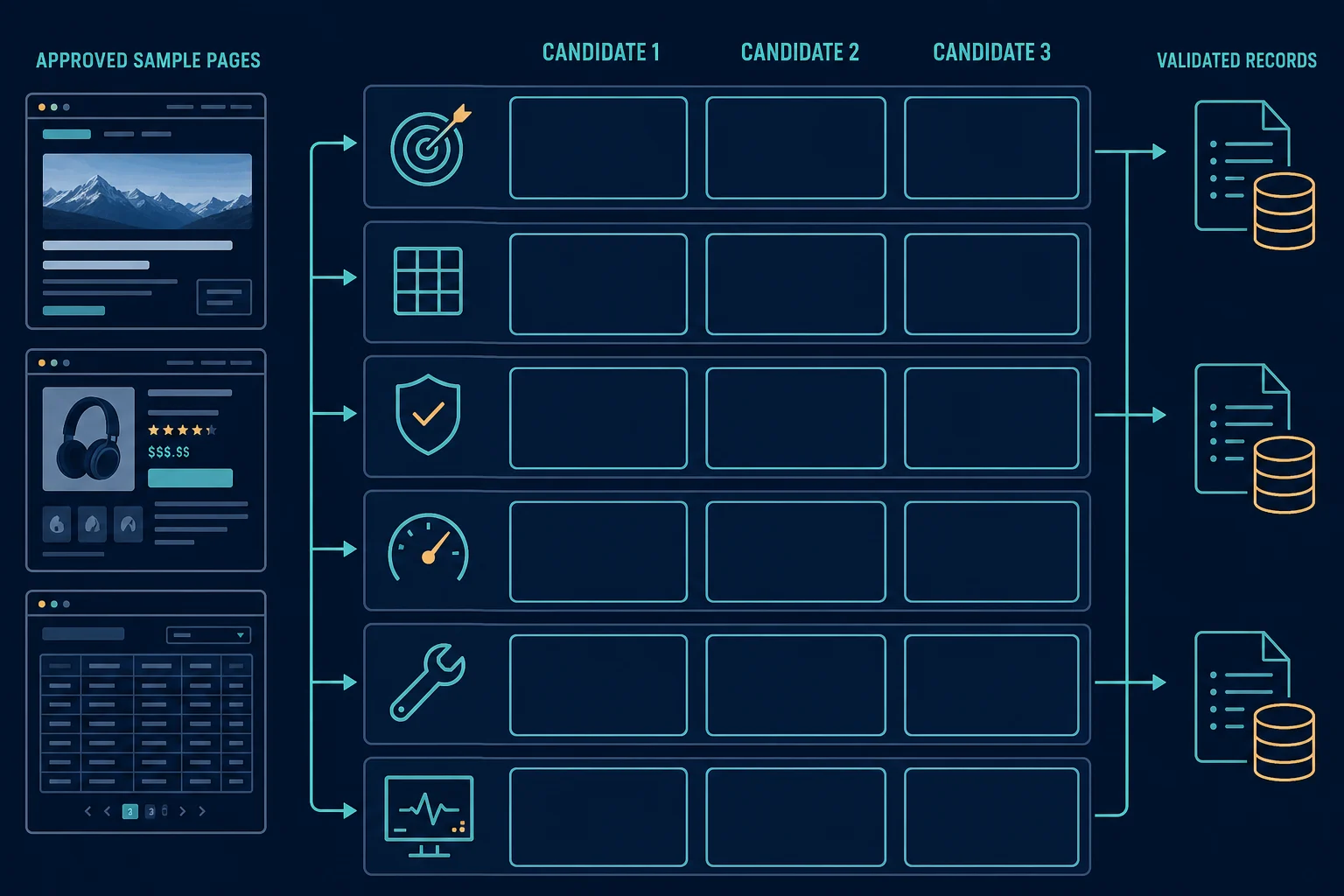
Run the pilot at conservative concurrency. Measure how each tool behaves when the target returns a denial or rate limit instead of rewarding aggressive retries.
Where proxies fit in a scraping tool stack
Proxies are a routing layer, not a substitute for the scraping tool. First make the collector correct with one direct or approved route at low volume. Add proxies only when a legitimate requirement depends on exit location, workload isolation, or reducing traffic concentration across independent sessions.
Keep one proxy route with one cookie jar and browser context for a stateful workflow. Rotate between independent tasks, not midway through a session. If a target returns the same access denial across routes, stop and review permission, authentication, request behavior, and source policy instead of expanding the pool.
The best proxy for web scraping guide compares datacenter, residential, and ISP routing by target sensitivity, session needs, location, speed, and cost. When regional observations genuinely require consumer-network locations, residential proxies support country, state, and city targeting. They do not grant access or make a disallowed workflow acceptable.
FAQ
What is the best scraping tool for beginners?
Use Beautiful Soup if you want to learn Python parsing from saved or permitted static HTML. Use Octoparse if you need a visual, no-code workflow, or the Web Scraper browser extension for small one-off jobs. Free tiers and limits change, so check the vendor's current plan page. In every case, start with a small fixed URL list and a defined output schema.
What is the best free data scraping tool?
Beautiful Soup, Scrapy, Crawlee, Playwright, Puppeteer, and Selenium are open source and free to use. You pay only for the servers, browsers, and proxies you run. Most no-code and managed tools have free tiers or trials with usage limits.
Which scraping tool keeps working when a site changes its layout?
No tool is immune to layout changes. LLM-based extraction (in Zyte API, ScrapingBee, Firecrawl, or your own code) often survives small layout changes better than fixed selectors. It can also return plausible wrong values, so keep schema checks and labeled test pages in place.
What is the best Python web scraping tool?
Beautiful Soup is a good parser for small static-HTML jobs, while Scrapy is a better fit for structured crawls with queues and pipelines. Playwright or Selenium can handle permitted browser-rendered fields, but a browser should not be the default when initial HTML is sufficient.
Is Scrapy better than Beautiful Soup?
They solve different scopes. Beautiful Soup parses an HTML or XML document. Scrapy manages crawling, requests, selectors, pipelines, and exports. A small script may need only Beautiful Soup plus an HTTP client. A recurring multi-page crawl usually benefits from Scrapy's structure.
Do scraping tools include proxies?
Some managed platforms and APIs bundle routing options, while self-hosted libraries generally use a proxy you configure. Evaluate routing separately from parsing and browser behavior so you can tell whether a failure comes from the request, page state, proxy, or extractor.
Is web scraping legal?
It depends on the source, data, jurisdiction, access method, contract terms, and intended use. Prefer authorized APIs and first-party exports, review site terms and the Robots Exclusion Protocol, avoid restricted or unnecessary personal data, and get legal advice for consequential projects. The data scraping legality guide summarizes the main US court decisions.
Final thoughts
Match the tool to the source, the rendering requirement, the operator, and the maintenance budget. Use a parser for HTML you already have, a crawler for queues and discovery, a browser only for permitted rendered fields, and a managed or no-code option when it removes infrastructure your team does not want to own.
Choose with a representative pilot, validate page states before accepting records, and measure cost per correct record rather than pages fetched. Add scheduling, monitoring, and proxy routing only where the workload proves they are needed.