Firecrawl MCP and Playwright MCP solve different halves of agent web work. Firecrawl MCP is a hosted web data API exposed as tools: the agent hands it a URL, a site, or a query, and gets back Markdown or schema-shaped JSON from Firecrawl's own browsers and proxies. Playwright MCP gives the agent a real browser on your machine and lets it act one step at a time, reading an accessibility snapshot, clicking an element by reference, and reading the page again.
Use Firecrawl MCP when the job is reading: pulling fields from known URLs, mapping or crawling a site, or searching and then scraping the results. Use Playwright MCP when the job is doing: logging in, filling forms, reacting to whatever the page shows next, testing your own app on localhost, or browsing from a network and IP you control. Many agents end up with both, routed by task.
The line has blurred since Firecrawl added a live browser tool, firecrawl_interact, so this comparison looks at what each server actually does today. We tested firecrawl-mcp 3.30.0 (the hosted endpoint, plus the local stdio server) and @playwright/mcp 0.0.83 running Chrome for Testing 155 headless, on October 14, 2026. The test pages were the public scraping sandboxes books.toscrape.com and quotes.toscrape.com.
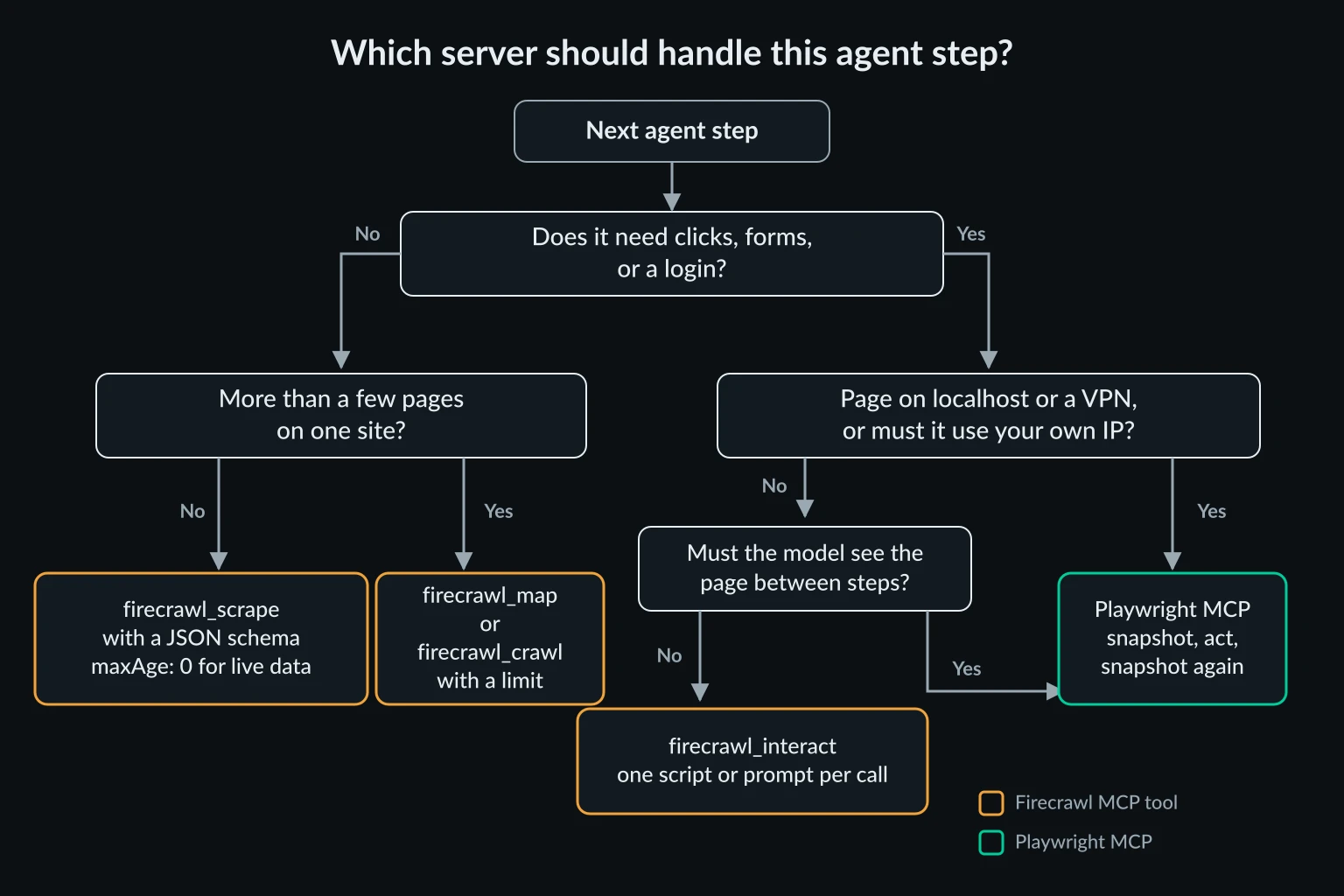
Firecrawl MCP vs Playwright MCP at a glance
| Firecrawl MCP | Playwright MCP | |
|---|---|---|
| What it is | Tools that call Firecrawl's API (scrape, map, crawl, search, interact, agent, monitors) | A local server that launches and drives Chromium, Chrome, Firefox, or WebKit |
| Where the page loads | Firecrawl's cloud browsers, or your self-hosted Firecrawl | Your machine, or wherever you run the server |
| What the model receives | Markdown, JSON matching your schema, links, screenshots | Accessibility snapshots with element refs, console logs, evaluate results |
| How it interacts | One script or prompt per firecrawl_interact call, run remotely |
One action per tool call, with a fresh snapshot in between |
| Multi-page work | firecrawl_map and firecrawl_crawl with page limits |
One navigation per call, driven by the model |
| Sessions | Interact sessions by scrapeId, saved state in named profiles |
The browser context, a persistent profile, or a storage state file |
| Cost | Credits: 1 per page, +4 for JSON extraction, 2 to 7 per browser minute for interact | Free and open source, plus your own compute and bandwidth |
| Account | Hosted keyless tier covers scrape, search, and parse only | None |
| Your own proxy | Not on Firecrawl Cloud. Self-hosted Firecrawl reads PROXY_SERVER |
--proxy-server flag or a config file |
Credit costs come from Firecrawl's billing documentation. The free plan gives 1,000 credits a month, and the Hobby plan is $19 a month for 5,000 credits on the pricing page. Check both before you budget, because they change.
What Firecrawl MCP does well
Firecrawl MCP is at its best when the agent knows what it wants from a page and doesn't care how the page got rendered. A firecrawl_scrape call with a JSON schema turns a page into exactly the fields you asked for, and the rendering, retries, and proxy choice all happen on Firecrawl's side.
On books.toscrape.com we asked for the title and price of every book on the front page:
{
  "url": "https://books.toscrape.com/",
  "formats": ["json"],
  "jsonOptions": {
    "prompt": "Every book on the page",
    "schema": {
      "type": "object",
      "properties": {
        "books": {
          "type": "array",
          "items": {
            "type": "object",
            "properties": {
              "title": { "type": "string" },
              "price": { "type": "string" }
            },
            "required": ["title", "price"]
          }
        }
      },
      "required": ["books"]
    }
  }
}
One call returned all 20 books in 5.0 seconds and 2,691 characters, including page metadata. Every title matched the page's full title attribute, not the truncated link text the page displays, and every price was correct. The response reported "creditsUsed": 5, which is the 1-credit scrape plus 4 credits for LLM extraction.
The other tools cover the multi-page jobs a browser server handles badly. firecrawl_map lists a site's URLs for 1 credit. firecrawl_crawl fetches every page under a path, bounded by limit, includePaths, and maxDiscoveryDepth, at 1 credit per page. firecrawl_search searches the web and can scrape the results in the same call. An agent can do in one tool call what would take a browser agent dozens of navigations, each with its own model turn.
Firecrawl caches pages for up to two days by default
Firecrawl serves a cached copy when it has one newer than maxAge, which defaults to 172,800,000 ms, or two days (fast scraping docs). Our books scrape came back with "cacheState": "hit" and a cachedAt 45 minutes old. A scrape of the quotes login page returned a copy cached 20 hours earlier.
That is fine for documentation and articles. It is wrong for prices, stock levels, or anything the agent checks to make a decision. Pass "maxAge": 0 when the agent needs the live page, and expect it to be slower.
The hosted keyless tier is a narrow slice
Without a key, the hosted endpoint at https://mcp.firecrawl.dev/v2/mcp lists three tools: firecrawl_scrape, firecrawl_search, and firecrawl_parse. Calling firecrawl_interact there returned This tool needs a Firecrawl account. with a signup link. Crawl, map, agent, and monitors need a key or an OAuth connection.
Where Playwright MCP is the better tool
Playwright MCP's advantage is the loop. After every action, the model sees the page again, so it can notice a cookie banner, a validation error, or a changed layout and adjust. That's what multi-step tasks need, and it's what a script written in advance can't do.
We ran a login task that Firecrawl's keyless MCP tier can't do: sign in at quotes.toscrape.com/login, then open page 2 and check that the session held. It took six tool calls:
browser_navigateto the login pagebrowser_snapshotto get element refs for the two text boxes and the buttonbrowser_fill_formwith the username and password refsbrowser_clickon the Login buttonbrowser_navigateto/page/2/browser_snapshotto read the result
The final snapshot had a Logout link and 10 "(Goodreads page)" links, which the site only renders for signed-in users. The six calls took 1.6 seconds of tool time and returned 15,623 characters, most of it in the last snapshot. Model thinking time between calls comes on top, and on a real task it dominates.
Two details matter for the agent's accuracy. Element refs are tied to a snapshot. In our runs, the same text box was e14 on a first visit and f2e14 on a later one, so the model has to take a fresh snapshot before acting on a new page. And in 0.0.83, browser_navigate returns a short summary and saves the full snapshot to a file in .playwright-mcp/. The model only gets refs inline when it calls browser_snapshot.
Playwright MCP also wins whenever the page isn't on the public internet. A hosted scraper can't reach http://localhost:5173, a staging site behind a VPN, or an intranet dashboard. A local browser can.
Use browser_evaluate when you only need data
Snapshots are built for acting, not reading. The books page snapshot was 32,715 characters. When the agent already knows what to extract, browser_evaluate runs a function in the page and returns only its result:
() => [...document.querySelectorAll("article.product_pod")].map(a => ({
  title: a.querySelector("h3 a").title,
  price: a.querySelector(".price_color").textContent
}))
That returned the same 20 titles and prices in 1,909 characters, and the navigate plus evaluate pair took 1.4 seconds with no credits. The catch is that a selector is brittle where Firecrawl's schema extraction is not, and the model has to write the selector, usually from a snapshot it already paid for. Evaluate is also arbitrary JavaScript in the page, so keep it behind your client's approval prompt.
Interaction: firecrawl_interact vs a step-by-step browser
Firecrawl does interact with pages now, in two ways, and both work differently from Playwright MCP.
Scrape actions. The local stdio server, started with a key, accepts an actions array on firecrawl_scrape: wait, scroll, screenshot, scrape, click, write, press, executeJavascript, and generatePDF. The hosted endpoint runs in a read-only mode, and its scrape schema has no actions field. When we passed a click action anyway, the call didn't fail. It returned the unchanged login page from cache, so an agent could think the click happened.
Interact sessions. firecrawl_interact opens a live browser on Firecrawl's side, tied to a scrapeId. Each call takes either a natural-language prompt or Playwright code (Node, Python, or Bash), runs it to completion, and returns the output. Later calls with the same scrapeId reuse the browser.
The MCP tool needs an account, but the same API answers keyless over REST, so we ran the login test there. Call one filled the form and clicked submit in Playwright code, which took 3.9 seconds including session startup. Call two opened page 2 and found the Logout link and all 10 Goodreads links in 0.4 seconds. The session lasted 4 seconds and billed 2 credits, because interact charges a one-minute minimum: 2 credits per browser minute for code, 7 with a prompt (interact docs). Sessions expire after 10 minutes, or after 5 minutes idle.
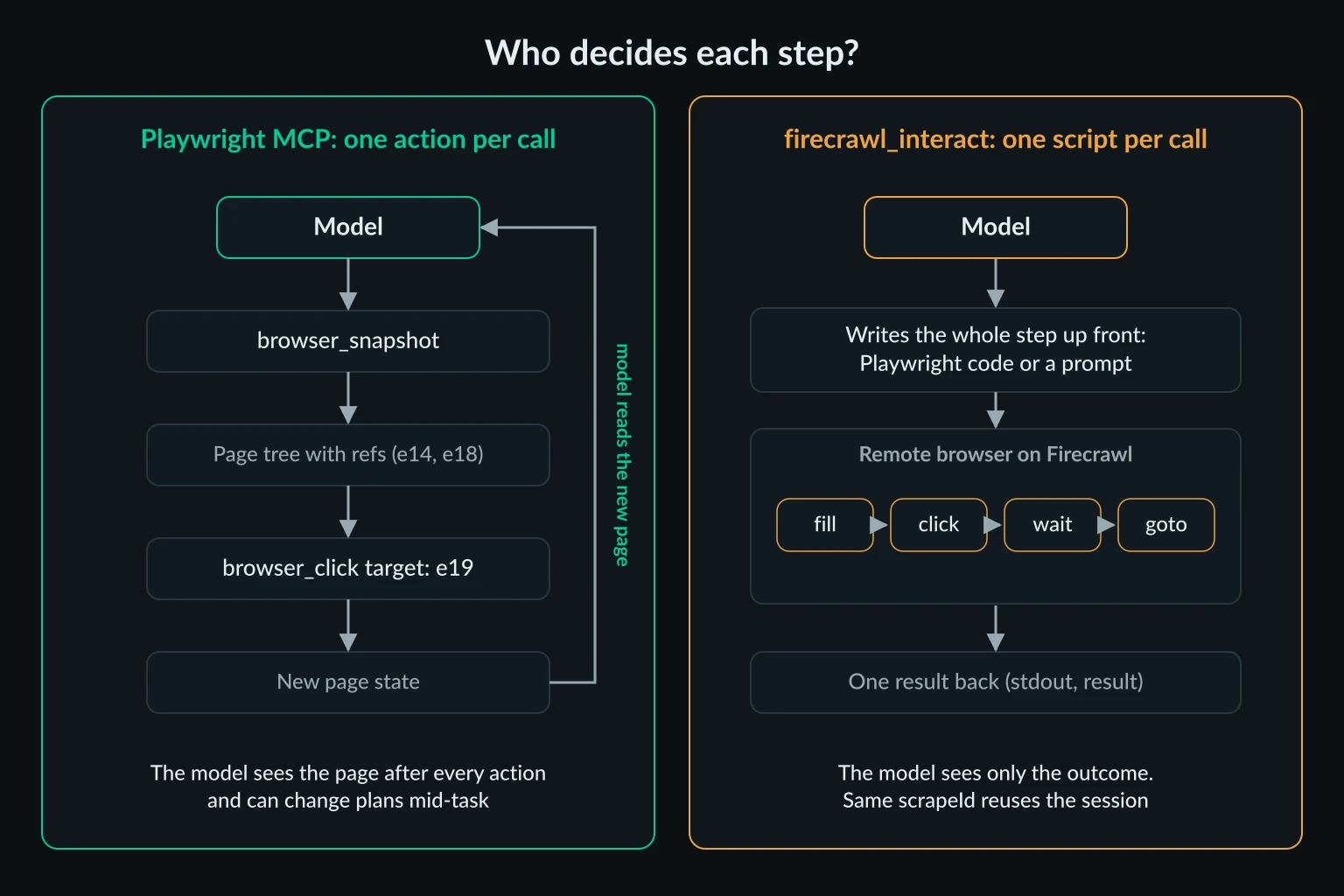
The difference is who decides each step. With Playwright MCP, the model sees the page between every click. With firecrawl_interact, the model writes the whole step up front, or delegates it to Firecrawl's own model with a prompt, and only sees the outcome. Firecrawl's README makes the same point: each interact call runs one turn to completion, and it suggests another tool when you need your own step-by-step control over a session. That fits our results: interact is good for a known sequence, like logging in and then scraping, and weaker for exploring an unfamiliar page.
Two more interact details are worth knowing before you hand it to an agent:
- Saved logins live in profiles. Pass
scrapeOptions.profilewithsaveChanges: trueon an interact call that opens a URL, and cookies and localStorage are saved when the session stops. Later scrapes can load the profile read-only. That's Firecrawl's answer to Playwright MCP's persistent profile. - The response carries session URLs. Every interact response includes a
cdpUrland live-view URLs with access tokens in them. The MCP tool returns the API response as is, so those URLs land in the model's context and your transcript logs. Anyone with the CDP URL can drive the session until it ends, so stop sessions when you're done and keep transcripts private.
Context cost: tool definitions and results
Every connected server sends its tool definitions with each request, unless the client loads them on demand. We counted the JSON of each server's tools/list response:
| Server and mode | Tools | Definition size |
|---|---|---|
| Playwright MCP 0.0.83 | 25 | 20,286 characters |
| Firecrawl MCP 3.30.0, hosted, no key | 3 | 26,485 characters |
| Firecrawl MCP 3.30.0, local with a key, feedback tools off | 26 | 81,285 characters |
| Firecrawl MCP 3.30.0, local with a key | 28 | 91,210 characters |
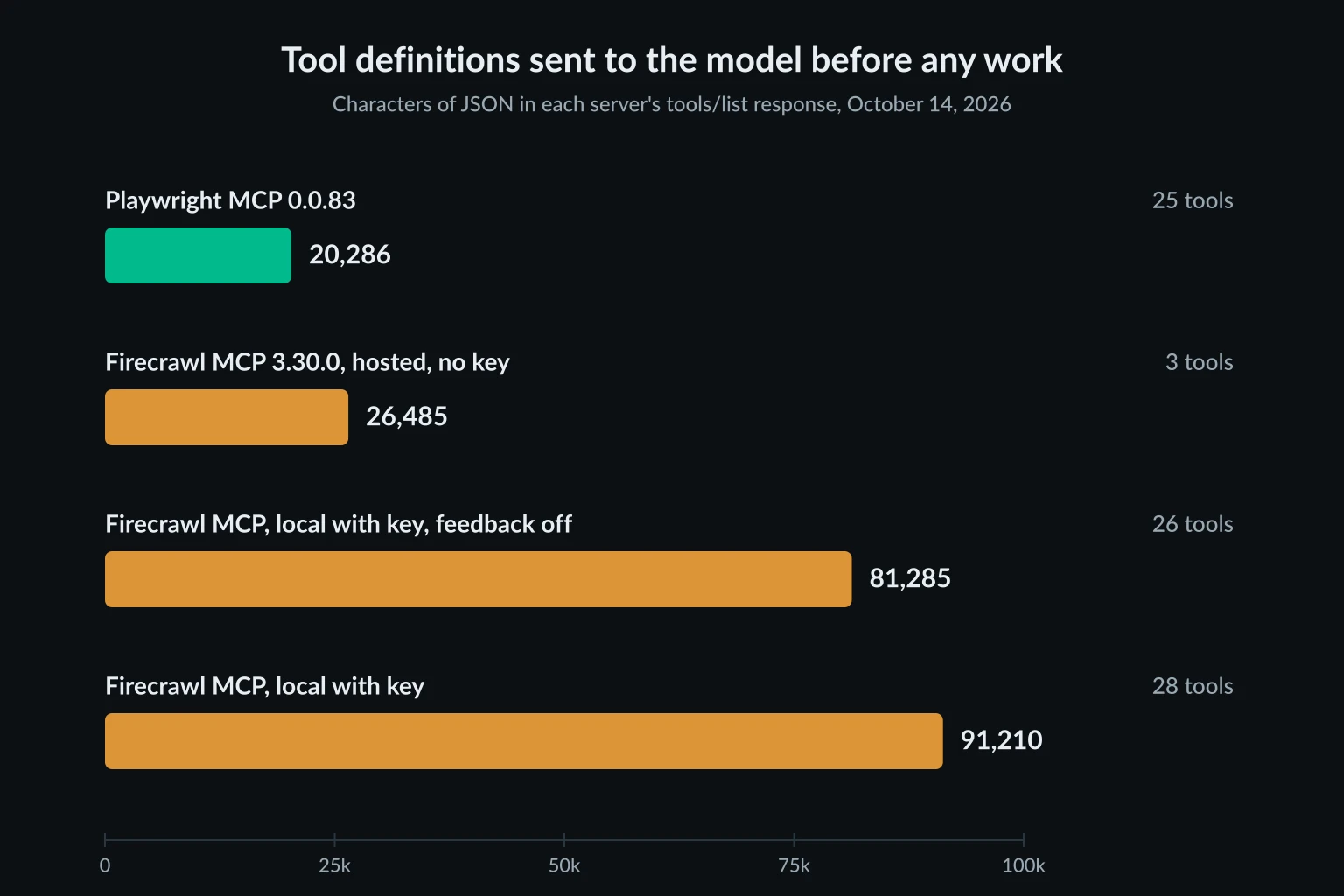
At the usual estimate of about four characters per token, the full Firecrawl tool set is roughly 23,000 tokens before the agent does anything. firecrawl_scrape alone is 10,799 characters, because its schema covers formats, JSON options, actions, profiles, location, caching, and Firecrawl's Alexandria catalogue. Setting FIRECRAWL_NO_SEARCH_FEEDBACK=1 and FIRECRAWL_NO_ENDPOINT_FEEDBACK=1 drops the two feedback tools.
How much this matters depends on the client. Claude Code turns on MCP tool search by default, so only tool names load at the start and full definitions arrive when the model needs a tool. Clients that send every definition on every request pay the full cost each turn, so disable the Firecrawl tools a project doesn't use.
Per-task output runs the other way. For the same tasks, here is what each server returned:
| Task | Firecrawl MCP | Playwright MCP |
|---|---|---|
| Report the exit IP | 1 call, 474 characters, 0.4 s | 2 calls, 470 characters, 1.1 s |
| Title and price of 20 books | 1 call, 2,691 characters, 5.0 s, 5 credits | Navigate + snapshot: 33,099 characters, 1.0 s. Navigate + evaluate: 2,293 characters, 1.4 s |
| Log in, then read page 2 | Over REST: 1 scrape + 2 interact calls, 4.9 s, 1 + 2 credits. Not available keyless in MCP | 6 calls, 15,623 characters, 1.6 s |
Times are tool time only, measured from our test server, and Firecrawl's include the network round trip to its API. Firecrawl's JSON extraction keeps results small without the model writing a selector. Playwright MCP is faster per call and free, but only stays small when the agent extracts with browser_evaluate instead of reading snapshots.
Where each server sends traffic
The exit IP test shows the biggest practical difference. Playwright MCP's IP check returned our server's own address, because the browser ran on that machine. Firecrawl's returned a Firecrawl proxy address with "timezone": "America/New_York" and "proxyUsed": "basic" in the metadata. Adding "location": {"country": "DE"} returned a different address with "timezone": "Europe/Berlin".
Firecrawl Cloud uses Firecrawl's proxies. You choose a country with location.country from the 26 locations in the proxies documentation, and enhanced proxies are listed for the US and the Netherlands only. The scrape schema has no field for your own proxy URL, and the proxy type parameter is deprecated in favor of auto. That's convenient, but the docs don't describe a way to keep one IP across sessions or to pick a city.
Self-hosted Firecrawl takes your proxy. Its PROXY_SERVER, PROXY_USERNAME, and PROXY_PASSWORD variables are read by both the Playwright service and the plain fetch engine in the Firecrawl source. Point the MCP server at your instance with FIRECRAWL_API_URL. The trade-off is in the self-hosting guide: the default stack has no screenshots or page actions, and interact and agent need Firecrawl Cloud.
Playwright MCP uses whatever you give it. Pass --proxy-server=http://host:port, or put credentials in a config file, and every page the agent opens exits through that proxy. The Playwright MCP proxy setup guide covers authentication, bypass rules, and how to check the exit IP from inside the agent.
That control matters most for the jobs Playwright MCP is good at. A logged-in workflow that runs every day should come from one stable address, which is what a dedicated ISP proxy gives you. Location-specific checks fit a sticky residential proxy session in the right country. When a browser agent on a cloud VM hits 403s or CAPTCHAs that a laptop doesn't, the IP is often part of the cause, and proxies for AI agents walks through telling IP problems from behavior problems.
Neither server changes what the agent is allowed to do. Keep agents on sites and accounts you're authorized to automate, and respect rate limits, robots.txt, and site terms.
Running Firecrawl MCP and Playwright MCP together
The two servers rarely compete for the same step, so many setups connect both. In Claude Code, a project .mcp.json like this keeps the key out of the file through environment variable expansion:
{
  "mcpServers": {
    "firecrawl": {
      "type": "http",
      "url": "https://mcp.firecrawl.dev/v2/mcp",
      "headers": {
        "Authorization": "Bearer ${FIRECRAWL_API_KEY}"
      }
    },
    "playwright": {
      "command": "npx",
      "args": ["@playwright/mcp@latest", "--isolated"]
    }
  }
}
Then give the agent a routing rule in its instructions, such as CLAUDE.md:
Read known URLs with firecrawl_scrape and a JSON schema. Pass maxAge 0 when the data must be current.
Use firecrawl_map or firecrawl_crawl with a limit for more than five pages on one site.
Use the Playwright browser only for logins, forms, multi-step flows, and localhost.
In the browser, extract data with browser_evaluate instead of reading full snapshots.
A rule like this prevents an expensive habit: the model opening a browser, taking a 30,000-character snapshot of a page, and reading all of it to answer one question. For plain HTML pages, an even lighter option is the Fetch MCP server, which returns Markdown with no browser at all. The best MCP servers for web access guide places both servers in the wider search, fetch, browser, and scraper stack.
FAQ
Is Firecrawl MCP free?
Partly. The hosted endpoint works without a key for scrape, search, and parse, capped per IP per day. A free account adds 1,000 credits a month and unlocks crawl, map, interact, and the other tools. Paid plans start at $19 a month for 5,000 credits.
Can Firecrawl MCP click buttons and log in?
Yes, with an account. firecrawl_interact runs Playwright code or a natural-language prompt in a remote browser and keeps the session between calls. The local server also accepts actions on scrape. The hosted scrape tool ignores actions, so don't rely on it for clicks.
Can Playwright MCP crawl a whole site?
It can visit pages one by one, but each page costs at least one model turn, plus a snapshot if the model reads the page that way. For more than a handful of pages, use a crawler such as firecrawl_crawl, or have the agent write a script and run it outside MCP.
Which uses less context, Firecrawl MCP or Playwright MCP?
Per result, Firecrawl's JSON extraction is usually smaller than a Playwright snapshot. In tool definitions, the full Firecrawl tool set is about four and a half times larger than Playwright MCP's. Clients with on-demand tool loading remove most of that difference.
Can I use my own proxies with Firecrawl MCP?
Not with Firecrawl Cloud, which uses its own proxy pool with country selection. A self-hosted Firecrawl instance reads PROXY_SERVER, PROXY_USERNAME, and PROXY_PASSWORD, and the MCP server can point at it with FIRECRAWL_API_URL. Playwright MCP takes a proxy directly.
Conclusion
Firecrawl MCP vs Playwright MCP is mostly a choice between reading and doing. Firecrawl MCP is the better fit for structured extraction, site maps, crawls, and search, with rendering and proxies handled on Firecrawl's side and paid for in credits. Playwright MCP is the better fit for logins, forms, exploratory multi-step tasks, local apps, and any workflow where you need to control the browser's IP. Connect both, route reading to Firecrawl and interaction to Playwright, and pass maxAge: 0 whenever the agent needs current data.
Technical references: Firecrawl MCP server, Playwright MCP, and the Model Context Protocol documentation.