The best MCP servers for web access are a small stack, not one winner. Most agents need one server per job. A search server finds URLs. A fetch server reads a known URL as Markdown. A browser server clicks, types, and renders JavaScript. A scraper server handles whole sites or structured data. For most Claude Code, Claude Desktop, or Cursor setups, that works out to Brave Search MCP or Exa MCP for search, the reference Fetch MCP server for reading, and Playwright MCP for interaction. Add Firecrawl, Apify, or Bright Data only when you need crawling, rendered pages from a hosted service, or volume.
The job matters more than the vendor, because the four kinds return very different amounts of text. We loaded the same Wikipedia article through four servers and Jina's Reader API. Fetch MCP returned 45,542 characters of Markdown. Playwright MCP's page snapshot returned 123,073. Fetch also returned nothing useful from a JavaScript-rendered page that every option with a browser behind it read in full. Pick the lightest server that can do the task, and the agent keeps more of its context window for the actual work.
This guide groups the servers by job, shows what each one costs in context and money, and flags the ones that are archived or have moved.
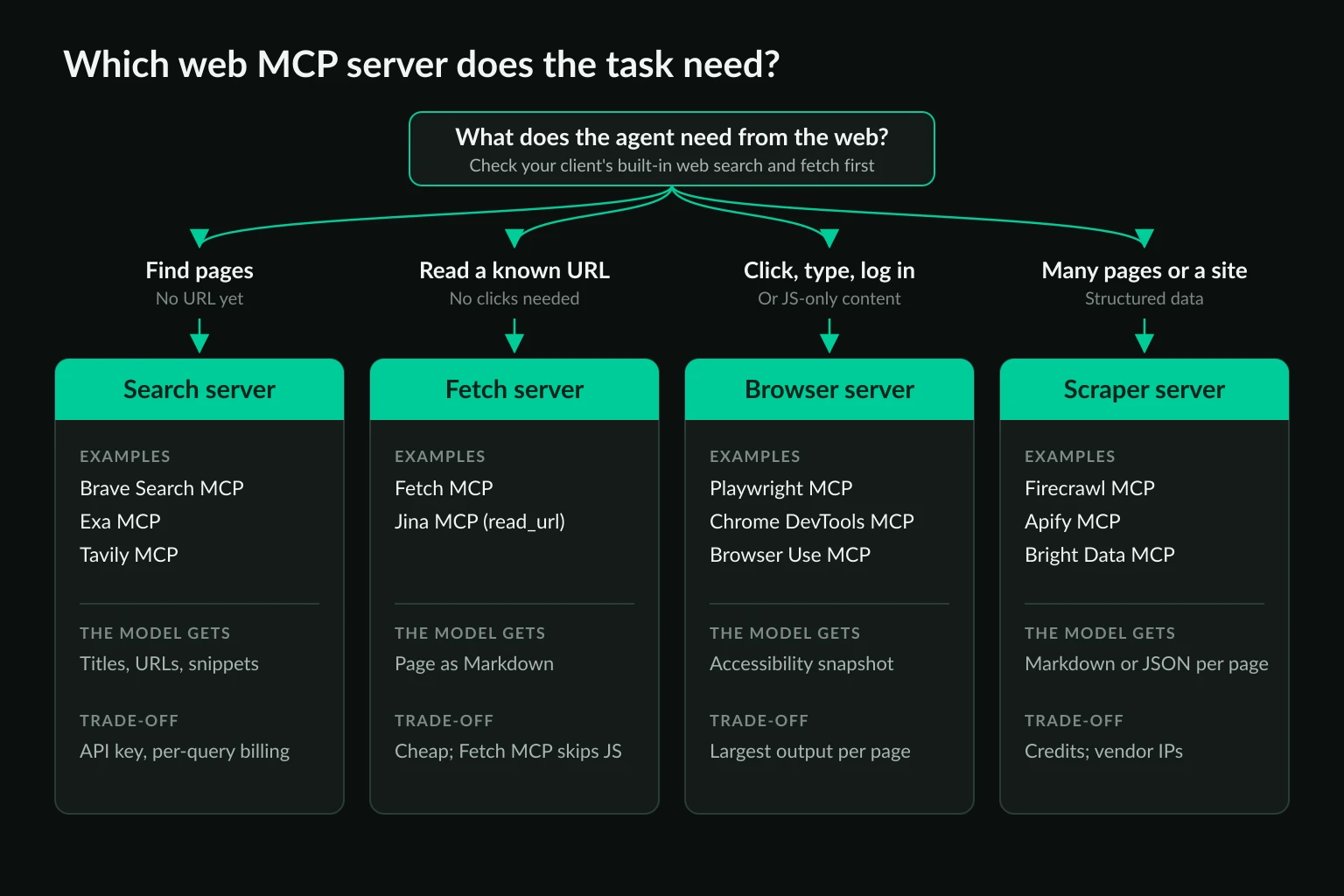
The best MCP servers for web access at a glance
All versions and prices below were checked on October 13, 2026. "Hosted" means the vendor runs the MCP server and you connect to a URL. "Local" means the server runs as a process on your machine.
| Server | Job | Runs | Key needed | Free allowance | Status |
|---|---|---|---|---|---|
| Brave Search MCP | Search | Local (@brave/brave-search-mcp-server 2.1.4) |
Yes, BRAVE_API_KEY |
$5 of credit a month, at $5 per 1,000 requests | Official, active |
| Exa MCP | Search + fetch | Hosted (https://mcp.exa.ai/mcp) |
No, rate-limited without one | $10 of credit a month | Official, active |
| Tavily MCP | Search + extract + crawl | Hosted or local (tavily-mcp 0.2.22) |
Yes | 1,000 credits a month | Official, active |
| Fetch MCP | Fetch | Local (mcp-server-fetch 2026.10.10) |
No | Free, open source | MCP reference server, active |
| Jina MCP | Fetch + search | Hosted (https://mcp.jina.ai/v1) |
Yes, in our test | Free key tier | Official, active |
| Playwright MCP | Browser | Local (@playwright/mcp 0.0.83) |
No | Free, open source | Microsoft, active |
| Chrome DevTools MCP | Browser + debugging | Local (chrome-devtools-mcp 1.10.1) |
No | Free, open source | Google, active |
| Firecrawl MCP | Scrape + crawl | Hosted or local (firecrawl-mcp 3.29.1) |
No for basic scrape on hosted, yes for crawl | 1,000 credits a month | Official, active |
| Apify MCP | Scrapers (Actors) | Hosted or local (@apify/actors-mcp-server 0.17.4) |
Yes, OAuth or APIFY_TOKEN |
$5 of platform usage a month | Official, active |
| Bright Data MCP | Search + scrape + browser | Hosted or local (@brightdata/mcp 3.0.0) |
Yes, API token | 5,000 requests a month | Official, active |
Free allowances come from each vendor's pricing page: Brave, Exa, Tavily, Firecrawl, Apify, and Bright Data. They change often, so recheck before you budget around one.
Three servers that still show up in older lists need a caveat. The original @modelcontextprotocol/server-brave-search package is deprecated on npm, and Brave now ships its own server. The Browserbase MCP repo is archived, and Browserbase points users to its hosted server at https://mcp.browserbase.com/mcp. The Puppeteer reference server lives in the MCP project's archived repo. All three still run, but don't expect fixes. If you keep Puppeteer MCP anyway, the Puppeteer MCP proxy guide covers its credential forwarder and the launch-options quirk that lets the model change the proxy.
Check your client's built-in web tools first
Before you install anything, look at what the client already does. Claude Code ships WebSearch and WebFetch as built-in tools, per its tools reference. Cursor's agent has a built-in web search tool and a browser tool (Cursor agent tools). The Claude apps have a built-in web search toggle.
If those cover your tasks, an extra search or fetch server mostly adds tool definitions to every request. MCP servers earn their place when you need something the built-ins don't give you. That might be a specific search index, control over output length, a real browser session, a proxy, or results you can reproduce across clients.
How much context each kind of server costs
Every MCP server costs context twice. Its tool definitions are sent with every request once it's connected. Then each tool call returns text that the model has to read. We measured both on October 13, 2026, by driving each server over stdio or HTTP with a small JSON-RPC script, the same way an MCP client talks to it.
Tool definitions loaded per request:
| Server | Tools | Definition size |
|---|---|---|
| Fetch MCP | 1 | 1,188 characters |
| Exa MCP (hosted, no key) | 2 | 2,465 characters |
| Jina MCP (hosted) | 12 | 8,648 characters |
| Playwright MCP | 25 | 20,286 characters |
| Chrome DevTools MCP | 30 | 24,100 characters |
| Firecrawl MCP (hosted, no key) | 3 | 28,161 characters |
Firecrawl's three keyless tools carry more definition text than Playwright's 25, because each schema is long: firecrawl_scrape alone takes 28 parameters. Tool count is a poor proxy for context cost. Clients that load tool definitions on demand reduce this overhead, but the per-call output below still lands in context.
Text returned for one page. We asked each option for the full content of three pages: a long Wikipedia article, the product listing at books.toscrape.com, and quotes.toscrape.com/js, which builds its quotes with JavaScript after load.
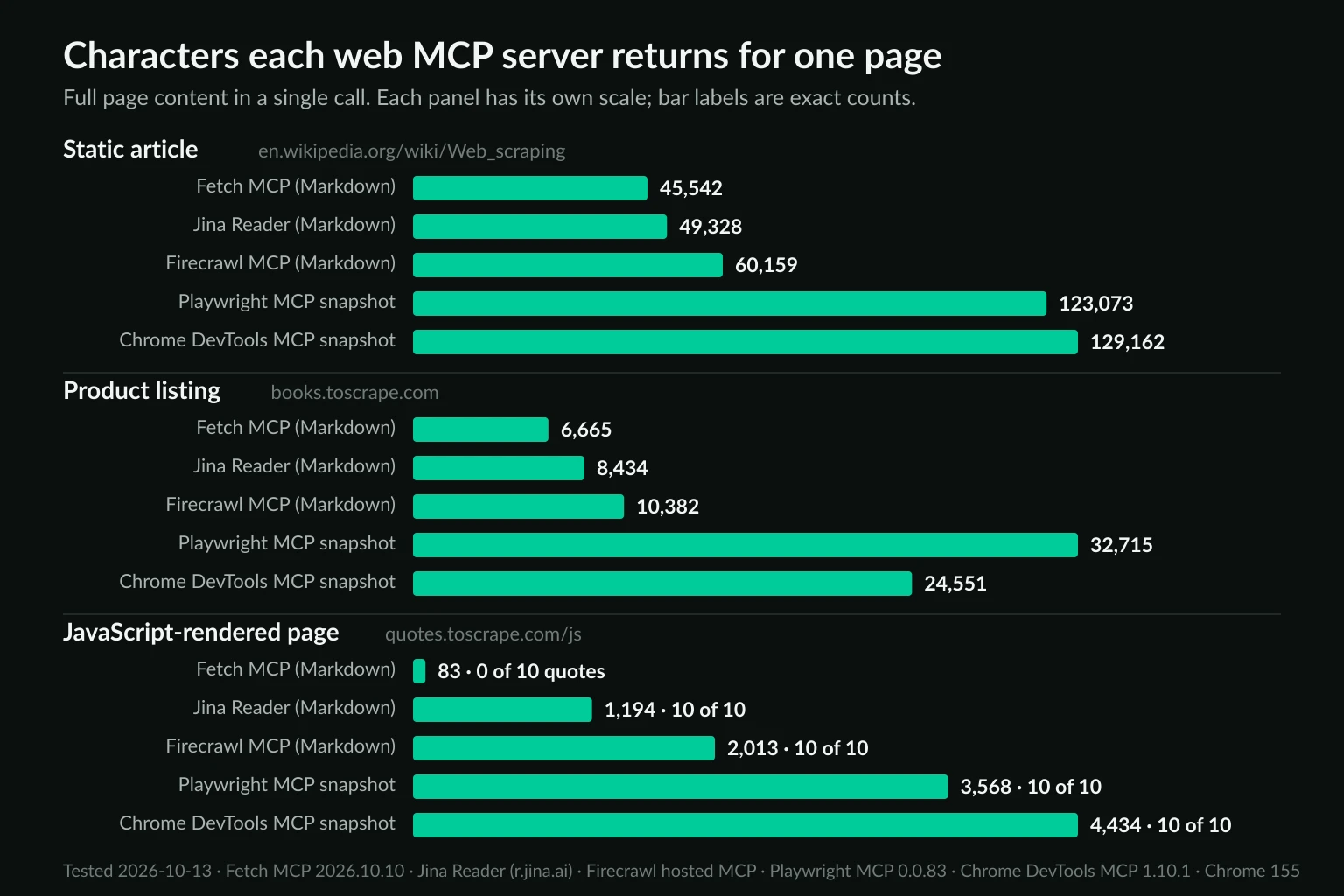
| Page | Fetch MCP | Jina Reader | Firecrawl MCP | Playwright MCP snapshot | Chrome DevTools MCP snapshot |
|---|---|---|---|---|---|
| Wikipedia: Web scraping | 45,542 | 49,328 | 60,159 | 123,073 | 129,162 |
| books.toscrape.com | 6,665 | 8,434 | 10,382 | 32,715 | 24,551 |
| quotes.toscrape.com/js | 83 (no quotes) | 1,194 (10 of 10 quotes) | 2,013 (10 of 10) | 3,568 (10 of 10) | 4,434 (10 of 10) |
Versions: mcp-server-fetch 2026.10.10 with max_length raised to 999,999, Jina Reader through https://r.jina.ai/ without a key, Firecrawl's hosted MCP firecrawl_scrape with Markdown output, @playwright/mcp 0.0.83 browser_snapshot, and chrome-devtools-mcp 1.10.1 take_snapshot. Both browser servers ran Chrome for Testing 155 in headless mode.
Four things stand out:
- Browser snapshots are 2 to 5 times larger than the Markdown versions of the same page. A snapshot lists every element with a reference ID so the model can click it later. That's the point of a browser server, and it's wasted context when the agent only needs to read. At the usual rule of thumb of about four characters per token, the Wikipedia snapshot is on the order of 30,000 tokens.
- Fetch MCP doesn't run JavaScript. On the JS page it returned 83 characters: the login link and a "Next" link. The response doesn't flag that anything is missing, so the model may conclude the page is empty. Jina, Firecrawl, and both browser servers render the page and returned all 10 quotes.
- Defaults hide most of this. Fetch MCP returns 5,000 characters per call by default, and the result ends by telling the model to call again with
start_indexset to 5000. Playwright MCP 0.0.83'sbrowser_navigatewrites the snapshot to a.playwright-mcp/page-*.ymlfile and returns a 276-character summary with a link to it. The model only gets the full tree inline when it callsbrowser_snapshot. Both are sensible defaults, and both mean "one page" can turn into several calls. - The client may cap it anyway. Claude Code warns when an MCP result passes 10,000 tokens, limits output to 25,000 tokens by default, and saves text results over 50,000 characters to a file instead of returning them inline (Claude Code MCP docs). Both browser snapshots of the Wikipedia article cross that line, and so does Firecrawl's 60,159-character result, which wraps the Markdown in JSON with page metadata. Fetch MCP's 45,542 characters stay inline.
Search results aren't small either. One keyless web_search_exa call returned 10 results and 30,565 characters, because Exa includes page highlights with each hit. That's more than many full articles.
Best search MCP servers
A search server answers "which pages should the agent read?" It returns titles, URLs, and snippets, then hands off to a fetch or browser server.
Brave Search MCP is the safe default. It queries Brave's own index, so it isn't a wrapper around another engine. The official server exposes web, news, image, video, and local search, plus brave_llm_context, which returns pre-extracted page content for grounding. It runs locally with npx -y @brave/brave-search-mcp-server and a BRAVE_API_KEY. The $5 monthly credit covers about 1,000 web searches at list price.
Exa MCP is the easiest to try. The hosted server works without a key at a rate limit. By default it exposes two tools, web_search_exa and web_fetch_exa, so it covers search and basic reading in one connection. Exa's index is built for descriptive, semantic queries such as "companies that publish proxy benchmark reports."
Tavily MCP goes further than search. tavily_extract, tavily_map, and tavily_crawl overlap with scraper servers, which makes it a reasonable single server for research agents that search and then read a handful of pages. It needs a key, either locally or on the hosted endpoint.
Perplexity's MCP server and Kagi's are both official. Perplexity's perplexity_search returns ranked results, but its perplexity_ask and perplexity_research tools return an answer written by Perplexity's model, so your agent is reasoning over another model's summary. That's fine for quick facts, but a poor fit when you need to cite primary sources.
Best fetch MCP servers for reading a URL
A fetch server turns a URL into Markdown. It's the cheapest way to give an agent a page, in both context and money.
Fetch MCP is the reference server from the MCP project. It has one tool, no account, and no browser. Install it with uvx mcp-server-fetch. By default it obeys robots.txt for requests the model initiates, but not for pages you request yourself through a prompt, and it refuses hosts that resolve to private or loopback addresses unless you pass --allow-private-ips. It's the right default for documentation, articles, changelogs, and anything else served as plain HTML. Its blind spot is client-rendered pages, as the quotes test showed. When the fetch itself needs to exit through a proxy, the Fetch MCP proxy guide covers --proxy-url, the environment-variable fallback, and which one wins.
Jina MCP wraps Jina's Reader API, which renders pages before converting them, so it handles JavaScript sites that Fetch MCP misses. The hosted server exposes 12 tools, including read_url, search_web, search_arxiv, and extract_pdf. Jina's README lists the key as optional for read_url, at a lower rate limit. In our test on October 13, 2026, though, read_url on https://mcp.jina.ai/v1 returned HTTP 401: Unauthorized without one, while the Reader API at r.jina.ai answered keyless. Plan on a free key. Jina's rate limit page lists the Reader at 20 requests per minute without a key and 500 with one.
Exa's web_fetch_exa and Firecrawl's firecrawl_scrape also fetch a single URL. If you've already connected one of those for search or crawling, you may not need a separate fetch server.
Best browser MCP servers
A browser server gives the agent a real browser to navigate, click, fill forms, and read the rendered page. Use it when the task needs interaction, a login, or content that only exists after scripts run. Don't use it just to read articles: the snapshots above are the price.
Playwright MCP is the default choice. Microsoft maintains it, it supports Chromium, Firefox, and WebKit, and its accessibility snapshots let the model act on elements by reference without needing a vision model. It launches its own browser, so you control the profile, viewport, and network settings in the server config. It also has an --extension mode that drives your existing Chrome tabs instead. The browser MCP server guide compares where each browser server takes a proxy, including the servers that attach to a Chrome you already run.
Chrome DevTools MCP is the better pick when the agent is debugging a site rather than using one. Alongside navigation and clicks, it exposes network request lists, console messages, performance traces, and a Lighthouse audit. That's why it carries 30 tools. For a coding agent checking why a page loads slowly or which request returns a 500, it's the stronger server. For general browsing, it's heavier than you need.
Browser Use MCP wraps the open-source Browser Use agent and adds a tool that hands a whole multi-step task to that agent, which then calls your LLM provider. If you already run Browser Use in Python, the Browser Use proxy guide covers its network settings. Hosted browser servers such as Browserbase move the browser to the vendor's cloud. That helps when the agent runs somewhere without a display or enough memory for Chrome. The Browserbase alternatives comparison covers the cloud browser options themselves.
Best scraping and crawling MCP servers
Scraper servers are for jobs that go beyond one page: crawl a docs site, map every URL on a domain, pull structured fields from 200 product pages, or reach pages a simple fetch can't load. Most are hosted services, so they cost credits, and they move the actual page requests off your machine.
Firecrawl MCP is the most direct upgrade from Fetch MCP. firecrawl_scrape renders the page and returns Markdown, and with a key you get firecrawl_map, firecrawl_crawl, and an agent tool for multi-step extraction. The hosted endpoint allows basic scrape, search, and parse calls without a key at a rate limit. The local server needs FIRECRAWL_API_KEY, or a FIRECRAWL_API_URL pointing at a self-hosted Firecrawl. For the head-to-head, Firecrawl MCP vs Playwright MCP runs the same extraction, login, and exit-IP tasks through both servers.
Apify MCP connects the agent to the Apify Store, where thousands of prebuilt scrapers called Actors live. Its tools search the store, read an Actor's input schema, and run it, so the agent can find a maintained scraper for a specific site rather than improvising one. This is the right fit for platform-specific data that a generic Markdown fetch handles badly, such as map listings, marketplace search results, or social profiles. Check each Actor's pricing, because many charge per result on top of platform usage.
Bright Data MCP bundles search, Markdown scraping, and, in opt-in tool groups, a remote browser and structured extractors for specific sites. Its free tier of 5,000 requests a month is the largest here. The base install exposes a handful of tools, and enabling every group raises that to 32, which matters for the definition overhead discussed above.
If you'd rather self-host, Crawl4AI's Docker server exposes an MCP endpoint at http://localhost:11235/mcp/sse, with tools for Markdown, screenshots, PDFs, and crawling.
For extraction at scale, an MCP server driven by a model is rarely the cheapest path. Once the agent has worked out what to collect, move the job to a conventional scraper. The AI web scraping guide covers LLM extraction in a pipeline, and the web data scraping tools comparison covers the non-agent options.
Recommended stacks by task
Most setups need two or three servers, not ten. These combinations cover the common cases without overlapping tools:
- Research and fact-checking agent: Brave Search MCP or Exa MCP, plus Fetch MCP. Add Jina or Firecrawl when sources are JavaScript-heavy.
- Coding agent that reads docs: Fetch MCP alone, or the client's built-in fetch. Docs sites are usually static, and Markdown keeps the context small.
- Frontend debugging or QA: Chrome DevTools MCP for network, console, and performance data. Playwright MCP if you also need cross-browser checks.
- Logged-in workflows, such as dashboards or supplier portals: Playwright MCP with a dedicated profile, or its
--extensionmode when the agent should use your existing session. - Data collection across many pages: Firecrawl MCP or Apify MCP to explore, then a scheduled scraper for the recurring job.
The research stack above, as a starting .mcp.json (Exa's hosted server needs no key, and the other two run locally):
{
  "mcpServers": {
    "exa": {
      "type": "http",
      "url": "https://mcp.exa.ai/mcp"
    },
    "fetch": {
      "command": "uvx",
      "args": ["mcp-server-fetch"]
    },
    "playwright": {
      "command": "npx",
      "args": ["@playwright/mcp@latest", "--isolated"]
    }
  }
}
Swap Exa for Brave Search MCP (npx -y @brave/brave-search-mcp-server with a BRAVE_API_KEY in its env block) if you want Brave's index instead. Keep keys in environment variables, never inline in a committed config, as the security section below explains.
Each server you connect adds definitions to every request and gives the model one more tool to choose from. Overlapping tools, such as three different fetch-style tools, make tool selection less predictable. Disable what a given project doesn't use.
Where the target site sees your agent's traffic
Whether a proxy matters depends on which machine makes the request. This is where local and hosted servers differ most.
Local servers send page requests from the machine they run on. Fetch MCP, Playwright MCP, Chrome DevTools MCP, and Browser Use MCP all connect to the target site from your IP. Run them from a cloud VM and the site sees a datacenter address, which is a common reason agents get CAPTCHAs or 403 responses that a laptop doesn't. These servers accept a proxy in their launch config. Fetch MCP takes --proxy-url, and the Playwright MCP proxy guide covers the flag, the authenticated config file, and how to check the exit IP from inside the agent.
Hosted servers send page requests from the vendor's network. With Exa, Jina, Firecrawl's hosted endpoint, Apify, or Bright Data, the target site never sees your IP, and a proxy on your machine changes nothing about how that page is fetched. Location and reliability are whatever the vendor offers. That's convenient, but it also means you can't choose a specific exit country or keep one IP across a session unless the vendor supports it.
For local browser servers, the proxy type should match the task. A logged-in or repeated workflow needs a stable IP, so a dedicated ISP proxy keeps the session consistent. Location-specific research fits a sticky residential proxy in the target country. Browser servers load full pages, so size residential bandwidth with the data usage calculator. The diagnosis side, meaning which block comes from the IP and which from the agent's behavior, is in proxies for AI agents.
A proxy changes where requests come from, not what the agent is allowed to do. Keep agents to sites and accounts you're authorized to automate, and respect robots.txt, rate limits, and site terms.
Security checks before you connect a web MCP server
Web access is where an agent meets untrusted text. A page can contain instructions aimed at the model, and the model may follow them with whatever other tools it has. A few habits limit the damage:
- Keep secrets out of shared config.
.mcp.jsonand.cursor/mcp.jsonare meant to be committed. Reference API keys through environment variables there, never inline. - Separate browsing from powerful tools. An agent that can read arbitrary pages and also push to Git or send email is the risky combination. Split those across sessions or require approval for the dangerous tools.
- Watch for code-execution tools. Playwright MCP's
browser_run_code_unsaferuns code in the server process, and it's in the default tool set in 0.0.83. Treat it as shell access and require approval for it in your client's permission settings. - Prefer official, maintained servers. Every server in the comparison table is published by the vendor or the MCP project. For anything else, read the source before you run it.
The MCP project's security best practices cover the protocol-level risks in more depth.
FAQ
What is the best MCP server for web search?
Brave Search MCP for most people: official, its own index, a local install, and a monthly free credit. Exa MCP is the quickest to try because its hosted server works without a key, and it suits semantic queries. Tavily MCP fits when you want search and extraction in one server.
Do I need a browser MCP server, or is a fetch server enough?
A fetch server is enough when the content is in the page's HTML, which covers most docs, blogs, and news. You need a browser server when the agent has to click, log in, fill forms, or read content that JavaScript builds after load. In our test, Fetch MCP returned none of the 10 quotes on a JavaScript-rendered page, and Playwright MCP returned all of them.
What are the best free MCP servers for web access?
Fetch MCP, Playwright MCP, and Chrome DevTools MCP are free and open source with no account. Exa's hosted server and Firecrawl's hosted scrape tool work without a key at a rate limit. Brave, Tavily, Apify, and Bright Data have recurring free allowances but need an account.
Why does my agent run out of context after a few pages?
Usually a browser snapshot. A long article came back at 123,073 characters as a Playwright MCP snapshot and 45,542 as Markdown from Fetch MCP. Use a fetch or reader server for reading, keep the browser server for interaction, and ask for page sections rather than whole pages.
Can I use several web MCP servers at once?
Yes. Clients load every configured server, and the model picks a tool per step. Keep the set small and non-overlapping, because each server adds tool definitions to every request and similar tools make the model's choice less predictable.
Conclusion
The best MCP servers for web access depend on the job. Use a search server such as Brave Search MCP or Exa MCP to find pages, Fetch MCP to read them, and Playwright MCP or Chrome DevTools MCP when the agent has to interact or the page needs JavaScript. Add Firecrawl, Apify, or Bright Data when the work becomes crawling or bulk extraction. Start with your client's built-in web tools, add the lightest server that fills a real gap, and remember that local servers send requests from your IP while hosted ones use the vendor's network.
Technical references: Model Context Protocol documentation, MCP reference servers, Playwright MCP, and Chrome DevTools MCP.