A browser MCP server is a Model Context Protocol server that lets Claude Code, Claude Desktop, Cursor, or another MCP client drive a web browser through tools like navigate, click, and snapshot. "Browser MCP" is also the name of one specific product: a Chrome extension plus the @browsermcp/mcp server, which automates the Chrome you already have open. Both meanings come up in the same searches, and this guide covers both.
Where the proxy goes depends on one question: who starts the browser. If the MCP server launches it, as Playwright MCP, Chrome DevTools MCP, and Browser Use MCP do, the proxy is a flag or environment variable in the server's config. If the server attaches to a browser you already run, as Browser MCP's extension does, the MCP config can't set a proxy at all. That browser keeps its own network settings. If the browser lives in a vendor's cloud, the proxy is a vendor option.
The rest of this guide shows the exact setting for each common server, where the config lives in each client, how to handle proxies that need a username and password, and how to check the exit IP from inside the agent. For the search, fetch, and scraper servers that usually sit alongside a browser server, see the best MCP servers for web access comparison.
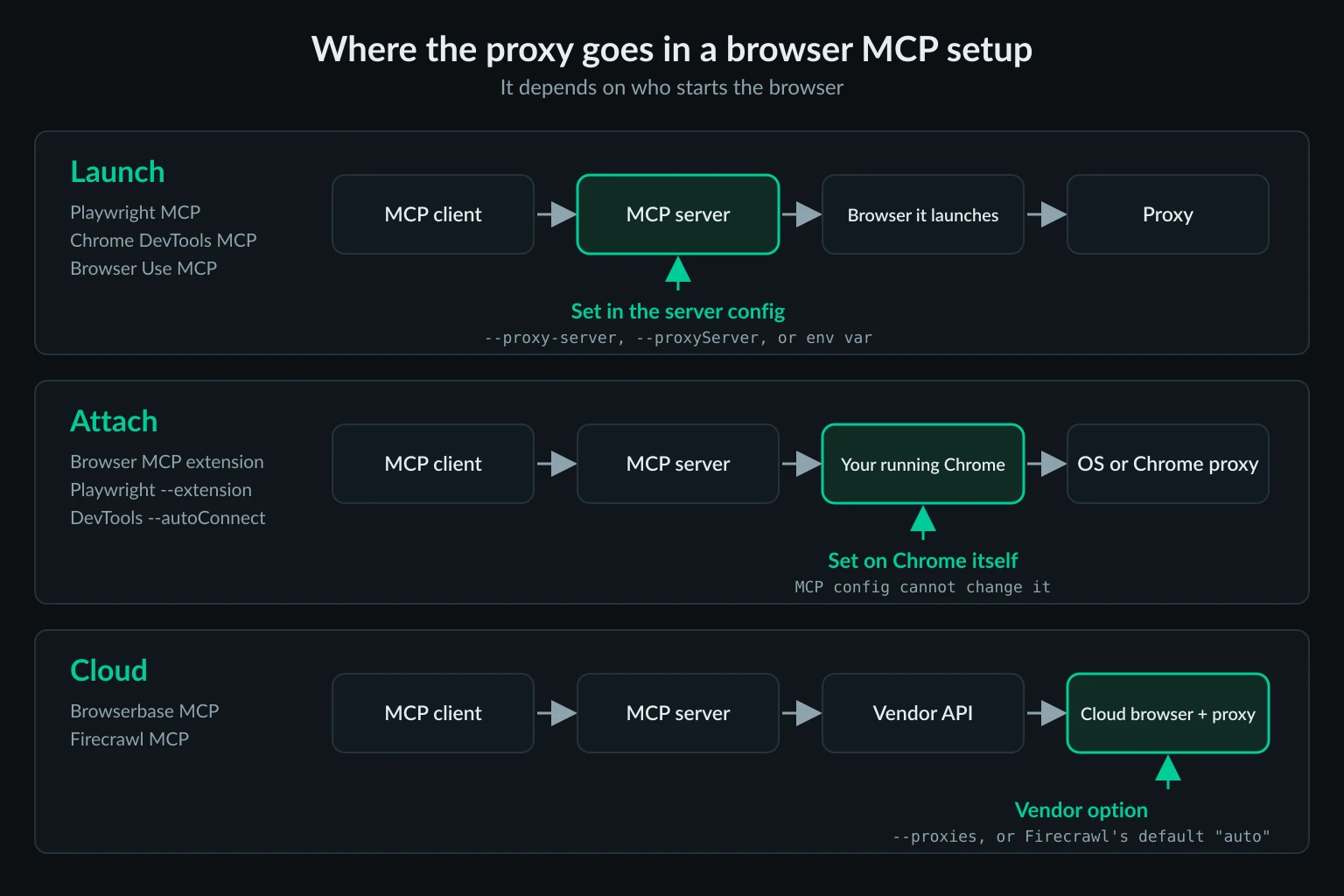
Browser MCP servers compared
These are the servers people usually mean by "browser MCP," checked against their current npm and PyPI releases:
| Server | Install | Who runs the browser | Proxy setting | Username and password |
|---|---|---|---|---|
| Playwright MCP (Microsoft) | npx @playwright/mcp@latest |
Server launches Chromium, Firefox, or WebKit | --proxy-server flag, or browser.launchOptions.proxy in a config file |
Yes, in the config file |
| Chrome DevTools MCP (Google) | npx -y chrome-devtools-mcp@latest |
Server launches Chrome, or attaches with --browserUrl / --autoConnect |
--proxyServer flag |
No |
| Browser MCP | npx @browsermcp/mcp@latest plus a Chrome extension |
Your own Chrome, through the extension | None in MCP config | Whatever your Chrome uses |
| Browser Use MCP | uvx "browser-use[cli]" --mcp |
Server launches Chromium | BROWSER_USE_PROXY_URL env var |
Yes, BROWSER_USE_PROXY_USERNAME and BROWSER_USE_PROXY_PASSWORD |
| Puppeteer MCP (archived reference server) | npx -y @modelcontextprotocol/server-puppeteer |
Server launches Chrome | --proxy-server inside the PUPPETEER_LAUNCH_OPTIONS env var |
No |
| Browserbase MCP | npx @browserbasehq/mcp (self-hosted) or the hosted server at https://mcp.browserbase.com/mcp |
Browserbase cloud | --proxies flag on the self-hosted server (Browserbase's own proxies) |
Not exposed by the MCP server |
| Firecrawl MCP | npx -y firecrawl-mcp |
Firecrawl's scraping API, not a browser you control | proxy parameter per scrape (deprecated; auto is the default) |
Not applicable |
Versions checked: @playwright/mcp 0.0.83, chrome-devtools-mcp 1.10.1, @browsermcp/mcp 0.1.3, browser-use 0.13.11, @modelcontextprotocol/server-puppeteer 2025.5.12, @browserbasehq/mcp 3.0.0, and firecrawl-mcp 3.29.1.
Two maintenance notes before you pick one. The Puppeteer reference server now lives in the MCP project's archived servers repo, and npm marks the package as no longer supported. Browser MCP's last npm release, 0.1.3, shipped in April 2025. Both still run, but Playwright MCP, Chrome DevTools MCP, and Browser Use MCP are the actively developed launch-mode options.
Where browser MCP config lives in Claude Code, Claude Desktop, and Cursor
All three clients use the same mcpServers JSON shape for local (stdio) servers. Only the file location and the way you keep secrets out of it differ.
| Client | Config location | Secrets without hardcoding |
|---|---|---|
| Claude Code | claude mcp add writes to ~/.claude.json (local or user scope) or .mcp.json in the project root (project scope) |
${VAR} and ${VAR:-default} expansion in .mcp.json |
| Claude Desktop | ~/Library/Application Support/Claude/claude_desktop_config.json on macOS, %APPDATA%\Claude\claude_desktop_config.json on Windows |
Put values in the server's env block and keep the file private |
| Cursor | ~/.cursor/mcp.json (global) or .cursor/mcp.json (project) |
${env:NAME} interpolation, or envFile for stdio servers |
Here is Chrome DevTools MCP with a proxy, in the JSON form that works in all three files:
{
  "mcpServers": {
    "chrome-devtools": {
      "command": "npx",
      "args": [
        "-y",
        "chrome-devtools-mcp@latest",
        "--isolated",
        "--proxyServer=http://proxy.example.com:8080"
      ]
    }
  }
}
The Claude Code equivalent is one command. Everything after -- goes to the server untouched:
claude mcp add --transport stdio chrome-devtools -- npx -y chrome-devtools-mcp@latest --isolated --proxyServer=http://proxy.example.com:8080
Whichever client you use, restart the server after changing its proxy. Claude Desktop needs a full quit and relaunch. In Claude Code, /mcp shows whether the server connected. The browser takes its proxy at launch, so a browser that is already running keeps the old setting.
Be careful with project-scoped files. .mcp.json and .cursor/mcp.json are meant to be committed, so reference credentials through variables there, never inline. The details are in the Claude Code MCP docs, Cursor MCP docs, and the MCP guide to connecting local servers to Claude Desktop.
Launch-mode servers: put the proxy on the server command
When the server starts the browser, the proxy is fixed for that browser's whole life. The agent's navigation and click tools all run inside it, so every page the agent opens exits through the proxy you set.
Chrome DevTools MCP
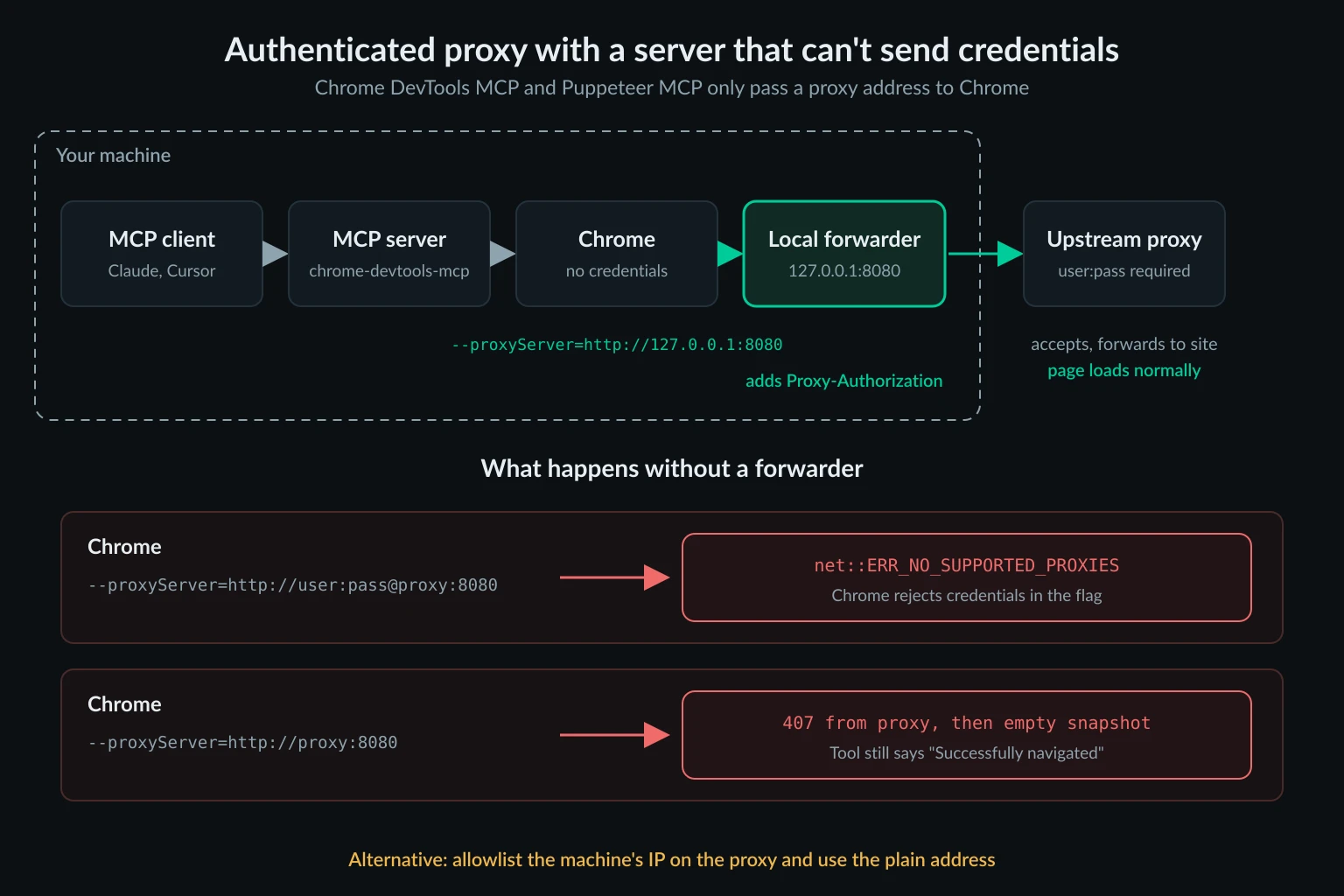
--proxyServer is passed straight to Chrome as --proxy-server when the server launches it. The server adds no credential handling, and Chrome doesn't accept a username and password in that flag. We ran chrome-devtools-mcp 1.10.1 against a local proxy that required Basic auth and drove it over stdio, the way an MCP client does:
--proxyServer=http://user:pass@127.0.0.1:18917failed every navigation withnet::ERR_NO_SUPPORTED_PROXIES. The same happened with asocks5://user:pass@URL.--proxyServer=http://127.0.0.1:18917with no credentials was worse. The proxy answered407, yetnavigate_pagereportedSuccessfully navigated to https://example.com, andtake_snapshotreturned an empty page. An agent reading that output may decide the site is blank, not that the proxy rejected it.- An unauthenticated proxy, or a local forwarder that adds the credentials (covered below), loaded the page normally.
Chrome sends localhost and 127.0.0.1 direct even when --proxy-server is set, so you don't need a bypass list to test a local dev server. Playwright MCP behaves the opposite way, as the next section explains. To change Chrome's bypass rules, add --chromeArg=--proxy-bypass-list=.... The --chromeArg option only applies when the server launches Chrome itself.
The proxy flag is ignored when Chrome DevTools MCP attaches instead of launching. With --browserUrl, --wsEndpoint, or --autoConnect (Chrome 144 and later), the server connects to a Chrome you started, and that Chrome's own flags decide the route.
Playwright MCP
Playwright MCP takes --proxy-server=http://host:port for unauthenticated endpoints and a --config JSON file with browser.launchOptions.proxy when you need username and password. Unlike raw Chrome, Playwright routes loopback traffic through the proxy unless your bypass list names it, so add localhost,127.0.0.1 to bypass when the agent tests a local app. The Playwright MCP proxy guide covers the config file, why a CLI flag can wipe out the credentials in that file, and its RCE-equivalent code tool that can make requests outside the browser proxy.
Browser Use MCP
Browser Use reads its proxy from environment variables, and it handles proxy authentication itself, so credentials work without a forwarder:
{
  "mcpServers": {
    "browser-use": {
      "command": "uvx",
      "args": ["browser-use[cli]", "--mcp"],
      "env": {
        "BROWSER_USE_PROXY_URL": "http://proxy.example.com:8080",
        "BROWSER_USE_PROXY_USERNAME": "YOUR_PROXY_USERNAME",
        "BROWSER_USE_PROXY_PASSWORD": "YOUR_PROXY_PASSWORD",
        "BROWSER_USE_NO_PROXY": "localhost,127.0.0.1"
      }
    }
  }
}
The server's direct browser tools, such as browser_navigate, don't need a model key. Its retry_with_browser_use_agent tool runs a full Browser Use agent and needs an LLM API key such as OPENAI_API_KEY. If you write Browser Use agents in Python rather than through MCP, the Browser Use proxy setup guide covers the ProxySettings object.
Puppeteer MCP
The archived Puppeteer server reads Chrome launch options from a JSON string in the PUPPETEER_LAUNCH_OPTIONS env var:
{
  "mcpServers": {
    "puppeteer": {
      "command": "npx",
      "args": ["-y", "@modelcontextprotocol/server-puppeteer"],
      "env": {
        "PUPPETEER_LAUNCH_OPTIONS": "{\"headless\":true,\"args\":[\"--proxy-server=http://proxy.example.com:8080\"]}"
      }
    }
  }
}
It has the same no-credentials limit as Chrome DevTools MCP. It also has a quirk worth knowing: its puppeteer_navigate tool accepts a launchOptions argument from the model. A new value restarts the browser, and a --proxy-server arg passed that way replaces yours. Only flags on the server's "dangerous" list, such as --no-sandbox, are blocked by default. --proxy-server isn't on that list. The Puppeteer MCP proxy guide goes deeper on locking that down, including a Docker egress setup. For Puppeteer code outside MCP, see how to use a proxy in Puppeteer.
Authenticated proxies when the server can't pass credentials
Most residential and ISP proxies authenticate with a username and password. Chrome DevTools MCP and Puppeteer MCP can't send them, and neither can a plain --proxy-server flag on any Chrome. You have two clean options.
Allowlist the machine's IP. If your proxy plan supports IP authentication, authorize the public IP of the machine running the browser. The proxy then accepts it without credentials, and the plain flag works. This suits a fixed server. It doesn't suit a laptop that moves between networks.
Run a local forwarder. A small proxy on 127.0.0.1 accepts unauthenticated connections from Chrome and forwards them upstream with your credentials. We used GOST 3.3.0 for the test above:
gost -L http://127.0.0.1:8080 -F "http://YOUR_PROXY_USERNAME:YOUR_PROXY_PASSWORD@proxy.example.com:8080"
Then point the MCP server at the forwarder:
"args": ["-y", "chrome-devtools-mcp@latest", "--isolated", "--proxyServer=http://127.0.0.1:8080"]
Bind the forwarder to 127.0.0.1, not 0.0.0.0. A listener that needs no password and is reachable from other machines is an open proxy billed to your account. To run the forwarder in its own container, see the GOST example in the computer use agents guide. A forwarder also keeps the password out of the MCP config entirely, where the agent can't read it back.
Attach-mode servers: the proxy belongs to your browser
Browser MCP, Playwright MCP with --extension, and Chrome DevTools MCP with --autoConnect or --browserUrl all drive a Chrome you started. That's their selling point: the agent works inside your logged-in profile with your real browser fingerprint. It also means no MCP setting can change the exit IP. Pages leave through whatever network path that Chrome already uses.
For Browser MCP, setup is the server entry plus the extension:
{
  "mcpServers": {
    "browsermcp": {
      "command": "npx",
      "args": ["@browsermcp/mcp@latest"]
    }
  }
}
Then click the extension icon and press Connect on the tab the agent should control. Until you do, tools return No connection to browser extension. The extension talks to the server over a local WebSocket on port 9009, and Chrome doesn't proxy loopback, so routing Chrome through a proxy doesn't break that link.
To give an attach-mode browser a proxy, set it on the browser:
- System proxy. On macOS and Windows, Chrome follows the OS proxy settings, so this changes every app that uses them. The Mac proxy settings guide walks through the network panel.
- A dedicated Chrome profile with its own flag. Start a second Chrome with
--user-data-dirpointing at a separate profile directory and--proxy-serverpointing at your proxy or forwarder, then connect the extension or debugging client to that window. If Chrome is already running with the same profile, the new launch only opens a window in the existing process, and the flag is ignored. Quit that profile completely first.
Changing the IP under a profile you're logged into has a cost. A session that was created at home and suddenly continues from another city can trigger security checks. Pick one exit per profile and keep it.
Cloud browser MCP servers: the proxy is a vendor option
With Browserbase MCP, the browser runs in Browserbase's cloud. The package moved from @browserbasehq/mcp-server-browserbase to @browserbasehq/mcp, and Browserbase now recommends its hosted server at https://mcp.browserbase.com/mcp. CLI flags such as --proxies only apply when you self-host with npx @browserbasehq/mcp or Docker. On the self-hosted server, --proxies turns on Browserbase's managed proxies for each session it creates. Browserbase's proxy documentation describes external proxies through its API, but the 3.0.0 CLI only passes a true or false value, so there is no flag for your own endpoint.
Firecrawl MCP doesn't hand the agent a browser at all. Its scrape tool calls the Firecrawl API, and Firecrawl picks the proxy for each request. The tool still accepts a proxy parameter (basic, stealth, enhanced, or auto in firecrawl-mcp 3.29.1), but Firecrawl's proxies documentation marks it as deprecated and recommends the default, auto, which retries with enhanced proxies when the basic tier fails. If you self-host Firecrawl, its API reads PROXY_SERVER, PROXY_USERNAME, and PROXY_PASSWORD, and the MCP server points at your instance with FIRECRAWL_API_URL. Firecrawl MCP vs Playwright MCP tests what that trade-off costs in context, credits, and interaction.
Traffic that doesn't go through the browser proxy
A browser proxy covers what the browser fetches. The MCP server process makes its own requests, and those go out directly unless you route them separately:
- Chrome DevTools MCP sends usage statistics to Google and can send trace URLs to the Chrome UX Report (CrUX) API from its performance tools. Turn both off with
--no-usage-statisticsand--no-performance-crux. TheCIorCHROME_DEVTOOLS_MCP_NO_USAGE_STATISTICSenv vars also disable usage statistics. - Playwright MCP's
browser_run_code_unsafetool runs code in the server process, so requests made from that code skip the browser proxy. - Browser Use MCP's agent tool calls your LLM provider from the server process.
- Firecrawl and Browserbase MCP call their vendor APIs from your machine. The target site never sees that hop, so proxying it gains nothing.
Most of this traffic goes to a tool vendor or your LLM provider, not the target site. The exception is code run through Playwright MCP's code tool, which can reach the target directly from your real IP. This matters when you need every outbound connection from an agent host to leave through one controlled egress. In that case, enforce it at the network layer, with a firewall or a container network that only reaches your forwarder, rather than trusting each tool's settings.
Verify the browser MCP exit IP from inside the agent
A server that starts without errors hasn't proved anything about its proxy. Test the proxy outside MCP first:
curl -x http://YOUR_PROXY_USERNAME:YOUR_PROXY_PASSWORD@proxy.example.com:8080 https://api.ipify.org
Then ask the agent:
Open https://api.ipify.org?format=json and tell me the IP address on the page.
The two IPs should match. With a geo-targeted proxy, open https://ipinfo.io/json as well and check the country. If the agent reports your home or office IP, the server is attached to an existing browser, an old server process is still running, or you edited a different client's config file.
Troubleshooting browser MCP proxy errors
Read the tool output before asking the model to retry. Browser errors come back as text, and they're usually specific.
| Symptom in tool output | Likely cause | Fix |
|---|---|---|
net::ERR_NO_SUPPORTED_PROXIES |
Credentials inside a Chrome --proxy-server or --proxyServer URL |
Remove them; use IP allowlisting or a local forwarder |
| "Successfully navigated," then an empty snapshot | The proxy returned 407 Proxy Authentication Required and Chrome had no credentials | Same as above, then rerun the IP check |
net::ERR_PROXY_CONNECTION_FAILED |
Wrong host, port, or scheme, or the proxy is down | Test with curl -x, then see ERR_PROXY_CONNECTION_FAILED |
| Agent reports your own IP | Attach mode, a stale server process, or the wrong config file | Restart the client, confirm which file it loads, launch a browser instead of attaching |
The browser is already running for <path>. Use --isolated to run multiple browser instances. |
Two Chrome DevTools MCP clients share the default profile | Add --isolated, or give each a different --userDataDir |
| Local dev server fails only in Playwright MCP | Playwright proxies loopback | Add localhost,127.0.0.1 to the bypass list |
No connection to browser extension |
Browser MCP's extension isn't connected to a tab | Click the extension icon and press Connect |
403, 429, or a CAPTCHA |
The proxy works and the site is making its own decision | Slow the agent down and review the task |
Choosing a proxy for a browser MCP agent
Agent sessions are long and stateful. One task can run for minutes across dozens of navigations, and the site expects the same visitor throughout. That rules out per-request rotation for most work.
- Logged-in or repeated tasks: a dedicated ISP IP keeps cookies and account history consistent from run to run.
- Location-specific research: a sticky residential session holds one consumer IP in the target country for the length of a task.
- Independent one-page lookups: rotating residential is fine when each task starts from a clean browser.
The broader trade-offs are in proxies for AI agents and sticky vs rotating proxies. Unknown Proxies offers ISP proxy plans with dedicated US and EU IPs and IP authentication, which pairs well with servers that can't send credentials, and residential proxies with sticky sessions and country targeting. Agents load full pages, so size residential bandwidth with the data usage calculator before you pick a plan.
A proxy changes where the agent connects from, not what it's allowed to do. Keep agents to sites and accounts you're authorized to automate, follow each site's terms and rate limits, and read the MCP security best practices before you give an agent your logged-in browser.
FAQ
What is Browser MCP?
Browser MCP is an MCP server (@browsermcp/mcp) plus a Chrome extension that lets Claude, Cursor, VS Code, or Windsurf control tabs in your existing Chrome profile. It was adapted from Playwright MCP, but it drives your own browser instead of launching a new one.
Is Browser MCP the same as Playwright MCP?
No. Playwright MCP launches a separate browser by default and accepts proxy settings. Browser MCP always uses your running Chrome, so it inherits that browser's network settings and logged-in sessions. Playwright MCP's --extension mode works more like Browser MCP.
Which browser MCP servers support authenticated proxies?
Playwright MCP, through its config file, and Browser Use MCP, through its env vars. Chrome DevTools MCP and Puppeteer MCP only take a proxy address, so use IP allowlisting or a local forwarder for credentials.
Can the agent switch proxies mid-session?
Not with Playwright MCP, Chrome DevTools MCP, or Browser Use MCP. They set the proxy at launch, and their browsing tools can't change it. The archived Puppeteer server is the exception, because the model can pass new launch options. For more than one exit, register one server per proxy under different names.
Does Browser MCP work with Cursor and Claude Code?
Yes. Both accept the same npx @browsermcp/mcp@latest server entry. The extension still has to be connected to a tab before any tool call works.
Conclusion
Setting up a browser MCP server with a proxy comes down to who starts the browser. For servers that launch it, put the proxy in the server's flags, env vars, or config file, and use a local forwarder where the server can't pass credentials. For Browser MCP and other attach-mode setups, set the proxy on Chrome itself. For cloud servers, use the vendor's option. Whatever you choose, check the exit IP from inside the agent before trusting it with real work.
Technical references: Model Context Protocol documentation, Chromium network settings, Chrome DevTools MCP, Browser MCP docs, and RFC 9110 on 407 Proxy Authentication Required.