The Puppeteer MCP server (@modelcontextprotocol/server-puppeteer) lets Claude, Cursor, or another MCP client drive Chrome through tools like puppeteer_navigate, puppeteer_click, and puppeteer_evaluate. It has no proxy setting of its own. Everything it passes to puppeteer.launch() comes from one environment variable, PUPPETEER_LAUNCH_OPTIONS, which holds serialized JSON. The proxy goes in as a --proxy-server item inside that object's args list.
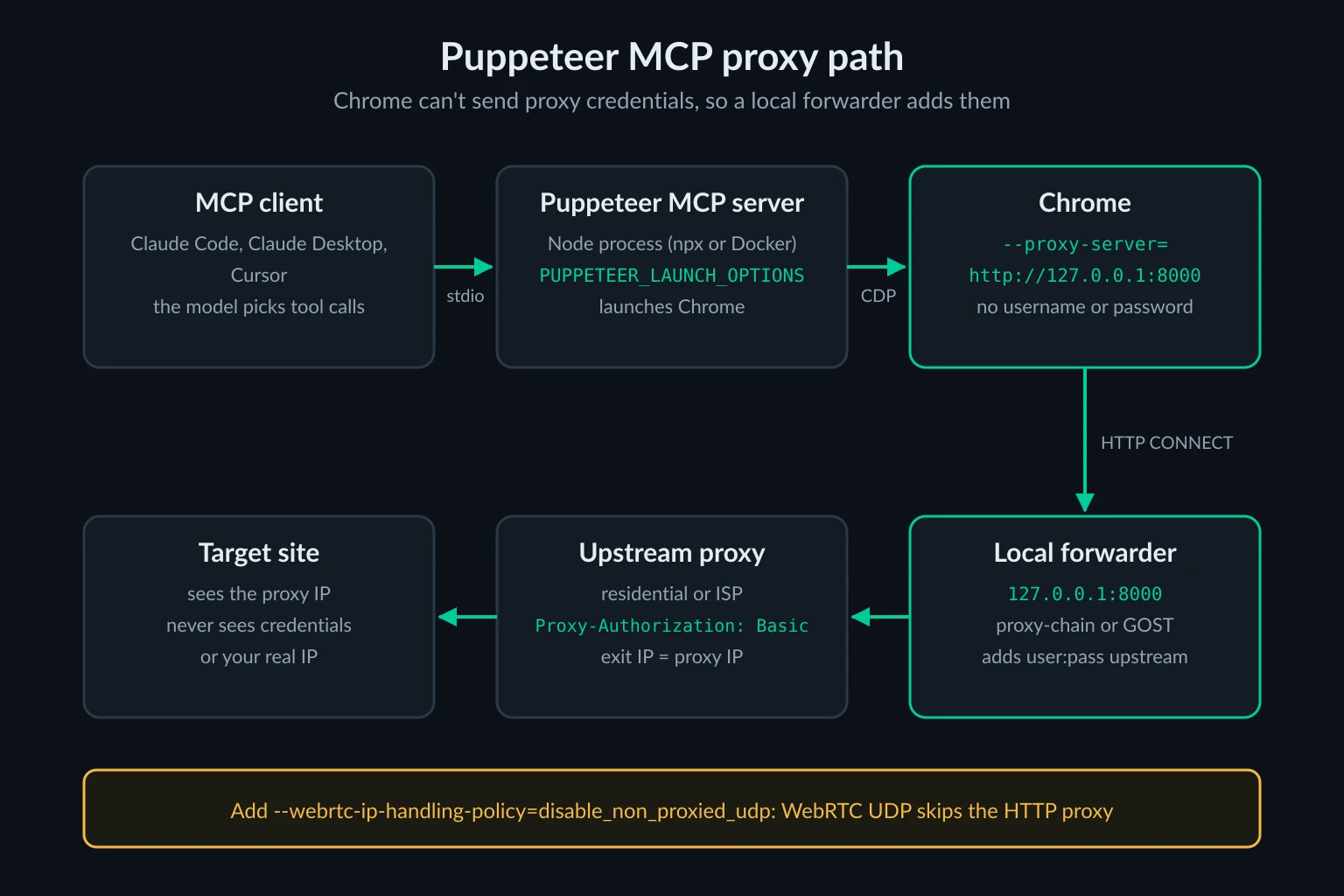
Two limits shape the rest of the setup. Chrome won't accept a username and password in --proxy-server, and this server has no way to answer a proxy's 407 challenge, so authenticated proxies need IP allowlisting or a small forwarder on 127.0.0.1. The model can also pass its own launchOptions to puppeteer_navigate. That restarts Chrome with whatever proxy the model chose, including none at all.
Every result below comes from a small Node harness that sent JSON-RPC tool calls to the server's stdin while two local test proxies logged each CONNECT. The browser was the one "headless": true launches by default: full Chrome for Testing 131.0.6778.204, found through Puppeteer's normal cache lookup with no executablePath. The only extra flag was --no-sandbox, which this Linux host needs. The sections cover the env config, the credential workaround, keeping the model from rerouting Chrome, a WebRTC leak that --proxy-server leaves open, and a status-aware exit IP check.
Which Puppeteer MCP server you are running
Several packages answer to "Puppeteer MCP," and they don't take proxies the same way. Check which one your client config launches before you change anything.
| Package | Status | How it gets a proxy |
|---|---|---|
@modelcontextprotocol/server-puppeteer 2025.5.12 |
Archived reference server, marked deprecated on npm, still about 24,000 weekly downloads | --proxy-server in PUPPETEER_LAUNCH_OPTIONS, or in launchOptions on a tool call |
@hisma/server-puppeteer 0.6.5 |
Community fork of the reference server, updated to Puppeteer 24 | Same env var and same tool arguments |
puppeteer-mcp-server 0.7.2 |
Separate project with an extra puppeteer_connect_active_tab tool |
No launch config at all. Start your own Chrome with --proxy-server and --remote-debugging-port=9222, then let the agent attach |
We repeated the proxy override, --no-proxy-server, and 407 tests on the Hisma fork, and it behaved the same as the reference server. The third package hardcodes its launch arguments, including --disable-web-security, so the only way to proxy it is to attach it to a Chrome you started yourself.
The archived repo states that no security guarantees are provided for its servers. If you're choosing fresh, Playwright MCP is actively maintained and accepts a proxy username and password in its config file. If you already rely on Puppeteer MCP's tool set or prompts, the setup below works.
Puppeteer MCP proxy config
For an unauthenticated endpoint, such as an IP-allowlisted proxy or a local forwarder, add the env var to the server entry. This is the same mcpServers shape Claude Desktop, Cursor, and a project .mcp.json use:
{
  "mcpServers": {
    "puppeteer": {
      "command": "npx",
      "args": ["-y", "@modelcontextprotocol/server-puppeteer"],
      "env": {
        "PUPPETEER_LAUNCH_OPTIONS": "{\"headless\":true,\"args\":[\"--proxy-server=http://127.0.0.1:8000\",\"--webrtc-ip-handling-policy=disable_non_proxied_udp\"]}"
      }
    }
  }
}
In Claude Code, the same server is one command. Single quotes keep the inner JSON intact. Claude Code needs another option, such as --transport stdio, between --env and the server name:
claude mcp add --env 'PUPPETEER_LAUNCH_OPTIONS={"headless":true,"args":["--proxy-server=http://127.0.0.1:8000","--webrtc-ip-handling-policy=disable_non_proxied_udp"]}' --transport stdio puppeteer -- npx -y @modelcontextprotocol/server-puppeteer
Three details in that config are easy to get wrong:
headlessdefaults tofalseunder npx. The server opens a visible Chrome window unless you set"headless": true. On a Linux server or CI runner with no display, a headful launch fails.- A JSON typo removes the proxy without stopping the server. If the string doesn't parse, the server prints
Failed to parse PUPPETEER_LAUNCH_OPTIONS: ...to stderr, falls back to{}, and launches Chrome with no proxy. The agent never sees that warning. It only appears in your client's MCP server log. Run the string throughjqorJSON.parsebefore you paste it. - The WebRTC flag is not optional for agents. Without it, a page can learn your real public IP over UDP even though every HTTP request goes through the proxy. That's covered in its own section below.
The first npx run installs Puppeteer 23.11.1, which downloads Chrome for Testing 131.0.6778.204 into ~/.cache/puppeteer. If you point executablePath at a different Chrome in the same JSON, the proxy flags work the same way.
Proxy credentials: what fails and what works
If your proxy endpoint expects a login, nothing in the env JSON can carry it. In plain Puppeteer you would call page.authenticate(), as the Puppeteer proxy guide shows. The MCP server never calls it and exposes no tool that can, and puppeteer_evaluate runs inside the page, where Puppeteer's API isn't available.
We pointed the server at a test proxy on port 18931 that rejects any request without a Proxy-Authorization header. Each attempt returned this:
Setting in args |
What the agent sees | What actually happened |
|---|---|---|
--proxy-server=http://user:pass@127.0.0.1:18931 |
JSON-RPC error -32603: net::ERR_NO_SUPPORTED_PROXIES at https://example.com |
Chrome rejected the proxy URL before connecting |
--proxy-server=socks5://user:pass@127.0.0.1:18931 |
The same ERR_NO_SUPPORTED_PROXIES error |
Chrome doesn't support SOCKS5 authentication either |
--proxy-server=http://127.0.0.1:18931 (no credentials) |
JSON-RPC error -32603: net::ERR_INVALID_AUTH_CREDENTIALS at https://example.com |
The proxy answered 407, and Chrome had nothing to send back |
--proxy-server=http://127.0.0.1:8000 (local forwarder) |
Navigated to https://example.com |
The forwarder added credentials, and the page loaded with status 200 |
The third row is a 407 Proxy Authentication Required that Chrome can't answer, and full Chrome turns it into a navigation error. That isn't true of every build. When we ran the same config earlier on chrome-headless-shell 155, the 407 came back as Navigated to https://example.com with an empty page, so an agent on "headless": "shell" may decide the site is blank and move on. Whatever the binary, puppeteer_navigate never reports the status code. A 403 from the site itself also returns Navigated to <url>.
The fix is to make sure Chrome never meets the 407 at all. There are two ways to do that.
Drop the login with IP authentication. Some plans let you register the public IP of the host that runs the MCP server. The proxy then accepts that host without a login, and the env JSON can point straight at http://host:port. Check what curl https://api.ipify.org returns on that host before you register it, and re-register whenever the host's address changes, for example after a VPS migration or on a home connection with a dynamic IP.
Run a local forwarder. proxy-chain is the Node package most Puppeteer users already know. This file listens on 127.0.0.1:8000 (or FORWARDER_PORT) without authentication and forwards every request upstream with your credentials:
// forwarder.mjs
import { Server } from "proxy-chain";

const port = Number(process.env.FORWARDER_PORT ?? 8000);

const server = new Server({
  host: "127.0.0.1",
  port,
  prepareRequestFunction: () => ({ upstreamProxyUrl: process.env.UPSTREAM_PROXY_URL }),
});

await server.listen();
console.log(`Forwarding 127.0.0.1:${port} to the upstream proxy`);
npm install proxy-chain
UPSTREAM_PROXY_URL="http://YOUR_PROXY_USERNAME:YOUR_PROXY_PASSWORD@proxy.example.com:8080" node forwarder.mjs
We ran this with proxy-chain 3.0.1, which needs Node 20.11 or later. The host: "127.0.0.1" line matters. Change it to 0.0.0.0 and anyone who can reach port 8000 gets free use of your paid plan, which is the classic open proxy mistake.
Note where the secret ends up. UPSTREAM_PROXY_URL lives in the shell that starts forwarder.mjs, while the mcpServers entry contains only http://127.0.0.1:8000. That means a .mcp.json you commit, or a Cursor config you sync between machines, carries no credentials. puppeteer_evaluate doesn't expose them either, since its scripts execute in the page's JavaScript context and can't see environment variables from any process.
The agent can change the Puppeteer MCP proxy
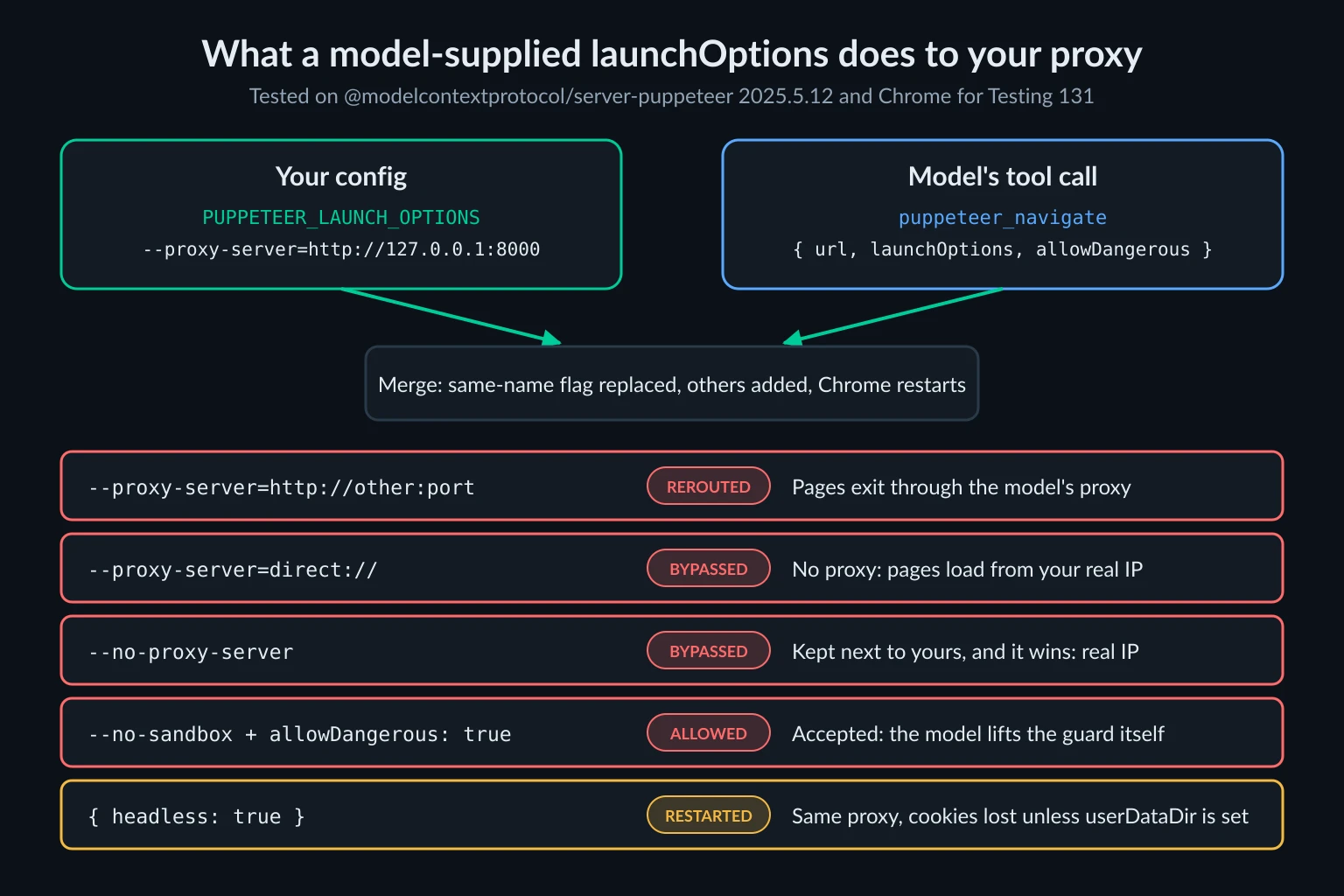
The puppeteer_navigate tool schema includes two optional arguments the model can fill in: launchOptions and allowDangerous. When launchOptions differs from the last value, the server closes Chrome and launches a new one with your env config merged with the model's. In the args array, a model-supplied flag replaces any env flag with the same name.
We started the server with --proxy-server=http://127.0.0.1:8000 in the env var and then sent tool calls with different launchOptions. The two test proxies logged which CONNECT requests reached them:
launchOptions sent by the model |
Result |
|---|---|
{"args":["--proxy-server=http://127.0.0.1:18932"]} |
Chrome restarted, and later pages went through the model's proxy instead of yours |
{"args":["--proxy-server=direct://"]} |
Chrome restarted with no proxy, so pages loaded from the host's real IP |
{"args":["--no-proxy-server"]} |
Chrome restarted with both flags, and --no-proxy-server won, so pages loaded from the host's real IP |
{"headless":true} |
Chrome restarted on your proxy, but cookies set before the restart were gone |
{"args":["--no-sandbox"]} |
Rejected with Dangerous browser arguments detected: --no-sandbox, until the model added "allowDangerous": true to the same call |
The --no-proxy-server row needs a closer look. The merge only replaces a flag with the same name, and --no-proxy-server is a different name, so your --proxy-server stays in the list next to it. Full Chrome checks --no-proxy-server first and goes direct. So the model has a second way to bypass your proxy besides direct://, and this one doesn't touch your --proxy-server value at all.
The last row matters because the danger list is the server's only guard, and the model can switch it off. Neither --proxy-server nor --no-proxy-server is on that list in the first place. The Hisma fork appends the model's args instead of replacing matching flags, but Chrome uses the last --proxy-server it sees, so the override still works there.
A model rarely does this unprompted. The risk is a page that tells it to, since anything the agent reads can carry a prompt injection. Three controls, from weakest to strongest:
- Read tool approvals. Claude Code and Cursor show the tool's arguments before running it. Don't auto-approve
puppeteer_navigateif you rely on the proxy. AlaunchOptionskey in the approval prompt is your cue to deny. - Fix the cookie side. Set
userDataDirin your env JSON. A restart then reopens the same profile, and in our test the cookie survived. Without it, every restart starts a fresh temporary profile. - Lock egress below the browser. If Chrome can only reach the forwarder, a model-supplied
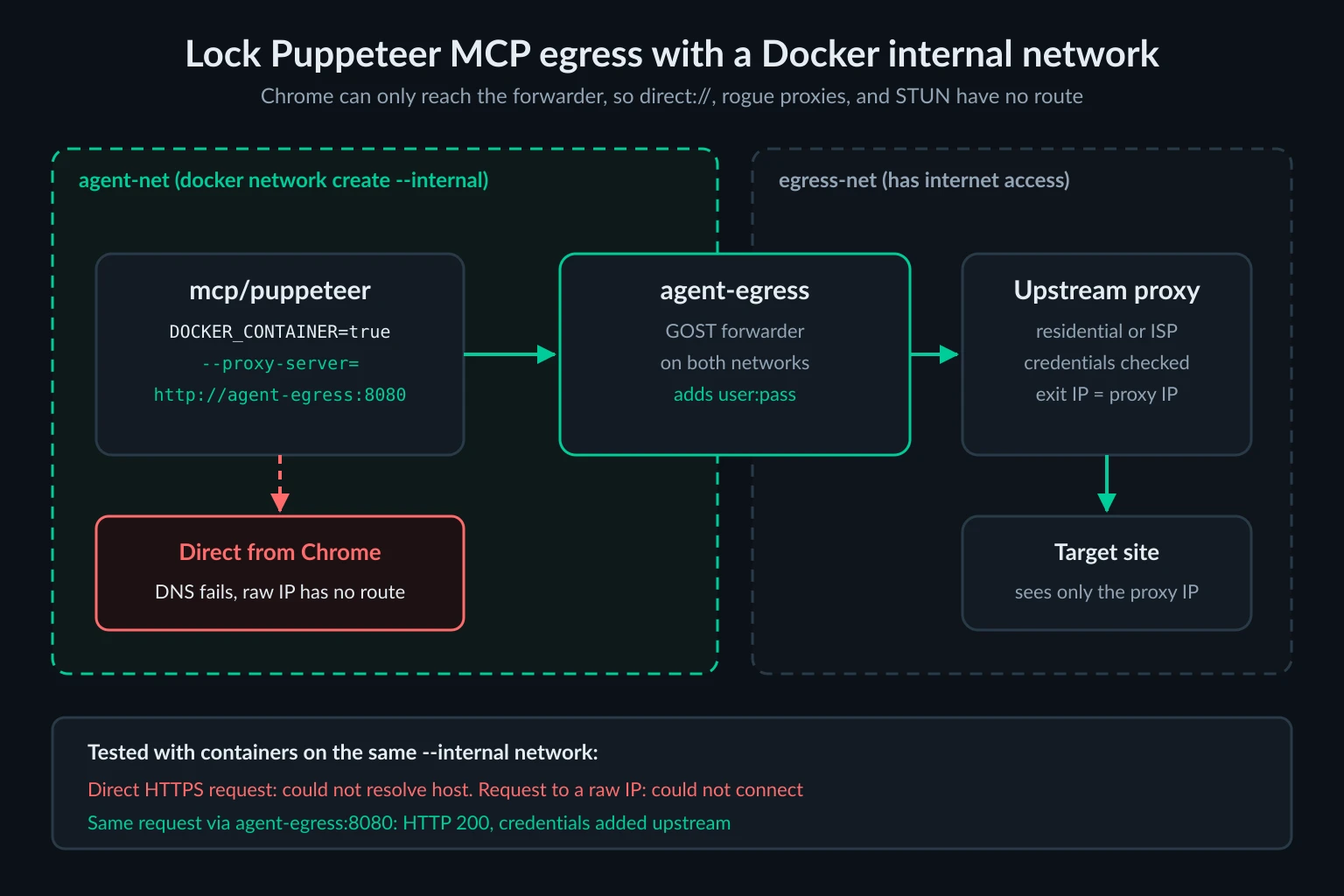
direct://,--no-proxy-server, or rogue proxy fails to connect. The next section shows how.
Lock egress for Puppeteer MCP in Docker
The reference server also ships as the mcp/puppeteer Docker image. With DOCKER_CONTAINER=true, it launches headless Chromium with --no-sandbox, --single-process, and --no-zygote added. Put that container on a Docker network created with --internal, which has no route out, and attach a forwarder to both that network and a normal user-defined one:
docker network create --internal agent-net
docker network create egress-net

docker run -d --name agent-egress --network egress-net --restart unless-stopped gogost/gost:3.3.0 \
  -L http://:8080 \
  -F "http://YOUR_PROXY_USERNAME:YOUR_PROXY_PASSWORD@proxy.example.com:8080"

docker network connect agent-net agent-egress
The forwarder is GOST, a 23 MB compressed image, so it doesn't need Node. Don't publish its port with -p, and keep it off the default bridge. It should only be reachable from containers on agent-net and egress-net. Then point the MCP server at it:
{
  "mcpServers": {
    "puppeteer": {
      "command": "docker",
      "args": [
        "run", "-i", "--rm", "--init",
        "--network", "agent-net",
        "-e", "DOCKER_CONTAINER=true",
        "-e", "PUPPETEER_LAUNCH_OPTIONS={\"args\":[\"--proxy-server=http://agent-egress:8080\",\"--webrtc-ip-handling-policy=disable_non_proxied_udp\"]}",
        "mcp/puppeteer"
      ]
    }
  }
}
We checked the network pattern with test containers on the same --internal network. A direct request failed to resolve the hostname, a request to a raw IP failed to connect, and the same request through agent-egress:8080 returned 200 with credentials added upstream. We didn't pull the mcp/puppeteer image itself (484 MB compressed), but Chrome inside it gets the same network, so direct:// or a proxy the model invents has nowhere to go. The internal network has no route out for UDP either, which closes the WebRTC path even if the flag is removed.
Close the WebRTC leak
--proxy-server covers HTTP, HTTPS, and WebSocket traffic. WebRTC can use UDP, which an HTTP proxy doesn't carry. With the default policy, any page can ask a public STUN server for the browser's address.
We ran a short RTCPeerConnection script through puppeteer_evaluate on a proxied session in Chrome 131 and compared flags:
Flag added to args |
Result |
|---|---|
| None | A srflx candidate with the host's real public IP, not the proxy's |
--force-webrtc-ip-handling-policy=disable_non_proxied_udp |
The same leak. Full Chrome ignores this switch |
--webrtc-ip-handling-policy=disable_non_proxied_udp |
No candidates at all |
The --force- switch does work in chrome-headless-shell, where an earlier run on version 155 returned no candidates with it. Full Chrome ignores it and reads --webrtc-ip-handling-policy instead. That covers the Chrome for Testing build Puppeteer downloads, and the Debian Chromium in mcp/puppeteer should behave the same way, though we didn't run that image. If you switch to "headless": "shell", rerun the script above rather than assuming either flag works. Chrome's WebRtcIPHandling policy documents the same values for managed browsers.
The model can override this flag too, by sending --webrtc-ip-handling-policy=default in launchOptions. The Docker egress lock is the only control here that the model can't undo.
Keep the flag in every config in this guide. It doesn't break normal browsing, and an agent rarely needs WebRTC.
Check the agent's exit IP and response status
Puppeteer MCP has no snapshot tool. The agent reads pages with puppeteer_evaluate or screenshots, so use those for the check. Before involving the agent, confirm the upstream works on its own:
curl -x http://YOUR_PROXY_USERNAME:YOUR_PROXY_PASSWORD@proxy.example.com:8080 https://api.ipify.org
Then give the agent this task:
Use puppeteer_navigate to open https://api.ipify.org?format=json.
Then use puppeteer_evaluate to return document.body.innerText.
The IP should match the curl result. For a geo-targeted proxy, repeat with https://ipinfo.io/json and check the country. Navigated to never includes a status code, so also have the agent check the status after any navigation that looks empty or wrong:
performance.getEntriesByType("navigation")[0].responseStatus
In our tests this returned 200 through the forwarder, 403 for a test URL that answers 403, and 407 when the forwarder was missing. The responseStatus property is available in Chrome 109 and later.
Sessions, profiles, and proxy choice
A Puppeteer MCP server drives one Chrome and one page at a time, so one server equals one network identity. When an agent needs two locations, register two servers and run two forwarders, for example with FORWARDER_PORT=8001 and FORWARDER_PORT=8002:
{
  "mcpServers": {
    "puppeteer-us": {
      "command": "npx",
      "args": ["-y", "@modelcontextprotocol/server-puppeteer"],
      "env": {
        "PUPPETEER_LAUNCH_OPTIONS": "{\"headless\":true,\"userDataDir\":\"/home/you/.puppeteer-mcp/us\",\"args\":[\"--proxy-server=http://127.0.0.1:8001\",\"--webrtc-ip-handling-policy=disable_non_proxied_udp\"]}"
      }
    },
    "puppeteer-de": {
      "command": "npx",
      "args": ["-y", "@modelcontextprotocol/server-puppeteer"],
      "env": {
        "PUPPETEER_LAUNCH_OPTIONS": "{\"headless\":true,\"userDataDir\":\"/home/you/.puppeteer-mcp/de\",\"args\":[\"--proxy-server=http://127.0.0.1:8002\",\"--webrtc-ip-handling-policy=disable_non_proxied_udp\"]}"
      }
    }
  }
}
Give each server its own userDataDir and never point two proxies at the same profile. Saved cookies that say "returning visitor" from a new IP are a common trigger for login checks.
Pick the upstream behind each forwarder by how long one identity has to last. Puppeteer MCP keeps a single page open and reuses its connections, so a gateway that hands out a new IP per connection can switch the exit between two clicks of the same task:
puppeteer-uslogs into the same dashboard every morning: use an ISP proxy, so the account sees one dedicated IP on every run.puppeteer-dechecks German prices or search results: use a residential session pinned to Germany, and keep the same session ID until the task finishes.- A throwaway server for unrelated single-page lookups: a rotating residential gateway is fine, as long as no
userDataDircarries cookies between them.
The session trade-off is covered in sticky vs rotating proxies, and the reasons agents get blocked at all are in proxies for AI agents. On the Unknown Proxies side, the ISP plans support IP authentication, so a fixed host can point the env JSON at the endpoint and skip forwarder.mjs entirely. The residential proxies dashboard generates sticky credentials per country, one set per forwarder. Residential traffic is billed by volume, and puppeteer_navigate waits for the full load event, so run your page count through the data usage calculator before you size a plan. Chrome for Testing also sent its own background requests through the forwarder in our tests, to clients2.google.com and accounts.google.com, so expect a little traffic per launch that the agent never asked for.
Troubleshooting Puppeteer MCP proxy errors
Errors from page.goto() come back as JSON-RPC errors with code -32603, not as tool results, so some clients show them as a generic tool failure. Expand the error text before you retry.
| Symptom | Likely cause | Fix |
|---|---|---|
net::ERR_NO_SUPPORTED_PROXIES at <url> |
Credentials inside the --proxy-server URL |
Remove them, then use IP allowlisting or a forwarder |
net::ERR_INVALID_AUTH_CREDENTIALS at <url> |
The proxy returned 407 and Chrome had no credentials | Start the forwarder or register the host's IP |
Navigated to <url>, then an empty page |
On chrome-headless-shell, the same 407 |
Check responseStatus, then fix the forwarder or allowlist |
net::ERR_PROXY_CONNECTION_FAILED at <url> |
Forwarder not running, or wrong host or port | Start the forwarder and test it with curl -x. See ERR_PROXY_CONNECTION_FAILED |
Navigation timeout of 30000 ms exceeded |
The proxy accepted the connection but never answered | Test the upstream with curl. The tool has no timeout argument |
| Agent reports your own IP | Malformed env JSON, a model-supplied direct:// or --no-proxy-server, or a stale server process |
Check stderr for Failed to parse PUPPETEER_LAUNCH_OPTIONS, review recent tool calls, restart the client |
Could not find Chrome (ver. 131.0.6778.204) |
The first-run Chrome download was skipped or used a different cache path | Run npx puppeteer browsers install chrome@131.0.6778.204 or set executablePath |
Dangerous browser arguments detected |
An arg such as --no-sandbox without ALLOW_DANGEROUS=true |
Use the Docker image, or set the env var deliberately |
403, 429, or a CAPTCHA with responseStatus from the site |
The request reached the target, which refused it | Reduce the agent's request rate before blaming the route |
For Chrome-level proxy errors that aren't specific to MCP, such as ERR_TUNNEL_CONNECTION_FAILED, the Puppeteer proxy error guide goes deeper.
None of this setup grants permission to automate a site. Point the agent only at accounts and data you're entitled to use, respect published rate limits and terms, and keep the reference server's own caution in mind: the browser it starts can open local files and internal addresses on your network.
FAQ
How do I add a proxy to Puppeteer MCP?
Set PUPPETEER_LAUNCH_OPTIONS in the server's env block to a JSON string whose args array includes --proxy-server=http://host:port. Restart the MCP server after changing it, because Chrome takes its proxy at launch.
Can Puppeteer MCP use a proxy with a username and password?
Not directly. Chrome rejects credentials in --proxy-server with ERR_NO_SUPPORTED_PROXIES, and the server never calls page.authenticate(). Register the host's IP with your provider so no login is needed, or point --proxy-server at a loopback forwarder (proxy-chain or GOST) that holds the login and attaches it upstream.
Can the AI agent change the proxy?
Yes. puppeteer_navigate accepts a launchOptions argument. A new --proxy-server value there replaces yours after a browser restart, including direct://, and adding --no-proxy-server sends full Chrome direct even with your flag still present. Deny tool calls that include launchOptions, or run the server on a network that can only reach your forwarder.
Is the Puppeteer MCP server still maintained?
The reference server lives in the archived modelcontextprotocol/servers-archived repo, and npm marks @modelcontextprotocol/server-puppeteer as deprecated. The @hisma/server-puppeteer fork updates it to Puppeteer 24 with the same configuration. Playwright MCP is the actively developed alternative.
Puppeteer MCP or Playwright MCP for proxied agents?
Playwright MCP accepts a proxy username and password in its config file, and its browsing tools can't relaunch the browser with new options. Puppeteer MCP needs a forwarder for credentials and lets the model change launch options. For a new setup that needs authenticated proxies, Playwright MCP needs fewer workarounds. The browser MCP server guide puts both next to Chrome DevTools MCP and the attach-mode servers, with the proxy setting for each.
Final thoughts
A Puppeteer MCP proxy setup is one --proxy-server flag inside PUPPETEER_LAUNCH_OPTIONS, plus the parts that flag doesn't cover. Add credentials with a local forwarder or IP allowlisting. Add the WebRTC flag. Remember that the model can pass its own launchOptions, and lock egress at the network if the route has to hold. Then have the agent load an IP echo page and read responseStatus before you hand it real work.
Technical references: Puppeteer MCP reference server, Puppeteer launch options, Chromium proxy documentation, Docker internal networks, Claude Code MCP documentation, and RFC 9110 on 407 Proxy Authentication Required.