The Fetch MCP server (mcp-server-fetch) is the Model Context Protocol reference server that gives Claude Desktop, Claude Code, Cursor, or any other MCP client a single fetch tool. The tool downloads a URL with a plain HTTP client, converts the HTML to Markdown, and returns it to the model. It doesn't run a browser, so JavaScript never executes and nothing is clicked. When a page needs JavaScript or clicks, that is a browser MCP server's job instead, and each one takes a proxy in a different place.
To send those fetches through a proxy, add --proxy-url http://USERNAME:PASSWORD@proxy.example.com:8080 to the server's args, or set HTTPS_PROXY in the server's own env block. Both accept credentials, and both accept HTTP or SOCKS5 proxies. Put the setting on the server and not in the shell you launch the client from. Otherwise your model API traffic goes through the proxy too.
We installed mcp-server-fetch 2026.10.10, the PyPI release from October 11, 2026, and drove it over stdio against a local logging proxy. The sections below cover the config for each client, which proxy settings win, what a single fetch sends through the proxy, and what the error messages actually mean.
Fetch MCP quick setup with a proxy
All three common clients use the same mcpServers JSON for local servers. This entry works in Claude Desktop's claude_desktop_config.json, Cursor's ~/.cursor/mcp.json or .cursor/mcp.json, and Claude Code's .mcp.json:
{
  "mcpServers": {
    "fetch": {
      "command": "uvx",
      "args": [
        "mcp-server-fetch",
        "--proxy-url",
        "http://USERNAME:PASSWORD@proxy.example.com:8080"
      ]
    }
  }
}
In Claude Code, the same server is one command. Everything after -- goes to the server unchanged:
claude mcp add fetch -- uvx mcp-server-fetch --proxy-url http://USERNAME:PASSWORD@proxy.example.com:8080
uvx comes with uv and runs the server without a separate install. If Claude Desktop can't start the server, give the full path from which uvx as the command, because desktop apps don't always inherit your shell's PATH. Restart the client after any change. The server reads its proxy once, at startup.
If your password contains @, :, /, or #, percent-encode it in the URL (@ becomes %40). The server parses the proxy setting as a URL, so a raw @ in the password breaks the host part.
Keep credentials out of shared config files
.mcp.json and .cursor/mcp.json are project files that usually get committed. Reference an environment variable instead of pasting the password:
| Client | Variable syntax in config | Example |
|---|---|---|
Claude Code (.mcp.json) |
${VAR} or ${VAR:-default} in command, args, env, url, and headers |
"HTTPS_PROXY": "${FETCH_PROXY_URL}" |
Cursor (mcp.json) |
${env:NAME} in the same fields, or an envFile for stdio servers |
"HTTPS_PROXY": "${env:FETCH_PROXY_URL}" |
| Claude Desktop | None documented. Put the value in the server's env block and keep the file private |
"HTTPS_PROXY": "http://USERNAME:PASSWORD@..." |
Running claude mcp add -s project fetch -e 'HTTPS_PROXY=${FETCH_PROXY_URL}' -- uvx mcp-server-fetch writes exactly that env entry into .mcp.json. We started Claude Code with FETCH_PROXY_URL set and asked it to fetch a page. Our proxy logged the authenticated CONNECT requests, so the expansion reaches the server. The syntax is documented in the Claude Code MCP docs and Cursor MCP docs.
--proxy-url vs HTTPS_PROXY: which setting wins
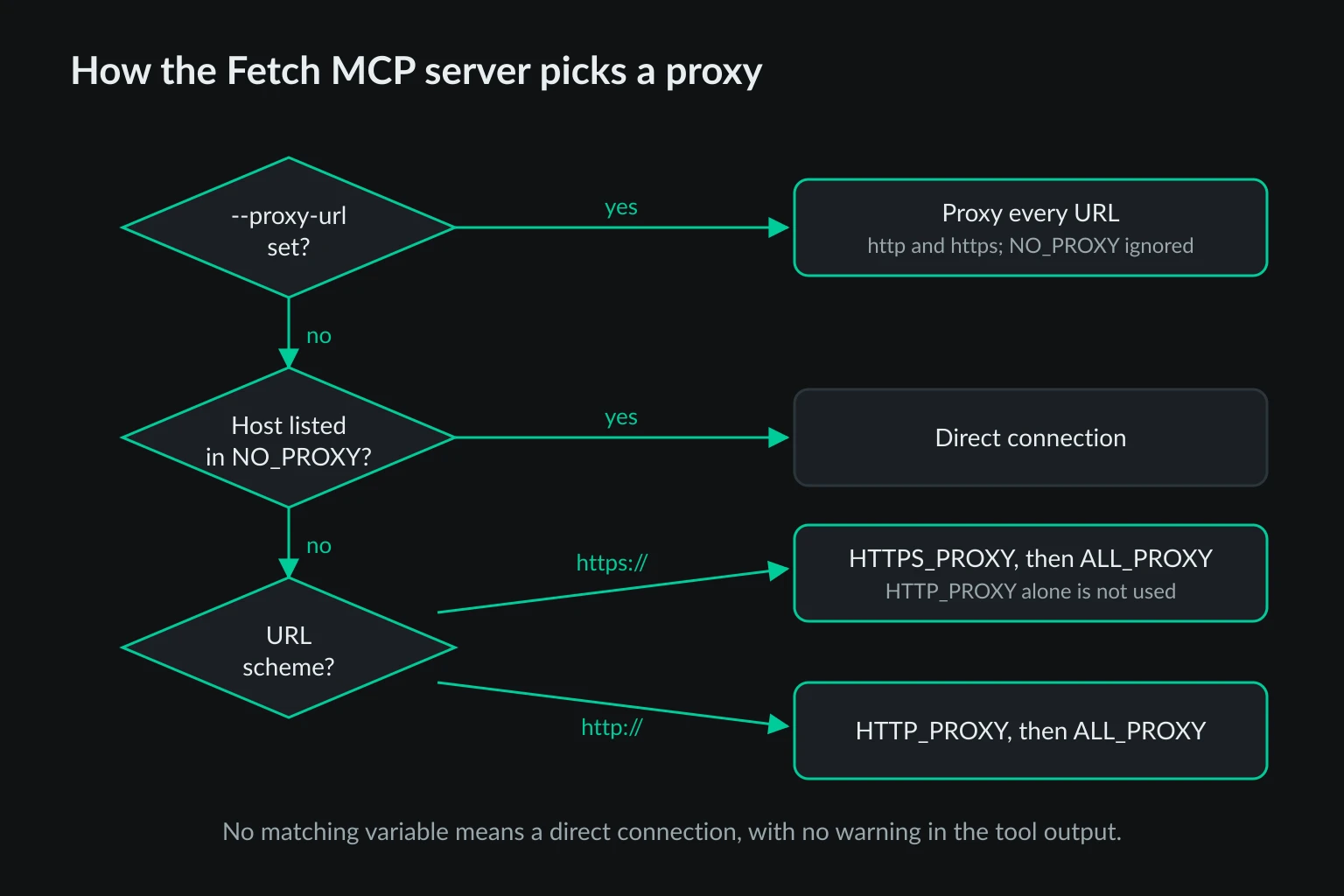
The server builds an HTTPX client for every fetch. --proxy-url becomes that client's proxy. Without the flag, HTTPX reads the standard proxy environment variables. The two paths behave differently, and the differences only show up when something goes direct that you expected to be proxied.
| Setting | https:// URLs |
http:// URLs |
NO_PROXY honored |
|---|---|---|---|
--proxy-url |
Proxied | Proxied | No |
HTTPS_PROXY |
Proxied | Direct | Yes |
HTTP_PROXY only |
Direct | Proxied | Yes |
ALL_PROXY |
Proxied | Proxied | Yes |
--proxy-url plus HTTPS_PROXY |
Flag wins | Flag wins | No |
We tested each row against the logging proxy. Two results catch people out:
HTTP_PROXYalone does not cover HTTPS. With onlyHTTP_PROXYset, a fetch ofhttps://example.comsucceeded and the proxy logged nothing. Almost every page is HTTPS, so setHTTPS_PROXY(orALL_PROXY) and not justHTTP_PROXY.--proxy-urlignoresNO_PROXY. WithNO_PROXY=example.comand the flag set, both requests for example.com still went through the proxy. WithHTTPS_PROXYinstead of the flag, the sameNO_PROXYvalue sent them direct. If you need a bypass list, use the environment variables.
SOCKS5 support
Release 2026.10.10 installs HTTPX with its SOCKS extra, so socks5://USERNAME:PASSWORD@host:1080 works out of the box. We ran it against a small SOCKS5 server that requires a username and password. Both requests arrived with the target as a domain name (DOMAIN example.com:443), so the proxy resolves the target host. socks5h:// behaved the same way. socks://, the form many desktop proxy settings export, is rewritten to socks5://.
Earlier releases listed plain httpx without the SOCKS extra, so a socks5:// URL fails on those unless the extra is installed separately. If you're pinned to an older version, upgrading is simpler.
Keep the proxy off Claude Code's own traffic
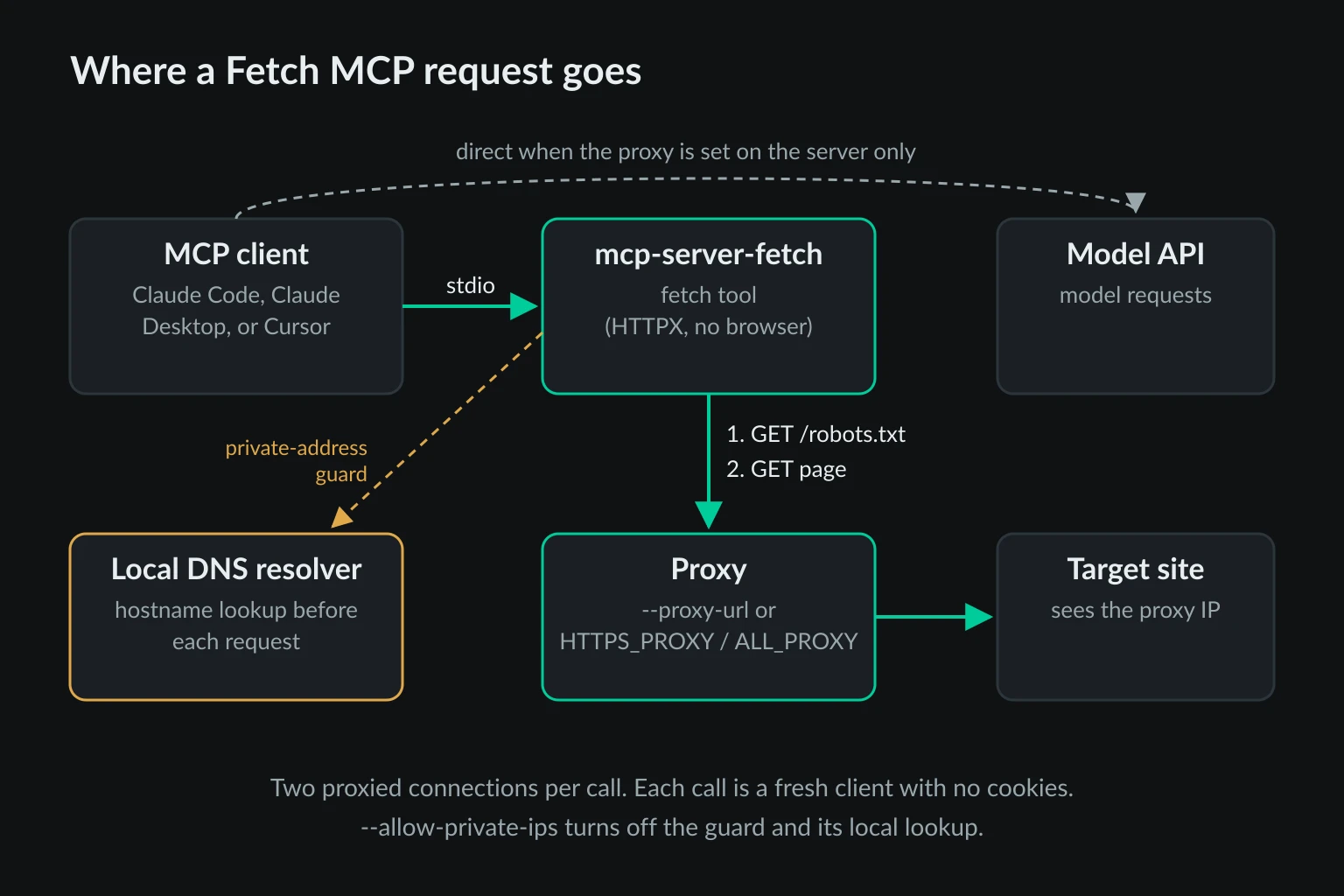
The easy mistake is to export the proxy in your shell and start the client from there. An MCP server inherits its client's environment, so the fetch tool does use the proxy. So does everything else.
We exported HTTPS_PROXY pointing at our logging proxy, started Claude Code with a fetch server that had no proxy settings of its own, and asked for one page. The proxy logged 12 CONNECT api.anthropic.com:443 requests, one to Claude Code's telemetry host, and 2 to the target site. Claude Code's built-in WebFetch tool behaved the same way: one CONNECT to the target, a dozen to the API.
That's expected behavior. Claude Code's network configuration docs say it respects the standard proxy variables. On a residential plan billed per GB, though, you'd pay to send every model request through consumer IPs and add latency to each one. You also lose the point of a separate fetch exit.
Put the proxy in the server's args or env block instead. Only the fetch server sees it, and the client keeps talking to the model API directly. It is also a good reason to add the Fetch MCP server to Claude Code even though WebFetch already exists: WebFetch follows Claude Code's own network settings, while the MCP server can have an exit of its own.
What one fetch call sends through the proxy
One fetch tool call isn't one request. Knowing what goes over the wire explains most of the cost and most of the errors.
Two connections per call. Unless you start the server with --ignore-robots-txt, it first downloads the site's /robots.txt, then the page, each with a new HTTP client. Our proxy logged two CONNECT requests for every call. With a per-request rotating proxy, the robots.txt check and the page can leave from different IPs. Nothing breaks, because the server keeps no cookies or session between the two requests or between calls.
A self-identifying User-Agent. Tool-initiated fetches send ModelContextProtocol/1.0 (Autonomous; +https://github.com/modelcontextprotocol/servers). Some sites and WAFs can block that string outright, whatever the IP. --user-agent replaces it for both the robots.txt request and the page, and the robots.txt rules are then matched against your custom string.
Two different timeouts. The page request gets 30 seconds. The robots.txt request uses HTTPX's 5-second default. We put a proxy in front that waited 6 seconds before answering CONNECT. Every fetch failed at about 5.5 seconds with Failed to fetch robots.txt https://example.com/robots.txt due to a connection issue. With --ignore-robots-txt, the same proxy worked and the call took 7.5 seconds. A slow residential exit can fail the robots check while the page itself would have loaded fine.
The whole page, for every chunk. The tool returns 5,000 characters by default and tells the model to call again with a higher start_index for more. Each of those calls downloads the full page again, plus robots.txt. We measured proxy traffic for three pages:
| Page | Proxy traffic per call | Markdown length | Calls at 5,000 chars | Calls at 40,000 chars |
|---|---|---|---|---|
| Wikipedia: Proxy server | 86 KB | 63,459 chars | 13 (about 1.1 MB) | 2 (about 172 KB) |
Python urllib.request docs |
41 KB | 74,844 chars | 15 (about 615 KB) | 2 (about 82 KB) |
| RFC 9110 | 225 KB | 552,870 chars | 111 (about 25 MB) | 14 (about 3.1 MB) |
HTTPX asks for gzip, so per-call traffic is well below the raw page size. RFC 9110 is 1.19 MB uncompressed, and 225 KB crossed the proxy. The multiplier still adds up. A model that pages through a long document 5,000 characters at a time downloads it once per chunk.
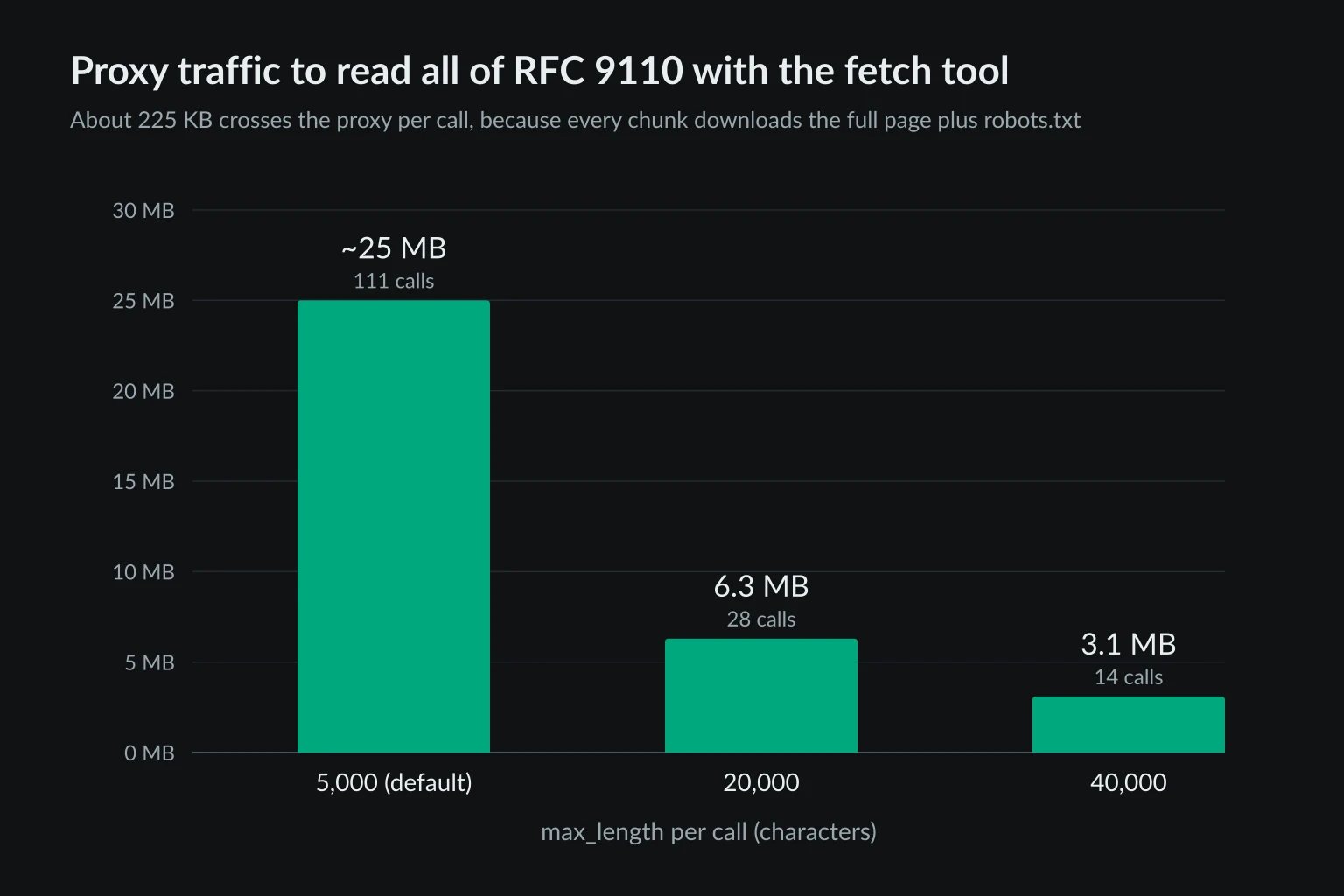
The model picks max_length itself, so tell it what you want. Something like "use the fetch tool with max_length 40000" works. Claude Code saves MCP text results over 50,000 characters to a file rather than returning them inline, and warns above 10,000 tokens of output, so 20,000 to 40,000 characters is a practical range there.
Fetch MCP proxy errors and what they mean
The fetch tool reports failures as text in the tool result, and the model often paraphrases them. Ask for the raw tool output when you debug. These are the exact messages from our tests:
| Tool output | What happened | Fix |
|---|---|---|
Failed to fetch robots.txt https://…/robots.txt due to a connection issue |
The robots.txt request failed at the proxy: wrong credentials, a dead proxy, or more than 5 seconds to connect | Rerun once with --ignore-robots-txt to see the real error, then test the proxy with curl -x |
Failed to fetch https://…/: ProxyError('407 Proxy Authentication Required') |
Wrong or missing proxy credentials on an HTTPS URL | Check the username, password, and percent-encoding. See 407 Proxy Authentication Required |
Failed to fetch http://…/ - status code 407 |
Same problem on a plain http:// URL. The robots check treats the 407 as "no robots.txt" and lets the page fetch fail |
Same as above |
ProxyError('Invalid username/password') |
SOCKS5 proxy rejected the credentials | Same as above |
ConnectError('All connection attempts failed') |
Nothing is listening at the proxy host and port | Check the host, port, and scheme. See ERR_PROXY_CONNECTION_FAILED for the general checklist |
Failed to set up the HTTP client, check the proxy configuration … Unknown scheme for proxy URL |
The proxy URL has an unsupported scheme or is malformed | Use http://, https://, socks5://, or socks5h:// |
Failed to fetch … - status code 403 or 429 |
The proxy worked, and the target site refused the request | Slow down, check the User-Agent, and read HTTP 403 or HTTP 429 |
When fetching robots.txt (…), received status 403 so assuming that autonomous fetching is not allowed |
robots.txt itself returned 401 or 403, often a WAF reacting to the IP or User-Agent | Treat it as a block. Don't rotate around it automatically |
Refused to fetch …: <host> resolves to ::1, which is not a public address |
The private-address guard, covered below | Expected for internal hosts. --allow-private-ips turns the guard off |
Note what the first row hides. A wrong password shows up as a vague connection issue, not a 407, because the robots.txt request fails first and its error message drops the details. For a 403 or 429, the tool returns only the status code and not the response body, so the model can't see a challenge page or a Retry-After hint.
To check the proxy outside MCP, run the same URL through curl and compare exit IPs:
curl -x http://USERNAME:PASSWORD@proxy.example.com:8080 https://api.ipify.org
Then ask the agent to fetch https://api.ipify.org?format=json with the fetch tool. The two IPs should match. If the agent reports your own IP, the client is running an old server process or reading a different config file than the one you edited.
DNS lookups and the private-address guard
Release 2026.10.10 added a guard against server-side request forgery. Before every request, including robots.txt and each redirect hop, the server resolves the hostname itself and refuses loopback, RFC 1918, link-local, and other non-public addresses. That blocks a prompt-injected page from steering the model to http://169.254.169.254/ or your router's admin page.
The guard runs even when a proxy is set. We traced the server's network calls during a SOCKS5 fetch of example.com. The proxy received the hostname as intended, and the server also made two lookups through the local resolver (127.0.0.53:53), one before each request. Two consequences follow:
- Your local resolver sees every hostname the agent fetches, even though the connection leaves through the proxy. For most setups that's harmless. If the hostnames themselves are sensitive, know that the proxy doesn't hide them from your network.
- Public names that resolve to private IPs are refused.
http://localtest.me/resolves to loopback, and the server refused it with the proxy set and before contacting the proxy at all.
--allow-private-ips removes both the check and the local DNS lookup. Our trace showed zero queries to port 53 with the flag on. It also removes the protection, so keep the default unless the agent genuinely needs a local dev server or an intranet page. The server README notes that the guard doesn't stop DNS rebinding between the check and the connection, and doesn't check names only the proxy can resolve.
Docker and pinned versions
The README also offers a Docker image. Arguments after the image name go to the server:
{
  "mcpServers": {
    "fetch": {
      "command": "docker",
      "args": [
        "run", "-i", "--rm", "mcp/fetch",
        "--proxy-url", "http://USERNAME:PASSWORD@proxy.example.com:8080"
      ]
    }
  }
}
Inside the container, 127.0.0.1 is the container itself, so a proxy or forwarder running on your machine needs the host's address instead. The mcp/fetch:latest tag on Docker Hub was last updated on July 7, 2026, before the 2026.10.10 release. It predates both the bundled SOCKS support and the private-address guard described above, so prefer uvx until the image is rebuilt.
uvx caches the version it first downloaded. Use uvx mcp-server-fetch@latest in args to pick up new releases, or pin an exact version such as mcp-server-fetch==2026.10.10 when you want behavior to stay fixed.
Choosing a proxy for Fetch MCP
The fetch tool is stateless. Each call is a fresh client with no cookies, so nothing depends on keeping one IP across calls. That shapes the choice:
- Fetching pages across many sites: rotating residential proxies spread requests across consumer IPs, and per-request rotation costs you nothing because no session exists to break.
- Location-specific research: a sticky residential session with country targeting keeps a task's fetches in one country, which matters for localized prices, search results, or region-locked docs.
- A small set of sites you check repeatedly: a dedicated ISP proxy gives a stable IP, which helps when a partner or staging site allowlists specific addresses.
For the broader picture of when agents need sticky or rotating IPs, see proxies for AI agents. If the job needs JavaScript rendering, clicks, or a logged-in session, the fetch tool is the wrong layer. Use a browser server such as Playwright MCP with a proxy. For scripted extraction rather than agent-driven fetching, the AI web scraping guide covers putting the proxy in your own fetcher.
Residential bandwidth is billed per GB, so plug the per-call numbers above into the data usage calculator. An agent making 300 fetch calls a day against pages like the Wikipedia example moves about 26 MB. One that pages through long specs 5,000 characters at a time can move that much on a single document.
A proxy changes where the request comes from, not what you're allowed to fetch. Keep the robots.txt check on unless you have permission to skip it, and follow each site's terms and rate limits.
FAQ
What is the Fetch MCP server?
It's the reference MCP server from the Model Context Protocol project, published on PyPI as mcp-server-fetch and on Docker Hub as mcp/fetch. It exposes one fetch tool, with url, max_length, start_index, and raw arguments, plus a fetch prompt for user-initiated fetches.
Does Fetch MCP run JavaScript?
No. It sends an HTTP GET and converts the returned HTML to Markdown. Pages that build their content with JavaScript come back empty or incomplete. Use a browser MCP server for those.
Can Fetch MCP use an authenticated proxy?
Yes. Put the username and password in the proxy URL, in --proxy-url or HTTPS_PROXY. Unlike Chrome's --proxy-server flag, the HTTP client sends the credentials itself, for both HTTP and SOCKS5 proxies.
Does the user-initiated fetch prompt also use the proxy?
Yes. The fetch prompt uses the same proxy setting. It skips the robots.txt check and sends a different User-Agent, ModelContextProtocol/1.0 (User-Specified; …), unless you set --user-agent.
Is Fetch MCP the same as Claude Code's WebFetch tool?
No. WebFetch is built into Claude Code and uses Claude Code's own network settings, plus a domain safety check against api.anthropic.com. The Fetch MCP server is a separate process, so it can have a proxy that the rest of Claude Code doesn't use. It is one piece of the stack compared in the best MCP servers for web access guide.
Conclusion
A Fetch MCP server proxy takes one setting: --proxy-url in the server's args, or HTTPS_PROXY in its env block when you want NO_PROXY to apply. Keep it scoped to the server so model traffic stays direct. Expect two proxied requests per call, and raise max_length for long pages so the model doesn't download the same document dozens of times. When a fetch fails with a vague "connection issue," rerun it with --ignore-robots-txt once to see the real proxy error. Then check the exit IP from inside the agent before you rely on it.
Technical references: Fetch MCP server source, mcp-server-fetch on PyPI, HTTPX proxy documentation, Model Context Protocol documentation, and RFC 9110 on 407 Proxy Authentication Required.