The right Browserbase alternative depends on which line of the bill you are trying to shrink. For most AI agent and scraping workloads, that line is proxy bandwidth, not browser hours. Browser time costs about $0.05-$0.12 per hour at most cloud browser vendors' list rates. Managed residential proxy traffic costs $6-$12 per GB, and a single browser page load can transfer 2-5 MB.
That leaves three realistic paths:
- Switch to another managed cloud browser such as Steel, Hyperbrowser, Browserless, Anchor, or Kernel. Pick based on proxy pricing and bring-your-own-proxy support, not just the hourly rate.
- Self-host Chromium with a Playwright server or an open-source browser API in Docker. Browser time becomes your own compute, and you take over operations.
- Stay on Browserbase and bring your own proxy. Browserbase accepts external HTTP/HTTPS proxies from the $20 Developer plan up, which takes your traffic off its $10-$12 per GB proxy meter.
This guide compares the pricing models with a worked example, shows a tested self-hosted setup, and covers what breaks when you migrate. Prices below were checked against each vendor's public pricing pages in October 2026. Re-check them before you commit, because this market reprices often.
What You Pay Browserbase For
Browserbase sells hosted Chromium sessions you control over the Chrome DevTools Protocol (CDP), plus the tooling around them: session replays, live debugging, stealth and CAPTCHA handling, persistent contexts, and the open-source Stagehand agent framework. According to the Browserbase plans page, the self-serve tiers look like this:
| Free | Developer ($20/mo) | Startup ($99/mo) | |
|---|---|---|---|
| Browser hours included | 1 | 100 | 500 |
| Hour overage | n/a | $0.12/hr | $0.10/hr |
| Proxy GB included | 0 | 1 GB | 5 GB |
| Proxy overage | n/a | $12/GB | $10/GB |
| Concurrent browsers | 3 | 25 | 100 |
| Max session length | 15 min | 6 hrs | 6 hrs |
Browser time is billed by the minute, and proxy traffic by the MB with a 1 MB minimum per session. The proxy docs note that proxy usage counts everything that crosses the proxy: page content, headers, authentication, and TLS overhead.
That last detail is where budgets go wrong. Browser hours are cheap and predictable. Proxy bytes scale with page weight, and modern pages are heavy.
How Much Bandwidth a Cloud Browser Session Uses
To put numbers on page weight, we loaded public pages in headless Chromium through Playwright and summed the bytes reported by the DevTools Network.loadingFinished events, which count headers and compressed bodies:
| Page | Cold load | With images, media, and fonts blocked |
|---|---|---|
| Wikipedia article | 0.46 MB | 0.49 MB |
| BBC News front page | 2.09 MB | 1.51 MB |
| GitHub repository page | 2.16 MB | 2.08 MB |
| The Verge homepage | 4.75 MB | 4.28 MB |
Two things stood out. First, a second page on the same site, loaded in the same browser context with a warm cache, still cost 1.6-2.0 MB. Second, blocking images saved between 0% and 28%, because JavaScript bundles dominate the weight on most pages. Asset blocking helps, but it will not turn a 5 MB page into a 500 KB one.
A reasonable planning number for an agent that browses general websites is about 2 MB per page view. An agent that takes 15 page views to finish a task uses around 30 MB per task. Plug your own measurements into the proxy data usage calculator if your targets are lighter or heavier.
Browserbase Alternatives: Pricing Compared
Here is how the main managed Browserbase alternatives price the two lines that matter. All of them expose a CDP or Playwright-compatible connection, so your automation code moves with small changes.
| Service | Browser time | Managed proxy traffic | Bring your own proxy |
|---|---|---|---|
| Browserbase | $0.10-$0.12/hr after included hours | $10-$12/GB after included GB | Developer plan ($20) and up, HTTP/HTTPS |
| Steel | $0.10/hr pay-as-you-go (15-min sessions, 10 concurrent), $0.08/hr on Scale ($250/mo, 1-hr sessions) | $10/GB, $6/GB on Scale | All plans, including free; HTTP, HTTPS, SOCKS5; no Steel proxy fee |
| Hyperbrowser | $0.10/hr | $10/GB, paid plans only | Enterprise plan only |
| Browserless | 1 unit per 30 seconds per connection, about $0.09-$0.24/hr | 6 units/MB residential, 2 units/MB datacenter | Paid plans |
| Anchor | $0.05/hr plus $0.01 per browser created | $8/GB | Growth plan and up; $0.20/GB egress |
| Kernel | Billed per GB-second of browser memory | Not metered, under a fair-use policy | Start-up plan ($200/mo) and up |
Browserless units cost $0.0015-$0.0020 each at overage rates. That makes a browser hour (120 units) about $0.18-$0.24 and residential proxy traffic roughly $9-$12 per GB at overage. Inside a prepaid plan the effective rate is lower: the Starter plan bundles 180,000 units for $140/mo when billed annually, about $0.09 per browser hour.
Kernel takes a different approach. Proxies are bundled and the meter runs on browser memory instead, so heavy pages do not raise the proxy line. That model rewards bandwidth-heavy workloads. Check its acceptable-use policy for restricted destinations before you count on it.
Worked Example: 1,000 Agent Tasks a Month
Take a workload of 1,000 agent tasks per month, each running about 3 minutes and 15 page views. That is 50 browser hours and about 30 GB of proxy traffic at 2 MB per page view. Using list prices and managed residential proxies:
| Option | Browser time | Proxy traffic | Approximate monthly total |
|---|---|---|---|
| Browserbase Startup | Included (50 of 500 hrs) | 5 GB included, 25 GB × $10 = $250 | $349 |
| Steel pay-as-you-go | 50 × $0.10 = $5 | 30 × $10 = $300 | $305 |
| Hyperbrowser | 50 × $0.10 = $5 | 30 × $10 = $300 | $305 plus plan fee |
| Anchor | $2.50 + 1,000 × $0.01 = $12.50 | 30 × $8 = $240 | $252.50 plus plan fee |
| Browserless Starter (annual) | 6,000 units | ~180,000 units | ~$150 ($140 + ~6,000 overage units) |
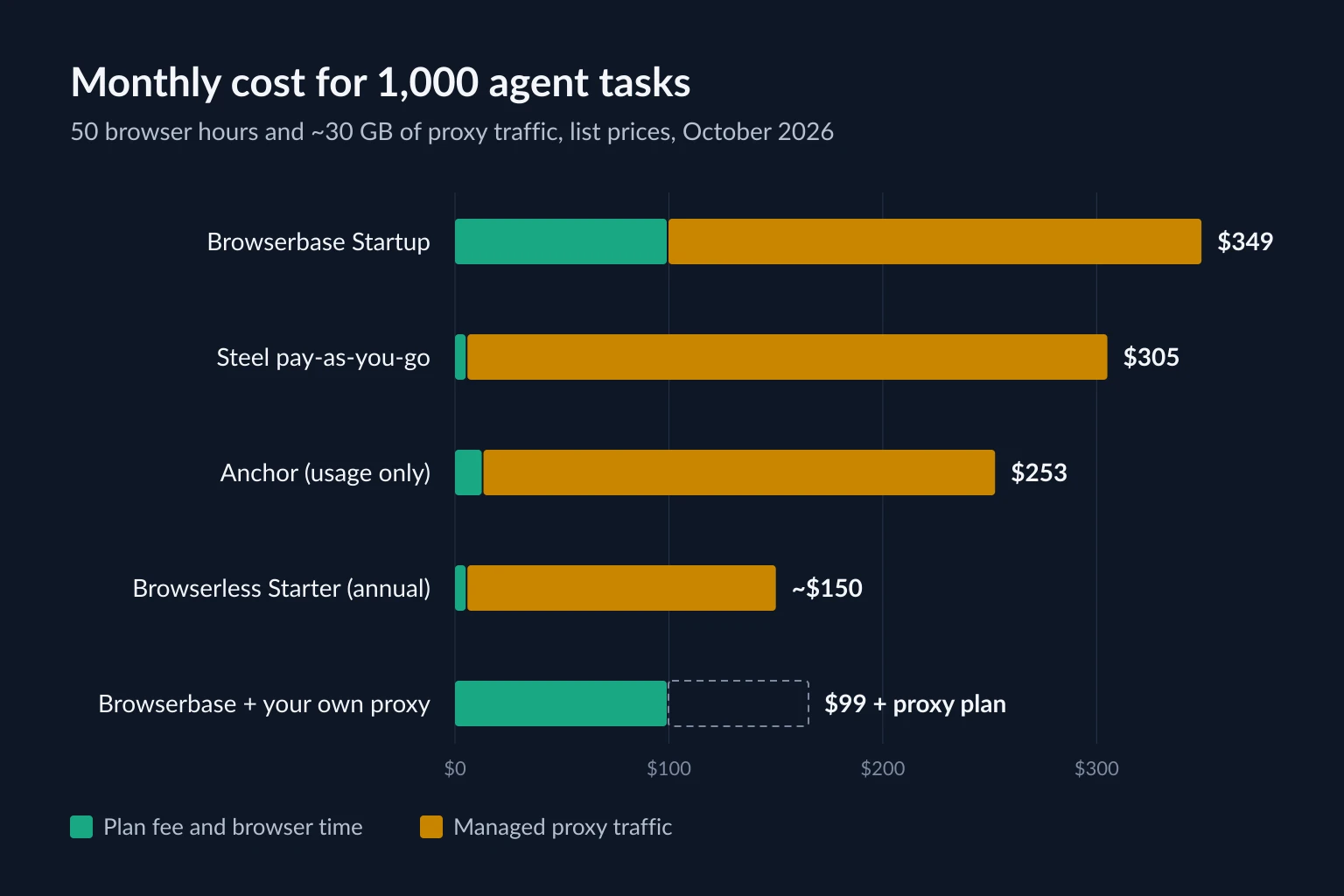
Proxy traffic is 70-98% of every bill here, so the hourly rate is close to irrelevant. Session caps matter more than the rate: Steel's pay-as-you-go plan and Browserless Starter fit this workload only because each task finishes in about 3 minutes, well inside their 15- and 30-minute session limits. Switching vendors to save $0.02 per browser hour saves $1 a month on this workload, while a $4 per GB difference in proxy pricing saves $120.
This is also why "stay on Browserbase and bring your own proxy" belongs on the list of Browserbase alternatives. With an external proxy, the same workload costs $99 plus your proxy bill. With static ISP proxies, which are priced per IP rather than per GB, that proxy bill stays flat no matter how heavy the pages get.
Self-Hosting: The Browserbase Alternative You Run Yourself
Self-hosting replaces per-hour browser billing with your own servers. It makes sense when you already run containers, your concurrency is steady, and you do not need vendor CAPTCHA handling or hosted session replays.
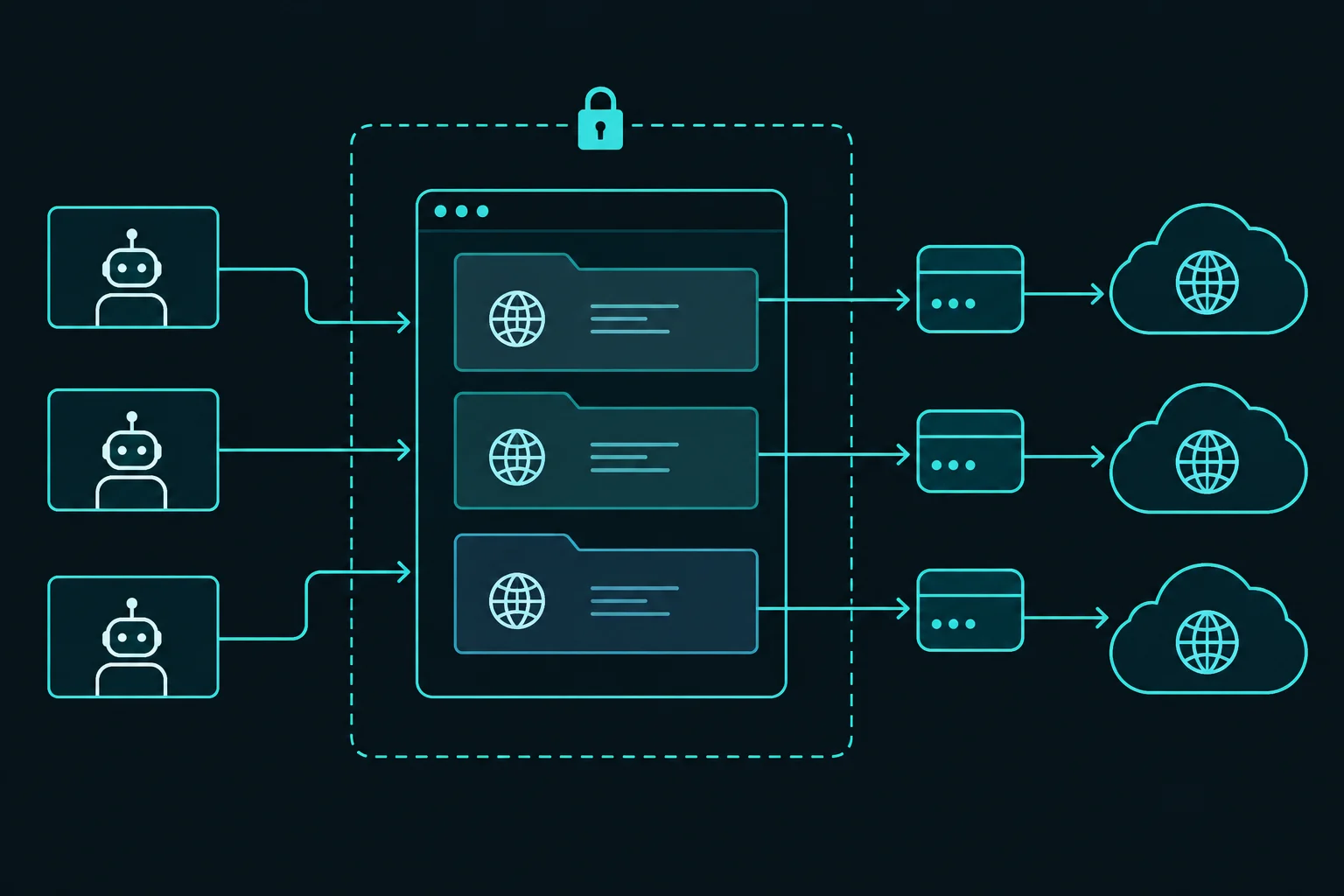
The simplest setup for code written against Playwright is the official Playwright server image. The Playwright Docker docs show how to run it as a remote browser server:
docker run -p 127.0.0.1:3000:3000 --rm --init -it \
  --workdir /home/pwuser --user pwuser \
  mcr.microsoft.com/playwright:v1.63.0-noble \
  /bin/sh -c "npx -y playwright@1.63.0 run-server --port 3000 --host 0.0.0.0"
The 127.0.0.1: prefix on the port mapping matters. The Playwright server has no authentication, so anyone who can reach port 3000 can drive your browsers and use your proxy credentials. Keep it on localhost or a private network, never on a public interface.
Your workers connect to it and give each task its own browser context with its own proxy:
import { chromium } from "playwright";

const browser = await chromium.connect(process.env.BROWSER_WS ?? "ws://127.0.0.1:3000/");

// One context per agent task: its own cookies, storage, and proxy session.
const context = await browser.newContext({
  proxy: {
    server: "http://proxy.example.com:8080",
    username: "user",
    password: "pass",
  },
});

const page = await context.newPage();
await page.goto("https://api.ipify.org?format=json");
console.log(await page.textContent("body")); // {"ip":"<proxy exit IP>"}

await context.close();
await browser.close();
We ran this pattern against a local playwright run-server and an authenticating test proxy. The proxy accepted the context's credentials, and the exit IP check printed the proxy's address. Two things to know:
- The client's Playwright version must match the server's (
1.63.0above). A mismatch fails at connect time. - The proxy is dialed from the server container, not from your worker. The proxy host has to be reachable from inside Docker.
For per-context proxy options, authentication, and rotation patterns, see the Playwright proxy guide.
When your agent framework needs a CDP URL
playwright run-server speaks Playwright's own protocol, not CDP. Frameworks such as Browser Use and Stagehand connect to a CDP WebSocket URL instead. For them, run a server that exposes CDP:
- Steel Browser, Steel's open-source browser API (Apache-2.0):
docker run -p 3000:3000 -p 9223:9223 ghcr.io/steel-dev/steel-browser. It accepts aproxyUrlwhen you create a session. - Browserless (
ghcr.io/browserless/chromium): the image is dual-licensed under SSPL-1.0 or a commercial license. The Browserless README states that closed-source commercial use requires the commercial license.
What you take over when you self-host
The hourly saving is real, but it buys you an operations job:
- Memory. In our test, an idle headless Chromium used about 280 MB of summed RSS, and each extra context with a heavy page open added 200-530 MB. Plan on roughly 0.5 GB per concurrent session, more for heavy single-page apps.
- Crash recovery. Browsers leak memory and hang on bad pages. Set a hard timeout per task and recycle browser processes on a schedule.
- Debugging. You lose hosted session replays. Playwright tracing (
context.tracing.start({ screenshots: true, snapshots: true })) is the closest replacement, but you store and serve the traces yourself. - CAPTCHAs and bot checks. There is no vendor stealth or solving layer. On sites that allow your automation, that is rarely a problem. On sites that challenge it, read the challenge as a signal about site policy, not as an engineering obstacle.
Bringing Your Own Proxy to a Cloud Browser
If the managed browser is worth keeping but the proxy line is not, external proxies are the cheapest change you can make. Browserbase configures them at session creation:
import Browserbase from "@browserbasehq/sdk";
import { chromium } from "playwright-core";

const bb = new Browserbase({ apiKey: process.env.BROWSERBASE_API_KEY });

const session = await bb.sessions.create({
  proxies: [
    {
      type: "external",
      server: "http://proxy.example.com:8080",
      username: process.env.PROXY_USER,
      password: process.env.PROXY_PASS,
    },
  ],
});

const browser = await chromium.connectOverCDP(session.connectUrl);
const page = browser.contexts()[0].pages()[0];
await page.goto("https://api.ipify.org?format=json");
console.log(await page.textContent("body"));
await browser.close();
Browserbase tests the proxy when it creates the session and throws an error if it cannot connect, so a bad credential fails fast instead of mid-task. Its docs also warn that not every proxy provider is supported. Run a session against your provider before you migrate traffic. Steel takes the same idea as a single useProxy: { server: "http://user:pass@host:port" } option and also accepts socks5://.
Which proxy type to bring depends on the task shape:
- ISP proxies give you static IPs with flat, IP-based pricing. They suit agents that log in, keep a session for minutes, and load heavy pages, because bandwidth does not change the bill.
- Residential proxies are priced per GB and give you a wide pool across locations. They suit tasks that need many cities or countries, or a fresh IP per task.
The detailed tradeoffs are in ISP vs residential proxies, and the session side is covered in sticky vs rotating proxies. Whichever you pick, keep one IP per task. Rotating mid-task breaks logins and carts in a browser the same way it does anywhere else.
Choosing a Browserbase Alternative
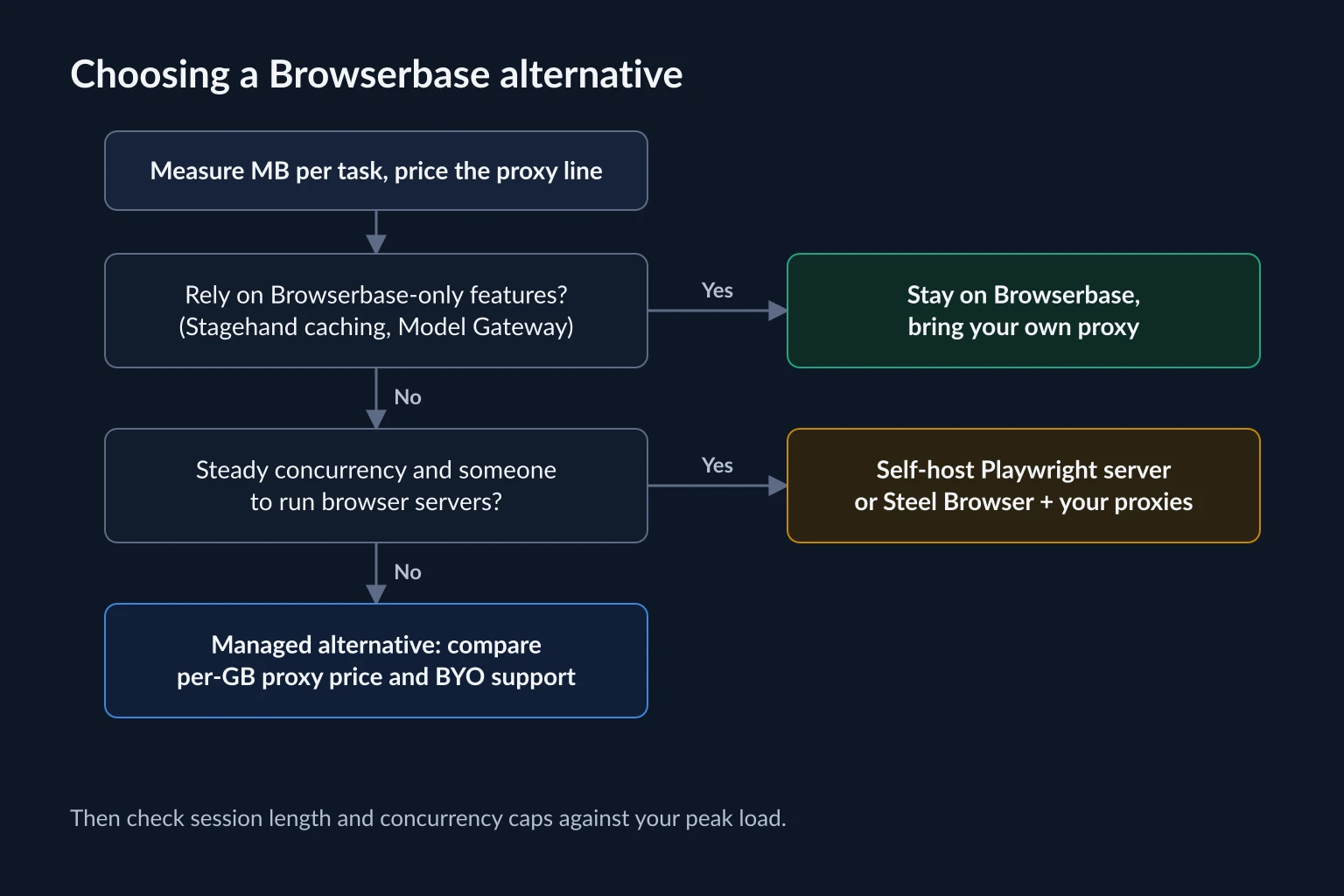
Work through these questions in order:
- Measure bytes per task and price the proxy line. If proxy GB is over half the bill, which it usually is, the proxy decision matters more than the browser vendor. Whatever you choose next, compare per-GB rates, bundled-proxy pricing such as Kernel's, and whether you can bring your own proxy.
- Do you depend on Browserbase-specific features? Stagehand runs against any CDP browser, but its browser configuration docs list server-side caching and the Model Gateway as Browserbase-only. Session replays, persistent contexts, and file download handling also differ by vendor. If your agents rely on these, staying and bringing your own proxy is usually less work than migrating.
- Is your concurrency steady, and do you have someone to run servers? Self-hosting pays off when you can keep servers busy. Spiky workloads with long idle gaps are cheaper on per-minute billing.
- Otherwise, pick a managed alternative on proxy terms. Then check session length and concurrency caps against your longest task and your peak load, not your average. Browserbase allows 6-hour sessions on its $20 and $99 plans. Steel caps sessions at 15 minutes on pay-as-you-go, 1 hour on Scale, and 24 hours only on custom-priced Enterprise. Browserless caps them at 15, 30, and 60 minutes across its paid plans.
Migrating Off Browserbase Without Surprises
Most migrations are a connection-string change: replace session.connectUrl with the new vendor's CDP WebSocket URL and keep your Playwright, Puppeteer, or Stagehand code. The problems show up around the edges:
- Verify the exit IP before the first real task. Load an IP echo endpoint in the new session and confirm the address and location you expect.
- Re-measure bandwidth on the new vendor. Different stealth layers, extensions, and default settings change bytes per page. Compare a sample of tasks before and after.
- Move authenticated state deliberately. Browser contexts and saved profiles do not transfer between vendors. Plan how agents will log in again, and keep the same IP per account during that first login.
- Recheck proxy errors. A
407 Proxy Authentication Requiredafter migration usually means credentials were not passed in the format the new vendor expects. The 407 error guide walks through the causes. - Keep automation within site rules. A cheaper browser does not change what a site permits. Respect rate limits, terms, and
robots.txtwhere they apply.
FAQ
What is the cheapest Browserbase alternative?
For low volume and short tasks, Steel's pay-as-you-go plan has no monthly base fee and accepts your own proxy on every plan, so browser time at $0.10 per hour is the main charge. It caps sessions at 15 minutes and 10 concurrent browsers, so agents with longer tasks need Steel's $250 Scale plan or a vendor with longer sessions, such as Browserbase. At steady high volume, self-hosting with a Playwright or Steel Browser container is cheapest on browser time. For bandwidth-heavy workloads, bundled-proxy pricing such as Kernel's, or flat-rate ISP proxies brought to any vendor, usually beats per-GB proxy billing.
Is there an open-source Browserbase alternative?
Yes. Steel Browser is Apache-2.0 and runs as a single Docker container with a CDP endpoint. Playwright's run-server is Apache-2.0 and works for Playwright clients. Browserless is source-available under SSPL-1.0, with a commercial license required for closed-source commercial use. Browserbase's own Stagehand framework is MIT-licensed and can drive self-hosted browsers.
Can I use my own proxies with Browserbase?
Yes, on the Developer plan and above. Pass type: "external" with the server, username, and password in the proxies array when you create a session. Browserbase supports HTTP and HTTPS proxies, validates the connection at session creation, and lets you route different domains through different proxies with domainPattern rules.
Why is my cloud browser proxy usage higher than the page size?
Proxy meters count everything that crosses the proxy: scripts, fonts, tracking calls, headers, and TLS overhead, not just the HTML you extract. In our measurements, news homepages transferred 2-5 MB each, even though the useful text was a few kilobytes.
Do I need residential proxies for a cloud browser?
Not always. Many sites work fine from a cloud vendor's default datacenter IPs. Add proxies when you need a specific location or a stable identity per account, or when a site you are permitted to automate treats hosting IPs differently. Start without one, measure success rates, then add the proxy type that fixes the specific failure.
Conclusion
The best Browserbase alternative is the one that fixes your largest cost line. For most agent workloads, that line is proxy bandwidth: browser hours cost cents, while managed proxy traffic costs $6-$12 per GB. Measure bytes per task first. Then decide whether to bring your own proxy to the browser you already use, move to a vendor with different proxy pricing, or self-host the browser entirely.
If you bring your own proxies, compare static ISP and per-GB residential options on the pricing page and match the proxy type to how long your agents hold a session.