Anchor Browser is a cloud Chromium platform built for AI agents. You create a session over its API, connect Playwright or Puppeteer to the cdp_url it returns, and get live view, recordings, saved login profiles, and hosted agent tasks around it. Browserless is an established browser-as-a-service: you point Puppeteer or Playwright at a WebSocket URL, and it also offers BrowserQL, REST endpoints for screenshots and scraping, and a Docker image you can run yourself.
Both accept your own proxy, but on very different terms:
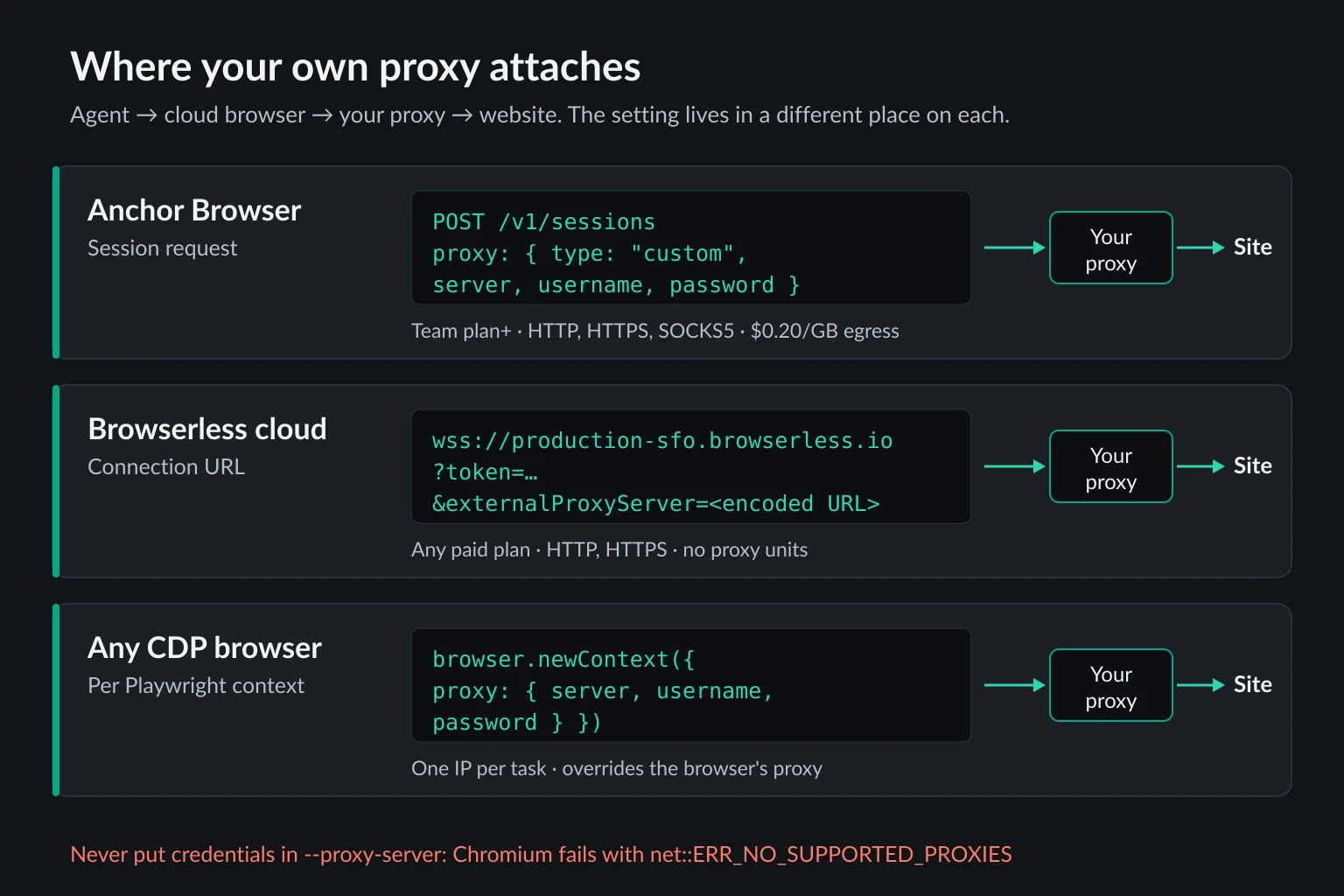
- Anchor Browser takes a custom proxy as a
proxyobject withtype: "custom"when you create the session. It accepts HTTP, HTTPS, and SOCKS5 with a username and password. You need the $500/month Team plan or higher, and Anchor still bills $0.20 per GB of egress on traffic that goes through your proxy. - Browserless takes your proxy on every paid plan, from $25/month billed annually. You pass it as an
externalProxyServerquery parameter (HTTP or HTTPS with credentials), as a--proxy-serverlaunch flag (including SOCKS5, but without credentials), or as a per-context proxy in Playwright. External proxies use no Browserless proxy units.
If bringing your own proxy is the main reason you're choosing a cloud browser, Browserless gets you there for the least money. Anchor is the stronger pick when you want agent features such as managed logins, profiles with a reserved IP, and Web Bot Auth signing, and your volume justifies the Team plan. Details below were checked against both vendors' docs, pricing pages, and the Browserless source code on October 6, 2026. We also tested the Chromium proxy behaviors both services depend on.
Anchor Browser vs Browserless at a Glance
| Anchor Browser | Browserless | |
|---|---|---|
| What you connect to | Session API, then cdp_url (CDP) |
WebSocket URL (CDP or native Playwright), BrowserQL, REST |
| Self-hosting | Enterprise only ("bring your own cloud / on premise") | Docker image, SSPL-1.0 or commercial license |
| Managed proxy | Residential, country/region/city targeting, $8/GB, Starter plan and up | Residential (6 units/MB) or datacenter (2 units/MB), all plans; city targeting on Scale |
| Bring your own proxy | Team plan ($500/mo) and up | Every paid plan (from $25/mo, billed annually) |
| BYOP protocols | HTTP, HTTPS, SOCKS5, all with credentials | HTTP/HTTPS with credentials; SOCKS5 only without credentials |
| Stable IP options | Dedicated sticky IP per profile; Anchor VPN on request | Sticky sessions on the managed pool (proxySticky=true) |
| Browser time | $0.05/hr plus $0.01 per browser created | 1 unit per 30 seconds per connection |
| Default session limits | 20-minute max duration, 5-minute idle timeout (both configurable) | 15, 30, or 60 minutes depending on plan |
| Agent extras | Identities and profiles, hosted AI tasks, MCP server, Web Bot Auth | MCP server, BrowserQL with stealth and CAPTCHA solving |
Anchor's prices come from the Anchor pricing page and its pricing docs. Plans are sold as monthly credits at $1 each, so the $500 Team fee buys 500 credits that usage draws from. One inconsistency to know about: the docs table lists bring-your-own-proxy from the $2,000 Growth plan, while the public pricing page includes "Custom proxy" in Team. Confirm with Anchor before you budget around Team. Browserless figures come from the Browserless pricing page.
What Anchor Browser Adds for AI Agents
Anchor sells more than a remote Chromium. The parts that matter for agent work:
- Sessions you configure up front. A
POST /v1/sessionscall sets the proxy, CAPTCHA solving, ad blocking, recording, headless or headful mode, viewport, and timeouts. Recording is on by default, and the browser runs headful unless you ask otherwise. - Authenticated browsers. Profiles save cookies and local storage when
persistis true, and identities let a session start already signed in to a third-party app. Both suit agents that work inside the same accounts every day. - Hosted agent tasks. Anchor can run the agent loop for you, billed per AI step ($0.01 to $0.10 depending on the model tier). It also integrates with Browser Use and Anthropic, OpenAI, and Gemini computer use, and ships a hosted MCP server. The best MCP servers for web access guide compares hosted MCP browser servers like that one with the local servers you run yourself.
- Web Bot Auth (Team plan and up). With
browser.web_bot_auth.active: true, Anchor signs requests as Anchor Browser using Cloudflare's Web Bot Auth. Sites can then recognize the traffic as a declared agent instead of guessing.
Two defaults catch agents out. Sessions stop after 20 minutes (timeout.max_duration) and five minutes after the last client disconnects (timeout.idle_timeout). Set both explicitly for long tasks, or -1 to disable them. Also, CAPTCHA solving and Extra Stealth both depend on an active proxy. The session API reference rejects CAPTCHA solving without one, and Anchor's stealth docs say Extra Stealth is switched off automatically when the proxy is.
Anchor Browser Proxy Options
Anchor gives you four ways to choose the exit IP:
- Anchor's managed proxy (Starter plan and up, $8/GB). Set
proxy.active: truewith a lowercasecountry_code, plus optionalregionandcity. City targeting is ignored unless you also pass a region. - Dedicated sticky IP. Create a profile with
dedicated_sticky_ip: true, and every session that loads that profile exits from the same IP, which no other profile uses. Extra Stealth turns on automatically for these sessions. - Anchor VPN. A dedicated egress IP for a project or identity, enabled by Anchor's team on request.
- Your own proxy (Team plan and up). Set
type: "custom"withserver,username, andpassword.
The Bring Your Own Proxy docs use Anchor's SDK. Here is the same request over plain HTTP, so it works without the SDK. It needs Node.js 18 or later and npm install playwright-core:
import { chromium } from "playwright-core";

const API = "https://api.anchorbrowser.io/v1/sessions";
const headers = {
  "anchor-api-key": process.env.ANCHOR_API_KEY,
  "Content-Type": "application/json",
};

const res = await fetch(API, {
  method: "POST",
  headers,
  body: JSON.stringify({
    session: {
      proxy: {
        active: true,
        type: "custom",
        server: "http://proxy.example.com:8080", // http://, https://, or socks5://
        username: process.env.PROXY_USER,
        password: process.env.PROXY_PASS,
      },
      timeout: { max_duration: 30, idle_timeout: 2 }, // minutes
    },
  }),
});
if (!res.ok) throw new Error(`Session not created: ${res.status} ${await res.text()}`);
const { data: session } = await res.json();

try {
  const browser = await chromium.connectOverCDP(session.cdp_url);
  const context = browser.contexts()[0];
  const page = context.pages()[0] ?? (await context.newPage());
  await page.goto("https://api.ipify.org?format=json");
  console.log(await page.textContent("body")); // should print your proxy's exit IP
  await browser.close();
} finally {
  await fetch(`${API}/${session.id}`, { method: "DELETE", headers });
}
A few details from Anchor's API schema and docs:
- Credentials are required fields. The
CustomProxyschema marksusernameandpasswordas required. IP allowlisting is impractical anyway, because the connection to your proxy comes from Anchor's infrastructure, not from your servers. - The proxy is fixed per session. It's set when the session is created. To give each agent task its own IP, create one session per task. If your provider picks the IP from a session ID in the username, give each session a different ID.
- Saved tasks have their own proxy setting. Anchor's hosted tasks read
task_default_browser_configuration. If you pass an existingsession_idto a run, that session's proxy wins and the task default is ignored. - Egress is still metered. Anchor bills $0.20/GB for traffic through your own proxy, or when you run without one. That is small next to $8/GB, but it isn't zero.
When Bringing Your Own Proxy Pays Off on Anchor
On Anchor, bringing your own proxy is a plan decision as much as a technical one. Starter costs $50/month and only has Anchor's proxy at $8/GB. Team costs $500/month, and each GB through your own proxy costs $0.20 in Anchor egress plus whatever your provider charges.
Browser hours cost the same on both plans, so the comparison comes down to proxy traffic. As long as your usage fits inside Team's 500 credits, the upgrade pays for itself once 8 × GB exceeds 500 + your proxy's price × GB:
| Your proxy's price | Team + your proxy is cheaper above | Page views at about 2 MB each |
|---|---|---|
| $2/GB | about 83 GB/month | about 42,000 |
| $3/GB | about 100 GB/month | about 50,000 |
| $4/GB | about 125 GB/month | about 62,000 |
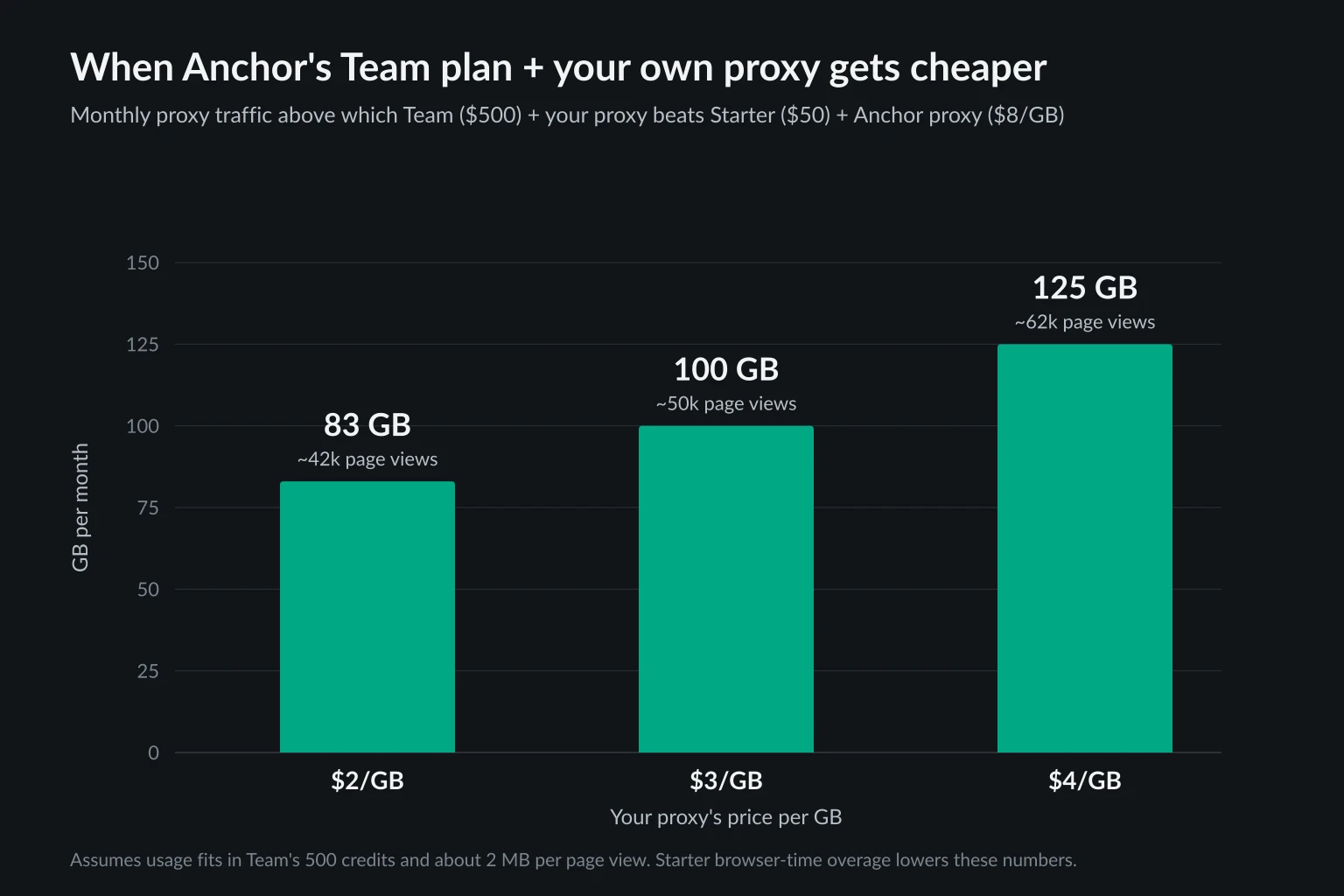
These are upper bounds, because browser-time usage on Starter beyond its 50 credits pulls the break-even lower. With flat-rate ISP proxies, your proxy cost doesn't grow with traffic. The break-even in GB is then (500 + your monthly IP fee) ÷ 8, and every GB past it saves close to $8.
The 2 MB per page view figure comes from our measurements in the Browserbase alternatives comparison. Measure your own agents' traffic before deciding, because page weight varies by more than 10x between sites. The data usage calculator turns page counts into GB.
Browserless Proxy Options
Browserless has a built-in proxy network and three ways to bring your own. The Browserless proxy docs cover all of them.
The built-in network is turned on with query parameters on your connection URL: proxy=residential or proxy=datacenter, plus proxyCountry=us and, on the Scale plan, proxyCity. Residential traffic costs 6 units per MB, which works out to roughly $9-$12 per GB at overage unit prices.
One default matters a lot for agents. On plain Puppeteer and Playwright WebSocket connections, each request can exit from a different node in the pool. Add proxySticky=true to keep one IP for the whole session. Stealth routes, BrowserQL, /unblock, and /scrape are sticky by default. An agent that logs in on one IP and continues on another tends to get logged out, as sticky vs rotating proxies explains.
Your own proxy with externalProxyServer
The recommended method is a single URL-encoded query parameter. Browserless handles proxy authentication for you:
import { chromium } from "playwright-core";

const proxyUrl = encodeURIComponent(
  `http://${process.env.PROXY_USER}:${process.env.PROXY_PASS}@proxy.example.com:8080`,
);
const endpoint =
  `wss://production-sfo.browserless.io?token=${process.env.BROWSERLESS_TOKEN}` +
  `&externalProxyServer=${proxyUrl}`;

const browser = await chromium.connectOverCDP(endpoint);
const page = await browser.contexts()[0].newPage();
await page.goto("https://api.ipify.org?format=json");
console.log(await page.textContent("body")); // should print your proxy's exit IP
await browser.close();
This URL is the CDP route, used with Puppeteer, Playwright's connectOverCDP(), and agent frameworks that take a CDP URL. For Playwright's native protocol, use the /chromium/playwright or /chrome/playwright path with chromium.connect() instead. Browserless's docs warn that mixing the two fails to connect. Regional hosts production-lon and production-ams work the same way.
The --proxy-server flag and per-context proxies
The other two methods are useful in specific cases:
--proxy-serveras a query parameter passes Chrome's own flag, for example&--proxy-server=socks5://proxy.example.com:1080. It is the only way to use SOCKS5 on Browserless, but Chrome can't send SOCKS credentials, so the proxy must allowlist by IP. For HTTP proxies, answer the credential challenge from your client:page.authenticate()in Puppeteer, orhttpCredentialson a new context in Playwright.- A per-context proxy from Playwright: connect without a proxy parameter, then call
browser.newContext({ proxy: { server, username, password } }). One Browserless browser can then run several agent tasks, each through its own IP.
On the free plan, externalProxyServer and --proxy-server are rejected with a 401 and the message Only paid cloud-unit plans can utilize a third-party proxy.
Self-hosted Browserless
The open-source image runs with one command. Keep the port on localhost and set a token, because anyone who can reach it can drive your browsers and your proxy:
docker run --rm -p 127.0.0.1:3000:3000 -e TOKEN=change-me ghcr.io/browserless/chromium
We read the Browserless source (version 2.57.0) to see which proxy options the image supports. Of the proxy query parameters, it handles only --proxy-server. externalProxyServer, proxy=residential, proxyCountry, and proxySticky don't appear in the open-source code, because they belong to the hosted service. Self-hosted, you pass the flag (ws://127.0.0.1:3000?token=change-me&--proxy-server=http://proxy.example.com:8080) and answer the auth challenge from the client, or skip the flag and set a proxy on each Playwright context. On the native /chromium/playwright route, the server converts the flag into Playwright's launch proxy.server, still without credentials.
The image is licensed under SSPL-1.0 or a commercial license. The README says closed-source commercial use needs the commercial license, so check that before you put it behind a product.
What We Tested: Credentials, Flags, and Per-Context Proxies
Both services ultimately configure Chromium, and most bring-your-own-proxy bugs come from Chromium's rules, not the vendor's. We reproduced each pattern locally. We ran headless Chromium 148 with remote debugging, connected Playwright 1.60 over CDP the way you connect to Anchor or Browserless, and sent traffic through two local proxies that require a username and password and log every request.
| Setup | Result |
|---|---|
--proxy-server=http://user:pass@127.0.0.1:18899 |
Navigation failed with net::ERR_NO_SUPPORTED_PROXIES. Chromium rejected the value, and the proxy never saw a request. |
--proxy-server=127.0.0.1:18899, new context with httpCredentials |
Worked. The proxy issued a 407, and Playwright answered it with the credentials. |
Browser flag points to proxy A, context sets proxy to proxy B |
The context went through proxy B. A second context set to proxy A went through A. |
No flag, context proxy with separate username and password |
Worked through the context's proxy. |
No flag, context proxy.server set to http://user:pass@host:port |
The proxy logged a 407 with no credentials, and navigation hung until our 15-second timeout. |
No flag, context created without a proxy |
Went direct, bypassing every proxy. |
What this means in practice:
- Never put credentials inside
--proxy-server. On Browserless, useexternalProxyServerwhen the proxy needs a password. Use the flag only for IP-allowlisted proxies. - Per-context proxies override the browser's proxy in Chromium. You can share one cloud browser across tasks and give each task its own exit IP. The flip side is that a context created without a proxy goes out directly from the vendor's IP. If an agent framework opens its own context, check where it exits.
- Keep
server,username, andpasswordseparate in Playwright. Credentials embedded inserverdon't fail fast. They time out, which looks like a slow site rather than an auth problem. The 407 error guide covers the other causes, and the Playwright proxy guide has more per-context patterns.
In every case, load an IP echo endpoint in the exact context your agent will use before the first real task.
Choosing Between Anchor Browser and Browserless
Work through these in order:
- Do you need SOCKS5 with a username and password? Only Anchor supports it, on Team and above. On Browserless, use an HTTP proxy, or a SOCKS5 proxy that allowlists the vendor's egress IPs.
- Is bringing your own proxy the main goal, at low or medium volume? Browserless lets you do it from its $25 tier. On Anchor, it only pays off once your traffic passes roughly 80-125 GB a month.
- Do your agents work inside logged-in accounts every day? Anchor's profiles, identities, and per-profile sticky IPs are built for this. On Browserless, you can keep state with its session and reconnect APIs, and keep the IP stable with your own ISP proxy or
proxySticky=true. - Do you want to run the browser yourself? Browserless's Docker image works with your proxies through the flag or per-context settings, subject to its license. Anchor only offers on-premise deployment on Enterprise.
- Do your agents need to identify themselves to Cloudflare-protected sites? Anchor's Web Bot Auth signs requests for you. With Browserless, you would have to build signing yourself.
For Browserbase, Steel, Hyperbrowser, and Kernel, the Browserbase alternatives comparison covers cloud browser pricing and proxy terms in detail. Headless browsers for AI agents goes deeper on Steel and Lightpanda and measures memory and proxy bandwidth per page.
Which Proxy to Bring
Both services hold one proxy configuration per session or context, so match the proxy type to the length and identity of each task:
- Logged-in, long-running agents fit static ISP IPs: the same address every day, priced per IP rather than per GB. On Anchor, pair one IP with one profile. On Browserless, pass it with
externalProxyServerfor each session that works in that account. - Tasks that need many locations or a fresh IP each run fit residential proxies with one sticky session per task. Most providers pick the sticky session from the proxy username, so give each session its own session ID.
A better IP won't get an agent through a site that doesn't want automated traffic. Respect robots.txt, rate limits, and terms of service, and treat repeated challenges as a signal about site policy. Proxies for AI agents separates the blocks an IP can fix from those it can't.
FAQ
What is Anchor Browser?
Anchor Browser is a cloud browser platform for AI agents. It runs Chromium sessions you control over CDP with Playwright or Puppeteer, and adds live view, recordings, saved profiles, managed logins, CAPTCHA solving, residential proxies, and hosted agent tasks billed per AI step.
Can I use my own proxy with Anchor Browser?
Yes, on the Team plan ($500/month) and above, according to Anchor's pricing page. Its docs table lists it from Growth, so confirm before you buy. Pass proxy: { active: true, type: "custom", server, username, password } when you create the session. HTTP, HTTPS, and SOCKS5 are supported, and Anchor still bills $0.20/GB of egress.
Does Browserless support SOCKS5 proxies?
Only through the --proxy-server launch flag, for example --proxy-server=socks5://host:port. Chrome doesn't support SOCKS authentication, so the proxy has to allowlist the browser's IP. The built-in network and externalProxyServer are HTTP and HTTPS only.
Is Browserless free to self-host?
The Docker image is free to run under the SSPL-1.0 license. Closed-source commercial use needs a commercial license. The self-hosted version supports your own proxy through --proxy-server or per-context settings, but not the hosted service's externalProxyServer or built-in proxy network.
Is Anchor Browser or Browserless cheaper with my own proxy?
Browserless, for most workloads. Its cheapest tier with external proxies costs $25/month billed annually, and your proxy traffic uses no Browserless units. Anchor needs at least the $500 Team plan and adds $0.20/GB egress, which only beats its own $8/GB proxy at roughly 80 GB a month or more.
Conclusion
Anchor Browser and Browserless both let an agent's traffic exit through your own proxy, but at different points and prices. Anchor Browser takes a custom proxy in the session request, supports authenticated SOCKS5, and adds agent features around it, from the $500 Team plan. Browserless takes externalProxyServer, a --proxy-server flag, or a per-context proxy on any paid plan, and its Docker image runs the same browser on your hardware.
Whichever you choose, set the proxy in the place the agent actually browses, verify the exit IP before each task, and keep one IP per task from start to finish. If you're bringing your own, compare static ISP and per-GB residential plans on the pricing page.