Hyperbrowser, Steel, and Lightpanda all give an AI agent a browser it can drive over the Chrome DevTools Protocol (CDP), but they are three different kinds of product. Hyperbrowser is a managed cloud Chromium service with hosted agents built in. Steel is an open-source Chromium browser API that you can self-host or rent as Steel Cloud. Lightpanda is a new headless browser, written from scratch, that runs JavaScript and builds a DOM but doesn't render pages to pixels.
The short version:
- Pick Hyperbrowser if you want hosted sessions, CAPTCHA solving, and ready-made agent runners (Browser Use, Claude computer use, OpenAI CUA) behind one API key, and you are fine with its managed proxies or static IPs. Bringing your own proxy is an Enterprise-plan feature.
- Pick Steel if you want the same API in the cloud and on your own servers, or you want to bring your own proxy on any plan, including over SOCKS5.
- Pick Lightpanda if your agent reads text and the DOM, not screenshots, and you need many concurrent browsers on little memory. Don't pick it for vision-based agents or sites that only work in a real Chrome.
The proxy story differs for each one, and that is often what decides the choice. Below, we compare the three headless browsers for AI agents, test Lightpanda against headless Chromium on memory and proxy bandwidth, and show where the proxy goes in each. Product details were checked against each vendor's docs and source code on October 5, 2026.
Hyperbrowser vs Steel vs Lightpanda at a Glance
| Hyperbrowser | Steel | Lightpanda | |
|---|---|---|---|
| Engine | Chromium | Chromium | Own engine (Zig + V8), no rendering |
| Run it yourself | No, cloud only | Yes, steel-browser (Apache-2.0) |
Yes, single binary (AGPL-3.0) |
| Cloud offering | Yes | Steel Cloud | Lightpanda Cloud |
| Protocols | CDP (Playwright, Puppeteer), Selenium | CDP, Selenium | CDP, WebDriver BiDi |
| Built-in agent features | Hosted Browser Use, Claude/OpenAI/Gemini computer use, HyperAgent, MCP server | Session replays, agent traces, CAPTCHA API | mcp and agent commands, Markdown and semantic-tree output |
| Screenshots for vision agents | Yes | Yes | Text-only renderings |
| Managed proxies | Paid plans; country, state, or city; static IPs | Per-GB residential with geo targeting; dedicated IPs | Shared datacenter IPs on Cloud |
| Bring your own proxy | Enterprise plan only | Every plan; HTTP, HTTPS, SOCKS5; no Steel fee | Yes, locally or on Cloud |
Pricing for the two Chromium clouds is covered in our Browserbase alternatives comparison. In brief: both list browser time at about $0.10 per hour and managed proxy traffic at about $10 per GB, so for most agent workloads the proxy line dominates the bill.
What an AI Agent Needs From a Headless Browser
An agent framework doesn't care much who runs the browser. It needs five things:
- A CDP or WebDriver endpoint that Playwright, Puppeteer, Browser Use, Stagehand, or an MCP server can attach to. The browser MCP server guide covers where each of those MCP servers takes a proxy.
- Isolation per task, so cookies, storage, and logins from one task don't leak into the next.
- One exit IP per task, held for the whole task. A login that starts on one IP and finishes on another is a common reason agents get logged out.
- A compact view of the page for the model: an accessibility tree, Markdown, or a screenshot, depending on whether the agent works from text or pixels.
- A way to see what happened: recordings, traces, or logs, because agent failures are hard to reproduce.
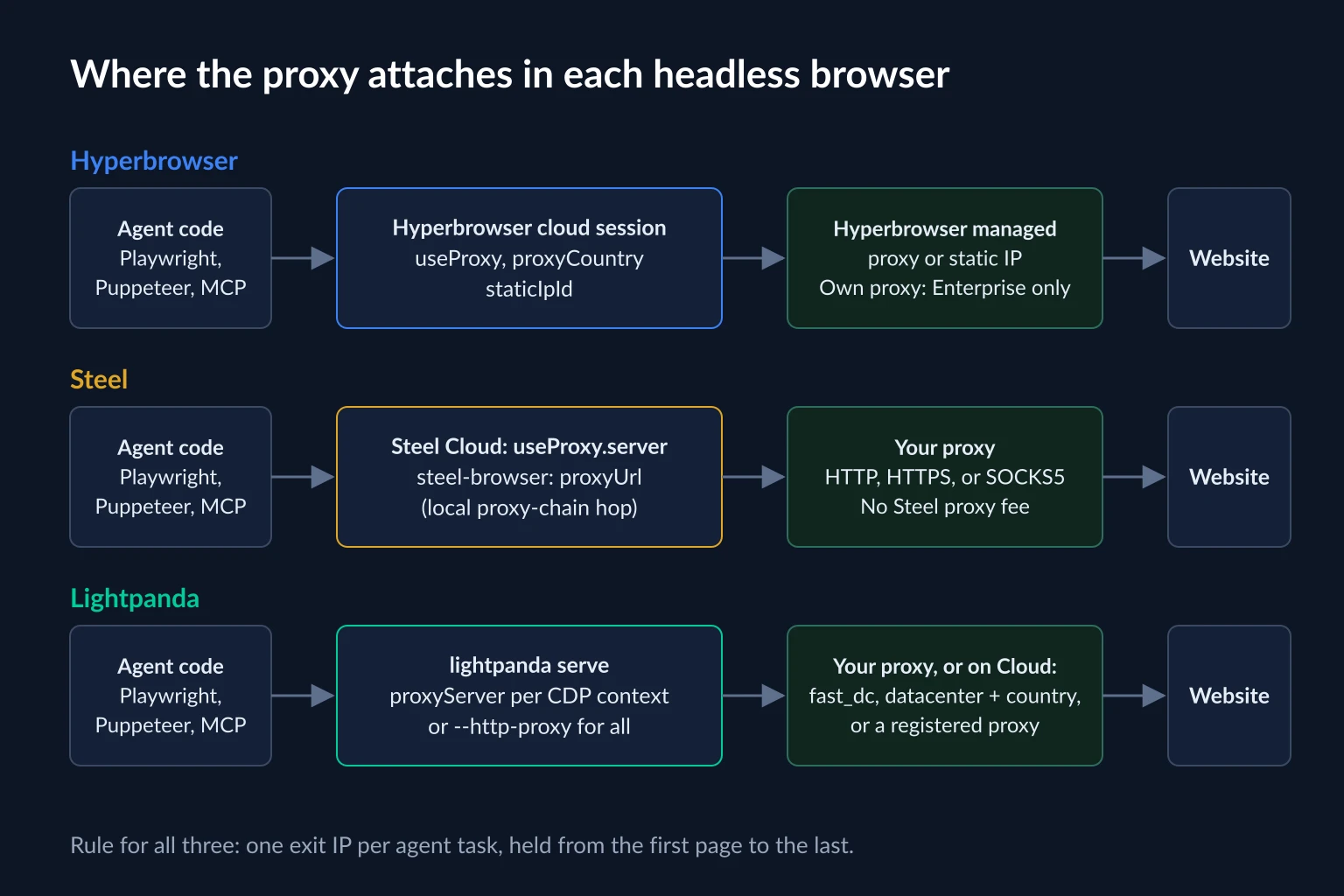
The three products split mostly on points 3 and 4: where you set the exit IP, and whether the browser renders pixels at all.
Hyperbrowser: Managed Chromium With Agents Built In
Hyperbrowser runs Chromium sessions in its cloud and hands you a wsEndpoint for Playwright, Puppeteer, or Selenium. Around those sessions it adds stealth mode, CAPTCHA solving, persistent profiles, recordings, live view, file uploads and downloads, and a choice of region.
What sets it apart is the layer above the browser. Hyperbrowser can run an agent for you: you start a Browser Use, Claude computer use, OpenAI CUA, or Gemini computer use task through its API and poll for the result, without hosting the agent loop yourself. It also maintains HyperAgent, an open-source Playwright-based agent framework, and an MCP server (npx hyperbrowser-mcp) that exposes scrape, crawl, and extract tools to MCP clients. Separate Fetch, Crawl, Search, and Extract APIs cover jobs that don't need an interactive session.
Hyperbrowser proxy options
According to the Hyperbrowser session parameters, proxies and CAPTCHA solving require a paid plan. Proxy settings are set when you create the session:
import { Hyperbrowser } from "@hyperbrowser/sdk";
import { chromium } from "playwright-core";

const client = new Hyperbrowser({ apiKey: process.env.HYPERBROWSER_API_KEY });

const session = await client.sessions.create({
  useProxy: true,
  proxyCountry: "US",
  proxyState: "NY", // or proxyCity, never both
});

try {
  const browser = await chromium.connectOverCDP(session.wsEndpoint);
  const page = browser.contexts()[0].pages()[0];
  await page.goto("https://api.ipify.org?format=json");
  console.log(await page.textContent("body"));
} finally {
  await client.sessions.stop(session.id);
}
A few details from the proxy configuration docs matter for agents:
- Location defaults to the US.
proxyCountrytakes an ISO code and defaults toUS.proxyStateandproxyCityare mutually exclusive. - Static IPs keep the same address across sessions. Pass
staticIpIdtogether withuseProxy: true. Hyperbrowser's docs pair this with profiles for agents that stay logged in. - Proxies can change mid-session.
PUT /session/:id/updatewithtype: "proxy"can turn the proxy off, move it to a new managed location, or switch to a static IP. A session that has used the managed proxy can't switch to a static IP later, or the other way round. - Your own proxy is Enterprise-only.
proxyServer,proxyServerUsername, andproxyServerPasswordexist, but only on the Enterprise plan, and they can only be set when the session is created.
That last point is the main tradeoff for Hyperbrowser. On self-serve plans, traffic runs through Hyperbrowser's own proxy network at its per-GB rate, so you can't move a bandwidth-heavy agent onto flat-rate IPs you already pay for.
Steel: One Browser API for Cloud and Self-Hosted
Steel is a browser API built on Chromium and Puppeteer. The server, steel-browser, is Apache-2.0 licensed, and Steel Cloud runs the same API with more features. You create a session, then attach Playwright, Puppeteer, or Selenium to it. Steel Cloud adds managed residential proxies, CAPTCHA solving, persistent profiles, session replays, and agent traces that line up a session's actions with its video.
Steel Cloud proxy options
The Steel proxy docs describe three forms of useProxy: true for Steel's managed residential pool, an object with geolocation (country, US state, or city), or an object with a server string for your own proxy. Your own proxy can be http://, https://, or socks5://, and Steel doesn't charge for the traffic.
import Steel from "steel-sdk";
import puppeteer from "puppeteer-core";

const client = new Steel({ steelAPIKey: process.env.STEEL_API_KEY });

const session = await client.sessions.create({
  useProxy: {
    server: `http://${process.env.PROXY_USER}:${process.env.PROXY_PASS}@proxy.example.com:8080`,
  },
});

try {
  const browser = await puppeteer.connect({
    browserWSEndpoint: `wss://connect.steel.dev?apiKey=${process.env.STEEL_API_KEY}&sessionId=${session.id}`,
  });
  const page = await browser.newPage();
  await page.goto("https://api.ipify.org?format=json");
  console.log(await page.evaluate(() => document.body.textContent));
  await browser.disconnect();
} finally {
  await client.sessions.release(session.id);
}
Release every session when the task ends, as Steel's docs instruct, instead of leaving it open until it times out.
Steel also has an optimizeBandwidth session option that blocks images, media, and stylesheets, or only the resource types and URL patterns you list. Our measurements below show why that matters when you pay per GB.
Self-hosted Steel Browser
The open-source server runs as one container:
docker run -p 127.0.0.1:3000:3000 -p 127.0.0.1:9223:9223 ghcr.io/steel-dev/steel-browser
Point the SDK at it with baseURL and pass your proxy as proxyUrl:
import Steel from "steel-sdk";
import { chromium } from "playwright";

const client = new Steel({ baseURL: "http://localhost:3000" });

const session = await client.sessions.create({
  proxyUrl: "http://user:pass@proxy.example.com:8080",
});
const browser = await chromium.connectOverCDP(session.websocketUrl);
Two things in the source code are worth knowing before you plan capacity:
- One session per container. The server keeps a single active session, and Steel's own local vs cloud comparison lists self-hosted concurrency as 1. Creating a new session relaunches the browser. For ten agents in parallel, run ten containers. Steel's Docker guide asks for at least 4 GB of RAM.
- Credentials stay out of Chrome. Chromium's
--proxy-serverflag can't carry a username and password. Steel works around this by starting a local proxy-chain server on a random port, pointing Chrome at that, and forwarding to your upstream proxy with the credentials attached. The server checks the proxy URL withnew URL(). A bareuser:pass@host:port, as in some README examples, passes that check but parses withuser:as the scheme and an empty host, so always includehttp://.
Keep port 3000 private, as in the command above. The API has no authentication, so anyone who can reach it can open sessions through your proxy.
Lightpanda: A Headless Browser Built for Machines
Lightpanda is not a Chromium fork. It is a browser engine written in Zig that uses V8 for JavaScript. It parses HTML, runs scripts, handles XHR and fetch, keeps cookies, and exposes the DOM over CDP, but it doesn't render pages to pixels. Version 1.0.0 shipped on October 2, 2026, as a single 188 MB Linux binary. It is AGPL-3.0 licensed and also sold as Lightpanda Cloud.
We downloaded 1.0.0 and drove it with Puppeteer 25 and Playwright 1.60. Here is what stood out for agent use:
- It loads less by default. Images, stylesheets, iframes, and workers are skipped unless you enable them with
--load-resources. - Screenshots are text-only.
page.screenshot()succeeds, but the image is a plain text rendering of the page, not a picture of its layout. Agents that decide from pixels, such as computer use agents, need Chromium. - It identifies itself. Requests carry
User-Agent: Lightpanda/1.0and aSec-Ch-Uaheader naming Lightpanda. The--user-agentflag refuses any value containing "Mozilla", so it can't pose as Chrome. It also supports--obey-robotsand Web Bot Auth request signing. - It has agent modes.
lightpanda mcpruns an MCP server,lightpanda fetch --dump markdownreturns a page as Markdown, andlightpanda agentruns an interactive browsing agent. - Telemetry is on by default. Set
LIGHTPANDA_DISABLE_TELEMETRY=trueto turn it off.
Lightpanda works with Playwright's connectOverCDP(), but its web platform coverage is still narrower than Chrome's. Test your target sites before committing.
Lightpanda proxy setup
The Lightpanda proxy guide documents a process-wide flag, which applies to every page the process loads:
LIGHTPANDA_DISABLE_TELEMETRY=true ./lightpanda serve \
  --host 127.0.0.1 --port 9222 \
  --http-proxy "http://user:pass@proxy.example.com:8080"
For agents, a per-task proxy is usually better. In our tests, Lightpanda honored the proxyServer option of CDP's Target.createBrowserContext, including a username and password in the URL, and that per-context proxy overrode the process-wide one. In Puppeteer that looks like this:
import puppeteer from "puppeteer-core";

const browser = await puppeteer.connect({ browserWSEndpoint: "ws://127.0.0.1:9222" });

// One context per agent task, each with its own proxy session
const context = await browser.createBrowserContext({
  proxyServer: `http://${process.env.PROXY_USER}:${process.env.PROXY_PASS}@${process.env.PROXY_HOST}`,
});
const page = await context.newPage();

await page.goto("https://api.ipify.org?format=json");
console.log(await page.evaluate(() => document.body.textContent));

await page.close();
await context.close();
await browser.disconnect();
We ran this against a local authenticating proxy that counts bytes and logs failed logins. The proxy saw the request with the right credentials, and the page printed the exit IP. Three details from testing:
- One browser context per CDP connection. A second
newContext()on the same connection failed withCannot have more than one browser context at a time. Open one connection per agent task instead. Two concurrent connections, each with its own context and proxy, worked side by side. The server accepts 16 CDP connections by default (--cdp-max-connections). - Wrong proxy credentials don't show up as a 407. Navigation failed with
CouldntConnect, while our proxy logged a rejected login. If Lightpanda can't connect through a proxy that works with curl, check credentials first, then the 407 troubleshooting steps. - Bearer-token proxies work too, with
--proxy-bearer-token, which sendsProxy-Authorization: Bearer <token>.
On Lightpanda Cloud, the proxy is a query parameter on the connection URL: proxy=fast_dc (the default, a single shared datacenter IP), proxy=datacenter&country=de for a country, or the ID of a custom proxy you register in the console.
Lightpanda vs Headless Chromium: What We Measured
Lightpanda's own benchmark claims about 16x less memory and 9x faster runs than headless Chrome over 100 pages. Agents care about two numbers in particular: memory per concurrent browser, and bytes through the proxy, which is what per-GB proxy plans bill.
We loaded four public pages in fresh contexts through the same byte-counting proxy on one Linux host. We compared Lightpanda 1.0.0 against Chromium 148 (Playwright's headless shell), with and without images, media, fonts, and stylesheets blocked. Proxy bytes include headers and TLS overhead in both directions. Each run waited for the load event plus 1.5 seconds, and Lightpanda's numbers stayed within 0.01 MB across two runs.
| Page | Chromium, full load | Chromium, assets blocked | Lightpanda 1.0.0 |
|---|---|---|---|
| Wikipedia article | 0.59 MB | 0.38 MB | 0.35 MB |
| BBC News front page | 2.39 MB | 1.75 MB | 1.81 MB |
| GitHub repository page | 2.45 MB | 1.89 MB | 1.80 MB |
| The Verge homepage | 5.97 MB | 4.90 MB | 4.95 MB |
Memory, measured as resident set size (RSS):
| State | Chromium (summed across processes) | Lightpanda |
|---|---|---|
| Idle, no page | 303 MB | 12 MB |
| The Verge homepage open | 815 MB | 246 MB |
Chromium's multi-process design shares memory between processes, so summed RSS overstates its footprint somewhat. Even allowing for that, a heavy page cost Lightpanda about a third of what it cost Chromium, and an idle Lightpanda server is almost free.
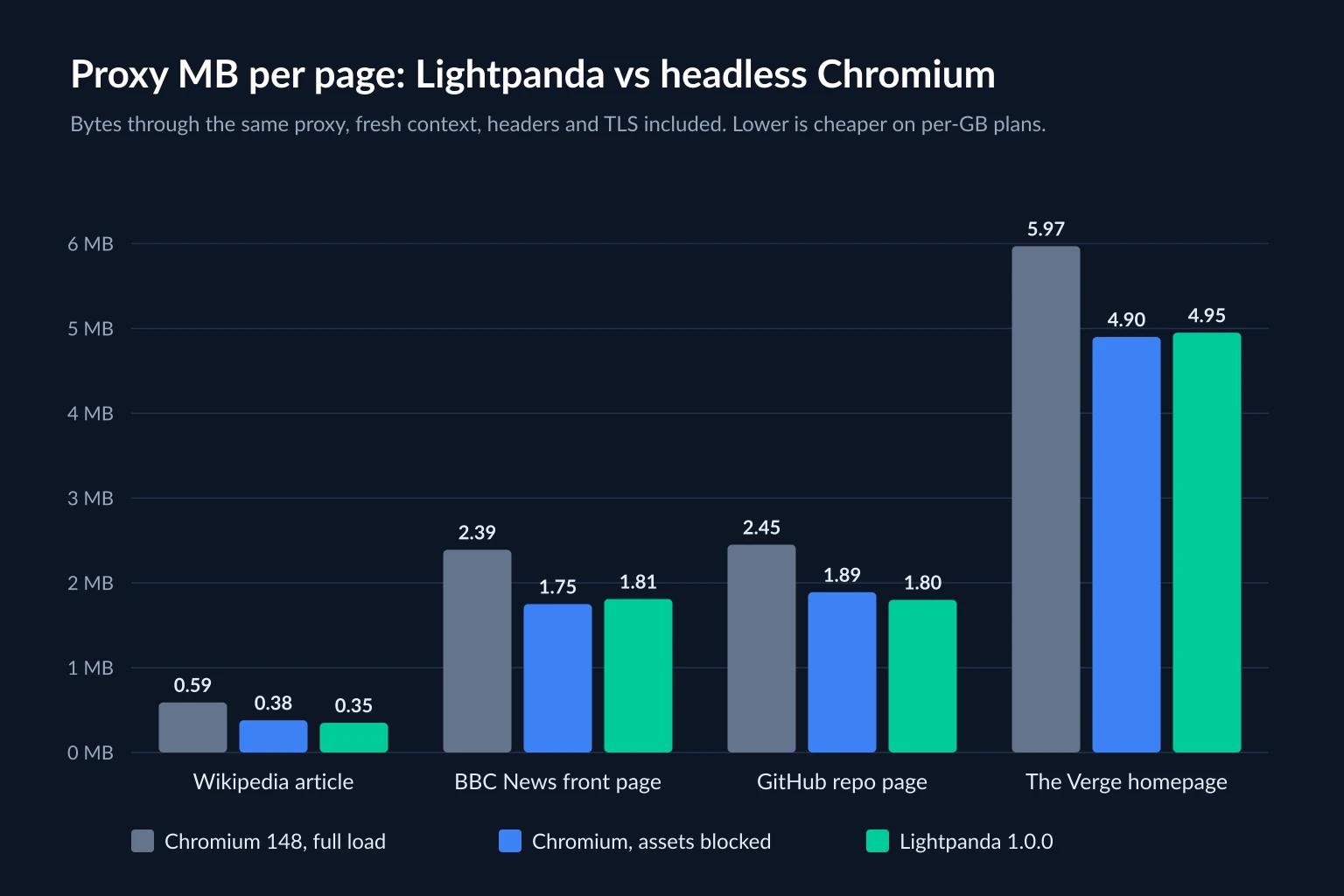
The bandwidth result surprised us. Lightpanda used 17-41% fewer proxy bytes than a default Chromium load, but almost exactly as many as Chromium with assets blocked. Skipping images doesn't help much, because JavaScript bundles make up most of the weight on modern pages, and Lightpanda downloads and runs them too.
The takeaways for proxy budgets:
- Lightpanda's real advantage is memory and concurrency, not bandwidth. It fits several times more agents on the same server.
- On Chromium, block assets the agent doesn't need. Steel's
optimizeBandwidthor Playwright'spage.route()gets you most of Lightpanda's bandwidth saving on a per-GB plan. - Plan for about 2 MB per page view either way, and size plans with the data usage calculator.
Choosing a Proxy for Each Headless Browser
Whichever browser you pick, the network rules for agents are the same: one exit IP per task, held from first page to last, in a location that matches the task. The browser only decides where you configure it.
- Logged-in agents and long tasks do best on static ISP proxies. You get the same IP every session, and pricing per IP means heavy pages don't raise the bill. With Steel, pass the ISP proxy as
useProxy.serverorproxyUrl. With Lightpanda, give each task's context its own IP. With Hyperbrowser, the self-serve equivalent is its static IPs. - Tasks that need many locations or a fresh IP each time fit sticky sessions on residential proxies. Use one sticky session per task, not rotation per request. Sticky vs rotating proxies explains the session settings, and ISP vs residential proxies covers the cost and trust tradeoffs.
- Verify the exit before the agent starts. Load an IP echo endpoint in the same context the agent will use. All three tools make it easy to get this wrong, through a Hyperbrowser session without
useProxy: true, a Steel session created withoutuseProxy, or a Lightpanda context created withoutproxyServer.
A better IP doesn't change what the browser says about itself. Lightpanda announces itself as Lightpanda on every request, and a residential IP won't change how a site treats that. If a site you're allowed to automate doesn't work in Lightpanda, switch that task to Chromium. If a site blocks automated agents outright, respect it. Proxies for AI agents separates the blocks an IP can fix from those it can't.
Which One to Pick
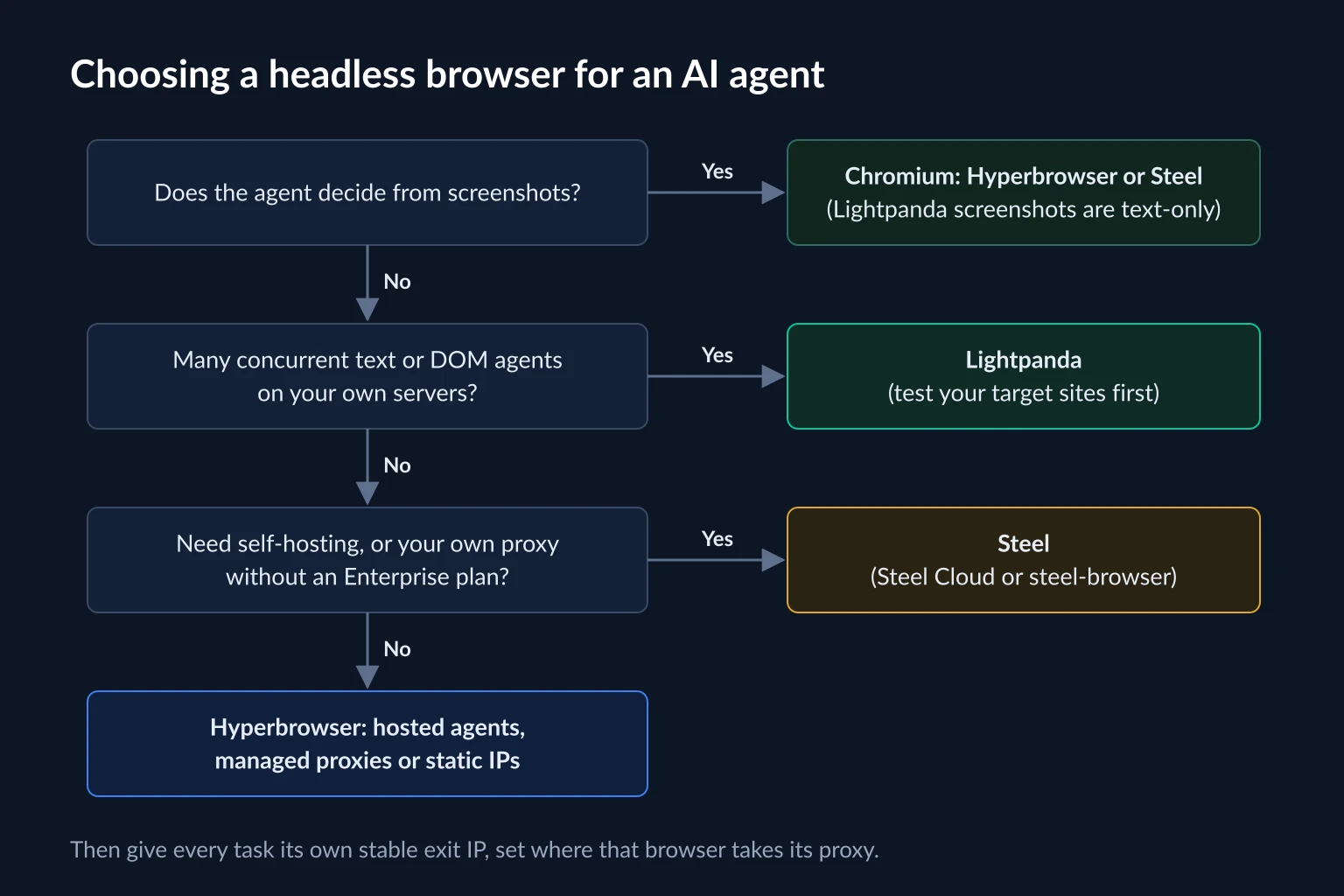
- Does the agent work from screenshots? If yes, you need Chromium: Hyperbrowser or Steel. Lightpanda's text-only screenshots won't work.
- Do you need dozens of concurrent browsers on your own hardware for text and DOM work? Lightpanda is the most memory-efficient option. Run your target sites through it first, because coverage is narrower than Chrome's.
- Do you need to self-host, or bring your own proxy without an Enterprise contract? Steel covers both, with the same API in the cloud and in Docker.
- Do you want hosted agent runners and CAPTCHA handling with as little infrastructure as possible? Hyperbrowser, accepting its managed proxies or static IPs on self-serve plans. If using your own proxy on a cloud browser is the deciding factor, Anchor Browser vs Browserless compares the two services built around that choice.
Framework guides for the next step: Browser Use proxy setup for agents that take a CDP URL, Playwright MCP proxy setup for MCP clients, and agentic browsers for the consumer browsers these tools are often confused with.
FAQ
What is Hyperbrowser?
Hyperbrowser is a cloud service that runs Chromium sessions for AI agents and scrapers. You connect with Playwright, Puppeteer, or Selenium, or let it run hosted agents such as Browser Use, Claude computer use, and OpenAI CUA. It also offers scrape, crawl, and extract APIs and an MCP server.
Can I use my own proxies with Hyperbrowser?
Only on the Enterprise plan, through the proxyServer, proxyServerUsername, and proxyServerPassword session parameters. Paid self-serve plans use Hyperbrowser's managed proxy network with country, state, or city targeting, plus optional static IPs.
Is Lightpanda based on Chromium?
No. Lightpanda is a separate engine written in Zig with V8 for JavaScript. It speaks CDP, so Puppeteer and Playwright can drive it, but it doesn't render pages and identifies itself as Lightpanda rather than Chrome.
Is Steel Browser open source?
Yes. The steel-browser server is Apache-2.0 licensed and runs from a single Docker image. Self-hosted, it handles one session per container and supports your own proxies. Managed proxies, CAPTCHA solving, and higher concurrency are Steel Cloud features.
What is the best headless browser for AI agents?
There isn't one best option for every agent. Chromium-based services such as Hyperbrowser and Steel suit agents that need screenshots or full browser compatibility. Lightpanda suits high-concurrency agents that only read text and the DOM. Decide first how your agent sees the page, then where you need to set the proxy.
Conclusion
As headless browsers for AI agents, Hyperbrowser, Steel, and Lightpanda answer different questions. Hyperbrowser is managed Chromium with agents built in and managed proxies by default. Steel is a Chromium browser API you can run anywhere, with your own proxy on every plan. Lightpanda is a lightweight non-Chromium browser that fits far more text-only agents on a server, but it doesn't render pixels or pose as Chrome.
Choose the browser by how your agent reads pages, then give every task its own stable exit IP. If you bring your own proxies, compare static ISP and residential plans on the pricing page.