An agentic browser is a web browser that an AI model operates for you. You give it a goal, such as "find a refundable hotel in Lisbon under €150 for these dates," and the model reads the page, decides what to click or type, performs the action, checks the result, and repeats until the task is done or it needs your approval.
That is the difference from an AI sidebar that only summarizes the page you are on. An agentic browser takes actions. Chrome with Gemini auto browse, Perplexity Comet, Opera Neon, Browse with Copilot in Edge, and the open-source BrowserOS are the current consumer examples. Developers get the same behavior by attaching frameworks like Browser Use or Playwright MCP to an ordinary Chromium.
This guide covers how agentic browsers work, which products exist and what they can do, where they are useful and where they fall short, and the security and network questions that come up once you rely on one.
What Is an Agentic Browser?
The term covers anything where a language model sits in the control loop of a real browser. Four tools are often lumped together, but only one of them is agentic:
| Tool | Who decides the next action | Uses a real browser | Example |
|---|---|---|---|
| Chatbot with a browsing tool | Model, but it only fetches and reads | Usually not | A search or "read this URL" tool |
| AI sidebar | You; the model summarizes or answers | Yes, the one you are using | "Summarize this page" panels |
| Browser automation script | Your code, fixed in advance | Yes | A Playwright or Selenium job |
| Agentic browser | The model, step by step | Yes | Chrome auto browse, Comet, Neon |
Most AI browsers ship both the sidebar and the agent. The sidebar answers questions about the page, and a separate agent mode, started per task, takes over the clicking. When people say "agentic browser," they mean a browser that has that second mode built in.
A script makes the same requests every run, so you can predict what it will do. An agent decides its path at runtime. It may open ten tabs to compare prices, revisit a page it already read, or try a different button when the first one fails. That flexibility is the point, and it is also the source of most of the risks covered below.
How an Agentic Browser Works
Every agentic browser runs the same loop, whatever the branding.
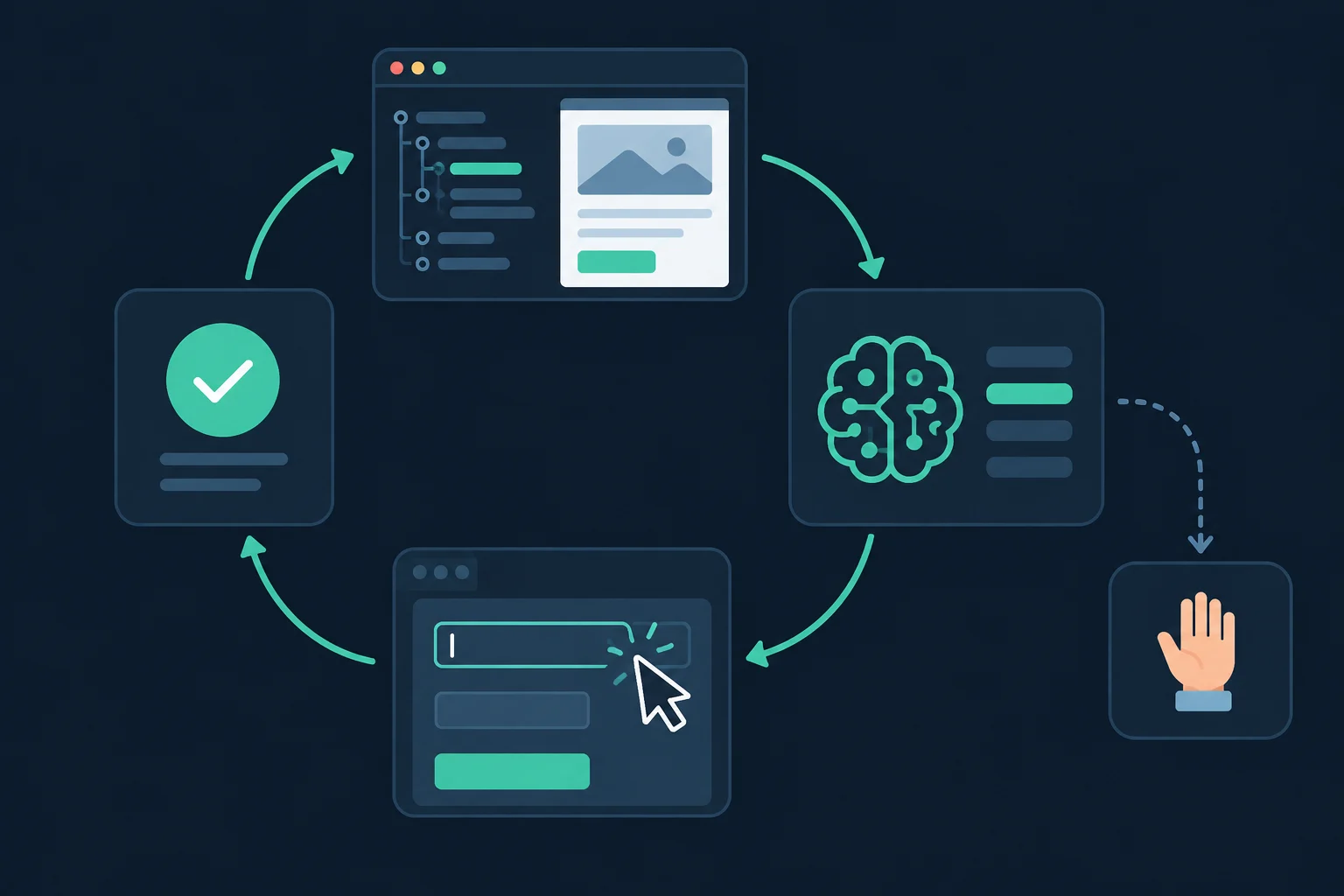
- Perceive. The browser hands the model a view of the page. That is usually the accessibility tree or a trimmed DOM with numbered interactive elements, often plus a screenshot for layout and visual cues.
- Plan. The model compares the page to the goal and picks one action: click element 14, type into the search box, scroll, open a new tab, or stop.
- Act. The harness turns that choice into real input events. Most tools drive Chromium through the Chrome DevTools Protocol, either directly or through Playwright.
- Check. The page changes, the loop starts again, and the model decides whether it is closer to the goal.
Consumer products add a fifth step: a confirmation gate. Google says Chrome's auto browse is designed to pause and ask before actions like making a purchase or posting on social media. Developer frameworks leave those gates to you.
Two practical consequences fall out of this loop. Each step is a real page load, so an agentic browser fetches scripts, fonts, and images just like a person's browser, and a ten-step task commonly moves tens of megabytes. Each step is also a model call, so agents spend seconds thinking between actions and then fire several actions in a burst.
Agentic Browser Examples in 2026
The product list changed a lot over the past year. Here is where the main options stood in October 2026.
| Product | Maker | What the agent does | Availability |
|---|---|---|---|
| Chrome with auto browse | Multi-step tasks such as comparing travel prices, filling forms, and building carts, with a pause before purchases and posts | Preview for US Google AI Pro and Ultra subscribers on desktop since January 2026; Android for eligible US users from late June 2026 | |
| Comet | Perplexity | A sidecar assistant that answers questions about the page and navigates on your behalf | Browser free for everyone since October 2, 2025; agentic browser control now runs on Perplexity Computer credits, which are only available on paid plans |
| Edge with Browse with Copilot | Microsoft | Takes actions on sites for you; formerly Copilot Actions | Copilot Mode was retired on May 13, 2026 and its features folded into Edge; Browse with Copilot is desktop-only for US Microsoft 365 Premium subscribers, with usage limits |
| Opera Neon | Opera | Several agents for browsing, research, and building output from your tabs; external agents can connect through MCP and a CLI | Browser is free; agent features need a $19.90/month subscription |
| BrowserOS | Open source (AGPL-3.0) | A Chromium fork with a built-in agent, plus a separate build that exposes the browser to Claude Code, Codex, or Cursor over MCP | Free; BrowserOS runs on macOS, Windows, and Linux, the MCP build (BrowserOS neo) on macOS and Windows; bring your own API keys or run local models through Ollama |
| ChatGPT Atlas | OpenAI | Agent mode inside your logged-in browser | Launched October 2025, retired August 9, 2026; OpenAI moved the agent features into the ChatGPT desktop app and a browser extension |
Two patterns stand out. The big browser makers are dropping the "separate AI mode" idea and building agent features into the default browser, often behind a subscription. And the open options, Neon's MCP connector and BrowserOS, are moving toward letting you bring your own agent rather than using the vendor's.
Is Browser Use an agentic browser?
Not on its own. Browser Use, Playwright MCP, and Stagehand are frameworks that turn a normal Chromium into an agentic one by putting a model in the loop. They have no address bar or tabs for you to use. In practice, developers often call the result an agentic browser anyway, and the security and network questions below apply to it the same way.
What People Use Agentic Browsers For
The tasks that work best share three traits: several pages, a clear finish line, and steps that are tedious but low-stakes.
- Comparison research. Flights across date ranges, product specs across five retailers, rental listings that match a checklist. The agent opens the tabs and builds the table.
- Form filling. Returns, warranty claims, appointment bookings, and applications that ask for the same details you have typed many times before.
- Account admin. Finding a cancellation page, changing a plan, downloading invoices from a portal.
- Multi-tab synthesis. Reading ten open tabs and producing a summary, a comparison, or a draft.
- Recurring checks. Some agentic browsers, including Neon, can run scheduled tasks such as checking a page each morning and reporting what changed.
- Web QA for developers. Clicking through a staging site in plain language to find broken flows before a release.
Agentic Browser Limitations
Agentic browsers are useful, but the current generation has clear limits:
- Speed. Every step waits on a model call. A task you could finish in 30 seconds may take the agent several minutes. The payoff comes on long, boring tasks, not quick ones.
- Reliability. Agents misread layouts, click the wrong item in a dense list, or get stuck on custom dropdowns, infinite scroll, and pop-ups. Check the output before you act on it.
- Hard stops. CAPTCHAs, two-factor prompts, and payment confirmation usually hand control back to you, by design.
- Access and cost. The strongest agent features are often limited to paid plans, one country, or desktop.
- Site rules. Some sites restrict automated access in their terms or block agents outright. An agent acting for you is still bound by those rules.
- Security. The model reads every page as input, including text written by attackers. This is the biggest open problem, covered next.
Agentic Browser Security Risks
The core risk is indirect prompt injection: the model reads untrusted page content and may treat it as instructions. In a normal browser, a malicious comment is just text. In an agentic browser that is logged in to your email, the same text can become an action.
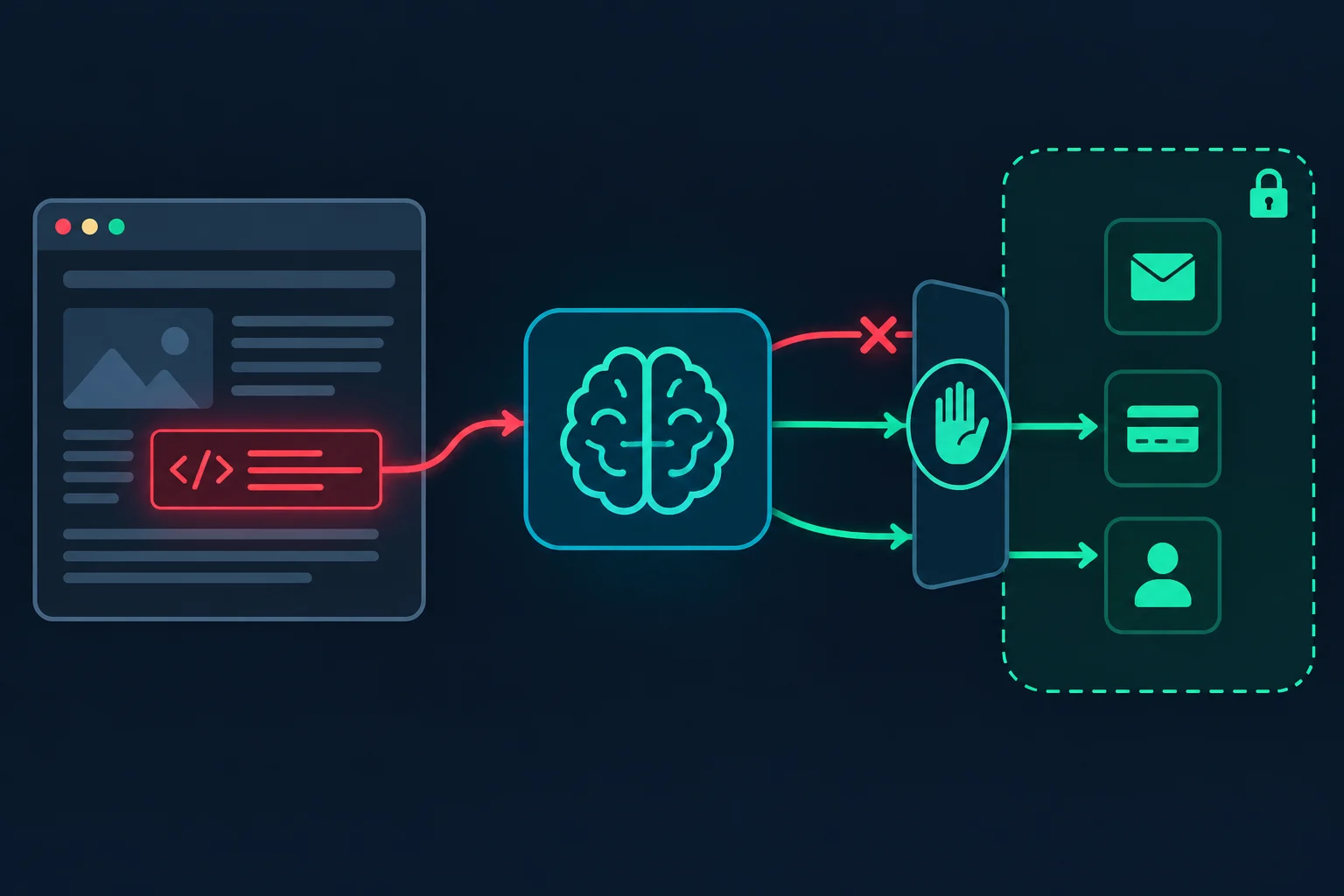
Brave's researchers showed this against Comet in 2025. Hidden text in a Reddit comment steered the agent, once a user asked it to summarize the page, into retrieving a one-time code from the user's email and posting it back. Brave's write-up on indirect prompt injection in agentic browsers is worth reading in full, and Brave later reported similar issues in other AI browsers. OWASP lists the same class of attack as LLM01: Prompt Injection.
Vendors have added mitigations such as confirmation prompts and logged-out agent modes, but none claims to have solved the problem. What helps on your side:
- Separate profiles. Run agent tasks in a browser profile that is logged in only to what the task needs, never the profile with your email and banking.
- Keep the gates on. Do not turn off confirmations for purchases, sends, posts, or password changes. If you build your own agent, add those gates in code.
- Limit the scope. Give the agent one task and a short list of sites. A self-run agent can enforce that with a local forward proxy that logs every host and refuses the rest.
- Use revocable credentials. Give agents scoped accounts and tokens you can revoke, not your personal logins.
Can Websites Detect or Block Agentic Browsers?
It depends on where the browser runs, because that decides whose IP and cookies the site sees.
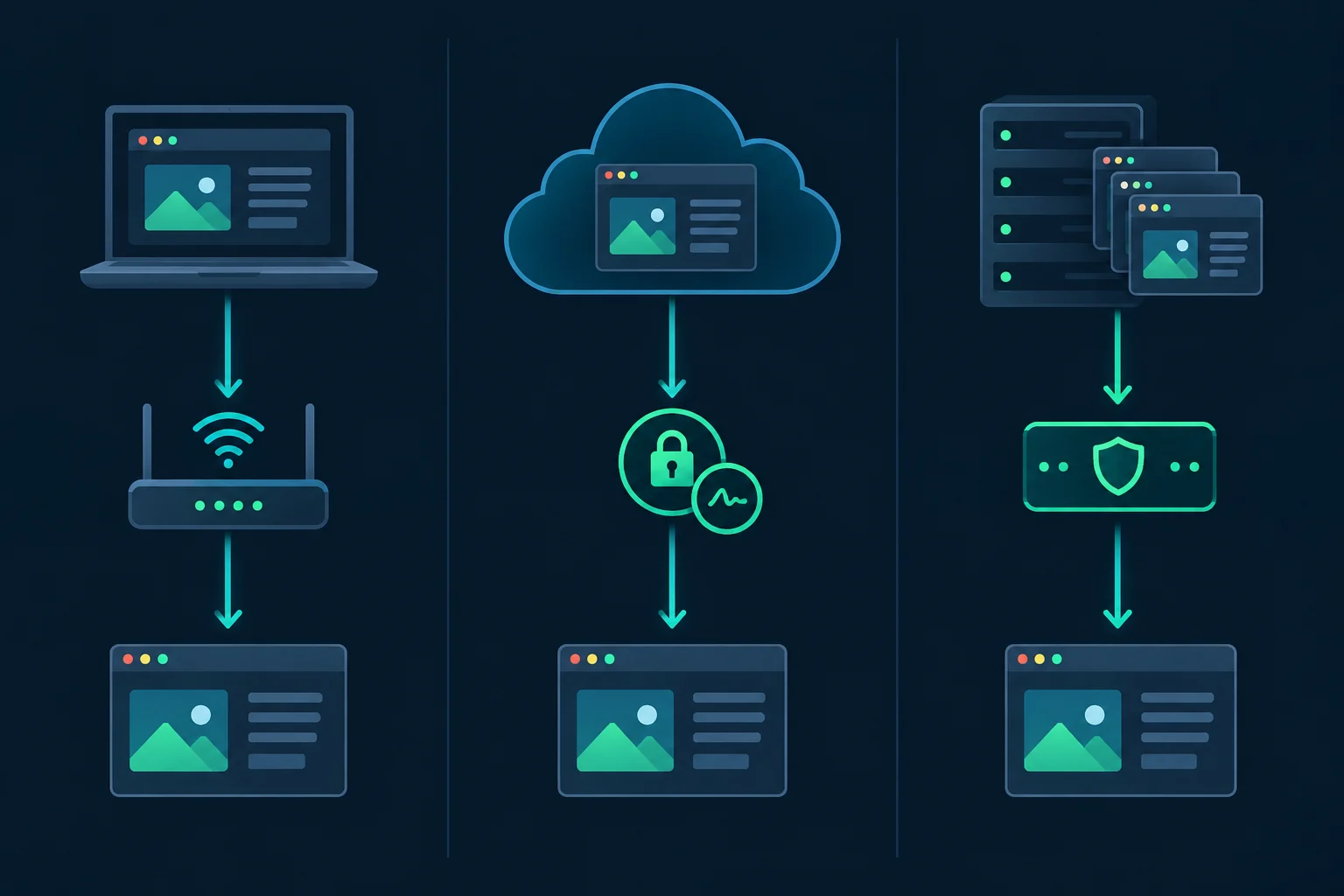
| Type | Where it runs | What the site sees |
|---|---|---|
| Local consumer browser | Your computer | Your IP, your cookies, a normal browser build |
| Vendor-hosted agent | The vendor's cloud | The vendor's IPs, often with signed requests |
| Self-run agent browser | Your server, laptop, or a browser API | Whatever network and profile you give it |
Local agentic browsers like Chrome, Comet, and Neon are hard to tell apart from you browsing, because the traffic mostly is you. Sites can still notice inhumanly fast form fills or click patterns, but the network identity is your own.
Vendor-hosted agents such as the cloud browser in ChatGPT Work run in the vendor's cloud and identify themselves on purpose. OpenAI signs those requests with HTTP Message Signatures (RFC 9421) and publishes its keys at https://chatgpt.com/.well-known/http-message-signatures-directory, so site owners can verify the agent with Web Bot Auth checks such as Cloudflare's. A site can then allow or block that agent by name.
Self-run agents are the ones most often blocked by accident. They usually run on cloud servers with datacenter IPs, and a default headless launch reports navigator.webdriver as true. If a site has decided not to allow automated agents at all, respect that. Use an official API or ask for access; is data scraping legal covers the legal side.
Do Agentic Browsers Need Proxies?
Only one of the three types can use one, and only that type usually needs one.
- Local consumer browsers: usually no. They already use your own connection. Chromium-based browsers use the OS proxy settings unless a policy, extension, or command-line flag overrides them (see Chromium's proxy configuration notes), so a system proxy would route your everyday browsing and the assistant's own backend calls too.
- Vendor-hosted agents: no, and you cannot add one. Their identity comes from the vendor's signature.
- Self-run agent browsers: often yes, when they run on cloud servers, need a specific country, or run several tasks that should not share one IP. The usual pattern is one exit IP per task. Sticky vs rotating proxies covers session lifetimes, ISP proxies vs residential proxies covers the IP-type tradeoff, and what are ISP proxies explains static IPs for long-lived logins.
For a self-run setup, you can launch one proxied Chromium with a dedicated profile and point any CDP-based agent at it:
google-chrome \
  --remote-debugging-port=9222 \
  --user-data-dir="$HOME/agent-profiles/task-01" \
  --proxy-server="http://proxy.example.com:8080"
Browser Use connects with Browser(cdp_url="http://localhost:9222"), and Playwright MCP with its --cdp-endpoint flag. Since Chrome 136, --remote-debugging-port only works with a non-default --user-data-dir. The --proxy-server flag also cannot carry a username and password, so use IP allowlisting or the framework's own proxy settings for authenticated proxies. Per-framework detail is in the Playwright proxy guide.
Agentic browsers load full pages, so measure one real task and size bandwidth with the data usage calculator before choosing a plan. Unknown Proxies offers residential proxies with country targeting and dedicated ISP plans.
FAQ
What is an agentic browser in simple terms?
It is a browser where an AI model does the clicking and typing. You describe a goal, and the model navigates, fills in forms, and compares pages until it finishes or asks you to confirm a sensitive step.
What is the difference between an AI browser and an agentic browser?
An AI browser adds a model to the browser, often only to summarize or answer questions about the current page. An agentic browser lets that model take actions across pages. Most AI browsers now ship both, with the agentic mode switched on per task.
What are examples of agentic browsers?
Chrome with Gemini auto browse, Perplexity Comet, Opera Neon, Microsoft Edge with Browse with Copilot, and the open-source BrowserOS. ChatGPT Atlas was one until OpenAI retired it in August 2026.
Are agentic browsers safe to use?
They are safe enough for low-stakes tasks if you keep confirmations on and limit what the agent can reach. The open risk is prompt injection, where text on a page steers the agent. Avoid giving an agent your main profile with email, banking, and password manager access.
Can websites tell when an agentic browser is visiting?
Sometimes. Vendor-hosted agents sign their requests so sites can identify them. Local agentic browsers look like their user, apart from behavior such as very fast form fills. Self-run agents on cloud servers are the easiest to spot because of datacenter IPs and automation flags.
Is ChatGPT Atlas still available?
No. OpenAI retired Atlas on August 9, 2026, and moved its agent features into the ChatGPT desktop app and a browser extension.
Conclusion
An agentic browser is an AI model in the control loop of a real browser: it reads, decides, acts, and checks, one step at a time. Chrome auto browse, Comet, Neon, Edge, and BrowserOS all run that loop with different models, prices, and limits. They work best on long, multi-page chores and still need you for logins, payments, and anything sensitive.
Before relying on one, decide what it can reach. Keep it in a separate profile, leave confirmations on, and treat every page it reads as untrusted input. If you run your own agentic browser on a server, give it a deliberate network identity with one exit IP per task.