The most useful AI agent examples today are research agents that search and read dozens of pages, monitoring agents that recheck the same sites on a schedule, booking and shopping agents that fill carts and forms, portal agents that log in to download invoices or update records, QA agents that click through a site before a release, and coding and support agents that mostly talk to APIs. What they share is a loop: a model picks the next action, a tool carries it out, and the result goes back to the model until the task is done.
What separates them, in practice, is how they reach the web. Some never leave a vendor's search backend. Some fetch a few HTML pages. Some drive a full browser that loads analytics scripts, fonts, and ad tags from nine other hosts. That difference decides which sites block them, what they cost in bandwidth, and whether they need a stable IP for the whole task.
This guide walks through 12 AI agent examples grouped by what they do on the web. It ends with a small test: four of these agents run against sandbox sites through one logging proxy, so you can see the traffic each one actually produces.
AI agent examples at a glance
| Example | Real products or builds | How it reaches the web | Traffic shape | What the network needs |
|---|---|---|---|---|
| Research agent | Gemini Deep Research, Claude's Research mode, Perplexity, a self-built search + fetch loop | Search API, then page fetches | Many domains, 1-3 requests each | Clean IP reputation; rotation is fine |
| Price and competitor monitoring | A scheduled agent or a script with an LLM extraction step | Fetch, sometimes a browser | One domain, many pages, repeated daily | Per-domain pacing, the right country |
| Lead research and enrichment | Clay's Claygent, custom CrewAI or LangGraph agents | Search, fetch, company sites | Wide and shallow | Rotation, polite rates |
| News and regulatory monitoring | Agents watching filings, changelogs, or policy pages | Fetch, RSS, APIs | Few domains, frequent rechecks | Caching and conditional requests |
| Shopping agent | Chrome auto browse, Claude in Chrome, Browser Use builds | Full browser | One retailer, deep, stateful | One sticky exit per session |
| Travel and booking agent | Agentic browsers, computer use agents | Full browser | Several sites, forms, date pickers | Sticky exit, matching geo |
| Portal and back-office agent | Computer use agents, Copilot Studio computer use | Browser or virtual desktop with a login | One site, logged in, long session | A stable IP the account has seen before |
| QA and testing agent | Playwright MCP, Stagehand, browser agents in CI | Browser against your own site | One domain, many flows | Geo checks; usually no proxy |
| Coding agent | Claude Code, Codex, GitHub Copilot cloud agent, Cursor | Package registries, docs, GitHub API | Bursty dependency downloads | Auth tokens and allowlists, not proxies |
| Customer support agent | Intercom Fin, Zendesk and Salesforce agents | Your help center and internal APIs | Almost no open-web traffic | None beyond your own APIs |
| Data entry and form agent | Computer use agents, RPA tools with an LLM | Browser or desktop app | One app, repetitive | Stable session |
| Personal assistant agent | ChatGPT Work, Claude with connectors | Mix of vendor-side browsing and APIs | Varies per task | Mostly the vendor's network, not yours |
The column that matters most is the fourth. A research agent touches many sites lightly, so no single site sees much of it. A monitoring agent hits one site hard, so pacing matters more than the IP. A portal agent stays logged in to one site for a long time, so an IP change in the middle of the task can look like account takeover.
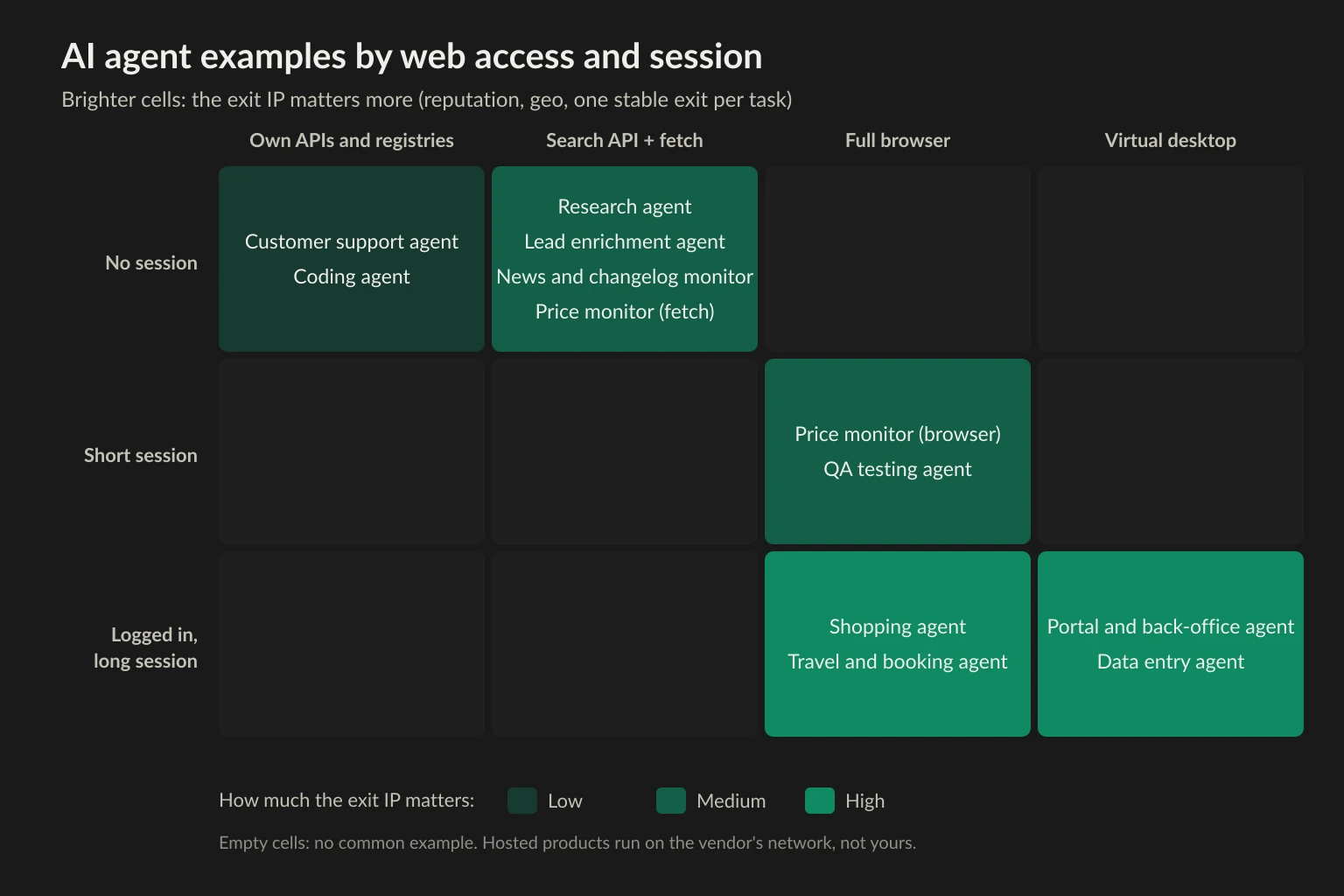
Four ways an AI agent reaches the web
Every example above uses one or more of four access methods. Knowing which one an agent uses tells you most of what a website will see.
- Search API. The agent sends a query to a search backend and gets back titles, snippets, and URLs. Claude Code's
WebSearchworks this way, and so do Tavily, Exa, and Serper. In our test below, Claude Code's searches never opened a connection from our machine to any search engine. That doesn't mean the target site saw nothing. Tavily and Exa can fetch result pages from their own servers to return page text, so the site sees the vendor's crawler. Traffic from your agent's IP starts only when it fetches the page itself. For a comparison of these backends, see Tavily vs Exa vs Serper. - Fetch. The agent downloads one URL and gets text or HTML back. No JavaScript runs, no images or fonts load, and the request often carries a tool-specific user agent. It is cheap and fast, and it is the method most likely to fail on sites that need JavaScript.
- Browser. The agent drives Chromium or Firefox through Playwright, Puppeteer, or CDP. The site sees a real browser, with all its third-party requests. This is what Browser Use, Stagehand, and Playwright MCP do, and what an agentic browser does for consumers.
- Virtual desktop. The agent works from screenshots and sends mouse and keyboard events to a sandboxed desktop. Network-wise it is a browser running on whatever machine you gave it. Computer use agents covers how that sandbox is wired.
Anthropic's guide to building effective agents draws a line between workflows, where code fixes the path in advance, and agents, which choose their own steps. That matters for traffic too. A workflow makes the same requests every run. An agent might decide to open a page twice, or follow a link you never expected.
AI agent examples that read the web
These agents collect information and return it. They don't log in or change anything on the sites they visit.
Research agents
Deep research products are the best-known AI agent examples in this group. Gemini Deep Research plans a set of searches, reads the results, and writes a report with citations. Claude's Research mode and Perplexity do the same. When you use these hosted products, the fetching happens on the vendor's servers, so the sites see the vendor's IPs, not yours.
When you build the same thing yourself, the shape changes. A research agent built on Claude Code, the Claude Agent SDK, or LangGraph usually calls a search API and then fetches pages from the machine running the agent. In our test, a research question about curl's latest release produced one or two searches and three or four fetches per run. Every fetch went out from our host. They always hit curl.se, and in some runs also github.com and Debian's security tracker.
The network problem for self-built research agents is reputation, not volume. Each site sees one or two requests, but if they come from a cloud datacenter range, some sites answer with a 403 or a challenge page. Proxies for AI agents explains how to tell which layer is blocking you.
Price and competitor monitoring agents
A monitoring agent checks the same product pages, prices, or stock levels every day and reports what changed. Here the LLM often does less than people assume. The best builds use a fixed crawler for the pages and call the model only for extraction or for deciding whether a change matters. Our price monitoring pipeline guide covers that design.
The traffic is deep and narrow: one retailer, dozens or hundreds of URLs, every day. That is the pattern rate limits are built for, so the first fix is pacing. A 429 Too Many Requests means slow down, not "add more IPs." Geo matters too, because many retailers show different prices, currencies, and stock by country.
Lead research and enrichment agents
Claygent is the familiar example. You give it a company or a person and a question, and it searches and reads public pages to fill in a column. Custom versions built with CrewAI or LangGraph do the same. The traffic is wide and shallow, like a research agent, but it runs across thousands of rows. At three pages per row, a batch of 5,000 companies means 15,000 page fetches spread over many domains. Rotation works well here because no request depends on the previous one.
Keep personal data rules in mind. Collecting public pages about companies is a different legal question from building profiles of people. See is data scraping legal before you scale one of these.
News, changelog, and regulatory monitoring agents
These agents watch a short list of pages, such as filings, policy pages, release notes, or status pages, and summarize what is new. The site list rarely changes, and most checks find nothing new. The useful engineering is caching: send If-None-Match or If-Modified-Since and let the server answer 304 Not Modified, and use RSS or an API where one exists. A proxy is rarely the answer for this group.
AI agent examples that act on websites
These agents change state on a site: a cart, a form, a booking, an account setting. That makes the session the unit of work, and the IP becomes part of the session.
Shopping agents
A shopping agent searches a retailer, compares options, and adds items to a cart. Consumer versions run inside the browser you are already using, such as Chrome auto browse and Claude in Chrome, so they use your home IP and your cookies. Developer versions built on Browser Use or Stagehand run a fresh browser in the cloud. That browser has no cookies, no history, and usually a datacenter IP, so it looks nothing like a returning customer. Retailers often concentrate their bot defenses on checkout pages.
Travel and booking agents
Booking is the classic agent demo: find a refundable hotel under a budget, compare three sites, and stop before payment. These tasks touch several sites, each through long flows with date pickers, filters, and pop-ups. Prices often depend on the visitor's country. An agent that searches from a German IP for a US user may see euro prices and different availability. Match the exit location to the user the agent is acting for.
Portal and back-office agents
This is where computer use earns its cost: supplier portals, insurance claim sites, government forms, and internal tools that have no API. The agent logs in, downloads invoices, updates records, or copies values between systems. Sessions last minutes, not seconds, and the account is real.
Two network rules follow. Keep one exit IP for the whole session, because a login from one IP followed by a click from another can trigger a security check or a forced logout. And prefer an IP the account has used before. An ISP proxy gives you a fixed address that stays the same across runs. A rotating pool does not.
QA and testing agents
QA agents click through your own staging or production site in plain language, such as "sign up with a new email and check the welcome page," and report what broke. Playwright MCP and Stagehand are common building blocks. Because the site is yours, the usual answer is to allowlist the agent's IP or test against staging. The one case where a proxy helps is geo testing: checking that the French site shows euro prices and the right cookie banner from a French IP.
Data entry and form-filling agents
Similar to portal agents, but repetitive: the same form, filled hundreds of times from a spreadsheet. The risk here is speed, not identity. A model that fills a form in two seconds, every two seconds, for an hour does not look like a person. Pace it, and keep the session stable.
AI agent examples that barely touch the open web
Some of the most widely used AI agents make very few requests to third-party websites.
Coding agents
Claude Code, Codex, Cursor, and GitHub Copilot's cloud agent read and write code, run tests, and open pull requests. Their web traffic is mostly package registries (npm, PyPI), documentation pages, and the GitHub API. The limits they hit are per-token and per-IP API quotas, not bot detection. GitHub, for example, allows 60 unauthenticated REST API requests per hour, and those are counted against the originating IP address. The fix is an auth token, not a different IP.
Network controls for coding agents point the other way: restricting egress, not expanding it. GitHub's cloud agent runs behind a firewall with a recommended allowlist for dependency downloads, to limit data exfiltration. AI agent security covers egress controls for agents that can run shell commands.
Customer support agents
Fin, Zendesk's AI agents, and Salesforce's Agentforce answer customer questions from a help center and take actions through internal APIs, such as issuing a refund or checking an order. They read your own knowledge base and call your own systems. There is nothing for a proxy to do here.
Personal assistant agents
General assistants with an agent mode mix all of the above. Some steps browse on the vendor's cloud browser, some call connectors such as email or calendar, and some hand off to a browser extension on your machine. You don't control the network on the vendor-side steps, so this guide focuses on agents you run yourself.
What four example agents sent over the network
To see how much these patterns differ, we ran four of the AI agent examples above against public test pages and logged every connection through one local proxy. Each task ran three times with Claude Code 2.1.310 in headless mode (claude -p) on Claude Haiku 5.5. Claude Code was started with HTTPS_PROXY pointing at a logging HTTP/CONNECT proxy on 127.0.0.1. Browser tasks used Playwright MCP 0.0.84 with --proxy-server set to the same proxy, driving Chromium headless shell from Playwright 1.65. We counted only site traffic. Anthropic API and telemetry connections went through the same proxy but are excluded from the site columns.
- Research: "What is the latest stable release of curl, when was it released, and name one security fix in it," with
WebSearchandWebFetch. - Price check (fetch): find the cheapest tablet across the four paginated pages of the webscraper.io static e-commerce test site, with
WebFetchonly. - Price check (browser): the same task with Playwright MCP tools.
- Portal login: log in at the quotes.toscrape.com sandbox with a demo account, then report the first quote's author and whether a Logout link is visible.
| Task | Tool calls | Site connections | Distinct site hosts | Site data | Model API and telemetry through the proxy | Agent time |
|---|---|---|---|---|---|---|
| Research (search + fetch) | 4-6 | 3-4 | 1-3 | 0.38-0.47 MB | 0.95-1.18 MB | 21-34 s |
| Price check, fetch | 4 | 4 | 1 | 66 KB | 0.75-0.76 MB | 10-12 s |
| Price check, browser | 10-11 | 12 | 10 | 1.37 MB | 0.95-1.02 MB | 11-12 s |
| Portal login, browser | 5 | 3 | 3 | 0.10 MB | 0.68-0.74 MB | 5.6-5.8 s |
Every run got the right answer: curl 8.23.0, the Lenovo IdeaTab at $69.99, and Albert Einstein with a visible Logout link. Each run cost between $0.002 and $0.04 in model usage.
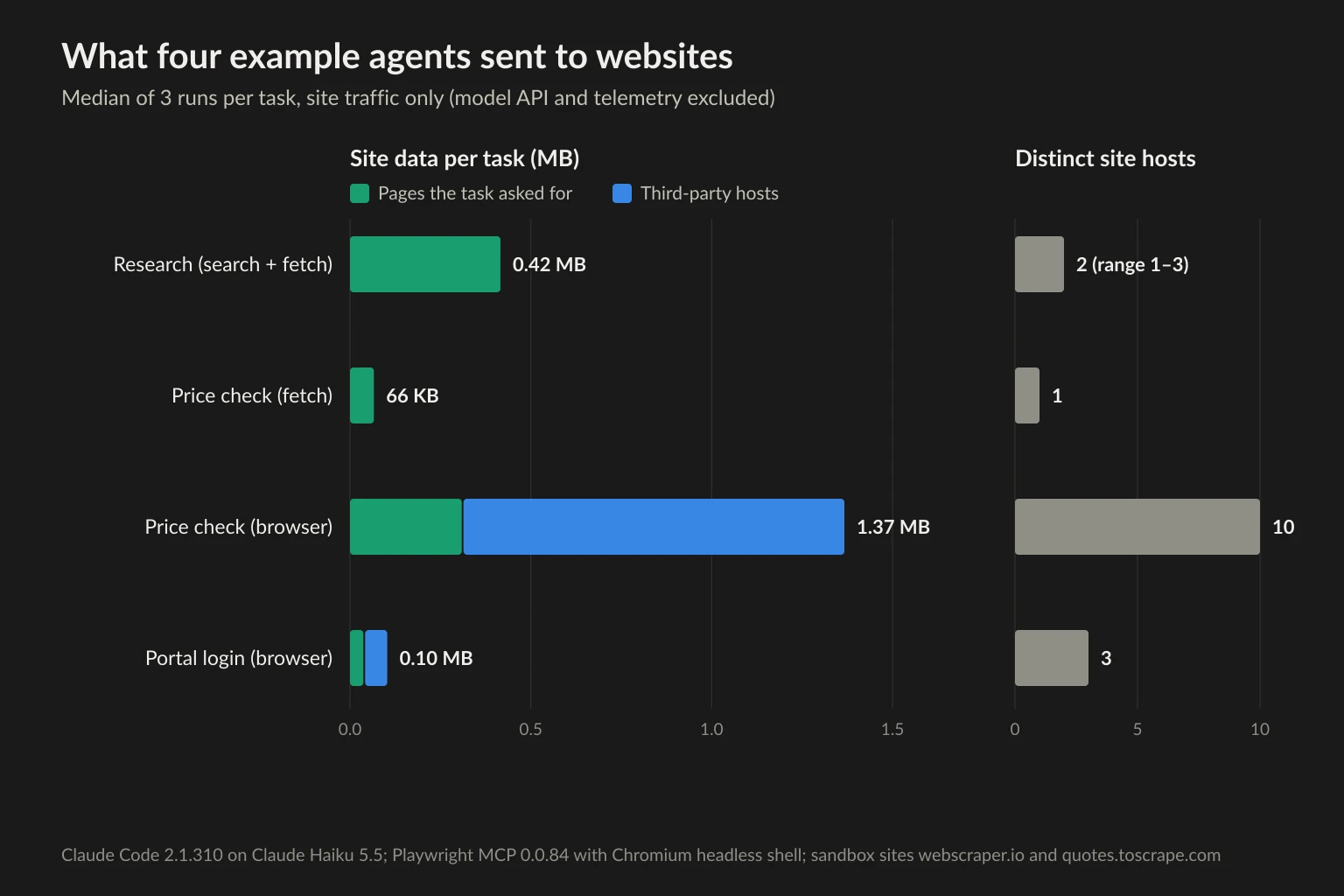
Four things stood out.
The same task cost 21 times more bandwidth in a browser. The fetch agent read the four tablet pages as 66 KB of HTML. The browser agent read the same four pages and moved 1.37 MB, and 77% of that went to hosts other than webscraper.io. Google Tag Manager alone was 568 KB, more than the four pages themselves (309 KB). The other hosts were Google Analytics, an ad tag, a consent manager, a help-desk widget, Google Fonts, and a CDN. All three browser runs hit the same 10 hosts. On a metered residential plan, you pay for every one of them.
The searches ran on Anthropic's side. Our proxy saw no connection from the research agent to any search engine. Only the follow-up WebFetch calls left our host, each on its own connection: to curl.se in every run, github.com in two runs, and security-tracker.debian.org in one. All three runs fetched curl.se/changes.html first, which was also the largest single response at 338 KB.
Claude Code's WebFetch opened a new connection per page, and the browser didn't. The four WebFetch calls in each fetch run were four separate CONNECTs to webscraper.io. The browser agent loaded all four pages over one connection to the site. The login agent did the same for the form page, the POST, and the redirect that followed. That changes how a rotating proxy behaves. A gateway that picks a new exit per connection gives the fetch agent a different IP for every page, while the browser keeps one exit for the whole short task.
The model traffic was bigger than the site traffic in three of four tasks. With HTTPS_PROXY exported for the whole agent, API calls and telemetry went through the proxy too. That added 0.68-1.18 MB per task. If your proxy is metered, route only the agent's web tools through it, as described in AI agent frameworks compared.
These were sandbox sites built for scraping practice, with light pages and no bot defenses, so treat the numbers as a floor. Retail and news pages load far more third-party script. The pattern held across all three runs, though: browser examples fan out to many hosts, fetch examples stay on the hosts they were asked about, and connection reuse decides how often a rotating exit changes.
Which network setup fits which AI agent example
The examples group into four network profiles. Pick by the traffic shape, not by the agent's brand.
| Profile | Examples | Exit IP | Rotation | First thing to tune |
|---|---|---|---|---|
| Wide and shallow | Research, lead enrichment | Residential or clean datacenter | Per request is fine | Reputation, user agent |
| Deep and narrow | Price and competitor monitoring | Residential in the target country | Slow, or sticky per crawl | Per-domain request rate |
| Stateful session | Shopping, booking, portals, data entry | ISP or sticky residential | None during a task | Session length, geo match |
| Own site or API | QA, coding, support | Your own IP, allowlisted | Not needed | API tokens, allowlists |
For stateful sessions, the rule is one task, one exit. Our browser runs kept a single connection to the task site for the whole task, so a per-connection rotating proxy would have kept the IP stable by accident. That only holds for short tasks. A portal session that idles for a few minutes can open a new connection and land on a new exit. Claude Code's WebFetch didn't get that luck. It opened a new connection per page, so a rotating gateway would give every page a different IP. Fetch tools built on a pooled client, such as a shared httpx.Client, can reuse one connection and keep the exit, so pin the session explicitly instead of relying on either behavior. Sticky vs rotating proxies explains how to pin a session, and ISP vs residential proxies covers when a fixed ISP address is worth it.
For browser agents, budget bandwidth from your own measurements. Browser page views on general sites often land around 2 MB each once scripts and fonts load, as our browser bandwidth measurements showed. The data usage calculator turns page views per task and tasks per day into a monthly figure. If you use residential proxies, blocking analytics and ad hosts in the browser is often the cheapest saving, as long as the site still works without them.
Where a proxy doesn't help
A better IP fixes reputation and location. It doesn't fix:
- A missing API key. Coding agents and enrichment agents hitting API quotas need tokens or a paid plan.
- Site rules. If a site's terms or
robots.txt(defined in RFC 9309) say no automated access, a proxy doesn't make it allowed. Use the site's API or ask for access. - Request rate. A 429 from one site means your agent is too fast for that site. Spreading the same rate over more IPs is the kind of behavior that gets ranges blocked.
- Browser fingerprint and behavior. A headless browser with automation flags gets flagged on any IP.
- Agent mistakes. An agent that reloads the same page ten times because it misread the result needs a better tool result, not a new exit.
FAQ
What are some examples of AI agents?
Common AI agent examples are deep research assistants (Gemini Deep Research, Claude's Research mode, Perplexity), shopping and booking agents in agentic browsers, computer use agents for back-office portals, coding agents such as Claude Code, Codex, and GitHub Copilot's cloud agent, customer support agents such as Intercom Fin, and lead enrichment agents such as Claygent.
What is an example of an AI agent in everyday life?
Asking a browser assistant to find a refundable hotel under a set price and fill in the booking form up to the payment step. The agent searches, compares, and fills fields on its own, then stops for your approval. Customer support chat that can actually issue a refund is another everyday example.
What are the five types of AI agents?
The textbook classification from Russell and Norvig's Artificial Intelligence: A Modern Approach lists simple reflex agents, model-based reflex agents, goal-based agents, utility-based agents, and learning agents. It describes how an agent decides, not what it does. Most LLM agents in this article are closest to goal-based agents: they take a goal and plan their own steps toward it.
Is ChatGPT an AI agent?
The chat interface on its own is a chatbot: it answers and waits. Its agent features, such as the cloud browser in ChatGPT Work, make it an AI agent, because they take a goal, browse, and act across several steps without you approving each one.
Do AI agents need internet access?
Not all of them. Support agents and many internal automation agents only call your own APIs. Research, monitoring, shopping, and portal agents need web access, and how they get it (search API, fetch, or browser) decides what websites see.
Do AI agents need proxies?
Only the ones that make requests to third-party sites from your own infrastructure, and only when the IP is the problem: datacenter reputation, the wrong country, or a session that needs one stable exit. Hosted products run on the vendor's network, and coding or support agents mostly need API tokens.
Final thoughts
The AI agent examples that matter for networking are the ones you run yourself against sites you don't own: research, monitoring, enrichment, shopping, booking, and portal agents. Classify each by how it reaches the web and how long it holds a session, then set up the network to match. Wide and shallow agents can rotate. Narrow ones need pacing. Stateful ones need one stable exit per task.
If your agent falls into the stateful group, start with a sticky residential or ISP exit in the user's country and check it before the task starts. Pricing lists both options.