AI agent security comes down to one assumption: anything the model reads can tell it what to do. Prompt injection has no reliable fix at the model level in 2026, so you can't make an agent safe by asking it to ignore bad instructions. You make it safe by limiting what a hijacked agent can reach. That means scoped tools and credentials, a sandbox around any code it runs, a human confirmation before irreversible actions, and a network path that only goes where the task needs.
The network layer is the one teams skip, and it is the one that turns a successful injection into a failed one. An agent that reads a poisoned page and then tries to send your API key to attacker.example only leaks something if that request can leave the machine. We tested common exfiltration routes against three sandbox setups on a cloud server. With only proxy environment variables set, the agent reached an off-list site, the cloud metadata service, and arbitrary DNS just by not using the proxy. An internal Docker network behind an allowlisting proxy blocked all of those. The one leak it couldn't stop was a POST to a domain on the allowlist, which no domain allowlist can stop.
This guide covers the threat model, prompt injection defenses that hold up, how to pick a sandbox, and the egress setup we tested, with configs you can copy.
The AI agent security threat model
An agent is a loop: the model reads context, picks a tool, your code runs it, and the result goes back into context. Every tool result is input the model will reason over. That includes web pages, emails, PDFs, issue comments, search snippets, and the output of other agents. None of that text is trusted, and the model has no way to tell your instructions from someone else's.
Simon Willison calls the dangerous combination the lethal trifecta. An agent becomes exploitable when it has all three of:
- Access to private data, such as your inbox, a database, or environment variables
- Exposure to untrusted content, such as web pages or inbound email
- A way to communicate externally, such as an HTTP tool, a browser, or even a rendered image URL
Meta's Agents Rule of Two turns that into a design rule. Within one session, an agent should have at most two of these: processing untrustworthy input, access to sensitive systems or private data, and the ability to change state or communicate externally. If a task needs all three, Meta's guidance is that the agent shouldn't run autonomously and needs at least human-in-the-loop approval.
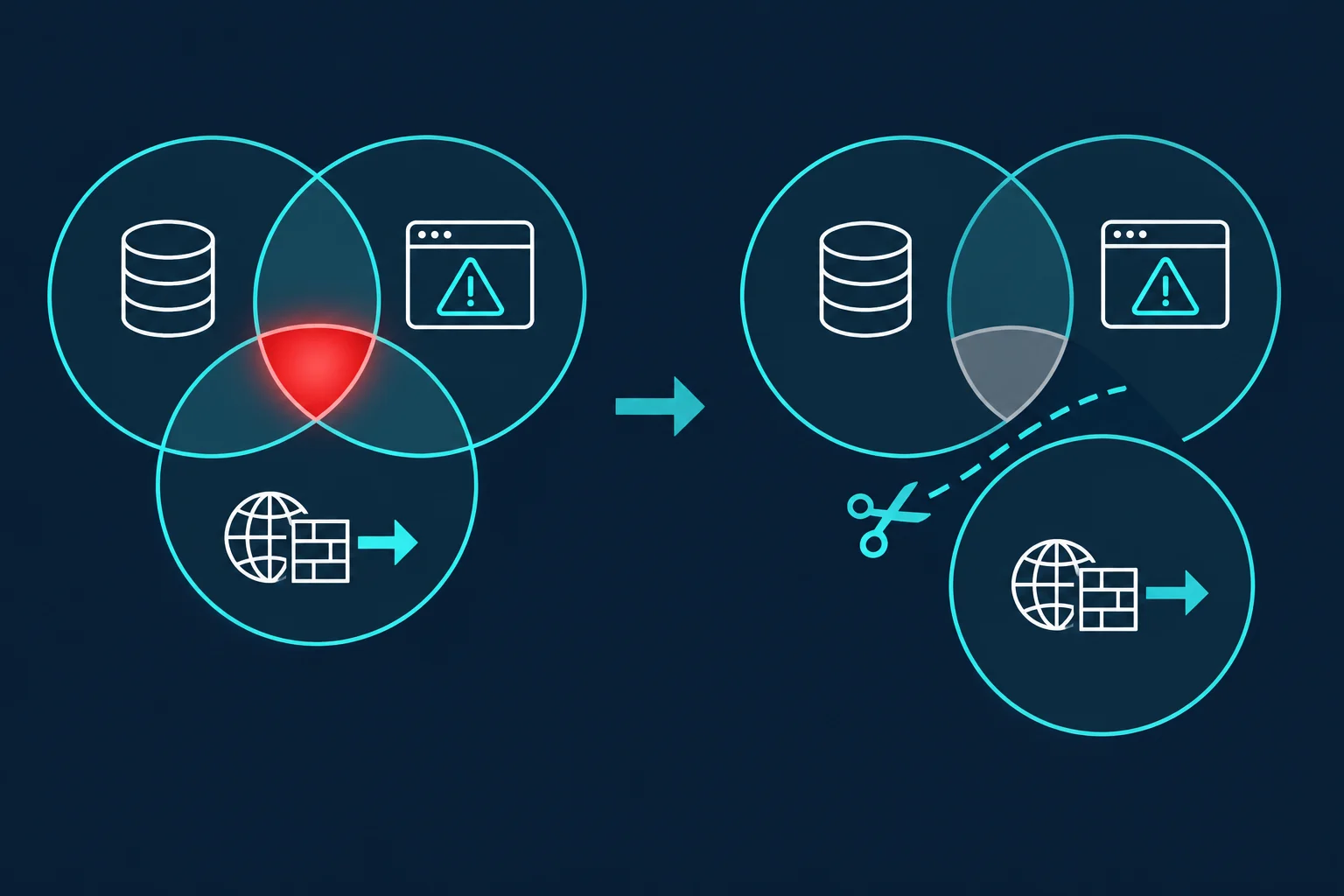
Most real agents need private data and untrusted content to be useful. The leg you can usually cut, or at least narrow to a few destinations, is outbound communication. That is why the egress section below gets the most space.
OWASP's Top 10 for Agentic Applications, published in December 2025, catalogs the wider set. Its first entry, ASI01 Agent Goal Hijack, is prompt injection seen from the agent's side. Several of the others, such as tool misuse, identity and privilege abuse, and unexpected code execution, describe what a hijacked agent does next. This table maps the threats you'll run into first to the control that addresses each one.
| Threat | How it shows up in an agent | Primary control |
|---|---|---|
| Goal hijack via prompt injection | A page, email, or tool output tells the agent to do something else | Treat all tool output as untrusted; gate actions in code |
| Tool misuse | The agent calls a legitimate tool with harmful arguments, such as DELETE or a transfer |
Narrow tools, argument validation, confirmations |
| Credential exposure | Secrets in the prompt, environment, or files the agent can read | Keep credentials outside the sandbox, scoped tokens |
| Code execution escape | Generated code reads the host, other tenants, or cloud metadata | Sandbox with its own kernel or a user-space kernel |
| Data exfiltration | Secrets leave through HTTP, DNS, image URLs, or an allowed domain | Default-deny egress through an allowlisting proxy |
| Supply chain | A malicious MCP server, package, or tool description | Pin and review tools; least privilege per server |
Why prompt injection can't be filtered out
Direct prompt injection is the user typing "ignore your instructions." Indirect prompt injection is the version that matters for agents: the instruction arrives inside data the agent fetched. OWASP ranks it first as LLM01: Prompt Injection. Our agentic browser guide walks through a real case against a logged-in AI browser.
Three things make it hard to stop:
- The instructions don't have to be visible. White-on-white text, HTML comments, alt text, and zero-width characters all reach the model, and screenshot-based agents read text humans skim past.
- Detection is probabilistic. Classifiers and "spotlighting" delimiters cut attack success rates, but an attacker only needs one phrasing that slips through. Anthropic's November 2025 prompt injection research measured a 1.4% attack success rate for Claude Opus 4.5 in browser use, even with its improved safeguards, and called prompt injection "far from a solved problem."
- Exfiltration doesn't need a dedicated tool. A model that writes Markdown can leak data in an image URL the client fetches automatically. A model with a fetch tool can put a secret in a query string. A model with a shell can use
nslookup.
The defenses that hold up don't rely on the model noticing the attack. They change what the model is able to do after reading untrusted text. Design Patterns for Securing LLM Agents against Prompt Injections (Beurer-Kellner et al., 2025) describes six such patterns, including Plan-Then-Execute, Dual LLM, and Context-Minimization. CaMeL (Debenedetti et al., 2025) goes further. A privileged model writes a program from the trusted request, and a quarantined model that reads untrusted data can't add new steps to it.
In practice, most teams combine a few cheap controls:
- Plan before reading. Fix the list of actions from the user's request, then let the agent read untrusted content only to fill in values, not to choose new actions.
- Gate irreversible actions in code. Sends, purchases, deletions, permission changes, and posts to public places require a human click. A confirmation the model can talk itself past is not a gate.
- Show what will leave. When an agent drafts an email or an API call, show the full payload, not a summary written by the same model.
- Disable automatic URL fetches in output. Don't render Markdown images or link previews from model output in a client that has access to private data.
Least privilege for agent tools and credentials
Every tool you register is a capability an attacker can borrow. Scope each one to the task, not to what is convenient.
- Use narrow tools. A
get_order_status(order_id)tool is safer than a raw SQL tool. If the agent does need SQL, give it a read-only role, not your app's database user. - Use per-agent credentials. Give each agent its own API keys, with read-only scopes where possible and short expiry. Then one leaked key exposes one agent, and revoking it doesn't break anything else.
- Never put secrets in the prompt. Anything in context can be repeated back or sent somewhere. Have your tool code attach credentials at call time, outside the model's view.
- Review MCP servers like dependencies. An MCP server's tool descriptions go straight into the model's context, and its code runs with whatever access you gave it. The MCP project's security best practices cover confused deputy attacks, token passthrough, SSRF to addresses such as
169.254.169.254, and scope minimization. Pin server versions and give each server only the tokens it needs.
The same rule applies to proxy credentials. If a browser agent needs a proxy, keep the password in a forwarder the agent can't read, not in its environment. The Puppeteer MCP proxy guide shows why: its navigate tool accepts launch options from the model, which can replace or switch off the proxy you configured.
Sandboxing AI agent code execution
If the agent runs code, whether that is generated Python, shell commands, or a headless browser, run it somewhere you can throw away. The choice is mostly about how much kernel the sandbox shares with your host.
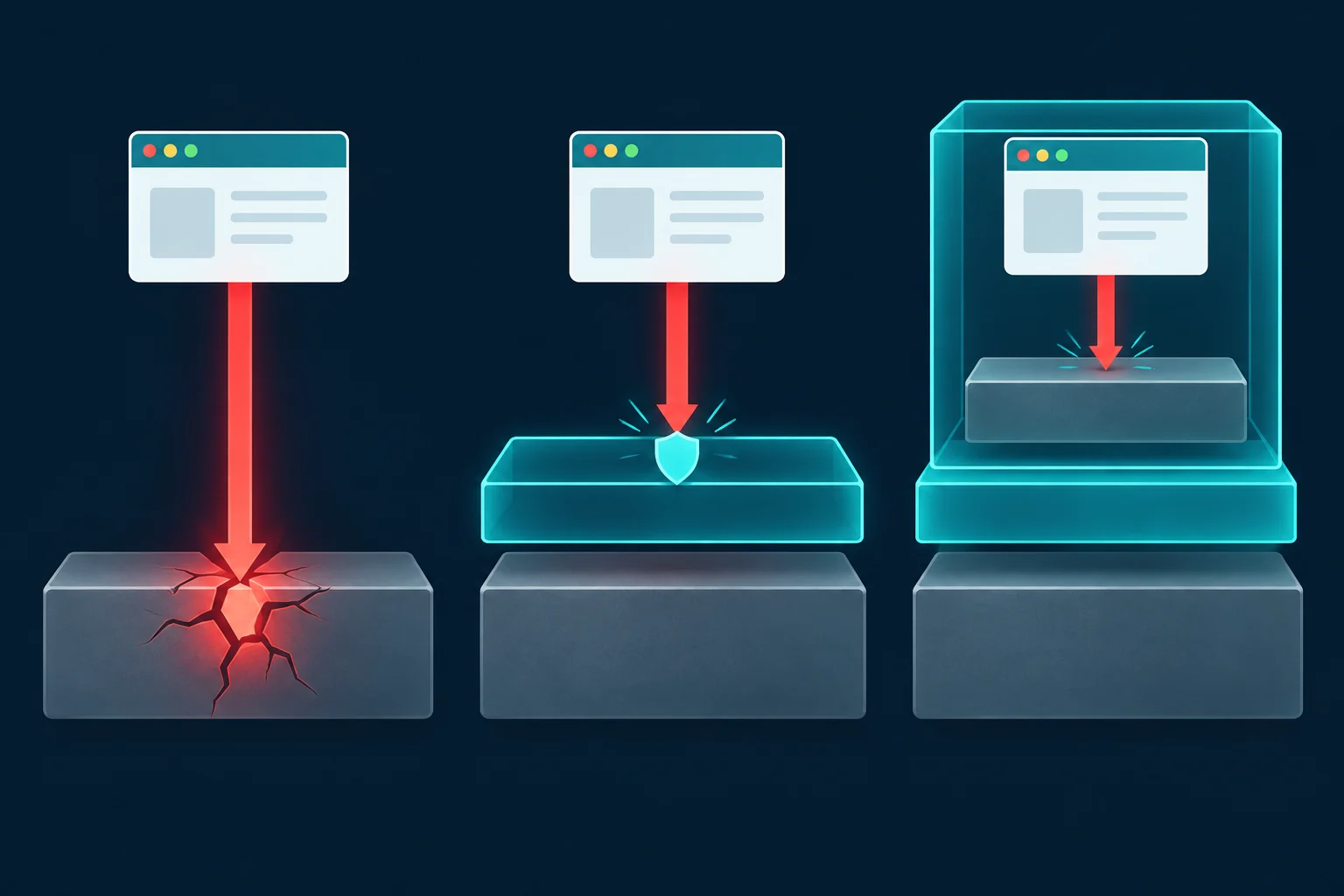
| Sandbox | Isolation boundary | Cost | Good fit |
|---|---|---|---|
| Plain Docker or Podman container | Namespaces and cgroups on the shared host kernel | Lowest | Your own agents running your own tasks, plus the network controls below |
| Process sandbox: bubblewrap, Landlock, seccomp, macOS Seatbelt | Kernel restrictions on one process tree | Lowest | Coding agents on a developer machine |
gVisor (runsc) |
A user-space kernel handles the container's syscalls | Slower syscalls and file I/O | Running untrusted code on shared hosts |
| Firecracker or other microVMs | A separate guest kernel on KVM | A VM per sandbox, though Firecracker advertises boot in under 125 ms | Multi-tenant code execution, hosted agent sandboxes |
Coding agents already ship with the process sandbox row. Claude Code's sandbox uses bubblewrap on Linux and Seatbelt on macOS, and its runtime is open source as sandbox-runtime. OpenAI's Codex sandbox uses Seatbelt on macOS and bubblewrap plus seccomp on Linux, with network access off by default in its workspace-write mode. For hosted code execution, gVisor and Firecracker are the common building blocks. E2B, for example, runs one Firecracker microVM per sandbox.
Whichever you pick, apply the same hardening:
- Run as a non-root user, drop Linux capabilities (
--cap-drop=ALL), and set--security-opt no-new-privileges. - Mount the workspace read-only where possible, and give the agent a scratch directory for writes.
- Don't mount the Docker socket, your home directory, or cloud credential files into the sandbox.
- Set CPU, memory, and PID limits so a runaway loop can't take down the host.
- Destroy the sandbox after each task instead of reusing one that a previous page may have influenced.
A sandbox limits what code can touch on the machine. By itself, it does nothing about where that code can send data. A default Docker container can reach the whole internet and, on many clouds, the instance metadata service.
Network isolation: the control injection can't talk past
Egress control is the part of AI agent security that works the same no matter how clever the injected text is. If the sandbox has no route to a destination, nothing the model writes can reach it.
We tested this on a Hetzner Cloud VM in Nuremberg running Docker Engine 29.1.3, using curlimages/curl (curl 8.22.0) as the stand-in for an agent's tools. The allowlisting proxy was Squid from the ubuntu/squid image, configured to allow only example.com and httpbin.org. We compared three setups:
- A. Proxy env vars only. The agent container sits on a normal Docker network with
HTTPS_PROXYandHTTP_PROXYpointing at Squid. This is the simplest setup, and the one most agent tools assume. - B. Internal network plus proxy. The agent container sits on a network created with
docker network create --internal. Squid is attached to that network and to a normal one, so it is the only way out. - C. No network. The agent process runs under bubblewrap 0.11.1 with
--unshare-net, which leaves it only a loopback interface.
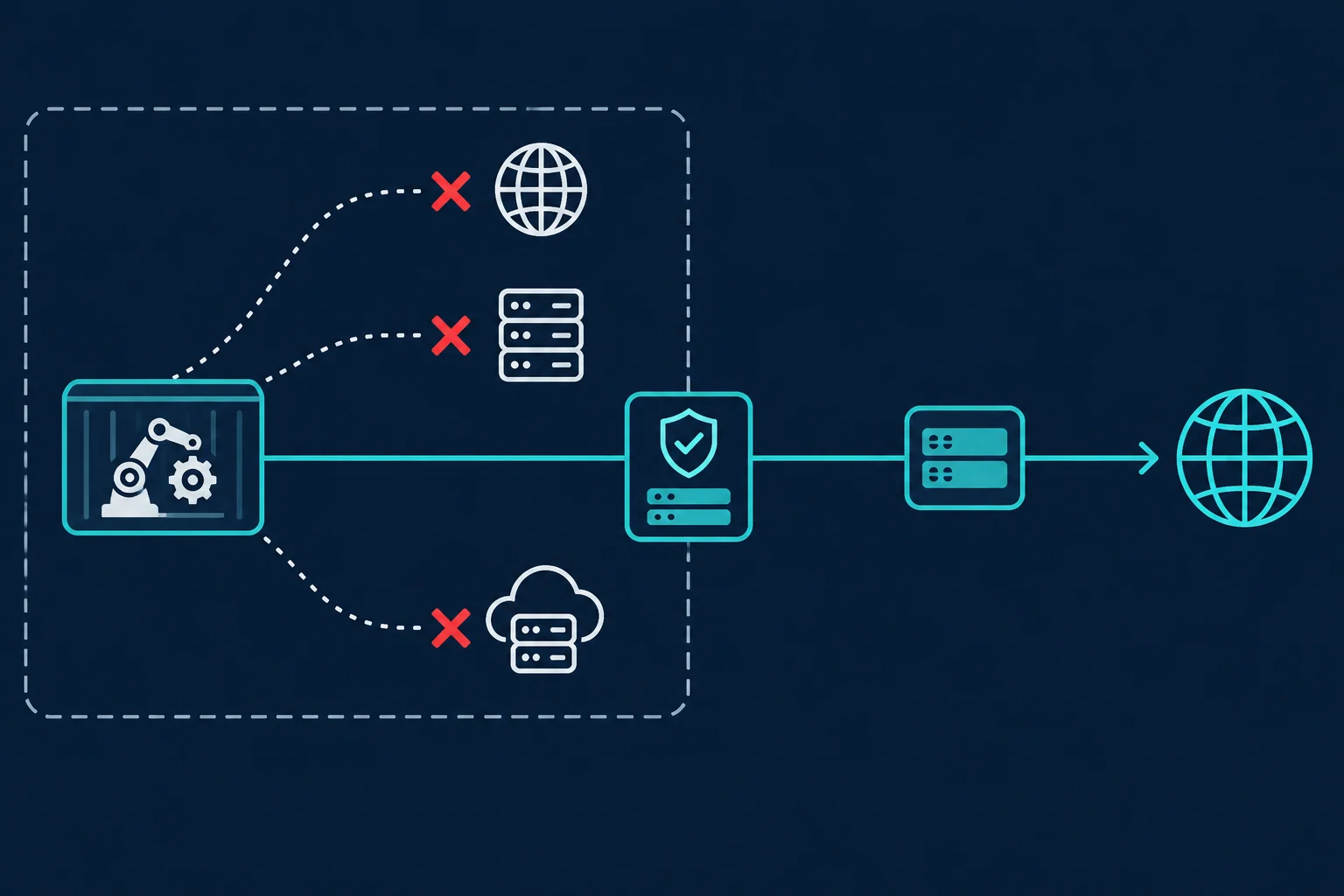
Here is what each probe returned:
| Probe from inside the sandbox | A: env vars only | B: internal network + Squid | C: --unshare-net |
|---|---|---|---|
HTTPS to allowlisted example.com |
200 | 200 | Could not resolve host |
HTTPS to off-list www.wikipedia.org |
403 on CONNECT |
403 on CONNECT |
Could not resolve host |
Same request with --noproxy '*' |
200, leaked | Could not resolve host | Could not resolve host |
Plain HTTP to the metadata service, uppercase HTTP_PROXY set |
Returned the VM hostname | Connection failed | Connection failed |
Same, with lowercase http_proxy |
403 from Squid | 403 from Squid | Not applicable |
| DNS lookup of an external name | Resolved | SERVFAIL |
Could not resolve |
Raw TCP to 1.1.1.1:443 |
Connected | Failed | Network unreachable |
CONNECT 1.1.1.1:443 through the proxy |
403 | 403 | Not applicable |
POST with a secret to allowlisted httpbin.org |
200, leaked | 200, leaked | Could not resolve host |
Four findings matter for anyone building agents.
Proxy environment variables are a suggestion, not a boundary. In setup A, the agent ignored the proxy with one flag and reached an off-list site. Any shell tool, any pip install, or any library that doesn't read proxy variables goes straight out. The container's network decides what is reachable, and the env vars only decide what is polite.
Uppercase HTTP_PROXY is silently ignored by curl. curl accepts only the lowercase http_proxy for plain HTTP, a defense against the httpoxy header attack, while it accepts either case for HTTPS_PROXY. With only uppercase variables set, our plain-HTTP request to the metadata service skipped Squid and returned the VM's hostname. Set both cases, and don't treat either as enforcement.
The metadata service is worth a probe of its own. On Hetzner Cloud, the metadata service exposes the hostname, public IPv4, and private networks. On AWS, IMDSv1 hands the instance role's temporary credentials to any process that asks. IMDSv2 requires a session token whose response hop limit defaults to 1, which keeps it away from most bridged containers, but AWS suggests raising the limit to 2 for container workloads. A sandbox on an internal network can't reach the metadata address no matter how the instance is configured.
DNS is an exfiltration path, and an internal network closes it. A query for <secret>.attacker.example reaches the authoritative name server for attacker.example even when every HTTP request is blocked, so the attacker reads the secret from their DNS logs. In setup A, the container resolved external names normally. On the --internal network, Docker's embedded resolver at 127.0.0.11 returned SERVFAIL for both external names we tried, so the agent couldn't resolve or leak through DNS. That is deliberate. Since Engine 26.0, Docker doesn't forward external DNS queries for containers attached only to internal networks, a fix aimed at exactly this exfiltration path. On older engines whose host resolver listens on loopback, such as systemd-resolved at 127.0.0.53, or for a container that is also attached to a normal network, DNS still gets out. The agent didn't need DNS anyway: with an HTTP proxy, the proxy resolves hostnames.
A domain allowlist can't stop writes to an allowed domain. Squid logged the exfiltration POST as a TCP_TUNNEL/200 entry for CONNECT httpbin.org:443, nothing more. For HTTPS, a forward proxy sees only the host and port in CONNECT, not the method, path, or body. Squid's HTTPS documentation says as much: without SslBump decryption, it has no access to the encrypted messages. So an allowlist is only as safe as the least trustworthy domain on it. github.com, pastebin.com, any webhook service, and any object storage bucket accept writes from anyone with an account, and an injected agent can create one. Claude Code's sandbox docs give the same warning about github.com. They add that because the proxy decides from the client-supplied hostname without inspecting TLS, sandboxed code could use domain fronting to reach hosts outside the allowlist. The same applies to Squid without SslBump.
Egress proxy config for AI agents
This is the Squid config from setup B. dstdomain entries that start with a dot match the domain and its subdomains:
http_port 3128

acl allowed_sites dstdomain .example.com httpbin.org
acl SSL_ports port 443
acl CONNECT method CONNECT

http_access deny CONNECT !SSL_ports
http_access allow allowed_sites
http_access deny all

cache deny all
access_log stdio:/var/log/squid/access.log
If the agent only drives a browser, the computer use agents guide covers a lighter variant that locks the browser to a credential-holding GOST forwarder. For agents with a shell or code execution, wire up the networks so the proxy is the only route:
docker network create --internal agent-net
docker network create egress-net

docker run -d --name egress --network egress-net \
  -v "$PWD/squid.conf:/etc/squid/squid.conf:ro" ubuntu/squid:latest
docker network connect agent-net egress

docker run --rm --network agent-net \
  -e HTTPS_PROXY=http://egress:3128 -e https_proxy=http://egress:3128 \
  -e HTTP_PROXY=http://egress:3128 -e http_proxy=http://egress:3128 \
  your-agent-image
Then check it the way an attacker would. From inside the agent container, run curl --noproxy '*' https://example.org, nslookup example.org, curl --noproxy '*' https://1.1.1.1, and curl --noproxy '*' http://169.254.169.254/. All four should fail. The 1.1.1.1 probe matters because it skips DNS: a container that can't resolve names may still have a direct route to any IP. If any of them succeed, the container has a route out that isn't the proxy.
Keep the allowlist per task, not per company. A research agent needs search and a few documentation sites. A coding agent needs your package registry and your Git host, ideally a mirror you control rather than all of github.com. Review access.log after real runs, because the TCP_DENIED lines show you what the agent tried to reach.
Keep proxy credentials out of the sandbox
Some agents need a specific exit IP: a stable address an internal API allowlists, a country for geo-specific results, or an IP that isn't your cloud provider's range. Point Squid at an upstream proxy with cache_peer, and the credentials live only in the egress container:
cache_peer proxy.example.net parent 8080 0 no-query no-digest login=AGENT_USER:AGENT_PASS name=upstream
never_direct allow all
We ran this against a test upstream that required Basic auth. The allowed request was logged as FIRSTUP_PARENT and arrived at the upstream with valid Proxy-Authorization. The off-list request was still refused by Squid before it reached the upstream. The agent container had no copy of the credentials and no route to the upstream: connecting to it by name failed because the internal network couldn't resolve it. never_direct allow all matters here. Without it, Squid can fall back to connecting directly when the parent is down, and your agent's traffic leaves from the server's own IP.
This is where ISP proxies and residential proxies fit into an agent stack. They give each agent a deliberate exit identity, separate from the server that holds your databases and keys. Use one proxy user per agent so you can rotate one without touching the rest, and a static ISP IP when the agent logs in to the same accounts every day. A proxy doesn't make an agent harder to inject, and it won't protect a domain you allowlisted. It does keep your infrastructure's IP out of the agent's traffic and gives you a second log of every host it reached.
AI agent security checklist
Before an agent touches real data, check that:
- Every tool result, page, and file is treated as untrusted input, including output from other agents.
- Sends, payments, deletions, and permission changes need a human confirmation enforced in code.
- Each agent has its own scoped, expiring credentials, and none of them appear in the prompt.
- Generated code runs in a disposable sandbox as a non-root user with no host mounts.
- The sandbox's only route out is an allowlisting proxy, and direct, DNS, and metadata probes fail.
- The allowlist contains no domain where anyone can write: no pastebins, webhook services, or entire code hosts.
- Proxy and API credentials live outside the sandbox, in the forwarder or the tool layer.
- You log tool calls and egress, and someone reviews denied requests after real runs.
FAQ
What is AI agent security?
It's the practice of limiting what an LLM-driven agent can read, run, and send, so that a manipulated agent can't cause real damage. Since prompt injection isn't solved, the controls sit outside the model: least-privilege tools, sandboxes for code, human confirmations, and restricted network egress.
Can prompt injection be fully prevented?
Not with current models. Classifiers and careful prompts reduce the success rate, but none of them guarantee that a model will ignore instructions hidden in content it reads. Design so a successful injection has nothing valuable to reach and no way to send data out.
Is a Docker container a secure sandbox for an AI agent?
It's a reasonable boundary for code you mostly trust, as long as you drop capabilities, run as non-root, and lock the network. For untrusted code from many users, add a stronger boundary such as gVisor or a microVM, because a container shares the host kernel.
Do AI agents need network isolation if they run in a sandbox?
Yes. A sandbox controls the filesystem and processes, not where data goes. In our test, a default container reached the open internet, resolved arbitrary DNS names, and read the cloud metadata service. An internal network behind an allowlisting proxy blocked all three.
Does a proxy make an AI agent secure?
No. A proxy is useful as the enforcement point for an egress allowlist and as a way to give an agent a separate exit IP. It can't stop the model from following injected instructions, and it can't inspect what an agent sends to an allowed HTTPS domain without TLS interception.
Final thoughts
AI agent security works when you stop expecting the model to defend itself. Assume an injected instruction will eventually get through, then make sure it lands in a sandbox with scoped credentials, a human gate in front of anything irreversible, and a network that only reaches the handful of hosts the task needs.
Start with egress, because it is cheap and you can test it in five minutes. Put the agent on an internal network, route it through an allowlisting proxy, and run the direct, DNS, and metadata probes yourself. If your agents also need a stable or country-specific exit IP, point that proxy at a dedicated upstream. ISP plans give each agent a static address, and residential proxies cover country-targeted sessions.