The main AI agent frameworks in late 2026 are LangGraph (with LangChain's create_agent on top), the OpenAI Agents SDK, the Claude Agent SDK, Google ADK, Microsoft Agent Framework, CrewAI, Pydantic AI, and smolagents in Python, plus Mastra and the Vercel AI SDK in TypeScript. Choose on three things: the language you ship in, how much control you need over the agent loop, and how tied you are to one model vendor. Tool calling, MCP support, and tracing are table stakes now.
The frameworks differ more in web access, and that matters once an agent leaves your laptop. A web tool can run on the model vendor's servers, in your own process, in an MCP subprocess, or in a browser. A proxy only affects the last three, and each one needs its own setting. We ran the web tools from several frameworks through a logging proxy. Some ignored an exported HTTPS_PROXY. Others sent the model API traffic through the proxy as well. In one run, that traffic was more than 10 times the size of the page the agent fetched.
This guide compares the frameworks first, then shows where each one's web requests leave from and how to scope a proxy to the tools that need it. If your agent is already getting 403s or CAPTCHAs, start with why web browsing agents get blocked, which covers diagnosis and proxy types.
Tested on 2026-10-15 with Python 3.12 and Node 24.16: openai-agents 0.23.1, langchain-community 0.4.2, crewai-tools 1.15.28, pydantic-ai-slim 2.56.0, smolagents 1.26.0, mcp 1.28.1 (Python) and 1.32.1 (TypeScript), ai 7.0.140, Bun 1.3.14, and Claude Code 2.1.299. All traffic went through a local proxy that logged every tunnel and counted bytes.
AI agent frameworks at a glance
| Framework | Language | How the agent is structured | Web access it ships with | Pick it when |
|---|---|---|---|---|
| LangGraph / LangChain | Python, JS | Explicit graph of nodes and state. LangChain 1.x create_agent is a prebuilt loop compiled to a LangGraph graph |
Provider search through bind_tools, community requests tools, MCP adapters |
You need durable, inspectable control flow and any model |
| OpenAI Agents SDK | Python, JS | Agents with handoffs and guardrails | Hosted WebSearchTool and HostedMCPTool, local ComputerTool, MCP |
You build on OpenAI models and want a thin loop |
| Claude Agent SDK | Python, TS | Claude Code's agent harness as a library | Built-in WebSearch and WebFetch tools, MCP |
You want a ready-made harness with files, shell, and web on Claude |
| Google ADK | Python, TS, Go, Java, Kotlin | Agents plus workflow agents (sequential, parallel, loop) | Gemini google_search and url_context, MCP |
You run on Gemini or Vertex AI |
| Microsoft Agent Framework | Python, .NET | Agents plus graph workflows. Successor to AutoGen and Semantic Kernel | Provider web search through the chat client, MCP | You are on .NET or Azure, or migrating off AutoGen |
| CrewAI | Python | Role-based crews and event-driven flows | crewai-tools scrape, search, and browser tools, MCP |
You want a multi-agent prototype quickly |
| Pydantic AI | Python | Typed agents with validated structured output | Provider-run WebSearchTool and WebFetchTool, local web_fetch_tool, MCP |
You want type safety in a Python service |
| smolagents | Python | Code agents that write Python as their actions | VisitWebpageTool, DuckDuckGo and Bing search tools |
You want a small framework you can read end to end |
| Mastra | TypeScript | Agents, workflows, and memory | Local webFetchTool, provider-mapped webSearchTool, MCP client |
You build TypeScript backends |
| Vercel AI SDK | TypeScript | ToolLoopAgent around generateText |
Provider tools such as openai.tools.webSearch and google.tools.googleSearch, MCP |
You want the thinnest layer in a TypeScript app |
LlamaIndex belongs on the same list for retrieval-heavy agents. Its FunctionAgent and AgentWorkflow classes cover the agent side, and its basic web page reader uses requests. AutoGen is now archived and no longer maintained, and its README points new projects to Microsoft Agent Framework, which reached 1.0 in April 2026.
How to choose an AI agent framework
Most teams can narrow the field in a few minutes with these questions.
How much control do you need over the loop? LangGraph and Microsoft Agent Framework workflows make every step an explicit node or edge, so you can checkpoint, resume, and insert human approval anywhere. The OpenAI Agents SDK, Pydantic AI, ADK, and the Vercel AI SDK run a standard tool-calling loop with hooks. CrewAI organizes work by roles and tasks. smolagents lets the model write Python as its actions, which is efficient but needs a sandbox.
Are you tied to one model vendor? The Claude Agent SDK only runs Claude. ADK's google_search and url_context only work with Gemini. The OpenAI Agents SDK's hosted tools only work with OpenAI models through the Responses API. LangGraph, Pydantic AI, CrewAI, Mastra, and the Vercel AI SDK are model-agnostic, so they suit teams that switch models for cost or quality.
What language do you ship? TypeScript teams usually land on the Vercel AI SDK or Mastra, and .NET teams on Microsoft Agent Framework. Python has the most choice.
How do you want the agent to reach the web? Hosted search is the least work, but you can't choose where requests come from. A local fetch tool or a browser gives you control over the exit IP, headers, and retries, and you take on the blocking problems. The rest of this guide is about that choice.
Where each framework's web tools run
Every web tool falls into one of four groups, and the group decides whether your proxy matters at all.
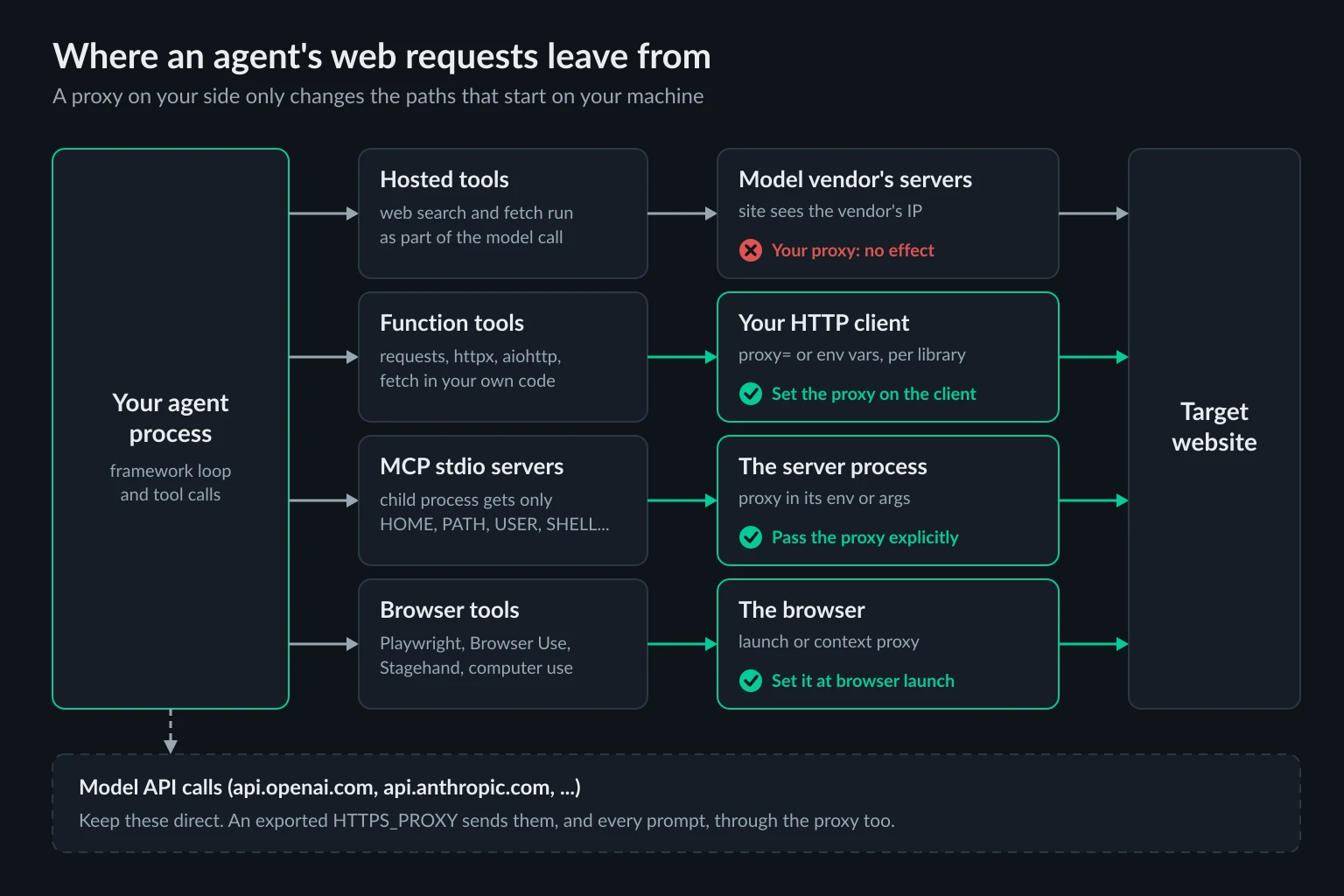
Hosted tools run on the model vendor's servers. The OpenAI Agents SDK's hosted tools, including WebSearchTool and HostedMCPTool, execute alongside the model on OpenAI's infrastructure. The same is true of Anthropic's server-side web search, ADK's google_search, Pydantic AI's native WebSearchTool and WebFetchTool, and AI SDK provider tools such as google.tools.googleSearch. The target site sees the vendor's IP. Your proxy never touches these requests. WebSearchTool accepts a user_location, which changes which results you get, not the IP the request comes from.
Function tools run in your process. Any tool you write, and most bundled fetch tools, make requests with an ordinary HTTP client. Whether that client honors HTTPS_PROXY depends on the library, not the framework. The next section shows which ones do.
MCP stdio servers run as child processes. The framework spawns the server, and the server makes the requests. Hosted MCP servers are a separate case: the vendor fetches the page, and the best MCP servers for web access covers that split.
Browser tools run in a browser. Playwright, Browser Use, Stagehand, and computer-use harnesses route traffic through the browser's own proxy setting. The OpenAI Agents SDK's ComputerTool belongs here too. It drives a Computer you implement, so the browser runs on your machine.
The Claude Agent SDK mixes two groups. Its WebSearch tool runs on Anthropic's search backend. WebFetch downloads the page from the machine running the agent. In our test, Claude Code 2.1.299 with HTTPS_PROXY set sent CONNECT example.com:443 through our proxy for a WebFetch call.
Which framework web tools follow HTTPS_PROXY
We exported HTTPS_PROXY pointing at the logging proxy, called each tool once on a public page, and checked whether the proxy saw the request.
| Tool or client | Went through the exported proxy? | Notes |
|---|---|---|
smolagents VisitWebpageTool |
Yes | Calls requests.get |
LangChain TextRequestsWrapper.get |
Yes | Sync path uses requests |
LangChain TextRequestsWrapper.aget |
No | Async path opens aiohttp.ClientSession(), which ignores env proxies by default |
CrewAI ScrapeWebsiteTool |
No | Its session sets trust_env = False and discards proxies |
Pydantic AI web_fetch_tool() |
Yes | Resolves DNS locally, then tunnels to the IP |
Claude Agent SDK WebFetch |
Yes | Model API calls and telemetry went through too |
| OpenAI and Anthropic Python SDKs | Yes | Your model API calls follow the env var |
Node 24 global fetch |
No | Only with NODE_USE_ENV_PROXY=1 or --use-env-proxy |
Bun fetch |
Yes | Bun reads the env vars by default |
| MCP stdio server started by the Python or TS MCP SDK | No | The env var never reaches the child process |
A few of these cost real debugging time.
LangChain's sync and async paths disagree. The same wrapper proxies .get() and goes direct on .aget(). aiohttp only reads proxy env vars when a session is created with trust_env=True, per its proxy support docs. Pass your own aiohttp.ClientSession(trust_env=True) through the wrapper's aiosession field. Note that langchain-community itself now warns that it is being sunset, so new code is better off with a tool you write.
CrewAI's scrape tool can't be proxied. Since its 2026 SSRF hardening, ScrapeWebsiteTool fetches through safe_get, which pins each connection to a validated IP and ignores environment proxies. We also set CREWAI_TOOLS_ALLOW_UNSAFE_PATHS=true and passed proxies= directly to safe_get. The request still went direct. If a CrewAI agent needs a proxied fetch, write a custom tool with your own HTTP client.
Pydantic AI's fetch tool tunnels to an IP, not a hostname. Our proxy logged CONNECT 172.66.147.243:443 instead of example.com:443. The tool resolves the name on your machine to block private addresses, then connects to that IP. The proxy still carries the traffic, but DNS comes from your server's resolver. A CDN may pick an edge near your server rather than near the proxy's exit country.
Node's fetch ignores the env vars. Node 24 only reads HTTP_PROXY and HTTPS_PROXY when you opt in with NODE_USE_ENV_PROXY=1 or --use-env-proxy, per the Node CLI docs. Bun reads them by default, so the same TypeScript agent can behave differently depending on the runtime.
Proxy the tool, not the process
Exporting HTTPS_PROXY for the whole agent is the most common setup and the most expensive one. As the table shows, the OpenAI and Anthropic SDKs follow it, so every model call goes out through the proxy too. Each call uploads the whole conversation, including the page text the agent just fetched. With residential bandwidth billed per GB, that adds up fast.
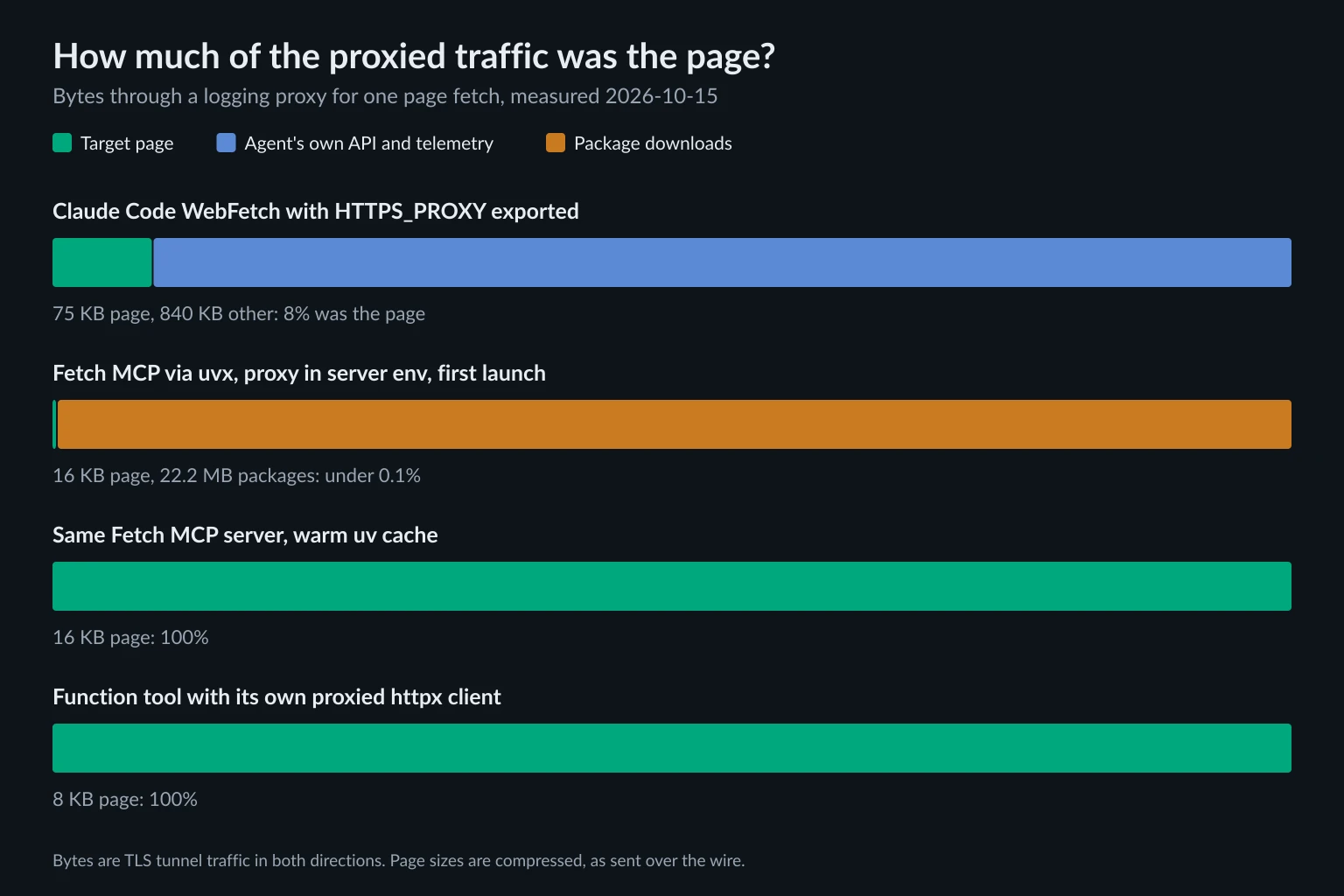
We asked Claude Code to read one Wikipedia article with WebFetch, with HTTPS_PROXY exported. The proxy carried 75 KB for the article, about 750 KB of Anthropic API traffic, and 92 KB of telemetry. Only 8% of the proxied bytes were the page we wanted. Claude Code has a large system prompt, so a leaner framework sends less per call. The pattern still holds: model traffic grows with every turn, and it doesn't need a residential IP.
Scope the proxy to the tool instead. In Python, give the tool its own client:
import os

import httpx
from agents import Agent, Runner, function_tool

MAX_CHARS = 20_000

# One client, one proxy, used only by this tool.
# An explicit proxy= takes precedence over HTTPS_PROXY and NO_PROXY.
web = httpx.Client(
    proxy=os.environ["AGENT_PROXY_URL"],  # http://USERNAME:PASSWORD@HOST:PORT
    timeout=30,
    follow_redirects=True,
)


@function_tool
def fetch_page(url: str) -> str:
    """Fetch a web page and return the status code and the start of its HTML."""
    html = ""
    with web.stream("GET", url) as r:
        # Read only what the agent will see, then stop the download.
        for text in r.iter_text():
            html += text
            if len(html) >= MAX_CHARS:
                break
    return f"HTTP {r.status_code}\n{html[:MAX_CHARS]}"


agent = Agent(
    name="researcher",
    instructions="Use fetch_page to read pages. Report the page title.",
    tools=[fetch_page],
)

result = Runner.run_sync(agent, "What is the title of https://example.com/?")
print(result.final_output)
The tool streams the response and stops once it has the 20,000 characters it returns, so a huge page or a stray file download doesn't burn proxy bandwidth. We invoked fetch_page through the SDK with a bogus HTTPS_PROXY also exported. The proxy logged one authenticated CONNECT example.com:443, and the bogus variable had no effect on the tool. It would still affect the model client, which reads the env var, so leave HTTPS_PROXY unset when you use this pattern. With no proxy variables exported, our proxy saw no model traffic at all. The same pattern works in any Python framework: LangGraph tools, Pydantic AI tools, and CrewAI custom tools are all plain functions. The proxy= argument is from httpx's proxy docs. httpx 0.28 removed the older proxies= argument.
In TypeScript, pass an undici ProxyAgent as the dispatcher for the tool's requests only:
import { tool } from "ai";
import { ProxyAgent, fetch } from "undici";
import { z } from "zod";

// Only requests made with this dispatcher use the proxy.
// Model API calls from the AI SDK keep their direct route.
const proxy = new ProxyAgent(process.env.AGENT_PROXY_URL!); // http://USERNAME:PASSWORD@HOST:PORT
const MAX_CHARS = 20_000;

export const fetchPage = tool({
  description: "Fetch a web page and return the status code and the start of its HTML",
  inputSchema: z.object({ url: z.string().url() }),
  execute: async ({ url }) => {
    const res = await fetch(url, { dispatcher: proxy, signal: AbortSignal.timeout(30_000) });
    const decoder = new TextDecoder();
    let html = "";
    // Read only what the agent will see, then stop the download.
    for await (const chunk of res.body ?? []) {
      html += decoder.decode(chunk, { stream: true });
      if (html.length >= MAX_CHARS) break;
    }
    return { status: res.status, html: html.slice(0, MAX_CHARS) };
  },
});
This type-checks against ai 7.0.148, undici 8.12.3, and zod 4.6.7. Running execute sent one authenticated tunnel through the proxy. undici's ProxyAgent reads the username and password from the URL and sends Proxy-Authorization itself. If you'd rather keep env vars, put every model and telemetry host in NO_PROXY. That is easy to get wrong, because one missed host goes through the proxy.
Pass the proxy to MCP servers explicitly
The official MCP SDKs don't hand your environment to the servers they spawn. The Python SDK's get_default_environment() copies only HOME, LOGNAME, PATH, SHELL, TERM, and USER on Linux and macOS (source). The TypeScript SDK uses the same list. Frameworks that build on these SDKs inherit this behavior, including the OpenAI Agents SDK, LangChain's MCP adapters, ADK, and Pydantic AI.
We tested it with a stdio server that reports its own HTTPS_PROXY. Started through MCPServerStdio with the variable exported in the parent, the server saw None. Passed in env, it saw the proxy URL:
import asyncio
import os

from agents import Agent, Runner
from agents.mcp import MCPServerStdio

proxy = os.environ["AGENT_PROXY_URL"]


async def main():
    async with MCPServerStdio(
        name="fetch",
        params={
            "command": "mcp-server-fetch",  # installed once with: uv tool install mcp-server-fetch
            "args": [],
            "env": {"HTTPS_PROXY": proxy, "HTTP_PROXY": proxy},
        },
    ) as fetch_server:
        agent = Agent(
            name="researcher",
            instructions="Use the fetch tool to read pages.",
            mcp_servers=[fetch_server],
        )
        result = await Runner.run(agent, "Summarize https://example.com/ in one line.")
        print(result.final_output)


asyncio.run(main())
The comment about installing once matters. We first launched the server with uvx mcp-server-fetch and the proxy in env. uvx is a child of that environment too, so on a cold cache it downloaded the server and its dependencies through the proxy: 22.2 MB of package traffic to fetch a 16 KB page. With a warm cache, the proxy saw only the page. In a container that starts with an empty cache on every run, you'd pay that 22 MB each time. Install the server into the image, or use a server-specific flag such as Fetch MCP's --proxy-url, which applies only to page fetches. The Fetch MCP proxy guide compares the flag and the env var.
The other frameworks have the same env field under different names:
- LangChain's
MultiServerMCPClienttakesenvin each stdio connection, and expands${VAR}references from your environment. - ADK's
McpToolsettakesStdioConnectionParamsthat wrap the MCP SDK'sStdioServerParameters(command=..., args=..., env=...). - Mastra's
MCPClientand the AI SDK'sExperimental_StdioMCPTransportuse the same six-variable default and take anenvobject next tocommandandargs.
Claude Code is the exception. Its MCP servers start with the client's full environment, so an exported proxy reaches them, along with the model traffic.
Browser tools: set the proxy at launch
Browser-based tools ignore the agent process's env vars and use the browser's own proxy setting. That setting goes on the launch options or the browser context, before the agent touches a page. The details depend on the tool: Browser Use takes a ProxySettings object, Playwright takes a proxy per context, Stagehand depends on whether it runs locally or on Browserbase, and Playwright MCP takes a config file. Sandboxed desktop harnesses for computer use agents need the proxy inside the sandbox.
Browsers also load images, scripts, and fonts, so a browser tool uses far more proxy bandwidth per task than a fetch tool. Estimate it with the data usage calculator before you pick a plan.
Which proxy fits agent web tools
Match the proxy to how the tool uses the web, not to the framework:
- Independent fetches across many sites (fetch tools, search-then-read loops): rotating residential proxies, so no single IP takes all the load.
- Multi-step tasks without a login (paginated research, browser sessions): a sticky residential session for the length of the task.
- Logged-in or allowlisted workflows (a supplier portal, a partner API that allowlists IPs): a static ISP proxy that keeps the same address.
The guide to proxies for AI agents explains these choices and how to tell an IP block from a fingerprint or rate-limit block. A proxy changes where requests come from, not what the agent is allowed to do. Keep agents to sites you're permitted to automate, respect robots.txt and rate limits, and stop on a firewall block instead of rotating around it.
FAQ
What is the best AI agent framework?
There isn't one best framework. LangGraph is the default when you need explicit control flow and any model. The OpenAI Agents SDK and the Claude Agent SDK are the shortest path on their own vendors' models. The Vercel AI SDK and Mastra lead for TypeScript. Microsoft Agent Framework fits .NET and Azure teams.
Is LangChain the same as LangGraph?
No, but they're closely tied. LangGraph is the lower-level runtime for stateful graphs. LangChain 1.x provides model and tool integrations, and its create_agent builds a prebuilt agent loop that compiles to a LangGraph graph.
Do hosted web search tools use my proxy?
No. Tools such as the OpenAI Agents SDK's WebSearchTool, ADK's google_search, and Anthropic's server-side web search run on the vendor's servers. The target site sees the vendor's IP, and nothing on your machine changes that.
Why does my agent ignore HTTPS_PROXY?
Usually because the HTTP client making the request doesn't read it. Common cases are aiohttp sessions without trust_env=True, Node's built-in fetch without NODE_USE_ENV_PROXY=1, CrewAI's SSRF-safe fetch, and MCP servers spawned by the MCP SDKs, which don't inherit the variable.
Should I set HTTPS_PROXY for the whole agent process?
Avoid it. Your model API calls follow it too, so you pay residential bandwidth for prompts and responses. In our Claude Code test, only 8% of the proxied bytes were the page. Give each web tool its own proxied client, or pass the proxy in an MCP server's env.
Is AutoGen still maintained?
No. AutoGen is archived, and Microsoft no longer ships bug fixes, security fixes, or new features for it. Microsoft recommends Microsoft Agent Framework for new projects. It combines AutoGen's agent patterns with Semantic Kernel's enterprise features.
Conclusion
Choose among AI agent frameworks by language, control flow, and model lock-in: LangGraph for explicit graphs, the OpenAI or Claude Agent SDK on their own models, ADK on Gemini, Microsoft Agent Framework on .NET, and the Vercel AI SDK or Mastra in TypeScript. Then check how each web tool reaches the internet. Hosted tools use the vendor's IP. Local fetch tools, MCP servers, and browsers each take their own proxy setting, and an exported HTTPS_PROXY reaches some of them and misses others.
Scope the proxy to the tool and keep model traffic direct. Log the exit IP from inside the tool before the agent relies on it. When a tool needs better IPs, use residential proxies for rotating or sticky sessions, or ISP proxies for a stable address.