Stagehand AI, Browserbase's open-source SDK for browser agents (act(), observe(), extract(), and an agent mode), sends its traffic through whichever browser it drives, so the proxy is set on that browser, not on Stagehand itself. There are two places to set it. A Browserbase session takes a proxies setting when it is created, either Browserbase's built-in proxies or your own proxy with a username and password. A local Chrome takes a proxy.server in its launch options, but only for proxies that don't need credentials.
That second point catches most people. In Stagehand 4.2.0, passing username or password to localBrowser.launch() throws Authenticated local browser proxies are not supported yet. Stagehand 3.x accepts the same fields and then drops them silently. With headless: true, every navigation fails with net::ERR_INVALID_AUTH_CREDENTIALS. In v3's default visible window, you're more likely to see a proxy sign-in prompt or a goto() that times out. The fix is to authorize your machine's IP with the proxy provider, or to run a small local forwarder that adds the credentials. Both are covered below.
This guide was checked against @browserbasehq/stagehand 4.2.0 (released October 8, 2026) and the 3.7.3 release on the v3-latest tag. We read the published package source and tested the Chrome-level behavior against a local logging proxy. If you are deciding whether to stay on Browserbase at all, the Browserbase alternatives guide compares the cost side.
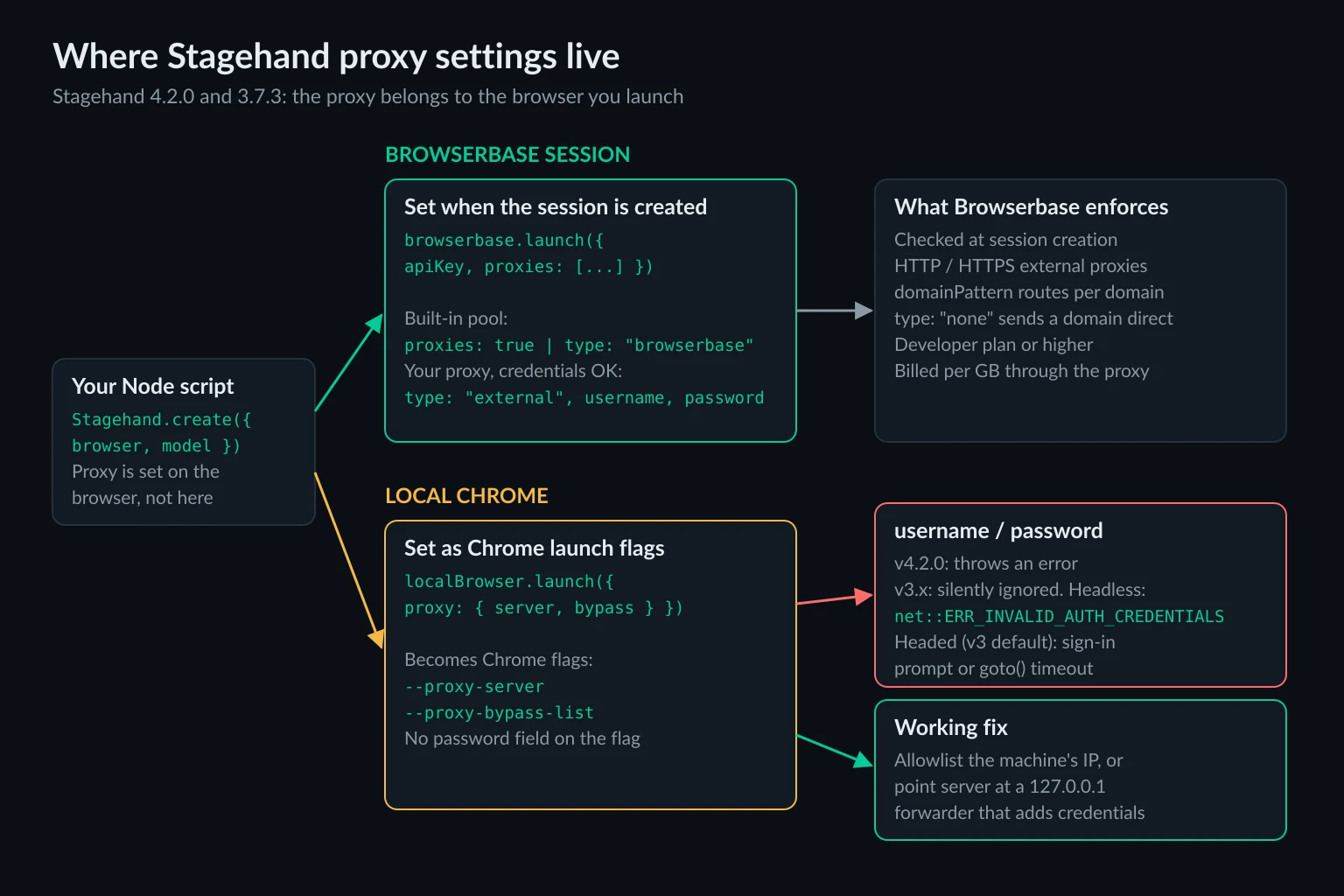
Stagehand AI Proxy Options at a Glance
| Where the browser runs | Where you set the proxy | Username and password | What to watch |
|---|---|---|---|
| Browserbase, built-in proxy | proxies: true or { type: "browserbase", geolocation } |
Not needed | Developer plan or higher; billed per GB of proxy traffic |
| Browserbase, your proxy | { type: "external", server, username, password } |
Supported | HTTP and HTTPS proxies only; checked when the session is created |
| Local Chrome, v4 | localBrowser.launch({ proxy: { server, bypass } }) |
Throws an error | Use IP allowlisting or a local forwarder |
| Local Chrome, v3 | localBrowserLaunchOptions.proxy |
Accepted, then ignored | Headless: ERR_INVALID_AUTH_CREDENTIALS; headed: sign-in prompt or goto() timeout |
| A Chrome you started yourself | Chrome's own --proxy-server flag |
Same as local | Stagehand can't change the proxy of a browser it didn't launch |
Stagehand v4 changed the API. Instead of new Stagehand({ env: "LOCAL" | "BROWSERBASE" }), you create a browser with localBrowser or browserbase, then pass it to Stagehand.create(). The proxy fields moved with the browser, so most v3 snippets you find online won't run unchanged on v4.
Browserbase Sessions: Built-In Proxies
The simplest setup is Browserbase's own proxy pool. In v4, the options you pass to browserbase.launch() go straight to Browserbase's session-create call, so proxies sits next to your API key:
import { browserbase, Stagehand } from "@browserbasehq/stagehand";

const browser = await browserbase.launch({
  apiKey: process.env.BROWSERBASE_API_KEY!,
  proxies: [{ type: "browserbase", geolocation: { country: "DE", city: "Berlin" } }],
});

const stagehand = await Stagehand.create({
  browser,
  model: { modelName: "openai/gpt-5.4-mini", apiKey: process.env.OPENAI_API_KEY },
});

const [page] = await browser.context.pages();
await page.goto("https://example.com");
await stagehand.act("click the first link on the page");

await stagehand.close();
await browser.close();
proxies: true is the short form. According to the Browserbase proxy docs, it tries a US exit and falls back to a nearby country when none is available. Geolocation takes ISO country codes, plus state for US locations and city.
A few limits from the same docs matter before you depend on the built-in pool:
- Plan. Proxies need the Developer plan or higher.
- Billing. Usage counts every byte through the proxy, including headers and TLS overhead, with a 1 MB minimum per session. Our Browserbase alternatives guide works through what that costs at agent volume.
- Blocked categories. Browserbase lists banking, crypto exchanges,
.govsites, streaming, ticketing, webmail, and gambling as unreliable or blocked through its proxies. A failure there usually surfaces asERR_TUNNEL_CONNECTION_FAILED.
On v3, the same object goes in browserbaseSessionCreateParams:
import { Stagehand } from "@browserbasehq/stagehand";

const stagehand = new Stagehand({
  env: "BROWSERBASE",
  apiKey: process.env.BROWSERBASE_API_KEY,
  browserbaseSessionCreateParams: {
    proxies: [{ type: "browserbase", geolocation: { country: "US", state: "NY" } }],
  },
});
await stagehand.init();
Bring Your Own Proxy to a Browserbase Session
Browserbase also accepts an external proxy, and this is the one place in Stagehand where proxy credentials work as you'd expect. Browserbase's servers make the connection to your proxy, so the local Chrome limitation doesn't apply:
const browser = await browserbase.launch({
  apiKey: process.env.BROWSERBASE_API_KEY!,
  proxies: [
    {
      type: "external",
      server: "http://proxy.example.com:8080",
      username: process.env.PROXY_USERNAME,
      password: process.env.PROXY_PASSWORD,
    },
  ],
});
Browserbase checks that it can reach the proxy when it creates the session and throws if it can't. A wrong port or a bad password fails at browserbase.launch(), not halfway through a task. Nothing is checked after that, so test against your real target before you scale up.
The proxies array is a routing table. Each entry can take a domainPattern regex, and the first match wins. Browserbase's SDK also accepts { type: "none" } to send a domain direct. This example sends a logged-in portal through your own proxy, skips the proxy for a static CDN, and gives everything else Browserbase's pool:
proxies: [
  {
    type: "external",
    server: "http://proxy.example.com:8080",
    username: process.env.PROXY_USERNAME,
    password: process.env.PROXY_PASSWORD,
    domainPattern: "seller-portal\\.example\\.com",
  },
  { type: "none", domainPattern: "cdn\\.example\\.com" },
  { type: "browserbase" },
],
Two constraints apply. The docs list HTTP and HTTPS for external proxies, with no SOCKS5. And a proxy that intercepts TLS needs its CA certificate uploaded to Browserbase and referenced in proxySettings.caCertificates, or every HTTPS page fails.
Local Chrome: What the Stagehand Proxy Option Does
When Stagehand launches Chrome on your machine, the proxy becomes two Chrome flags. In 4.2.0, the launcher turns proxy.server into --proxy-server and proxy.bypass into --proxy-bypass-list, and does nothing else with it. Before launching, it checks the options and rejects credentials:
import { localBrowser } from "@browserbasehq/stagehand";

// Works: a proxy that needs no credentials
const browser = await localBrowser.launch({
  headless: true,
  proxy: { server: "http://203.0.113.10:8080", bypass: "localhost;127.0.0.1" },
});

// Throws: "Authenticated local browser proxies are not supported yet"
await localBrowser.launch({
  proxy: { server: "http://proxy.example.com:8080", username: "user", password: "pass" },
});
The Stagehand browser configuration docs say the same thing: credentials raise an error in the TypeScript, Python, and Go SDKs alike.
Stagehand 3.x is harder to debug. Its schema accepts username and password, but the launcher only reads server and bypass, and nothing answers the proxy's login challenge. We reproduced the result with headless Chrome 148 against a local proxy that requires Basic auth. The proxy returned 407 Proxy Authentication Required, and Chrome's navigation failed with net::ERR_INVALID_AUTH_CREDENTIALS. v3 launches a visible window unless you set headless: true, and a visible Chrome usually reacts to a 407 with a proxy sign-in prompt, so the symptom there is more likely a goto() that hangs until it times out. We couldn't test a visible browser on our headless test host. Two community pull requests to fix this, #1484 and #2208, were still open in October 2026.
Chrome's --proxy-server accepts http://, https://, socks4://, and socks5:// schemes, so an unauthenticated SOCKS5 proxy works locally. The flag has no field for credentials on any scheme. For how the 407 handshake works, see the 407 Proxy Authentication Required guide.
Authenticated Proxies With a Local Stagehand Browser
Most commercial proxies authenticate with a username and password, so you need one of two workarounds.
Option 1: Authorize your IP instead of a password
If your proxy plan supports IP allowlisting, add the public IP of the machine running Chrome in the provider's dashboard. The proxy then accepts that machine without credentials, and the plain proxy: { server } setup works on both v3 and v4. This suits a static ISP IP used from a fixed server. It doesn't suit a laptop on changing networks or autoscaled containers with shifting egress IPs.
Option 2: A local forwarder that adds the credentials
Run a proxy on 127.0.0.1 that needs no password from Chrome and forwards everything to your real proxy with credentials attached. In Node, Apify's Apache-2.0 proxy-chain does this in a few lines:
npm install @browserbasehq/stagehand@4.2.0 proxy-chain zod@4.4.3
Stagehand 4.2.0 pins zod 4.4.3. With a newer zod at the top level, TypeScript rejects the schema you pass to extract() because the two copies' types don't match.
import { anonymizeProxy, closeAnonymizedProxy } from "proxy-chain";
import { localBrowser, Stagehand } from "@browserbasehq/stagehand";
import { z } from "zod";

// PROXY_URL looks like http://username:password@proxy.example.com:8080
const localProxy = await anonymizeProxy(process.env.PROXY_URL!);
// localProxy is something like http://127.0.0.1:45231, with no credentials

const browser = await localBrowser.launch({
  headless: true,
  proxy: { server: localProxy, bypass: "localhost;127.0.0.1" },
});

try {
  const [page] = await browser.context.pages();
  const res = await page.goto("https://api.ipify.org?format=json");
  console.log("exit IP:", (await res?.json<{ ip: string }>())?.ip);

  const stagehand = await Stagehand.create({
    browser,
    model: { modelName: "openai/gpt-5.4-mini", apiKey: process.env.OPENAI_API_KEY },
  });
  await page.goto("https://example.com");
  const { data } = await stagehand.extract(
    "extract the main heading",
    z.object({ heading: z.string() }),
  );
  console.log(data.heading);
  await stagehand.close();
} finally {
  await browser.close();
  await closeAnonymizedProxy(localProxy, true);
}
We tested the forwarding step with headless Chrome 148. Chrome pointed at a proxy that requires a password failed with ERR_INVALID_AUTH_CREDENTIALS. Pointed at the proxy-chain address in front of that same proxy, it loaded the page, and the upstream proxy logged an authenticated CONNECT example.com:443. The forwarder listens only on 127.0.0.1 by default, so other machines can't use it as an open proxy.
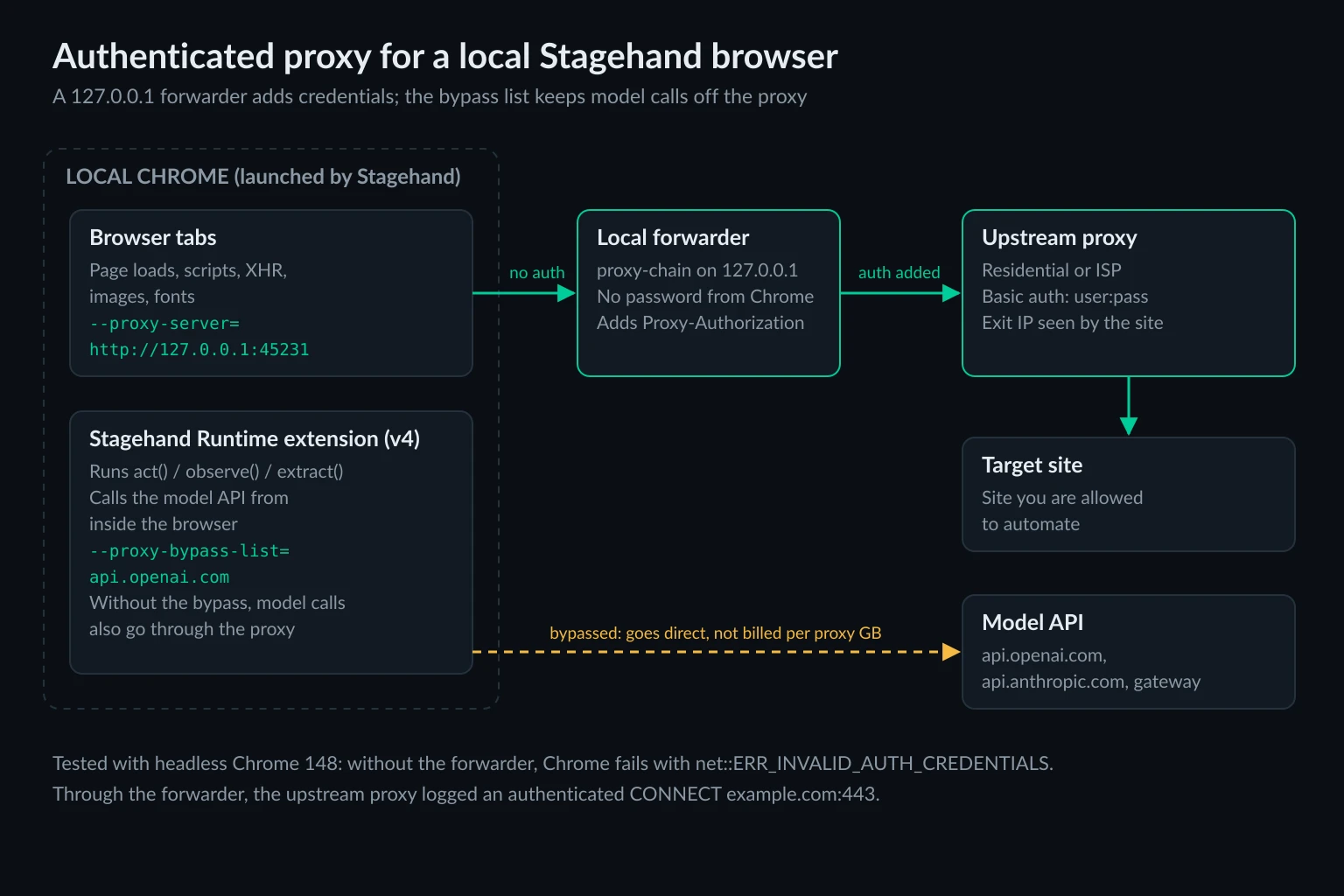
For several agents in parallel, call anonymizeProxy() once per upstream identity, such as one sticky session or one ISP IP each. Give each agent its own browser and profile directory. Each call opens its own local port, so identities can't mix.
The same forwarder fixes v3. Put the local URL in localBrowserLaunchOptions.proxy.server and leave out username and password. If you run Python or Go, or want the forwarder outside your process, a standalone forwarder such as GOST does the same job. The computer use agents guide shows that setup in Docker.
Connecting to a Chrome you started yourself
localBrowser.connect({ cdpUrl }) attaches Stagehand to a browser that is already running. Stagehand didn't launch it, so it can't add a proxy. Start that Chrome with --proxy-server yourself, and the same credential limit applies. In v4, connect() also finds or loads the Stagehand Runtime extension in that browser, so the model-call routing in the next section applies there too. A cloud CDP endpoint works the same way. The proxy belongs to whoever launched that browser. Anchor Browser vs Browserless compares two such endpoints on bring-your-own-proxy terms, and headless browsers for AI agents covers Steel and Lightpanda endpoints you can run yourself.
In Stagehand v4, Model Calls Go Through the Browser's Proxy
This v4 change affects your proxy bill. In v3, the SDK called OpenAI, Anthropic, or Google from your Node process. In v4, the AI SDK providers ship inside the Stagehand Runtime Chrome extension's service worker, and the npm package's Node code has no model client at all. When you pass model: { modelName, apiKey }, model requests start inside the browser. Only a custom model: { generate } callback runs in your own process.
A browser extension's network requests follow the browser's proxy settings. We checked this with a minimal MV3 extension whose service worker fetches https://api.openai.com/v1/models. With --proxy-server set, our logging proxy recorded CONNECT api.openai.com:443. With --proxy-bypass-list=api.openai.com;api.anthropic.com added, the request went direct and never reached the proxy.
For a local v4 setup, that means three things:
- Per-GB proxies bill for your model traffic. The page snapshots Stagehand sends to the model, and the responses, count toward a residential plan's bandwidth.
- Every model call takes an extra hop, which adds the proxy's latency to every
act(),observe(), andextract(). - The fix is the bypass list. Add your model provider's API host to
bypass, for example"localhost;127.0.0.1;api.openai.com". Use your gateway's hostname if you route models through one.
Chrome also makes its own background requests. With a fresh profile and Stagehand's default --disable-background-networking and --disable-component-update flags, our test Chrome still pulled about 460 KB from Google's gvt1.com update hosts through the proxy at startup. Stagehand creates a new temporary profile on every launch unless you set userDataDir. Check your proxy logs for that traffic if you pay per GB and launch often.
Verify the Exit IP Before the Agent Runs
Make the first navigation of every run an IP check, and fail fast if it's wrong:
const [page] = await browser.context.pages();
const res = await page.goto("https://api.ipify.org?format=json");
const { ip } = (await res?.json<{ ip: string }>()) ?? { ip: "" };
if (ip !== process.env.EXPECTED_EXIT_IP) {
  throw new Error(`Unexpected exit IP ${ip}`);
}
This takes one request and catches the common failures before the model spends tokens. The forwarder may not be running, the bypass list may be too broad, a session may have rotated, or you may be on your server's own IP after a config change. With rotating residential endpoints, check the country instead of the exact address. A geolocation API that returns the country code does that.
Choosing Proxies for Stagehand Agents
Stagehand agents log in, fill forms, and step through flows, so they need one stable identity per run. Per-request rotation splits a single page load across several exit IPs and breaks those sessions. The sticky vs rotating proxies guide explains why.
- Accounts the agent works in every day (dashboards, seller portals, back-office tools): a dedicated static ISP proxy with a persistent
userDataDir, so cookies and IP stay paired. ISP plans are priced per IP, which helps when v4 model traffic or heavy pages would otherwise be billed per GB. - Research across many sites, or checks from specific countries: sticky residential proxies, with one sticky session per task. Unknown Proxies sticky sessions hold an exit IP for up to 2 hours.
- Many independent page fetches: this may not need an agent at all. A plain HTTP client or Playwright with per-context proxies is cheaper and faster.
For the framework-neutral view of why browsing agents get blocked and which IP fixes which failure, see proxies for AI agents.
Troubleshooting Stagehand Proxy Errors
| Symptom | Likely cause | Fix |
|---|---|---|
Authenticated local browser proxies are not supported yet |
v4 localBrowser.launch() with username or password |
IP allowlisting or a local forwarder |
net::ERR_INVALID_AUTH_CREDENTIALS on every page |
Headless v3 with credentials in localBrowserLaunchOptions.proxy, or wrong credentials on the forwarder's upstream |
Use a forwarder; test the upstream URL with curl -x |
Proxy sign-in prompt, or goto() times out |
Headed v3 (the default) with credentials in localBrowserLaunchOptions.proxy; Chrome is waiting for proxy credentials |
Use a forwarder or IP allowlisting; don't type credentials into the prompt in an automated run |
net::ERR_PROXY_CONNECTION_FAILED |
Nothing listening at proxy.server, often a forwarder that exited or a wrong port |
Check that the forwarder is still running; see ERR_PROXY_CONNECTION_FAILED |
browserbase.launch() throws when you add an external proxy |
Browserbase could not connect to your proxy at session creation | Check host, port, scheme, and credentials; Browserbase accepts HTTP and HTTPS only |
ERR_TUNNEL_CONNECTION_FAILED on Browserbase |
A blocked site category, an unsupported city, or a temporary pool issue | Retry without the city, try without proxies, or route that domain to your own proxy |
| Exit IP is your server's IP | Attached with connect() to a Chrome started without --proxy-server, or the target matched bypass |
Launch through Stagehand or add the flag; tighten the bypass list |
| Proxy bandwidth far above page sizes | v4 model calls and Chrome background traffic going through the proxy | Bypass model API hosts; reuse a userDataDir |
To test the credentials outside the browser, run curl -x "$PROXY_URL" https://api.ipify.org. If curl fails, the problem is the proxy account, not Stagehand.
Use Stagehand Within Site Rules
A proxy changes where your agent connects from. It doesn't change what the agent is allowed to do. Automate accounts you own or are authorized to operate, follow the site's terms and rate limits, and use an official API when one exists. If a site challenges or blocks every run, treat that as the site's answer about automated access rather than a reason to rotate harder.
FAQ
What is Stagehand AI?
Stagehand is Browserbase's open-source, MIT-licensed SDK for browser agents. It adds act(), observe(), and extract() methods that take plain-language instructions, plus an agent mode for multi-step tasks. Version 4 has TypeScript, Python, and Go SDKs and runs against either a local Chrome or a Browserbase cloud session.
Does Stagehand support proxies?
Yes. Browserbase sessions support built-in proxies and external proxies with credentials through the proxies session option. Local Chrome supports a proxy.server and bypass list, but not proxy usernames and passwords. Use IP allowlisting or a local forwarder for those.
Can I use my own proxy with Stagehand on Browserbase?
Yes, on the Developer plan and above. Add { type: "external", server, username, password } to proxies in browserbase.launch() on v4, or in browserbaseSessionCreateParams on v3. Use domainPattern to send only some domains through it.
Does Stagehand support SOCKS5 proxies?
Locally, yes, for SOCKS5 proxies without authentication, because Chrome's --proxy-server accepts socks5://. Browserbase external proxies are HTTP and HTTPS only. For an authenticated SOCKS5 upstream, proxy-chain can forward to it from a local HTTP port.
Why does my Stagehand v3 proxy fail with ERR_INVALID_AUTH_CREDENTIALS?
Stagehand 3.x passes only the proxy server to Chrome and drops the username and password you set. The proxy answers 407, and Chrome has no credentials to send. Headless Chrome reports ERR_INVALID_AUTH_CREDENTIALS; a visible window usually shows a proxy sign-in prompt and the navigation times out. Run a local forwarder with the credentials, or allowlist your IP with the provider.
Conclusion
Stagehand AI proxy setup depends on where the browser runs. On Browserbase, set proxies when you create the session, either the built-in pool or your own HTTP proxy with credentials. On a local Chrome, proxy.server works only for proxies that need no password. Use IP allowlisting or a proxy-chain forwarder for everything else, and on v4 add your model API host to the bypass list so model calls don't spend proxy bandwidth.
If you're bringing your own proxies to Stagehand, compare static ISP and sticky residential plans on the pricing page. Choose by how long each agent needs to keep one identity.