Tavily, Exa, and Serper all give an AI agent web search through one API call, but they return different things. Tavily is a search-and-extract API built for LLMs: one call returns ranked results with cleaned page text, and Nebius bought the company in 2026. Exa runs its own index, tuned for descriptive queries, and sells page contents separately with control over how fresh they are. Serper returns Google's results page as JSON (titles, links, snippets) and nothing from the pages themselves, at $0.30 to $1.00 per 1,000 queries.
Pick Tavily when you want one call that returns readable text. Pick Exa when the query is a description ("startups that publish proxy benchmarks") rather than keywords, or when you need to control cache age. Pick Serper when you want Google's ranking cheaply and you'll read the pages yourself.
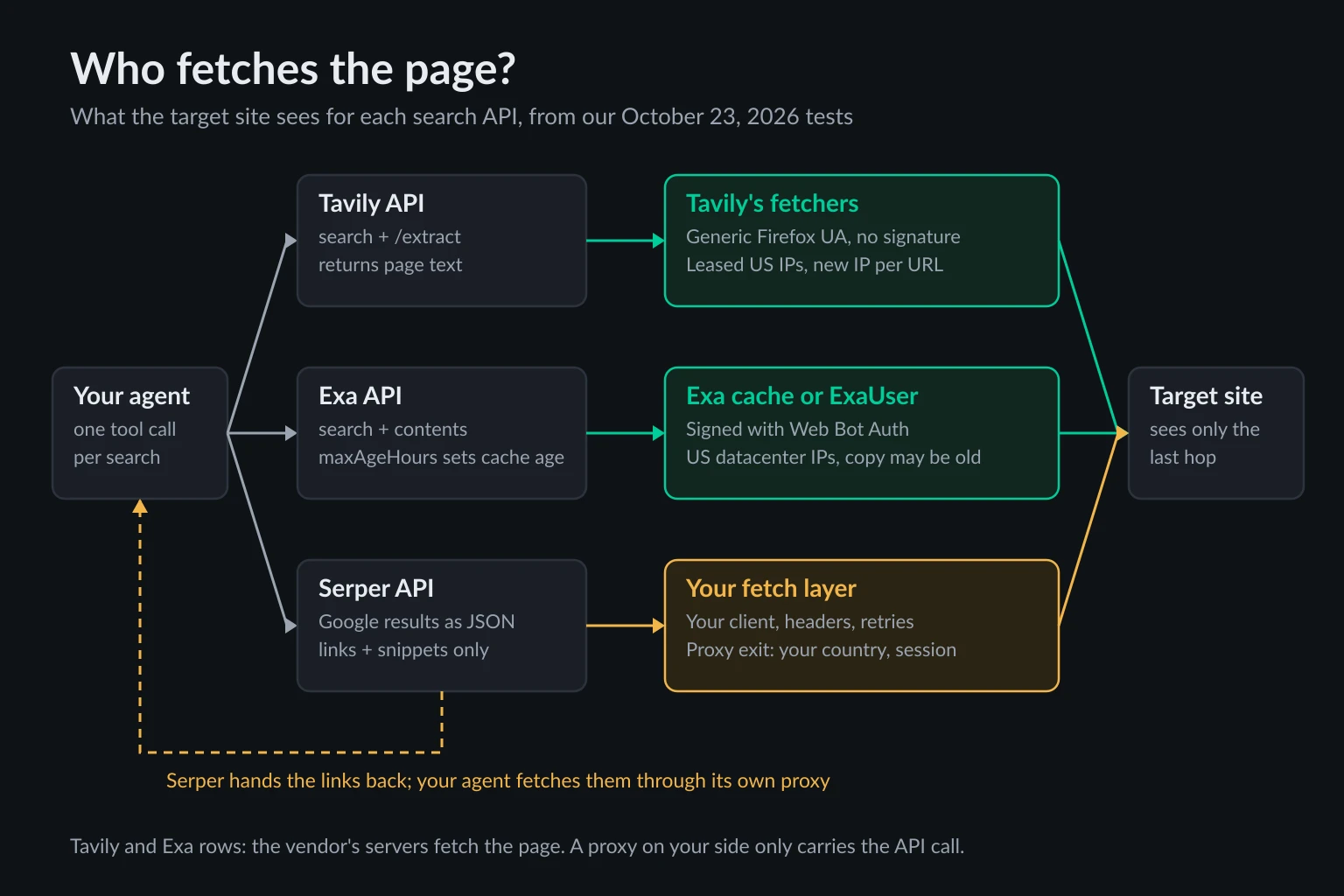
With Tavily and Exa, the vendor's servers fetch every page, from their own IP addresses. You don't choose the country or the session, and only Exa lets you set how old the copy may be. Agents that need fresh prices, localized pages, or sites that block crawlers need their own fetch layer. This guide covers what each API returns and costs, what target sites actually see when the vendor fetches for you, and how to build that fetch layer.
Tested on 2026-10-23. We probed all three APIs' error responses and read the official Python SDKs (tavily-python 0.8.5, exa-py 2.26.0). To see what a target site receives, we pointed Exa's hosted MCP server and Tavily's keyless /extract at pages that echo back the request. The fetch-layer script below ran through a local proxy that required credentials and counted bytes. We had no paid keys, so we didn't benchmark result quality. Prices come from each vendor's pricing page on that date.
Tavily vs Exa vs Serper at a glance
| Tavily | Exa | Serper | |
|---|---|---|---|
| Results come from | Tavily's own search backend | Exa's own index | Google's results page |
| Default search returns | Title, URL, relevance score, up to 3 content chunks per result | Title, URL, metadata; text, highlights, or summary if requested | Title, link, snippet, position, plus answer box and knowledge graph when Google shows them |
| Full page text | include_raw_content on search, or /extract (up to 20 URLs) |
contents.text on search, or /contents (up to 100 URLs) |
No (separate scrape endpoint) |
| Cache control | Not in the documented API | maxAgeHours (0 = always live) |
Not applicable |
| Location | country boosts ranking |
userLocation |
gl, hl, location |
| Entry price | 1,000 credits a month free; $0.008 per credit | $10 of credit a month free; $7 per 1,000 auto searches |
2,500 free queries; $1.00 per 1,000 |
| Bad key returns | 401 |
401 (402 with no key) |
403 |
Tavily: search and page text in one call
Tavily's POST https://api.tavily.com/search is built for an LLM's context window. Each result carries a content field with up to three relevant chunks (chunks_per_source, 1 to 3), and include_raw_content: "markdown" adds the full cleaned page. include_answer adds an LLM-written answer on top. The search reference lists 0 to 20 results per call.
curl -s https://api.tavily.com/search \
  -H "Authorization: Bearer $TAVILY_API_KEY" \
  -H "Content-Type: application/json" \
  -d '{"query": "residential proxy bandwidth pricing", "max_results": 5,
       "search_depth": "basic", "include_raw_content": "markdown",
       "include_usage": true}'
Credits are where Tavily rewards attention. Per the credits page and search reference:
basic,fast, andultra-fastsearches cost 1 credit.advancedcosts 2.auto_parameters: truecan switchsearch_depthtoadvanced, which costs 2 credits. Setsearch_depthyourself./extractcosts 1 credit per 5 successful URLs (basic) or 2 per 5 (advanced). Failed URLs are free./researchcosts 4 to 110 credits (mini) or 15 to 250 (pro), set by how much work it does.
The pricing page gives 1,000 free credits a month. After that it's $0.008 per credit pay-as-you-go, or $30 a month for 4,000. Nebius announced its acquisition of Tavily on February 10, 2026, and the API and pricing still run under the Tavily name.
Tavily also has a keyless mode for /search and /extract: send X-Tavily-Access-Mode: keyless and no key. It's rate-limited per IP address. Our first calls got 429 with "code": "ip_rate_limit_exceeded". The body said "retry_after_seconds": 60, but the Retry-After header said 600. A retry after 65 seconds got another 429, and calls went through again after the header's 10 minutes. Trust the header.
Two details matter when Tavily sits inside an agent tool. /extract returns HTTP 200 even when some URLs fail, and lists them in failed_results, so check that array instead of the status code. And the Python SDK doesn't retry. tavily-python 0.8.5 maps a 429 to UsageLimitExceededError and 403, 432 (plan limit), and 433 (pay-as-you-go limit) to ForbiddenError, and raises them straight to your code.
Exa: its own index, with contents you pay for
Exa doesn't wrap Google or Bing. It searches its own index, and its default type: "auto" is built for natural-language descriptions, which suits research agents looking for lists of companies, papers, or people. numResults goes up to 100. Page text, highlights, and summaries are opt-in and billed per page.
curl -s https://api.exa.ai/search \
  -H "x-api-key: $EXA_API_KEY" \
  -H "Content-Type: application/json" \
  -d '{"query": "proxy providers that publish per-GB residential pricing",
       "type": "auto", "numResults": 5,
       "contents": {"text": {"maxCharacters": 20000}, "maxAgeHours": 24}}'
The setting that matters most for agents is maxAgeHours. Per the search reference, 0 always fetches the page live, -1 always uses the cache, and leaving it out means "cached if available, live otherwise." The /contents endpoint returns a statuses array that says, per URL, whether the page was cached or crawled, plus an httpStatusCode when the fetch failed. Log it. It's the only signal of whether the text your agent reasoned over was fetched just now or came from the cache.
Prices from Exa's pricing page: $4 per 1,000 lite searches, $7 per 1,000 auto searches, $12 per 1,000 deep searches (each up to 10 results), and $1 per 1,000 pages for each content type you request. Text and highlights on the same page bill as two. You get $10 of credit every month without a card.
Exa also sells searches without a key. A keyless POST /search returned 402 Payment Required with an x402 offer of $0.007 in USDC, the same $7 per 1,000 as a keyed auto search. A wrong key returns 401 with "tag": "INVALID_API_KEY". exa-py 2.26.0 doesn't retry 429s either.
Serper: Google results as JSON, and nothing else
Serper is the thinnest of the three. POST https://google.serper.dev/search with an X-API-KEY header returns what Google showed for the query: organic results with title, link, snippet, and position, plus the answer box, knowledge graph, and other SERP features when they appear. Other paths cover news, images, places, maps, shopping, scholar, patents, and autocomplete.
curl -s https://google.serper.dev/search \
  -H "X-API-KEY: $SERPER_API_KEY" \
  -H "Content-Type: application/json" \
  -d '{"q": "residential proxy bandwidth pricing", "gl": "us", "hl": "en", "num": 10}'
That's cheap and fast (Serper advertises 1 to 2 seconds), and you get Google's ranking, which is still what many users mean by "search." But a snippet is 150-odd characters. If the agent needs to read the page, someone has to fetch it, and with Serper that's you. Serper runs a separate scrape endpoint at scrape.serper.dev, which we didn't test.
Pricing on serper.dev starts with 2,500 free queries and no card. Paid credit packs run from $50 for 50,000 ($1.00 per 1,000, 50 queries per second) to $3,750 for 12.5 million ($0.30 per 1,000, 300 per second). Credits expire after 6 months, and only successful responses are charged.
A wrong key returns 403 with {"message":"Unauthorized.","statusCode":403}. That's easy to misread in an agent loop as a blocked page. Treat a 403 from google.serper.dev as a configuration error, not something to retry.
Serper collects Google results on your behalf, and Google's terms and robots.txt disallow automated access to /search. Our guide to scraping Google search results covers what that means for SERP APIs and the ongoing Google v. SerpApi case.
What a target site sees when Tavily or Exa fetches for you
Search APIs that return page text fetch the pages themselves. The site sees the vendor, not you. To check what that looks like, we asked Exa's hosted MCP server (web_fetch_exa, which needs no key) for pages that echo back the request, with a random query string so no cached copy could exist.
The request arrived from 154.12.133.210 (AS174 Cogent, Walnut, California) on one run and 192.241.116.50 (AS55286 B2 Net Solutions, Los Angeles) on another, both datacenter addresses. It identified itself openly:
User-Agent: Mozilla/5.0 (compatible; ExaUser/1.0; +https://crawler.exa.ai/exauser)
Signature-Agent: "https://crawler.exa.ai"
Signature-Input: sig=("@authority" "signature-agent");keyid="fEcp7SI5JcfvpiZ1M638-CDmUFO6m0fTqc8_Outh7U4";...;tag="web-bot-auth";alg="ed25519"
That's Web Bot Auth, an RFC 9421 message signature. Exa's ExaUser page says the fetcher is verified automatically on Cloudflare, Akamai, and other providers, that robots.txt "may not apply" because a user started the fetch, and that it doesn't try to get past logins, paywalls, or CAPTCHAs. That's transparent crawler behavior. It also means a site that blocks signed AI agents blocks your agent's reads, and you can't change that from your side.
The cache showed up just as clearly:
- Repeat fetches were cached copies. The same URL fetched 20 seconds later came back with an identical response, including the same random UUID and signature timestamp, in 6.8 ms instead of 417 ms.
- Copies without a cache-buster can be old.
https://ipinfo.io/jsonwithout a query string came back showing an AWSus-west-2address, not either of the crawler IPs above, so it was an earlier fetch. - A news page was 13 days old. On October 23, Exa returned the Reuters technology page in 11 ms. The newest story on it was dated October 10.
The cache helped too. From our test host, a plain HTTP client got 403 from Stack Overflow and 401 from Reuters, and Exa served both from its copy. If an old copy works for the task, that's a real advantage. If the agent is checking a price, a stock level, or today's news, it's a silent error. The hosted MCP tool exposes no freshness setting, so these were default-cache results. Through the API, maxAgeHours: 0 forces a live fetch, still from Exa's IPs.
Tavily looked different. We sent the same kind of cache-busted echo URLs to keyless /extract, 10 URLs across three calls:
- No crawler identity. The request arrived as
Mozilla/5.0 (X11; Ubuntu; Linux x86_64; rv:154.0) Gecko/20100101 Firefox/154.0withAccept: */*, and no signature headers. - A different IP per URL, even within one call. We saw
136.0.94.182,136.0.94.246, and151.245.223.39. All three sit in ranges leased through the IPXO marketplace and announced by US carrier networks (AS7029 Windstream, AS5650 Verizon Business). ip-api.com classified one as hosting and another as a proxy. - Many plain pages failed. 6 of the 10 URLs came back in
failed_resultsas"Failed to fetch url"or"Error fetching content", including Reuters and every JSON echo service except ipinfo.io. The HTTP status was still200. - Raw content includes the page chrome. The Stack Overflow question came back as 73,932 characters of Markdown that opens with the sign-up modal and a tag list before the question. Budget context for that, or pass a
queryso/extractreturns ranked chunks instead.
Neither approach is wrong, but they fail differently. Exa's fetcher is easy for a site to recognize and allow or block, and its cache can hand you a copy that's days old unless you set maxAgeHours. Tavily's fetcher looks like a generic browser from rotating addresses, and pages that don't work come back as a bare "Failed to fetch url". Neither lets you choose the exit country or keep a session.
The same applies to every agent framework that wraps these APIs. LangChain, CrewAI, and Pydantic AI tools for Tavily and Exa only send the API call from your machine. The Pydantic AI web tools guide and the CrewAI tools guide show this per tool. tavily-python's proxies= argument (or TAVILY_HTTPS_PROXY) only routes that API call, which is useful behind a corporate egress proxy and changes nothing about what target sites see.
When you need your own fetch layer
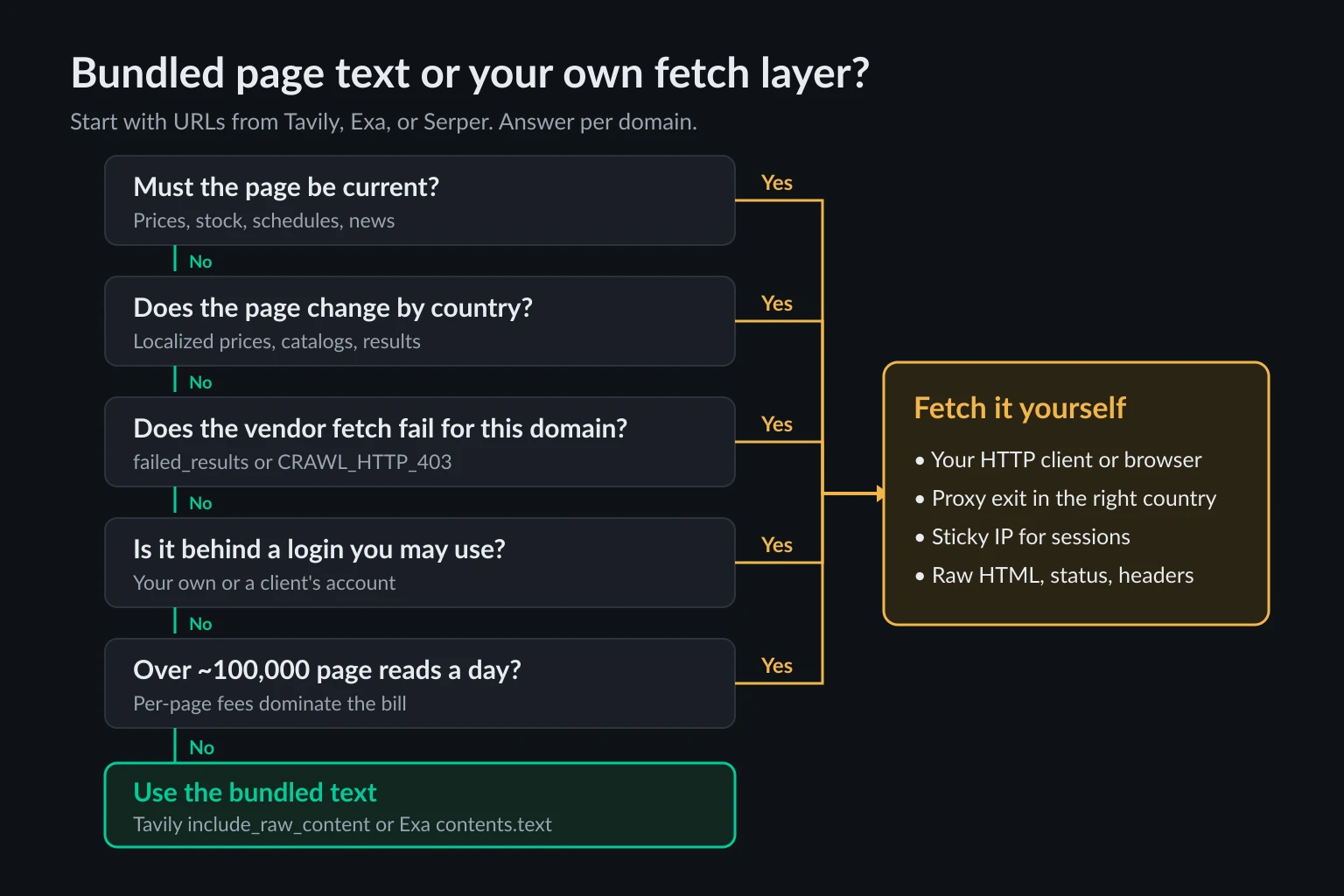
A fetch layer is the code that takes URLs from search and downloads the pages from infrastructure you control: your HTTP client, your headers, your proxy, your retry policy. You need one when any of these is true:
- Freshness is the point. Prices, stock, schedules, status pages, and news change faster than a search index refreshes. Exa's
maxAgeHours: 0forces a live fetch, but it still comes from Exa's IPs, and a failure comes back as a status tag rather than a page you can debug. - Location changes the page. Tavily's
countryboosts ranking and Serper'sgllocalizes Google's results, but neither changes where pages are fetched from. Our Exa fetches all came from US datacenters. If a retailer shows different prices in Germany, you need an exit IP in Germany. - The site blocks the vendor's fetcher. A signed, self-identified crawler is easy to block, and blocking it is the site owner's right. Watch
failed_results(Tavily) andstatuses(Exa). If one domain keeps failing, a search API won't fix it. - The page sits behind a session. None of the three logs in for you. Pages from an account you're authorized to use need cookies, a consistent IP across requests, and your own client.
- Volume makes per-page pricing expensive. At 100,000 page reads a day, $1 to $1.60 per 1,000 pages (Exa contents, Tavily
/extract) is $100 to $160 a day before search. Bandwidth for plain HTML costs a fraction of that, as the next section shows. - You need the raw response. Audits, change detection, and structured extraction want the exact HTML, status code, and headers, not a cleaned summary.
If none of those apply, don't build one. A research agent reading public documentation and evergreen articles is better served by Tavily's include_raw_content or Exa's contents.text than by code you have to maintain.
Cost per 1,000 agent tasks
Take a typical research step: one search, then read the full text of the top 5 results. At list prices on October 23, 2026, that costs:
| Setup | What you pay for | Per 1,000 tasks |
|---|---|---|
Tavily search with include_raw_content |
1 credit | $8.00 |
Tavily search, then /extract on 5 URLs |
1 + 1 credits | $16.00 |
Exa lite search with contents.text |
$4 + 5 × $1 per 1,000 pages | $9.00 |
Exa auto search with contents.text |
$7 + 5 × $1 per 1,000 pages | $12.00 |
| Serper search, then your own HTML fetch | $1.00 + about 0.35 GB of proxy traffic | about $2 at $3/GB |
The bandwidth figure comes from measurement, not guesswork. We fetched 7 typical pages (a Wikipedia article, Python docs, two news homepages, a GitHub repo, and two API docs pages) as plain HTML with compression on. They averaged about 66 KB (67,117 bytes) on the wire, from 29 KB to 143 KB. Five pages plus headers and TLS overhead is about 0.35 MB per task, or 0.35 GB per 1,000 tasks. Compression matters here: in the script test below, two pages that decompressed to 515 KB of HTML moved 109 KB through the proxy, and proxy plans bill the compressed bytes. At $8/GB, closer to premium residential pricing, the Serper row is about $3.80, still below every hosted option in the table.
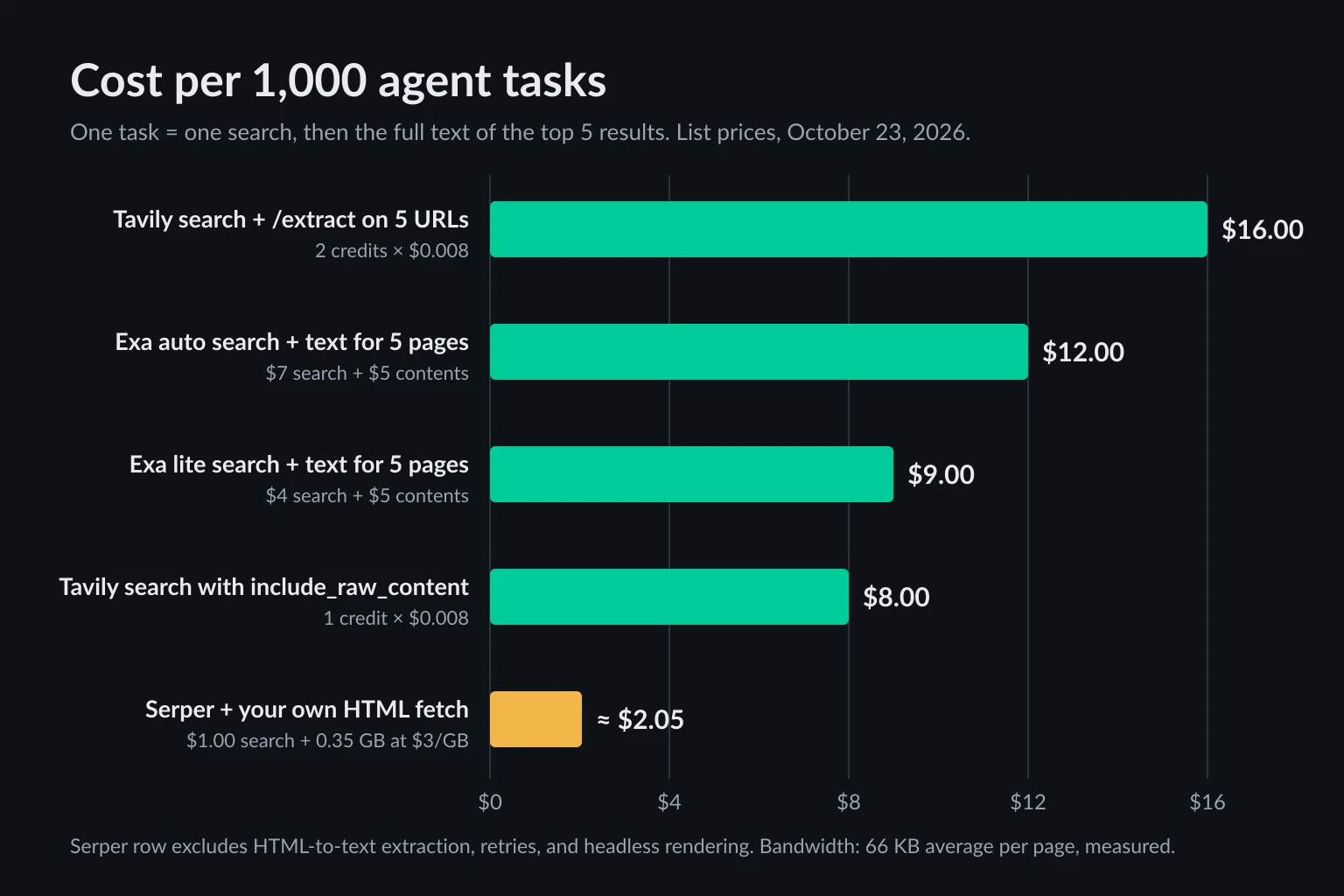
The cheap row hides costs. You write and run the HTML-to-text step that Tavily and Exa include. Some pages fail and need retries. Pages that only render with JavaScript need a headless browser, which loads scripts, images, and fonts and can move several megabytes per page instead of 66 KB. Estimate that before you commit: the data usage calculator turns page weight and request counts into monthly GB. A mixed setup is common: let Tavily or Exa handle general reading, and send only the domains from the list above through your own fetch layer.
Build a search-then-fetch layer with Serper and a proxy
This script runs one Serper search, then fetches each result through your proxy with browser-like headers. It retries a 429 using Retry-After, stops reading any response at 5 MB, and records everything else as-is. It needs Python 3.9+ and pip install requests.
import os
import time

import requests

SERPER_URL = "https://google.serper.dev/search"
PROXY_URL = os.environ["PROXY_URL"]  # http://user:pass@host:port
MAX_BYTES = 5_000_000  # stop reading at 5 MB; the proxy bills every byte

BROWSER_HEADERS = {
    "User-Agent": (
        "Mozilla/5.0 (Windows NT 10.0; Win64; x64) AppleWebKit/537.36 "
        "(KHTML, like Gecko) Chrome/141.0.0.0 Safari/537.36"
    ),
    "Accept": "text/html,application/xhtml+xml,application/xml;q=0.9,*/*;q=0.8",
    "Accept-Language": "en-US,en;q=0.9",
}


def search(query: str, country: str = "us", num: int = 10) -> list[str]:
    """One Serper call. The API doesn't need your scraping proxy."""
    r = requests.post(
        SERPER_URL,
        headers={"X-API-KEY": os.environ["SERPER_API_KEY"]},
        json={"q": query, "gl": country, "num": num},
        timeout=15,
    )
    r.raise_for_status()  # a 403 here means a bad key, not a blocked page
    return [item["link"] for item in r.json().get("organic", [])]


def fetch(session: requests.Session, url: str, attempts: int = 3) -> dict:
    for attempt in range(attempts):
        try:
            with session.get(url, timeout=20, stream=True) as r:
                body = bytearray()
                for chunk in r.iter_content(64 * 1024):
                    body += chunk
                    if len(body) > MAX_BYTES:  # a PDF or dataset, not a page
                        break
        except requests.RequestException as exc:
            return {"url": url, "status": None, "error": type(exc).__name__}
        if r.status_code == 429 and attempt < attempts - 1:
            wait = r.headers.get("Retry-After", "")
            time.sleep(min(int(wait), 60) if wait.isdigit() else 5 * (attempt + 1))
            continue
        ok = r.ok and len(body) <= MAX_BYTES
        return {
            "url": url,
            "status": r.status_code,
            "bytes": len(body),
            "html": body.decode(r.encoding or "utf-8", "replace") if ok else None,
        }


if __name__ == "__main__":
    session = requests.Session()
    session.trust_env = False  # otherwise HTTPS_PROXY in the env overrides the line below
    session.proxies = {"http": PROXY_URL, "https": PROXY_URL}
    session.headers.update(BROWSER_HEADERS)

    for url in search("residential proxy bandwidth pricing", country="us", num=5):
        page = fetch(session, url)
        print(page["status"], page.get("bytes", page.get("error")), url)
        # page["html"] goes to your extractor (trafilatura, readability, an LLM)
We ran it with requests 2.34.2 on Python 3.14, with Serper replaced by a local stub that returned five test URLs, and every fetch going through a local proxy that required a password and counted bytes. The output:
200 298925 https://en.wikipedia.org/wiki/Proxy_server
429 0 https://httpbin.org/status/429
403 0 https://httpbin.org/status/403
200 216510 https://docs.python.org/3/library/urllib.request.html
None ConnectionError https://nonexistent.invalid/
The 429 was retried twice with 5 and 10 second waits, because httpbin sends no Retry-After. The 403 was recorded and left alone. The session ignored a bogus HTTPS_PROXY we exported to test trust_env = False, which matters because requests lets environment proxies override session.proxies. The requests no-proxy guide explains that precedence.
What to change for production:
- Pick the proxy type by job. Rotating residential proxies suit one-off reads across many domains, and a new IP per request is fine there. Logged-in or multi-step fetches need a sticky session or a static ISP IP, so the site sees one consistent visitor.
- Match the exit country to the page. If
search()runs withgl="de", fetch through a German exit. Otherwise you read the US version of a page Google ranked for Germany. - Pace per host, not globally. Agents fan out. Five parallel tool calls to the same domain look like a burst. Our guide to crawling without getting blocked covers per-host delays and robots.txt.
- Stop on 403. A 403 usually means the site has decided not to serve you. Rotating IPs to get around it ignores that decision and is the fastest way to get a whole range blocked. Log it and route the domain elsewhere, or drop it.
Respect robots.txt and site terms in the fetch layer. That's easier here than with a hosted fetcher, because you decide the policy instead of inheriting the vendor's.
Handle each API's errors in your agent tool
Agent tool wrappers tend to send any error string back to the model, which then retries the same call. Map these first:
| Response | Tavily | Exa | Serper |
|---|---|---|---|
| Bad or missing key | 401 |
401 INVALID_API_KEY (402 with no key at all) |
403 |
| Rate limited | 429, may include Retry-After |
429 RATE_LIMIT_EXCEEDED; 503 SERVICE_OVERLOADED |
Not documented |
| Out of credit | 432 plan limit, 433 pay-as-you-go limit |
402 NO_MORE_CREDITS or a budget tag |
Requests refused at zero balance |
| Partial failure | 200 with failed_results |
200 with per-URL statuses, such as CRAWL_HTTP_403 |
Not applicable |
Retry only the rate limits and overload errors, with backoff, honoring Retry-After when present. Surface key and credit errors to a human, not the model. Pass partial failures to the model as data, such as "3 of 5 pages failed: 403, 403, timeout", so it can decide whether the remaining sources are enough.
Frequently asked questions
What is Tavily?
Tavily is a web search API for AI agents and RAG pipelines. It returns ranked results with page text already extracted for an LLM, and it also offers extract, crawl, map, and research endpoints. Nebius announced it was acquiring Tavily in February 2026.
Is Tavily free?
Partly. Every account gets 1,000 API credits a month, and a basic search costs 1 credit. Keyless access to /search and /extract also exists, rate-limited per IP address. Beyond that it's $0.008 per credit.
Is Serper the official Google Search API?
No. Serper is a third-party service that returns Google results as JSON. Google's own Custom Search JSON API is closed to new customers, and existing customers have until January 1, 2027 to move off it.
Can I route Tavily or Exa through my own proxy?
You can route the API call. tavily-python accepts proxies=, and exa-py uses requests, which follows HTTPS_PROXY. The pages are still fetched by Tavily's or Exa's servers from their own IPs. To control where pages are fetched from, fetch them yourself.
Which is best for LangChain or CrewAI?
All three have integrations: langchain-tavily, langchain-exa, and GoogleSerperAPIWrapper in LangChain, and Tavily, Exa, and Serper tools in crewai-tools. Choose by what the agent needs back (page text, semantic search, or Google ranking), not by framework. For MCP clients such as Claude Code or Cursor, see the best MCP servers for web access.
Conclusion
Tavily vs Exa vs Serper comes down to what your agent needs back. Tavily returns page text in one call at about $8 per 1,000 searches. Exa searches its own index and lets you pay for contents with explicit cache control. Serper gives you Google's results for $1 per 1,000 or less and leaves the pages to you.
Tavily and Exa fetch pages from their own infrastructure: Exa as a signed crawler or from cache, Tavily from rotating leased IPs. You can't pick the country or the session. When freshness, location, blocks, sessions, or volume matter, add your own fetch layer: search with whichever API ranks best for your queries, then fetch through a proxy you control. If that's where you're heading, compare residential and ISP plans: residential bills by the GB from the cost section, and ISP bills by the IP with unmetered bandwidth.