Pydantic AI, the Pydantic team's Python agent framework, gives an agent web access in three ways, and each one leaves from a different place. Native tools such as WebSearchTool and WebFetchTool run on the model vendor's servers, so your proxy never sees them. The local web_fetch_tool and the model provider clients run in your Python process on httpx2, and they follow HTTPS_PROXY from the environment. A custom tool uses whatever HTTP client you give it.
That makes Pydantic AI proxy setup simple to start and awkward to finish. web_fetch_tool has no proxy or http_client argument, it opens a new tunnel for every fetch, and it doesn't back off when a site rate-limits you. A 429 goes straight back to the model as a retry prompt. For anything beyond light research, write your own fetch tool: give it a dedicated httpx2 client with the proxy on the transport, and have it honor Retry-After.
Tested on 2026-10-22 with pydantic-ai-slim 2.59.0 (the current PyPI release), httpx2 2.16.0, openai 3.36.0, ddgs 9.16.0, and Python 3.12. All traffic went through a local proxy that required credentials and logged every request, and the rate-limit tests used a local server that returns 429 with Retry-After: 2.
Where Pydantic AI web traffic comes from
Before you set a proxy, work out which of these components your agent actually uses:
| Component | Where the request leaves from | HTTP client | Follows HTTPS_PROXY |
Proxy setting |
|---|---|---|---|---|
Model providers (OpenAIProvider, AnthropicProvider, ...) |
Your process | httpx2.AsyncClient built by the provider |
Yes | http_client= |
Native WebSearchTool, WebFetchTool |
Model vendor's servers | Vendor's | Not applicable | None |
WebFetch capability |
Vendor if the model supports it, otherwise local | Depends on the model | Only on the local path | local= |
web_fetch_tool() |
Your process | New httpx2 client per call | Yes, tunnels to the resolved IP | None |
duckduckgo_search_tool() |
Your process | ddgs (primp) |
Yes, in our test | DDGS(proxy=...) or DDGS_PROXY |
Your own @agent.tool |
Your process | Yours | Your choice | Yours |
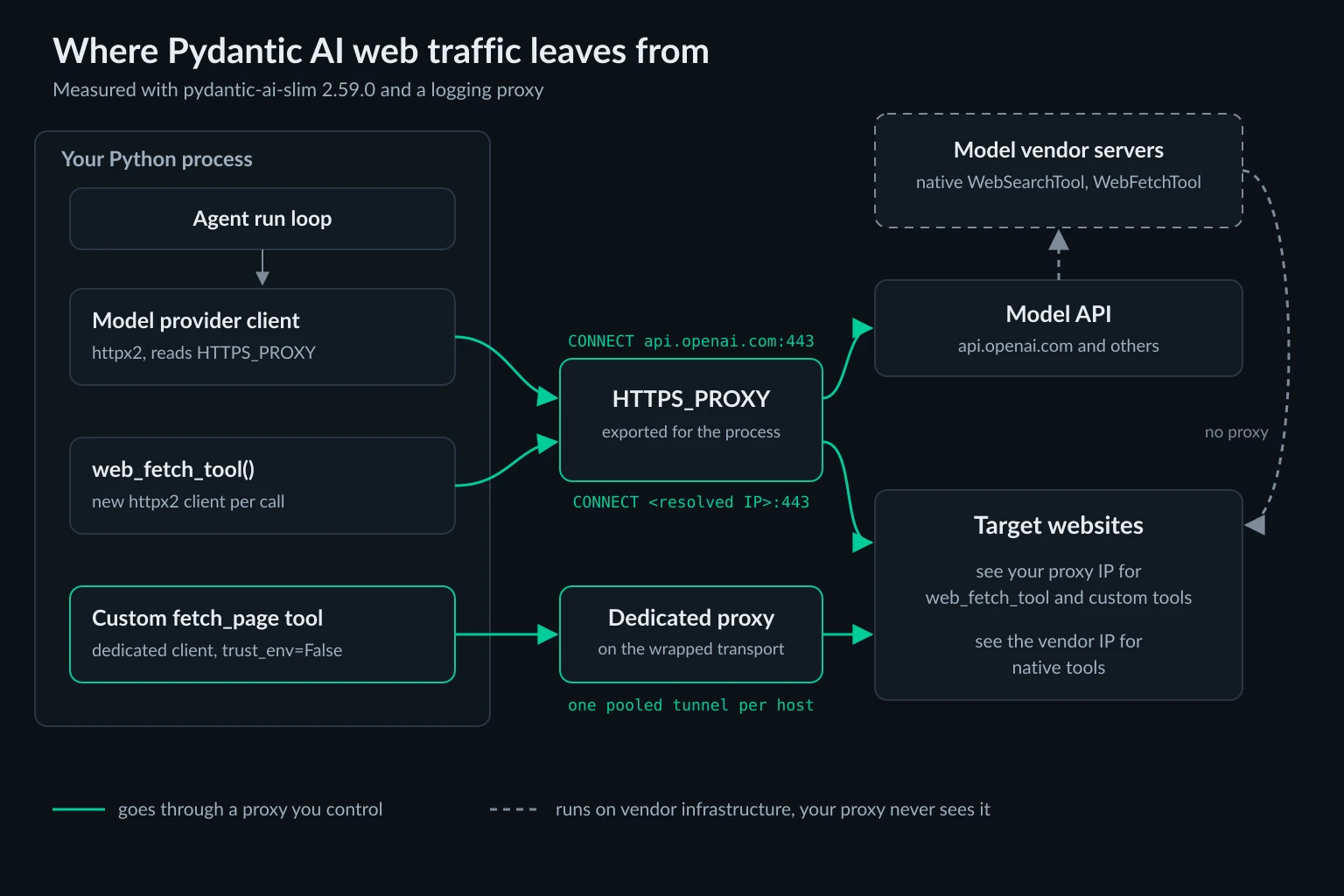
Native tools are the ones that surprise people. Their requests come from the vendor's IP ranges, and a proxy can't change that. WebSearchTool accepts a user_location, but that only localizes the results. It doesn't change where the request comes from. The native tools docs list which providers support each one.
Search tools that call a hosted API, such as the Tavily and Exa common tools, make only the API call from your machine. Tavily or Exa crawls the pages, so the target sites never see your proxy either.
The WebFetch capability decides egress by model
The WebFetch capability looks portable, but the same agent code fetches from different places depending on the model:
from pydantic_ai import Agent
from pydantic_ai.capabilities import WebFetch

agent = Agent("openai:gpt-5-mini", capabilities=[WebFetch(local=True)])
On a model with native URL fetching, which in 2.59.0 means Anthropic or Google, the vendor fetches the page. On a model without it, local=True swaps in web_fetch_tool() and the fetch runs on your machine. Leave local out and run the agent on OpenAI's Chat Completions API, and you get UserError: Native tool(s) ['WebFetchTool'] not supported by this model before the first request. Setting max_uses forces the native path, because only the native tool supports it.
If you want every fetch to go through your own proxy whatever the model, pass your own tool as the fallback and turn native fetching off. Use the fetch_page function defined further down, but leave off its @agent.tool_plain(retries=2) decorator. If the agent already has a tool named fetch_page, Pydantic AI raises UserError: FunctionToolset 'web_fetch' defines a tool whose name conflicts with existing tool from the agent: 'fetch_page'. Wrap the function in Tool so the retry budget carries over:
from pydantic_ai import Agent, Tool
from pydantic_ai.capabilities import WebFetch

agent = Agent(
    "openai:gpt-5-mini",
    capabilities=[WebFetch(native=False, local=Tool(fetch_page, max_retries=2))],
)
Passing the bare function also works, but then the tool gets the agent's default retry budget instead of 2. We ran this setup with a scripted model. It saw one tool, fetch_page, the proxy logged the request as CONNECT example.com:443, and the run stopped after the third failed call with exceeded max retries count of 2.
Pydantic AI proxy behavior in web_fetch_tool
web_fetch_tool() is the quickest way to give an agent the web:
from pydantic_ai import Agent
from pydantic_ai.common_tools.web_fetch import web_fetch_tool

agent = Agent(
    "openai:gpt-5-mini",
    tools=[
        web_fetch_tool(
            allowed_domains=["example.com"],
            headers={"User-Agent": "acme-research-agent/1.0 (+https://acme.example/bot)"},
            timeout=20,
        )
    ],
)
The common tools docs cover installing the web-fetch extra. The factory takes no proxy argument. To route it, export HTTPS_PROXY=http://USERNAME:PASSWORD@proxy.example.com:8080 before you start the process. That works, but four details matter once you look at the proxy log.
It tunnels to an IP, not the hostname. To block requests to private addresses, the tool resolves the hostname on your machine and then asks the proxy for CONNECT 172.66.147.243:443 instead of CONNECT example.com:443. TLS still verifies the real hostname through SNI. As a side effect, NO_PROXY doesn't apply: we set NO_PROXY=example.com and the fetch still went through the proxy, because httpx2 matched the rule against the IP. If you need some hosts to go direct, use a custom tool. The Requests NO_PROXY guide covers how the matching normally works.
Every call opens a new tunnel. Each fetch creates and closes its own httpx2 client, so nothing is pooled. Two back-to-back fetches of example.com, in separate model turns, showed up as two separate CONNECT lines. On a gateway that assigns a new exit IP per connection, every page can arrive from a different IP. Cookies don't carry over between calls either, so a login or a multi-step flow won't hold.
The default User-Agent is pydantic-ai/2.59.0. Our test server logged that string on every request. Some sites block unknown agents outright, and a 403 Forbidden is what you'll see. Use headers= to send a User-Agent that identifies your agent and a contact URL.
Proxy errors reach the model. With a wrong password, the agent got a retry prompt that said Failed to fetch https://example.com: 407 Proxy Authentication Required. The model can't fix your credentials, so the run spends model turns on an error it can't act on. The 407 guide covers the usual credential and encoding mistakes.
Keep model API calls off the proxy
An exported HTTPS_PROXY also catches the model client. Our proxy logged CONNECT api.openai.com:443 as soon as the agent made its first model request. To keep model traffic direct, give the provider a client that ignores the environment:
import httpx2

from pydantic_ai import Agent
from pydantic_ai.models.openai import OpenAIChatModel
from pydantic_ai.providers.openai import OpenAIProvider

direct = httpx2.AsyncClient(trust_env=False, timeout=httpx2.Timeout(600, connect=5))
model = OpenAIChatModel("gpt-5-mini", provider=OpenAIProvider(http_client=direct))
agent = Agent(model)
With this client, the proxy saw no model traffic at all. The timeout matches what Pydantic AI uses when it builds the client itself: 600 seconds overall, with 5 seconds to connect. NO_PROXY=api.openai.com also works for model clients, because they connect by hostname.
How Pydantic AI handles rate limits and 429s
A 429 can come from two places in an agent, and Pydantic AI treats them very differently.
Model API 429s are retried by the vendor SDK. The OpenAI and Anthropic SDKs default to max_retries=2, and Pydantic AI doesn't change that. Against a mock endpoint that always answered 429 with Retry-After: 1, the SDK sent three requests one second apart. It then raised ModelRateLimitError, which is also a ModelHTTPError with status_code 429. FallbackModel falls back on ModelAPIError by default, so a rate-limited primary model hands off to the next one.
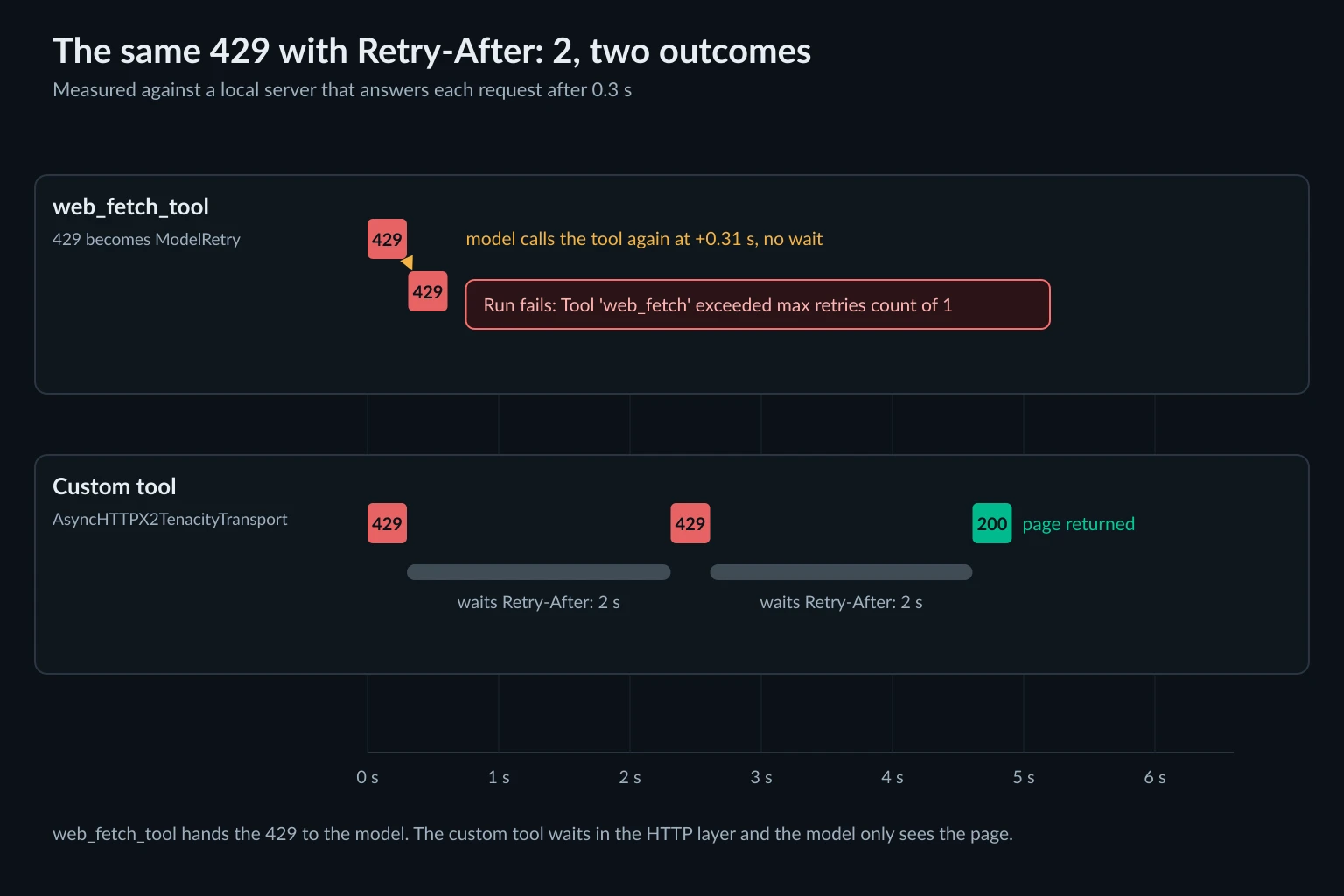
Target-site 429s from web_fetch_tool become a model retry. The tool catches the HTTPStatusError and raises ModelRetry. The model then sees this:
Failed to fetch http://127.0.0.1:18914/limited: Client error '429 Too Many Requests' for url 'http://127.0.0.1:18914/limited'
For more information check: https://developer.mozilla.org/en-US/docs/Web/HTTP/Status/429
The Retry-After value isn't in the message, and nothing waits. Our scripted model called the tool again immediately, and the second request reached the server 0.3 seconds after the first. Tools get one retry by default, so the second 429 ended the run with UnexpectedModelBehavior: Tool 'web_fetch' exceeded max retries count of 1. A real model may rephrase and try another URL instead, but the tool won't wait for it. The tool retries docs explain the budget, which Agent(retries=...) or @agent.tool(retries=...) can raise.
Parallel tool calls arrive as a burst. When a model asks for five fetches in one response, Pydantic AI runs them concurrently. Our test server logged all five requests within 1 ms of each other, with five in flight at once. Nothing limits requests per host. Your options:
@agent.tool(sequential=True)makes that tool run alone. In our test, five calls ran one at a time, 0.3 seconds apart.model_settings={"parallel_tool_calls": False}asks the model for one tool call per response, on providers that support the setting.- A semaphore inside your tool caps concurrent fetches without serializing everything.
Agent-level limits count runs and model requests, not site requests. Agent(max_concurrency=4) caps how many runs execute at once. UsageLimits(request_limit=...) counts model requests and defaults to 50. UsageLimits(tool_calls_limit=8) is the one that caps fetches per run. Pass it to agent.run() so a confused model can't loop through pages forever.
None of these settings understand a site's rate limit. Our HTTP 429 guide covers how servers count requests and why backing off beats rotating IPs.
A proxied fetch tool for Pydantic AI with Retry-After backoff
This tool puts the proxy, the backoff, and the domain check in the HTTP layer, so the model never has to decide how long to wait. Install the extras first. The retries extra pulls in tenacity:
pip install "pydantic-ai-slim[openai,retries]"
import os

import anyio
import httpx2
from tenacity import retry_if_exception_type, stop_after_attempt

from pydantic_ai import Agent, ModelRetry, UsageLimits
from pydantic_ai.retries import AsyncHTTPX2TenacityTransport, RetryConfig, wait_retry_after

PROXY_URL = os.environ["SCRAPE_PROXY_URL"]  # http://user:pass@host:port
ALLOWED_HOSTS = {"example.com", "www.example.com"}
MAX_BYTES = 500_000  # stop downloading after ~500 KB


def raise_on_throttle(response: httpx2.Response) -> None:
    # Only 429 and 503 are worth retrying. A 403 won't change on the next attempt.
    if response.status_code in (429, 503):
        response.raise_for_status()


async def check_url(request: httpx2.Request) -> None:
    # Runs before the first request and before every redirect hop.
    url = request.url
    # url.port is None only on the scheme's default port (80 or 443).
    if url.scheme not in ("http", "https") or url.port is not None or url.host not in ALLOWED_HOSTS:
        raise ValueError(f"{url} is not allowed")


transport = AsyncHTTPX2TenacityTransport(
    RetryConfig(
        retry=retry_if_exception_type(httpx2.HTTPStatusError),
        wait=wait_retry_after(max_wait=60),
        stop=stop_after_attempt(4),
        reraise=True,
    ),
    # The proxy goes on the wrapped transport, not on the client.
    wrapped=httpx2.AsyncHTTPTransport(proxy=PROXY_URL),
    validate_response=raise_on_throttle,
)

fetch_client = httpx2.AsyncClient(
    transport=transport,
    trust_env=False,
    follow_redirects=True,
    timeout=httpx2.Timeout(30, connect=10),
    headers={"User-Agent": "acme-research-agent/1.0 (+https://acme.example/bot)"},
    event_hooks={"request": [check_url]},
)
in_flight = anyio.Semaphore(2)  # also held while a call waits out Retry-After

agent = Agent("openai:gpt-5-mini", instructions="Answer from the pages you fetch. Cite the URL.")


@agent.tool_plain(retries=2)
async def fetch_page(url: str) -> str:
    """Fetch a public web page and return the first 20,000 characters of its body."""
    async with in_flight:
        try:
            async with fetch_client.stream("GET", url) as response:
                if response.status_code >= 400:
                    return f"HTTP {response.status_code} from {url}. Do not retry this URL."
                body = bytearray()
                async for chunk in response.aiter_bytes():
                    body += chunk
                    if len(body) >= MAX_BYTES:
                        break
        except ValueError as e:
            raise ModelRetry(f"{e}. Allowed hosts: {', '.join(sorted(ALLOWED_HOSTS))}")
        except httpx2.HTTPStatusError as e:
            return f"HTTP {e.response.status_code} from {url} after 4 attempts. Do not fetch this host again in this run."
    return body.decode(response.encoding or "utf-8", errors="replace")[:20_000]


if __name__ == "__main__":
    result = agent.run_sync(
        "What does https://example.com say?",
        usage_limits=UsageLimits(request_limit=10, tool_calls_limit=8),
    )
    print(result.output)
We tested this tool without a model API key. A scripted FunctionModel was swapped in with agent.override(), which the testing guide describes. The scripted model asked for several URLs in one response. Here is what happened to each request:
| Request | Result |
|---|---|
| Page that returned 429 twice, then 200 | Waited 2 s twice, then returned the page |
| Page that always returned 429 | Four attempts 2 s apart, then the "do not fetch this host again" text |
Host not on the allowlist, or https://example.com:8443/ |
ModelRetry listing the allowed hosts. No request was sent |
Allowed page that redirected to 169.254.169.254 |
ModelRetry. The redirect wasn't followed |
| 5 MB page | Reading stopped at 500 KB, and the tool returned 20,000 characters |
https://example.com/x |
HTTP 404 ... Do not retry this URL. |
| Wrong proxy password | The run stopped with ProxyError: 407 Proxy Authentication Required |
Bogus HTTPS_PROXY also exported |
Ignored. Every request used SCRAPE_PROXY_URL |
The test server never saw more than two requests in flight. The design choices behind those results:
The tool returns text for a block and raises ModelRetry for bad input. A ModelRetry uses up the tool's retry budget, and once the budget runs out the run fails. A rate limit that outlasts four attempts isn't something the model can fix, so the tool tells it to move on. A URL outside the allowlist is something the model can fix, so that case raises ModelRetry.
Proxy failures raise. httpx2.ProxyError isn't caught, so a bad password stops the run with a clear error instead of reaching the model. That's an operator problem, not a model problem.
trust_env=False keeps the route fixed. A stray HTTPS_PROXY or NO_PROXY in the environment can't change where this tool sends traffic, and the model client can keep its own route.
The allowlist checks the URL, not the IP. The hook refuses anything that isn't http or https on the default port, or isn't on the host list. httpx2 runs request event hooks before every redirect hop, so a redirect to another host or port is refused too. The hook doesn't check what the hostname resolves to, so it isn't a full replacement for web_fetch_tool's private-address check. Keep the list to public hosts you trust. Without a hook like this, a custom tool will fetch any URL the model picks.
The body is streamed with a size cap. fetch_client.get() would load the whole response into memory before you cut it to 20,000 characters, and you'd pay proxy bandwidth for all of it. Streaming stops reading at 500 KB. web_fetch_tool has a similar limit, max_download_bytes, which defaults to 50 MiB.
The semaphore also counts backoff waits. A call keeps its slot while the retry transport sleeps on Retry-After. With these settings, one host that keeps answering 429 can hold a slot for a few minutes and delay fetches to other hosts. Raise the limit if the agent reads from many sites at once.
One shared client reuses connections. Three requests to example.com in a row went through a single CONNECT tunnel, so they left from one exit IP. That suits a short sticky session. If you need a new IP for every page, use your provider's rotation settings. Sticky vs rotating proxies explains the trade-off.
Where the proxy goes when you add a retry transport
The retry transport is where a working setup can quietly break. Passing any transport= to an httpx2 client turns off environment proxies, and a client-level proxy= routes around your transport. We ran the same client three ways against a page that returned 429 twice before succeeding:
| Configuration | Proxy used | Retries ran |
|---|---|---|
AsyncClient(proxy=URL, transport=retry_transport) |
Yes | No. The first 429 came straight back |
AsyncClient(transport=retry_transport) with HTTPS_PROXY exported |
No. The proxy logged nothing | Yes |
AsyncHTTPX2TenacityTransport(..., wrapped=AsyncHTTPTransport(proxy=URL)) |
Yes | Yes, and Retry-After was honored |
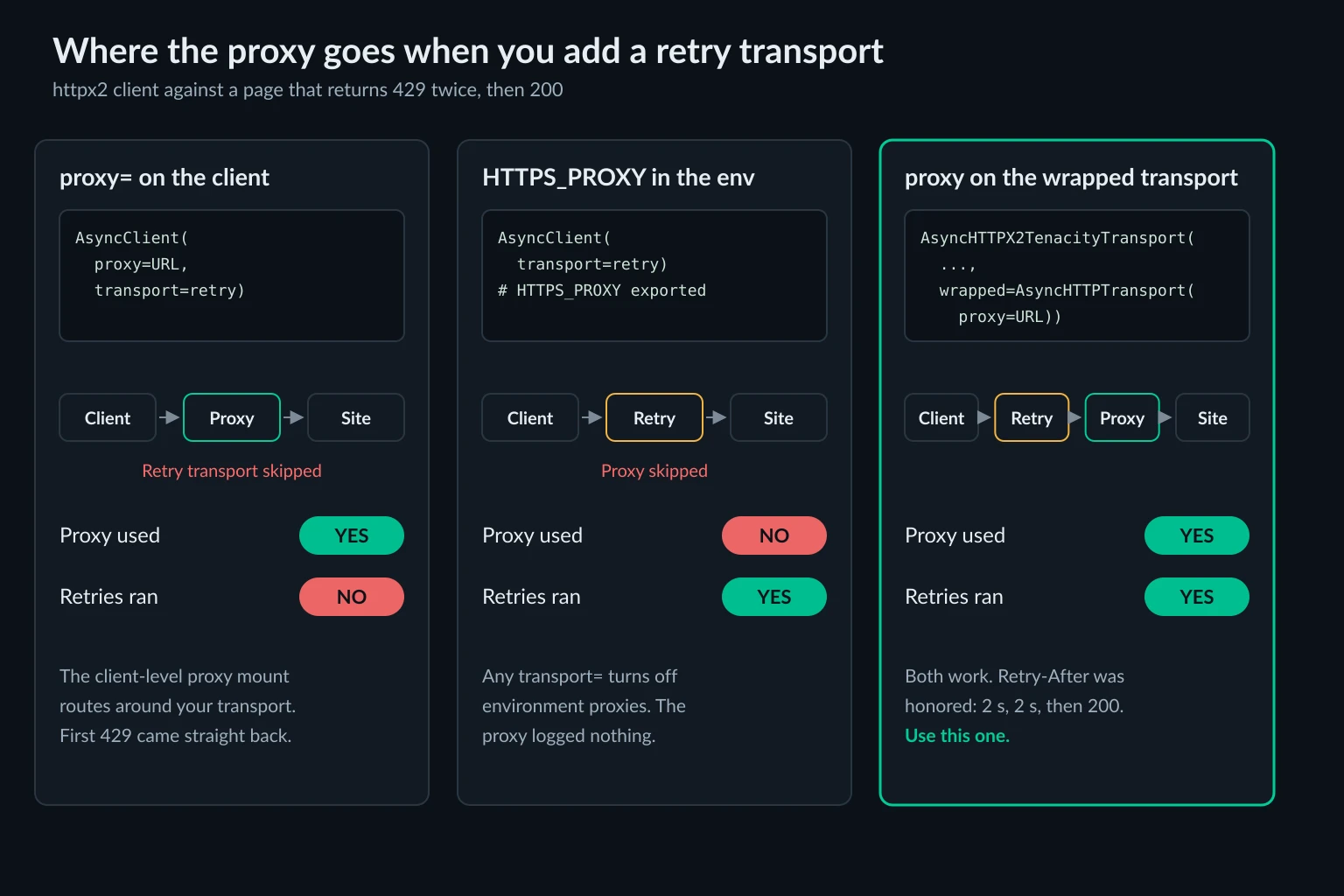
Only the third setup gives you both. The same applies if you add retries to a model provider client: put the proxy, if you want one there, on the wrapped httpx2.AsyncHTTPTransport. The Pydantic AI retries docs cover wait_retry_after and the transport options, but they don't mention the proxy interaction.
Which proxies fit Pydantic AI web tools
Pick the proxy based on what the tool does:
- Independent page fetches across many sites. This is the shape of
web_fetch_tooland most research agents. Rotating residential proxies spread the load, and nothing depends on keeping one IP. - Multi-step or logged-in work on one site. Use a sticky session or a static ISP IP, and use one shared client per session so cookies and the exit IP stay together. The pricing page compares both plan types.
- Native search and fetch. No proxy helps here. If a site blocks the vendor's crawler, switch that task to a local tool.
A better IP doesn't fix bad pacing. Respect Retry-After, keep tool calls per run low, and identify your agent in the User-Agent. Check each site's terms before you automate it. Proxies for AI agents covers the agent behaviors that get IPs flagged, and is data scraping legal covers the legal side.
FAQ
Does Pydantic AI support proxies?
Not as a single setting. Model providers and web_fetch_tool follow HTTPS_PROXY because their httpx2 clients read the environment. You can pass a proxied client to a provider with http_client=. Native web tools run on the vendor's servers and can't use your proxy.
Does web_fetch_tool use HTTPS_PROXY?
Yes. It doesn't accept a proxy argument, so the environment is the only way to route it. It tunnels to the resolved IP address, so NO_PROXY hostname rules don't match it. It also opens a new connection for every fetch.
Does Pydantic AI retry 429 errors?
For model APIs, the vendor SDK retries twice and honors Retry-After, then Pydantic AI raises ModelRateLimitError. For web_fetch_tool, a 429 becomes a ModelRetry with no wait. If the retry hits another 429, the run fails. Use AsyncHTTPX2TenacityTransport with wait_retry_after in a custom tool to back off properly.
Why does my agent fail with "exceeded max retries count of 1"?
A tool raised ModelRetry twice in a row, with no successful call in between. With web tools, that usually means the same site answered 429, 403, or a proxy 407 twice. Raising the retry count only hides the problem. Have the tool return a "stop" message for blocks, and fix proxy credentials outside the model loop.
How do I keep model API calls off the proxy?
Don't export HTTPS_PROXY for the whole process. Give the proxy to your fetch tool's client only. If the variable has to stay, pass http_client=httpx2.AsyncClient(trust_env=False) to the provider or add the API hostname to NO_PROXY.
Conclusion
Pydantic AI's built-in web access is fine for light research. A local web_fetch_tool behind an exported HTTPS_PROXY gets you a proxied fetch in one line. For production scraping, a custom Pydantic AI tool is worth the 80 lines. You get a dedicated httpx2 client, the proxy on the wrapped transport, Retry-After backoff, a URL allowlist, a download cap, and a limit on concurrent fetches. Pass UsageLimits to every run, keep native tools for tasks where the vendor's IP is acceptable, and choose rotating or sticky IPs based on whether the agent needs one session or many independent pages.