None of CrewAI's built-in HTTP fetch tools can use a proxy. ScrapeWebsiteTool, ScrapeElementFromWebsiteTool, URLReadTool, and WebsiteSearchTool all download through an SSRF-safe fetcher that ignores HTTPS_PROXY, and it either rejects a proxies= argument or silently empties it. SeleniumScrapingTool can use a proxy through an undocumented options argument, but only one that needs no username and password. The hosted tools (Firecrawl, Scrapfly, Hyperbrowser, Browserbase, and others) fetch from the vendor's network, so a proxy there is a setting on the vendor's side.
If a CrewAI agent needs to scrape through your own residential or ISP proxy, write a custom tool with its own HTTP client or browser. Both versions are below, tested inside a running crew. This guide also covers what the built-in tools return when a site blocks them, which matters as much as the IP.
Tested on 2026-10-17 with Python 3.12, crewai and crewai-tools 1.15.28, httpx 0.28.1, Selenium 4.51 with Chrome for Testing 155, Playwright 1.64 (chromium-headless-shell), hyperbrowser 1.13.0, and browserbase 1.21.0. A local proxy that required Basic auth logged every request and tunnel. With no model API available on the test host, the crew runs used a scripted stand-in LLM, so the tool calls went through CrewAI's normal agent executor.
CrewAI tools for web scraping and where they fetch from
The question that decides proxy setup is where the page is actually downloaded. For each scraping and browser tool in crewai-tools 1.15.28:
| Tool | Where the page is fetched | Can it use your proxy? |
|---|---|---|
ScrapeWebsiteTool, ScrapeElementFromWebsiteTool |
Your machine, via safe_get |
No. Environment proxies are ignored and proxies= is rejected |
URLReadTool, WebsiteSearchTool (RAG loader) |
Your machine, via safe_get |
No, same fetcher |
SeleniumScrapingTool |
Local Chrome | Yes, through options= or driver=, but only with IP-allowlisted proxies |
BrowserbaseLoadTool |
Browserbase | Broken with current browserbase releases (see below) |
StagehandTool |
Browserbase (hardcoded env="BROWSERBASE") |
Browserbase's proxy settings, not yours |
HyperbrowserLoadTool |
Hyperbrowser | Hyperbrowser's pool, or your own proxy on its Enterprise plan. Pin session_options in a subclass |
FirecrawlScrapeWebsiteTool |
Firecrawl | Firecrawl's pool: proxy and location in config |
ScrapflyScrapeWebsiteTool |
Scrapfly | Scrapfly's pool: proxy_pool and country in scrape_config |
| Spider, Oxylabs, Bright Data, Serper scrape, Jina, Tavily | The vendor's API | The vendor's network. A proxies setting (Tavily) only routes your API call |
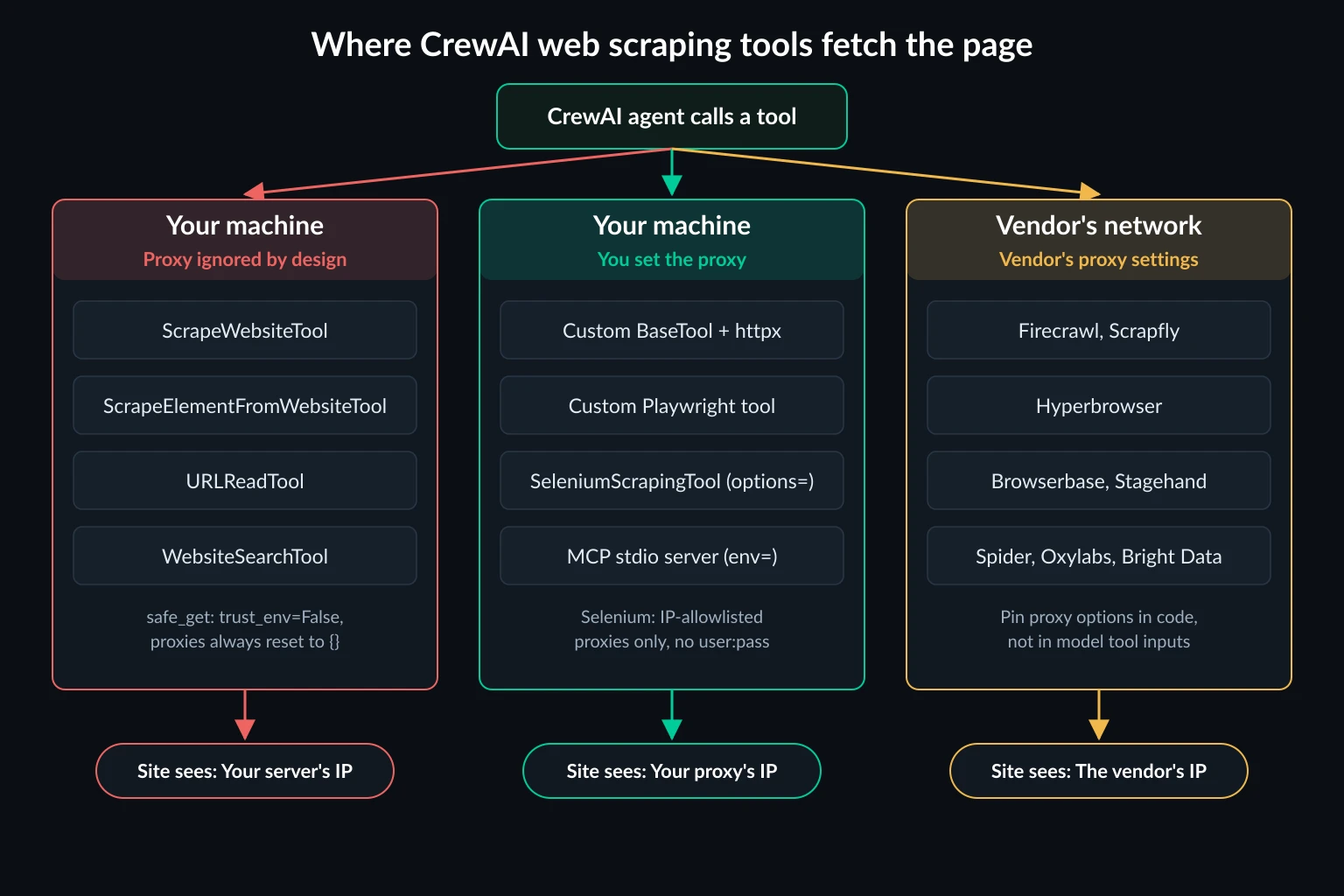
The left group causes most of the confusion. Those tools run in your own process, so it's natural to expect your proxy settings to apply to them.
Why ScrapeWebsiteTool ignores your proxy
Since CrewAI's 2026 SSRF hardening, the local fetch tools download through safe_get in crewai_tools/security/safe_requests.py. It validates the URL, resolves it, pins the TCP connection to the checked IP, and re-validates every redirect hop. To keep that guarantee, the session it builds sets trust_env = False and proxies = {}. Pass proxies= yourself and you get ValueError: Proxies are not allowed for safe_get. Set CREWAI_TOOLS_ALLOW_UNSAFE_PATHS=true and the error goes away, but the next line still resets proxies to an empty dict.
That's a sound security decision. A tool that fetches whatever URL a model hands it shouldn't be able to reach 169.254.169.254 or your internal network. It does mean the proxy has to live somewhere else.
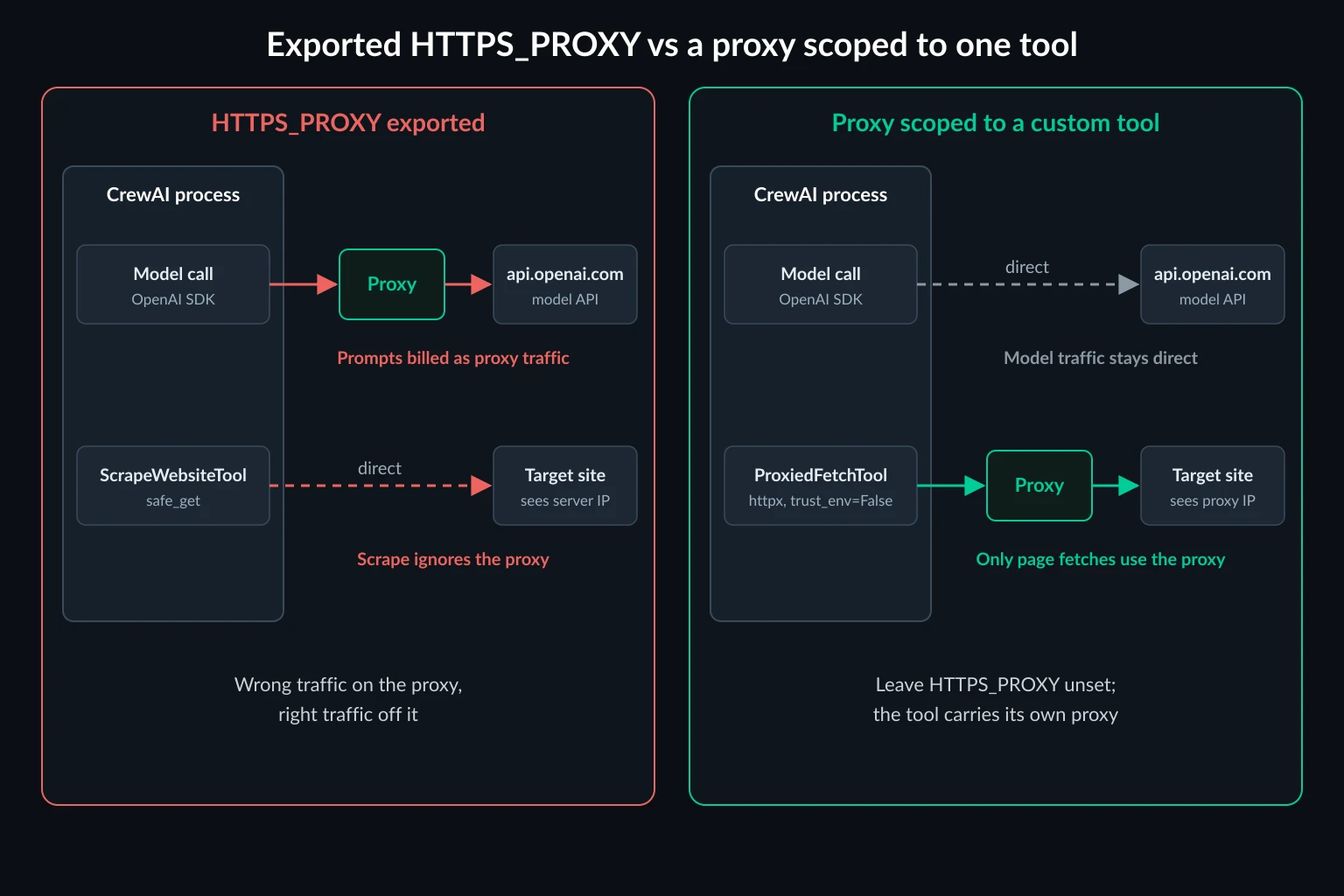
The usual first attempt makes things worse. CrewAI's OpenAI provider uses the OpenAI Python SDK, which does read HTTPS_PROXY. With the variable exported, our proxy logged CONNECT api.openai.com:443 for the model call and nothing for ScrapeWebsiteTool. You end up paying proxy bandwidth for prompts and completions while the scrape still leaves from your server's IP.
Two more problems with the built-in scrape tools
These matter whether or not you use a proxy.
Blocks come back as content. ScrapeWebsiteTool never checks the status code. We pointed it at endpoints that return 403 and 429, and both times it returned The following text is scraped website content: followed by nothing. ScrapeElementFromWebsiteTool returned an empty string. A real block page with a body, such as a challenge page or an "Access denied" notice, is passed to the agent as if it were the article. The model then summarizes the block page or concludes the page is empty. URLReadTool does better: it returns Error: Failed to fetch '...'. HTTPError, though without the status code.
The default User-Agent is from 2021. ScrapeWebsiteTool sends Chrome/96.0.4664.110 with a Referer: https://www.google.com/ header. A five-year-old Chrome version is an easy signal for bot filters. You can override headers on the tool, but that doesn't fix the proxy or the status handling. For what a realistic header set looks like, see web scraping headers.
A proxied web scraping tool for CrewAI agents
A custom BaseTool with its own httpx client fixes all three problems: the proxy, the status codes, and the headers. httpx and BeautifulSoup are already installed with crewai and crewai-tools.
# proxied_fetch.py
import os
from typing import Any

import httpx
from bs4 import BeautifulSoup
from crewai.tools import BaseTool
from pydantic import BaseModel, Field, PrivateAttr


class FetchPageInput(BaseModel):
    url: str = Field(..., description="Full URL of the page to read, starting with https://")


class ProxiedFetchTool(BaseTool):
    name: str = "fetch_page"
    description: str = (
        "Fetch a web page through the scraping proxy. Returns the HTTP status "
        "and the page text, or says clearly that the request was blocked."
    )
    args_schema: type[BaseModel] = FetchPageInput
    max_bytes: int = 5_000_000  # stop downloading after 5 MB of decoded body
    max_chars: int = 20_000
    _client: httpx.Client = PrivateAttr()

    def model_post_init(self, context: Any, /) -> None:
        super().model_post_init(context)
        self._client = httpx.Client(
            proxy=os.environ["SCRAPER_PROXY_URL"],  # http://USERNAME:PASSWORD@HOST:PORT
            trust_env=False,  # ignore HTTPS_PROXY / NO_PROXY from the shell
            timeout=httpx.Timeout(30, connect=10),
            follow_redirects=True,
            headers={
                "User-Agent": "Mozilla/5.0 (Windows NT 10.0; Win64; x64) AppleWebKit/537.36 "
                "(KHTML, like Gecko) Chrome/155.0.0.0 Safari/537.36",  # keep the version current
                "Accept-Language": "en-US,en;q=0.9",
            },
        )

    def _run(self, url: str) -> str:
        try:
            with self._client.stream("GET", url) as r:
                if r.status_code in (401, 403, 407, 429, 503):
                    return (
                        f"BLOCKED: HTTP {r.status_code} from {url}. "
                        "Do not treat this as page content. Do not retry immediately."
                    )
                body = bytearray()
                for chunk in r.iter_bytes():
                    body += chunk
                    if len(body) >= self.max_bytes:
                        break  # don't let one huge page fill memory
        except httpx.ProxyError as e:
            return f"PROXY ERROR: {e}. Check the proxy credentials and port."
        except httpx.TimeoutException:
            return f"TIMEOUT fetching {url}. Try again later or skip this source."
        except httpx.HTTPError as e:
            return f"FETCH ERROR on {url}: {e}"
        html = bytes(body[: self.max_bytes]).decode(r.encoding or "utf-8", errors="replace")
        text = BeautifulSoup(html, "html.parser").get_text(" ", strip=True)
        return f"HTTP {r.status_code} {r.url}\n\n{text[: self.max_chars]}"
Give it to an agent the same way you would ScrapeWebsiteTool:
from crewai import Agent, Crew, Task

from proxied_fetch import ProxiedFetchTool

researcher = Agent(
    role="Pricing researcher",
    goal="Collect list prices from public pricing pages",
    backstory="You read pricing pages and report exact figures with their source URL.",
    tools=[ProxiedFetchTool()],
    llm="openai/gpt-5-mini",
)

task = Task(
    description="Report the monthly price of each plan on {url}.",
    expected_output="A list of plan names and monthly prices.",
    agent=researcher,
)

crew = Crew(agents=[researcher], tasks=[task])
print(crew.kickoff(inputs={"url": "https://example.com/pricing"}).raw)
What we saw when we ran it:
- Inside a crew, the agent's tool call produced one
CONNECT example.com:443with valid credentials at the proxy. The scope is the tool, so model calls stay direct as long asHTTPS_PROXYisn't exported. - With a bogus
HTTPS_PROXYexported, the tool ignored it and usedSCRAPER_PROXY_URL. That's whattrust_env=Falseis for. - With a wrong password, the tool returned
PROXY ERROR: 407 Proxy Authentication Requiredinstead of raising, so the agent reports the failure rather than crashing the crew. If you see that, the 407 troubleshooting guide covers the credential side. - On a
429, the agent gotBLOCKED: HTTP 429 ...instead of empty "content". An explicit block message makes it far less likely that the model writes an answer from a block page.
trust_env=False also matters for safety, because you've swapped CrewAI's SSRF-checked fetcher for your own. With it, no NO_PROXY entry can route a host around the proxy, so every request goes through the remote proxy and resolves there, not on your network. The tool streams the body and stops at max_bytes, so a multi-gigabyte file can't fill the worker's memory. If the URLs come from untrusted input such as user prompts, scraped links, or emails, also check the hostname against an allowlist before self._client.stream("GET", url).
Rotation and sticky sessions with httpx
httpx keeps connections open. Two requests to httpbin.org from the same tool instance went through one CONNECT tunnel. A tunnel has one exit IP for as long as it lives, so on a rotating gateway, back-to-back requests to the same host can come from the same IP until the connection closes.
That's usually what a multi-page task wants. If you need a fresh IP per request, create the client inside _run so every call opens a new tunnel. If you need the same IP for a whole task, such as paginating a search or staying logged in, use a sticky session from your provider instead of relying on connection reuse. Sticky vs rotating proxies explains when each one fits.
SeleniumScrapingTool with a proxy
The SeleniumScrapingTool docs list website_url, css_element, cookie, wait_time, and return_html as constructor arguments. The source also accepts options (a Chrome Options object) and driver (a ready WebDriver). If you pass neither, it starts headless Chrome with no proxy.
from selenium.webdriver.chrome.options import Options
from crewai_tools import SeleniumScrapingTool

opts = Options()
opts.add_argument("--headless=new")
opts.add_argument("--proxy-server=http://PROXY_HOST:PORT")  # no user:pass here

selenium_tool = SeleniumScrapingTool(options=opts)
This works with an IP-allowlisted proxy. In our test, example.com loaded through the proxy and the tool returned the page text. Credentials are the problem:
user:passin--proxy-server: Chrome refuses the proxy and sends no traffic at all.SeleniumScrapingToolreturned Chrome's error page as the scraped content:This site can’t be reached ... ERR_NO_SUPPORTED_PROXIES. No error was raised.- A proxy that needs auth, with no credentials: Chrome got a
407and the tool returned an empty string. - Selenium's BiDi
add_auth_handler(passed in throughdriver=): in headless Chrome for Testing 155 with Selenium 4.51, the handler registered but answered no auth challenges at all. That included the proxy's407and, in a separate check, a website's Basic auth prompt. Chrome sent fourCONNECTattempts without credentials and the page load timed out. We couldn't test headed Chrome on that host. Confirm the handler works on your own setup before an agent depends on it.
There's also a cost worth knowing. In the allowlisted run, only 2 of the 10 requests Chrome sent through the proxy were for example.com. The other 8 went to Google services (clients2.google.com, accounts.google.com, www.google.com, and update.googleapis.com), and adding --disable-background-networking and --disable-component-update didn't stop them. They're small, but they're billed traffic on a per-GB plan.
So for SeleniumScrapingTool, use a proxy you can allowlist by IP. Unknown Proxies' ISP proxies support IP authentication. For user/password proxies, the Selenium proxy guide covers a local forwarding proxy and an extension-based setup. For a CrewAI agent, though, the simpler route is a Playwright tool.
A Playwright browser tool for JavaScript-heavy pages
Playwright takes a username and password in its proxy option and answers the 407 itself. That makes it the easiest way to give a CrewAI agent a real browser behind a residential proxy:
# browser_fetch.py
import os

from crewai.tools import BaseTool
from playwright.sync_api import Error as PlaywrightError, sync_playwright
from pydantic import BaseModel, Field


class BrowserFetchInput(BaseModel):
    url: str = Field(..., description="Full URL of the page to render, starting with https://")


class BrowserFetchTool(BaseTool):
    name: str = "render_page"
    description: str = (
        "Load a JavaScript-heavy page in a real browser through the scraping "
        "proxy and return its visible text. Slower than fetch_page; use it only "
        "when fetch_page returns an empty or script-only page."
    )
    args_schema: type[BaseModel] = BrowserFetchInput
    max_chars: int = 20_000

    def _run(self, url: str) -> str:
        proxy = {
            "server": os.environ["SCRAPER_PROXY_SERVER"],  # http://HOST:PORT
            "username": os.environ["SCRAPER_PROXY_USER"],
            "password": os.environ["SCRAPER_PROXY_PASS"],
        }
        with sync_playwright() as p:
            browser = p.chromium.launch(proxy=proxy)
            try:
                page = browser.new_page()
                response = page.goto(url, wait_until="domcontentloaded", timeout=45_000)
                status = response.status if response else 0
                if status in (401, 403, 407, 429, 503):
                    return f"BLOCKED: HTTP {status} from {url}. Do not treat this as page content."
                page.wait_for_timeout(1_500)  # let client-side rendering settle
                text = page.inner_text("body")
                return f"HTTP {status} {page.url}\n\n{text[: self.max_chars]}"
            except PlaywrightError as e:
                return f"BROWSER ERROR on {url}: {e.message.splitlines()[0]}"
            finally:
                browser.close()
Install it with pip install playwright and playwright install chromium. In our runs, the proxy got an unauthenticated CONNECT first, answered it with 407, and then got the same CONNECT with credentials. That's normal challenge-response behavior. The sync API worked from inside Crew.kickoff() without event-loop errors, and a 429 came back as BLOCKED: HTTP 429.
One failure mode to recognize: with a wrong password, the headless shell didn't raise an auth error. It retried the tunnel and page.goto timed out after 45 seconds. If this tool times out on every URL, check the proxy credentials before you blame the target site.
Launching a browser per call adds startup time to every call but keeps each call isolated, which suits agents that make a handful of browser calls per task. Give the agent both tools and let the descriptions steer it to fetch_page first. A browser loads images, scripts, and fonts, so it uses far more proxy bandwidth per page than a plain fetch. The data usage calculator gives a per-page estimate before you choose a plan. For per-context proxies and longer-lived browsers, see the Playwright proxy guide.
Vendor-hosted CrewAI tools and their proxy settings
Hosted tools fetch the page on the vendor's infrastructure. Your proxy can't change their exit IP, and putting one in front of their API call only adds latency. What you can control is the vendor's own proxy option, and for two of these tools, where that option is set matters.
Firecrawl takes settings in the tool's config, which you set in code. Its proxy docs list proxy values basic, enhanced, and auto (the default), plus location.country for geo-targeting. The same page now marks the proxy parameter as deprecated and recommends leaving it on auto, so location is the setting worth pinning. The CrewAI tool's docstring still mentions stealth, which Firecrawl's current docs don't list.
Scrapfly and Hyperbrowser take their settings as tool inputs, which means the model decides them on every call. ScrapflyScrapeWebsiteTool exposes scrape_config (where proxy_pool and country go), and HyperbrowserLoadTool exposes params. Unless the model happens to pass the right values, you get the defaults. For Hyperbrowser, the session options can include your own proxy credentials, which should never pass through a prompt.
Pin them in a subclass instead. Hyperbrowser's proxy docs accept your own proxy server through proxy_server, proxy_server_username, and proxy_server_password:
import os
from typing import Any, Literal

from crewai_tools import HyperbrowserLoadTool

PROXY_SESSION = {
    "use_proxy": True,
    "proxy_server": os.environ["SCRAPER_PROXY_SERVER"],  # http://HOST:PORT
    "proxy_server_username": os.environ["SCRAPER_PROXY_USER"],
    "proxy_server_password": os.environ["SCRAPER_PROXY_PASS"],
}


class ProxiedHyperbrowserTool(HyperbrowserLoadTool):
    def _run(
        self,
        url: str,
        operation: Literal["scrape", "crawl"] = "scrape",
        params: dict[str, Any] | None = None,
    ) -> str:
        params = dict(params or {})
        # Replace whatever session options the model sent with your proxy.
        params["session_options"] = dict(PROXY_SESSION)
        return super()._run(url, operation, params)
We checked this against hyperbrowser 1.13.0 with the API client stubbed out. Even when the model's input set use_proxy to False, the scrape job was built with use_proxy=True and your proxy server. Check your plan first. Hyperbrowser's docs say proxies need a paid plan, and custom proxy servers are Enterprise-only. On other paid plans, pin {"use_proxy": True, "proxy_country": "US"} instead to use Hyperbrowser's own pool with a fixed country.
BrowserbaseLoadTool is broken. crewai-tools requires browserbase>=1.0.5, and the tool calls Browserbase.load_url(), a method the 1.x SDK no longer has. With browserbase 1.21.0, every call raised AttributeError: 'Browserbase' object has no attribute 'load_url'. The tool's only proxy option was a proxy=True boolean anyway. Browserbase itself supports custom proxies through sessions.create(proxies=[{"type": "external", "server": ..., "username": ..., "password": ...}]), per its proxy docs. To use that from CrewAI, create the session in a custom tool and connect Playwright to it over CDP. StagehandTool always runs on Browserbase and accepts a session_id, so you can create the proxied session first and hand its ID to the tool. The Stagehand proxy guide covers that side.
MCP servers in a CrewAI crew
CrewAI agents can also get web tools from MCP servers through the mcps field. For a local server, crewai.mcp.MCPServerStdio builds the child's environment from the MCP SDK's get_default_environment() plus your env dict. That default is a short allowlist with no proxy variables, so a proxy exported in your shell stops at the CrewAI process. Put it in env explicitly:
import os

from crewai import Agent
from crewai.mcp import MCPServerStdio

proxy = os.environ["SCRAPER_PROXY_URL"]

researcher = Agent(
    role="Researcher",
    goal="Read the pages you are given",
    backstory="You summarize web pages accurately.",
    mcps=[
        MCPServerStdio(
            command="mcp-server-fetch",
            args=[],
            env={"HTTPS_PROXY": proxy, "HTTP_PROXY": proxy},
        )
    ],
    llm="openai/gpt-5-mini",
)
Whether the server honors the variable depends on its HTTP client. The Fetch MCP server proxy guide covers that server's --proxy-url flag and the env-var route.
Which proxy fits a CrewAI scraping crew
Pick the proxy for the tool's traffic pattern, not for CrewAI:
- A fetch tool reading many unrelated pages: rotating residential proxies. Each new tunnel gets a different exit, which spreads a crew's requests across many addresses.
- A multi-step task on one site (pagination, search then detail pages): a sticky residential session that holds one exit until the task finishes.
- SeleniumScrapingTool, logged-in sessions, or IP-allowlisted partner sites: ISP proxies, which keep one static address and support IP authentication.
Routing through a proxy doesn't make a crawl acceptable to the site. Keep crews to sites you're allowed to collect from, respect robots.txt and rate limits, and treat a 403 or 429 as a signal to slow down or stop, not to rotate and retry. CrewAI makes parallel agents easy, and three agents hitting one site at once looks like a burst. For diagnosing which kind of block a crew is hitting, see why web browsing agents get blocked, and HTTP 429 Too Many Requests covers backoff.
FAQ
Does CrewAI's ScrapeWebsiteTool support proxies?
No. In crewai-tools 1.15.28 it fetches through safe_get, which ignores HTTPS_PROXY and HTTP_PROXY, rejects a proxies= argument, and still discards proxies when CREWAI_TOOLS_ALLOW_UNSAFE_PATHS=true is set. Use a custom BaseTool with its own proxied client.
How do I add a proxy to a CrewAI agent?
Add it to the tool, not the agent. Write a custom tool whose HTTP client or browser carries the proxy, as in the ProxiedFetchTool and BrowserFetchTool examples above, and pass it in tools=[...]. Avoid exporting HTTPS_PROXY for the whole process, because CrewAI's OpenAI calls will follow it while the built-in scrape tools won't.
Why does my CrewAI agent say the page was empty?
Usually the site blocked the request. ScrapeWebsiteTool doesn't check status codes, so a 403 or 429 comes back as empty "scraped content", and a block page with text comes back as if it were the article. Run the URL with a tool that reports the status, like the custom tool above, to see what's happening.
Can SeleniumScrapingTool use an authenticated proxy?
Not directly. Chrome rejects credentials in --proxy-server with ERR_NO_SUPPORTED_PROXIES. Selenium's BiDi auth handler is an option on paper, but in our headless Chrome 155 test it answered no auth challenges at all. Use IP-allowlisted proxies with the tool's options argument, a local forwarding proxy, or a Playwright-based custom tool.
Which CrewAI tools work with residential proxies?
Your own custom tools, and HyperbrowserLoadTool on Hyperbrowser's Enterprise plan if you pin session_options in a subclass. Firecrawl, Scrapfly, Bright Data, Oxylabs, and similar tools use the vendor's own residential pools. You choose those through the vendor's settings and pay the vendor for them.
Conclusion
The CrewAI tools for web scraping split three ways. The local fetch tools can't be proxied by design. SeleniumScrapingTool takes a proxy without credentials through options. The hosted tools use their vendor's network. If your crew needs a specific exit IP, write a small custom tool with an httpx client or a Playwright browser. Scope the proxy to that tool, have the tool report blocks instead of passing them off as content, and keep model traffic direct.
Then pick the IP type for the job. Use rotating or sticky residential proxies for fetch tools reading many sites, and static ISP proxies for allowlisted browsers and logged-in workflows.